Skin Cancer: Early Detection, Diagnosis, and Evolving Management Strategies
Tuesday, May 19, 2026
Skin cancer remains the most common malignancy in the United States, representing a growing clinical and public health challenge. Despite its prevalence, it is also one of the most preventable and, when detected early, highly treatable cancers. For primary care physicians (PCPs), skin cancer sits squarely within the scope of daily practice—not only because of its frequency, but also because early recognition often begins outside the dermatology office. As frontline providers, PCPs are uniquely positioned to identify suspicious lesions, stratify patient risk, initiate diagnostic workups, and coordinate care that can significantly alter patient outcomes.
The importance of this role continues to expand as incidence rates climb and as advances in diagnostics and therapeutics reshape the management landscape. Understanding the nuances of skin cancer—from early presentation to evolving treatment modalities—enables PCPs to deliver more effective, timely, and comprehensive care.
Epidemiology and Risk Factors
The incidence of skin cancer continues to rise steadily, influenced by a combination of environmental, behavioral, and demographic factors. Increased ultraviolet (UV) radiation exposure remains the most significant contributor, whether from natural sunlight or artificial sources such as tanning beds. At the same time, an aging population has contributed to higher cumulative UV exposure across lifetimes, further elevating risk. Improved awareness and detection have also played a role, leading to more diagnoses, particularly in early-stage disease.
Risk factors are multifactorial and often cumulative. Patients with fair skin, light-colored eyes, and a propensity to burn rather than tan are at increased risk due to lower melanin protection against UV radiation. A history of blistering sunburns, especially during childhood, is strongly associated with melanoma risk. Chronic sun exposure, more often linked to occupational or lifestyle factors, increases the likelihood of non-melanoma skin cancers such as basal cell carcinoma (BCC) and squamous cell carcinoma (SCC).
Immunosuppressed individuals—including organ transplant recipients and patients on long-term immunosuppressive therapy—are at markedly increased risk, particularly for aggressive SCC. Genetic predispositions, such as familial melanoma syndromes, and a personal history of skin cancer further compound risk. For PCPs, recognizing these risk factors during routine visits allows for targeted surveillance strategies that can significantly improve early detection.
Types of Skin Cancer
Skin cancer is broadly categorized into melanoma and non-melanoma types, each with distinct biological behavior, clinical presentation, and prognostic implications.
Basal cell carcinoma is the most common form of skin cancer, arising from basal keratinocytes in the epidermis. It is characteristically slow-growing and rarely metastasizes, but it can be locally invasive and destructive if left untreated. Clinically, BCC often presents as a pearly or translucent papule, frequently with visible telangiectasias. Some lesions may ulcerate centrally, giving rise to the classic “rodent ulcer” appearance.
While prognosis is excellent with appropriate treatment, delayed recognition can lead to significant morbidity, particularly when lesions occur in cosmetically or functionally sensitive areas such as the face.
Squamous cell carcinoma arises from more differentiated keratinocytes and carries a higher risk of metastasis compared to BCC. It typically presents as a scaly, erythematous plaque or nodule, which may become hyperkeratotic or ulcerated. SCC is often associated with chronic sun exposure and may arise from precursor lesions such as actinic keratoses.
High-risk features—including location on the ears or lips, larger size, deeper invasion, and immunosuppression—are associated with an increased likelihood of metastasis and poorer outcomes.
Melanoma, while less common than BCC or SCC, is far more aggressive and accounts for the majority of skin cancer-related deaths. It originates from melanocytes and has a strong propensity for early metastasis. Melanoma can present in a variety of forms, including superficial spreading, nodular, lentigo maligna, and acral lentiginous subtypes. The well-known ABCDE criteria—Asymmetry, Border irregularity, Color variation, Diameter greater than 6 millimeters, and Evolution—remain a useful clinical framework for identifying suspicious pigmented lesions. However, clinicians must remain vigilant for atypical presentations, including amelanotic melanomas, which may lack pigmentation altogether.
The Critical Importance of Early Detection
Early detection is the most significant determinant of outcomes in skin cancer, particularly for melanoma. When identified at an early, localized stage, melanoma carries an excellent prognosis, with five-year survival rates exceeding 99 percent. However, once the disease spreads regionally or distantly, survival rates decline dramatically.
Primary care settings offer critical opportunities for early detection, often during visits for unrelated concerns. Patients may not recognize the significance of a changing lesion or may delay seeking dermatologic evaluation. In this context, even a brief visual inspection of exposed skin or a focused examination prompted by patient concern can lead to earlier diagnosis.
While the role of universal full-body skin examinations in primary care remains debated, there is strong support for targeted screening in high-risk populations. Patients with significant risk factors benefit from regular skin evaluations, either in primary care or through referral to dermatology. Just as importantly, educating patients to perform self-examinations and report changes promptly can serve as a powerful adjunct to clinical screening.
Clinical Evaluation and Diagnosis
Effective diagnosis begins with a thorough history and physical examination. A detailed history should explore personal and family history of skin cancer, patterns of sun exposure, use of tanning beds, and any changes in existing lesions or the appearance of new ones. Immunosuppressive conditions and medications should also be noted, as they influence both risk and management strategies.
The physical examination should focus on identifying suspicious lesions, with attention to asymmetry, border irregularity, color variation, and changes over time. Documentation of lesion characteristics—including size, location, and morphology—is essential for monitoring and follow-up. Dermoscopy has emerged as a valuable adjunct in primary care, improving diagnostic accuracy when used by trained clinicians. It allows for visualization of subsurface structures not visible to the naked eye and can help distinguish benign from malignant lesions.
Definitive diagnosis requires histopathologic confirmation. Biopsy remains the gold standard, and PCPs who are trained in minor dermatologic procedures can often perform this step efficiently within the primary care setting. Shave biopsies are commonly used for superficial lesions, while punch biopsies are useful for smaller or diagnostically uncertain lesions. When melanoma is suspected, excisional biopsy with narrow margins is generally preferred to ensure accurate assessment of tumor depth, which is critical for staging and management.
Advances in Diagnostic Technology
Technological advancements are increasingly enhancing the ability of PCPs to detect skin cancer earlier and with greater accuracy. Artificial intelligence (AI)-assisted diagnostic tools are becoming more accessible, offering image analysis that can support clinical decision-making. While not a replacement for clinical judgment, these tools can serve as valuable adjuncts, particularly in settings where dermatologic expertise is limited.
Total body photography and digital mole mapping are especially useful for patients with numerous nevi or high melanoma risk. These tools allow for longitudinal monitoring of lesions, making it easier to detect subtle changes over time. Teledermatology has also expanded access to specialist input, enabling PCPs to obtain rapid consultations and reduce delays in care. In underserved or rural areas, this approach can significantly improve diagnostic accuracy and patient outcomes.
Treatment Options
The management of skin cancer varies depending on the type, stage, and location of the lesion, as well as patient-specific factors. For non-melanoma skin cancers such as BCC and SCC, treatment is often straightforward and highly effective when initiated early.
Surgical excision remains the cornerstone of treatment for most lesions, offering high cure rates. In cases where tissue preservation is critical, such as lesions on the face, Mohs micrographic surgery provides precise margin control while minimizing removal of healthy tissue. Less invasive options, including cryotherapy and curettage with electrodessication, may be appropriate for select low-risk lesions. Topical therapies, such as 5-fluorouracil or imiquimod, can be used for superficial BCC or actinic keratoses, particularly when surgery is not desirable.
Melanoma management is more complex and depends heavily on staging. Early-stage melanoma is typically treated with wide local excision, with margins determined by tumor thickness. Sentinel lymph node biopsy may be indicated to assess regional spread. In advanced disease, systemic therapies have dramatically improved outcomes. Immune checkpoint inhibitors, such as pembrolizumab and nivolumab, have revolutionized the treatment of metastatic melanoma by enhancing the body’s immune response against tumor cells. Targeted therapies directed at specific mutations, such as BRAF inhibitors, offer additional options for selected patients.
The Role of Primary Care Physicians
Primary care physicians are integral to every stage of skin cancer management, from prevention to long-term surveillance. Their role begins with patient education, emphasizing sun protection strategies that can reduce lifetime risk. Counseling on the use of broad-spectrum sunscreen, protective clothing, and avoidance of peak UV exposure is particularly important for younger patients, where behavior modification can have long-term benefits.
In addition to prevention, PCPs are responsible for identifying high-risk individuals and implementing appropriate screening strategies. This includes determining which patients require more frequent skin examinations and ensuring that concerning lesions are evaluated promptly. Early detection often hinges on the ability of the PCP to recognize subtle changes and act decisively.
PCPs may also manage certain low-risk skin cancers directly, particularly when trained in dermatologic procedures. This can improve access to care and reduce delays associated with specialist referral. For more complex cases, PCPs play a critical role in coordinating multidisciplinary care, ensuring that patients receive timely evaluation and treatment from dermatologists, surgeons, and oncologists.
Long-term follow-up is another essential component of care. Patients with a history of skin cancer are at increased risk for recurrence and for developing new primary lesions.
Ongoing surveillance, combined with reinforcement of preventive behaviors, helps mitigate this risk and supports better long-term outcomes.
Challenges in Primary Care
Despite their central role, PCPs face several challenges in managing skin cancer. Time constraints during office visits can limit the ability to perform thorough skin examinations. Variability in training and comfort with dermatologic procedures may also affect diagnostic accuracy and management decisions. In some regions, limited access to dermatology services can delay referrals and treatment.
Addressing these challenges requires a combination of continued education, adoption of new technologies, and collaborative care models. Expanding training opportunities in dermatologic evaluation and biopsy techniques can empower PCPs to take a more active role in skin cancer management. Integration of teledermatology and AI tools may further support clinical decision-making and improve access to care.
Future Directions
The future of skin cancer management in primary care is shaped by innovation and a growing emphasis on early detection. Advances in AI and imaging technologies are likely to enhance diagnostic accuracy and streamline workflows. Non-invasive diagnostic tools, including molecular and optical imaging techniques, are under development and may reduce reliance on biopsy in the future.
At the same time, continued progress in systemic therapies—particularly in immunotherapy—will further improve outcomes for patients with advanced disease. As these treatments become more widely used, PCPs will play an increasingly important role in managing side effects and coordinating care across specialties.
Conclusion
Skin cancer represents a critical area of opportunity for primary care physicians to make a meaningful impact on patient outcomes. With rising incidence rates and a strong correlation between early detection and survival, the role of the PCP is more important than ever. Through vigilant clinical assessment, patient education, and appropriate use of diagnostic and referral pathways, PCPs can significantly reduce the burden of this common disease.
In many cases, the difference between a curable lesion and a life-threatening malignancy lies in early recognition. Within the primary care setting, that recognition often begins with a single observation—one that underscores the enduring importance of clinical awareness and proactive care in modern medicine.
Reducing Return Visits with Smarter Diagnostic Decisions
Sunday, May 10, 2026
by Adam Irvine, Staff Writer, Physicians Office Resource
In today’s primary care environment, reducing unnecessary return visits is more than a matter of convenience—it is central to improving patient outcomes, optimizing clinic efficiency, and strengthening patient trust. While some follow-ups are clinically appropriate and necessary, a significant portion of return visits stem from incomplete diagnostic workups, delayed or insufficient testing, or diagnostic uncertainty at the initial encounter.
Smarter diagnostic decision-making offers a powerful lever to reduce avoidable revisits. By leveraging appropriate testing, applying clinical reasoning with greater precision, and integrating evolving diagnostic tools into routine practice, primary care physicians (PCPs) can resolve more patient concerns in a single visit—or at least establish a clearer, more definitive care pathway.
This article explores the key drivers of unnecessary return visits and outlines actionable strategies PCPs can use to improve diagnostic efficiency without compromising quality of care.
The Cost of Unnecessary Return Visits
Return visits place a burden on both patients and healthcare systems. For patients, repeat appointments can mean additional time off work, increased anxiety, delayed treatment, and higher out-of-pocket costs. For practices, they contribute to overcrowded schedules, reduced access for new or acutely ill patients, and clinician burnout.
Importantly, repeat visits are not always benign. They can signal missed or delayed diagnoses, which in turn may lead to disease progression or complications. In value-based care models, excessive return visits may also negatively impact performance metrics, patient satisfaction scores, and reimbursement.
Why Do Patients Return? Common Diagnostic Gaps
Several recurring factors contribute to avoidable return visits:
- Incomplete Initial Workups
Time constraints and competing priorities often lead to narrow or staged diagnostic approaches. While sometimes appropriate, overly conservative testing can result in missed opportunities to reach a diagnosis earlier.
- Overreliance on Empiric Treatment
Empiric therapy without diagnostic confirmation—such as prescribing antibiotics for presumed infections—may temporarily mask symptoms without addressing the underlying cause, leading patients to return when symptoms persist.
- Limited Use of Point-of-Care Testing
Failure to utilize available point-of-care (POC) diagnostics can delay answers that could otherwise be obtained during the initial visit.
- Diagnostic Uncertainty and Cognitive Bias
Anchoring bias, premature closure, and availability bias can all contribute to incomplete evaluations and missed diagnoses.
- Poor Patient Communication
When patients do not fully understand their diagnosis, expected symptom trajectory, or when to seek follow-up care, they are more likely to return unnecessarily.
The Case for Smarter Diagnostics
Smarter diagnostic decision-making does not mean ordering more tests indiscriminately. Rather, it involves selecting the right tests at the right time for the right patient. This approach balances clinical judgment, evidence-based guidelines, and the growing availability of rapid, high-quality diagnostic tools.
Key principles include:
- Diagnostic completeness: Addressing the most likely and most serious potential diagnoses upfront
- Timeliness: Reducing delays between presentation, testing, and diagnosis
- Precision: Using tests with high sensitivity and specificity appropriate to the clinical scenario
- Efficiency: Minimizing unnecessary steps and repeat visits
Leveraging Point-of-Care Testing
Point-of-care testing has evolved significantly in recent years and is now a cornerstone of efficient primary care diagnostics. CLIA-waived tests, in particular, offer rapid results with minimal operational complexity.
Common High-Impact POC Applications
- Respiratory infections: Rapid antigen and molecular testing for influenza, COVID-19, RSV, and strep throat
- Urinalysis: Immediate evaluation of urinary tract infections, kidney disease indicators, and metabolic abnormalities
- HbA1c: On-the-spot diabetes diagnosis and management adjustments
- Lipid panels: Real-time cardiovascular risk assessment
By providing actionable data during the visit, POC testing enables clinicians to make informed decisions immediately—reducing the need for follow-up visits solely to review results.
Molecular vs. Antigen Testing: Choosing the Right Tool
Understanding the strengths and limitations of different diagnostic modalities is essential.
- Antigen tests offer speed and convenience but may have lower sensitivity, particularly in early or asymptomatic disease.
- Molecular tests (e.g., PCR-based) provide higher sensitivity and specificity, enabling more confident rule-in or rule-out decisions.
For example, in a patient with respiratory symptoms and risk factors for complications, a molecular test may reduce the likelihood of a false negative and prevent a return visit due to unresolved symptoms.
Strategically selecting between these modalities can significantly impact diagnostic accuracy and downstream care utilization.
Diagnostic Stewardship: Avoiding Both Under- and Over-Testing
While under-testing can lead to missed diagnoses and return visits, over-testing carries its own risks, including false positives, incidental findings, and increased healthcare costs.
Diagnostic stewardship involves:
- Following evidence-based guidelines
- Considering pre-test probability
- Understanding test characteristics
- Avoiding “just-in-case” testing without clinical justification
The goal is to achieve diagnostic clarity with the least necessary resource utilization.
Improving Clinical Decision-Making
- Use Structured Clinical Frameworks
Clinical decision rules and algorithms—such as the Centor criteria for strep throat or Wells score for pulmonary embolism—can guide appropriate testing and reduce uncertainty.
- Revisit the Differential Diagnosis
Before concluding a visit, take a moment to reassess the differential diagnosis. Ask: What else could this be? What can’t I afford to miss?
- Guard Against Cognitive Bias
Awareness of biases such as anchoring and premature closure can improve diagnostic accuracy. Deliberate reflection and second opinions (when needed) can help mitigate these risks.
Enhancing Patient Communication
Even the most accurate diagnosis can lead to a return visit if the patient is unclear about next steps.
Key communication strategies include:
- Set expectations: Clearly explain the expected course of illness
- Provide contingency plans: Outline when and why the patient should return
- Use teach-back methods: Confirm patient understanding
- Offer written instructions: Reinforce verbal guidance
When patients understand what is normal versus concerning, they are less likely to seek unnecessary follow-up care.
Integrating Technology and Data
Electronic health records (EHRs), clinical decision support tools, and predictive analytics can enhance diagnostic decision-making.
- Clinical decision support systems (CDSS): Provide evidence-based recommendations at the point of care
- Diagnostic checklists: Help ensure completeness of evaluations
- Data tracking: Identify patterns in return visits and areas for improvement
Practices that leverage data effectively can continuously refine their diagnostic strategies.
Diagnostic Strategy in Acute Respiratory Presentations
Acute respiratory complaints remain one of the most common drivers of primary care visits—and, not surprisingly, a frequent source of return encounters. While experienced clinicians are well-versed in managing these cases, variability in diagnostic approach—often driven by time constraints, test availability, or patient expectations—can influence downstream utilization.
In practice, the challenge is not recognizing likely etiologies but determining how much diagnostic certainty is necessary at the index visit to confidently guide management and avoid re-evaluation.
For example, in a patient presenting with cough, fever, and fatigue, a clinical diagnosis of a viral syndrome is often appropriate. However, without confirmatory testing, several variables remain unresolved:
- Is this influenza, where antivirals may be beneficial?
- Could this be COVID-19, with implications for isolation and risk stratification?
- Is there a risk of bacterial superinfection that may evolve?
In settings where rapid multiplex molecular testing is available, some practices have found value in increasing diagnostic specificity at the initial visit—not necessarily to change management in every case, but to:
- Reduce diagnostic ambiguity for both clinician and patient
- Improve confidence in withholding unnecessary antibiotics
- Provide clearer guidance on expected disease course
- Decrease “just in case” return visits when symptoms persist longer than anticipated
Importantly, this approach is not universally necessary. In low-risk patients with mild symptoms, supportive care without testing remains entirely appropriate. However, in higher-risk populations—or in practices experiencing high revisit rates for respiratory complaints—targeted use of more sensitive diagnostics may help close the loop at the initial encounter.
The key is not broader testing, but more intentional testing—aligning diagnostic certainty with the clinical and operational needs of the practice.
Operational Strategies for Implementation
To fully realize the benefits of smarter diagnostics, practices should consider:
- Expanding Access to POC Testing
Evaluate which tests can be integrated into the practice setting and train staff accordingly.
- Streamlining Workflow
Ensure that diagnostic testing fits seamlessly into patient flow without creating bottlenecks.
- Training and Education
Keep clinicians and staff updated on new diagnostic technologies and guidelines.
- Monitoring Outcomes
Track return visit rates, diagnostic accuracy, and patient satisfaction to measure impact.
Balancing Efficiency with Patient-Centered Care
While reducing return visits is an important goal, it should never come at the expense of patient-centered care. Some follow-ups are necessary and beneficial, particularly for chronic disease management, complex conditions, and patient reassurance.
The objective is not to eliminate return visits entirely, but to ensure that each visit adds value.
The Future of Diagnostics in Primary Care
Advances in diagnostic technology continue to reshape primary care:
- Expanded molecular testing panels
- At-home diagnostic integration
- Artificial intelligence–driven decision support
- Wearable health data influencing diagnostic pathways
As these tools become more accessible, PCPs will be increasingly empowered to make faster, more accurate diagnoses—further reducing unnecessary return visits.
Conclusion
Reducing return visits through smarter diagnostic decisions represents a win-win for patients, providers, and healthcare systems. By prioritizing diagnostic completeness, leveraging point-of-care and molecular testing, applying structured clinical reasoning, and enhancing patient communication, primary care physicians can resolve more issues at the initial visit and improve overall care quality.
In an era defined by increasing demand and limited resources, the ability to “get it right the first time” is not just a clinical advantage—it is a necessity.
A1c Testing in the Exam Room: Transforming Diabetes Management in Real Time
Friday, May 01, 2026
by Matt Baker, Physicians Office Resource
From Retrospective Data to Real-Time Decision-Making
For decades, hemoglobin A1c (HbA1c) has served as the cornerstone of diabetes diagnosis and longitudinal management. Its ability to reflect average glycemic control over approximately three months makes it indispensable in primary care. Yet despite its clinical value, the traditional laboratory-based A1c workflow has long been constrained by a fundamental limitation: time. When results are delayed by days, the opportunity to act in the moment—when the patient is present, engaged, and receptive—is lost.
In most primary care settings, A1c testing has historically been a retrospective tool. Blood is drawn during the visit, sent to a centralized laboratory, and results are returned sometime later. Clinicians must then decide whether to call the patient, wait until the next visit, or attempt to make treatment changes without the benefit of face-to-face discussion.
Each of these approaches introduces friction, and often, inaction. This delay contributes to what is widely recognized as clinical inertia—the failure to initiate or intensify therapy when indicated.
Point-of-care (POC) A1c testing represents a meaningful departure from this paradigm. By bringing accurate, rapid testing directly into the exam room, clinicians can obtain actionable data within minutes and make informed decisions during the same encounter.
This shift transforms A1c from a passive marker into an active driver of care, enabling a more responsive, patient-centered model of diabetes management.
The Clinical Role of A1c: Why Timing Changes Everything
HbA1c remains one of the most reliable and widely accepted measures of long-term glycemic control. Unlike fasting plasma glucose, it does not require patient preparation and is less influenced by short-term fluctuations due to stress, illness, or dietary variability. Because it reflects glycation over the lifespan of red blood cells, it provides a stable, integrated picture of glycemic exposure over roughly 8–12 weeks.
However, the value of A1c is not solely in its accuracy—it lies in its timing. A precise measurement that arrives too late to influence care decisions is inherently limited in its clinical utility. In chronic diseases such as diabetes, where management depends on iterative adjustments to therapy, even small delays can compound over time. A missed opportunity to intensify treatment today may translate into months of suboptimal glycemic control, increasing the risk of both microvascular and macrovascular complications.
When A1c results are available during the visit, their meaning changes. The number is no longer a retrospective summary; it becomes a real-time signal that can guide immediate action. This temporal shift—from delayed to immediate—fundamentally alters the way clinicians and patients interact with the data.
Point-of-Care A1c Testing: A Practical Evolution in Primary Care
Point-of-care A1c testing has matured significantly over the past decade, evolving from a niche capability into a practical, scalable solution for primary care practices. Modern systems require only a small fingerstick sample and deliver results in a matter of minutes, often within the timeframe of a standard office visit. These devices are typically CLIA-waived, meaning they are designed for ease of use and require minimal training for clinical staff.
What distinguishes current-generation POC devices is not just their speed, but their reliability. Most systems are standardized to National Glycohemoglobin Standardization Program (NGSP) and International Federation of Clinical Chemistry (IFCC) reference methods, ensuring that results are consistent with those obtained from central laboratories. This alignment has been critical in driving adoption, as clinicians can trust that treatment decisions based on POC results are grounded in accurate data.
Equally important is the integration of these devices into clinical workflows. Rather than disrupting the visit, A1c testing can be performed during rooming or early in the encounter, with results available by the time the physician begins the clinical discussion. This seamless integration allows practices to maintain efficiency while enhancing the quality of care delivered.
Real-Time Clinical Decision-Making: Closing the Loop
The most immediate and tangible benefit of exam-room A1c testing is the ability to make decisions in real time. Instead of deferring action until lab results return, clinicians can evaluate glycemic control, discuss contributing factors, and adjust treatment plans within a single visit.
This capability has profound implications for therapy management. When an elevated A1c is identified, clinicians can initiate or intensify pharmacologic therapy on the spot, whether that involves adding a second oral agent, introducing a GLP-1 receptor agonist, or initiating basal insulin. Conversely, when A1c levels have improved, therapy can be de-escalated appropriately, reducing the risk of hypoglycemia and medication burden. The immediacy of these decisions ensures that treatment is aligned with current clinical status rather than outdated data.
Beyond medication adjustments, real-time A1c testing provides an opportunity to address adherence and lifestyle factors in a meaningful way. When patients and clinicians review the result together, the conversation naturally shifts toward understanding the drivers behind the number. This might include medication adherence, dietary patterns, physical activity, or psychosocial barriers. Addressing these factors in the moment increases the likelihood of meaningful change.
Perhaps most importantly, point-of-care testing reduces clinical inertia. By eliminating delays, it removes one of the primary barriers to timely intervention. Over time, this can lead to more consistent achievement of glycemic targets and improved long-term outcomes.
Patient Engagement: Turning Data into Motivation
While the clinical advantages of real-time A1c testing are significant, its impact on patient engagement may be even more transformative. Diabetes management is inherently behavioral, requiring sustained lifestyle changes and adherence to complex treatment regimens. Data alone is rarely sufficient to drive change; it must be presented in a way that is immediate, relevant, and actionable.
When patients receive their A1c result during the visit, the number becomes tangible. It is no longer an abstract value communicated days later via a phone call or patient portal. Instead, it is part of a live conversation, contextualized within the patient’s recent behaviors and experiences. This immediacy strengthens the connection between actions and outcomes, making the consequences of daily choices more apparent.
Real-time feedback also facilitates shared decision-making. Rather than prescribing changes in a top-down manner, clinicians can engage patients in a collaborative discussion about next steps. For example, a patient whose A1c has improved may be encouraged to reflect on what strategies have been effective, reinforcing positive behaviors. Conversely, a patient with worsening control can be invited to identify barriers and co-develop solutions. This collaborative approach fosters a sense of ownership and accountability, which is critical for long-term success.
In addition, immediate results can enhance adherence. When treatment changes are made in direct response to current data and explained in context, patients are more likely to understand and accept the rationale behind those changes. This clarity reduces confusion and increases the likelihood that patients will follow through with recommendations.
Advancements in Point-of-Care Technology
The rapid evolution of point-of-care A1c testing technology has been a key driver of its adoption in primary care. Modern analyzers are designed to balance accuracy, speed, and usability, making them well-suited for busy clinical environments.
Benchtop analyzers such as the Afinion 2 Analyzer and the DCA Vantage Analyzer have become mainstays in many practices. These systems are capable of delivering results in just a few minutes and often support multiple assays, including urine albumin-to-creatinine ratio (ACR), allowing clinicians to assess both glycemic control and early signs of nephropathy during the same visit. Their ability to interface with electronic health record systems further enhances their utility, enabling automatic documentation and reducing the risk of transcription errors.
In parallel, portable and handheld devices have expanded the reach of A1c testing beyond traditional clinic settings. Systems like the A1CNow Plus System are compact, easy to use, and well-suited for mobile clinics, home visits, and community health programs. These devices maintain a high level of accuracy while offering greater flexibility in how and where care is delivered.
Underlying these platforms are increasingly sophisticated analytical technologies. Techniques such as boronate affinity and fluorescence-based detection have improved resistance to interference from hemoglobin variants, enhancing reliability across diverse patient populations. Emerging microfluidic technologies are further refining precision while reducing sample volume and processing time, bringing point-of-care testing ever closer to laboratory-grade performance.
Extending Care Beyond the Clinic: At-Home A1c Testing
The evolution of A1c testing is not limited to the clinical setting. Advances in technology have enabled the development of at-home A1c testing kits, which allow patients to measure their levels independently.
These systems typically use a fingerstick sample and provide results within minutes, offering a convenient way for patients to monitor trends between office visits. While they are not intended to replace clinician-directed testing, they can serve as a valuable adjunct, particularly in the context of remote patient monitoring or telehealth.
At-home testing empowers patients by giving them more frequent insight into their glycemic control. This can reinforce adherence to treatment plans and encourage proactive engagement with lifestyle modifications. When integrated into a broader care model that includes clinician oversight and digital health tools, at-home A1c testing can support a more continuous, rather than episodic, approach to diabetes management.
Integration with Digital Health Ecosystems
As healthcare continues to embrace digital transformation, A1c testing is increasingly being integrated into connected care ecosystems. Many modern point-of-care devices are capable of interfacing directly with electronic health records, allowing results to be uploaded automatically and made immediately available to the care team. This integration supports more efficient documentation, facilitates quality reporting, and enables population health management.
In addition, A1c data can be combined with other sources of information, such as continuous glucose monitoring (CGM) and remote patient monitoring platforms. While A1c provides a long-term view of glycemic control, CGM offers granular, real-time insights into glucose variability and time-in-range. Together, these tools provide a more comprehensive picture of a patient’s metabolic status, allowing for more nuanced and individualized care.
Telehealth has further expanded the relevance of real-time diagnostics. In hybrid care models, patients may complete A1c testing at home or in a local setting, with results transmitted to their primary care provider for review during a virtual visit. This approach maintains the immediacy of decision-making while reducing the need for in-person visits, improving access and convenience.
Clinical Considerations and Implementation
Despite its many advantages, the adoption of point-of-care A1c testing requires thoughtful implementation. Practices must consider factors such as staff training, workflow integration, and quality control. Although CLIA-waived devices are designed for ease of use, ensuring consistent technique and adherence to calibration protocols is essential for maintaining accuracy.
There are also clinical considerations to keep in mind. While modern devices are highly reliable, certain conditions—such as hemoglobinopathies, anemia, or recent transfusions—can affect A1c measurements. Clinicians should remain vigilant for situations in which alternative markers of glycemic control may be more appropriate.
Cost is another factor, particularly for smaller practices. However, when viewed in the context of improved efficiency, reduced follow-up visits, and better clinical outcomes, point-of-care testing often represents a favorable investment. In value-based care models, the ability to achieve glycemic targets and reduce complications can translate into meaningful financial benefits.
Alignment with Value-Based Care
The shift toward value-based care has placed greater emphasis on outcomes, quality metrics, and patient satisfaction. Diabetes management is a central focus of many of these initiatives, with measures such as A1c control serving as key performance indicators.
Point-of-care A1c testing aligns naturally with these goals. By enabling immediate intervention, it increases the likelihood that patients will achieve and maintain target A1c levels. This, in turn, reduces the risk of complications such as retinopathy, nephropathy, and cardiovascular disease. Improved outcomes not only benefit patients but also support practice performance under value-based reimbursement models.
Furthermore, the enhanced patient experience associated with real-time testing can improve satisfaction and retention. Patients appreciate the efficiency of receiving results during the visit and the opportunity to engage in meaningful discussions about their care.
These factors contribute to stronger patient-provider relationships and better long-term engagement.
The Future of A1c Testing in Primary Care
Looking ahead, the role of A1c testing in primary care is likely to continue evolving. Advances in technology are expected to yield even faster, smaller, and more accurate devices, further reducing barriers to adoption. At the same time, the integration of artificial intelligence and predictive analytics may enhance the clinical utility of A1c data, providing clinicians with decision support based on individual patient trends.
There is also growing recognition that A1c, while invaluable, is only one piece of the glycemic puzzle. Metrics such as time-in-range, glycemic variability, and hypoglycemia burden are gaining prominence, particularly with the widespread adoption of CGM. The future of diabetes management will likely involve a more holistic approach that combines these metrics with A1c to guide care.
Conclusion: A More Immediate, More Effective Model of Care
A1c testing in the exam room represents more than a technological advancement; it reflects a broader shift toward immediacy, integration, and patient-centered care. By eliminating delays and enabling real-time decision-making, point-of-care testing transforms A1c from a retrospective measure into a dynamic tool for guiding treatment.
For primary care physicians, this shift offers a clear opportunity to improve the management of diabetes. With real-time data at their fingertips, clinicians can make more timely decisions, engage patients more effectively, and achieve better outcomes. As healthcare continues to evolve, the integration of point-of-care diagnostics into routine practice will play an increasingly important role in delivering high-quality, efficient, and responsive care.
Screening for Iron Deficiency, Lead & Anemia: What’s New?
Tuesday, April 14, 2026
by Adam Irvine, Staff Writer, Physicians Office Resource
Screening for iron deficiency, anemia, and lead exposure remains a foundational component of preventive care in primary care practice, particularly across pediatrics, women’s health, and vulnerable populations. However, recent evidence has begun to reshape how clinicians approach screening—shifting away from a model focused primarily on detecting overt disease toward one that emphasizes earlier identification, improved biomarkers, and more nuanced risk-based strategies.
Historically, screening efforts have centered on identifying anemia through hemoglobin testing and detecting lead exposure at higher thresholds. While these approaches remain important, they are increasingly recognized as insufficient for capturing early or subclinical disease. Iron deficiency without anemia, for example, can still significantly impact patient well-being, while even low levels of lead exposure have been shown to cause measurable neurodevelopmental harm. As a result, primary care physicians are being asked to rethink traditional screening paradigms and adopt a more proactive and comprehensive approach.
Iron Deficiency: A Shift Toward Earlier Recognition
Iron deficiency is among the most prevalent nutritional deficiencies encountered in clinical practice, particularly affecting infants, children, and women of reproductive age. What has changed most significantly in recent years is the recognition that iron deficiency exists along a spectrum and that clinically meaningful symptoms can occur well before anemia develops.
Patients with iron deficiency may present with fatigue, decreased exercise tolerance, cognitive impairment, and reduced productivity even when hemoglobin levels remain within normal limits. This has led to growing awareness that relying exclusively on hemoglobin as a screening tool may delay diagnosis and treatment.
One of the most important updates in this area involves the use of ferritin as a primary screening biomarker. Ferritin reflects iron stores and allows for earlier detection of deficiency. In addition, updated guidance suggests that traditional ferritin thresholds were too conservative. Whereas a ferritin level below 15 ng/mL was historically used to define iron deficiency, more recent recommendations support higher thresholds—often below 30 ng/mL or even 45 ng/mL in the presence of anemia—to improve diagnostic sensitivity.
This shift is particularly relevant in patients with chronic inflammatory conditions, where ferritin may be falsely elevated. In such cases, combining ferritin with transferrin saturation (TSAT) improves diagnostic accuracy and helps distinguish between true iron deficiency and anemia of chronic disease.
Screening recommendations are also evolving. While universal screening in asymptomatic adults is not yet widely endorsed, there is increasing momentum toward more proactive screening in high-risk populations. These include infants, who are typically screened for anemia around 12 months of age, as well as pregnant individuals, who undergo routine hematologic evaluation during prenatal care. Increasingly, clinicians are also considering ferritin testing early in pregnancy to detect iron deficiency before anemia develops.
Adolescent females and women of reproductive age represent another key group in whom expanded screening is gaining traction. Menstrual blood loss places these patients at higher risk, and earlier detection of iron deficiency may improve both clinical outcomes and quality of life. In adults more broadly, targeted screening is often appropriate in patients presenting with fatigue, chronic disease, or other nonspecific symptoms.
Anemia: Refining Evaluation and Clinical Approach
Although anemia screening continues to rely on hemoglobin and hematocrit measurements, the approach to evaluation has become more sophisticated. Rather than treating anemia empirically, current best practices emphasize identifying the underlying cause.
Iron deficiency remains the most common etiology, but clinicians must also consider other contributors such as chronic inflammation, vitamin B12 or folate deficiency, renal disease, and occult blood loss. In particular, iron deficiency anemia in adult men and postmenopausal women warrants careful investigation, as it may be the first sign of gastrointestinal pathology, including malignancy.
Recent guidance supports a more structured diagnostic approach in these patients, including evaluation for gastrointestinal sources of bleeding, screening for celiac disease, and testing for Helicobacter pylori infection when appropriate. This reflects a growing recognition that anemia is often a symptom of an underlying condition rather than a diagnosis in itself.
In pediatric populations, anemia screening continues to play a critical role in early development. Iron deficiency anemia in infancy and early childhood has been associated with long-term cognitive and behavioral consequences. As a result, routine screening during the first year of life remains a key preventive measure, with additional risk-based screening throughout childhood.
A notable trend in both adult and pediatric care is the increasing recognition of non-anemic iron deficiency as a clinically significant condition. This has implications for both screening and management, as earlier intervention may prevent progression to anemia and mitigate associated symptoms.
Lead Screening: Lower Thresholds and Increased Awareness
Perhaps the most significant shift in screening practices relates to lead exposure. Over the past decade, accumulating evidence has reinforced the concept that there is no safe level of lead exposure, particularly in children. Even low blood lead levels have been associated with adverse neurodevelopmental outcomes, including reduced IQ, attention deficits, and behavioral challenges.
In response to this evidence, public health authorities have lowered the blood lead reference value to 3.5 µg/dL. This change reflects a move toward identifying and addressing exposure at earlier stages, rather than waiting for higher, more overtly toxic levels.
Screening recommendations vary based on population and geographic risk, but several key principles apply. Children enrolled in Medicaid are required to undergo lead screening at 12 and 24 months of age, while many states recommend universal screening for all children at similar intervals, particularly in high-risk areas. For children who have not been previously screened, catch-up testing is recommended.
Testing typically begins with a capillary blood sample, which offers convenience and accessibility in pediatric and primary care settings. If the capillary blood sample returns elevated results, the patient should have additional testing via a venous sample to confirm toxicity levels.
Management of elevated lead levels has also evolved. At lower levels, intervention focuses on education, environmental assessment, and nutritional optimization. As levels increase, more intensive monitoring and intervention are required, with chelation therapy reserved for significantly elevated cases.
An important and often underrecognized connection exists between lead exposure and iron deficiency. Iron-deficient individuals absorb lead more readily, which can exacerbate toxicity. As a result, screening for iron deficiency is recommended in patients with elevated lead levels, and addressing nutritional deficiencies is an essential component of management.
Integrating Screening into Primary Care Workflows
For primary care physicians, one of the key challenges is integrating these evolving screening recommendations into already busy clinical workflows. Fortunately, many opportunities exist to align screening with routine preventive care visits.
In pediatric practice, well-child visits provide a natural framework for screening. At approximately 12 months of age, children are typically screened for anemia and undergo initial lead testing. Repeat lead screening is often performed at 24 months, with additional risk-based screening as needed throughout early childhood.
In adolescent care, particularly for female patients, clinicians may consider incorporating ferritin testing into routine evaluations, especially in those with symptoms suggestive of iron deficiency or with known risk factors such as heavy menstrual bleeding.
In adult primary care, screening is often more individualized. Patients presenting with fatigue, chronic illness, or risk factors for nutritional deficiency may benefit from evaluation that includes a complete blood count and iron studies. Rather than ordering isolated tests, clinicians are increasingly adopting a more comprehensive approach that combines multiple relevant biomarkers to improve diagnostic yield and reduce the need for repeat testing.
What’s Changing—and Why It Matters
Across all three domains—iron deficiency, anemia, and lead exposure—a common theme is emerging: the importance of earlier detection and intervention. Advances in our understanding of disease progression and risk have highlighted the limitations of traditional screening thresholds and approaches.
In iron deficiency, this has led to a greater emphasis on ferritin testing and the recognition of non-anemic deficiency as clinically meaningful. In anemia, it has prompted more thorough evaluation to identify underlying causes rather than relying on empiric treatment. In lead screening, it has resulted in lower thresholds for concern and a broader focus on environmental and social determinants of health.
These changes are not merely academic. They have direct implications for patient outcomes, particularly in vulnerable populations such as young children, pregnant individuals, and patients with limited access to care. By identifying disease earlier and addressing contributing factors more comprehensively, primary care physicians have the opportunity to improve both short- and long-term health outcomes.
Future Directions
Looking ahead, several trends are likely to further shape screening practices. Advances in point-of-care testing may soon allow for rapid, in-office assessment of ferritin and other biomarkers, reducing barriers to early detection. At the same time, increasing integration of electronic health record tools may enable more precise risk stratification, helping clinicians identify patients who would benefit most from screening.
There is also growing interest in developing formal guidelines for the diagnosis and management of iron deficiency without anemia, which could further expand screening recommendations. In the realm of lead exposure, continued collaboration between healthcare providers and public health agencies will be essential for identifying and mitigating environmental risks.
Conclusion
Screening for iron deficiency, anemia, and lead exposure is undergoing a meaningful transformation. The traditional focus on detecting overt disease is being replaced by a more proactive, prevention-oriented approach that emphasizes early identification, improved diagnostic tools, and individualized risk assessment.
For primary care physicians, this evolution underscores the importance of thinking beyond hemoglobin alone, incorporating updated ferritin thresholds, and recognizing the clinical significance of low-level lead exposure. By integrating these insights into routine practice, clinicians can enhance their ability to detect and address these common but often underrecognized conditions.
Ultimately, these changes represent an opportunity to deliver more effective, patient-centered care—improving outcomes through earlier intervention and a deeper understanding of the factors that contribute to disease.
IBS vs. IBD: Distinguishing Functional and Inflammatory Bowel Disorders in Primary Care
Wednesday, April 08, 2026
Gastrointestinal complaints remain among the most common reasons for visits in primary care, with abdominal pain, bloating, and altered bowel habits frequently driving evaluation. Among the most commonly encountered diagnoses are irritable bowel syndrome (IBS) and inflammatory bowel disease (IBD)—two conditions that share overlapping symptoms but differ profoundly in pathophysiology, diagnostic approach, prognosis, and management.
For primary care physicians, the ability to distinguish between IBS and IBD is critical. IBS is a functional gastrointestinal disorder without structural or biochemical abnormalities detectable on routine testing, while IBD encompasses chronic, immune-mediated inflammatory conditions that can lead to progressive intestinal damage and systemic complications. Misclassification can delay appropriate therapy in IBD or lead to unnecessary testing and anxiety in IBS.
This article provides a comprehensive overview of IBS and IBD, highlighting their differences and offering a detailed discussion of each condition’s subtypes, clinical presentation, diagnostic strategies, and treatment approaches.
Understanding the Fundamental Differences
At a high level, IBS and IBD represent two ends of the gastrointestinal disease spectrum.
IBS is classified as a disorder of gut-brain interaction. It is characterized by chronic abdominal pain associated with changes in bowel habits—without evidence of inflammation, mucosal damage, or structural pathology. Symptoms are often influenced by diet, stress, and visceral hypersensitivity, and while IBS can significantly impact quality of life, it does not increase mortality or lead to long-term intestinal injury.
In contrast, IBD—including Crohn’s disease and ulcerative colitis—is marked by chronic inflammation of the gastrointestinal tract. This inflammation is driven by dysregulated immune responses in genetically susceptible individuals and can result in mucosal ulceration, fibrosis, strictures, fistulas, and increased risk of colorectal cancer. Unlike IBS, IBD often presents with systemic features such as weight loss, anemia, and fatigue.
Clinically, distinguishing between the two requires careful attention to “alarm features.”
While IBS patients typically present with intermittent symptoms and normal laboratory findings, IBD patients often exhibit objective signs of inflammation such as elevated inflammatory markers, fecal calprotectin, or endoscopic abnormalities.
Irritable Bowel Syndrome (IBS)
Pathophysiology and Overview
IBS is a multifactorial condition involving altered gut motility, visceral hypersensitivity, immune activation at a low level, and disruptions in the gut microbiome. Increasing evidence highlights the role of the gut-brain axis, with bidirectional signaling between the central nervous system and enteric nervous system contributing to symptom generation.
Psychological stress, prior gastrointestinal infections (post-infectious IBS), and dietary triggers—particularly fermentable carbohydrates—are frequently implicated.
Subtypes of IBS
IBS is classified into subtypes based on predominant bowel habits:
- IBS with constipation (IBS-C)
- IBS with diarrhea (IBS-D)
- IBS with mixed bowel habits (IBS-M)
- IBS unclassified (IBS-U)
These subtypes are not static; patients may shift between them over time, which has implications for treatment selection.
Clinical Presentation
The hallmark of IBS is recurrent abdominal pain associated with defecation or changes in stool frequency or form. Patients commonly report bloating, gas, and a sensation of incomplete evacuation. Pain is often crampy, varies in location, and may improve or worsen with bowel movements.
Importantly, IBS does not typically present with nocturnal symptoms, unintentional weight loss, gastrointestinal bleeding, or significant laboratory abnormalities. The presence of these features should prompt evaluation for alternative diagnoses, including IBD.
Diagnosis
IBS is a clinical diagnosis based on symptom criteria, most commonly the Rome IV criteria, which require recurrent abdominal pain at least one day per week in the last three months, associated with at least two of the following:
- Related to defecation
- Associated with a change in stool frequency
- Associated with a change in stool form
Routine diagnostic testing should be limited in the absence of alarm features. However, targeted testing—such as celiac serology, inflammatory markers, or fecal calprotectin—may be appropriate to exclude organic disease.
Management Strategies
Management of IBS is multifaceted and tailored to symptom subtype and severity.
Dietary modification is often first-line, with the low FODMAP diet demonstrating efficacy in reducing symptoms. Fiber supplementation, particularly soluble fiber, may benefit patients with IBS-C, while poorly tolerated fibers should be avoided.
Pharmacologic Management of IBS-C
For patients with constipation-predominant IBS (IBS-C), pharmacologic therapy often progresses in a stepwise fashion, beginning with over-the-counter (OTC) options and advancing to prescription therapies when symptom control remains inadequate. This escalation is common—many IBS-C patients report only partial or inconsistent relief with OTC interventions, particularly when abdominal pain and bloating are prominent alongside constipation.
Over-the-Counter (OTC) Options
Initial pharmacologic therapy typically includes osmotic and bulk-forming agents, which are widely accessible and generally well tolerated.
Polyethylene glycol (PEG) is one of the most commonly used osmotic laxatives and works by retaining water in the stool to increase stool frequency. While PEG is effective for improving bowel movement frequency, it has limited impact on global IBS symptoms such as abdominal pain and bloating, which are key components of IBS-C. As a result, patients may experience improved stooling but persistent discomfort.
Magnesium-based products, such as magnesium hydroxide or citrate, also act as osmotic agents. These can be effective in the short term but may be limited by tolerability, particularly diarrhea or electrolyte disturbances with chronic use.
Bulk-forming agents such as psyllium are often recommended early in treatment. Soluble fiber can improve stool consistency and frequency, and some patients report modest improvement in overall symptoms. However, insoluble fiber (e.g., bran) may exacerbate bloating and abdominal discomfort and is generally less well tolerated in IBS-C populations.
Stimulant laxatives, including senna and bisacodyl, are sometimes used intermittently for rescue therapy. While effective at inducing bowel movements, they are not ideal for chronic management due to the potential for cramping and the lack of effect on underlying IBS pathophysiology.
Despite these options, a substantial proportion of IBS-C patients continue to experience symptoms—particularly abdominal pain, bloating, and incomplete evacuation—prompting consideration of prescription therapies.
Prescription Therapies: Targeted Mechanisms for IBS-C
When OTC therapies fail to provide adequate relief, escalation to prescription medications is appropriate. Unlike traditional laxatives, these agents target specific mechanisms involved in IBS-C pathophysiology, including intestinal fluid secretion, motility, and visceral hypersensitivity.
Guanylate Cyclase-C (GC-C) Agonists
These medications activate guanylate cyclase-C receptors on the intestinal epithelium, increasing cyclic GMP levels. This results in enhanced chloride and bicarbonate secretion into the intestinal lumen, leading to increased fluid secretion and accelerated transit.
Importantly, GC-C agonists also appear to reduce visceral pain signaling, making them particularly effective for patients with prominent abdominal pain. Clinical trials have demonstrated improvements in both bowel movement frequency and global IBS symptoms.
Diarrhea is the most common adverse effect and may lead to discontinuation in some patients, but overall tolerability is favorable.
Chloride Channel Activators
These types of therapies activate type-2 chloride channels (ClC-2) on intestinal epithelial cells, promoting fluid secretion and facilitating stool passage.
Chloride channel activators have demonstrated efficacy in improving spontaneous bowel movements and some global symptoms of IBS-C, although its impact on abdominal pain is generally less robust compared to GC-C agonists.
Common side effects include nausea, which can be mitigated by taking the medication with food.
Sodium/Hydrogen Exchanger 3 (NHE3) Inhibitors
Sodium/Hydrogen Exchanger 3 (NHE3) Inhibitors represents a newer class of therapy targeting sodium absorption in the small intestine. By inhibiting the NHE3 transporter, this therapy reduces sodium uptake, leading to increased water secretion into the intestinal lumen and softer stools.
In addition to improving bowel movement frequency, NHE3 inhibitors have demonstrated benefits in reducing abdominal pain and bloating, making it a valuable option for patients with more complex symptom profiles.
Diarrhea remains the most common adverse event, consistent with other secretory agents.
5-HT4 Receptor Agonists: Addressing Motility Dysfunction
In addition to secretory agents, 5-HT4 receptor agonists provide a targeted approach to improving gastrointestinal motility.
These agents act on serotonin (5-HT4) receptors located on enteric neurons within the myenteric plexus. Activation of these receptors enhances the release of excitatory neurotransmitters such as acetylcholine, promoting coordinated peristalsis and accelerating colonic transit. This mechanism directly addresses one of the core physiologic abnormalities in IBS-C—delayed intestinal transit.
Clinically, 5-HT4 receptor agonists increase spontaneous bowel movements, improve stool consistency, and reduce straining and the sensation of incomplete evacuation. Their impact on abdominal pain is generally more modest compared to GC-C agonists, but they are particularly effective in patients with motility-predominant symptoms.
Positioning Therapy in Clinical Practice
In practice, the transition from OTC to prescription therapy is often driven by persistent symptoms despite adequate trials of fiber and osmotic agents. Importantly, IBS-C management should not focus solely on stool frequency; addressing abdominal pain and bloating is equally critical for improving patient quality of life.
Many patients require a combination approach, integrating dietary modification (such as low FODMAP), pharmacologic therapy, and behavioral interventions. Shared decision-making is essential, as treatment response can vary significantly between individuals.
Given the chronic nature of IBS-C, clinicians should set realistic expectations with patients—emphasizing symptom control rather than cure—and be prepared to adjust therapy over time.
Inflammatory Bowel Disease (IBD)
Pathophysiology and Overview
IBD is a chronic inflammatory condition arising from an inappropriate immune response to intestinal microbiota in genetically predisposed individuals. Environmental factors such as smoking, diet, and antibiotic exposure also play a role.
The two primary forms of IBD—Crohn’s disease and ulcerative colitis—are distinguished by their distribution and depth of inflammation.
Subtypes of IBD
Crohn’s Disease
Crohn’s disease can affect any part of the gastrointestinal tract from mouth to anus and is characterized by transmural inflammation. It often presents with “skip lesions,” meaning discontinuous areas of disease.
Subtypes are often categorized based on location and behavior:
- Ileal
- Colonic
- Ileocolonic
- Upper GI involvement
Behavioral classifications include inflammatory, stricturing, and penetrating disease.
Ulcerative Colitis
Ulcerative colitis is limited to the colon and rectum, with continuous inflammation beginning in the rectum and extending proximally.
Subtypes are based on disease extent:
- Ulcerative proctitis
- Left-sided colitis
- Extensive colitis (pancolitis)
Inflammation in ulcerative colitis is typically confined to the mucosal layer.
Clinical Presentation
IBD often presents with chronic diarrhea, which may be bloody in ulcerative colitis. Abdominal pain, urgency, and tenesmus are common. Systemic symptoms such as fatigue, weight loss, and fever may also occur.
Extraintestinal manifestations are a key distinguishing feature and may involve the skin (erythema nodosum), joints (peripheral arthritis), eyes (uveitis), and hepatobiliary system (primary sclerosing cholangitis).
Unlike IBS, IBD symptoms may occur at night and are frequently associated with laboratory abnormalities such as anemia, elevated C-reactive protein (CRP), and hypoalbuminemia.
Diagnosis
The diagnosis of IBD requires a combination of clinical, laboratory, endoscopic, and histologic findings.
Initial evaluation typically includes blood tests (CBC, CRP, ESR), stool studies to exclude infection, and fecal calprotectin to assess intestinal inflammation. Elevated fecal calprotectin is particularly useful in distinguishing IBD from IBS.
Colonoscopy with biopsy remains the gold standard for diagnosis, allowing direct visualization of mucosal inflammation and histologic confirmation. Imaging studies such as CT or MR enterography are often used in Crohn’s disease to assess small bowel involvement and complications.
Management Strategies
The management of IBD has evolved significantly, with a focus on achieving and maintaining remission while preventing complications.
Treatment is tailored to disease severity, location, and patient-specific factors.
Aminosalicylates (5-ASA) are commonly used in mild to moderate ulcerative colitis but have limited efficacy in Crohn’s disease. Corticosteroids are effective for inducing remission but are not suitable for long-term use due to side effects. Immunomodulators are used for maintenance therapy in selected patients.
Biologic therapies have transformed IBD management, targeting specific inflammatory pathways. These include anti-TNF agents, anti-integrin therapies, and interleukin inhibitors. More recently, small-molecule agents such as Janus kinase (JAK) inhibitors have expanded treatment options.
Surgical intervention may be required in cases of refractory disease or complications such as strictures, fistulas, or dysplasia. Unlike Crohn’s disease, ulcerative colitis can be cured with total colectomy, although this carries significant implications for quality of life.
Key Clinical Distinctions for Primary Care
For primary care physicians, differentiating IBS from IBD often hinges on recognizing patterns in presentation and identifying red flags.
IBS is characterized by chronic, fluctuating symptoms without objective evidence of inflammation. Patients typically appear well, and laboratory testing is normal. Symptoms are often triggered by stress or diet and improve with conservative management.
IBD, on the other hand, should be suspected in patients with persistent diarrhea, especially if bloody, accompanied by systemic symptoms or abnormal laboratory findings.
The presence of nocturnal symptoms, weight loss, anemia, or elevated inflammatory markers should prompt further evaluation and referral for endoscopy.
Fecal calprotectin has emerged as a valuable noninvasive tool in primary care, helping to distinguish inflammatory from functional bowel disorders and guide referral decisions.
The Role of Primary Care in Long-Term Management
Primary care physicians play a central role in both IBS and IBD management. In IBS, ongoing care focuses on symptom management, patient education, and reassurance. Establishing a strong therapeutic relationship is essential, as patients often benefit from continuity of care and validation of their symptoms.
In IBD, primary care physicians are key partners in monitoring disease activity, managing comorbidities, ensuring vaccination compliance, and addressing preventive care needs such as colorectal cancer screening. Coordination with gastroenterology is essential, particularly as treatment regimens become increasingly complex.
Looking Ahead: Evolving Understanding and Future Directions
Advances in microbiome research, precision medicine, and targeted therapies continue to reshape the landscape of gastrointestinal disease.
In IBS, emerging therapies aimed at modulating the microbiome and gut-brain axis hold promise for more personalized treatment approaches.
In IBD, the expansion of biologic and small-molecule therapies is enabling more precise targeting of inflammatory pathways, with the goal of achieving deep remission and altering disease course.
For primary care physicians, staying informed about these developments is critical, as early recognition and appropriate management can significantly impact patient outcomes.
Conclusion
While IBS and IBD share overlapping gastrointestinal symptoms, they represent fundamentally different conditions requiring distinct diagnostic and therapeutic approaches. IBS is a functional disorder driven by gut-brain interactions, whereas IBD is a chronic inflammatory disease with potential for serious complications.
Accurate differentiation begins in primary care, where careful history-taking, recognition of alarm features, and judicious use of diagnostic tools can guide appropriate management and referral. By understanding the nuances of each condition, primary care physicians can improve diagnostic accuracy, optimize treatment, and ultimately enhance patient quality of life.
CLIA-Waived Diagnostics: How Speed and Accuracy Are Transforming Clinical Decision-Making
Wednesday, April 01, 2026
by Matt Baker, Physicians Office Resource
Introduction: The Diagnostic Imperative in Modern Primary Care
Primary care physicians today operate at the intersection of clinical complexity, patient expectations, and increasing pressure to deliver efficient, evidence-based care. Across family medicine, internal medicine, pediatrics, OB/GYN, and geriatric medicine, clinicians are tasked with making rapid decisions that directly influence outcomes, resource utilization, and patient satisfaction.
At the center of these decisions lies diagnostic testing.
Historically, primary care has relied on a combination of clinical judgment, laboratory send-out testing, and rapid in-office assays. However, delays in results, diagnostic uncertainty, and workflow inefficiencies have often complicated care delivery. The evolution of CLIA-waived diagnostics—encompassing both antigen-based and molecular testing—has begun to fundamentally change this dynamic.
Today, clinicians can access high-quality diagnostic results within minutes, enabling real-time, evidence-based decision-making. The implications are profound: faster answers, more accurate diagnoses, improved antimicrobial stewardship, and enhanced patient experiences.
Understanding CLIA-Waived Diagnostics
CLIA-waived tests are designed to be simple, safe, and reliable, allowing them to be performed in point-of-care settings without the need for complex laboratory infrastructure. These tests meet criteria established under the Clinical Laboratory Improvement Amendments (CLIA), making them widely accessible across physician offices, urgent care centers, and outpatient clinics.
Two primary categories dominate the CLIA-waived diagnostic landscape:
- Antigen-based tests, which detect specific proteins from pathogens
- Molecular tests, which detect genetic material (DNA or RNA) using amplification technologies
Each modality offers distinct advantages, and together they provide a complementary toolkit that supports a wide range of clinical scenarios.
Speed as a Catalyst for Better Clinical Decisions
Perhaps the most transformative aspect of CLIA-waived diagnostics is speed. Many tests—both antigen and molecular—deliver results in as little as a few minutes to under half an hour. This rapid turnaround reshapes the clinical encounter.
In traditional workflows, physicians often rely on empiric treatment while awaiting laboratory confirmation. This can lead to overtreatment, delayed therapy, or the need for follow-up communication once results become available. With CLIA-waived testing, clinicians can instead make immediate, data-driven decisions during the patient visit.
For example, a patient presenting with fever, cough, and malaise during respiratory virus season can be tested and diagnosed before leaving the exam room. Whether the result indicates influenza, COVID-19, RSV, or no viral infection at all, the physician can tailor treatment, counseling, and follow-up accordingly—on the spot.
This shift from delayed to real-time diagnostics improves clinical efficiency, reduces uncertainty, and enhances patient trust.
Antigen Testing: Speed, Accessibility, and Clinical Utility
Antigen-based CLIA-waived tests have long been a cornerstone of point-of-care diagnostics in primary care. Their rapid turnaround time—often within minutes—combined with ease of use and lower cost makes them highly valuable in high-volume clinical settings.
These tests are particularly effective when pathogen burden is high, such as during the early symptomatic phase of infections like influenza or COVID-19. In such scenarios, antigen testing can provide quick answers that enable immediate clinical action.
In practice, antigen tests are often used for:
- Rapid screening during peak respiratory seasons
- Triage decisions in busy clinics or urgent care settings
- Situations where immediate isolation or cohorting decisions are needed
Their speed allows clinicians to quickly identify infectious patients, initiate appropriate precautions, and begin treatment when indicated.
However, antigen tests do have limitations. Their lower sensitivity compared to molecular assays means that false negatives can occur, particularly in cases with low viral load or early infection. As a result, negative antigen results in patients with high clinical suspicion may require confirmatory testing.
Despite these limitations, antigen testing remains an essential tool—particularly when speed, cost, and accessibility are prioritized.
Molecular Diagnostics: Elevating Accuracy at the Point of Care
CLIA-waived molecular diagnostics represent a significant advancement in point-of-care testing. By detecting pathogen-specific genetic material, these tests offer superior sensitivity and specificity, bringing laboratory-level accuracy directly into the physician office.
Modern molecular platforms have been engineered for simplicity, allowing them to meet CLIA waiver requirements while delivering results in approximately 10 to 30 minutes. This combination of speed and precision makes them particularly valuable in cases where diagnostic certainty is critical.
Molecular testing is especially impactful in:
- Differentiating between pathogens with overlapping symptoms
- Detecting infections in early or low viral load stages
- Confirming negative antigen results when clinical suspicion remains high
For instance, respiratory infections caused by influenza, RSV, and SARS-CoV-2 often present similarly. Molecular assays can accurately distinguish between these pathogens, enabling targeted treatment decisions and more precise patient counseling.
By reducing false negatives and diagnostic ambiguity, molecular diagnostics allow clinicians to practice with greater confidence and precision.
A Complementary Approach: Using Antigen and Molecular Testing Together
Rather than viewing antigen and molecular diagnostics as competing technologies, many primary care practices are adopting a complementary, tiered approach.
In this model, antigen testing serves as a rapid, cost-effective first-line tool for screening and immediate decision-making. Molecular testing is then used in situations where:
- Clinical suspicion remains high despite a negative antigen result
- Diagnostic confirmation is necessary before initiating treatment
- Patient risk factors warrant the highest level of diagnostic accuracy
This layered strategy allows clinicians to balance speed, cost, and accuracy, tailoring their approach to each patient’s clinical presentation and risk profile.
Advancing Antimicrobial Stewardship
One of the most important implications of improved point-of-care diagnostics is their role in antimicrobial stewardship.
Diagnostic uncertainty has historically driven the overuse of antibiotics, particularly in cases of respiratory illness where viral and bacterial infections can present similarly. CLIA-waived diagnostics—both antigen and molecular—help address this challenge by providing rapid, actionable insights.
When a viral pathogen is identified, clinicians can confidently avoid prescribing antibiotics, reducing unnecessary exposure and helping combat antimicrobial resistance. Conversely, accurate identification of bacterial infections ensures that antibiotics are used appropriately and effectively.
This precision in prescribing not only benefits individual patients but also supports broader public health efforts.
Workflow Efficiency and Practice Impact
The integration of CLIA-waived diagnostics into primary care workflows offers significant operational benefits.
Rapid in-office testing reduces the need for follow-up communication, minimizes delays in care, and decreases administrative burden associated with tracking laboratory results. Patients receive answers during their visit, improving satisfaction and adherence to treatment plans.
From a practice management perspective, these efficiencies can translate into improved throughput, optimized scheduling, and enhanced overall performance. As reimbursement models continue to evolve, point-of-care diagnostics are increasingly recognized as both a clinical and economic asset.
Applications Across the Primary Care Spectrum
CLIA-waived diagnostics provide value across all primary care specialties.
In family and internal medicine, they support the management of common acute conditions such as respiratory infections and streptococcal pharyngitis, enabling timely and appropriate treatment.
In pediatrics, where rapid diagnosis is essential and symptom presentation can be nonspecific, these tests provide clarity that can prevent disease progression and unnecessary interventions.
In OB/GYN, point-of-care diagnostics facilitate timely identification of infections that may impact maternal and fetal health, allowing for prompt and targeted treatment.
In geriatric medicine, where patients often present with atypical symptoms and increased vulnerability, diagnostic accuracy is critical to avoid complications and optimize outcomes.
Enhancing the Patient Experience
For patients, the benefits of CLIA-waived diagnostics are immediate and tangible.
Receiving a diagnosis during the same visit reduces anxiety, eliminates uncertainty, and allows for prompt initiation of treatment. Patients are more likely to trust and adhere to care plans when decisions are supported by clear diagnostic evidence.
In an era where convenience and transparency are increasingly valued, point-of-care diagnostics align closely with patient expectations for modern healthcare delivery.
The Future of CLIA-Waived Testing
The landscape of CLIA-waived diagnostics continues to evolve rapidly. Advances in technology are expanding the range of detectable pathogens, improving test performance, and further reducing turnaround times.
Multiplex testing capabilities are enabling clinicians to assess multiple pathogens simultaneously from a single sample, providing comprehensive diagnostic insights in real time. Integration with digital health platforms and electronic medical records is also enhancing data utilization and population health management.
As innovation continues, the role of CLIA-waived diagnostics in primary care will only expand, further solidifying their place as a cornerstone of modern clinical practice.
Conclusion: Better Diagnostics, Better Decisions
CLIA-waived diagnostics—spanning both antigen and molecular testing—are transforming how primary care physicians approach diagnosis and treatment.
By delivering rapid, reliable results at the point of care, these tools enable clinicians to move beyond uncertainty and make informed decisions in real time. Antigen testing provides speed and accessibility, while molecular diagnostics offer enhanced accuracy and diagnostic confidence.
Together, they form a powerful, complementary approach that supports better clinical outcomes, improved antimicrobial stewardship, and a more efficient healthcare system.
In today’s fast-paced clinical environment, the ability to act quickly and accurately is no longer a luxury—it is a necessity. CLIA-waived diagnostics are helping primary care physicians meet that need, one patient at a time.
Renal Cell Carcinoma: Insights for Primary Care and Specialty Physicians
Wednesday, March 25, 2026
Renal Cell Carcinoma (RCC)—continues to rise in incidence across the United States, representing approximately 4% of all new cancer diagnoses. The vast majority of cases are clear cell RCC, followed by papillary, chromophobe, and less common hereditary variants. While improved imaging utilization has contributed to earlier detection, shifts in risk factors—particularly obesity, metabolic disease, and smoking patterns—continue to influence epidemiologic trends. For primary care physicians and specialists alike, early recognition and evidence-based evaluation remain central to improving outcomes, as prognosis is highly dependent on stage at diagnosis.
Epidemiology and Risk Factors
The incidence of renal cancer has steadily increased over the last few decades, a trend driven by both an actual rise in disease and a higher frequency of incidental detection during imaging for unrelated issues. Clear cell RCC represents roughly three-quarters of new cases, while papillary and chromophobe variants account for most of the remaining diagnoses. This landscape is further shaped by a number of well-established risk factors. Smoking remains one of the strongest modifiable contributors, with chronic tobacco exposure nearly doubling the risk of RCC. Obesity and metabolic syndrome, through mechanisms involving chronic inflammation, altered hormone levels, and insulin resistance, also significantly elevate risk. Hypertension adds another dimension; both longstanding uncontrolled blood pressure and prolonged use of certain antihypertensive medications have been linked to increased RCC incidence. Patients with chronic kidney disease—especially those with end-stage renal disease or acquired cystic kidney disease—experience a markedly higher risk as well.
Genetic predispositions constitute a smaller but clinically important share of RCC cases. Syndromes such as von Hippel–Lindau (VHL), hereditary papillary RCC, and Birt–Hogg–Dubé can predispose individuals to early onset or multifocal tumors. Looking back at 2025, epidemiologic trends continued to show rising detection among younger adults due to widespread imaging and an increase in small renal masses (SRMs). These tumors, often ≤4 cm, are frequently asymptomatic and represent a new frontier in nuanced decision-making around surveillance versus intervention.
Clinical Presentation: Signs and Symptoms
The classic triad of hematuria, flank pain, and a palpable abdominal mass is now rare, occurring in fewer than 10% of patients. Today, most renal cancers are detected incidentally on CT or ultrasound performed for unrelated abdominal complaints. Nevertheless, a wide range of symptoms may still prompt evaluation. Hematuria—either microscopic or gross—remains one of the most common presenting signs and may suggest underlying malignancy when stones and infection have been excluded. Flank or abdominal pain may also occur, particularly in larger or centrally located tumors, while systemic symptoms such as fatigue, unintended weight loss, and fever can accompany more advanced disease.
RCC is known for producing several paraneoplastic syndromes. Anemia or erythrocytosis may arise due to abnormal erythropoietin regulation, while hypercalcemia can result from parathyroid-related protein secretion. Hypertension sometimes develops as a consequence of renin production by the tumor. New-onset, non-reducible left-sided varicocele can signal obstruction of the left renal vein by tumor thrombus. In metastatic disease, symptoms often reflect the site of spread, such as bone pain, dyspnea, or persistent cough. For primary care physicians, recognizing subtle presentations—especially in patients with multiple risk factors—can accelerate diagnostic imaging and referral, improving the likelihood of curative treatment.
Evaluation typically begins with a combination of laboratory tests and imaging. A urinalysis is a foundational step, allowing clinicians to detect hematuria, proteinuria, or evidence of infection. Basic laboratories—including a complete blood count, metabolic panel, liver function tests, and calcium—provide insight into potential paraneoplastic effects and help assess renal function before contrast-enhanced imaging or surgical intervention.
Ultrasound is often the first imaging modality encountered in primary care settings. It is particularly useful for distinguishing cystic from solid masses. However, contrast-enhanced CT of the abdomen and pelvis remains the gold standard for characterizing renal tumors, assessing enhancement patterns, measuring local extension, and evaluating lymph nodes or venous invasion. MRI plays an important role when contrast is contraindicated or when assessing complex cystic lesions, often using the Bosniak classification to stratify malignancy risk. Solid enhancing masses are generally presumed malignant until proven otherwise.
Renal mass biopsy has gained broader acceptance in recent years. Although not required for all patients—especially those proceeding directly to surgery—it can be invaluable in cases involving indeterminate imaging findings, comorbid patients under consideration for active surveillance, or situations where histopathology may influence systemic therapy decisions. Staging relies on the standard TNM system, with Stage I and II tumors confined to the kidney, Stage III demonstrating local extension into veins or perinephric tissues, and Stage IV representing metastatic disease.
Emerging diagnostic tools are reshaping evaluation paradigms. Radiomics and AI-enhanced imaging can analyze subtle features to estimate tumor grade and aggressiveness, supporting more personalized management pathways. Liquid biopsy technologies—particularly circulating tumor DNA—are advancing and show promise for surveillance and early recurrence detection, though they are not yet routine. Molecular profiling, especially in metastatic RCC, is now common practice, guiding modern targeted and immunotherapy regimens.
Management of Localized Renal Cancer
Management strategies for localized diseases must balance oncologic control with preservation of renal function. Active surveillance is increasingly embraced for small renal masses, particularly those under 2–3 cm, slow-growing lesions, and tumors in elderly or medically fragile patients. Many SRMs display indolent behavior, and serial imaging—typically every 3–6 months—allows clinicians to monitor growth kinetics before recommending intervention. Growth rates under 0.5 cm per year often support continued observation.
For most T1 tumors, partial nephrectomy is the preferred curative approach. Nephron-sparing surgery preserves kidney function and offers equivalent cancer-specific survival compared to radical nephrectomy for small tumors. Robotic techniques dominate surgical practice in 2026, enabling precise excision even in anatomically challenging locations. Radical nephrectomy remains the treatment of choice for large, centrally located, or surgically complex tumors where partial resection is not feasible.
Minimally invasive ablative therapies, such as radiofrequency ablation and cryoablation, are excellent options for patients with small tumors who are poor surgical candidates or wish to avoid major surgery. Long-term data demonstrate good local control, although recurrence risk is slightly higher than with surgical excision. Nonetheless, ablation continues to expand, especially among patients with solitary kidneys or multiple comorbidities.
The treatment of metastatic RCC has transformed significantly, with survival steadily improving due to advances in immunotherapy and targeted therapeutics. Checkpoint inhibitors form a major pillar of therapy. Agents targeting the PD-1 pathway have produced durable responses, and when combined with CTLA-4 inhibitors, can provide synergistic benefit, particularly in patients with intermediate or poor prognostic features.
Targeted therapies remain central as well. VEGF-targeting tyrosine kinase inhibitors continue to be widely used, given their strong track record in delaying disease progression. mTOR inhibitors are deployed in specific contexts or as part of combination regimens. In recent years, IO + TKI combinations have become a dominant first-line strategy, offering high response rates and manageable toxicity profiles.
The role of cytoreductive nephrectomy has shifted. Once universally performed, surgery is now more selectively recommended. Current evidence supports performing nephrectomy after systemic therapy for patients who demonstrate a favorable response or for those with localized symptoms requiring palliative relief. For poor-risk patients or those with heavy metastatic burden, initial systemic therapy without surgery is often preferred.
Surveillance After Treatment
Post-treatment surveillance protocols vary by stage, tumor characteristics, and treatment modality. For patients with Stage I–II disease, follow-up imaging is usually conducted every 6–12 months, incorporating CT of the chest, abdomen, and pelvis or MRI when appropriate. Individuals with Stage III–IV disease or those with high-risk features require more intensive monitoring, typically at 3–6 month intervals for the first two years, then annually thereafter.
Surveillance includes renal function assessment, blood pressure monitoring, and metabolic evaluation—critical components for patients with reduced renal mass following partial or radical nephrectomy. For those treated with immunotherapy, clinicians must remain vigilant for delayed immune-related adverse events, which can manifest months after therapy completion.
Primary care physicians are integral in long-term follow-up, managing hypertension, chronic kidney disease progression, metabolic risk factors, and reinforcing lifestyle modifications that may reduce recurrence risk or support overall health. This shared-care approach is particularly valuable as survivorship increases.
Emerging and Future-Facing Therapies
Exciting innovations continue to reshape the RCC treatment landscape. HIF-2α inhibitors remain one of the most closely watched targeted therapy classes. Newer agents in this category show improved potency and tolerability and hold promise for combination regimens that exploit vulnerabilities in the VHL/HIF pathway, which drives most clear-cell RCC tumors.
Novel immunotherapies—including bispecific antibodies, engineered T-cell therapies, and personalized cancer vaccines—are advancing through clinical trials, offering the possibility of deeper, more durable responses. Meanwhile, AI-driven diagnostics are rapidly integrating into clinical workflows, using radiomic signatures and genomics to inform prognosis and treatment selection. This convergence of imaging and molecular science is accelerating the transition toward fully personalized renal cancer care.
Newer ablative technologies, such as irreversible electroporation and next-generation microwave ablation systems, seek to improve local control while minimizing damage to surrounding renal tissue. These innovations may ultimately expand minimally invasive treatment options for patients with small tumors or high surgical risk.
Practical Guidance for Primary Care and Front-Line Physicians
Early detection remains one of the most powerful determinants of outcome. Persistent hematuria—particularly when infection, stones, and benign urologic conditions have been excluded—should prompt imaging. Unexplained flank pain accompanied by systemic symptoms, refractory hypertension without an identifiable cause, or unusual laboratory findings such as hypercalcemia, worsening creatinine, or unexplained anemia may also indicate the need for further evaluation. Any palpable abdominal mass warrants expedited imaging and referral.
Primary care physicians should refer patients with any solid renal mass or complex cystic lesion on imaging to urology. Oncology involvement becomes essential when locally advanced or metastatic disease is identified, when molecular profiling is warranted, or when systemic therapy is being considered. Effective patient education regarding smoking cessation, weight management, blood pressure control, and avoidance of nephrotoxins can significantly influence long-term outcomes, particularly for individuals with reduced renal reserve after surgery.
Conclusion
Renal cancer continues to evolve as both a diagnostic and therapeutic challenge—but also as an area of rapid clinical innovation. Earlier detection, improved imaging technologies, minimally invasive interventions, and powerful immunotherapy and targeted therapy combinations have changed the trajectory for many patients. For primary care physicians and specialists, staying informed about emerging diagnostic tools, evolving treatment pathways, and modern surveillance strategies is critical to ensuring optimal outcomes.
As the field continues advancing into 2026 and beyond, multidisciplinary care remains the cornerstone of effective renal cancer management. Collaboration among primary care, urology, oncology, nephrology, and radiology will ensure that patients receive timely, precise, and personalized treatment across the continuum of care.
Colorectal Cancer Screening Beyond FIT: What’s Changing?
Sunday, March 15, 2026
by Matt Baker, Staff Writer, Physicians Office Resource
Colorectal cancer (CRC) remains one of the most preventable yet deadly cancers worldwide. Despite decades of advances in screening and early detection, CRC continues to be one of the leading causes of cancer-related deaths in the United States. For primary care physicians (PCPs), colorectal cancer screening represents one of the most impactful preventive services they can provide. Early detection dramatically improves outcomes, yet screening rates remain below optimal levels in many populations.
Historically, screening strategies have relied heavily on colonoscopy and stool-based tests such as the fecal immunochemical test (FIT). While FIT has become a widely used and accessible screening method, rapid advances in diagnostic technologies are expanding the range of tools available to clinicians. New molecular tests, blood-based diagnostics, and imaging innovations are redefining the screening landscape and creating new opportunities for primary care physicians to identify disease earlier.
Understanding colorectal cancer, the populations at greatest risk, the evolution of screening technologies, and the emerging future of CRC detection is essential for clinicians working on the front lines of preventive care.
Understanding Colorectal Cancer
Colorectal cancer develops in the colon or rectum, which together make up the final portion of the gastrointestinal tract. Most colorectal cancers originate as noncancerous growths known as adenomatous polyps that form in the inner lining of the colon. Over time—often over a period of ten to fifteen years—these polyps may accumulate genetic mutations that transform them into malignant tumors. Because this progression typically occurs slowly, there is a substantial window of opportunity for screening programs to detect and remove precancerous lesions before cancer develops.
In its early stages, colorectal cancer frequently produces few or no symptoms. This silent progression is one of the main reasons screening is so critical. When symptoms do occur, they may include persistent changes in bowel habits such as diarrhea or constipation, narrowing of stool, rectal bleeding, blood in the stool, abdominal pain or cramping, unexplained weight loss, fatigue, or iron-deficiency anemia. Unfortunately, by the time these symptoms appear, the disease may already be advanced. Screening enables clinicians to detect both precancerous polyps and early-stage cancers when treatment is most effective and survival rates are highest.
The survival benefit of early detection is significant. When colorectal cancer is identified at a localized stage, five-year survival rates exceed 90 percent. However, when the disease has spread to distant organs, survival rates drop dramatically. This stark contrast underscores the importance of screening programs that identify disease before symptoms arise.
Who Is at Risk?
Colorectal cancer can develop in individuals without obvious risk factors, but certain characteristics significantly increase the likelihood of developing the disease. Age remains the most important risk factor. The majority of colorectal cancers occur in individuals over the age of 50. However, in recent years there has been a concerning increase in colorectal cancer incidence among younger adults. In response to this trend, major guideline bodies including the U.S. Preventive Services Task Force and the American Cancer Society now recommend that average-risk individuals begin screening at age 45 rather than 50.
Family history also plays a significant role in colorectal cancer risk. Individuals with a first-degree relative—such as a parent or sibling—who has been diagnosed with colorectal cancer or advanced adenomas face a higher risk of developing the disease themselves. In addition to familial clustering, several hereditary cancer syndromes dramatically elevate risk. Lynch syndrome, also known as hereditary nonpolyposis colorectal cancer, is the most common inherited cause of CRC and results from mutations in mismatch repair genes. Familial adenomatous polyposis (FAP), although less common, leads to the development of hundreds or thousands of colon polyps and carries an almost inevitable progression to cancer if untreated.
Lifestyle factors also contribute significantly to colorectal cancer risk. Diets high in processed or red meats have been associated with increased incidence, while diets rich in fruits, vegetables, and fiber appear to offer protective effects. Obesity, sedentary lifestyle, tobacco use, and excessive alcohol consumption have also been linked to higher CRC risk.
Additionally, certain medical conditions increase susceptibility, including inflammatory bowel diseases such as ulcerative colitis and Crohn’s disease, as well as type 2 diabetes.
Primary care physicians play a central role in identifying these risk factors through routine patient interactions. By recognizing individuals with elevated risk profiles, clinicians can initiate earlier screening, tailor screening intervals, and provide preventive counseling that may reduce overall risk.
The History and Evolution of Colorectal Cancer Screening
Screening for colorectal cancer has evolved significantly over the past several decades. Early screening strategies focused primarily on detecting hidden blood in stool, which can be a sign of colorectal tumors. The guaiac-based fecal occult blood test (gFOBT), introduced in the late twentieth century, became one of the first widely adopted population screening tools. This test used a chemical reaction to detect heme in stool samples and demonstrated the ability to reduce colorectal cancer mortality when used regularly.
However, gFOBT had several limitations. Patients were required to follow dietary restrictions prior to testing because certain foods could trigger false-positive results. The test also had relatively low sensitivity for detecting early-stage cancers and precancerous polyps. Despite these drawbacks, gFOBT represented a major milestone in preventive oncology and laid the groundwork for modern screening programs.
The development of colonoscopy transformed colorectal cancer detection and prevention. Unlike stool-based tests, colonoscopy allows direct visualization of the entire colon and rectum using a flexible endoscope. During the procedure, clinicians can identify and remove polyps before they progress to cancer. Because colonoscopy both detects existing tumors and prevents future cancers through polyp removal, it is widely considered the gold standard for colorectal cancer screening.
Despite its effectiveness, colonoscopy is not without barriers. The procedure requires bowel preparation, sedation, and access to specialized medical facilities. Some patients are reluctant to undergo invasive procedures, and limited availability of gastroenterology services in certain regions can restrict access. These challenges have contributed to ongoing interest in non-invasive screening alternatives.
The Emergence and Role of FIT
The fecal immunochemical test (FIT) represented a significant advancement over earlier stool-based screening methods. Unlike gFOBT, FIT uses antibodies to detect human hemoglobin in stool samples. This specificity eliminates the need for dietary restrictions and improves test accuracy.
FIT offers several advantages that have made it a widely recommended screening option. It is inexpensive, non-invasive, and easy for patients to complete at home. Because the test requires only a single stool sample and no special preparation, patient adherence rates are often higher compared with colonoscopy-based screening programs. FIT is typically recommended on an annual basis for average-risk adults.
However, FIT also has limitations. The test primarily detects bleeding lesions, meaning that polyps or early cancers that are not actively bleeding may be missed. Additionally, because FIT must be repeated annually to maintain effectiveness, long-term patient adherence is critical. Positive results require follow-up colonoscopy to confirm the diagnosis and remove any detected lesions.
While FIT remains an important component of colorectal cancer screening programs, advances in diagnostic science are expanding screening options beyond FIT alone.
Screening Beyond FIT
Recent years have seen rapid innovation in colorectal cancer diagnostics, with new technologies designed to improve detection rates and increase patient participation in screening programs.
One of the most widely adopted innovations is multitarget stool DNA testing. These tests combine traditional FIT with molecular analysis of DNA biomarkers that are shed by cancerous or precancerous cells into stool. By detecting specific genetic mutations and epigenetic changes associated with colorectal cancer, multitarget stool DNA tests can identify tumors that may not yet be bleeding. Clinical studies have demonstrated higher sensitivity for detecting colorectal cancer compared with FIT alone. Because these tests are typically performed every three years rather than annually, they may also improve patient compliance with screening recommendations.
Blood-based screening tests represent another promising frontier in colorectal cancer detection. These tests analyze circulating tumor DNA or other biomarkers present in a patient’s bloodstream. The appeal of blood-based screening is significant, particularly within primary care settings. A simple blood draw performed during routine laboratory testing could potentially identify early-stage colorectal cancers without requiring stool collection or invasive procedures. Several blood-based CRC screening tests have recently entered the market, and ongoing research continues to evaluate their performance characteristics.
Another alternative screening modality is CT colonography, sometimes referred to as virtual colonoscopy. This imaging-based technique uses specialized computed tomography to create detailed three-dimensional images of the colon. CT colonography is non-invasive and does not require sedation, although bowel preparation is still necessary. If suspicious lesions are identified, a traditional colonoscopy is required to remove polyps or obtain tissue samples.
Beyond these established methods, emerging research is exploring the use of advanced molecular biomarkers, including DNA methylation markers, microRNA signatures, and proteomic indicators of cancer development. Artificial intelligence is also being integrated into diagnostic workflows to improve the detection of polyps during colonoscopy and to enhance risk prediction models.
The Critical Role of Primary Care Physicians
Primary care physicians play a central role in colorectal cancer prevention and early detection. Numerous studies have demonstrated that physician recommendation is one of the strongest predictors of whether patients complete screening. Because PCPs maintain ongoing relationships with patients and coordinate preventive care, they are uniquely positioned to ensure screening guidelines are followed.
Routine primary care visits provide valuable opportunities to assess patient eligibility for screening, discuss available screening options, and address concerns that may prevent patients from participating in screening programs. Some patients may prefer non-invasive tests such as FIT or stool DNA testing, while others may opt for colonoscopy. Offering multiple screening options can significantly improve adherence.
In addition to initiating screening discussions, primary care physicians play an important role in ensuring appropriate follow-up. Positive results from stool-based or blood-based screening tests require timely colonoscopy to confirm the diagnosis and remove potentially precancerous lesions. Coordinating this follow-up care is critical to ensuring screening programs achieve their intended impact.
Primary care clinicians are also instrumental in addressing disparities in screening uptake. Socioeconomic barriers, limited healthcare access, and lack of patient awareness contribute to lower screening rates in certain populations. Through patient education and proactive outreach, PCPs can help close these gaps and improve population-level outcomes.
The Future of Colorectal Cancer Screening
The future of colorectal cancer screening is likely to involve increasingly personalized and technology-driven approaches. Advances in molecular diagnostics, artificial intelligence, and data analytics are expected to reshape how clinicians identify and monitor patients at risk.
Blood-based screening tests may become more widely adopted as evidence supporting their accuracy continues to grow. These tests could significantly improve screening participation among individuals who are reluctant to complete stool-based testing or undergo colonoscopy.
Risk-based screening models are also emerging. By integrating patient genetics, lifestyle factors, medical history, and biomarker data, clinicians may be able to tailor screening intervals and modalities to individual risk profiles. Such precision screening strategies could optimize resource utilization while improving early detection rates.
Artificial intelligence is also expected to play an increasing role in colorectal cancer prevention. AI-assisted colonoscopy systems are already improving adenoma detection rates by helping clinicians identify subtle lesions that might otherwise be missed. Digital health platforms may also enhance screening programs through automated reminders, remote monitoring, and population health analytics.
Conclusion
Colorectal cancer remains a significant public health challenge, yet it is one of the most preventable forms of cancer when effective screening programs are in place. Over the past several decades, screening technologies have evolved from basic stool tests to advanced molecular diagnostics capable of detecting early-stage disease with increasing precision.
While the fecal immunochemical test continues to serve as an important screening tool, emerging technologies such as multitarget stool DNA tests, blood-based diagnostics, and advanced imaging modalities are expanding the options available to clinicians. These innovations have the potential to increase patient participation in screening programs and detect disease earlier.
For primary care physicians, the opportunity to impact colorectal cancer outcomes is substantial. By identifying patients at risk, initiating screening conversations, and offering a range of screening options beyond FIT, PCPs can play a critical role in reducing colorectal cancer incidence and mortality.
As diagnostic technologies continue to advance, integrating these tools into primary care workflows will be essential. Through proactive screening strategies and continued innovation, healthcare providers can move closer to the goal of preventing colorectal cancer before it becomes life-threatening.
Urinalysis in Primary Care: An Underrated Diagnostic Tool
Sunday, March 01, 2026
by Adam Irvine, Staff Writer, Physicians Office Resource
Urinalysis is one of the oldest diagnostic tests in medicine and remains among the most versatile tools available to clinicians today. Despite advances in molecular diagnostics, imaging technologies, and complex laboratory assays, urinalysis continues to provide rapid, cost-effective, and clinically meaningful insights into a wide range of conditions. For primary care physicians—who often serve as the first point of contact for patients—urinalysis offers a unique opportunity to detect disease early, guide treatment decisions, and monitor chronic conditions.
Yet in modern clinical practice, urinalysis is sometimes overlooked or underutilized. While commonly associated with urinary tract infections (UTIs), its diagnostic potential extends far beyond this single application. Urinalysis can reveal clues about kidney disease, metabolic disorders, systemic infections, liver dysfunction, and even early indicators of chronic illnesses such as diabetes and hypertension.
As healthcare continues shifting toward preventive medicine and earlier detection of disease, urinalysis deserves renewed attention as a powerful, accessible diagnostic tool in the primary care setting.
Understanding Urinalysis
Urinalysis is a diagnostic test that evaluates the physical, chemical, and microscopic characteristics of urine. Because urine is a filtrate of blood produced by the kidneys, it contains metabolic byproducts and biomarkers that reflect processes occurring throughout the body. Changes in urine composition can therefore signal abnormalities in multiple organ systems.
A standard urinalysis typically consists of three components: physical examination, chemical analysis, and microscopic evaluation.
The physical examination assesses characteristics such as urine color, clarity, and odor. Normal urine is typically pale yellow and clear. Deviations from this appearance can indicate underlying pathology. Dark amber urine may suggest dehydration or liver disease, cloudy urine can be associated with infection or crystalluria, and reddish discoloration may indicate hematuria.
The chemical analysis is commonly performed using a dipstick test that evaluates several parameters simultaneously. These include pH, specific gravity, protein, glucose, ketones, bilirubin, urobilinogen, blood, leukocyte esterase, and nitrites. Each parameter provides specific clinical insights. For example, the presence of protein may indicate renal disease, glucose can signal hyperglycemia or diabetes, and leukocyte esterase combined with nitrites is suggestive of bacterial infection.
The microscopic examination involves centrifuging urine and examining the sediment under a microscope. This analysis can identify red blood cells, white blood cells, epithelial cells, casts, crystals, bacteria, and yeast. These findings provide additional diagnostic clarity, helping differentiate between renal pathology, infection, and contamination.
Together, these three layers of analysis allow urinalysis to serve as a rapid screening tool that can reveal abnormalities across multiple physiological systems.
The Historical Roots of Urinalysis
Urinalysis has been practiced in some form for thousands of years and is among the earliest documented diagnostic techniques in medicine. Ancient physicians recognized that urine could provide valuable information about a patient’s health long before modern laboratory methods existed.
One of the earliest medical practices related to urinalysis was uroscopy, the visual examination of urine. Historical records from ancient Egypt, Greece, and India describe physicians assessing urine color, clarity, and sediment as indicators of disease. In medieval Europe, physicians often carried glass flasks known as “matulas,” which were used to inspect urine samples. The color and appearance of urine were compared against charts to diagnose various conditions.
Although many interpretations during these early centuries lacked scientific accuracy, the underlying concept—that urine reflects internal physiological processes—was fundamentally correct.
Scientific advances during the 17th and 18th centuries began transforming urinalysis into a more objective diagnostic tool. Early chemists discovered that urine from individuals with diabetes contained sugar, which could be detected by tasting the urine or observing fermentation reactions.
The 19th century brought further refinement with the introduction of chemical testing methods capable of detecting protein, glucose, and other substances. Microscopy also began playing a role in urine examination, enabling physicians to identify cells, crystals, and casts that reflected kidney pathology.
The 20th century marked a major turning point with the development of reagent strip testing, commonly known as dipstick testing. These strips allowed clinicians to assess multiple urine parameters simultaneously within minutes, making urinalysis accessible in physician offices, clinics, and hospitals.
Today, urinalysis continues to evolve with automated analyzers, digital microscopy, and emerging biomarker technologies that expand its diagnostic capabilities.
Evolution of Urinalysis in Modern Clinical Practice
Modern urinalysis combines traditional diagnostic principles with advanced laboratory technology. Automated urine analyzers now perform high-throughput testing with improved accuracy and reproducibility, reducing human error and standardizing results across clinical settings.
Automated systems can analyze urine chemistry using advanced reagent strip readers while also performing digital imaging of urine sediment. These technologies enable laboratories to identify cells, crystals, and microorganisms with greater precision than manual microscopy alone.
In addition, clinical laboratories increasingly incorporate reflex testing protocols, where abnormal dipstick findings automatically trigger microscopic examination or additional testing. For example, a positive leukocyte esterase or nitrite result may prompt microscopic analysis to confirm the presence of white blood cells or bacteria.
Point-of-care urinalysis has also become widely available in primary care practices, urgent care centers, and outpatient clinics. Rapid dipstick testing allows clinicians to obtain immediate diagnostic insights during a patient visit, facilitating faster decision-making and treatment initiation.
Despite these technological advancements, the core value of urinalysis remains unchanged: it provides a simple, noninvasive method for assessing a patient’s physiological status.
Why Urinalysis Remains an Underrated Diagnostic Tool
Although urinalysis is routinely used in clinical practice, its full diagnostic potential is often underappreciated. Many clinicians primarily associate urinalysis with diagnosing urinary tract infections, overlooking its broader applications in detecting systemic disease.
One reason urinalysis may be underutilized is the increasing availability of advanced diagnostic technologies. Molecular tests, imaging studies, and specialized laboratory assays have become integral components of modern medicine. While these tools provide valuable insights, they are often more expensive and less accessible than urinalysis.
Urinalysis, by contrast, is inexpensive, rapid, and widely available. Yet its ability to reveal early signs of disease remains significant.
For example, proteinuria detected through urinalysis can serve as an early indicator of chronic kidney disease (CKD). Identifying protein in urine before symptoms develop allows physicians to initiate interventions that may slow disease progression.
Similarly, the detection of microscopic hematuria can signal underlying pathology ranging from kidney stones to malignancy. Early identification enables timely evaluation and referral when necessary.
Urinalysis can also provide valuable clues about metabolic disorders. The presence of glucose and ketones in urine may indicate poorly controlled diabetes, while abnormal pH levels can suggest metabolic disturbances or predisposition to certain types of kidney stones.
Additionally, urinalysis plays a role in identifying systemic illnesses. Conditions such as lupus, vasculitis, and other autoimmune diseases often produce characteristic urine abnormalities before more obvious clinical manifestations occur.
Because urine reflects metabolic and renal processes, urinalysis effectively functions as a window into multiple organ systems. For primary care physicians responsible for early detection and disease management, this makes urinalysis particularly valuable.
Opportunities for Expanded Use in Primary Care
Primary care physicians are uniquely positioned to leverage urinalysis as a screening and monitoring tool across a broad range of conditions.
Routine urinalysis during annual wellness visits can provide baseline information about a patient’s renal and metabolic health. Changes in urine composition over time may reveal early disease processes that would otherwise remain undetected.
Patients with chronic conditions such as diabetes, hypertension, and chronic kidney disease particularly benefit from periodic urinalysis monitoring. Detecting worsening proteinuria, hematuria, or other abnormalities can guide treatment adjustments and referrals to specialists.
Urinalysis also plays an important role in evaluating nonspecific symptoms commonly encountered in primary care. Patients presenting with fatigue, abdominal pain, or edema may have underlying conditions that produce detectable urine abnormalities.
In addition, urinalysis remains a valuable tool in pediatric and geriatric populations, where symptoms of disease may be subtle or atypical. Early detection through routine testing can prevent complications and improve outcomes.
Expanding the use of urinalysis does not require complex infrastructure. Most primary care clinics already have access to point-of-care dipstick testing, making implementation straightforward.
The Future of Urinalysis
As diagnostic medicine continues evolving, urinalysis is poised to benefit from new technologies that enhance its diagnostic capabilities.
One area of innovation involves urinary biomarkers—molecules in urine that can signal specific disease processes. Researchers are actively studying biomarkers associated with kidney injury, cancer, cardiovascular disease, and neurological disorders. These biomarkers may enable earlier detection of disease than traditional laboratory tests.
Another emerging field is digital urinalysis, which uses artificial intelligence and machine learning to analyze urine microscopy images. AI-powered systems can automatically identify cells, bacteria, and crystals, improving diagnostic accuracy while reducing laboratory workload.
Point-of-care testing technologies are also advancing rapidly. Portable analyzers and smartphone-integrated diagnostic platforms may soon allow clinicians—and potentially even patients—to perform sophisticated urine analyses outside traditional laboratory environments.
Additionally, advances in microfluidics and lab-on-a-chip technologies may enable multiplex urine testing capable of detecting dozens of biomarkers simultaneously from a single sample.
These innovations could transform urinalysis from a basic screening tool into a powerful platform for precision diagnostics.
Reaffirming the Value of Urinalysis in Primary Care
Despite the rapid expansion of advanced diagnostic technologies, urinalysis remains one of the most practical and informative tests available to clinicians. Its noninvasive nature, rapid turnaround time, and broad diagnostic scope make it particularly well suited for primary care settings.
For primary care physicians tasked with detecting disease early and managing diverse patient populations, urinalysis provides valuable insights that extend far beyond urinary tract infections. From identifying early kidney disease to uncovering metabolic and systemic conditions, the information contained in urine can guide clinical decision-making in meaningful ways.
As healthcare continues emphasizing preventive care and early diagnosis, re-embracing urinalysis as a frontline diagnostic tool may improve patient outcomes while reducing healthcare costs.
With ongoing technological advancements and the discovery of new urinary biomarkers, the future of urinalysis appears increasingly promising. For clinicians seeking efficient, accessible diagnostic tools, urinalysis represents not merely a routine test—but an underrecognized cornerstone of modern primary care diagnostics.
The State of Physician Office Diagnostics: 2026 Report
Friday, February 20, 2026
by Aaron Medaris
Physician office diagnostics are in the middle of a practical “reset” in 2026. The pandemic era normalized rapid, near-patient testing and raised expectations for convenience and speed. Now, the day-to-day reality is being shaped by a different mix of forces: workforce constraints, tighter margins, payer friction, evolving respiratory-virus guidance, and a growing demand to make care decisions in the exam room rather than “send-outs and wait.”
Across many specialties, but especially primary care, pediatrics, OBGYN, dermatology, and pain management, the common theme is the same: diagnostics are no longer an ancillary service—they’re a core operational capability. Practices that treat testing as a system (clinical pathways + workflow + quality + connectivity + reimbursement) are better positioned to improve patient experience, protect revenue, and reduce downstream leakage.
Below is a specialty-aware look at what’s changing—and what to prioritize—based on current guidance and policy signals heading into the 2025–2026 respiratory season and beyond.
- The 2026 physician-office diagnostic landscape: what’s driving change
Patients expect “answers today”
Consumer expectations now mirror urgent care and retail clinic norms: rapid answers, same-visit treatment decisions, and minimal follow-up friction. This is most visible in respiratory illness, STI evaluation, pregnancy-related concerns, UTI workups, and medication monitoring. This shift is one of the primary drivers behind expanded point-of-care testing menus and upgraded workflows designed to reduce callbacks and follow-ups.
Respiratory viruses remain the workflow stress test
The 2025–2026 season guidance continues to emphasize practical outpatient decision-making for influenza, COVID-19, and RSV—where testing can guide treatment, but therapy shouldn’t always wait for a result.
In practice, that means your testing menu and turnaround time (TAT) must match your clinical “decision window”—especially for higher-risk patients who benefit most from early antivirals.
Administrative burden pushes more “diagnostics at the point of decision”
Prior authorization and payer utilization management continue to pressure staffing and throughput. The American Medical Association’s prior authorization survey documents sustained burden and limited adoption of exemptions like “gold card” programs.
While PA is often discussed in imaging and specialty drug contexts, the operational response is broader: practices prefer diagnostics that reduce avoidable referrals, repeat visits, and delayed treatment.
CLIA compliance expectations are tightening back to “normal”
Post–public health emergency flexibilities are gone; Centers for Medicare & Medicaid Services communications underscore the return to pre-PHE requirements for starting testing (e.g., needing applicable fees and a CLIA number/certificate before testing). For offices expanding beyond waived testing, the compliance and inspection readiness burden is real—and must be planned.
- 2026 “must-have” diagnostic capabilities in primary care
Primary care remains the hub where a high volume of decisions benefit from rapid, reliable data. The most successful offices in 2026 are building a diagnostic footprint around five high-value categories:
Respiratory infection triage and treatment pathways
The question isn’t “Do we test?” but what we do with results, and how quickly.
What’s shifting:
- Outpatient guidance recognizes that a positive test isn’t always required to start antivirals for influenza or COVID-19, particularly when clinical suspicion is high and the patient is at risk for severe disease—yet testing can support appropriate treatment choices and stewardship.
- Practices increasingly want differentiation (flu vs COVID-19 vs RSV), because it affects antiviral use, isolation guidance, return-to-school/work counseling, and risk stratification.
Operational insight:
If your workflow can’t deliver a result within the visit (or in a timeframe that changes management), testing becomes “documentation” rather than decision support. In 2026, many offices are evaluating whether they need:
- Rapid antigen testing for immediate triage, plus
- Higher-sensitivity options (often molecular) for cases where false negatives are costly (high-risk patients, outbreaks, congregate settings, or when treatment hinges on confidence).
Cardiometabolic monitoring as “care velocity”
Diabetes, dyslipidemia, and kidney risk management depend on routine, repeatable monitoring. Offices that accelerate monitoring reduce gaps in care and strengthen quality performance.
Practical emphasis for 2026:
- Make sure your diagnostic cadence aligns with guideline-driven intervals (and your payer contracts).
- Close the loop: results reviewed, acted upon, documented, and communicated without delays.
Urinalysis, pregnancy testing, and basic microscopy decisions
Despite being “old school,” these tests remain high-impact for differential diagnosis and triage—especially in primary care and OBGYN.
FIT testing and preventive screening enablement
Even when the test is completed at home, the office’s role is diagnostic enablement: ordering, tracking, results capture, follow-up, and colonoscopy referral navigation.
Medication safety and monitoring
Point-of-care decisions around anticoagulation history, renal function considerations, and adherence counseling increasingly depend on having actionable data quickly (even if confirmatory testing is sent out).
- Pediatrics: fast answers, infection control, and family-centered decisions
Pediatrics is uniquely sensitive to household dynamics, school policies, and caregiver anxiety—making rapid diagnostics a clinical and communication tool.
2026 pediatric diagnostic priorities:
- Respiratory season playbooks: define when to test, when to treat, and when to reassure.
- Strep testing workflow (and follow-up culture/confirmatory strategy, depending on the method you use and local policies).
- Dehydration and UTI pathways: avoid missed diagnoses while minimizing unnecessary antibiotics.
Operational insight:
Peds offices benefit from “family flow” design—specimen collection that’s quick, predictable, and consistent, with scripts for what results mean (and don’t mean). In 2026, consistency is as valuable as technology.
4) OBGYN: accuracy, timeliness, and patient trust
OBGYN care frequently relies on diagnostics that carry immediate patient implications and require thoughtful counseling.
High-value focus areas:
- Pregnancy confirmation and early evaluation workflows.
- Vaginitis/STI testing pathways that balance speed, accuracy, and overtreatment risk.
- Prenatal screening coordination (where the office often manages timing, logistics, and follow-up—even for send-out assays).
Operational insight:
In OBGYN, the best diagnostic systems reduce “diagnostic limbo”—that waiting period where anxiety rises, phone calls increase, and follow-up adherence drops. Clear expected timelines, patient messaging, and electronic result capture matter as much as the test itself.
- Dermatology: diagnostics that prevent delays and repeat visits
Dermatology diagnostics in-office often revolve around rapid rule-outs and procedure-based confirmation.
Common diagnostic drivers:
- KOH preps and simple microscopy decisions (where used and supported by training).
- Biopsy workflows: specimen integrity, pathology partner performance, and result turnaround expectations.
- Acne and inflammatory disease monitoring: labs tied to medication safety and long-term management.
Operational insight:
Derm practices that treat diagnostics as a supply chain (collection → labeling → transport → pathology coordination → patient follow-up) reduce rework and reputational risk. In 2026, reliability is a competitive advantage.
- Pain management: monitoring, risk stratification, and documentation integrity
Pain management is documentation- and compliance-intensive, and diagnostics often function as part clinical tool, part risk-management tool.
Diagnostic considerations:
- Toxicology testing policies (including appropriate use, patient communication, and consistency).
- Comorbidity monitoring (renal/hepatic considerations, metabolic risk, and medication interactions).
- Clear documentation workflows to support medical necessity and minimize payer disputes.
Operational insight:
In pain management, diagnostic strategy should be policy-driven and transparent—patients do better when expectations are clear, consistent, and framed as safety and quality rather than suspicion.
- Quality, compliance, and the “CLIA reality check” for 2026
For many offices, the question is whether to remain primarily CLIA-waived or expand into moderate complexity. Each choice has consequences.
Key compliance signals to keep on your radar:
- CMS has emphasized that after the public health emergency, laboratories may only begin testing after they meet applicable requirements and receive their CLIA number/certificate—i.e., expedited COVID-era pathways are not the norm.
- Proficiency testing requirements remain a core operational obligation for many non-waived testing areas (and are updated annually).
Practical takeaway:
If you expand your in-office menu, don’t just budget for the instrument—budget for training, QC, documentation, competency assessment, proficiency testing, and inspection readiness.
- Reimbursement and operations: what “good” looks like now
Even with excellent clinical intent, diagnostics fail when operations break down. In 2026, high-performing practices build around these operational pillars:
- Clinical pathways first, test menu second
Start with: “What decisions do we make in-visit, same-day, 48 hours, and one week?”
Then align test methods and partners to those decision timelines.
- Staffing design and cross-training
Because turnover happens, resilience requires:
- Role-based checklists (collection, run, QC, documentation)
- Cross-training at least two people per testing workflow
- Simple competency refresh routines
- Connectivity and results capture
If results aren’t discrete-data captured, searchable, and reportable, you lose value:
- Quality reporting becomes harder
- Follow-up is inconsistent
- Population management suffers
- Patient communication as a diagnostic deliverable
“Your test is negative” is not enough. In 2026, patients want:
- What the result means
- What to watch for
- When to return
- Whether treatment is still recommended based on risk
- Administrative friction still matters
Prior authorization burden remains a significant operational drag in physician practices, consuming staff time and delaying care.
Diagnostics that reduce unnecessary downstream services—and support defensible documentation—help practices navigate this reality.
- The 2026–2027 outlook: where physician office diagnostics is headed
Expect three major trends to intensify:
- More “near-patient” decision support
Not every test becomes point-of-care, but more clinical choices will be made with immediate data—especially for respiratory illness and chronic disease touchpoints. - Higher expectations for performance and stewardship
As more advanced tests migrate closer to the patient, practices will face pressure to use them appropriately—avoiding unnecessary antibiotics, reducing repeat visits, and improving guideline adherence. - Operational excellence becomes the differentiator
The winning model isn’t “the newest analyzer.” It’s a reliable diagnostic system: trained staff, clean workflows, consistent documentation, thoughtful patient messaging, and strong follow-up.
Closing: diagnostics as a strategic capability
In 2026, physician office diagnostics sits at the intersection of clinical quality, patient experience, and business stability. Primary care, pediatrics, OBGYN, dermatology, and pain management each have specialty-specific needs—but all benefit from the same core strategy:
Build a diagnostic ecosystem that produces actionable answers within the timeframe that changes care. Align it to clinical pathways, staff it sustainably, keep it compliant, capture results cleanly, and communicate clearly.
If you do that, in-office diagnostics becomes more than testing—it becomes a practice-level advantage during a time when speed, trust, and reliability matter more than ever.
Sources
- Centers for Disease Control and Prevention (CDC). Clinical Overview of Respiratory Viruses.
https://www.cdc.gov/respiratory-viruses/hcp/clinical-overview/index.html - Centers for Disease Control and Prevention (CDC). Clinical Guidance for Outpatient Influenza Testing and Treatment.
https://www.cdc.gov/flu/hcp/clinical-guidance/testing-guidance-for-outpatient.html - Centers for Disease Control and Prevention (CDC). Influenza Antiviral Medications: Summary for Clinicians.
https://www.cdc.gov/flu/hcp/antivirals/summary-clinicians.html - Centers for Disease Control and Prevention (CDC). Strategies for Clinical Management of COVID-19 in the Outpatient Setting.
https://www.cdc.gov/covid/hcp/clinical-care/outpatient-treatment.html - Centers for Medicare & Medicaid Services (CMS). CLIA Program and Policy Guidance for Laboratories Post–Public Health Emergency.
https://www.cms.gov/files/document/qso-23-15-clia-revised-2025-09-23.pdf - Centers for Medicare & Medicaid Services (CMS). 2026 Approved CLIA Proficiency Testing Programs.
https://www.cms.gov/files/document/2026-approved-proficiency-testing-programs-clia.pdf - American Medical Association (AMA). 2024–2025 Prior Authorization Physician Survey Report.
https://www.ama-assn.org/system/files/prior-authorization-survey.pdf - American Academy of Pediatrics (AAP). Outpatient Management of Respiratory Illness in Children.
https://www.aap.org/en/pages/2019-novel-coronavirus-covid-19-infections/clinical-guidance/ - S. Preventive Services Task Force (USPSTF). Recommendations on Screening for Diabetes, Lipid Disorders, and Colorectal Cancer.
https://www.uspreventiveservicestaskforce.org/uspstf/recommendation-topics - Infectious Diseases Society of America (IDSA). Guidelines on Strep Pharyngitis, COVID-19, and Influenza Management.
https://www.idsociety.org/practice-guideline/
PANDAS – A Guide for Physicians and Parents
Sunday, February 15, 2026
by SEKISUI Diagnostics
Strep throat is one of those common childhood illnesses that can usually be treated with a simple round of antibiotics, but sometimes it can have greater ramifications for the child. Some children can develop sudden physical and psychiatric symptoms a few weeks after infection, a condition called Pediatric Autoimmune Neuropsychiatric Disorders Associated with Streptococcal Infections (PANDAS).
While the true prevalence of PANDAS is not known, the U.S. PANDAS Network estimates that one in 200 children are affected, typically between the ages of four and nine years old.1 Physicians treating pediatric patients should be aware of the symptoms of PANDAS, how to diagnose PANDAS, and what treatments are available.
Symptoms of PANDAS
The onset of PANDAS symptoms is usually about four to six weeks after infection with strep. These include behaviors similar to obsessive-compulsive disorder and Tourette’s, which can then worsen within a couple of days.2
There are both psychological and physical symptoms that manifest with PANDAS. This is an episodic condition, which means that symptoms may disappear for a while and then recur later, especially with another strep infection.3
These symptoms include the following4:
- Obsessive, compulsive, and repetitive behaviors
- Separation anxiety, fear, and panic attacks.
- Incessant screaming, irritability, and frequent mood changes
- Tics and unusual movements,
- Sensitivities to light, sound, and touch
- Hyperactivity, inability focus, and memory problems
- Joint pain, depression, and sleep problems
- Lack of interest in food, leading to weight loss
Diagnosing PANDAS
Because there’s no specific test to identify it, and the symptoms can indicate other disorders, PANDAS is not easy to diagnose. If there are any unusual symptoms after the strep infection, make an appointment with your pediatrician to conduct a strep test or a blood test to rule out anything else.5
According to Healthline, diagnosing PANDAS requires “a careful medical history and physical examination.” The diagnosis has to meet a certain level of criteria to qualify for PANDAS6:
- Between three years old and puberty
- Sudden onset or worsening of already existing symptoms, with symptoms becoming more severe for periods of time
- Presence of obsessive-compulsive behaviors, tic disorder, or both
- Evidence of other neuropsychiatric symptoms, such as hyperactivity, mood changes, developmental regression, or anxiety
- Previous or current strep-A infection, confirmed by a throat culture or blood test
Treating PANDAS
PANDAS treatment involves addressing both the physical and psychiatric symptoms, starting with ensuring that the strep infection is completely gone.7
Early treatment for PANDAS is ideal because it can minimize future relapses, which can increase the duration and intensity of symptoms down the road. If treated early, children with PANDAS can go into remission entirely. If left untreated, PANDAS can cause permanent debilitation and can even become encephalitic. 8
Treating PANDAS can address different aspects of the syndrome – antibiotics can help control or reduce symptoms, while other treatments like intravenous immunoglobin replacement (IVIG) therapy can help to address any underlying infections and autoimmune reaction that causes PANDAS. IVIG, which is an off label use, involves the use of an immunoglobulin solution to treat immune deficiencies, which some physicians and researchers believe can address the encephalitic-like inflammation.9
PANDAS Outlook
The prognosis for children with PANDAS depends on several factors, most notably how quickly they were diagnosed. 10 Any delay in diagnosis allows symptoms to settle in and become harder to treat. While remission periods are fairly common, there can be flare ups of symptoms that are shorter, less intense, and more manageable as children receive appropriate treatment.
This is a challenging condition, but it’s important to know that complete recovery is possible with early diagnosis and proper treatment. Outside of medical treatment, there are many ways that families can create a supportive, peaceful environment that helps their child manage PANDAS symptoms. It’s important to establish routines and maintain consistent daily schedules to provide stability during the unpredictable flares of symptoms. Predictability is a strong ally in these situations.
Being emotionally supportive helps the child to understand that their symptoms are not their fault and that treatment can help them. Any reassurance that providers or parents can provide a supportive environment for healing and understanding. Family counseling and even support groups are great for additional resources.
Educational support is also important because it encourages transparency between parents and teachers about the child’s condition to ensure that they understand the full scope of the diagnosis and the nature of these behavioral changes.11
PANDAS is a challenging condition for children to be diagnosed with, but it’s important to remember that there is hope with an early diagnosis and comprehensive treatment plan. With an OSOM Strep A Test from SEKISUI Diagnostics, providers can conduct strep tests to determine further a diagnosis for children experiencing these symptoms.
References
- Statistics, PANDAS Network
- PANDAS: A Guide for Parents, Healthline
- PANS and PANDAS: Questions and Answers, National Institute of Mental Health
- What is PANDAS Syndrome?, WebMD
- PANS and PANDAS: Questions and Answers, National Institute of Mental Health
- PANDAS: A Guide for Parents, Healthline
- PANDAS: A Guide for Parents, Healthline
- PANDAS Treatment Options, PANDAS Network
- PANDAS Treatment Options, PANDAS Network
- What is PANDAS? Complete Guide to Symptoms, Causes, and Treatment, Washington Behavioral Medicine
What is PANDAS? Complete Guide to Symptoms, Causes, and Treatment, Washington Behavioral Medicine
What Patients Really Want: Re-Centering Primary Care on the Human Experience
Thursday, December 04, 2025
by Aaron Medaris
Modern primary care medicine is at a crossroads. While physicians juggle administrative burdens, time pressures, and complex chronic care, patients are increasingly vocal about what they value most in their medical encounters. Numerous surveys, including the Commonwealth Fund International Health Policy Survey, NEJM Catalyst Insights Council reports, and data from The Beryl Institute’s State of Patient Experience, consistently reveal that patient satisfaction and adherence hinge less on clinical sophistication and more on human connection, communication, and trust.
This article distills what patients consistently report as most important in their interactions with primary care providers (PCPs), and offers practical, evidence-based strategies for meeting those expectations without sacrificing efficiency or clinical rigor.
- Listening and Empathy Still Matter More Than Anything
When asked what defines a “good doctor,” patients almost never start with credentials or technology. They talk about being heard.
In a 2023 BMJ Open study analyzing over 50,000 patient comments, the most frequently cited determinants of satisfaction were the physician’s ability to listen, show understanding, and convey genuine care. Patients often describe this not in abstract terms, but through very tangible moments — a physician who looks away from the computer to make eye contact, who asks follow-up questions, or who remembers personal details from a previous visit.
Why it matters:
- Perceived empathy correlates directly with clinical outcomes. A 2019 Patient Education and Counseling study found that higher empathy scores among clinicians were associated with better control of chronic diseases such as diabetes and hypertension.
- Listening builds trust, which drives adherence. Patients who trust their provider are more likely to take prescribed medications, disclose sensitive information, and return for follow-up care.
Practical strategies:
- Start with silence. Let patients speak uninterrupted for the first 90 seconds. Research shows most patients complete their initial concern within this time.
- Summarize what you heard. Repeating key points back signals attention and accuracy.
- Acknowledge emotion. Even brief statements like “I can see this has been really frustrating for you” can defuse anxiety and build rapport.
- Patients Want Time — or the Feeling of It
Average primary care visits in the U.S. last about 16 minutes, yet patients consistently report feeling rushed. What they crave is not necessarily longer visits, but the sense that their time and concerns are valued.
Why it matters:
A 2022 Annals of Family Medicine study found that patients’ perception of time adequacy — even more than actual visit length — was a top predictor of satisfaction. When patients feel their physician is hurried, they’re less likely to share important information or ask clarifying questions.
Practical strategies:
- Front-load attention. Start each encounter with undivided focus; even 60 seconds of genuine presence can set a calm tone for the visit.
- Use technology wisely. Voice recognition, AI scribes, or pre-visit questionnaires can reclaim minutes otherwise lost to data entry.
- End with an open door. Simple statements like “If you think of something else after you leave, send me a message” signal continued availability without extending visit time.
- Communication Clarity and Follow-Through
Patients increasingly navigate complex care ecosystems — specialists, portals, insurance networks — and often feel lost between touchpoints. Clear, consistent communication from their PCP remains the anchor.
What patients value most:
- Plain language explanations. Health literacy remains a major barrier; over one-third of adults struggle to interpret medical information. Patients want clinicians who translate jargon into clear, actionable steps.
- Consistency and follow-up. A single call or portal message after test results can transform the patient’s sense of care continuity.
- Transparency. Patients appreciate knowing why a test, referral, or medication is recommended — and what the alternatives might be.
Practical strategies:
- The “teach-back” method. Ask patients to explain back the plan in their own words to confirm understanding.
- Set expectations. Clarify how results will be communicated (“You’ll see your lab results in the portal within three days, and I’ll message you if there’s anything to discuss”).
- Close the loop. Even a brief follow-up note reinforces reliability and builds long-term trust.
- Accessibility and Responsiveness
The modern patient defines quality care not only by the office visit, but by how accessible their clinician is between visits.
What matters most:
- Timely responses. Patients report frustration when messages or refill requests go unanswered for days.
- Ease of scheduling. Online scheduling, extended hours, and same-day appointments are now viewed as hallmarks of good care.
- Convenience. Telemedicine, asynchronous messaging, and integrated urgent-care access are highly valued, particularly among younger adults and caregivers.
Practical strategies:
- Empower the team. Train staff to triage portal messages efficiently, reserving only complex questions for direct physician response.
- Offer digital touchpoints. A quick secure message can replace unnecessary follow-ups while reinforcing connection.
- Balance boundaries. Setting clear expectations (“I respond to portal messages within 24–48 hours”) maintains responsiveness without burnout.
- Patients Crave Partnership, Not Paternalism
Today’s patients expect shared decision-making. They want to feel informed, respected, and empowered in their own care — not dictated to.
Why it matters:
- Studies in JAMA Network Open show that patients who feel involved in care decisions are more likely to follow through with treatment plans and report higher satisfaction.
- Shared decision-making enhances adherence, reduces malpractice claims, and improves health literacy.
Practical strategies:
- Present options with pros and cons. Use visuals or decision aids for chronic conditions like hypertension, diabetes, or depression.
- Invite preferences. Ask, “What matters most to you when choosing between these options?”
- Acknowledge uncertainty. Patients respect honesty when medicine doesn’t have a clear answer.
- Respect and Non-Judgment
Patients frequently report feeling judged — about weight, mental health, substance use, or social circumstances. This perception can drive avoidance of care.
The data:
A 2021 Health Affairs analysis found that patients who perceived discrimination or judgment from clinicians were 2–3 times more likely to delay or forego future medical visits.
What patients want:
- Respectful curiosity, not assumptions. They want physicians to ask, not presume, about lifestyle or adherence.
- Cultural sensitivity. Awareness of social, racial, and cultural contexts communicates respect and improves accuracy.
- Emotional safety. Patients want to know they can disclose sensitive issues without being shamed.
Practical strategies:
- Use neutral language. Replace “Why didn’t you take your medication?” with “What got in the way of taking it?”
- Acknowledge vulnerability. “These are tough conversations; I appreciate your honesty.”
- Reflect inclusivity through language, imagery, and policies in your practice.
- Continuity and Relationship
Perhaps more than any other specialty, primary care thrives on continuity. Patients value having “a doctor who knows me.”
Why it matters:
- Long-term relationships reduce hospitalizations, lower mortality, and improve preventive care compliance.
- Continuity builds context — physicians understand patterns, family dynamics, and life stressors that affect health.
What patients describe:
They want someone who recognizes them, remembers past issues, and cares about their well-being beyond symptoms. They often use words like trust, familiarity, comfort, dependability.
Practical strategies:
- Personal touch. Brief notes like “How’s your daughter’s college search going?” make patients feel remembered.
- Stable care teams. Consistency in nursing and support staff enhances the perception of reliability.
- Transition planning. When referrals or changes are necessary, hand-offs should be warm and personal, not transactional.
- Holistic Care and Prevention
Patients increasingly expect their primary care physician to consider more than immediate illness — to address lifestyle, mental health, and long-term wellness.
What patients value:
- Proactive prevention. Clear reminders and motivation for screenings, immunizations, and lifestyle interventions.
- Attention to mental health. Patients appreciate physicians who ask about stress, sleep, and mood — even briefly.
- Integration of lifestyle medicine. Nutrition, exercise, and mindfulness guidance signal that the physician cares about the whole person.
Practical strategies:
- Normalize the whole-person conversation. “I ask all my patients about stress and sleep, since they affect everything else.”
- Collaborate with allied health professionals. Nutritionists, behavioral health specialists, and physical therapists can extend the reach of primary care.
- Use data for motivation. Personalized feedback from wearables or labs can make prevention tangible.
- The Value of Diagnostic Care in the Physician–Patient Relationship
While communication and empathy drive trust, patients also deeply value diagnostic precision — the assurance that their physician is proactive, evidence-based, and attentive to the underlying “why” behind symptoms.
Why diagnostic care matters to patients
- Confidence and reassurance.
Patients often equate good care with thoroughness. When physicians order appropriate tests, explain their purpose, and review results personally, patients feel cared for and safe. Conversely, missed or delayed diagnostics are a top driver of patient dissatisfaction and litigation. - Early detection saves lives.
From lipid panels to colon cancer screening and infectious disease testing, primary care remains the frontline of early intervention. Patients trust their PCP to identify risks before they become disease. - A bridge between prevention and treatment.
Diagnostics link patient symptoms to actionable pathways. When results are discussed clearly — with context, visuals, or trend data — patients become active participants in managing their own health. - Personalization of care.
Today’s patients increasingly expect precision — not one-size-fits-all medicine. Diagnostic data (labs, imaging, genetic markers, point-of-care testing) provide that personalization, showing patients that their care plan is based on their biology, not averages.
What patients want from diagnostic care
- Timely testing and results. Waiting weeks for answers erodes confidence.
- Transparency about necessity and cost. Patients appreciate knowing why a test is ordered and whether alternatives exist.
- Clear explanations. Lab values are meaningful only when contextualized in plain language.
- Visible follow-through. A simple call or note reviewing results, even when normal, reassures patients that nothing was overlooked.
Practical strategies
- Make diagnostics conversational. “Here’s what I’m testing for and why.”
- Show data trends visually. Graphing cholesterol or A1C over time strengthens understanding.
- Close the loop immediately. Patients should never see results before hearing from you.
- Leverage point-of-care testing. Rapid strep, flu, HbA1c, or lipid testing empowers same-day decisions and reduces uncertainty.
Ultimately, diagnostic excellence reinforces empathy — it tells patients, “I care enough to look deeper.”
When diagnostic care and communication merge, trust becomes unshakable.
- Transparency Around Costs and Options
Healthcare affordability remains a major pain point. Patients increasingly expect physicians to help them navigate costs, even if only to acknowledge them.
What patients appreciate:
- Honesty. “This test is useful, but it’s expensive — let’s check your insurance coverage first.”
- Alternatives. Generic substitutions, lower-cost labs, or stepwise testing strategies.
- Predictability. Clear expectations about billing reduce frustration and build goodwill.
Practical strategies:
- Use price-transparency tools. Many EHRs and pharmacy systems can estimate out-of-pocket costs.
- Collaborate with office staff. A knowledgeable billing or care coordinator can address financial questions patients may hesitate to raise.
- Empathy around cost discussions. Even brief acknowledgment (“I know healthcare costs can be stressful”) humanizes the conversation.
- Compassion, Consistency, and Credibility
Ultimately, patients want their physician to be human — compassionate, competent, and consistent. A sense of safety in the relationship matters as much as clinical accuracy.
What this looks like in practice:
- A calm, confident demeanor during uncertainty.
- Respect for patient values even when disagreeing.
- Reliability over time — doing what you say you will.
In a 2024 Medscape survey of 10,000 patients, when asked, “What do you most want from your physician?” the top responses were:
- “To feel my doctor genuinely cares about me.”
- “To have confidence they know what they’re doing.”
- “To know they’ll be there when I need them.”
The Takeaway: The Science of Connection Is the Heart of Medicine
As primary care evolves with technology, data analytics, and value-based reimbursement, it’s easy to assume that quality means efficiency or innovation. But to the patient, quality still means connection.
Patients want:
- To be seen, heard, and respected.
- To understand their care and participate in decisions.
- To trust that their physician cares — not only about the disease, but about them as a person.
The future of primary care will depend on balancing scientific progress with this timeless truth. No matter how advanced medicine becomes, healing begins with listening — and the best technology will always be compassion.
References
- BMJ Open. 2023;13:e075284. “What Patients Value in Physician Interactions.”
- Annals of Family Medicine. 2022;20(5):451–458. “Perceived Time and Patient Satisfaction.”
- Patient Education and Counseling. 2019;102(5):895–901. “Empathy and Chronic Disease Outcomes.”
- JAMA Network Open. 2021;4(6):e2110191. “Shared Decision Making and Patient Adherence.”
- Health Affairs. 2021;40(9):1405–1413. “Perceived Discrimination in Health Care and Care Avoidance.”
Medscape Patient Experience Report. 2024.
Restoring the Brain’s Balance: How Nanoparticles May Revolutionize Alzheimer’s Treatment
Friday, October 24, 2025
Alzheimer’s disease (AD) is a progressive neurodegenerative disorder that is the most common cause of dementia, accounting for an estimated 60–70% of dementia cases globally.
It is characterized by gradual decline in memory, thinking, language, and behavior, eventually interfering with daily life and independence.
On a microscopic level, Alzheimer’s is associated with two hallmark pathological features in the brain:
- Amyloid plaques — extracellular deposits of aggregated forms of the amyloid-β protein (Aβ).
- Neurofibrillary tangles — intracellular aggregates of hyperphosphorylated tau protein.
These lesions are thought to contribute to neuronal dysfunction and ultimately neuron death, synaptic loss, and brain atrophy (shrinkage), particularly in brain regions involved in memory such as the hippocampus and cerebral cortex.
The disease is progressive, often beginning years (or even decades) before symptoms appear. Some brain changes (e.g. amyloid accumulation) may start long before overt cognitive decline is evident.
There is no known cure. Currently approved treatments aim to relieve symptoms or slow decline, but none fully reverse or halt the disease.
Risk Factors and Epidemiology
Age
Age is the strongest known risk factor. The likelihood of developing Alzheimer’s increases with advancing age (especially past 65).
However, Alzheimer’s is not simply “normal aging.” Many people age without developing Alzheimer’s. CDC+1
There is also younger-onset Alzheimer’s (“early-onset”), which occurs before age 65. Though less common, it can begin as early as in one’s 40s or 50s.
Genetics & Family History
A family history of Alzheimer’s increases risk, though the genetics are complex and not fully understood.
One of the better-understood genetic risk factors is the APOE (apolipoprotein E) gene. The APOE ε4 allele increases Alzheimer’s risk (especially when two copies are present), though not everyone with ε4 develops the disease.
In rare familial (dominantly inherited) Alzheimer’s disease, specific mutations (e.g. in APP, PSEN1/2 genes) can lead to early-onset disease in a predictable manner.
Other Risk Factors & Contributing Factors
While the exact triggers for Alzheimer’s remain uncertain, researchers have identified a number of contributing factors:
- Cardiovascular health: hypertension, high cholesterol, diabetes, obesity, and other cardiovascular risk factors are associated with higher Alzheimer’s risk.
- Head trauma: moderate to severe head injuries may elevate risk.
- Lifestyle factors: physical inactivity, smoking, low mental and social engagement are potential modulators (though causal relationships are challenging to prove).
- Other comorbidities: vascular and cerebrovascular disease, chronic inflammation, and metabolic factors may play roles in disease onset or progression.
Prevalence & Public Health Impact
In the United States alone, over 6 million people aged 65+ live with Alzheimer’s disease.
Worldwide, tens of millions suffer from dementia, with Alzheimer’s being the most common cause.
Given rising lifespans globally, Alzheimer’s poses a growing public health and social challenge — not only in terms of medical care costs, but also the burden on caregivers and families.
Symptoms & Clinical Course
Early Signs
- Mild memory lapses: forgetting recent conversations, appointments, or names.
- Difficulty with planning, problem-solving, organizing tasks
- Misplacing objects, difficulties in spatial orientation
- Changes in mood, personality, or social withdrawal
At first, individuals may be aware of their difficulties; companions or families may notice the deficits later on.
Progressive Decline
As the disease advances:
- Memory loss intensifies: forgetting events, names, faces
- Language difficulties: trouble finding words or following conversations
- Impaired judgment and decision-making
- Problems with visuospatial skills (e.g. driving, navigating)
- Behavioral and psychiatric symptoms: agitation, apathy, delusions, depression
- In late stages: inability to carry on conversation, loss of basic self-care abilities, requiring full dependence
On average, after diagnosis, life expectancy is about 4 to 8 years, though many live longer (up to 15–20 years) depending on age, health status, and comorbidities.
Current & Emerging Approaches to Treatment
Because Alzheimer’s is a complex, multifactorial disease, therapeutic strategies take multiple forms: symptomatic treatments, disease-modifying therapies, and experimental directions.
Symptomatic Treatments (Approved Therapies)
These therapies do not cure Alzheimer’s but aim to ease symptoms or slow decline:
- Cholinesterase inhibitors (e.g. donepezil, rivastigmine, galantamine): aim to increase levels of acetylcholine (a neurotransmitter reduced in Alzheimer’s) and help cognition or behavior in mild-to-moderate stages.
- Memantine: targets the glutamatergic (NMDA receptor) system and may help in moderate-to-severe stages.
These treatments typically yield modest symptomatic benefit and do not substantially halt disease progression.
Disease-Modifying Therapies (Targeting Pathology)
The more ambitious goal is to slow, halt, or reverse underlying disease processes (amyloid, tau, inflammation, neuroprotection). Some of the strategies being explored include:
- Anti-amyloid antibody therapies: such as aducanumab (Aduhelm), lecanemab (Leqembi), and donanemab (Kisunla), which target various forms of amyloid-β to reduce its accumulation or promote clearance.
- Lecanemab has shown in clinical trials a slowing of cognitive decline in early-stage Alzheimer’s.
- These therapies sometimes carry risks such as brain swelling or microhemorrhages (so-called ARIA: amyloid-related imaging abnormalities).
- Anti-tau therapeutics: targeting tau aggregation, phosphorylation, or spreading of tau pathology (e.g. tau antibodies, small molecules). This is a more challenging area, still mostly in research phases.
- Anti-inflammatory and immune-modulating approaches: given the role of neuroinflammation and microglia in Alzheimer’s, therapies that regulate microglial activity or chronic inflammation are under investigation.
- Neuroprotection and regenerative strategies: promoting neuron survival, synaptic resilience, or even neural regeneration.
- Small molecules, peptides, and gene therapies: designed to intervene in disease pathways (oxidative stress, mitochondrial dysfunction, protein homeostasis)
- Early detection & biomarker approaches: using imaging (PET scans), cerebrospinal fluid biomarkers, and (more recently) blood-based biomarkers to detect Alzheimer’s before symptoms arise and enable earlier intervention.
- Nanotechnology / nanomedicine: using nanoparticles to deliver drugs across the blood-brain barrier, to target amyloid or tau, or to act as catalytic agents or “nanozymes” to degrade pathological proteins.
Because Alzheimer’s is slowly progressive and begins long before symptoms, many believe that effective therapies will need to be applied early — possibly before cognitive deficits are overt.
Challenges & Outlook
- The blood-brain barrier (BBB) is a major obstacle for drug delivery to the central nervous system. Many therapeutic molecules cannot cross it efficiently.
- Many past therapies that showed promise in animal or cellular models have failed in human trials, due to complexity of human brain biology.
- Side effects and safety are important risks (e.g., brain swelling, bleeding in anti-amyloid therapies).
- Alzheimer’s is biologically heterogeneous; different patients may respond variably to therapy.
- Early diagnosis and intervention are crucial; by the time symptoms are severe, much neuronal damage may already be irreversible.
Nevertheless, the pace of Alzheimer’s research has accelerated, with increased funding, better biomarker tools, and novel interdisciplinary approaches (including nanotechnology) offering hope.
Nanoparticles to Clear Brain Plaque: The Recent Mouse Study
A recent study (reported by UPI and other outlets) describes how scientists used specially designed nanoparticles to promote clearance of Alzheimer’s-associated toxins (notably amyloid-β) in mouse models. Below is a summary of their approach and findings.
Core Concept & Rationale
- The researchers’ focus was not only on targeting amyloid-β directly, but on repairing the brain’s blood-brain barrier (BBB) and supporting the cerebrovascular system’s natural clearance pathways.
- They used supramolecular nanoparticles that act not merely as passive drug carriers but as active biofunctional agents — meaning the nanoparticles themselves exert therapeutic actions.
- The idea is that by restoring vascular and barrier health, the brain’s innate “waste disposal” systems (e.g. transporters, perivascular clearance) can resume removing amyloid-β and other toxic species more effectively.
Experimental Approach
- The nanoparticles were administered to Alzheimer’s model mice (presumably via systemic injection, likely bloodstream).
- The researchers assessed amyloid-β levels, blood-brain barrier integrity, and cognitive/behavioral outcomes in the treated mice over time.
- Their design allowed the nanoparticles to promote repair and normalization of cerebrovascular function and barrier integrity, rather than focusing exclusively on amyloid binding or clearance.
Key Findings & Outcomes
- Within one hour of nanoparticle administration, the treated mice displayed a 50–60% reduction in amyloid-β levels compared to controls.
- Over extended treatment, the mice exhibited striking reversal of Alzheimer’s-like pathology: improved blood-brain barrier function, restoration of vascular health, and cognitive/behavioral recovery.
- The researchers interpret this as a feedback mechanism: once the barrier and vascular function are repaired, the brain’s own clearance systems resume, leading to further removal of toxins (like amyloid-β) and restoration of homeostasis.
- The authors argue that this vascular-focused approach may be more effective than targeting neurons directly, especially when barrier health is compromised.
Significance and Caveats
- The results are compelling in mice, showing rapid amyloid clearance and functional recovery.
- However, translating to humans is challenging. Human brains, blood-brain barriers, and cerebral vasculature are more complex, and many Alzheimer’s treatments that succeeded in mice have failed in human clinical trials.
- Safety, dosing, off-target effects, immune responses, and long-term stability are key obstacles that must be addressed in future work.
- Nonetheless, the study highlights an intriguing paradigm shift: focusing on vascular repair and barrier restoration as a lever to revive intrinsic clearance pathways — essentially turning the brain’s own waste management back on.
Conclusion & Perspective
Alzheimer’s disease remains one of the great medical challenges: a slowly progressive, multifaceted neurodegenerative disorder for which there is no cure. Its pathology involves complex interplay of protein aggregates (amyloid and tau), neuronal loss, synaptic dysfunction, vascular compromise, and chronic inflammation.
Emerging therapies aim beyond just symptomatic relief — targeting the root processes of disease. Among these, nanotechnology offers a promising toolkit: nanoparticles that can cross or modulate the blood-brain barrier, carry therapeutic cargo, or act as catalytic agents to neutralize pathological proteins.
The recent mouse study showing that supramolecular nanoparticles can restore cerebrovascular integrity, then trigger rapid amyloid clearance and cognitive recovery, is a provocative proof-of-concept. It suggests that repairing the vascular/BBB system might unlock the brain’s own regenerative and clearance mechanisms.
That said, the journey from mouse models to human patients is long and fraught with hurdles. Yet progress in biomarker detection, improved imaging, safer delivery systems, and a deeper understanding of Alzheimer’s heterogeneity make me cautiously optimistic that advances like this might pave the way for more effective human therapies in the future.
If you like, I can go deeper into the types of nanoparticles used, the mechanism by which they restore the BBB, or review other recent nanoparticle-based Alzheimer’s studies. Would you like me to dig into those?
Artificial Intelligence in Diabetes Care: Evolving Roles for the Primary Care Physician
Wednesday, October 15, 2025
by Adam Irvine, Staff Writer, Physicians Office Resource
Diabetes care has long been a cornerstone of primary care practice. With nearly 38 million Americans living with diabetes and another 98 million with prediabetes, the majority of whom are managed outside of endocrinology settings, primary care physicians sit at the center of diabetes detection, management, and prevention. From early diagnosis and medication initiation to long-term monitoring, education, and coordination of multidisciplinary care, the PCP’s role is both broad and deeply personal.
Managing diabetes in primary care, however, is increasingly complex. The modern PCP must juggle medication regimens that have expanded far beyond metformin, keep pace with evolving treatment algorithms, interpret data from continuous glucose monitors (CGMs), and tailor care plans to individual comorbidities, health literacy, and socioeconomic barriers. Add to this the administrative load of electronic health records (EHRs) and limited visit time, and it becomes clear that even the most experienced physicians are stretched thin in their efforts to deliver guideline-based, patient-centered care.
This is where artificial intelligence (AI) is beginning to make a measurable difference. Once viewed as a futuristic concept, AI is now emerging as a practical ally in the primary care setting—augmenting, not replacing, the physician’s judgment. From risk prediction and early detection to automated insulin titration, decision support, and patient engagement, AI technologies are transforming how diabetes is identified, treated, and followed up.
For primary care physicians, this transformation is not about ceding control to machines but about leveraging intelligent systems to make care more precise, proactive, and personalized. AI-driven algorithms can flag undiagnosed cases, recommend medication adjustments, identify patients at risk for complications, and provide ongoing behavioral coaching between visits—all while freeing clinicians to focus on the art of medicine: communication, motivation, and empathy.
In this article, we explore how artificial intelligence is reshaping diabetes care across the continuum—from prediction and prevention to treatment optimization and complication monitoring—through the lens of the primary care physician. We will examine where AI tools are already proving their value, what challenges remain, and how thoughtful integration can help PCPs provide higher-quality, more efficient, and more individualized care to their patients with diabetes.
AI for Risk Prediction and Early Detection
One of the earliest and most promising AI roles is in identifying individuals at high risk for incident diabetes or early-stage disease before overt hyperglycemia.
- Risk models and screening: ML models can integrate demographic, lab, and electronic health record (EHR) features to generate individualized risk scores for progression to type 2 diabetes. These models may outperform traditional risk calculators by discovering nonlinear interactions and novel predictors.¹ ⁵
- Nontraditional signals: Some investigational AI tools analyze ECG data or imaging biomarkers to detect subtle metabolic signatures that precede biochemical changes. In the U.K., for instance, a trial is planned to test an AI-ECG tool (called Aire-DM) that flags future diabetes risk up to 13 years before onset.²
- Type 1 risk prediction: Beyond type 2 disease, AI has been used to better identify those at high risk of developing type 1 diabetes in the near term, potentially enabling earlier intervention or enrollment in prevention trials.³
Implications for PCPs
By embedding AI-based risk scores in the EHR workflow, PCPs could better target screening, lifestyle counseling, or structured prevention. For example, patients flagged as high risk might be prioritized for more frequent monitoring, nutritional/behavioral interventions, or inclusion in digital prevention programs.
Subphenotyping and Personalization of Type 2 Diabetes
Not all patients with type 2 diabetes are biologically identical. AI can help uncover subtypes that may predict differential treatment response, complication risks, or disease trajectories.
- Glycemic trajectory clustering: Unsupervised ML techniques can group patients by patterns of glucose progression, insulin secretion decline, or comorbidity profiles.
- Subtype discovery with CGM data: Researchers at Stanford used AI algorithms on continuous glucose monitor (CGM) datasets to delineate multiple subtypes within type 2 diabetes, offering the possibility of more precise therapeutic choices (e.g., agents with better effect in one subtype versus another).¹¹
- Digital twins / in silico modeling: Some platforms create a “digital twin” of a patient (a computational model reflecting their physiology and responses), which can simulate how different treatment options might affect glycemic control or metabolic outcomes. Notably, a “Whole-Body Digital Twin” platform showed higher remission rates of type 2 diabetes compared to standard care in a pilot trial.⁴
Implications for PCPs
In practice, such subtyping could guide earlier choices (e.g., use of GLP-1 RA, SGLT2 inhibitors, or insulin) tailored to an individual’s predicted trajectory or response, rather than a “one-size-fits-all” escalation.
Clinical Decision Support and Insulin Dosing Algorithms
Perhaps the most clinically actionable AI use is decision support—helping clinicians choose the best interventions and guiding insulin management.
- Insulin titration and dosing: Reinforcement learning and predictive modeling have been used to propose dynamic insulin regimens that adapt to glucose trends and patient behavior.⁵
- AI-based decision support systems (CDSS): Some systems offer real-time recommendations for dosing adjustments, flagging extreme glucose excursions, or suggesting incremental changes. For inpatients, AI-based systems for insulin titration (e.g., iNCDSS) have been evaluated. A multisite randomized trial in China found that AI-based insulin CDSS was noninferior to endocrinologist-driven management.⁶
- Integration with closed-loop / AID systems: In patients on insulin pumps or multiple daily injections with CGM, AI is integral to automated insulin delivery (AID) systems. Neural network–based algorithms (e.g., “neural-net artificial pancreas”) have shown improvements in time in range (TIR).⁷ ¹²
Implications for PCPs
For most PCPs not directly managing insulin pumps or complex regimens, AI CDSS can offer suggestions (e.g., “increase basal insulin by X units,” “adjust mealtime ratio”) while leaving final judgment to the clinician. The key is to ensure interoperability with the EHR and maintain clarity around alerts and overrides.
Patient Engagement, Education, and Behavioral Nudges
AI is extending beyond clinician-facing tools into direct patient support—an area where primary care often struggles due to limited staff bandwidth.
- Conversational agents / chatbots: AI-driven virtual coaches can answer patient questions, deliver diabetes education (nutrition, medication adherence, foot care), and adapt messaging to individual learning styles.⁸
- Personalized “nudges”: AI can analyze a patient's behavior, glucose patterns, medication adherence, and context to generate customized reminders—e.g., encouraging mealtime bolus, increasing activity, or checking glucose. In one study in type 2 diabetes, AI-powered nudges showed promise in improving glycemic outcomes.⁹
- Lifestyle guidance: AI models can ingest diet logs, wearable sensor data (e.g., step counts, heart rate), and CGM trends to deliver actionable suggestions about meal composition, timing, and physical activity patterns.⁵ ¹⁰
- Voice/ambient interfaces: Researchers are exploring AI via smart speakers to support diabetes self-management—offering reminders, education, or prompts to log glucose values. One Stanford-led trial using an AI-based smart speaker yielded improvements in glycemic control.¹¹
Implications for PCPs
By offloading some education and routine follow-up to AI-driven agents, PCPs can focus their time on higher-yield interactions. PCPs will want to vet such tools for accuracy, transparency, and privacy protection before recommending them to patients.
Complication Screening and Prognostication
AI is making inroads into predicting and detecting complications—an area of critical importance in diabetes care.
- Retinopathy screening: AI-based evaluation of fundus photos to detect and grade diabetic retinopathy is one of the most mature AI applications. Multiple algorithms have achieved regulatory clearance and are being deployed in screening programs.¹²
- Predicting nephropathy, neuropathy, and cardiovascular risk: ML models can forecast the progression of chronic kidney disease, risk of diabetic neuropathy, or macrovascular events by using longitudinal lab values, genomics, and other covariates.⁵ ¹²
- Prognostic modeling for hospitalization: AI might flag patients at imminent risk of decompensation or hyperglycemia-related hospitalization, enabling preemptive intervention.⁵
Implications for PCPs
Incorporation of AI-based complication risk scores into the EHR could sharpen decisions on screening intervals (e.g., when to order microalbuminuria, refer to nephrology, or order retinal imaging) and inform patient discussions about intensity of control.
Implementation Challenges, Risks, and Ethical Concerns
Despite the promise, AI adoption in diabetes care faces substantial challenges. PCPs should be aware of these when evaluating or deploying AI tools.
- Data bias and representativeness: Many AI models are trained on datasets that may underrepresent minority populations, lower socioeconomic strata, or specific geographic regions. This can lead to performance drift or unfairness.¹²
- Overfitting and generalizability: AI models may perform well on their training dataset but degrade in new settings or with different patient populations.⁵
- Data integration and workflow friction: Many AI tools require seamless integration with EHRs, CGM platforms, and clinical systems. Poor UX or lack of interoperability can undermine uptake.¹²
- Alert fatigue and trust: Excessive or non-actionable alerts can lead to clinician fatigue or ignoring suggestions. Building clinician trust in AI recommendations (and allowing for override) is essential.¹²
- Regulation, liability, and oversight: Clinicians must understand regulatory status (FDA clearance, CE marking) and liability—if following AI guidance leads to patient harm, who is responsible?
- Explainability and transparency: “Black box” models may offer limited interpretability. Clinicians may be reluctant to act on opaque recommendations.
- Patient privacy, data security, and consent: As AI tools accumulate sensitive data (glucose trends, behavior logs), safeguarding privacy is critical. Informed consent and clear data stewardship policies are needed.
- Health inequities and access: AI tools may exacerbate disparities if only available to patients with smartphones, continuous glucose monitors, or digital literacy.⁵
Practical Considerations for PCP Adoption
For PCPs to adopt AI tools meaningfully, a few guiding principles may help:
- Start with modest pilots
Begin with limited implementation—e.g., offering AI-based patient education to a subset, or using decision support only for complex insulin cases—before scaling. - Workflow integration is critical
Tools must fit naturally into EHR-based workflows, minimizing clicks and interruptions. AI outputs should be concise, prioritized, and actionable. - Clinician oversight and override
Always preserve clinician final decision-making. AI should suggest, not dictate. Provide mechanisms for clinicians to override or ignore. - Validate locally
Monitor tool performance in your own patient population. Compare outcomes (e.g., glycemic control, hypoglycemia) before and after adoption. - Educate clinicians and staff
Training, transparency, and clear user guides are essential to build trust and correct misconceptions about AI. - Engage patients thoughtfully
Introduce AI-based patient tools gradually, explain to patients their role, benefits, and limitations, and monitor adherence or feedback. - Partner with technology / informatics teams
Close collaboration with IT, data governance, and compliance teams ensures smooth integration, security, and maintenance.
Future Horizons
Looking ahead, several trends suggest how AI may further transform primary care–led diabetes management:
- Generative AI and synthetic data: Tools that fill gaps in limited data or simulate patient trajectories may support more robust modeling in smaller practices.¹³
- Federated learning: Using models trained across distributed data sources (without sharing raw data) can improve generalizability while protecting privacy.⁵
- Ambient sensing and Internet-of-Things integration: Smart sensors, wearables, and passive monitoring (e.g., continuous dietary intake logs, physical activity sensors) may feed predictive AI systems without requiring patient input.
- Adaptive therapy loops: AI that continually learns from individual patient responses (i.e., closed feedback loops) may refine therapy algorithms over time.
- Cross-disease modeling: Because many patients with diabetes have comorbidities (hypertension, CKD, heart disease), AI models that manage multiple conditions in concert may become more common.
- Population health and risk stratification: AI could support proactive outreach in primary care panels—flagging patients needing follow-up, intensification, or screening before they fall through the cracks.
The rising maturity and variety of AI applications in diabetes care offer primary care physicians powerful new tools. From early risk prediction and individualized therapy to decision support, patient engagement, and complication detection, AI promises to enhance efficiency, precision, and outcomes. However, realizing this promise demands careful attention to data quality, workflow design, clinician trust, equity, regulation, and implementation strategy.
For PCPs, the optimal approach is one of cautious, phased adoption—beginning with well-validated, lightly disruptive tools—and continuous evaluation. Over time, AI may shift some of the cognitive and analytic burden out of our daily practice, freeing us to focus more on complex judgment, relationship building, patient teaching, and holistic care.
References
- AI-based diabetes care: risk prediction models and implementation concerns. npj Digital Medicine. 2024. https://www.nature.com/articles/s41746-024-01034-7
- NHS to begin world-first trial of AI tool to identify type 2 diabetes risk. The Guardian. 2024. https://www.theguardian.com/society/2024/dec/23/nhs-to-begin-world-first-trial-of-ai-tool-to-identify-type-2-diabetes-risk
- Novel Artificial Intelligence Models Detect Type 1 Diabetes Risk Before Clinical Onset. American Diabetes Association – Press Release. 2024. https://diabetes.org/newsroom/press-releases/novel-artificial-intelligence-models-detect-type-1-diabetes-risk-clinical
- Artificial Intelligence Offers Significant Rate of Remission for Type 2 Diabetes Compared to Standard Care. American Diabetes Association – Press Release. 2024. https://diabetes.org/newsroom/artificial-intelligence-offers-significant-rate-remission-type-2-diabetes-compared-to-standard-care
- Artificial intelligence in diabetes management. Review (PMC10591058). 2023. https://pmc.ncbi.nlm.nih.gov/articles/PMC10591058
- Assessing the Impact of AI in Inpatient Diabetes Management. JAMA Network Open. 2025. https://jamanetwork.com/journals/jamanetworkopen/fullarticle/2833625
- Ask the Expert session examines evolving clinical care with AI. ADA Meeting News. 2024. https://www.adameetingnews.org/ask-the-expert-session-examines-evolving-clinical-care-with-ai
- Application of Artificial Intelligence in Diabetes Education and Management: Present Status and Promising Prospect. Frontiers in Public Health. 2020. https://www.frontiersin.org/journals/public-health/articles/10.3389/fpubh.2020.00173/full
- Type 2 Diabetes Patients Can Benefit from AI-Powered Nudges: Report. American Hospital Association. 2024. https://www.aha.org/aha-center-health-innovation-market-scan/2024-07-02-type-2-diabetes-patients-can-benefit-ai-powered-nudges-report
- Artificial Intelligence Enabled Lifestyle Medicine in Diabetes Care: A Narrative Review. Review (PMC12274213). 2024. https://pmc.ncbi.nlm.nih.gov/articles/PMC12274213
- ‘Smart speaker’ shows potential for better self-management of Type 2 diabetes. Stanford Medicine News. 2024. https://med.stanford.edu/content/sm/news/all-news/2024/01/smart-speaker-diabetes.html
- Diabetes and artificial intelligence beyond the closed loop: a review of the landscape, promise and challenges. Diabetologia (PMC10789841). 2024. https://pmc.ncbi.nlm.nih.gov/articles/PMC10789841
Generative artificial intelligence in diabetes healthcare. Cell Reports Medicine / iScience. 2025. https://www.cell.com/iscience/fulltext/S2589-0042%2825%2901312-4
Preparing for the Respiratory Illness Season: Practical Steps for Primary Care, Pediatrics, and Urgent Care Practices
Tuesday, September 30, 2025
by Matt Baker, Staff Writer, Physicians Office Resource
Each fall and winter, respiratory viruses place significant demands on outpatient medicine. Primary care physicians, pediatricians, and urgent care providers are often the first point of contact for patients experiencing cough, fever, congestion, and other respiratory symptoms. In 2025, the convergence of influenza, COVID-19, RSV, and other viral pathogens is expected to once again increase patient load, stretch staff capacity, and test the preparedness of outpatient clinics.
By acting now, practices can position themselves to manage surges efficiently while maintaining high-quality care and protecting staff well-being. This article outlines evidence-based and practical steps to prepare your team, office, and workflows for the upcoming respiratory illness season.
- Anticipating Patient Volume and Resource Needs
One of the most predictable aspects of respiratory illness season is unpredictability—some years see moderate case counts while others overwhelm clinics. A proactive staffing and supply plan reduces bottlenecks when demand spikes.
Staffing
- Cross-training: Medical assistants may need to help with swabbing, nurses may rotate into triage roles, and front desk staff may support patient education or vaccine scheduling. Investing in cross-training now ensures flexibility later.
- Contingency planning: Develop a system for temporary coverage in the event of staff illness. Consider part-time, per diem, or retired clinicians who can step in during peak demand.
- Flex scheduling: Evening or weekend hours can help decompress high-volume weekdays and improve patient satisfaction, particularly in urgent care.
Supplies
- Diagnostic tests: Stock rapid antigen kits for quick triage and molecular assays for confirmatory diagnosis. Multiplex panels (COVID/Flu/RSV) may be especially useful for pediatric populations.
- PPE: Even if mandates fluctuate, respiratory protection remains important. Keep a reserve of N95 or KN95 masks, gloves, gowns, and eye protection.
- Vaccines: Ensure your cold storage units have adequate capacity. Verify calibration and temperature monitoring systems to prevent spoilage.
Tip: Track usage patterns from prior years to better estimate order volumes. For example, if your pediatric office doubled flu vaccine doses last year, consider increasing orders early this season.
- Optimizing Testing and Diagnosis
Rapid, accurate diagnosis benefits both patient care and clinic efficiency.
- Point-of-care testing (POCT) reduces delays in treatment decisions and minimizes unnecessary antibiotics. A child with confirmed influenza can start oseltamivir promptly, while a patient with negative results may avoid needless antibiotic exposure.
- Multiplex testing is increasingly important as symptoms overlap. In one swab, clinicians can distinguish among COVID-19, influenza A/B, and RSV, guiding isolation, treatment, and patient counseling.
- Triage algorithms help staff decide when POCT is sufficient versus when PCR confirmation or referral is warranted. Create clear flowcharts visible to both clinicians and support staff.
Case example: A 3-year-old with cough and fever presents at your office. A rapid multiplex test confirms RSV. Instead of prescribing antibiotics or escalating unnecessarily, your team provides supportive care instructions and educates the family about red-flag symptoms. This reduces downstream costs and builds trust with parents.
- Vaccination Strategies
Vaccines remain the strongest preventive measure against severe respiratory disease.
Influenza
- CDC recommends vaccination for everyone over six months of age, ideally before the end of October. Encourage patients not to delay, even if flu activity appears low.
- High-dose and adjuvanted formulations should be prioritized for older adults.
COVID-19
- Updated boosters targeting current variants continue to be essential. Primary care physicians are key in addressing lingering vaccine fatigue and misinformation.
- Reassure patients about safety profiles and emphasize protection against hospitalization and long COVID.
RSV
- Pediatrics: Nirsevimab, a monoclonal antibody, is now available to protect infants under eight months, and certain high-risk toddlers.
- Adults: Recently approved vaccines for older adults should be incorporated into fall immunization planning, especially for those with COPD, heart disease, or diabetes.
Implementation Tips
- Use standing orders so nurses can administer vaccines without requiring physician approval for each patient.
- Offer co-administration (flu and COVID boosters at the same visit).
- Track uptake rates by age group to identify under-vaccinated populations in your practice.
- Workflow and Infection Control
Maintaining safe and efficient office flow is essential when contagious illnesses peak.
- Cohorting patients: Designate specific exam rooms or time blocks for sick visits to limit cross-contamination.
- Telehealth: Retain telemedicine as a tool for mild symptom checks, prescription renewals, or post-illness clearance notes. It helps reduce waiting room congestion.
- Infection prevention: Retrain staff on proper donning and doffing of PPE, surface disinfection, and handling of contaminated waste.
- Air quality: Portable HEPA filters or upgraded HVAC systems can lower airborne viral load, particularly in pediatric offices where masking compliance may be variable.
- Patient Education and Communication
Clear, proactive messaging empowers patients and reduces strain on staff.
Topics to Emphasize
- Prevention: Hand hygiene, proper cough etiquette, and masking in crowded settings remain effective.
- When to seek care: Provide criteria for home care versus urgent evaluation (e.g., shortness of breath, dehydration, persistent high fever).
- Return-to-school/work guidance: Parents especially appreciate written instructions on when children are safe to return.
Communication Channels
- Digital: Use EHR messaging, text alerts, and practice websites to update patients on vaccine availability or testing policies.
- Printed handouts: Distribute educational sheets at check-in or discharge.
- Community engagement: Partner with schools, daycares, and senior centers to share timely information.
Example: A pediatric practice can post weekly updates on flu vaccine availability on its Facebook page, reducing phone call volume to the front desk.
- Clinical Management and Therapeutics
Beyond prevention, clinicians must be ready with evidence-based management strategies.
Antivirals
- Influenza: Oseltamivir remains first-line for high-risk patients; baloxavir offers single-dose convenience. Initiate therapy within 48 hours of symptom onset for greatest benefit.
- COVID-19: Nirmatrelvir/ritonavir (Paxlovid) is highly effective but requires screening for drug-drug interactions. Remdesivir remains an option for certain high-risk outpatients.
- RSV: Supportive care remains the standard, though hospitalization thresholds differ for infants and older adults.
Protocol Development
- Create standardized treatment pathways for common clinical scenarios. For instance:
- High-risk older adult with flu-like symptoms → rapid flu test → if positive, initiate antiviral immediately.
- COVID-positive patient with mild symptoms but CKD → consult protocol for Paxlovid contraindications and consider alternatives.
Antibiotic Stewardship
- Reinforce guidelines for avoiding unnecessary antibiotic prescriptions. Overprescribing increases resistance and offers little benefit for viral illness.
- Data and Reporting Requirements
Accurate data tracking supports public health surveillance and helps clinics anticipate surges.
- Ensure your EHR is configured for automated reporting of COVID-19, flu, and RSV testing where required.
- Assign a staff lead to monitor state and local health department updates for outbreak alerts.
- Consider participating in syndromic surveillance networks, which can offer early warnings of community spread.
- Supporting Staff and Sustaining Resilience
High patient volumes and long seasons can wear down even the most dedicated teams. Sustaining morale and resilience is critical.
- Regular check-ins: Short daily huddles keep communication open and allow staff to voice concerns.
- Mental health resources: Encourage use of employee assistance programs, peer support, or wellness apps.
- Recognition: Small gestures—lunch for the team, public acknowledgment of extra effort—help maintain morale.
- Break coverage: Ensure staff can take true breaks to recharge, especially during double shifts.
Conclusion
The respiratory illness season is inevitable, but its impact on your practice can be managed with preparation. By strengthening staffing plans, securing supplies, implementing efficient testing, promoting vaccinations, and communicating effectively with patients, outpatient practices can stay ahead of the surge.
Primary care physicians, pediatricians, and urgent care providers are the backbone of community respiratory illness response. With thoughtful preparation, your practice can continue to deliver safe, timely, and effective care—even when waiting rooms fill and phone lines buzz. Ultimately, preparation is not just about logistics—it’s about protecting your patients, your staff, and the trust your community places in you.
Confronting Burnout and Retention Challenges in Health Care
Monday, September 15, 2025
by Adam Irvine, Staff Writer, Physicians Office Resource
The U.S. health care system is at a crossroads. Despite significant advances in medical technology, diagnostics, and therapeutics, the backbone of health care—frontline employees—continues to strain under heavy workloads, staffing shortages, and limited career advancement opportunities. A new survey conducted by The Harris Poll, commissioned by Strategic Education, Inc., highlights a looming crisis that physicians and health care leaders cannot afford to ignore.
Between June 26 and July 21, 2025, the Harris Poll surveyed 1,504 frontline health care employees and 304 employers in the U.S. The results paint a sobering picture: a majority of health care workers are considering leaving their jobs within the next year, and most feel undervalued, underappreciated, and unsupported in their professional growth.
For physicians—many of whom serve as both clinical leaders and mentors within health systems—these findings are particularly relevant. The ability to retain a stable, motivated, and skilled workforce directly impacts patient care, workflow efficiency, and personal well-being. This article unpacks the survey’s findings and explores practical ways physicians and employers can help combat burnout and build resilience within their teams.
Key Findings from the Harris Poll Survey
- High Turnover Risk
The survey revealed that 55% of frontline health care employees intend to search for, interview for, or switch jobs in 2026. This turnover intention spans nursing assistants, personal care aides, and even more specialized clinical roles.
For physicians, this has direct implications: higher turnover among nurses and allied health professionals increases workload, complicates care coordination, and contributes to the vicious cycle of burnout.
- Workers Feel Undervalued
An overwhelming 84% of employees reported feeling underappreciated at their current organization. Fewer than one-third said they felt “very valued,” and only one in five believed their employer was strongly invested in their long-term career success.
This sense of undervaluation extends beyond paychecks. Many workers cited lack of recognition, limited advancement opportunities, and minimal employer support for education as driving dissatisfaction.
- Education and Career Growth Are Retention Levers
More than 60% of respondents said they would be more likely to stay with their current employer if tuition assistance, career development programs, or educational benefits were provided. While employers recognize that lack of growth opportunities drives attrition, fewer are acting decisively to address the gap.
This is an actionable insight: investment in continuing education and career pathways may be one of the most effective tools for reducing turnover.
- Generational and Role Differences
Generational divides emerged strongly in the data. Younger employees—particularly Gen Z and Millennials—were more likely to consider leaving their jobs and placed higher value on education and growth opportunities.
Additionally, roles like nursing assistants and patient care aides, which already experience high attrition, are at greatest risk. Early-career clinicians in these roles are not only harder to retain but also crucial for maintaining continuity of care.
- Technology Skills and the Rise of AI
Interestingly, 43% of employees identified artificial intelligence (AI) as the most critical clinical or technical skill they will need in the next five years. However, 42% also expressed concern that AI could replace parts of their role. Employers see AI training as a workforce priority, but many lack adequate resources to implement it.
For physicians, this underscores the importance of staying engaged in conversations about AI adoption—both to ensure patient safety and to support staff through the transition.
- A Growing Workforce Shortage
Finally, the Harris Poll situates these findings within a larger workforce challenge. The Health Resources and Services Administration (HRSA) projects a shortage of nearly 700,000 health care workers—including physicians, registered nurses, and licensed practical nurses—by 2037. If burnout and turnover are not addressed, this shortage will accelerate, impacting access and quality of care.
Why This Matters for Physicians
As a physician, you may wonder: What can I do about systemic burnout and retention issues? While no single physician can fix national workforce shortages, local leadership and daily clinical culture play an outsized role in shaping staff experience.
- Burnout is contagious: If team members are disengaged or leaving, physicians face more administrative burden and clinical overload.
- Retention improves care quality: A stable workforce ensures smoother handoffs, better patient safety, and stronger care coordination.
- Physicians are leaders: Whether officially or informally, physicians set the tone for recognition, mentorship, and respect within clinical teams.
By understanding the drivers of dissatisfaction and turnover, physicians can take proactive steps to combat burnout at both the personal and organizational level.
Strategies to Combat Burnout and Support Retention
- Acknowledge and Appreciate Your Team
Small acts of recognition can go a long way. Thanking nurses, aides, and allied health staff publicly during rounds or in team meetings reinforces a culture of respect. Celebrating milestones (certifications, years of service, completed projects) demonstrates that contributions are valued.
- Tip for physicians: During handoff or morning huddle, highlight at least one staff member’s effort. Even brief acknowledgments build morale.
- Support Educational Opportunities
Given that more than 60% of workers cited education benefits as a reason to stay, physicians can advocate within their organizations for tuition reimbursement, professional development funds, or flexible scheduling for continuing education.
- Tip for physicians: If you supervise trainees or staff, encourage enrollment in workshops, CME sessions, or certification programs. Offer to mentor or write recommendations when appropriate.
- Foster Career Development
Many frontline staff see their current role as a stepping stone. By helping team members chart a path forward, physicians can play a vital role in retention.
- Tip for physicians: Ask staff during annual reviews or informal check-ins where they see themselves in five years. Offer guidance on next steps and connect them to resources.
- Address Workload and Efficiency
Physicians are acutely aware of how staffing shortages increase patient volumes and documentation requirements. While systemic reforms are needed, small process improvements can help.
- Tip for physicians: Engage staff in workflow redesign. Often, the best solutions come from those closest to the work. Eliminating redundant documentation or reorganizing patient flow can ease burdens.
- Build Psychological Safety
When staff feel safe to voice concerns, admit mistakes, or suggest changes without fear of blame, morale improves.
- Tip for physicians: Model transparency by admitting your own mistakes and inviting feedback. Encourage open dialogue about workload, patient care challenges, and new initiatives.
- Address Technology Concerns Head-On
AI and other digital tools are reshaping clinical practice. Staff need reassurance that these technologies are intended to support—not replace—them.
- Tip for physicians: Include your team in conversations about new tools. Demonstrate how AI can reduce administrative burden (e.g., automating documentation) while preserving the irreplaceable human aspects of care.
- Care for Yourself, Too
Physician burnout is well documented, and leading by example is essential. Prioritizing your own wellness through boundaries, peer support, and healthy habits signals to staff that self-care is not a weakness but a necessity.
- Tip for physicians: Share your wellness practices with your team. This normalizes taking breaks, using support resources, and setting realistic expectations.
A Call to Action for Physicians
The Harris Poll findings are a wake-up call. With more than half of frontline health care workers planning to change jobs in the next year, the profession faces a crisis that threatens not only staff morale but also patient outcomes.
Physicians occupy a unique position at the intersection of leadership, mentorship, and direct care. By fostering recognition, advocating for educational opportunities, addressing workload inefficiencies, and building psychological safety, physicians can play a pivotal role in combating burnout.
The projected shortage of 700,000 health care workers by 2037 should not be viewed as inevitable. Instead, it should galvanize the profession to act—locally, in clinics and hospitals, and nationally, in conversations about workforce development and health care reform.
Ultimately, retaining and uplifting the health care workforce is not just an HR initiative—it is a clinical imperative. For physicians, investing in the well-being of colleagues is investing in the well-being of patients.
Quick Reference: Survey Takeaways
|
Finding |
Key Data |
Implication for Physicians |
|
Turnover intention |
55% plan to switch jobs in 2026 |
Prepare for instability; foster retention locally |
|
Feeling undervalued |
84% feel underappreciated |
Recognition and respect are critical leadership tools |
|
Education as a retention lever |
60% would stay if tuition assistance offered |
Advocate for education benefits and mentor staff |
|
Generational divides |
Younger workers more likely to leave |
Tailor support and mentorship to early-career staff |
|
AI and technology |
43% say AI is key skill; 42% worry about replacement |
Reassure, train, and engage staff in AI adoption |
|
Workforce shortage |
700,000 projected by 2037 |
Act now to stabilize teams and advocate for system-level reform |
Conclusion
The Harris Poll underscores what many physicians already sense on the ground: health care workers are burned out, undervalued, and seeking new opportunities. Yet it also highlights solutions—education, recognition, and leadership—that can make a meaningful difference.
By leaning into their role as leaders, physicians can help build resilient teams, mitigate burnout, and contribute to a more sustainable future for the profession.
Breast Cancer in the Primary Care Setting: Screening, Risk, and Survivorship
Monday, September 01, 2025
by Adam Irvine, Staff Writer, Physicians Office Resource
Breast cancer remains the most common cancer diagnosed in women worldwide and the second leading cause of cancer-related death in women in the United States. With an estimated lifetime risk of about 1 in 8, nearly every primary care physician (PCP) will care for multiple patients affected by breast cancer, whether through screening, risk reduction, early recognition, or survivorship care. Although oncologists and breast specialists ultimately guide treatment, the role of the PCP is central in prevention, detection, long-term monitoring, and patient education.
This article provides an updated overview of what every primary care physician should know about breast cancer, including practical screening strategies, red flag symptoms, genetic risk identification, survivorship management, and preventive counseling. The goal is to empower PCPs with structured, actionable approaches that can be applied in daily practice.
Epidemiology and Risk Factors
General Epidemiology
Breast cancer accounts for approximately 30% of all new cancer diagnoses in women. While incidence increases with age, it is important to remember that younger women, though less frequently affected, often present with more aggressive subtypes. Men represent less than 1% of all breast cancer cases, but awareness of this possibility is crucial, especially in high-risk families.
Risk Factors
PCPs should be able to distinguish non-modifiable from modifiable risk factors:
- Non-modifiable:
- Increasing age (risk accelerates after age 50)
- Female sex
- Family history of breast, ovarian, pancreatic, or prostate cancer
- BRCA1/2 mutations and other genetic syndromes (e.g., TP53, PTEN, CHEK2)
- Dense breast tissue on mammography
- Reproductive factors: early menarche, late menopause, nulliparity, late age at first birth
- Prior chest radiation (especially in childhood cancer survivors)
- Modifiable:
- Obesity and weight gain after menopause
- Alcohol use (risk increases in dose-dependent fashion)
- Smoking
- Sedentary lifestyle
- Prolonged hormone replacement therapy (HRT)
For primary care, risk assessment should be a routine part of preventive visits, updated annually to capture new family history or lifestyle changes.
Screening Guidelines in Primary Care
Mammography
Breast cancer screening recommendations vary slightly among organizations, but consensus is forming around earlier initiation:
- USPSTF (2024 update): Biennial mammography starting at age 40 and continuing through age 74.
- American Cancer Society (ACS): Annual mammography beginning at 45, with the option to start at 40. After 55, every 1–2 years.
- ACOG: Annual mammography starting at 40.
Practical tip: PCPs should offer shared decision-making beginning at age 40 and tailor frequency based on risk factors.
High-Risk Populations
For women at significantly elevated risk (≥20% lifetime risk, BRCA carriers, strong family history, prior chest irradiation), guidelines recommend:
- Annual breast MRI + mammogram beginning at age 30.
- Consider earlier screening if a family member was diagnosed at a very young age.
Clinical Breast Exam & Breast Awareness
Routine clinical breast exams are no longer universally recommended for asymptomatic women, but remain reasonable in the context of symptom evaluation or high-risk patients. Encouraging “breast self-awareness” rather than rigid monthly self-exams is increasingly favored—patients should know what is normal for their own breasts and report any changes promptly.
Recognizing Red Flags
Although most breast complaints prove benign, PCPs must remain vigilant for suspicious features. Key red flags include:
- A firm, irregular, immobile breast mass
- Spontaneous, unilateral, bloody nipple discharge
- Nipple retraction, skin dimpling, or “peau d’orange” changes
- New asymmetry or unexplained persistent breast pain
- Axillary lymphadenopathy
Evaluation strategy:
- <30 years: Begin with breast ultrasound.
- ≥30 years: Diagnostic mammogram plus targeted ultrasound.
- If imaging is suspicious, proceed to core needle biopsy and refer to a breast specialist.
Timely recognition and referral are critical—delays in diagnosis remain one of the leading contributors to worse outcomes.
Genetic Risk and Counseling
Primary care physicians are often the first to recognize when a patient may benefit from genetic evaluation. Consider referral for genetic counseling/testing if any of the following apply:
- Two or more first-degree relatives with breast or ovarian cancer
- Breast cancer diagnosed in a relative before age 50
- Male breast cancer in the family
- Known familial BRCA mutation
- Triple-negative breast cancer diagnosed before age 60
- Personal or family history of multiple related cancers (ovarian, pancreatic, prostate)
PCPs should not feel pressured to manage genetic testing independently. Instead, their role is to recognize high-risk individuals and facilitate timely referral to genetics specialists.
Survivorship Care in Primary Care
Thanks to advances in treatment, there are over 4 million breast cancer survivors in the U.S. today. Once active oncology treatment concludes, many patients transition back to primary care for long-term follow-up. PCPs should be comfortable managing:
Surveillance
- Annual mammography of remaining breast tissue.
- Clinical visits every 3–6 months for the first 3 years, then annually (in collaboration with oncology).
- Attention to new symptoms that may signal recurrence: persistent bone pain, weight loss, neurologic changes, cough, or dyspnea.
Treatment-Related Complications
- Cardiotoxicity: Monitor cardiac function in patients with prior anthracycline or trastuzumab exposure.
- Osteoporosis: Aromatase inhibitors accelerate bone loss; ensure regular DEXA screening and appropriate supplementation.
- Menopausal symptoms: Hot flashes, vaginal dryness, and fertility challenges may require supportive management.
- Lymphedema: Educate on early recognition and preventive strategies.
Psychosocial Concerns
Depression, anxiety, body image concerns, and sexual dysfunction are common yet underrecognized. PCPs should screen proactively and refer for counseling, support groups, or sexual health therapy as needed.
Prevention and Risk Reduction in Primary Care
Even small lifestyle changes can lower breast cancer risk. PCPs should emphasize:
- Exercise: At least 150 minutes of moderate-intensity activity weekly.
- Weight control: Particularly important after menopause.
- Alcohol moderation: Ideally <1 drink per day.
- Smoking cessation: Both direct and indirect risk reduction.
- Diet: Increased intake of fruits, vegetables, fiber; reduced processed foods.
For very high-risk women, chemoprevention may be appropriate. Tamoxifen, raloxifene, or aromatase inhibitors reduce breast cancer risk in carefully selected populations. PCPs should initiate the conversation but typically refer to oncology for shared decision-making.
Prophylactic surgery, including bilateral mastectomy or oophorectomy, may be lifesaving for BRCA carriers. These discussions should occur in partnership with breast specialists and genetic counselors.
Addressing Health Equity
Disparities in breast cancer outcomes remain stark: Black women are diagnosed at similar rates as White women but are 40% more likely to die of the disease. Contributing factors include later-stage diagnosis, lower access to timely care, and more aggressive tumor biology.
Primary care physicians play a critical role in addressing these disparities by:
- Ensuring universal access to screening in underserved populations.
- Proactively following up on abnormal screening results.
- Advocating for culturally competent patient education and support.
Practical Tools for PCPs
At-a-Glance Checklist
- Risk assessment performed at preventive visits
- Family history updated annually
- Screening mammography ordered at appropriate interval
- High-risk patient referred for genetics/early MRI
- Patient educated about breast self-awareness
- Survivorship care plan documented (if relevant)
- Lifestyle counseling provided
Simplified Screening Algorithm
- Age <40: Screen only if high risk → refer to genetics/imaging.
- Age 40–74: Mammogram every 1–2 years.
- High-risk (BRCA, strong family history, prior radiation): Start MRI + mammogram at 30.
- >75 years: Individualized decision-making based on health status and life expectancy.
Conclusion
For primary care physicians, breast cancer management extends far beyond simply ordering mammograms. The PCP’s role encompasses risk assessment, early recognition of red flags, genetic counseling referral, survivorship care, and preventive counseling. Equally important is the responsibility to address disparities in care and ensure that every patient—regardless of background—has access to timely, evidence-based prevention and treatment.
By incorporating structured checklists, clear screening algorithms, and patient-friendly education, PCPs can significantly impact breast cancer outcomes. Ultimately, the partnership between primary care and oncology is essential to reducing the burden of this disease and improving both survival and quality of life for patients.
Antigen vs. Molecular: Benefits, Limitations, and Practical Considerations
Friday, August 22, 2025
by Adam Irvine, Staff Writer, Physicians Office Resource
Point-of-care (POC) testing has transformed clinical decision-making by enabling rapid diagnostic results in outpatient clinics, urgent care centers, emergency departments, and even at the bedside. Two of the most widely utilized POC diagnostic modalities for infectious diseases are antigen testing and molecular testing (including nucleic acid amplification tests, or NAATs).
While both aim to identify the presence of a pathogen, their methodologies, performance characteristics, and practical implications differ significantly. Understanding these differences is essential for physicians to select the most appropriate test for a given patient, clinical setting, and operational workflow.
Overview of Antigen and Molecular Testing
Antigen Testing
Antigen tests detect specific proteins on the surface of a pathogen, often using lateral flow immunoassay technology. These tests are generally designed for rapid detection, with turnaround times as short as 10–30 minutes. Common POC antigen tests include those for influenza, respiratory syncytial virus (RSV), group A streptococcus, and SARS-CoV-2.
Molecular Testing
Molecular tests detect the genetic material (DNA or RNA) of a pathogen, usually via polymerase chain reaction (PCR) or other nucleic acid amplification techniques such as isothermal amplification (e.g., LAMP, TMA). Historically, these were laboratory-based due to the complexity of equipment and processes. However, recent advances in microfluidics, cartridge-based platforms, and portable analyzers have brought molecular testing into the POC environment, with turnaround times as short as 15–45 minutes.
Benefits of Antigen Testing at the POC
- Speed and Simplicity
Antigen tests typically provide results in less than 30 minutes without requiring specialized laboratory equipment or personnel. This is particularly beneficial in acute care settings where immediate treatment or isolation decisions are needed.
- Cost-Effectiveness
Antigen tests are generally less expensive than molecular tests, both in terms of equipment and per-test cost. For high-volume outpatient clinics or resource-limited settings, this can be a significant advantage.
- Ease of Use
Most antigen tests are CLIA-waived, enabling use in a wide range of clinical settings without the need for high-complexity laboratory certification. Minimal training is required for staff, and sample preparation is often straightforward.
- Suitability for High Prevalence Scenarios
When disease prevalence is high, the positive predictive value (PPV) of antigen testing increases, making rapid antigen results particularly useful during peak seasonal outbreaks.
Drawbacks of Antigen Testing at the POC
- Lower Sensitivity
Antigen tests generally have lower sensitivity than molecular tests, especially in cases with low viral or bacterial load. This increases the risk of false-negative results, particularly early or late in the infection course.
- Variable Performance by Pathogen
While some antigen tests (e.g., group A strep) have relatively strong performance, others (e.g., influenza and SARS-CoV-2) may vary considerably in sensitivity depending on the manufacturer, specimen quality, and timing of testing.
- Need for Confirmatory Testing
Because of their reduced sensitivity, antigen test negatives may require follow-up molecular testing when clinical suspicion remains high. This can delay final diagnosis and treatment in some cases.
Benefits of Molecular Testing at the POC
- High Sensitivity and Specificity
Molecular assays are generally considered the gold standard for infectious disease detection due to their ability to amplify and detect minute amounts of pathogen genetic material. Sensitivity often exceeds 95%, even in early infection.
- Broad Pathogen Detection
Many modern molecular POC platforms are multiplex-capable, enabling detection of multiple pathogens from a single sample (e.g., SARS-CoV-2, influenza A/B, and RSV in one assay). This is especially valuable in patients with overlapping clinical presentations.
- Improved Diagnostic Confidence
The high accuracy of molecular testing reduces the need for confirmatory testing and minimizes false negatives, enabling more confident clinical decision-making.
- Utility in Low Prevalence Settings
Because of their high specificity, molecular tests maintain strong positive predictive value even when disease prevalence is low—something antigen tests struggle with due to higher false-positive rates under these conditions.
Drawbacks of Molecular Testing at the POC
- Higher Cost
Molecular POC instruments and consumables are significantly more expensive than antigen tests. This includes the upfront investment in analyzers and the per-cartridge cost for each test.
- Longer Turnaround Time
Although much faster than traditional lab-based PCR, molecular POC tests typically require 15–45 minutes to produce results—longer than most rapid antigen assays. In high-volume settings, this can create workflow bottlenecks.
- More Complex Operation
While simplified compared to central lab PCR, many molecular systems still require more operator training and careful handling to prevent contamination. Some platforms are CLIA moderate complexity, restricting use in certain settings.
- Maintenance and Supply Chain Considerations
POC molecular instruments require calibration, periodic maintenance, and reliable access to proprietary test cartridges—factors that may complicate deployment in smaller or resource-limited facilities.
|
Feature |
Antigen Testing |
Molecular Testing |
|
Target |
Pathogen surface proteins |
Pathogen genetic material (DNA/RNA) |
|
Technology |
Lateral flow immunoassay |
PCR or other nucleic acid amplification (NAAT) |
|
Typical Turnaround Time |
10–30 minutes |
15–45 minutes |
|
Sensitivity |
Moderate (50–90%, pathogen-dependent) |
High (>95% for most pathogens) |
|
Specificity |
High (>95%) |
Very high (>98%) |
|
Best Use Case |
High-prevalence settings, rapid screening |
High accuracy needed, low-prevalence settings, high-risk patients |
|
Cost per Test |
Low |
Moderate to high |
|
Equipment Needs |
Minimal |
Analyzer required |
|
Complexity |
Usually CLIA-waived |
Often CLIA-moderate complexity |
|
Multiplex Capability |
Rare |
Common (e.g., respiratory panels) |
|
Confirmatory Testing Needed |
Sometimes, especially with negatives in high-suspicion cases |
Rarely needed |
|
Operational Advantage |
Speed, simplicity, low cost |
Accuracy, pathogen coverage, diagnostic confidence |
Comparative Performance in Clinical Practice
To illustrate the differences, consider SARS-CoV-2 testing:
- Antigen POC Tests: Sensitivity around 80–85% in symptomatic patients within the first five days of symptom onset; specificity typically >97%.
- Molecular POC Tests: Sensitivity >95% and specificity >99% across a wider time frame, including pre-symptomatic and later stages of illness.
In influenza, antigen tests have sensitivities ranging from 50–80% depending on the patient population and test brand, while molecular influenza assays typically exceed 95% sensitivity.
Clinical Decision-Making at the Point of Care
Choosing between antigen and molecular testing at the POC involves balancing diagnostic accuracy, turnaround time, cost, and clinical urgency.
- When speed outweighs sensitivity: In scenarios such as school or workplace clearance, rapid antigen testing offers a practical solution, particularly when positive results will be acted upon immediately and negative results are unlikely to alter management.
- When accuracy is paramount: In high-risk patient populations (immunocompromised, elderly, comorbidities) or when the consequences of a missed diagnosis are significant, molecular testing is the preferred choice.
- Hybrid approaches: Some facilities deploy antigen testing for initial screening with reflex molecular testing for negatives in high-suspicion cases. This strategy can balance speed, cost, and accuracy.
Operational Considerations for Physicians
When implementing POC testing protocols, physicians should consider:
- Regulatory Requirements – Determine whether the test is CLIA-waived or moderate complexity.
- Staff Training – Even simple tests require competency training and ongoing quality control.
- Workflow Integration – Consider how testing fits into patient flow and result documentation in the EHR.
- Cost-Benefit Analysis – Factor in not only per-test cost but also the potential cost savings from reduced follow-up visits, hospitalizations, or unnecessary treatments.
- Supply Chain Reliability – Ensure consistent access to test kits, reagents, and maintenance services.
Future Directions in POC Infectious Disease Testing
The gap between antigen and molecular testing is narrowing. Emerging technologies such as ultrasensitive digital immunoassays are boosting antigen sensitivity to near-PCR levels, while molecular test manufacturers continue to reduce turnaround times and device costs. Additionally, the expansion of multiplex respiratory panels in POC formats will allow physicians to rapidly differentiate between pathogens that present with similar symptoms, streamlining both diagnosis and treatment.
Key Takeaways
- Antigen tests offer speed, simplicity, and affordability, making them valuable in high-prevalence or resource-limited settings, but their lower sensitivity requires careful interpretation.
- Molecular tests deliver superior accuracy and diagnostic confidence, especially in low-prevalence settings or high-risk patients, but come with higher costs and slightly longer turnaround times.
- A strategic, patient-centered approach—possibly combining both modalities—can optimize care while balancing cost and efficiency in point-of-care settings.
Understanding Peripheral Artery Disease: Diagnosis and Management
Friday, August 01, 2025
by Adam Irvine, Staff Writer, Physicians Office Resource
Peripheral Artery Disease (PAD) is a manifestation of systemic atherosclerosis that primarily affects the lower extremities. It is a common but often underdiagnosed condition, with significant implications for cardiovascular morbidity and mortality. As the population ages and diabetes and smoking rates continue to impact vascular health globally, early recognition and optimal management of PAD are crucial for reducing adverse outcomes. This article provides a brief overview of PAD, focusing on its pathophysiology, clinical presentation, diagnostic approaches, and evidence-based management.
Pathophysiology and Epidemiology
PAD is caused by atherosclerotic narrowing or occlusion of arteries, most commonly in the legs. It shares the same risk factors as coronary artery disease (CAD), including smoking, diabetes mellitus, hypertension, dyslipidemia, and advanced age.
An estimated 8.5 million people in the United States and over 200 million globally are affected by PAD. Despite its prevalence, PAD is underrecognized, especially in patients who are asymptomatic or who attribute their symptoms to aging or arthritis.
PAD is more than a localized limb problem. Patients with PAD have a significantly higher risk of myocardial infarction, stroke, and cardiovascular death, highlighting the importance of systemic risk factor management.
Clinical Presentation
PAD presents on a spectrum from asymptomatic disease to critical limb ischemia (CLI):
- Asymptomatic PAD
Many patients (up to 50%) have no limb symptoms but have abnormal ankle-brachial index (ABI) measurements or imaging findings. These individuals remain at increased cardiovascular risk.
- Intermittent Claudication
This is the most classic symptom—exertional muscle pain (typically in the calf, thigh, or buttocks) relieved by rest. It reflects hemodynamically significant arterial obstruction.
- Atypical Leg Symptoms
Some patients present with leg fatigue or exertional discomfort without classic claudication. These cases are frequently misdiagnosed, underscoring the need for a high index of suspicion.
- Critical Limb Ischemia (CLI)
Characterized by rest pain, non-healing wounds, or gangrene. CLI indicates advanced disease and a high risk of limb loss and cardiovascular death.
Diagnostic Evaluation
The goal of diagnostic testing is to confirm the presence of PAD, assess its severity, and guide treatment decisions.
- Ankle-Brachial Index (ABI)
- Method: Ratio of systolic blood pressure at the ankle to that in the brachial artery.
- Interpretation:
- 1.30: Non-compressible vessels (often seen in diabetes, requires further testing)
- 1.00–1.30: Normal
- 0.91–0.99: Borderline
- 0.41–0.90: Mild to moderate PAD
- ≤0.40: Severe PAD
- Advantages: Inexpensive, non-invasive, and widely available.
- Limitations: May be falsely elevated in patients with calcified vessels (e.g., diabetes, ESRD).
- Toe-Brachial Index (TBI)
- Used when ABI is unreliable due to non-compressible arteries. Toe pressures are typically unaffected by arterial calcification.
- Segmental Limb Pressures and Pulse Volume Recordings (PVRs)
- Help localize the level of disease.
- Useful in conjunction with ABI to assess severity and guide revascularization planning.
- Exercise ABI Testing
- Performed in patients with normal resting ABI but exertional symptoms.
- A post-exercise drop in ABI indicates flow-limiting disease.
- Duplex Ultrasonography
- Provides anatomical and hemodynamic data.
- Useful for identifying the location and severity of stenosis or occlusion.
- First-line imaging for patients being considered for intervention.
- Computed Tomography Angiography (CTA) and Magnetic Resonance Angiography (MRA)
- Offer detailed visualization of arterial anatomy.
- CTA is quick and widely available but requires iodinated contrast and radiation.
- MRA avoids radiation and uses gadolinium, but is contraindicated in certain renal patients.
- Digital Subtraction Angiography (DSA)
- Gold standard for vascular imaging.
- Invasive but offers therapeutic potential during the same procedure.
Risk Factor Modification
The cornerstone of PAD management is aggressive risk factor modification to reduce cardiovascular risk and slow disease progression.
- Smoking Cessation
- Strongly associated with PAD incidence and progression.
- All patients should receive counseling and access to pharmacotherapy (e.g., varenicline, nicotine replacement, bupropion).
- Diabetes Management
- Tight glycemic control (A1c <7%) reduces microvascular complications and may slow PAD progression.
- Consider SGLT2 inhibitors or GLP-1 receptor agonists with cardiovascular benefit.
- Hypertension Control
- Target <130/80 mmHg for most PAD patients.
- ACE inhibitors or ARBs are preferred for their cardiovascular benefits.
- Lipid Management
- Statins are indicated for all PAD patients.
- High-intensity statin therapy reduces CV events and may improve walking distance.
- Antiplatelet Therapy
- Aspirin (75–325 mg daily) or clopidogrel (75 mg daily) is recommended to reduce CV events.
- Dual antiplatelet therapy is not routinely recommended unless there's a recent revascularization.
Symptom Management and Functional Improvement
- Exercise Therapy
- Supervised Exercise Therapy (SET) is first-line for patients with intermittent claudication.
- Typically consists of 30–45 minutes, 3 times/week for at least 12 weeks.
- Shown to improve walking distance more than pharmacologic therapy or revascularization alone.
- Pharmacologic Therapy for Claudication
- Cilostazol (a phosphodiesterase III inhibitor) can improve walking distance in patients with claudication.
- Contraindicated in heart failure.
- Pentoxifylline is less effective and rarely used.
Revascularization
Indicated for patients with lifestyle-limiting symptoms unresponsive to medical therapy or those with CLI.
- Endovascular Therapy
- Preferred first approach for many patients due to lower risk.
- Techniques include angioplasty, stenting, atherectomy.
- Best suited for focal disease, particularly in the iliac and superficial femoral arteries.
- Surgical Revascularization
- Considered in patients with long-segment occlusions or those unsuitable for endovascular procedures.
- Includes bypass grafting using autologous vein or prosthetic conduit.
- Hybrid Approaches
- Combine open and endovascular techniques for complex disease.
Management of Critical Limb Ischemia
CLI requires urgent evaluation by a vascular specialist. Goals are to relieve ischemia, promote wound healing, and prevent limb loss.
- Wound care and infection control are critical.
- Prompt revascularization (endovascular or surgical) is often necessary.
- Multidisciplinary care (vascular, wound, infectious disease, podiatry) improves outcomes.
Long-Term Monitoring and Follow-up
- Monitor ABI annually or more frequently in symptomatic patients.
- Assess for new or worsening symptoms.
- Reinforce adherence to medications, exercise, and lifestyle modification.
- Coordinate care with cardiology, endocrinology, and vascular surgery as needed.
Special Populations
- Diabetic Patients
- Higher risk of CLI and limb loss.
- Foot care education and regular podiatric evaluations are essential.
- Patients with Chronic Kidney Disease
- Increased risk of arterial calcification.
- Non-invasive testing (e.g., TBI, duplex) preferred over contrast-based imaging when possible.
Conclusion
Peripheral Artery Disease is a common, systemic atherosclerotic disease with significant implications for patient morbidity and mortality. For physicians, early recognition and proactive management—including risk factor control, symptom relief, and timely revascularization—are essential for improving outcomes.
An individualized approach, incorporating non-invasive diagnostics, lifestyle interventions, pharmacotherapy, and procedural options, ensures comprehensive care. Given the high cardiovascular risk associated with PAD, physicians must remain vigilant not only for limb symptoms but also for broader systemic disease implications.
Expanding Diagnostic Capabilities in the Physician Office
Friday, July 25, 2025
by Michael Baker, Physicians Office Resource Staff Writer
As physician practices evolve into more comprehensive diagnostic hubs, integrating new testing equipment offers both opportunities and regulatory challenges. Understanding the differences between CLIA-waived, moderately complex, and highly complex tests is critical for compliance, operational efficiency, and patient care optimization. This article guides medical directors and physicians through key considerations for evaluating, selecting, and implementing new diagnostic equipment in outpatient settings.
Introduction
Physician office laboratories (POLs) play an increasingly critical role in providing immediate diagnostic insights that support timely clinical decisions. As the healthcare landscape shifts toward value-based care, in-office diagnostics can improve patient outcomes by reducing turnaround times and enhancing patient engagement. However, adding new testing equipment or expanding test menus must be undertaken with careful attention to regulatory requirements, operational workflow, staff training, and financial feasibility.
Whether considering CLIA-waived tests for rapid diagnostics or branching into more advanced moderate or high complexity testing, understanding the full implications of such an expansion is essential for medical directors and practice leaders.
Understanding CLIA and Laboratory Test Classifications
The Clinical Laboratory Improvement Amendments (CLIA) of 1988 regulate all laboratory testing performed on humans in the United States, with the aim of ensuring quality and reliability. Under CLIA, tests are categorized into three levels of complexity:
- CLIA-Waived Tests
- Moderate Complexity Tests
- High Complexity Tests
These categories are defined based on factors such as test methodology, operator skill required, interpretation of results, and potential risk to the patient if performed incorrectly.
CLIA-Waived Tests
CLIA-waived tests are simple, low-risk diagnostic tests that the FDA has determined can be performed accurately with minimal training. Examples include:
- Glucose by glucose oxidase method
- Urine pregnancy tests
- Rapid streptococcal antigen tests
- Influenza A/B antigen tests
- COVID-19 antigen tests
- HbA1c point-of-care devices
- Fecal immunochemical tests (FIT)
These tests require only a CLIA Certificate of Waiver, which is relatively easy to obtain. Laboratories performing waived testing are still subject to basic quality control and record-keeping requirements, but inspections are less frequent compared to moderate or high complexity labs.
Benefits:
- Minimal regulatory burden
- Fast setup and minimal staff training
- Ideal for point-of-care diagnostics
- Shorter result turnaround time
Considerations:
- Test selection must be limited to FDA-approved waived tests
- Proper documentation and QC logs still required
- CLIA-waived status must be verified before test implementation
Moderate and High Complexity Tests
Moderately and highly complex tests require a CLIA Certificate of Compliance or Certificate of Accreditation, as well as a more rigorous regulatory framework.
Moderate complexity tests include many benchtop analyzers used for:
- Basic chemistry panels
- Complete blood counts (CBCs)
- Electrolyte testing
- Basic immunoassays
High complexity tests include:
- Molecular diagnostics (e.g., PCR testing)
- Genetic testing
- Complex immunoassays
- Certain infectious disease panels
Both require extensive documentation, adherence to proficiency testing programs, formal quality assurance protocols, and employment of certified laboratory personnel.
Key Differences Between Moderate and High Complexity:
|
Category |
Operator Training |
Quality Requirements |
Oversight |
Cost |
|
CLIA-Waived |
Minimal |
Basic QC |
Self-inspection or state visit |
Low |
|
Moderate |
Licensed technician |
Full QC and QA |
CLIA-inspected |
Medium |
|
High |
Licensed specialist or pathologist |
Advanced QA/QC, PT |
Often CAP/Joint Commission |
High |
Steps for Adding Diagnostic Equipment or Tests
- Assess Clinical Needs and Goals
Evaluate which conditions are most frequently treated and how enhanced diagnostics could support faster or more accurate treatment. For example:
- Chronic disease management: HbA1c, lipid panels, renal function
- Infectious disease diagnosis: Flu, strep, COVID-19, RSV
- Women's health: hCG, STIs
- Cardiovascular risk: Troponin, BNP
- Evaluate Test Complexity and CLIA Requirements
Determine whether your desired test is waived, moderate, or high complexity. Visit the FDA CLIA Waived Test Database or consult the Centers for Medicare & Medicaid Services (CMS) for guidance.
- If adding waived tests: ensure your lab has an active Certificate of Waiver
- If upgrading to moderate or high complexity: prepare for application or upgrade of CLIA certificate and inspection
- Facility and Staffing Requirements
For moderate/high complexity testing, consider:
- Physical space: appropriate benchtop or enclosed lab areas
- Environmental controls (temperature, humidity, contamination prevention)
- Certified laboratory personnel: medical technologists, lab supervisors, directors
- Training programs and competency assessments
- Equipment Selection and Validation
Choose diagnostic platforms based on:
- Analytical performance (sensitivity, specificity)
- FDA approval status and CLIA categorization
- Reagent and consumable costs
- Connectivity with EMR/LIS systems
- Vendor support and training services
Conduct verification/validation studies to establish accuracy, precision, reportable range, and reference intervals if performing moderate or high complexity testing.
- Implement Quality Assurance and Proficiency Testing
- Waived Tests: Implement basic QC (e.g., internal controls, lot verification)
- Moderate/High Complexity: Develop full QA programs including daily QC, instrument maintenance, calibration verification, and PT participation through approved organizations (e.g., CAP, COLA)
- Regulatory and Billing Compliance
Ensure CPT coding and documentation align with CMS and payer requirements. Proper test menu management and use of appropriate modifiers (e.g., QW for waived tests) is critical to reimbursement success.
Opportunities with CLIA-Waived Test Expansion
The number of available CLIA-waived tests continues to grow. Notable recent additions include:
- Molecular point-of-care tests for influenza, COVID-19, and RSV
- Lipid panel analyzers suitable for wellness visits
- Rapid A1C and microalbumin tests for diabetic screening
- At-home collection kits processed in waived labs
These offer physician practices the ability to enhance:
- Annual wellness exams
- Chronic disease screening
- Preventive services
- Rapid triage for acute illnesses
Advantages of Moderate and High Complexity Testing
While CLIA-waived testing offers convenience and ease of implementation, expanding into moderate or high complexity testing can unlock a wide array of clinical, operational, and financial advantages for physician practices committed to delivering more comprehensive care.
- Enhanced Diagnostic Capabilities
Moderate and high complexity testing enables physicians to diagnose and manage a broader spectrum of conditions with greater precision. Practices can bring in-house a wide variety of diagnostic tools that were previously outsourced, including:
- Complete blood counts (CBCs)
- Basic and comprehensive metabolic panels (BMP/CMP)
- Lipid panels and liver function tests
- Thyroid function tests (TSH, Free T4)
- Molecular diagnostic tests (e.g., respiratory panels, STI testing, COVID-19 PCR)
By implementing these tests onsite, clinicians are empowered to make more data-driven decisions during the initial patient encounter, minimizing treatment delays and enhancing continuity of care.
- Faster Turnaround Time and Improved Workflow
In-house moderate and high complexity testing reduces reliance on third-party labs and accelerates time-to-result. Rapid turnaround supports:
- Same-day diagnosis and treatment decisions
- Improved patient adherence and satisfaction
- Reduced need for follow-up appointments
- Revenue Diversification and Practice Growth
Moderate and high complexity testing opens the door to expanded billing opportunities. Many of these tests are reimbursable at higher rates than waived tests, providing:
- Additional revenue streams
- Better ROI from diagnostic equipment
- Enhanced profitability per patient encounter
- Improved Chronic Disease Management and Preventive Care
For practices focused on long-term care and disease prevention, having access to more sophisticated testing tools allows for better:
- Monitoring of chronic conditions (e.g., diabetes, kidney disease, heart failure)
- Risk stratification and early intervention
- Population health analytics
- Clinical Autonomy and Customization
Operating a moderate or high complexity lab gives practices more control over their diagnostic strategy. Physicians can tailor test menus to their patient population and clinical expertise, while also:
- Selecting platforms with preferred assay performance
- Adjusting reporting parameters and critical values
- Designing lab operations to meet unique workflow or specialty needs
- Advancement in Point-of-Care Molecular Testing
Recent advances in molecular testing have blurred the line between complexity and convenience. Many molecular platforms now offer CLIA moderate complexity classification with near-point-of-care usability, allowing practices to benefit from:
- High sensitivity and specificity
- Multiplex pathogen detection
- Fast turnaround times comparable to waived tests
Financial Considerations
Adding diagnostic equipment should be evaluated as a return-on-investment (ROI) decision. Key financial elements include:
- Capital investment in equipment and infrastructure
- Ongoing costs: consumables, QC materials, service contracts
- Billing potential: volume of reimbursable tests, payer mix
- Operational impact: staff time, workflow integration
A break-even analysis and projected reimbursement model can help determine whether adopting new diagnostics aligns with the practice’s long-term strategic goals.
Conclusion
Expanding diagnostic capabilities through the addition of new equipment and tests can provide significant clinical and financial benefits for physician practices. However, it requires careful planning, regulatory understanding, and strategic investment. CLIA-waived tests offer a low-barrier entry point with immediate patient care impact, while moderate and high complexity testing can elevate a practice's diagnostic capacity when supported by appropriate infrastructure and compliance protocols.
Practice leaders should take a multidisciplinary approach—engaging clinical staff, compliance officers, and financial planners—to ensure any additions align with the practice’s mission and operational capabilities. When done correctly, in-office diagnostics can transform a clinic’s responsiveness, patient satisfaction, and revenue potential.
References
- CMS CLIA Overview: https://www.cms.gov/Regulations-and-Guidance/Legislation/CLIA
- FDA CLIA Waived Test List: https://www.fda.gov/medical-devices/ivd-regulatory-assistance/clia-waiver-application
- COLA Lab Accreditation: https://www.cola.org
- Clinical Laboratory Standards Institute (CLSI): https://clsi.org
- College of American Pathologists (CAP): https://www.cap.org
The Global Future of Ambulatory Surgery Centers
Wednesday, July 09, 2025
by Dr. Shakeel Ahmed
Ambulatory Surgery Centers are no longer a peripheral innovation—they are becoming the epicenter of outpatient surgical delivery. In the United States and across both developed and emerging markets, ASCs are reshaping the economics, logistics, and ethics of surgical care.
“The future belongs to those who believe in the beauty of their dreams.”
— Eleanor Roosevelt
- United States: The U.S. ASC market was valued at $45.6 billion in 2024 and is projected to grow to $55.3 billion by 2029, marking a 21% increase. Outpatient surgical volumes are expected to reach 109.6 million cases by 2033—an 18% rise from 2023 levels.
- Brazil: In 2023, Brazil’s ASC market generated $1.46 billion in revenue, with projections reaching $2.2 billion by 2030. Orthopedics was the largest revenue-generating segment, while otolaryngology is anticipated to experience the fastest growth.
- United Kingdom: The UK ASC market is expected to grow from $9.65 billion in 2023 to $14.59 billion by 2030, at a CAGR of 6.1%. Orthopedics leads in revenue, while otolaryngology is projected to grow the fastest.
- Germany: Germany’s ambulatory services market generated $73.56 billion in 2023 and is forecasted to reach $106.89 billion by 2030, growing at a CAGR of 5.5%. Surgical specialties are the fastest-growing segment, reflecting a shift toward outpatient surgical care.
In my opinion, these are the emerging trends that are transforming the outpatient surgery market and will define the future of ambulatory surgery centers.
Technological Renaissance in Outpatient Surgery
Over the last few decades, the evolution and improvement of technology have transformed surgery centers from simple procedural sites into hubs of medical innovation. Minimally invasive surgeries—including laparoscopic and arthroscopic procedures—are increasingly performed in outpatient settings. These are now paired with robotic-assisted systems and precision-guided imaging that enhance outcomes and minimize complications.
I have personally witnessed procedures once considered too complex for outpatient settings—such as total knee replacements, cervical fusions, and cardiac ablations—now performed routinely in ASCs across the country and internationally. This progress is due in large part to the rise of smarter operating rooms, featuring real-time intraoperative analytics, integrated artificial intelligence diagnostic systems, and advanced surgical tools.
Globally, this adoption is accelerating. Countries like Singapore and Germany are rapidly implementing intelligent surgical platforms, often retrofitting existing facilities to meet new standards. According to GlobalData, over 70% of new ASC constructions in the U.S. by 2028 will be equipped with robotic capabilities. As this renaissance continues, surgery centers are not merely viable alternatives—they are becoming the rightful and ethical frontrunners of surgical care.
Unmatched Cost Efficiency and Economic Sustainability
Since their inception, ASCs have stood as pillars of cost containment in surgical care—a truth that is more evident today than ever before. National data shows that, on average, procedures performed in ASCs are 45% less expensive than the same procedures conducted in hospital outpatient departments.
From experience, I can attest that this advantage stems from streamlined infrastructure, lower administrative overhead, and focused workflows. For example, Medicare pays nearly $1,000 less for cataract surgery when performed in an ASC versus a hospital. The same cost efficiencies apply to colonoscopies and knee procedures. These savings extend to insurers, patients, and the healthcare system at large.
ASCs also boast higher procedural turnover, enabling more cases to be performed per day with fewer resources. In bundled payment models and Accountable Care Organizations (ACOs), ASCs have been shown to reduce total episode costs by up to 30%. Increasingly, employers are directing their workforces toward ASC networks as a strategy to control self-funded healthcare costs. With national healthcare spending projected to reach 20% of U.S. GDP by 2028, ASCs represent a sustainable solution for both public and private payers.
The Consumerization of Surgery and Patient-Driven Design
Modern surgical patients expect more than clinical competence—they demand convenience, cost transparency, personalization, and a premium experience. ASCs have responded accordingly, blending luxury hospitality with medical excellence.
Digital preoperative platforms now allow patients to complete paperwork and medication reconciliation from home. Real-time procedure tracking systems keep families informed, while post-discharge apps monitor pain scores and wound healing—tools I’ve highlighted in previous writings. Millennials and Gen X, now the dominant cohort for elective procedures, overwhelmingly prefer ASCs due to lower infection risks, shorter wait times, and more personalized care.
According to Press Ganey, patient satisfaction in ASCs averages 92%, compared to 84% in hospital surgical units. Many ASCs now offer concierge services and direct-pay pricing for uninsured and international patients. As healthcare becomes more of a competitive service industry, ASCs are setting the gold standard by merging clinical outcomes with consumer convenience.
Policy Tailwinds Accelerating Global ASC Adoption
Governments worldwide are increasingly endorsing outpatient surgical models as a means to reduce healthcare costs and address surgical backlogs. In the United States, the Centers for Medicare & Medicaid Services (CMS) has added over 60 procedures to its ASC-covered list in the past five years, including total knee arthroplasty and cardiac ablation.
In the United Kingdom, Independent Sector Treatment Centers (ISTCs) now account for over 8% of elective procedures, easing strain on NHS hospitals. Germany’s Federal Joint Committee (G-BA) has expanded outpatient allowances, mandating a shift from hospitals to specialized day clinics. Middle-income countries such as Brazil and Mexico are promoting ASCs through public-private partnerships.
The World Health Organization has identified outpatient expansion as a strategic pillar in global surgical reform. A collective policy shift is underway: ASCs are being institutionalized not as fringe alternatives, but as core components of modern healthcare infrastructure.
Here is the continuation of the fully corrected and professionally formatted article — Sections 5 through 12:
Physician Autonomy and Ownership-Driven Innovation
One of the most compelling aspects of the ASC model is its ownership structure. Nearly 65% of ASCs in the U.S. are partially or fully physician-owned, according to VMG Health. I have seen firsthand how this structure aligns clinical and operational goals in ways that large hospital systems cannot replicate.
Physician-owners are more likely to invest in advanced technologies, eliminate unnecessary testing, and adhere to evidence-based protocols. A study published in Health Affairs found that physician-owned ASCs had a 17% lower complication rate for common orthopedic procedures compared to hospital-based surgical departments.
Globally, countries like Kenya and Colombia are witnessing a rise in physician-founded ASCs, as local doctors seek independence from bureaucratic systems. In Brazil, orthopedic specialists have formed regional ASC cooperatives to pool resources and scale their outpatient services. The ASC business model fosters a culture of innovation, initiative, and agility—qualities essential to modern, high-stakes healthcare environments.
Private Equity and Strategic Capital Infusion
A frequent question I receive is about the biggest financial transformation in outpatient surgery over the last decade. In my view, the answer is unequivocal: private equity. Between 2019 and 2023, private equity transactions involving ASCs more than doubled, with over 150 acquisitions in 2023 alone, according to PitchBook.
This influx of capital has accelerated growth. Multi-site chains are consolidating under regional brands, new centers are sprouting in underserved markets, and specialty-focused ASCs—particularly in GI, spine, and orthopedics—are attracting aggressive investments. In the UK, private equity is targeting ophthalmology ASCs to meet rising cataract surgery demands, projected to grow 25% by 2030.
However, the PE model is not without controversy. Critics, myself included, worry that investor-driven operations may prioritize volume over value, pressuring providers to work at unsafe speeds. That said, there are undeniable advantages: private equity enables the deployment of advanced revenue cycle systems, AI-based scheduling tools, and real estate strategies that would be out of reach for smaller physician groups. This relationship between private capital and ASC expansion will continue to define how outpatient surgery is financed and delivered in the future.
Outpatient Growth in Emerging Economies
Emerging markets have become unexpected leaders in ASC development. Countries like Brazil, Turkey, and South Africa are seeing explosive growth in outpatient surgery, driven by rising demand, limited hospital infrastructure, and younger demographics that favor convenience.
In Brazil, the ASC market is growing at 7.8% annually and is projected to reach $2.2 billion by 2030, with orthopedics and ophthalmology leading the way. These nations are leapfrogging traditional hospital models, opting instead for more affordable, tech-enabled outpatient solutions.
Governments are supporting the shift with tax incentives, public-private partnerships, and regulatory reform. I’ve visited several modern ASC facilities in these regions—equipped with modular ORs, mobile diagnostics, and AI-driven intake systems—and have found them not only expanding access, but also redefining global outpatient care standards.
Artificial Intelligence and Predictive Workflow Optimization
Quality means doing it right when no one is looking.”
— Henry Ford
There was a time when artificial intelligence (AI) was the stuff of science fiction. Today, it is actively reshaping ASC operations. At our centers, AI tools now optimize OR block times by analyzing case trends, durations, and staffing patterns—reducing downtime by 25–30%.
Predictive analytics helps flag high-risk patients for cancellation or complications, allowing staff to intervene proactively. Machine learning is also improving clinical care by predicting postoperative complications like infections or DVTs. Integrated triage systems powered by AI have improved surgical outcomes by up to 20% and reduced postoperative ER visits by 15%.
Remote monitoring tools track patient recovery in real-time and alert nurses to concerning trends—dramatically reducing admission rates. Globally, countries like Germany, South Korea, and the Netherlands are investing heavily in outpatient AI infrastructure. Deloitte projects that over 50% of high-volume ASCs in developed markets will implement clinical AI systems by 2028. This marks a turning point in the precision and personalization of surgical care.
Site-Neutral Payment Reform and Reimbursement Shifts
As an advocate for the ASC sector, I frequently emphasize the need for site-neutral payment reform—one of the most crucial policy changes in U.S. healthcare. This reform would mandate equal reimbursement rates for identical procedures performed in ASCs and hospital outpatient departments (HOPDs). Currently, HOPDs are reimbursed up to 200% more than ASCs for the same surgeries.
CMS and MedPAC both endorse site-neutrality, with potential Medicare savings estimated at over $15 billion per decade. A RAND study found that diverting just 50% of eligible HOPD cases to ASCs could save the U.S. system $38 billion annually.
Globally, countries like Australia and Sweden are evaluating similar reforms to align cost incentives with outcomes. For our industry, site-neutrality represents not just fiscal justice—it is a structural inflection point that could catapult ASCs into market dominance.
Clinical Specialization and High-Acuity Capability
When I began in this field, ASCs were largely limited to low-risk procedures like cataracts and colonoscopies. Today, they routinely handle complex cases such as total joint replacements, multi-level spinal fusions, and even same-day cardiac ablations.
This transformation is driven by safer anesthesia protocols, better preoperative risk stratification, and increasingly sophisticated surgical equipment. A study in JAMA Surgery found that joint replacement outcomes in ASCs are equivalent—or even superior—to hospital settings, with fewer complications and faster recovery.
In Europe, countries like Sweden and Germany have certified orthopedic- and spine-focused ASCs that use regional anesthesia, ERAS (Enhanced Recovery After Surgery) protocols, and integrated pain management. The U.S. now has over 600 ASCs performing total joints, up from just 25 in 2014. As this specialization intensifies, ASC networks are evolving into centers of excellence, with higher quality control, better outcomes, and more efficient delivery models.
Digital Transformation and Virtual-First Integration
Digital transformation is revolutionizing ASC scalability and patient engagement. What started as a pandemic-era necessity has become permanent: telemedicine is now standard in preoperative consults, eliminating unnecessary in-person visits.
AI-enhanced scheduling platforms predict patient flow and staff needs, reducing surgical bottlenecks. Postoperative care is increasingly app-based, tracking pain, movement, and wound healing. A study in The American Journal of Surgery reported a 23% drop in 30-day complications when using such tools.
Billing and revenue cycle management have moved to the cloud, enabling real-time benefit verification, automated authorizations, and fewer denials. Countries like Singapore and the Netherlands are leading virtual-first ASC integration, using national EHRs to unify surgical workflows. This ecosystem is creating a model where outcomes, satisfaction, and efficiency reinforce one another.
Global Talent and Surgical Workforce Redistribution
The expansion of ASCs is reshaping not only care delivery but also workforce dynamics. Traditional hospital employment models are increasingly seen as rigid and burnout-inducing. ASCs offer greater autonomy, better income per hour, and more predictable schedules.
According to a 2023 Medscape survey, 63% of surgeons under age 45 would prefer to work in ASCs full-time. In Brazil and Colombia, younger surgeons are forming ASC cooperatives to exit bloated state-run systems. In the UK, private ASCs are recruiting NHS-trained specialists for flexible, consultant-based roles.
This model is also drawing talent in nursing, IT, and operations—attracted by mission-driven, agile environments. This workforce shift is about more than job satisfaction; it’s about creating a care culture rooted in flexibility, professionalism, and purpose.
Conclusion
As surgical care evolves globally, Ambulatory Surgery Centers are emerging as the strategic nucleus of efficiency, innovation, and patient-centered delivery. What began as a cost-saving alternative has now become a cornerstone of 21st-century medicine.
From AI and robotics to policy reform and physician-led entrepreneurship, ASCs are not just transforming where surgery happens—but how it happens. Their model is scalable, sustainable, and indispensable. The message is clear: the ASC is no longer a substitute—it is the surgical institution of the future.
I end with the wise words of George Bernard Shaw, “ Progress is impossible without change, and those who cannot change their minds cannot change anything.”
Spanning two decades, Dr. Shakeel Ahmed, a gastroenterologist turned healthcare mogul, has transformed his vision into the Midwest's leading Ambulatory Surgery Centers network. His dual expertise in medical administration and surgical execution-gained from years of frontline experience-has been pivotal in mastering the complexities of the healthcare sector. Dr. Ahmed's notable contributions extend beyond the ASC sphere; he has played a key role in developing a comprehensive healthcare network, including a range of medical facilities, diagnostic centers, and surgical establishments across several states. His literary contributions includes 6 published books alongside hundreds of articles in prestigious national and international journals. He is a consultant for multiple governments on healthcare development and works as an advisor to various governments across four continents in the establishment of outpatient surgery centers.
Men’s Health: The Fourth Decade
Sunday, July 06, 2025
by Adam Irvine - Physicians Office Resource
Introduction
The decade of the 40s marks a transitional phase for many men — biologically, psychologically, and socially. While many remain outwardly healthy and active, this age group often begins to experience the early manifestations of chronic conditions that will shape their future health. For family physicians, this decade presents a critical opportunity for targeted intervention and preventive care.
This article outlines the most common health concerns for men in their 40s, recommends evidence-based screenings and diagnostics, and provides guidance for initiating lifestyle counseling and treatment strategies that align with current guidelines.
Common Health Concerns in Men in Their 40s
- Cardiovascular Disease Risk
Cardiovascular disease (CVD) remains the leading cause of death for men in the U.S. Although clinical manifestations like myocardial infarction are more common in later decades, subclinical atherosclerosis often begins in the 30s and 40s.
Risk Factors to Assess:
- Hypertension
- Hyperlipidemia
- Smoking history
- Diabetes or prediabetes
- Family history of premature CVD
- Obesity and sedentary lifestyle
Screening Recommendations:
- Blood pressure: Every year, or more frequently if elevated
- Fasting lipid panel: At least every 5 years, more often with risk factors
- HbA1c or fasting glucose: Every 3 years or as indicated
- ASCVD risk score: Calculate to guide statin therapy
Treatment:
- Lifestyle modification is the first line (diet, exercise, smoking cessation)
- Pharmacologic treatment per USPSTF and ACC/AHA guidelines
- Weight Gain and Metabolic Syndrome
Many men gain weight during this decade due to declining metabolism and decreased physical activity. Metabolic syndrome — defined by central obesity, hypertension, dyslipidemia, and insulin resistance — increases risk for CVD and type 2 diabetes.
Clinical Markers:
- Waist circumference >40 inches
- Fasting glucose >100 mg/dL
- Triglycerides >150 mg/dL
- HDL <40 mg/dL
- Blood pressure ≥130/85 mmHg
Management Strategies:
- Nutrition counseling (consider referral to a dietitian)
- Exercise prescription (150 minutes/week moderate activity)
- Behavioral therapy for sustained weight loss
- Mental Health: Depression, Anxiety, and Stress
Men in their 40s face career pressures, relationship challenges, and the psychological implications of aging. Unfortunately, men are less likely to seek help for mental health concerns, and depression may present with irritability or somatic complaints rather than low mood.
Screening Tools:
- PHQ-9 for depression
- GAD-7 for anxiety
- Substance use screening (AUDIT-C, DAST)
Treatment:
- Cognitive behavioral therapy (CBT)
- Selective serotonin reuptake inhibitors (SSRIs)
- Encouraging open conversations about stress and masculinity
- Low Testosterone and Sexual Health
Symptoms such as decreased libido, fatigue, loss of muscle mass, and erectile dysfunction (ED) often emerge in the 40s. While age-related testosterone decline is common, hypogonadism should be ruled out.
Evaluation:
- Morning total testosterone (x2 if low)
- LH, FSH, and prolactin if testosterone is low
- Assessment for diabetes, sleep apnea, and cardiovascular disease
Management:
- Lifestyle modification
- Treat underlying causes (e.g., obesity, OSA)
- Testosterone replacement therapy (TRT) only in symptomatic, confirmed low testosterone after shared decision-making
- Prostate Health
While prostate cancer screening typically begins at 50 (or earlier with risk factors), lower urinary tract symptoms (LUTS) such as urgency, nocturia, and weak stream may start in the 40s.
Evaluation:
- International Prostate Symptom Score (IPSS)
- Digital rectal exam (DRE) if indicated
- PSA testing if high-risk (African American men, family history)
Management:
- Watchful waiting for mild symptoms
- α-blockers or 5α-reductase inhibitors for moderate to severe LUTS
- Urology referral as needed
Preventive Screenings and Age-Appropriate Testing
|
Screening/Test |
Recommendation |
|
Blood pressure |
Every year; more if ≥130/80 mmHg |
|
Lipid panel |
Every 5 years, or more frequently if ASCVD risk is elevated |
|
Diabetes (A1c or fasting) |
Every 3 years, starting at age 40, or sooner with risk factors |
|
Colon cancer |
Begin at 45 (USPSTF); options include FIT, Cologuard, colonoscopy |
|
Hepatitis C |
One-time screening if born 1945–1965 or with risk factors |
|
HIV/STIs |
At least once; more often with risk |
|
Mental health (depression) |
Annually using PHQ-9 or similar screening tool |
|
Testosterone (if symptomatic) |
Two separate morning total testosterone levels |
|
Skin cancer |
Visual skin exam; encourage patient self-exams |
|
Vision/hearing |
Baseline assessment if symptomatic |
Cancer Awareness and Risk Reduction
Though prostate cancer screening is often deferred until the 50s, certain cancers warrant attention starting in the 40s.
Colorectal Cancer:
- New USPSTF guidelines recommend beginning CRC screening at age 45
- Options include fecal immunochemical test (FIT), multitarget stool DNA (Cologuard), and colonoscopy
Skin Cancer:
- Men in their 40s may not use sunscreen regularly and have increased cumulative UV exposure
- Counsel on monthly skin self-exams and sun protection
Lung Cancer:
- For patients 50–80 with a 20 pack-year smoking history who currently smoke or quit within the last 15 years, recommend annual low-dose CT
Musculoskeletal and Bone Health
Men in their 40s often experience the early signs of joint degeneration and back pain. While osteoporosis is less common in men than women, it's not rare — particularly in those with risk factors.
Key Considerations:
- Vitamin D and calcium intake
- Resistance training to maintain muscle mass and bone density
- Assess for secondary osteoporosis in men with fragility fractures
Bone Density Testing:
- Not routine in the 40s, unless risk factors (e.g., long-term steroid use, hypogonadism, alcohol abuse, family history of osteoporosis)
Sleep Disorders and Fatigue
Men in their 40s are at increasing risk for obstructive sleep apnea (OSA) due to weight gain, enlarged neck circumference, and changes in airway tone.
Common Symptoms:
- Snoring
- Daytime sleepiness
- Morning headaches
- Difficulty concentrating
Diagnosis:
- STOP-BANG questionnaire
- Home sleep apnea testing or in-lab polysomnography
Treatment:
- CPAP therapy
- Weight loss
- Avoidance of alcohol and sedatives
Lifestyle Interventions: The Foundation of Health
Family physicians play a central role in motivating behavior change. Conversations around the “40s checkup” should emphasize the opportunity to prevent long-term disease with small, sustainable steps.
Exercise:
- Encourage 150–300 minutes/week of moderate-intensity aerobic activity
- Include resistance training ≥2 days/week
Nutrition:
- Mediterranean diet shown to reduce CVD risk
- Limit processed foods, excess sodium, and sugar-sweetened beverages
Alcohol and Tobacco:
- Limit alcohol to ≤2 drinks/day
- Offer smoking cessation counseling and pharmacotherapy
Stress Management:
- Encourage mindfulness, therapy, and social support
- Screen for work-related burnout or midlife crisis symptoms
Engaging the Male Patient
One of the challenges in managing health in men in their 40s is getting them to come in at all. Studies show men are less likely to seek preventive care than women. Strategies to overcome this include:
- Framing the visit as a “performance tune-up” rather than a “check-up”
- Highlighting long-term goals (e.g., staying active for kids, sports)
- Using clear, direct language and providing data when possible
- Addressing concerns about sexual health early in the visit
Conclusion
The 40s offer a golden window for preventive care. As chronic diseases start to emerge silently, this decade is an ideal time for primary prevention, risk reduction, and health optimization. Family medicine physicians, who serve as both gatekeepers and advocates, are uniquely positioned to influence this trajectory.
Through thoughtful screening, shared decision-making, and motivational counseling, we can help our male patients navigate this critical decade with resilience, vitality, and longevity.
References
- U.S. Preventive Services Task Force. www.uspreventiveservicestaskforce.org
- American College of Cardiology. ASCVD Risk Estimator.
- American Diabetes Association. Standards of Medical Care in Diabetes—2024.
- American Urological Association. Guidelines on LUTS/BPH.
- CDC National Health Statistics Reports, 2023.
- Harvard Men's Health Watch. Health threats for men in their 40s.
Evolution to Revolution: Bacterial Vaginosis Testing & Treatment
Saturday, July 05, 2025
by Jeff Reid and Galit Gelman, SEKISUI Diagnostics
A landmark study, Male-Partner Treatment to Prevent Recurrence of Bacterial Vaginosis, published in the New England Journal of Medicine (NEJM) on March 5th, 2025 has profoundly impacted our understanding of Bacterial vaginosis (BV), a condition affecting nearly a third of women worldwide.1,2 This research, conducted in Melbourne Australia, reveals that BV is likely a Sexually Transmitted Infection (STI), challenging the long-held belief that it results from an imbalance in the vaginal microbiome and considered a common vaginal disorder. The findings have significant implications, and the medical community is now questioning how we approach BV testing and treatment, necessitating a shift towards a more comprehensive and inclusive diagnostic and therapeutic strategy.
Current Diagnostic Methods
Previously, BV diagnosis relied on clinical criteria, such as Amsel's Criteria, or determining the Nugent score from a vaginal Gram stain.3 These methods involve assessing symptoms such as vaginal discharge, odor, and pH levels, as well as microscopic examination of vaginal smears for specific bacterial patterns. However, more modern and convenient methodologies for diagnosing BV have become available over the past decade. A prime example is the OSOM® BVBLUE® Test, which is a visual read enzymatic assay that detects sialidase activity in only 10 minutes or less.4 This rapid, CLIA-waived test is designed for point-of-care testing, empowering healthcare professionals with the ability to test-&-treat at the very first patient visit. Also, there are molecular platforms available, such as the BD Max Vaginal Panel, that can accurately diagnose BV in a lab-based setting.5
While there are several effective tools and protocols diagnosing BV in females, there are no established diagnostic tests specifically for BV in males or a general test for both sexes. Current detection-in-males research focuses on detecting BV-associated bacteria in penile skin and urethral samples, but these methods are not widely available or standardized.6
The Melbourne Study
The Melbourne study, led by Professor Catriona Bradshaw and Dr. Lenka Vodstrcil, demonstrates that treating both partners simultaneously significantly reduces BV recurrence rates. In their trial involving 164 heterosexual, monogamous couples, the recurrence of BV was halved when both the female and her male partner received treatment compared to treating the female alone.7 This breakthrough suggests that reinfection from sexual partners is a major factor in BV recurrence, supporting the notion that BV is indeed an STI.
Implications for Testing and Treatment: A Paradigm Shift
Given the new evidence, testing for BV should evolve to include considerations for sexual transmission. Here are several key changes that could enhance diagnostic accuracy and treatment efficacy:
- Diagnostic Accuracy:
- Point-of-Care Tests: Tools like the OSOM® BVBLUE® Test continues to offer a rapid, affordable and reliable solution, which could be particularly beneficial in settings with limited laboratory resources or to patients experience reoccurrence of symptoms.9 Affordable diagnostic tools are especially important if BV is added into national and international guidelines for routine STI screening.
- PCR Testing: While more expensive, polymerase chain reaction (PCR) tests can identify specific bacterial genetic material, potentially improving diagnostic accuracy. These tests could be used more widely, especially in cases where traditional methods are inconclusive.3
- Inclusion of Sexual Partners in Testing and Treatment Protocols:
- Testing for Male Partners: Developing tests to detect BV-associated bacteria in males could help identify carriers and prevent reinfection. This would involve analyzing penile skin and urethral samples for bacteria linked to BV. 6
- Partner Treatment: Incorporating partner treatment into standard care could significantly reduce recurrence rates. This involves administering oral and topical antibiotics to male partners simultaneously with female treatment.8
Challenges and Future Directions
While the Melbourne study offers promising insights, several challenges remain:
- Stigma Associated with STIs: Labeling BV as an STI may increase stigma, requiring healthcare providers to approach discussions sensitively and emphasize the importance of partner involvement in treatment.12
- Further Research Needs:
- Diverse Populations: Studies should be conducted in diverse populations, including non-monogamous relationships and LGBTQIA+ communities, to ensure that treatment strategies are universally effective.13
- Bacterial Identification: Identifying the specific bacteria responsible for BV could lead to more targeted treatments and diagnostic tests.14
- Guideline Updates:
- Educating both healthcare providers and the public about BV as an STI is crucial. This includes discussing the role of sexual transmission and the importance of partner treatment to reduce stigma and improve treatment adherence.
- National and international health guidelines should be revised to reflect BV's status as an STI and recommend partner treatment. This will require coordination among health organizations and policymakers.
- Adding BV testing into the routine screening protocol when testing for STI’s to reduce transmission and spread of the infection. As of now the CDC STI Treatment Guidelines list 9 of the most prevalent STIs, screening recommendations and treatment considerations.15
Conclusion
The Melbourne study marks a significant turning point in our understanding and management of BV. By acknowledging BV as a STI and incorporating it into standard screening and treatment as well as providing partner treatment into standard care, we can improve cure rates and reduce recurrence. However, this shift requires a multifaceted approach, including enhanced diagnostic tools, public education, and further research to address the complexities of sexual transmission. As we move forward, it is essential to balance the need for effective treatment with sensitivity towards the stigma associated with STIs, ensuring that all individuals affected by BV receive comprehensive and compassionate care.
Citations:
- Vodstrcil LA, Plummer EL, Doyle M, et al. Treating male partners of women with bacterial vaginosis (StepUp): a protocol for a randomised controlled trial to assess the clinical effectiveness of male partner treatment for reducing the risk of BV recurrence. BMC Infect Dis. 2020;20(1):834. Published 2020 Nov 11. doi:10.1186/s12879-020-05563-w
- New STI impacts 1 in 3 women: landmark study reveals men are the missing link. Medicine, Nursing and Health Sciences. Published March 28, 2025. https://www.monash.edu/medicine/news/latest/2025-articles/new-sti-impacts-1-in-3-women-landmark-study-reveals-men-are-the-missing-link
- CDC. Bacterial Vaginosis - STI Treatment Guidelines. www.cdc.gov. Published 2021. https://www.cdc.gov/std/treatment-guidelines/bv.htm
- OSOM® BVBLUE® Test. Sekisui Diagnostics. Published April 14, 2025. Accessed April 4, 2025. https://sekisuidiagnostics.com/product/osom-bvblue-test/
- Savicheva AM. Molecular Testing for the Diagnosis of Bacterial Vaginosis. Int J Mol Sci. 2023;25(1):449. Published 2023 Dec 28. doi:10.3390/ijms25010449
- Zozaya M, Ferris MJ, Siren JD, et al. Bacterial communities in penile skin, male urethra, and vaginas of heterosexual couples with and without bacterial vaginosis. Microbiome. 2016;4:16. Published 2016 Apr 19. doi:10.1186/s40168-016-0161-6
- Mayo Clinic. Bacterial vaginosis - Diagnosis and treatment - Mayo Clinic. Mayoclinic.org. Published 2019. https://www.mayoclinic.org/diseases-conditions/bacterial-vaginosis/diagnosis-treatment/drc-20352285
- Dall C. Trial finds male-partner antibiotic treatment cuts bacterial vaginosis recurrence. CIDRAP. March 6, 2025. Accessed April 4, 2025. https://www.cidrap.umn.edu/sexually-transmitted-infections/trial-finds-male-partner-antibiotic-treatment-cuts-bacterial.
- Bradshaw CS, Morton AN, Garland SM, Horvath LB, Kuzevska I, Fairley CK. Evaluation of a point-of-care test, BVBlue, and clinical and laboratory criteria for diagnosis of bacterial vaginosis. J Clin Microbiol. 2005;43(3):1304-1308. doi:10.1128/JCM.43.3.1304-1308.2005
- Datcu R, Gesink D, Mulvad G, et al. Bacterial vaginosis diagnosed by analysis of first-void-urine specimens. J Clin Microbiol. 2014;52(1):218-225. doi:10.1128/JCM.02347-13
- Naicker D, Ramsuran V, Naicker M, et al. Strong correlation between urine and vaginal swab samples for bacterial vaginosis. S Afr J Infect Dis. 2021;36(1):199. Published 2021 Jun 17. doi:10.4102/sajid.v36i1.199
- newsGP - Key to bacterial vaginosis treatment unlocked. NewsGP. Published 2025. Accessed April 4, 2025. https://www1.racgp.org.au/newsgp/clinical/key-to-bacterial-vaginosis-treatment-unlocked?feed=RACGPnewsGPArticles
- Partner cohort treatment study for Bacterial vaginosis PACT. Mshc.org.au. Published 2025. Accessed April 4, 2025. https://www.mshc.org.au/research/research-studies/pact-study
- Gupta AH. Bacterial Vaginosis May Be Sexually Transmitted, New Study Shows. The New York Times. https://www.nytimes.com/2025/03/05/well/bacterial-vaginosis-sexually-transmitted-study.html. Published March 5, 2025.
- Centers for Disease Control and Prevention. STI screening recommendations. www.cdc.gov. Published 2021. https://www.cdc.gov/std/treatment-guidelines/screening-recommendations.htm
Transforming Diagnostic Efficiency and Patient Care
Thursday, July 03, 2025
by Matthew Baker - Staff Writer, Physicians Office Resource
For generations, the U.S. healthcare system has operated largely in reaction mode—intervening after symptoms present, after disease progresses, and often after irreversible damage has already occurred. In this model, physicians treat crises, not precursors. It’s a system that rewards volume, not prevention—and it’s buckling under its own weight.
Abstract
CLIA-waived laboratory testing has revolutionized point-of-care diagnostics in outpatient settings. Designed for simplicity, speed, and safety, these tests empower physicians to deliver faster diagnoses and treatment decisions with minimal regulatory burden. As diagnostic technology advances, a new wave of CLIA-waived tests is transforming clinical practice by enhancing chronic disease management, streamlining workflows, and improving patient outcomes. This article reviews the current landscape, key benefits, and future trends in CLIA-waived testing, with a focus on new innovations that are redefining diagnostics in physician offices and urgent care clinics.
Introduction
In the era of value-based care and consumer-driven healthcare, physicians must balance quality, efficiency, and patient satisfaction. Laboratory testing, a cornerstone of diagnosis and treatment planning, often creates a bottleneck due to delays in sample transport and result turnaround from external labs. CLIA-waived tests address this gap by enabling rapid, accurate testing at the point of care, allowing for same-visit clinical decisions.
Physician offices and urgent care centers are uniquely positioned to benefit from this testing modality, and the availability of new CLIA-waived platforms is expanding the scope of what can be achieved in real time.
Understanding CLIA and Waived Test Designation
The Clinical Laboratory Improvement Amendments (CLIA) of 1988 established federal quality standards for laboratory testing. Under CLIA, diagnostic tests are categorized by complexity:
- Waived
- Moderate complexity
- High complexity
CLIA-waived tests are those deemed by the FDA to be simple and low-risk, with a negligible chance of producing incorrect results when performed correctly. These tests are authorized for use in non-laboratory environments, provided the facility holds a CLIA
Certificate of Waiver.
Currently, more than 130 unique tests carry CLIA-waived status, encompassing a broad range of conditions from infectious diseases to metabolic disorders.
Advantages of CLIA-Waived Testing in Ambulatory Settings
- Rapid Results Enable Same-Visit Care
Turnaround time is one of the greatest strengths of CLIA-waived testing. Conditions like streptococcal pharyngitis, influenza, COVID-19, and urinary tract infections can be diagnosed and treated during a single visit, eliminating the need for follow-up calls or additional visits.
This is particularly advantageous in urgent care settings, where immediate answers are expected and continuity of care may be limited.
- Enhanced Patient Satisfaction and Clinical Engagement
Point-of-care testing reduces uncertainty and wait times, leading to improved patient satisfaction. Patients are more likely to adhere to a treatment plan when diagnoses are explained and initiated immediately. This reinforces the physician-patient relationship and supports long-term health outcomes.
- Operational and Financial Efficiency
On-site testing eliminates outsourcing fees, reduces staffing demands for follow-up communications, and can streamline clinic workflows. Many CLIA-waived tests are reimbursable under Medicare and private insurance, creating opportunities for revenue capture.
Practices operating under value-based care contracts also benefit from tighter control over quality metrics related to chronic disease management and preventive care.
- Real-Time Chronic Disease Monitoring
Tests such as HbA1c and lipid panels can be conducted during regular checkups, enabling proactive management of diabetes, cardiovascular risk, and other chronic conditions. This allows immediate therapeutic adjustments based on real-time biometrics.
Common CLIA-Waived Tests in Use
Below is a representative sample of commonly performed CLIA-waived tests in outpatient settings:
|
Category |
Test Examples |
|
Infectious Disease |
Rapid Strep A, Influenza A/B, COVID-19 antigen |
|
Endocrine |
Blood glucose, HbA1c |
|
Cardiovascular |
Lipid panel (fingerstick) |
|
Urinalysis |
Dipstick, microalbumin |
|
GI Disorders |
Fecal occult blood, H. pylori breath test |
|
Reproductive Health |
Urine hCG pregnancy test |
|
Hematology/Coagulation |
PT/INR (e.g., CoaguChek XS) |
|
Toxicology |
Urine drug screens |
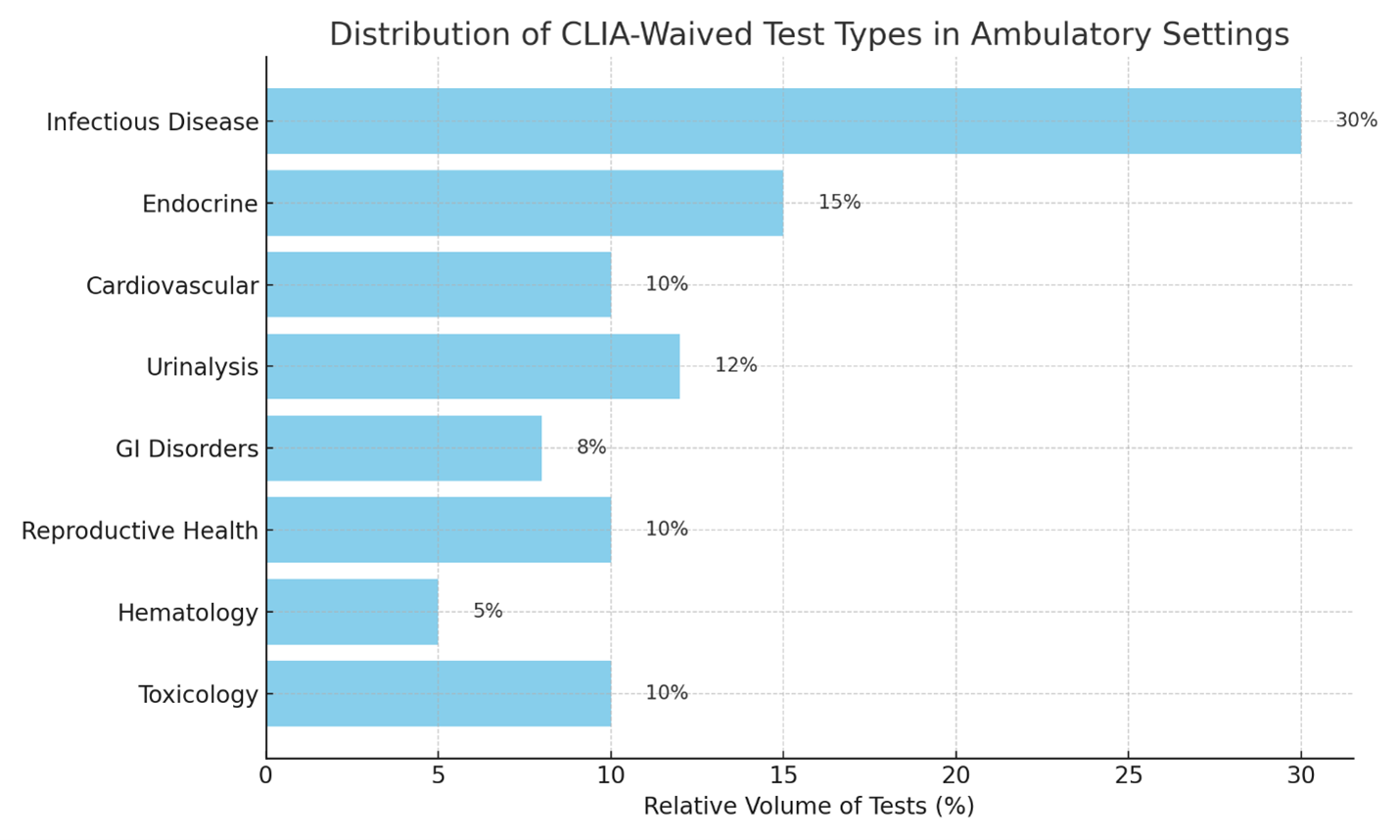
These tests are frequently employed in primary care workflows, wellness exams, and acute illness visits.
Innovations in CLIA-Waived Testing: What's New in 2024–2025
- Molecular Respiratory Panels
Molecular testing is no longer limited to centralized laboratories. New CLIA-waived molecular diagnostic platforms now offer PCR-level accuracy at the point of care. Many of these tests can detect multiple respiratory pathogens, such as:
- SARS-CoV-2
- Influenza A and B
- Respiratory syncytial virus (RSV)
This is a major leap in diagnostic capability, particularly during flu seasons and pandemics.
- Combo Testing: COVID-19 + Flu + RSV
Multiplex lateral flow tests from multiple diagnostics companies now offer simultaneous detection of three major respiratory viruses from a single nasal swab. These combo tests are CLIA-waived and often deliver results within 15–30 minutes.
This simplifies triage decisions, reduces unnecessary antibiotic use, and enables appropriate isolation measures.
- HbA1c and Lipid Testing Advancements
Diagnostic devices and tests from major brands now offer improved precision, integrated quality control, and EHR compatibility for quantitative HbA1c measurement. These devices allow same-visit testing and therapeutic titration for diabetic patients.
- Non-Invasive H. pylori Testing
There are multiple CLIA-waived options for H. pylori detection. They provide a non-invasive alternative to endoscopy or stool antigen tests and deliver accurate results within minutes, suitable for primary care GI screening.
Regulatory and Operational Considerations
CLIA Certificate of Waiver
Any physician office or clinic performing waived tests must apply for a CLIA Certificate of Waiver (CMS Form 116). The certification is valid for two years and requires minimal administrative oversight.
Staff Training and Quality Assurance
While waived tests are low complexity, accuracy still depends on proper technique. Staff should be trained in:
- Sample collection and handling
- Equipment maintenance
- Interpretation and documentation of results
Basic quality control protocols, while not mandated, are recommended to reduce risk of error.
Billing and Coding
Most CLIA-waived tests are reimbursable using HCPCS Level II codes and relevant CPT codes. Correct modifier use (e.g., QW for Medicare) is essential to avoid claim rejections.
Future Directions in CLIA-Waived Testing
Several trends are likely to influence the next phase of development in this space:
- Digital Integration: Many new analyzers now offer Bluetooth or cloud connectivity, enabling automatic upload of results to electronic health records (EHRs).
- Home-Based Waived Testing: Tests that were once restricted to office use are now available for home administration under provider oversight, supporting remote care models.
- AI-Enhanced Devices: Some platforms incorporate artificial intelligence for image analysis (e.g., automated urinalysis) and result interpretation, reducing inter-operator variability.
- Expanded Panels: Look for more multiplex platforms that assess a combination of pathogens or biomarkers with a single sample.
Conclusion
CLIA-waived laboratory testing has become a foundational element in outpatient and urgent care medicine. For physicians, these tests offer a reliable, efficient, and financially sustainable approach to diagnosing and managing a wide range of conditions. With innovations expanding both the scope and accuracy of what is possible at the point of care, clinicians are better equipped than ever to deliver timely, informed care decisions.
As healthcare continues to evolve toward accessibility, efficiency, and personalized medicine, CLIA-waived testing will remain at the forefront of diagnostic strategy in ambulatory settings.
A Shift Toward Proactive Health
Tuesday, July 01, 2025
by Shakeel Ahmed, MD
For generations, the U.S. healthcare system has operated largely in reaction mode—intervening after symptoms present, after disease progresses, and often after irreversible damage has already occurred. In this model, physicians treat crises, not precursors. It’s a system that rewards volume, not prevention—and it’s buckling under its own weight.
Today, that paradigm is shifting. With chronic diseases dominating the nation’s morbidity and mortality profile, and healthcare spending ballooning past $4.5 trillion annually, the urgency to invest in prevention has never been clearer. Preventive medicine—long viewed as an aspirational ideal—is rapidly becoming the backbone of future care delivery. It’s a pivot not only driven by compassion but by hard economics, better outcomes, and technological capability.
According to the CDC, six in ten U.S. adults live with at least one chronic condition, and four in ten live with two or more. Diseases like diabetes, obesity, hypertension, and heart disease are no longer edge cases—they’re the new baseline. These preventable or modifiable conditions now account for 90% of all U.S. healthcare expenditures. If we aim to bend the cost curve and improve life expectancy—now stagnating at around 76.4 years—the path forward is obvious: anticipate disease, intervene early, and keep people healthy for as long as possible. In this article, we will discuss the major factors and forces shaping the future of preventive medicine in the country.
Ten Expanding Forces Defining the Future of Preventive Care
- More Screenings, Sooner, for More People
Thanks to the Affordable Care Act, more than 150 million Americans now have access to no-cost preventive services, including over 80 USPSTF-recommended screenings for various cancers, cardiovascular risks, infectious diseases, and mental health conditions. These include:
- Mammograms beginning at age 40, which have helped reduce breast cancer mortality by 40% since widespread adoption.
- Colorectal cancer screenings now beginning at age 45, a change made in response to rising incidence among younger adults.
- Annual lung cancer screenings for adults aged 50–80 with a 20-pack-year smoking history, which can reduce lung cancer deaths by up to 20%.
As a result, colorectal cancer screening rates have surpassed 70% among insured adults, and cervical cancer mortality has declined by over 50% since the introduction of the Pap test. Yet disparities persist—underscoring the need for further policy alignment and outreach.
- AI, Biometrics, and Wearables: The Rise of Real-Time Prevention
More than 125 million Americans now use wearable health devices, including Apple Watch, Fitbit, Oura Ring, and newer devices like the Dexcom G7 and WHOOP Band. These devices monitor:
- Cardiac rhythms to detect arrhythmias like atrial fibrillation (AFib)—a major cause of stroke.
- Oxygen saturation and sleep cycles, identifying early warning signs of sleep apnea or chronic fatigue syndrome.
- Continuous glucose levels, now accessible through consumer-friendly monitors, allowing prediabetics and diabetics to respond in real time.
AI-enhanced platforms are also now embedded in diagnostic imaging. For example, Google Health’s AI system has demonstrated 94.5% accuracy in detecting diabetic retinopathy from retinal images. Dermatology apps can detect melanoma with sensitivity comparable to dermatologists. When paired with remote monitoring, this technology turns homes into early-detection hubs.
- Medicare Advantage: A National Experiment in Preventive Incentives
Over 31 million Americans—nearly half of all Medicare beneficiaries—are now enrolled in Medicare Advantage (MA). These private plans have aligned financial incentives with preventive goals, offering:
- No-cost annual wellness exams
- Behavioral health integration, including teletherapy and substance abuse treatment
- SilverSneakers fitness memberships
- Chronic care management and medication therapy services
According to a 2023 study published in JAMA, MA enrollees had a 43% lower rate of avoidable hospitalizations and 23% fewer ER visits compared to those in traditional Medicare. MA is becoming a proving ground for prevention-first healthcare economics.
- Obesity: The Costliest and Most Preventable Crisis
Obesity has become the root cause of much of America’s chronic disease burden. With 42.4% of adults and 19.7% of youth categorized as obese, the nation faces a public health emergency. Obesity raises the risk of:
- Type 2 diabetes by 300–400%
- Heart disease by 200%
- At least 13 types of cancer, including colon, breast, and pancreatic
The economic cost exceeds $173 billion annually in direct medical expenses, not including lost workforce productivity or military readiness. Yet, even a 5–10% reduction in weight can normalize A1C, lower blood pressure, and improve sleep apnea—all of which reduce the need for medications and procedures.
- National Diabetes Prevention Program (NDPP): A Model Worth Scaling
The CDC’s NDPP is one of the most rigorously validated public health programs in recent memory. Through structured lifestyle intervention—nutrition, activity, and behavior coaching—participants reduce their risk of developing diabetes by 58%, and by 71% for those over age 60. It is now being implemented by over 2,000 organizations nationwide, including:
- Community health centers
- YMCAs and senior centers
- Digital platforms like Omada Health and Virta Health
Longitudinal studies show that NDPP also reduces the incidence of hypertension, fatty liver disease, and depression. The return on investment is estimated at $2.40 for every $1 spent.
- Wellness at Work: Employers Step In
Over 82% of large employers (500+ employees) now offer wellness programs, with over half offering biometric screenings, health risk assessments, and personalized coaching. Employers like Google, Salesforce, and Johnson & Johnson are investing in:
- Mental health apps like Headspace and Calm
- On-site fitness centers or gym subsidies
- Incentives for smoking cessation, weight loss, and step goals
Johnson & Johnson alone reported $250 million in health cost savings over a decade, along with a 67% decline in employee smoking rates. RAND’s research estimates $1.50 to $3 in savings for every dollar spent on comprehensive wellness initiatives.
- Vaccination: A Lifesaving Preventive Strategy
From childhood through adulthood, vaccination is still the gold standard in disease prevention. The CDC reports that:
- Routine immunizations in children born between 1994 and 2018 prevented 419 million illnesses, 26.8 million hospitalizations, and 936,000 premature deaths.
- Flu vaccinations alone prevent 3.2 million illnesses, 1.6 million doctor visits, and 100,000 hospitalizations annually in the U.S.
- Increasing shingles vaccine uptake in adults over 60 could prevent over 1 million painful episodes annually.
Improving adult immunization rates by even 10% could save $1.1 billion annually, mostly in avoidable hospitalizations.
- Genomics and Precision Screening
Genomic medicine is ushering in a new era of personalized prevention. Programs like:
- Geisinger’s MyCode (over 300,000 participants)
- NIH’s All of Us Research Program (aiming for 1 million volunteers)
are uncovering genetic variants that increase risk for BRCA-related breast and ovarian cancers, Lynch syndrome, familial hypercholesterolemia, and more. Individuals with actionable genetic findings are guided toward:
- Early or intensified screenings
- Risk-reducing medications or surgeries
- Lifestyle interventions tailored to gene-environment interactions
Pharmacogenomics is also growing, helping to determine which patients will benefit from statins or anticoagulants while minimizing adverse side effects.
- Food as Medicine: Nutrition’s Role in Prevention
The concept of “food as medicine” is moving from pilot projects to mainstream policy. Programs in states like California, Massachusetts, and New York are testing prescription meals for patients with heart failure, diabetes, or CKD. Outcomes include:
- 32% reduction in hospitalizations
- $220 in per-member-per-month cost savings
- Improved A1C, LDL, and BMI outcomes
CMS is now evaluating whether to include such meals in standard coverage for high-risk Medicare beneficiaries. If scaled, such programs could save over $30 billion in national healthcare costs annually.
- The ACA’s Lasting Impact: Universal Preventive Coverage
Perhaps the most impactful legacy of the Affordable Care Act is its mandate that all major insurers cover preventive services at no cost to patients. This includes:
- Cancer screenings
- Immunizations
- Tobacco cessation counseling
- Preconception and prenatal services
By eliminating cost barriers, preventive care utilization has surged—particularly among low-income and minority populations. According to HHS, coverage for preventive services increased by 25% among Black and Hispanic adults in the first five years of the ACA’s implementation, reducing historical disparities in disease burden.
Looking Ahead: From Episodic to Continuous Care
Preventive medicine is no longer a footnote—it’s becoming the framework. With emerging technologies, better data, evolving payment models, and a national imperative to reduce costs while improving outcomes, prevention is finally being recognized for what it is: the highest-value form of care we can offer.
Still, the road ahead requires vigilance. Challenges such as health literacy gaps, mistrust in public health institutions, and fragmented data systems must be addressed. But the tools are here. The incentives are aligning. And the American public is ready for a system that values wellness as much as it does rescue.
If the next decade of U.S. healthcare is defined by one thing, let it be this: a national shift from treating illness to preserving health. That is where the future lies—not just for medicine, but for society as a whole.
The Future of Artificial Intelligence in Healthcare: Revolutionizing Diagnosis, Treatment, and Options
Thursday, May 01, 2025
by Dr. Shakeel Ahmed
This is our second series of articles for this esteemed publication. In our previous series, we explored various healthcare investment opportunities available to healthcare entrepreneurs and physicians. Now, we shift our focus to the future, examining how artificial intelligence (AI) is shaping different aspects of healthcare and healthcare businesses over the next decade and beyond.
“ In the long history of humankind, those who learned to collaborate and improvise most effectively have prevailed.”
– Charles Darwin
AI’s presence in healthcare is well established, so I won’t spend valuable magazine space explaining its fundamentals. Instead, we will dive straight into its impact, starting with AI’s role in surgery. Future articles will explore its influence in fields like preventive medicine, healthcare finance, and Ambulatory Surgery Centers, offering insights into how AI is revolutionizing medicine across multiple domains.
Artificial Intelligence in Surgery: Present and Future:
Artificial Intelligence (AI) is transforming healthcare at a breakneck pace, revolutionizing the way we as clinicians are diagnosing disease processes, performing surgeries, and how we are managing the postop care of our patients. This is being done at an exponential pace not just in the inpatient setting, but also in the outpatient surgical industry. In fact, in the latter is where this transformation is most apparent, where artificial intelligence-driven technologies are vastly improving the precision with which surgeries are performed, thereby leading to a reduction in complications and enhancement of results. As AI continues to integrate into our surgical practices around the US and abroad, it is reshaping our outcomes, minimizing the error which the human mind hitherto would make, and streamlining all of the processes of our care.
From robotic-assisted surgeries to artificial intelligence-enhanced postoperative and preoperative care, the role for AI is becoming increasingly vital in the evolution of surgery. As one of the last bastions of the old method of clinical application, physicians like us are watching this change with a mixture of awe, consternation, and positive energy, for the impact in our opinion will continue to expand further beyond current human imagination, leading to safer, more cost effective, and faster procedure times in the same breath.
AI and Robotic-Assisted Surgery: Enhancing Precision and Efficiency
In my opinion one of the most impressive applications of AI has been in robotic-assisted surgery. This modality allows for more precision most importantly in minimally invasive procedures, thus leading to better outcomes and much shorter recovery times. The systems utilized by AI-drive algorithms provide real time guidance in all of the facets of surgical care, improving visualization and assisting the surgeons in executing all of the different complicated maneuvers of surgery with better accuracy.
The Da Vinci Surgical System by Intuitive Surgical is one of the best and well known AI powered robotic platforms currently being used in our setups. Since its introduction, it has been deployed in close to 7,000 facilities around the world. This system is extremely beneficial, and most importantly for minimally invasive surgeries like hernia repairs, microscopic spine surgeries, laparoscopic cholecystectomy, and gynecological procedures. The robotic arms of the system driving by Artificial Intelligence mimic the movements of the surgeon’s hands, and yet with enhanced stability and dexterity that only a high-end machine can perform. This leads to a significant reduction in the likelihood of human error. There is also a 3D high definition visualization system with Da Vinci, which improves the surgeon’s ability to navigate delicate structures, tissues and fields around the human body.
Medtronic’s Hugo RAS System is also making significant strides in robotic-assisted surgery. This is a modular AI-enhanced robotic system. It is designed to bring the benefits hereto mentioned of robotic-assisted surgery to a much broader range of procedures, including urology and gynecology cases. Just like its competitors, its AI-powered analytics and motion control allow for much better decision making during surgeries than ever before, making it a very valuable asset for outpatient procedures and surgery centers. Surgery center owners like myself have developed a particular liking for Artificial Intelligence with applications like these, because in spite of all of the other finances and bells and whistles attached with healthcare innovations the most important one is better patient safety and outcome, and AI is showing that to use in real time, pun intended.
CMR Surgical’s Versius Robot is another Artificial Intelligent powered robotic system which is revolutionizing outpatient surgical care in the fields of colorectal surgery, gynecology, and thoracic surgery. Unlike its competitors and older models, Versius is designed to be more adaptable and more compact, thus allowing it to be used in more surgically confined places like smaller outpatient surgical centers. Its AI capabilities help maximize and optimize surgical instruments movement, improve the workflow in the surgical spaces, and thereby lead to enhanced patient safety and comfort.
In Orthopedic Surgery, Zimmer Biomet’s Rosa (Robotic Surgical Assistant) platform is making news and transforming care in knee and hip replacement surgeries. This system leverages Artificial Intelligence to accurately analyze a patient’s anatomy, providing real time guidance and feedback to the surgeon during knee and hip joint replacement surgeries. Rosa’s capabilities help improve patient’s positioning during surgery, reduce the variability needed in these complex and long surgical procedures, and also enhances postsurgical recovery time for patients who are undergoing these cases in an outpatient setting. I have seen this particularly useful in outpatient joint surgeries in midsized surgery centers where efficacy and time management is key.
Another significant player in this field is Brainlab’s Cirq, a robotic assistant being used in spine surgery. Cirq is using AI-driven movement and navigation to assist spine surgeons in placing spinal implants with razor-sharp accuracy, within submillimeter limits. This is leading to significant improvement in outpatient spine surgery outcomes, where precision in micrometers is crucial for patient outcomes. Cirq is helping surgeons perform complex spinal surgeries more efficiently by integrating AI-powered automated adjustments and image guidance. As expected this is leading to faster recovery times and significant reduction in risks of these surgeries.
AI in Preoperative Planning and Intraoperative Guidance
Artificial Intelligence as expected is transforming the ways these surgeries are planned even before a patient enters the operating room. Traditionally preoperative planning relied on images reviewed by the human mind. Now AI powered platforms can analyze thousands and more of medical images in real time, offering clinicians knowledge and insight that helps the surgeon choose the best approach for every surgery they perform. Imagine having the clinical acumen and availability of a hundred different doctors at your fingertips guiding you into what the best mode of action should be for your patient’s surgery. Imagine the results.
As an example, Surgical Theater’s Precision VR platform utilizes virtual reality and Artificial Intelligence to create a 3D simulation of the surgery. The surgeon uses this, much like a high level video game the knowledge of which is alien to me at this age, to rehearse complex procedures in a virtual environment before performing them on their actual patients. Precision VR is extremely used for cardiac procedures and neurosurgical cases, where life and death hinges on millimeters of movement.
Another cutting edge tool is Asensus Surgical’s Augmented Intelligence Platform, which is helping enhance performance of laparoscopic surgeries but providing Artificial Intelligence-powered intraoperative guidance. The platform’s AugmentedOR Portal collects and analyzes performed data on surgeries, and helps guide surgeons improve their techniques for the cases and identifies areas and deficiencies in their case. The overall patient outcome, as expected is better.
The next frontier for Artificial Intelligence of course was image technology. There also it is playing a very crucial role in outpatient surgery. Orthogrid’s AI-based imaging platform is being used to improve the accuracy of joint replacements by optimizing the imaging services performed fluoroscopically during these cases. In real time this ensures that the implants in patients are placed with the highest level of accuracy needed, which thus leads to better outcomes, success rates and reduction of complications.
AI in Postoperative Care, Documentation, and Remote Monitoring
Next, but by no means lower on the list, is AI’s role in outpatient surgery in the postop arena. The documentation of inpatient monitoring process has been improved in a huge way with Artificial Intelligence. As I can tell you from experience in running multiple surgery centers simultaneously, one of the biggest challenges that surgeons are facing is the time consuming task of postoperative documentation. AI-powered platforms such as Olive AI and Nuance’s Dragon Medical One automate this process, allowing the surgeons to dictate the note while AI is transcribing and organizing it in real time. A recent study has found that AI-generated postoperative notes are often more accurate than those written by the surgeons, freeing up valuable time for patient care. Postoperative surgical monitoring is also being improved by Artificial Intelligence. Companies like Current Health and Biofourmis are developing wearable technologies that can track a patient’s vital signs even after the surgery is over. These systems use learning system to detect early signs of complications such as respiratory issues, clotting, infections, etc., and then alert the surgeons and other medical providers before it is too late. This remote monitoring by Artificial Intelligence is extremely beneficial for outpatient procedures, as I see our patients discharged quicker than ever before and watched even beyond the field of our vision.
In the field of Pain Management Artificial Intelligence has led to significant reduction and opioid dependency by personalizing the treatment plans for each patient. Consider this concierge care for patients pay. Hinge Health, for example is using AI-driven machines and motion sensors that are designed to learn a patients rehab program and customize it for recovery for them. With the help of these programs patients are regaining mobility and managing their pain in a much more efficient way without having to rely on heavy opioid medications with the resultant complications and long-term dependency.
The Future of AI in Outpatient Surgery: A Look Ahead
“ Any sufficiently advanced technology is indistinguishable from magic.”
- Arthur C. Clarke
I can only surmise what will happen next. Just when we feel that we have a handle on how fast AI can take off, AI takes off at a speed way beyond our guess. The next decade will witness huge advancement in AI-driven surgical technology. There are companies, emerging companies, like Proprio which are developing AI-enhanced augmented reality systems that provide real time viewing of human anatomical structures during surgery, reducing the need of a surgeon to rely on typical image screens from current days. Another system, Avail Medsystems is pioneering tele present surgery, allowing subspecialty and expert surgeons to provide real time guidance remotely, expanding the access to specialized centers beyond their reach which don’t have subspecialty care on premise.
Predictive analytics are also being developed by AI and being integrated into the ambulatory surgery market to enhance outcomes and improve patient care. AI can analyze vast amounts of patient date, and predict which patients and individuals are at higher risk for postoperative complications, allowing the surgeons to take measures to prevent those complications even before they operate. This level of precision will improve surgical safety, ensure better recovery, and most importantly reduce complications.
AI continues to evolve. We are poised to only become safer, more efficient and more streamlined. The integration of Artificial Intelligence with these imaging systems, robotic platforms, and real time navigation tools for surgeons have shown unprecedented and unbelievable results in surgical precision in patient care. The future is bright. It is not just about improving one or two surgeries or procedures. It is about transforming the whole macrocosm of surgery, making higher quality care and results a real option for real people.
The Crucial Role of Primary Care Physicians in Screening for Colorectal Cancer
Wednesday, March 26, 2025
by Adam Irving, Physicians Office Resource Staff Writer
Colorectal cancer (CRC) is the third most common cancer diagnosed in both men and women and remains a leading cause of cancer-related deaths worldwide. Early detection through screening significantly improves prognosis and reduces mortality. As primary care physicians (PCPs) play a crucial role in preventive medicine, understanding the available CRC screening options is essential for guiding patients in making informed choices. This article provides an overview of colorectal cancer, risk factors, and the various screening modalities available to detect the disease.
Epidemiology and Risk Factors
CRC primarily affects individuals over 50 years of age, but in recent years, there has been an increase in incidence among younger adults. Risk factors include:
- Age (50 years and older)
- Family history of colorectal cancer or adenomatous polyps
- Personal history of inflammatory bowel disease (ulcerative colitis, Crohn's disease)
- Genetic syndromes (e.g., Lynch syndrome, familial adenomatous polyposis)
- Lifestyle factors (diet high in red and processed meats, obesity, smoking, alcohol consumption, and physical inactivity)
Given these risk factors, PCPs should emphasize the importance of screening in at-risk populations and discuss modifiable lifestyle changes that may reduce CRC risk.
Screening Guidelines
The U.S. Preventive Services Task Force (USPSTF) and the American Cancer Society (ACS) recommend CRC screening for average-risk adults starting at age 45. Those with higher risk factors may need earlier and more frequent screening. Various screening methods exist, each with its benefits and limitations.
Screening Methods
There are two main categories of CRC screening tests: stool-based tests and visual (structural) exams. PCPs should be familiar with these options to help patients select the most appropriate test based on individual risk factors, preferences, and accessibility.
Stool-Based Tests
These non-invasive tests detect blood or DNA markers in stool samples and require no bowel preparation.
- Fecal Immunochemical Test (FIT)
- Detects hidden blood in the stool from lower gastrointestinal bleeding.
- Recommended annually.
- High sensitivity for detecting CRC but lower for adenomas.
- No dietary or medication restrictions.
- Guaiac-Based Fecal Occult Blood Test (gFOBT)
- Detects blood in the stool through a chemical reaction.
- Requires annual testing.
- Dietary restrictions (avoiding red meat and certain medications) are necessary.
- Lower sensitivity compared to FIT.
- Multi-Target Stool DNA Test (mt-sDNA) (e.g., Cologuard®)
- Detects both DNA mutations and occult blood.
- Recommended every three years.
- Higher sensitivity for CRC and advanced adenomas than FIT.
- More expensive than FIT and gFOBT.
Visual (Structural) Exams
These tests allow direct visualization of the colon and rectum and have higher sensitivity for detecting precancerous lesions.
- Colonoscopy
- Gold standard for CRC screening.
- Recommended every 10 years for average-risk individuals.
- Requires full bowel preparation.
- Allows for polyp removal and biopsy during the procedure.
- Higher cost and risk (perforation, bleeding) compared to non-invasive tests.
- Flexible Sigmoidoscopy
- Examines the rectum and lower third of the colon.
- Recommended every 5 years, or every 10 years when combined with FIT.
- Less invasive than colonoscopy but does not evaluate the entire colon.
- CT Colonography (Virtual Colonoscopy)
- Uses computed tomography to create detailed images of the colon.
- Recommended every 5 years.
- Requires bowel preparation but is less invasive than colonoscopy.
- Polyps detected require a follow-up colonoscopy for removal.
Choosing the Right Test for Patients
The best CRC screening test is the one that the patient is willing and able to complete. PCPs should discuss the pros and cons of each method while considering the patient’s risk factors, medical history, preferences, and access to healthcare facilities. Key considerations include:
- Average-Risk Individuals: FIT or colonoscopy are the most commonly recommended options.
- High-Risk Individuals: Colonoscopy is preferred due to its ability to detect and remove precancerous lesions.
- Patients Avoiding Invasive Tests: FIT or stool DNA testing may be suitable alternatives.
- Patients with Limited Access to Colonoscopy: Stool-based tests can be useful interim solutions.
Barriers to CRC Screening and Strategies to Improve Uptake
Despite the proven benefits of CRC screening, adherence remains suboptimal due to factors such as:
- Lack of awareness about screening recommendations.
- Fear or discomfort with colonoscopy preparation.
- Concerns over cost and insurance coverage.
- Limited access to healthcare providers or screening facilities.
To improve screening rates, PCPs can:
- Educate patients on the importance of CRC screening and available options.
- Offer multiple screening choices tailored to patient preferences.
- Implement reminder systems for patients due for screening.
- Advocate for policy changes that increase insurance coverage and access to CRC screening.
Primary care physicians play a pivotal role in colorectal cancer prevention and early detection. By understanding the different screening methods and individualizing recommendations based on patient preferences and risk factors, PCPs can help increase screening adherence and ultimately reduce CRC-related morbidity and mortality. Encouraging patients to participate in regular screening remains a key strategy in the fight against colorectal cancer.
Top 5 Criteria for Choosing a Chemistry Analyzer for a Physician’s Office Laboratory
Thursday, March 20, 2025
by Michael Baker, Physicians Office Resource Staff Writer
In a physician’s office laboratory (POL), having a reliable and efficient chemistry analyzer is essential for providing timely and accurate diagnostic results. These instruments play a crucial role in analyzing blood, serum, plasma, urine, and other biological fluids to measure various chemical components, such as glucose, electrolytes, lipids, enzymes, and proteins.
Choosing the right chemistry analyzer is a critical decision that impacts workflow efficiency, patient care, and overall laboratory performance. With many options available, selecting the best one requires careful consideration of multiple factors. Below are the top five criteria to consider when selecting a chemistry analyzer for a physician’s office laboratory.
- Accuracy and Precision of Test Results
The primary purpose of a chemistry analyzer is to provide accurate and precise test results that aid in diagnosing and monitoring patients. Accuracy refers to how close the test results are to the true value, while precision refers to the consistency of results when repeated tests are performed.
Factors Affecting Accuracy and Precision
- Analyzer Technology: Some analyzers use dry chemistry, while others use wet chemistry methods. Wet chemistry tends to be more accurate but requires liquid reagents.
- Calibration and Quality Control: A high-quality analyzer should offer automated calibration and built-in quality control checks to minimize errors.
- Reagent Quality: The quality of reagents significantly affects test results. Some analyzers use proprietary reagents that enhance accuracy.
- Interference Minimization: Advanced analyzers incorporate features to minimize interference from lipemia, hemolysis, and icterus, ensuring more reliable results.
Why This Matters
Inaccurate test results can lead to misdiagnosis, incorrect treatments, and potential harm to patients. Physicians rely on chemistry analyzers to make critical decisions, so investing in a device with superior analytical performance is essential.
- Test Menu and Customization Options
Every physician’s office laboratory has specific testing needs based on the patient population, medical specialty, and practice focus. The chemistry analyzer should offer a comprehensive test menu that aligns with the laboratory’s requirements.
Key Considerations
- Basic vs. Advanced Panels: Some analyzers offer only basic metabolic and lipid panels, while others include advanced markers such as cardiac enzymes, liver function tests, and thyroid hormones.
- Customization and Expandability: Some analyzers allow labs to add or remove specific tests, providing flexibility as testing needs evolve.
- Throughput and Efficiency: Consider how many tests the analyzer can perform per hour. A POL with high patient volume will need an instrument with faster turnaround times.
Examples of Commonly Performed Tests
- Basic Metabolic Panel (BMP)
- Comprehensive Metabolic Panel (CMP)
- Liver Function Tests (LFTs)
- Lipid Profile
- Renal Function Tests
- Cardiac Markers (e.g., Troponin, CK-MB)
- Thyroid Function Tests (T3, T4, TSH)
- Electrolytes (Sodium, Potassium, Chloride, Bicarbonate)
Why This Matters
A broad and flexible test menu ensures that the POL can meet current and future testing demands. Selecting an analyzer with a limited test menu may require sending additional tests to external laboratories, increasing costs and turnaround time.
- Ease of Use and Automation Features
Since many physician’s office laboratories are staffed by medical assistants, nurses, or general practitioners rather than specialized laboratory technicians, ease of use is a crucial factor when selecting a chemistry analyzer.
Automation Features to Look For
- User-Friendly Interface: Touchscreen displays, intuitive software, and guided workflows simplify operations.
- Automated Sample Handling: Features such as barcode scanning, automatic dilution, and clot detection reduce manual workload.
- Minimal Maintenance: Some analyzers require daily or weekly maintenance, while others are designed with self-cleaning mechanisms.
- Preloaded Reagents and Cartridges: Eliminates the need for manual reagent preparation, reducing the risk of errors.
- Onboard Storage of Reagents and Consumables: Reduces the frequency of reagent replacement, increasing efficiency.
Training and Support
Even with automation, proper training is essential. Manufacturers that offer training programs, online resources, and responsive customer support can help ensure smooth operation and minimize downtime.
Why This Matters
A complex, difficult-to-use analyzer can lead to errors, inefficiencies, and frustration among staff. An intuitive, automated system improves productivity and reduces the likelihood of human error, leading to better patient outcomes.
- Speed and Throughput Capacity
The speed at which an analyzer processes samples is a crucial factor for maintaining an efficient workflow in a physician’s office laboratory. Laboratories with high patient volumes need analyzers that can deliver rapid results without compromising accuracy.
Throughput Considerations
- Low Throughput (Less than 50 tests/hour): Suitable for small offices with low patient volume.
- Medium Throughput (50–200 tests/hour): Ideal for moderately busy POLs.
- High Throughput (200+ tests/hour): Needed for high-volume practices.
Turnaround Time (TAT)
- STAT Testing: Some analyzers offer STAT (immediate) testing capabilities, delivering results in minutes.
- Batch vs. Random-Access Processing: Batch analyzers process multiple samples at once but may have delays between batches. Random-access analyzers can run tests as needed without waiting for a batch.
Why This Matters
Fast, efficient analyzers improve patient care by reducing wait times and enabling same-day diagnosis. If an analyzer is too slow, physicians may have to delay treatment decisions or refer tests to external labs, increasing costs and inconvenience.
- Cost and Long-Term Investment Considerations
Purchasing a chemistry analyzer involves both upfront and ongoing costs. Understanding the full financial implications helps ensure that the investment is sustainable.
Key Cost Factors
- Initial Purchase Price: Entry-level benchtop analyzers may cost $10,000–$30,000, while high-end models can exceed $100,000.
- Reagent and Consumable Costs: Some analyzers require proprietary reagents, which may be more expensive than third-party options.
- Maintenance and Service Agreements: Routine maintenance, calibration, and potential repairs can add to the long-term cost.
- Software and Connectivity Fees: Some manufacturers charge additional fees for software upgrades, data storage, or integration with electronic medical records (EMR) systems.
- Warranty and Support: A strong warranty and responsive technical support reduce the risk of costly downtime.
Cost vs. Value Analysis
Rather than focusing solely on the cheapest option, consider:
- Cost per Test: Lower reagent costs can offset a higher initial investment.
- Durability and Reliability: A slightly more expensive but robust analyzer can be more cost-effective in the long run.
- Total Cost of Ownership (TCO): Factor in purchase price, maintenance, reagents, and labor costs over the machine’s lifespan.
Why This Matters
A poorly chosen analyzer can lead to unexpected expenses, operational inefficiencies, and disruptions in patient care. Carefully evaluating both initial and ongoing costs ensures a financially sustainable investment.
Final Thoughts: Making the Right Choice
Selecting a chemistry analyzer for a physician’s office laboratory is a significant decision that affects diagnostic accuracy, workflow efficiency, and financial sustainability. The best choice depends on the laboratory’s specific needs, including test volume, staffing expertise, and budget constraints.
Key Takeaways
- Accuracy and Precision – Ensure high-quality, reliable test results to support patient care.
- Test Menu and Customization – Choose an analyzer that aligns with the laboratory’s testing requirements.
- Ease of Use and Automation – Opt for a user-friendly, low-maintenance instrument to enhance efficiency.
- Speed and Throughput – Consider the analyzer’s processing speed to optimize workflow.
- Cost and Investment Considerations – Evaluate upfront and ongoing costs to ensure a cost-effective choice.
By carefully assessing these factors, physicians can select the right chemistry analyzer that enhances laboratory performance, improves patient outcomes, and supports the long-term success of their practice.
Prescribing More than Weight-loss Drugs:
Friday, March 14, 2025
by Michael Baker, Physicians Office Resource Staff Writer
Let’s be honest, with the introduction of weight loss drugs, conversations between physicians and patients, about dropping those unwanted pounds are picking up. The nice thing for HCPs is that this sometimes-sensitive subject is being brought up by patients themselves, which hasn’t always been the case. But as you know, there is so much more to the conversation than “weight-loss drugs.”
As front-line healthcare providers, physicians play a crucial role in supporting their overweight and obese patients in achieving and maintaining a healthier weight. However, addressing weight loss in a clinical setting can be challenging due to the complexity of obesity and the stigma often associated with it. This article explores evidence-based strategies physicians can use to help their patients lose weight effectively and sustainably.
Step 1:
Create a Supportive and Non-Judgmental Environment
Even with patients bringing up the topic of losing weight more than they did in the past, physicians must still approach the topic of weight loss with empathy and sensitivity. Obesity is a multifactorial condition influenced by genetics, environment, behavior, and socioeconomic factors. Avoiding stigmatizing language and focusing on health rather than appearance can help patients feel more comfortable discussing their weight. Terms such as “weight management” or “health improvement” are often more acceptable than “weight loss” or “obesity treatment.”
A supportive environment can foster trust and open communication. Physicians should actively listen to patients’ concerns, validate their experiences, and avoid assigning blame. This approach helps build a collaborative relationship, making patients more likely to engage in discussions about lifestyle changes.
Step 2:
Conduct a Comprehensive Assessment
Before recommending weight-loss strategies, it is essential to perform a thorough assessment of the patient’s health, lifestyle, and weight history. This includes:
- Medical History: Identify comorbid conditions such as hypertension, diabetes, or sleep apnea that may influence weight management.
- Dietary Habits: Assess eating patterns, portion sizes, and food choices.
- Physical Activity: Understand the patient’s current activity levels and any barriers to exercise.
- Psychosocial Factors: Consider mental health conditions, stress, and social support systems.
- Weight History: Discuss previous attempts at weight loss, including what worked and what did not.
This comprehensive evaluation provides a foundation for tailoring interventions to the patient’s unique needs and circumstances.
Step 3:
Set Realistic and Individualized Goals
Setting achievable and personalized goals is critical for long-term success. Unrealistic expectations can lead to frustration and disengagement. Physicians should help patients focus on modest weight loss—typically 5-10% of their initial body weight—as even small reductions can significantly improve health outcomes, such as lowering blood pressure and improving glycemic control.
Goals should also extend beyond the scale. For example, improved energy levels, better sleep, and enhanced mobility can be meaningful milestones that motivate patients to sustain their efforts.
Step 4:
Develop a Collaborative Weight Management Plan
Physicians should work with patients to create a comprehensive, individualized plan that includes dietary changes, physical activity, behavioral strategies, and, when appropriate, medical interventions. Each component is discussed below:
Nutrition
Encouraging a balanced, calorie-controlled diet is a cornerstone of weight management. Physicians should:
- Emphasize whole, minimally processed foods such as fruits, vegetables, lean proteins, and whole grains.
- Encourage portion control and mindful eating to help patients recognize hunger and fullness cues.
- Suggest evidence-based dietary approaches such as the Mediterranean diet, low-carbohydrate diets, or plant-based diets, tailored to the patient’s preferences and health needs.
- Refer patients to registered dietitians for specialized nutritional guidance and support.
Physical Activity
Regular physical activity is essential for weight loss and overall health. Physicians should:
- Recommend at least 150 minutes of moderate-intensity aerobic activity per week, as per guidelines from organizations such as the American Heart Association.
- Encourage resistance training to build muscle mass and improve metabolism.
- Help patients identify enjoyable activities that fit their lifestyle, such as walking, swimming, or dancing.
- Address barriers to exercise, such as lack of time, joint pain, or financial constraints, and suggest practical solutions.
Behavioral Strategies
Behavioral interventions can help patients develop healthier habits and sustain weight loss. Physicians can:
- Encourage self-monitoring of food intake, physical activity, and weight.
- Teach stress management techniques, such as mindfulness or relaxation exercises.
- Promote goal setting and problem-solving to address challenges as they arise.
- Recommend cognitive-behavioral therapy (CBT) for patients struggling with emotional eating or other psychological barriers.
Medical Interventions
For some patients, lifestyle changes alone may not be sufficient. Physicians should consider:
- Pharmacotherapy: FDA-approved weight-loss medications can be used as adjuncts to diet and exercise for patients with a BMI ≥30 or ≥27 with comorbidities. Physicians must monitor for potential side effects and efficacy.
- Bariatric Surgery: For patients with severe obesity (BMI ≥40 or ≥35 with comorbidities) who have not succeeded with other interventions, bariatric surgery may be an option. Referral to a specialized bariatric center is essential for appropriate evaluation and care.
Step 5:
Address Psychological and Emotional Factors
Obesity often has psychological and emotional dimensions that can affect weight management. Physicians should:
- Screen for depression, anxiety, and eating disorders, referring patients to mental health professionals as needed.
- Recognize the impact of stress on weight gain and recommend stress-reduction strategies.
- Foster positive body image and self-esteem to help patients stay motivated.
Step 6:
Provide Ongoing Support and Follow-Up
Weight management is a lifelong journey, and ongoing support is crucial for maintaining progress. Physicians should:
- Schedule regular follow-up visits to monitor progress, celebrate successes, and address setbacks.
- Adjust the weight-loss plan as needed based on the patient’s response and preferences.
- Provide resources such as educational materials, support groups, or digital health tools (e.g., apps for tracking diet and exercise).
- Encourage patients to view setbacks as temporary and focus on long-term behavior change rather than perfection.
Step 7:
Educate and Empower Patients
Education is a powerful tool for empowering patients to take charge of their health. Physicians should:
- Provide clear, evidence-based information about the benefits of weight loss and the risks of obesity.
- Debunk common weight-loss myths and emphasize the importance of sustainable changes over quick fixes.
- Encourage patients to take an active role in their care by asking questions and seeking support when needed.
Conclusion
Helping overweight patients lose weight is a complex but rewarding aspect of medical practice. By creating a supportive environment, conducting thorough assessments, setting realistic goals, and developing personalized weight management plans, physicians can empower their patients to achieve better health. Addressing psychological factors, providing ongoing support, and advocating for systemic change further enhance the likelihood of success. With compassion, patience, and a multidisciplinary approach, physicians can make a meaningful difference in the lives of their patients struggling with obesity.
Optimizing Diagnostics: Key Components to Consider When Selecting a New Hematology Analyzer
Saturday, March 01, 2025
by Michael Baker Staff Writer, Physicians Office Resource
Integrating a hematology analyzer into a medical practice offers several key benefits that can enhance both patient care and operational efficiency. In-house testing allows for immediate processing of blood samples, leading to faster diagnostic results. This can facilitate prompt clinical decision-making, especially in urgent cases.
Quick access to hematology results enables physicians to rapidly identify and address conditions such as anemia, infections, or clotting disorders, thereby enhancing patient outcomes and satisfaction. Modern hematology analyzers provide high precision and reliability. In-house control over the testing process can minimize pre-analytical errors, ensuring more accurate results compared to sending samples to an external lab. Streamlining laboratory processes with an integrated analyzer reduces turnaround times, minimizes administrative delays, and enhances workflow efficiency, ultimately saving time for both clinical staff and patients. Reducing reliance on external laboratories can lower per-test costs over time. Additionally, offering comprehensive in-house testing services may attract more patients and create additional revenue streams for the practice.
When adding a new hematology analyzer to a physician office laboratory, both physicians and lab managers must carefully consider a range of factors to ensure that the instrument meets clinical needs, integrates well with existing systems, and supports the overall efficiency of the laboratory. A thoughtful evaluation can not only improve diagnostic accuracy and turnaround times but also contribute to long-term cost savings and streamlined workflow. Below are key considerations to keep in mind when selecting a hematology analyzer.
- Analytical Performance and Throughput
- Accuracy and Precision: Verify that the analyzer has been validated through robust clinical studies and meets regulatory standards. Look for detailed performance data that demonstrates reliable precision, linearity, and low error rates.
- Sample Volume and Throughput: Assess the instrument’s ability to handle your typical sample load. Ensure that its throughput aligns with your lab’s daily volume without compromising turnaround times.
- Specimen Requirements: Consider the type and volume of specimens needed. An analyzer that accommodates smaller sample volumes or diverse sample types can be particularly beneficial in a physician office setting.
- Workflow Integration and Automation
- User Interface: A user-friendly interface minimizes training time and reduces the likelihood of operator error. Intuitive controls and clear on-screen prompts help ensure consistent results.
- Automation Features: Look for automated sample loading, barcode reading, and error detection systems. These features not only improve efficiency but also help maintain quality control.
- Software and Connectivity: The analyzer should seamlessly integrate with your Laboratory Information System (LIS) and Electronic Medical Records (EMR). This connectivity facilitates data management, reduces manual data entry, and supports real-time result reporting.
- Regulatory Compliance and Quality Control
- Regulatory Standards: Confirm that the analyzer complies with current regulatory and quality standards. This includes adherence to FDA guidelines and alignment with CLIA requirements for laboratory testing.
- Quality Control Mechanisms: An integrated quality control system—such as built-in calibration checks and internal QC materials—helps maintain accuracy over time. Consider how the instrument supports both internal and external quality assurance programs.
- Cost and Total Cost of Ownership
- Initial Investment vs. Operational Costs: Evaluate both the upfront purchase price and the ongoing costs, including reagents, consumables, maintenance, and service contracts. A higher initial cost may be justified if the instrument offers greater reliability and lower long-term expenses.
- Service and Maintenance: Investigate the vendor’s service offerings, warranty details, and support responsiveness. Reliable technical support can minimize downtime and ensure continuous laboratory operation.
- Space, Scalability, and Future-Proofing
- Physical Footprint: Ensure that the analyzer’s size and design fit within your existing laboratory space. Compact models that do not compromise on performance can be ideal for smaller facilities.
- Scalability: Consider whether the instrument can accommodate future testing needs or be upgraded as technology evolves. An analyzer with modular features or flexible software can adapt to changing laboratory demands.
- Integration with Future Technologies: With the rapid advancement in diagnostic technologies, choose an analyzer that supports integration with emerging tools and methods, ensuring your laboratory remains at the forefront of clinical diagnostics.
- Vendor Reputation and Training
- Vendor Track Record: Research the vendor’s history and reputation in the market. User testimonials and peer reviews can provide insights into the reliability and performance of the instrument.
- Training and Support: Adequate training for laboratory staff is essential. Evaluate the availability of comprehensive training programs and ongoing educational resources provided by the manufacturer.
Conclusion
Investing in a new hematology analyzer is a strategic decision that requires balancing performance, integration, cost, and future needs. By carefully evaluating the analyzer’s analytical capabilities, ease of use, regulatory compliance, and support infrastructure, physicians and lab managers can ensure that the instrument not only meets current diagnostic demands but also supports long-term laboratory efficiency and patient care quality. A comprehensive assessment today paves the way for a more streamlined and responsive laboratory environment tomorrow.
Farm to Factory to Table: Ultra Processed Foods
Friday, February 14, 2025
by Adam Irvine, Staff Writer, Physicians Office Resource
Ultra processed foods (UPFs) have become a significant component of many modern diets, and understanding their impact is essential for physicians who strive to promote optimal patient health. As the landscape of food production evolves, it is increasingly important for healthcare providers to recognize not only the nutritional shortcomings of these products but also their broader implications for public health. This article outlines key points physicians should know about ultra processed foods and provides insights into the potential mechanisms behind their adverse health effects, epidemiological evidence, and clinical considerations.
What Are Ultra Processed Foods?
Ultra processed foods are defined by their industrial formulation and extensive processing. Characterized by the inclusion of additives, artificial flavors, colors, and preservatives, these products often contain ingredients rarely used in home cooking. According to the NOVA food classification system, UPFs are created through a series of industrial techniques and typically have a high content of added sugars, unhealthy fats, and sodium, with minimal nutritional value.
Epidemiological Evidence and Health Implications
Multiple studies have associated high consumption of ultra processed foods with an increased risk of several chronic conditions, including:
- Obesity and Metabolic Syndrome: Diets rich in UPFs are linked with weight gain and a higher incidence of insulin resistance.
- Cardiovascular Disease: The high levels of sodium and unhealthy fats in UPFs contribute to hypertension and dyslipidemia.
- Type 2 Diabetes: The rapid absorption of refined carbohydrates and added sugars in these foods can impair glucose metabolism.
- Cancer: Emerging research suggests that additives and the chemical by-products of processing might have carcinogenic properties.
- Gut Dysbiosis: Altered gut microbiota due to excessive consumption of additives and low dietary fiber can impact immune function and inflammation.
Mechanisms Behind the Adverse Effects
Understanding the potential mechanisms by which ultra processed foods affect health can aid physicians in advising their patients:
- Nutritional Imbalance: UPFs often displace nutrient-dense foods, leading to deficiencies in essential vitamins, minerals, and fiber.
- High Glycemic Load: The refined carbohydrates found in UPFs can cause rapid spikes in blood glucose, contributing to insulin resistance.
- Additives and Chemical Exposure: Emulsifiers, artificial sweeteners, and preservatives may disrupt gut barrier function, promoting inflammation and metabolic disturbances.
- Palatability and Overconsumption: The engineered taste profiles of these foods can lead to overeating by stimulating reward pathways in the brain, similar to addictive substances.
Clinical Considerations and Patient Counseling
Physicians are uniquely positioned to influence dietary behaviors. When discussing ultra processed foods with patients, consider the following strategies:
- Patient Education: Explain the differences between whole, minimally processed foods and ultra processed alternatives. Use practical examples that resonate with patients’ everyday experiences.
- Nutritional Counseling: Collaborate with dietitians to develop dietary plans that emphasize whole grains, fruits, vegetables, lean proteins, and healthy fats.
- Behavioral Interventions: Encourage mindful eating practices, such as reading labels and preparing meals at home, to reduce reliance on UPFs.
- Chronic Disease Management: For patients with conditions like diabetes or hypertension, provide tailored advice on reducing UPF intake as part of a broader therapeutic strategy.
- Community Health Advocacy: Physicians can also play a role in public health by advocating for policies that promote access to fresh, minimally processed foods and transparent food labeling.
Will there be government regulations on Ultra Processed Food?
The U.S. government hasn't yet unveiled a comprehensive policy specifically targeting ultra processed foods. However, several initiatives and regulatory efforts are indirectly addressing concerns related to these foods:
- Nutrition Guidelines: Agencies like the USDA and HHS regularly update the Dietary Guidelines for Americans. These guidelines emphasize the consumption of whole and minimally processed foods, indirectly discouraging diets heavy in ultra processed items.
- Labeling Regulations: The FDA has been working on improving nutrition labels—such as clearer disclosures of added sugars and other ingredients—which can help consumers make more informed choices about ultra processed foods.
- Public Health Campaigns: Various public health programs and educational campaigns aim to raise awareness about the risks of diets high in processed foods. These efforts encourage healthier eating habits that favor whole foods over highly processed alternatives.
- Research and Monitoring: Government-funded research, including studies by the CDC and NIH, continues to examine the health impacts of ultra processed foods. Findings from this research can inform future policy decisions.
Future Directions and Research Needs
While the evidence linking UPFs to chronic disease continues to grow, further research is essential to understand the complex interactions between food processing, additives, and health outcomes. Physicians should stay updated with the latest studies to refine dietary recommendations and contribute to informed discussions on public health nutrition policies.
Conclusion
Ultra processed foods represent a significant challenge in modern dietary patterns, contributing to a host of chronic diseases and metabolic disturbances. For physicians, understanding the composition, mechanisms, and health impacts of these foods is critical in providing effective patient care. By educating patients, advocating for healthier food environments, and staying abreast of emerging research, healthcare providers can help mitigate the adverse effects of ultra processed foods and promote a shift towards healthier dietary practices.
Understanding and Overcoming Physician Burnout
Saturday, February 01, 2025
by Adam Irvine, Staff Writer, Physicians Office Resource
As we begin a new year, our thoughts often turn to hope and improvement. The end of the old and the beginning of a new. A time to re-start and a time to become something more. New year’s resolutions often focus on physical, social, emotional, spiritual, and intellectual goals with hopes of bettering relationships with others, but also relationships with ourselves.
In such a demanding role as a healthcare provider, sometimes the thought of trying to do anything more than you’re already doing can be daunting and maybe even paralyzing. It’s important to recognize the common signs of what many experience in the industry referred to as “Physician Burnout.” Understanding this condition and how to cope and overcome it can provide hope, improvement, and drive for a better you. This article aims to provide actionable strategies to help physicians recognize, address, and overcome burnout.
Understanding Physician Burnout
Physician burnout has emerged as one of the most critical challenges facing the medical community today. It is a multifaceted issue characterized by emotional exhaustion, depersonalization, and a diminished sense of personal accomplishment. According to recent studies, burnout affects nearly 40-50% of physicians, with significant consequences for individual well-being, patient care, and the healthcare system as a whole.
Burnout is not merely about stress or fatigue; it is a chronic condition resulting from prolonged exposure to stressors that overwhelm an individual’s ability to cope. Among physicians, burnout often stems from several factors, including:
- Workload and Administrative Burden: The increasing demands of electronic health records (EHRs), documentation, and compliance requirements leave less time for patient care, contributing to feelings of inefficacy.
- Emotional Labor: The responsibility of making life-and-death decisions, coupled with the emotional toll of patient outcomes, can lead to emotional exhaustion.
- Lack of Autonomy: Physicians often feel constrained by bureaucratic policies, limiting their ability to practice medicine as they see fit.
- Work-Life Imbalance: Long hours, irregular schedules, and the inability to disconnect from work can erode personal relationships and self-care routines.
- Cultural Expectations: The culture of medicine often glorifies self-sacrifice, discouraging physicians from seeking help or admitting vulnerability.
Recognizing these contributing factors is the first step toward addressing burnout. But how can physicians move beyond recognition to actionable solutions?
Strategies to Address Burnout
- Prioritize Self-Care
Physicians are often so focused on caring for others that they neglect their own well-being. Prioritizing self-care is essential to prevent and recover from burnout. Consider the following:
- Sleep Hygiene: This is a tough one, for your profession, but do your best to aim for 7-8 hours of quality sleep per night. Establish a bedtime routine to promote restful sleep.
- Nutrition: Maintain a balanced diet rich in whole foods, lean proteins, and healthy fats. Avoid excessive caffeine and processed foods.
- Exercise: Regular physical activity can reduce stress and improve mood. Aim for at least 150 minutes of moderate-intensity exercise per week.
- Mindfulness and Relaxation: Practices such as meditation, yoga, or deep breathing exercises can help manage stress and improve emotional resilience.
- Set Boundaries
Establishing clear boundaries between work and personal life is critical to maintaining balance. Some tips include:
- Learn to Say No: Avoid overcommitting to additional responsibilities that could exacerbate stress.
- Scheduled Downtime: Block out time in your calendar for personal activities and family commitments.
- Limit After-Hours Work: Set specific times to disconnect from work-related emails and calls.
- Foster Supportive Relationships
Isolation is a common contributor to burnout. Building and maintaining strong relationships can provide emotional support and perspective.
- Peer Support: Engage with colleagues through regular meetings or informal gatherings to share experiences and challenges.
- Mentorship: Seek guidance from a mentor who understands the unique pressures of medical practice.
- Family and Friends: Spend quality time with loved ones to reconnect with your personal identity outside of medicine.
- Seek Professional Help
Sometimes, burnout may require the intervention of a mental health professional. Therapy or counseling can help physicians process their experiences and develop coping strategies. Cognitive-behavioral therapy (CBT), for example, is particularly effective in addressing negative thought patterns.
Additionally, many institutions now offer Employee Assistance Programs (EAPs) that provide confidential counseling services tailored to healthcare professionals.
- Leverage Technology Wisely
While technology is often cited as a stressor, it can also be a tool for reducing burnout when used effectively.
- Optimize EHR Use: Invest time in training to improve efficiency with EHR systems. Use shortcuts, templates, and voice recognition software to streamline documentation.
- Telemedicine: Incorporate telehealth solutions to enhance work flexibility and reduce time spent on commutes.
- Apps for Well-Being: Explore wellness apps that offer guided meditations, stress tracking, or time management tools.
- Advocate for Systemic Changes
Burnout is not solely an individual issue; it is deeply rooted in systemic factors. Physicians can play an active role in advocating for organizational and cultural changes to combat burnout collectively.
- Workplace Policies: Collaborate with leadership to implement policies that promote work-life balance, such as flexible scheduling or reduced on-call hours.
- Streamlined Workflows: Advocate for initiatives that reduce administrative burdens, such as scribing services or improved EHR interfaces.
- Wellness Committees: Join or establish committees focused on physician well-being to ensure that burnout prevention remains a priority within the organization.
- Cultivate Resilience
Resilience is the ability to adapt and thrive despite adversity. While resilience does not eliminate stress, it equips physicians with tools to manage it effectively.
- Gratitude Practice: Reflect on positive aspects of your work and life. Keeping a gratitude journal can help shift focus from challenges to achievements.
- Professional Development: Engage in activities that rekindle your passion for medicine, such as attending conferences, pursuing research, or mentoring students.
- Embrace Imperfection: Recognize that perfection is unattainable and that mistakes are opportunities for growth, not failure.
The Role of Organizations in Combating Burnout
While individual strategies are essential, healthcare organizations must also take responsibility for creating environments that reduce burnout risk. Some key actions include:
- Leadership Support: Leaders should prioritize physician well-being and model healthy behaviors, such as taking breaks and seeking help when needed.
- Workload Management: Ensure equitable distribution of work and provide adequate staffing to minimize overwork.
- Recognition Programs: Celebrate the contributions of physicians through awards, public acknowledgment, or simple thank-you notes.
- Confidential Support Services: Offer accessible mental health resources without fear of stigma or professional repercussions.
Measuring Success in Burnout Prevention
To ensure that interventions are effective, organizations and individuals should regularly assess their impact. Metrics may include:
- Surveys: Use validated tools such as the Maslach Burnout Inventory (MBI) to track burnout levels over time.
- Feedback Mechanisms: Collect input from physicians about workplace policies and their impact on well-being.
- Retention Rates: Monitor physician turnover and absenteeism as indirect indicators of burnout.
A Collective Effort
Overcoming physician burnout requires a collective effort involving individuals, healthcare organizations, and broader systemic changes. By prioritizing self-care, fostering supportive relationships, and advocating for workplace improvements, physicians can reclaim their passion for medicine and improve their quality of life. Simultaneously, organizations must recognize their role in creating environments that prioritize well-being and sustainable practice.
Burnout is not an inevitable consequence of a medical career. With the right strategies and support systems in place, physicians can thrive in their roles, delivering high-quality care while maintaining their own health and happiness. Together, we can build a healthcare culture that values the well-being of those who dedicate their lives to caring for others.
AI Medical Scribes
Wednesday, December 04, 2024
by Michael Baker, Staff Writer Physicians Office Resource
When a physician sees 10-25 patients per day those visits can easily blend together by the end of the day. Keeping them straight is vital to the patient’s treatment, safety, and to the physician’s sanity. Documenting visits has long been part of the game with physicians, whether it’s been a medical scribe that silently sits in the corner documenting the entire patient visit on their laptop. Or a physician pausing during the examination to take notes on their own device or voice recorder. It’s something that must be done and done correctly.
In the new age of artificial intelligence (AI), AI-powered medical scribes have quickly emerged as transformative tools for the healthcare industry. With advancements in natural language processing (NLP) and machine learning, these systems now offer capabilities that were previously unimaginable. Designed to streamline documentation, AI scribes assist in creating electronic health records (EHR) entries by capturing patient-provider interactions in real-time. For physicians, this innovation promises time savings, reduced administrative load, and potentially improved patient care. However, it also introduces challenges and ethical considerations, prompting physicians to carefully evaluate whether AI medical scribes align with their practice's needs.
In this article, we’ll examine AI medical scribes, their advantages and drawbacks, and practical tips to help physicians decide if this technology is a good fit for their practice.
Understanding AI Medical Scribes
An AI medical scribe is a digital assistant equipped with NLP algorithms to interpret, document, and structure patient interactions. These AI tools "listen" during patient visits, either through audio capture or EHR integration, and produce structured notes that a physician can review and approve. Unlike traditional human scribes, AI medical scribes offer speed, scalability, and can work around the clock without fatigue, making them attractive to practices seeking efficiency.
Benefits of AI Medical Scribes for Physicians
Enhanced Time Efficiency: One of the most widely acknowledged advantages of AI scribes is their ability to free physicians from the extensive time demands of documentation. Studies have shown that EHR tasks can consume up to half of a physician's workday. AI scribes reduce the time spent manually inputting notes, offering immediate transcriptions that physicians can review, edit, and approve, freeing them up for patient care.
Improved Workflow and Productivity: AI scribes can integrate directly with EHR systems, enabling seamless information transfer. This real-time documentation helps streamline the process, allowing healthcare providers to work more efficiently and avoid end-of-day backlog, which has historically led to increased after-hours work and physician burnout.
Reduced Physician Burnout: Administrative burden is a major contributor to physician burnout. By lightening this load, AI medical scribes can help reduce stress and support physician well-being. This also benefits patient care, as physicians with lighter administrative demands can spend more time focusing on clinical matters and building patient relationships.
Enhanced Patient-Physician Interaction: When physicians aren't focused on screens and typing, they can dedicate more attention to their patients. With AI handling the documentation, patient encounters can feel more personal and engaging, potentially improving patient satisfaction and quality of care.
Consistency and Scalability: AI scribes are not prone to the scheduling and availability issues associated with human scribes. Practices with fluctuating patient volumes may benefit from the consistency and scalability of AI technology, especially in settings where hiring and training new staff might be a challenge.
Challenges and Limitations of AI Medical Scribes
Accuracy and Reliability Concerns: While AI medical scribes have made significant strides, the risk of inaccuracies remains. AI algorithms may misinterpret medical jargon, patient accents, or soft-spoken individuals, leading to potential documentation errors. Additionally, these systems often require physician oversight to ensure all notes are complete and correctly reflect the patient's visit.
Over-Reliance on Technology: Physicians may find it tempting to trust AI documentation fully, which could reduce vigilance in reviewing notes for accuracy. An over-reliance on AI could lead to errors if physicians assume the technology always records patient information correctly, potentially impacting patient safety.
Data Security and Privacy: AI medical scribes handle sensitive patient information, creating potential risks if data is not managed securely. Compliance with HIPAA and other data privacy laws is essential, yet challenging, as these systems rely on cloud-based storage, data transmission, and real-time processing. Ensuring that the AI scribe provider has strong security measures and HIPAA compliance is essential to protect patient data.
Implementation and Cost: While AI scribes can lead to long-term savings, initial implementation can be costly. From software setup and integration with EHR systems to training and ongoing support, the upfront investment might be significant. Smaller practices may find this financial commitment challenging without clear evidence of return on investment.
Limited Adaptability and Contextual Understanding: Although AI scribes can capture standard patient interactions, they may struggle with complex cases or situations requiring nuanced understanding. For example, conversations involving complex diagnostic reasoning or subtle patient cues might not be fully captured, potentially impacting the quality of documentation.
Practical Considerations for Implementing an AI Medical Scribe
If you are considering an AI medical scribe, here are practical steps and considerations to guide your decision-making process:
Evaluate Practice Needs: Assess whether documentation tasks are consuming substantial time and impacting patient care. If your practice handles high volumes or complex documentation, AI scribes may provide the efficiency boost you need.
Research Vendor Offerings: With many AI scribe solutions on the market, conduct thorough research on vendors to find a system that aligns with your practice’s specific needs. Compare features, reliability, and customer support to ensure you select a reputable provider.
Assess Data Security and Compliance: Confirm that the AI scribe complies with HIPAA and other privacy standards. Review the provider’s data security measures, including encryption and secure data storage, to protect sensitive patient information.
Trial Period and Staff Feedback: Consider running a trial period to see how well the AI scribe integrates with your practice’s workflow. Engage your team in providing feedback to gauge the system's performance and user-friendliness. Training staff to use the AI scribe effectively is crucial to successful implementation.
Continued Human Oversight: Even with an AI scribe, human oversight remains essential. Regularly review and verify notes to maintain high accuracy levels. Establish guidelines for checking documentation and correcting any errors to ensure patient records are complete and accurate.
Cost-Benefit Analysis: Calculate the potential return on investment by evaluating how much time and administrative work AI scribes can save. Consider whether the anticipated efficiency gains outweigh the initial and ongoing costs of implementation.
Future Directions and Potential for Growth
AI medical scribes represent just the beginning of a broader transformation in healthcare documentation. As NLP and machine learning technologies continue to advance, future iterations may offer even greater accuracy, adaptability, and functionality. For example, upcoming AI models may be able to provide diagnostic support or flag potential red flags in patient data, further enhancing clinical decision-making.
AI scribes could also expand into other areas, such as patient intake, billing documentation, and medical coding. However, as the technology grows more sophisticated, regulatory and ethical considerations will be increasingly important to ensure AI systems are used responsibly and with patient safety as the priority.
Is an AI Medical Scribe Right for Your Practice?
AI medical scribes have significant potential to reduce administrative burdens, increase efficiency, and improve patient care. However, they also bring challenges, including accuracy concerns, data privacy issues, and financial costs. For a physician or practice considering this technology, it's essential to weigh the benefits against potential risks and to approach implementation thoughtfully.
Ultimately, an AI scribe may be a valuable addition to a practice focused on improving efficiency and patient interaction, provided there is commitment to maintaining human oversight and upholding data security standards. By carefully evaluating your practice’s unique needs and integrating AI with a balanced approach, you can harness this technology to enhance healthcare delivery while safeguarding patient care quality.
How to Create a Medical Empire Part 6
Wednesday, November 06, 2024
Part 6:
Ambulatory Surgery Centers Investment
by Dr. Shakeel Ahmed
Part 6 of a 6 Part Series
For parts 1, 2, 3, 4 and 5 of this series please visit PhysiciansOfficeResource.com/articles
Entering the laboratory industry offers an exciting opportunity for healthcare professionals and investors alike, providing essential services to the medical field while also holding substantial financial promise. With advancements in molecular diagnostics, the lab industry has seen consistent growth, driven by demand for specialized testing and precision medicine. However, success in this space requires not just clinical expertise but also a firm grasp of business fundamentals, regulatory requirements, and market trends. This article outlines the key considerations and challenges involved in building a successful diagnostic laboratory, from initial planning to long-term profitability, in a rapidly evolving healthcare landscape.
“ The future belongs to those who believe in the beauty of their dreams.”
— Eleanor Roosevelt
In my previous articles, I discussed investments in Multispecialty Groups, ASCs, Imaging Centers. The logical next addition to your portfolio is a medical lab. While an integrated practice-owned lab concept is an excellent investment for physicians, I want to focus in this article on a de novo freestanding lab concept for investors. The greatest benefit to the latter is a broader patient base. The disadvantage? Navigating the treacherous tracks of federal and state laws. Having said that, the laws and principles of the business apply to both setups.
Introduction
The American Clinical Laboratory Association (ACLA) is the national trade association of leading clinical laboratories. It renders essential information about diagnostic laboratories and their evolution to meet the nation’s continuously evolving healthcare needs to patients and healthcare providers. The ACLA sees clinical laboratories as the first line of defense against disease, since all diseases inherently have identifiable factors that can be gleaned from the chemistry of blood and other fluids and the histology of tissue; such information spawns the ability to diagnose, and we’d be lost without it.
The ACLA, illuminating the critical role labs play in the healthcare system, states that diagnostic laboratories provide more than 70 percent of the medical information (knowledge) to diagnose and treat (action) patients. This is staggering when you consider how much additional (and crucial) information was provided by labs during the recent COVID-19 pandemic.
Infectious agents, among many other culprits conspiring to do us in, are constantly changing. The pandemic adjustments to the sudden, unanticipated, and additional volume are just one example of how laboratories offer another advantage in the practice of medicine—they are designed to adapt.
Laboratories played a vital role in developing and distributing tests for COVID-19—in fact, providing the majority of the tests in the US. But COVID isn’t entirely over; not yet. No one can guarantee a new variant or a wholly different infectious agent altogether won’t rear its ugly head, making diagnostic labs our anchor in safe harbors.
Therefore, if you’re looking to enter the laboratory business, this can be very lucrative financially; additionally, you can be reassured that the clinical laboratory world is expanding quickly. Since 2016, diagnostic and medical laboratories have grown by 1.5 percent yearly. It should continue at this rate (or faster) based on observable trends.
What Is Involved
CBCs, metabolic profiles, fasting glucose determination, Pap smears, and the other quotidian tests of yesteryear are now only afterthoughts in a brave new world of biochemistry and histology. Consider that it wasn’t until 1984 that Helicobacter pylori (and not psychological stress) was associated with gastritis, with subsequent years of opportunities wasted due to a lack of credibility. One Nobel Prize later, H. pylori histological testing is mainstream in evaluating recalcitrant GERD and high GI cancer risk.
So, with total medical knowledge doubling every few months now, newly discovered epiphanies and complexities will continue to usher in ways to identify, quantify, and qualify illness. And treat them.
For example, molecular diagnostics, the process of identifying disease by studying the molecules in its cascade of determinants, such as proteins, DNA, and RNA in fluid or tissue, has skyrocketed due to the COVID-19 pandemic creating unprecedented demand for such testing. Also, advancements in precision medicine and genetics continue increasing demand. With the human genome project continually being raided for novel ways to address disease, the future of the diagnostic laboratory seems unbridled. While you may not be winning a Nobel Prize anytime soon, the academic and intellectual fascination will be nonstop. And—financially—stepping into the laboratory business is likely a sure bet if done right.
Do It Right
Besides walking hand-in-hand with a crucial piece of the modern diagnostic and treatment paradigm, owning a laboratory can be financially rewarding. The financial performance of diagnostic laboratories contributes significantly to our economy, generating $75 billion in revenue annually and employing over four hundred thousand people.
Physicians who consider such a venture should feel comfortable making such a rewarding and lucrative lateral move, considering they did well in their previous “box”; this portends well for doing well out of the box. Indeed, they already have a head start over other entrepreneurs because of their diagnostic sensibilities, education, and training. But that does not mean it isn’t challenging—it is.
Even with the proper knowledge and resources, running a laboratory business can be complex and challenging, albeit rewarding and profitable. Laboratories play a fundamental role in the practice of medicine and provide critical diagnostic and analytical services to hospitals, clinics, and all other healthcare providers.
Create a Detailed Business Plan
This can steer you through the difficult questions before you start spending money or sweat equity over qualms about feasibility and profitability. A detailed business plan is useful for you and your potential investors. While it won’t guarantee the future, it will portend it reasonably well enough upon which to rely for making decisions.
According to the US Small Business Association (SBA.gov), a business plan will include:
- The Executive Summary: A brief overview of your lab, what it will do, and why it will do well. It should also include the business type. (Sole proprietorship, partnership, LLC, C-Corp, S-Corp? These considerations depend on your economic environment and what serves your financial plan best. This is probably advice you will have to pay for.)
- Company Description: An outline of what your lab will specialize in, what makes your lab unique (especially compared to your competitors), the advantages of your location, what needs you will fill, and all the positive aspects you can list.
- Market Analysis: The take on all the research into your competition.
- Organization and Management: Who will run the lab, how many employees will you hire, how many specialty tests and techs to support them, and how will it be managed?
- Marketing and Sales: Your plan to capture funding and sales and the marketing strategies you’ll use to do this. How will you get into this market? How will you expand? What about communication and distribution?
- Funding Requests: How much will you need on the front end and during the transition from start-up to profitability? What will this funding cover? Why is the funding necessary?
- Financial Projections: This is the crux of your business plan—why and how you plan for the lab to be profitable, and the road to that time.
- Appendix: Your research sources.
Within your business plan will be the following additional considerations: How financially successful are the average labs in your area? How crowded is the marketplace you’re seeking to enter? Have other labs required continued funding to be viable? Are there any special relationships with payers with whom you might have trouble contracting? These considerations take into account the networking milieu you’ll be entering. Will you have more partnering associations than competitors (or, read another way, more allies than enemies)?
What is the market demand? Can you do the market research to make a legitimate case for getting into the lab business? There should be a competitive analysis. Are there competitors, and if so, can you do it better with newer technology? (Any lab already in business is already behind the times regarding technology.) Can you offer state-of-the-art technology for bragging rights that will give you a competitive advantage? Are there new cutting-edge technologies you want to feature? Are there new research and testing opportunities brewing, such as what emerged from the recent pandemic?
Who will be your customers? Learning this will be part of this research. This means knowing what products and services you will offer and how these will jive in the competitive marketplace. For example, do you want to invest in durable medical equipment to diagnose conditions specific to one demographic that is irrelevant to the demographics that predominate in your area? Do you want to cater to specialists from outpatient services, e.g., histology services for endoscopic biopsies, HPV testing, and reading colposcopy tissue biopsies for a large gynecology presence in the area?
Will there be customers you need from whom you’ll be excluded contractually? Insurance panels are designed for several purposes, but none of those purposes are to benefit anyone but the insurers. Always keep that in mind. Nevertheless, networking potential is essential to learning who your customers will be.
Will you be competing with a large, nearby hospital? This requires extensive assessment of what you can offer to be done better, cheaper, or quicker.
Will your customers include those who favor online and delivery methods, e.g., stool samples, COVID-19 screening, genetic swabs, etc.? If so, will you have synchrony between your brick-and-mortar building and your online capabilities? This also includes the digital transfer of results to patients and providers alike.
Will your demographics be ethnically focused, age-specific, or predominate according to other considerations, such as gender? Will you be serving a particular niche?
Will a research grant strategy be a part of your plan? If so, in what way and under which funding possibilities?
What do data and statistics say about market demands, trends, and penetration?
These inquiries will answer issues over geographic realty trends, average labor costs, funding potential, and your competitors’ state-of-the-art assets (or lack thereof). Pay for consultants to get you this information, because you’ll have to commit to or decline this venture sooner or later and need the best information.
You need to know the costs of the reagents and media involved in your testing, the costs of the required equipment, and the employee salary costs.
If there are many competitors, will they adversely threaten the success of your lab? Remember that everything in this venture depends on supply and demand; even with competition, if demand is not completely supplied, there will be room for you. Thus, a competitor merely existing does not necessarily mean a struggle.
What about your other customers? By this, I mean your investors. Start-up labs require liquidity, so you must consider your investors as your other customers. Part of your business plan requires you to delineate project milestones that depend on product and service delivery. You also have to discuss cost-effective solutions such as rental of space, equipment, furniture, etc., vs. ownership, shared space, employee pools, and other ideas that can be explained as part of your anticipated return of investment.
Multiphase government research grants and direct sales of home testing over the internet will help control costs.
Signing long-term customer contracts (including those other customers) is as important as the ones utilizing your services.
Buy (Sow)/Collect (Reap)
What type of lab you choose will determine the equipment and instrumentation you need to buy. For example, molecular diagnostics will be involved with the following:
- DNA extraction
- PCR machine/thermocycler
- RT-PCR machine
- Gel electrophoresis
- DNA sequencing
- Refrigerators/freezers
- Buffers, gloves, tips, and other consumables
- Any safety apparatus and other durable medical equipment and their supplies
Besides the cost of space (rental vs. amortization of purchase), incubators, refrigerators/freezers, computer systems (hardware and software), and furniture, most labs, generally, will need:
- microscopes
- hematology and differential counters, chemistry, blood gas, urine, DNA, and immunoassay analyzers
- autoclaves
- hotplates
- histology and cytology equipment
- gamma counters
- microplate readers/washers
- point-of-care analyzers
- immunoassay analyzers
- hormonal testing
- cancer diagnosis and treatment biomarker testing
- hazard safety items, e.g., hoods, eyewash stations
Such equipment can range from $20,000 to $50,000.
The investment range of a small to medium lab can be from $38,000 to $200,000. However, this can anticipate a revenue potential of $350,000 to up to $1 million annually. Of course, the larger the lab, the bigger the numbers, not the least of which are the investment costs. On a positive note, the industry trend is excellent and growing. It has grown 3.1 percent annually in the last five years. As of 2023, more than thirty thousand diagnostic and medical labs were running in the United States.
Lab tests can cost anywhere from one hundred dollars to $1,000 or more, but for your purposes, they can be averaged as $300 per test. With all things applied, a 20 percent profit margin after overhead, space, and labor can be reasonably expected.
What Could Go Wrong?
The biggest challenge today for laboratories is a need for more qualified or certified employees, especially after the recent pandemic. The average lab technician has a bachelor’s degree.
As a higher public and legislative sensitivity to medical waste continues, you can be sure there will be added costs to regulatory requirements in the future.
But keep in mind that our population is aging, expanding the industry by 24 percent in the last ten years. They will be getting older and more sizeable within the demographic cut of the pie.
Get Funding
Funding is no small part of the what-you-need formula. Different aspects of this are covered in other areas, but one beneficial tool is affiliating your lab with a grant. The federal government offers hundreds, funded by agencies such as the National Institutes of Health (NIH), the National Science Foundation (NSF), the Department of Energy (DOE), and more.
Winning grants offer prestige, credibility, goodwill, and bragging rights and are often the subject of news fillers on the evening news. Even better, they don’t have to be paid back. Free money, free advertising. (Well, not really; the work has to be done, and there are often laborious protocols used and strings attached.) Some grants are renewed annually on a rotating basis, making them permanent within your budget. (They can just as capriciously disappear, too, so don’t rely on them.)
Another source is venture capital. This can come from deeper pockets than other sources and provide a quick input of the cash you need, but they are the proverbial good news/bad news.
The good news is the large amount of capital you can get—and quickly. The investors may already be in the industry and can provide valuable advice too. They are usually big shots and can add credibility to your business, especially if they sit on your Board of Directors. They can jumpstart your business, allow you to grow faster, and cease any wasting of time that only enables other competitors to pass you up. It’s reassuring that they share in any plan’s fragility in case you grow too fast or even collapse.
The bad news is that this is dilutive financing. These partners now own a percentage of your company, earning a share of your profit; depending on their stake, they can even make decisions outside of your control, including taking you out of the management loop.
There are many venture capital firms centered on biotech and life sciences. Still, you need to be a salesman to attract their interest. Even if you strike out, at least you’ve made connections with business leaders who may be helpful to you in the future.
Accreditation
You will need both business accreditation and lab accreditation.
Business Accreditation
All businesses, including those in the “noble” profession of medicine, must file as a business with the state in which they operate. This includes obtaining an EIN. This means you need to name your business, which has ramifications in marketing, branding, and even searchability on search engines. If you think yourself clever, this is the time to shine.
You should choose a short, unique, catchy name that is easy to say and spell. It should be relevant to what your lab offers. In today’s SEO world, using a keyword can be a great idea, e.g., “medical testing,” “medical lab,” “diagnostic tests,” etc.—not those words, necessarily, but you get the idea.
Don’t put your location in the brand’s name because it will compromise expanding elsewhere. Also, anticipate your online presence. Your name should be able to be placed in a domain URL (Web name/address) that isn’t taken already.
Once you settle on that perfect name, you can verify whether it can be yours by consulting your state’s Secretary of State website. You can file the forms you need to get an EIN and a business license if available.
Be aware that just because a name is available in your state doesn’t mean others elsewhere aren’t watching. (As a ridiculous example, if you name your lab “Lab Retrieval,” you might get a nasty cease-and-desist letter from an attorney for a company involved with Labrador retrievers. Silly, but crazier things have happened.)
Besides your state, your city will probably require licensing. After all, how else to tax?
Lab Accreditation
The laboratory industry is governmentally regulated at both the federal and state levels. The regulations include compliance with laws and regulations related to the handling and testing of biological specimens as well as the management of patient information and the handling of controlled substances.
In handling specimens and biological substances, most regulations are for safety; however, there are other concerns, such as whether you meet fire regulations. Did construction or renovation follow code? Are there enough well-demarcated exits or parking spaces?
Laboratory facilities are highly regulated because of what they are. For example, handling potentially dangerous biological pathogens will fall under the CDC’s biosafety regulations based on a determined biosafety level. Such designations have implications from supply and inventory to customers to the very types of employees you need to hire.
Certifications—the official ones—are issued, some mandatory but optional, others which can be chosen among many. What your lab does will determine the regulations and certification requirements.
Such accreditation is usually lab-specific, depending on what you test, how you test it, whether or not there are hazards in testing it, how you dispose of your hazmat materials and biohazards, etc. CLIA has an actual complexity scale by which it certifies labs.
There are laboratory consulting specialists who can guide you through this, not the least of which are those knowledgeable of your state’s CLIA peculiarities, as well as with the Joint Commission, COLA, SAMSHA, or CAP, all of which are flavored according to the lab-specific accreditation you need. All clinical diagnostic labs are required to have a CLIA license, even if they are accredited by the additional organizations above. But these additional accreditations can add value to your lab.
Financial Considerations
Budgeting
It is important to clearly understand the costs associated with running a laboratory. In this respect, you will need to create a budget as part of your business plan to be used in your proposals. What type of lab you will run will heavily influence your budgeting. The type will dictate your inventory, employee salaries, and any special costs involved in handling specific substances, biological or otherwise.
How you plan to treat your investors is part of the budget too. Will you need to begin returning (ROI) in the first year, and how much? This all figures into the cost of running your business.
Instead of buying, leasing equipment favorably impacts two issues:
Expense
It’s much cheaper to lease than buy, altering your budget by increasing your ability to go in other directions with your liquidity. Opting to lease equipment rather than purchase will change the part of your budget that applies to the space you use as well. Especially in a start-up venture, the leasing savings can be put toward other aspects of your business, such as salaries that will be competitive. A start-up can be a start-up faster.
Nondilutive financing is the term that applies to leasing. This refers to any capital received which doesn’t require a compensatory surrender of your ownership share. It proves a creative way to get a start-up or otherwise small business off the ground more quickly by enabling full operation of your lab sooner.
Other forms of nondilutive funding are tax credits, vouchers, grants, winning competitions, and even “friendly territory” loans, e.g., from family. Especially initially, nondilutive strategies allow the building of equity without otherwise penalizing you. Companies want to ensure that they can continue to create equity during the initial growth phase, which makes nondilutive capital a critical instrument.
Some loans, even nondilutive ones (e.g., family), can still charge you interest, which must be budgeted. Also, some grants may have some strings attached that affect income in other ways. The Small Business Administration offers loan options if you meet their criteria. If you’re a veteran, you should also sit down with your banker about that. Your proposed research also garners financing opportunities in terms of the available grants.
Interestingly, the government response to employee attrition due to the coronavirus pandemic was the nondilutive funding made possible by the Paycheck Protection Program, which offered loan forgiveness for using at least 60 percent of the money salaries. It even offered a low 1 percent interest rate for those who couldn’t meet the criteria but received funding anyway.
Leasing allows you, as a shareholder, more ownership of your lab business while allowing you to crank up sooner with expensive, sophisticated equipment. A smaller cost at the get-go allows your money to follow more emergent paths of day-to-day necessities.
Leasing is also fast. It doesn’t have the vetting and lag involved in acquiring a loan or soliciting more dilutive investor funds.
You must budget for business insurance in your overhead projections, including general liability, property, equipment breakdown, worker’s comp, commercial auto, professional liability, and even business interruption protection.
Every area in the country has unique risks: earthquakes, tornadoes, flooding, hurricanes, fire, sinkholes, etc. These are zebras among the many horses you must consider paying for, but consider whether you could survive a business interruption of a week, a month, or even longer. There is also an all-in-one type called a Business Owner’s Policy.
Besides budgeting for lab equipment and its space, staff, overhead, insurance, accounting fees, and payroll costs, you should set aside an emergency stash for surprises (they will be there, trust me). There will also be legal fees.
The wild card in the budget is how fast you want to set funds aside for growth. Do you want to scrape by, or do you have eyes on the future?
You need to budget into your needs any “upfit” accessorizing your physical business needs: special personnel (specialty techs and science experts); materials; specimens; software (accounting, reporting, and bridging software to allow your software to talk with other software beyond your walls); personnel (lab technicians, scientific specialists); testing materials and other consumables; and digital equipment (mobile devices, computers, networking servers, backup services, etc.), which can also be leased.
Industry-specific software such as Qualer, HealthAxis, or CGM can manage workflows, regulatory compliance, specimen and other inventory, billing, and digital storage and retrieval of records.
Remember, each state also has electronic record, waste disposal, safety, HR, and other requirements to which you must adhere. Your certifications will likely pigeonhole you into specific protocols.
Accounting
Even though payroll is part of budgeting, it also has a special place in accounting. Your payroll scheme should ensure you stay efficient and cost-effective if it is designed to optimize what staff you hire and when.
The staff you need to consider is a lab director, consultant(s) (clinical, laboratory, etc.), technical manager, general supervisor, and finance director. As an aside, CLIA requires several of these, depending on what type of lab you have; the good news is that one person can wear several of these hats. As your staff and/or their roles grow, it underscores the benefit of an excellent HR department.
Currently, males outnumber female employees, but not by much—53.3 to 46.7 percent, respectively. Thus, gender is probably not an issue in the search for employees. Just remember that sexual harassment is a big part of HR sensibilities. That doesn’t mean “don’t hire women.” No, it means protecting everyone from workplace ugliness and having the appropriate HR resources in your plan.
It may be cost-efficient to outsource your payroll because such services have become very competitive. Otherwise, you can assign it to one of your other hat-wearers.
All other accounting will follow the general guidelines for business accounting. Your finance director will know what these are.
Financial Planning
With the numerous revenue streams in progress, financial planning will help you make informed decisions about everything from business management to your life goals. Your financial plan will be a living, breathing beast, which will change as the world does and change how your future, planned or unexpected, unfolds.
Know the Science
You may not be a rocket scientist, and you may very well be a brain surgeon, but it’s neither rocket science nor brain surgery. Nevertheless, you must understand the tests and services you will offer. This includes the latest technology and methodologies of different tests, managing your inventory, and ensuring the accuracy and reliability of your results.
Architecture is a player in science. Your lab, depending on your intent, will include either wet labs, dry labs, or both, as well as other areas:
- Wet labs handle liquids. This involves knowledge of resistant surfaces, adequate sinks and waste drainage, and fume hoods for noxious gases and dangerous particles that can waft through the air.
- Dry labs/tech labs are not only laboratory zones handling dry chemicals but also computer systems (tech lab for collecting, storing, and communicating results and workstations for IT services.) Higher-power HVAC systems are needed for the extra heat generated. Also, backup generators will be necessary.
- Depending on your safety or protocol standards, lab clean rooms may be necessary.
- Electronics protection will spare sensitive (and expensive) equipment from the ravages of rogue sparks and the like. Antielectrostatic discharge systems will prevent serious waste that can occur by shuffling your feet across the carpet.
Everything changes. Building in a modular concept allows you to rearrange your architecture as the future becomes the present (where you don’t want to be stuck in the past!). You want your lab to morph with the times, and that is best designed on the front end.
The answer is to design with flexibility so that you can make changes over time without enduring the interruptions caused by extensive renovation projects. Modular also simplifies moving.
Can’t Build? Buy It.
All of the above information pertains to starting a lab business from scratch. But what if you just don’t want the hassle? What if you wanted something turnkey you could just step into by writing a check?
Writing that check, however, invokes the above information on funding only if you have the wherewithal to debit yourself without angst. If not, return to the Funding and Financial Considerations sections. But for argument’s sake, let’s assume you’re ready just to buy your lab business.
“Always look for the fool in the deal. If you don’t find one, it’s you.”
—Mark Cuban
But this value is much more than the equipment, inventory, and revenue. You must also figure in the futures of this particular lab and the industry itself.
For example, there’s goodwill. Goodwill is the intangibles that assign worth, such as brand, reputation, and even employee loyalty. If the revenue and the books that define it are the body of the business, the goodwill is its soul. Yes, goodwill is a thing, and yes, you can pay extra for it. However, it may open a can of negotiable worms since it’s something intangible, if not philosophical. Ultimately, goodwill impacts revenue, so you must respect it somewhat.
What about the ongoing contracts? Are they guaranteed to continue? Are they likely to leave you? Are new ones likely to come to you? What you really want to feel comfortable with is the continuity of the status quo. After all, you’re not stepping in to rescue a failing business; you’re buying one to set yourself up sweet. Revenue depends, not solely but primarily, upon the contracts with payers in effect and an expectation of them continuing.
If you’re a physician, you already know about the special club you’re a member of, called the in-network club. This is a huge deal because many large networks are closed and locked up from the inside. If you have every reason to believe the in-network relationships will continue, you should expect to pay more for the lab you’re considering. This is because it can take years to “mature” a family of in-network relationships with payers. In fact, buying or buying into an up-and-running lab with a mature camaraderie and solidarity with payers is one of the distinct advantages of buying a currently operating lab instead of starting your own!
Licensing and certifications are certainly already in place in a running lab. All clinical diagnostic labs must have a CLIA license, but additional organizations can also accredit labs. While a major certification or two may suffice, additional accreditations can benefit the right buyer. And if the CLIA licensing is specific to the higher complexity of lab services, this is even more valuable. Some states also require an Out-of-State Processing License if what you’re testing comes to you across state lines. If the lab you’re considering holds such certification to test samples from all fifty states, that is very valuable indeed. Chalk up another plus for buying a lab instead of starting one.
Labs come with stuff. They have upfitted additions, lab equipment, furniture, computers, supporting equipment, delivery vehicles, etc. Typically, the added portion for the stuff should be 50 percent of its actual worth since things devalue over time.
The type of lab matters. Laboratories specializing in blood/chemistry, pathology, molecular, and next-generation sequencing have value scales based on the number and types of assays done.
Location. As in location, location, location.
Staff stability refers to the happiness of the employees (how quick is the employee turnover?), but also the qualifications of the staff. Certified Medical Lab Scientists, Medical Lab Technicians, and a Board-Certified High Complexity Lab Director are very valuable and figure into the total value of the lab. The sales reps should be EKRA compliant (based on the Eliminating Kickbacks in Recovery Act [EKRA]).
Intellectual property can be valuable. Is something innovative being offered, vetted by grants, and supported by the data and medical literature? This is a very wild wild card and can add considerably to the value of the lab.
Follow the money. All of the above is important, but money is the biggest determinant of a lab’s value. In seeking to purchase an established and profitable lab, you do this via evaluations based on multiple EBITDA (according to the previous twelve months) and adding or subtracting from it, depending on the many items I’ve already explored.
You want at least three years of financials.
Small labs usually come in at four to six times EBITDA. ($1.5 million EBITDA will value at $6–9 million, and medium-sized labs typically see a valuation of four to six times the EBITDA. As the EBITDA increases, so can the range of multiples of EBITDA.
Caveat emptor: The increased business created by the recent unprecedented COVID-19 testing could have inflated the reality of a lab’s post-COVID-19 worth, so beware.
Running something as complex and challenging as a laboratory can be thrilling and satisfying. When done right, it is an excellent investment, whether you own it all or share ownership with the investors who made it possible.
It requires a strong business understanding of the industry, a scientific understanding of the testing, a clinical appreciation for the pathology, diplomacy to romance in-network payers, and a willingness to jockey around for a position with the changing times. Such a business is at the top of technology.
The nuts and bolts are challenging but reasonable: financial, operational, and marketing aspects, having a team of employees who are all-in for excellence, public service, and public relations, and an aggressive networking continuum that grows over the years.
Profitability
The profitability of a lab may be the toughest question to answer in the business of medicine. As I mentioned above, lab revenues can range from a constant state of deficit to a profit in the millions. It all depends on your location, payor mix, and test mix. While a practice depending on bread-and-butter CBCs and chemistries may only be able to generate a few thousand in profits every month, others during times of mass COVID-19 testing made fortunes. There were labs running thirty to forty thousand COVID-19 tests daily at the height of the pandemic, and by garnering a technical and professional component fee of $110 to $120 per test, were generating millions in profits every month. I hope everyone remembers at what human cost and suffering those profits came at, and hopefully we will never see either those sufferings or those test numbers in our lifetime again.
Here are some basic labs and CPT codes that a nascent lab can expect to do:
- Complete Blood Count (CBC): HCPCS code 85025
- Basic Metabolic Panel (BMP): HCPCS code 80048
- Lipid Panel: HCPCS code 80061
- Comprehensive Metabolic Panel (CMP): HCPCS code 80053
- Thyroid-Stimulating Hormone (TSH): HCPCS code 84443
- Hemoglobin A1c (HbA1c): HCPCS code 83036
- Prothrombin Time (PT/INR): HCPCS code 85610
- Urinalysis: HCPCS code 81002
- Hepatitis C Virus (HCV) Antibody: HCPCS code 86803
- Vitamin D, 25-Hydroxy: HCPCS code 82306
The reimbursement for these tests can range from four to five dollars up to forty-five or fifty dollars, depending on plans.
A real-life example of a lab we recently set up included these data and results. The lab was established in two phases. Phase 1 included simpler test, with their attendant lower equipment cost. These tests are called moderate CLIA intensity.
The CLIA Moderate Testing Program included these costs:
- Chemistry Analyzer: $40,000–$60,000 (brand new)
- CMP’s (CPT 80053) reimbursement: $10.56 per test
- Immunoassay Analyzer: $40,000–$60,000 (brand new)
- Some IBD markers like CRP and Sed rates are moderately complex; however, others like pANCA are highly complex. TGG for celiac is moderate complexity. You can do the blood/serum tests on different immunoassay analyzers. Knowing more about the markers you want to test will determine what equipment you look at.
- Hematology: $10,000–15,000 (brand new)
- CBC’s (CPT 85025) reimbursement: $7.771 per test
Typically, a group will implement chemistries and CBCs for reasons that are intangible (for example. running pre-op testing on-site reduces issues with sending patients to a third-party collection site for pre-ops). At ideal volumes, these platforms can be financially viable in-house, but don’t expect it to move the needle on your bottom line. Instead, it should make your life easier and more productive.
However, some lines of testing run on the immunoassay analyzer (vitamins, hormones, protein markers) can be somewhat profitable. This is where a utilization report comes in handy to see if there are any diamonds in the rough.
A practice can gauge the strength of their referrals to see what kind of numbers they can generate.
As an example:
- Five tests per day as minimum viable volumes for bringing in-house CLIA mod analyzer
- Ten to twenty tests per day as ideal viable volumes
Stepping up a notch, we start entering the realm of high complexity tests (CLIA High Complexity).
It’s important to identify the profit generating tests of the lab. These will be high complexity tests. High complexity tests are usually ordered by specialty providers (taking a gastroenterologist here as an example). Ideally, the high complexity testing program not only makes your life easier, but at ideal volumes you operate at 50 percent margins or higher and get paid per sample in the triple digits ballpark.
A few examples would be:
- Molecular PCR Diagnostics Program:
Gastrointestinal Pathogen Panels (GIP) (i.e., Clostridium difficile, E. Coli, Salmonella, Shigella, Norovirus, Giardia)- Billing/Reimbursements for these tests would be (based on Illinois, National Government Services, Inc. [NGS MAC-A58963)):
- 87505 (three to five pathogen targets)—$128.90
- 87506 (six to eleven Gl pathogen targets)—$262.99
- Billing/Reimbursements for these tests would be (based on Illinois, National Government Services, Inc. [NGS MAC-A58963)):
- 87507 (twelve to twenty-five Gl targets)—$416
- Reimbursement is dependent upon ICD-10 codes supporting medical necessity
- Capital Equipment Costs for these tests would be:
- For one (1) testing platform: PC System + extraction platform + ancillary equipment = ~$164,000–$222,000
Again, as I mentioned above, the viability and profitability of a lab is completely user- and site-dependent, and every investor would have to run their own numbers to see if these waters are worth treading.
In summary, opening a successful lab entails meticulous planning, encompassing clear objectives and financial projections. It is not the most complicated of healthcare ventures to set up, but therein lies its greatest peril. There are so many variables that go into the success and failure of the lab business that are beyond your control that it ranks at the top of my list of high-risk medical investments. It is easy to accomplish, but much easier to fail at. Tread wisely.
How to Create a Medical Empire Part 5
Friday, October 25, 2024
Part 5:
Ambulatory Surgery Centers Investment
by Dr. Shakeel Ahmed
Part 5 of a 6 Part Series
For parts 1, 2, 3, and 4 of this series please visit PhysiciansOfficeResource.com/articles
This is the fifth installment in our series of articles on establishing a multi-business portfolio. Having discussed Ambulatory Surgery Centers in the last edition, it’s time to move to a closely related entity, the Imaging Centers. Currently, there are approximately forty thousand medical imaging centers in the USA, performing more than a hundred million imaging procedures yearly. While tightly regulated by the same laws and forces that oversee the rest of healthcare, Imaging industry is unique in the sense that it allows a non-clinical person to have ownership in it. That opens the door to 300 plus million investors in the country.
Imaging, for the most part, is non-invasive. That allows the comfort factor to creep in when a patient chooses a center for their next test. While no one would opt for brain surgery at the cozy little office next to the mall, for an MRI that dogma flips on its head. Suddenly the imposing hospital seems overkill for a simple X-Ray. This convenience factor has created casualties for hospital departments witnessing hospital department “outmigration” to these independent diagnostic testing facilities, or IDTFs.
Covid helped turn the tables for IDTFs as well. I digress, but I will use a similar example to propound on that. Before the pandemic, telemedicine was seen as a vehicle for fraud. However, telemedicine has been legitimatized during the COVID-19 era. The same applies to all other healthcare concepts that seemed far-fetched previously, but now seem to be the norm. Outpatient procedures, convenient imaging and lab facilities far from the walls of the bug-infested hospitals, all are the rage now.
Additionally, site-neutral policies of third-party payors have hit the profit margin of the larger hospitals, many of which can no longer compete and certainly won’t see sense in upgrading their technology. The arrival of high deductible health plans and the regulation of price transparency will lower the costs further, and as out-of-pocket payments engender price-shopping, the elasticity of demand in the radiology and imaging healthcare areas will widen price discrepancies for a brisk competitive consumer landscape. In short, imaging centers are powerhouses. They are hard to compete with and hard to outperform.
In terms of financial performance, IDTFs are astounding in their contributions to the US economy. They generate $25 billion in annual revenue and employ over one hundred thousand people. They also have maneuvered into having lower costs than hospital-based imaging centers. This translates into cost savings for both patients and payors. Having one seems to fit all the criteria for a win-win proposition.
Diagnostic centers are varied, from standalone endoscopy to pathology centers to yet-to-be-defined versions that will come with the evolution of medicine. Imaging centers may be the most expensive due to the sophisticated equipment that must be purchased and maintained via expensive subscription maintenance plans. As expensive as they are to build and run, it may be surprising that these are among the fastest-growing types in the industry. There are, however, aspects to imaging centers you can take advantage of that are more conservative (and financially viable). For example, you can start a center specializing in just MRI or one of a dozen other modalities, e.g., CT, PET scans, etc.
Cost
The beauty of imaging centers is, you can start small and then grow. Growing it over time is the best strategy, especially since some imaging technologies have yet to be invented, while the ever-expanding literature keeps coming up with new reasons to use the equipment that is already in place.
Regarding construction costs, you are a captive audience to your zip code. Certain parts of the country have reasonable construction fees and supply costs, but others don’t. The following section on location discusses the desirability of where you will be located, but you have to balance what you can build and how much you can spend on where that is. And remember the mindset of excellence that must be part of your formula.
Fixed Costs
If you’re playing imaging center Monopoly on Marvin Gardens instead of Baltic Avenue, your site will express a certain panache, but it will cost you more per square foot. These are fixed costs, determined by price per square foot based on industrial or retail zone pricing. If you’re placing your center in a building already constructed, we’re talking renovation. The amortization of your building over, say, thirty years is a fixed cost. So are the ten-year amortized big-ticket equipment items. Add the following:
- Building or renovation costs
- Architectural fees, which will likely be 20 percent of the building’s cost. Add that into your fixed annual cost as amortized over ten years.
- Certifications and inspections, another 2 percent
- Equipment
- An MRI machine, at a bargain, will be $300,000; high-end ones can reach seven figures. A CT will be in the low- to mid-six-figure range. When the annual service contracts, which can be as much as $100,000 per machine per year, or amortized, it blurs the line between fixed and recurring costs.
- A mammography unit can cost $250,000, but you must add the yearly service contract of $50,000 per year to your 10-year amortization. X-ray is $100,000 per digital machine, with another $50,000 per year in contractual servicing.
- Cloud data storage, which will cost about $18,000 per year, but as your data accrues, so will your annual costs.
- Furniture is part of your marketing because patients don’t want scraggly chairs. Plus, remember the desks, office furniture, etc. A few hundred thousand dollars will drop to around $20,000 per year’s amortization.
Annual Recurring Costs
- Salaries:
- radiologists (annually, each $400,000 + malpractice insurance + benefits)
- technologists, e.g., ultrasound tech, MRI tech, mammogram tech, CT/X-ray tech (at $70,000 per tech, per year)
- medical physicist for regulatory compliance ($60,000 to $180,000 depending on whether you share one or have them all to yourself)
- a couple of secretaries at $50,000 per year
- a business/marketing person for about $100,000 per year
- custodial personnel for about $40,000 per year
- Insurance, another 1 percent
- Property taxes are around 2 percent of your building’s assessed value annually.
- Utilities ($40,000 annually):
- water
- heat
- electricity
- 5 percent of gross revenue to experts to maximize revenue while avoiding Medicare fraud. (It happens!)
- Consumables, e.g., toilet paper, stationery, contrast media, disposable medical items (syringes, etc.), another $35,000, perhaps.
So, now we’re talking about up to $1.5 to $2 million a year to buy, build, renovate, and/or run it. Give or take. Amortized over ten or thirty years, depending on what’s amortized.
Everything quoted here is an example, pulled from our own experience in the field.
Game-plan
Simple:
- Get your money.
- Just find a place to renovate or some land to build one.
- Buy the equipment, then accommodate your site for the equipment (renovation).
- Adhere to specifications for the diagnostic equipment requirements.
- Meet building codes and regulations regarding everything from lead-lined rooms and other shielding to parking spots allotted. Don’t cut corners, or you’ll pay later.
- Get approval from your investors and the local, state, and federal agencies whose blessings you need. Obtain a CON, if required by your state.
- Set a reasonable timeline.
- Hire someone who builds imaging centers.
- Hire the staff.
- Turn the whole thing on.
- And simply maintain profitability via patient satisfaction and marketing.
Caveats To Watch For
Some important points to consider when opening your own imaging center are;
- Patient Convenience: Your location must be visible; those who pass by and note your existence may contribute to your income someday. Visibility is the first (initial and innate) step in marketing. It must be easy to find, it must be easily accessible from major and recognizable roadways, and it must be easy to hop out of the car and walk right in. If failures in any of these merits occur, you may get a patient the first time (maybe), but you won’t the second. (Remember step eleven above.) Don’t forget public transportation considerations.
- Provider Convenience: Many IDTFs are located near hospitals, which offers benefits in subtle ways. First, referrals from adjacent office parks or the hospital can reach your facility easily. While this qualifies for the Patient Convenience bullet point above, the ease of patient compliance means physicians ordering the imaging are more likely to have their orders come to fruition. Chasing down noncompliant patients is a time- and money-waster. Also, if for any reason, the referring doctor needs to attend to the patient at the imaging center (e.g., allergic reaction, invasive procedures, etc.), a simple walk-to at lunch can prevent a provider from destroying their whole scheduled day. Additionally, if you’re near the hospital, many of your competitors will be, too, who cannot tout their convenience to patients over your own.
- Imaging Center Convenience: While this heading implies a certain anthropomorphism, it lends itself well as a cautionary tale. You don’t want to have to literally fight tooth-and-nail to fit into, for example, an office park and become its problem child—i.e., noise, PR over hazardous waste, hogging up parking due to high appointment turnover, and other things the neighbors will torture you over. After all, unlike the pediatrician next door, you can’t just pick up and move. Therefore, a standalone facility avoids such intramural unpleasantness at the get-go.
Equipment
As a simplistic example, let’s consider buying an MRI, a CT scanner, an ultrasound unit, a mammogram/tomography unit, and X-ray equipment. The type of imaging equipment you plan to have will determine the requirements of each room and the imaging center as a whole.
As a whole and in its entirety, your imaging center must be able to accommodate portable equipment. This means leeway for going down halls and making turns into separate rooms. It would be best to consider special traffic “lanes” so that equipment doesn’t have to navigate through patients in the waiting or procedure rooms.
Imaging has advanced. Gone are the days of simple x-rays and ultrasounds. You now have behemoths that need to be transported, installed, and activated. The advances in imaging modalities are astounding. Where these advances fit into building imaging centers is flexibility. Walls, conduits, even Wi-Fi has to be considered, and while things are smaller and niftier, they still have to battle lead-lined walls and other obstacles. This means that hardwiring is still a necessity. And so are the attendant electrical, plumbing, and HVAC paraphernalia.
The requirements of your equipment mandate planning for them before building or renovation. Also, you must make room for the future, and there are those who can help predict—as best they can—what that future holds. MRI shielding should be adequate to reduce interference from the outside and reduce noise from the inside. Proper shielding can reduce the number of scans you might have to redo because of improper shielding.
As an example of cost outlay, as mentioned above, an MRI machine can cost between $300,000 to over a million dollars, depending on whether you begin with a refurbished one or an advanced model. The savings on a used machine can be significant, and even the added expense of a maintenance contract will not exceed what you save. Right now, MRI is the crown jewel of imaging, so you want to weigh in carefully on how you proceed with your preferences.
This includes materials intrinsic to MRI technology. What you choose for magnetic shielding is driven by its cost versus performance. You can use cheap metal, but you may not realize any savings if you need more of it to match what more expensive shielding material does.
Magnetism, being so invisible (and powerful), can cause a broken machine, should someone blunder into the vicinity with metal. Expensive machines are also costly to fix, so a metal detector in the room’s foyer might not be overreacting.
Specific shielding is also required for CT scanners and even X-ray procedures, but mainly to protect people from becoming unintended targets of X-radiation. OSHA will be watching.
The Digital
There is the hardware, and then there is the digital software. The flowsheet of how data and results will be stored, relayed, and collated is just as important in any construction. EMR (electronic medical records) is now reaching out to the patients to allow interactivity, so you’ll have to be up to speed on center-patient interfaces just as much as center-hospital interfaces and center-provider interfaces. Your financial viability and success also depend on a reliable billing and coding system. You need a team knowledgeable in the billing and coding process, including insurance requirements, reimbursement rates, and regulatory rules and regulations. This will help increase revenue and reduce the risk of denied claims.
Time Money Coefficient
How many exits are there? How does your parking allotment jive with the expected patient turnover per hour? Will your sprinklers damage your MRI or CT? Will your place be ready for the fire inspector? Before it’s over, you’ll be familiar with the Americans with Disabilities Act (ADA). Among the governmental regulatory agencies, the ADA, the stakeholders’ grumbling, the SEC, and your patient (tolerant, not sick person) banker, what will finally emerge is the go-ahead to break ground. Unless you have all the degrees to master these issues, you will be up to your neck in experts. Because only an expert can deal with the problems, and if there are no experts, now it’s actually twice the problem.
Breaking Ground
Construction is not on autopilot. It requires time well spent at the site of construction—daily. You may have a foreman; you may have a contractor. But they need to be liable for the mistakes, like the wrong nails. True, the time you make to be there will take you away from your practice or what you usually do for a living, but it’s time well spent, paying you a different way. And it’s gold reimbursed if it means you open on the day initially set on the timeline.
Any sizable and new construction will attract a certain amount of rubbernecking, especially if your location is choice among traffic streams and thoroughfares. Marketing can begin the day you break ground with the right newspaper press releases and a picture. After that, an attractive sign that promises what’s to come will jump-start your marketing before you even get your first image. You own the land, so use it before the slab is poured. Signage is an ongoing advertising campaign invited into public consciousness with each craning of a commuter’s neck. It won’t beat out a train wreck, but it should be there noticeably.
Staffing
Staffing requires preliminary planning because your staff comes to you before patients make any appointments. If you already have a clinical presence in the community, professionals already know about your project. Their employers know that these employees may end up working with you, so the time to design lucrative and competitive salaries and perks should begin at the time of construction. You can get the word out if you have an organized networking machine.
Foremost, an imaging center relies on a team of highly skilled and experienced radiologists and technologists. The vetting process for board certification and the necessary credentials to perform imaging procedures you will offer will define the requirements. Accuracy in interpreting results and timeliness in providing them to referring physicians and patients are also part of the job; being professionals, you shouldn’t expect them to suffer any shortcomings in that respect.
While budgetary concerns may drive your initial forays into purchasing your equipment, it is also important to have state-of-the-art equipment and technology. This not only ensures that patients receive the best possible care, but it also helps to attract new patients and referring physicians via bragging rights. Investing in the latest imaging equipment, such as MRI and CT scanners and digital imaging systems, is essential. This can also help increase the center’s efficiency and reduce wait times for patients. The patients won’t know what strength tesla magnetic field is rearranging the hydrogen atoms in their bodies, but they will notice unreasonable wait times—for either their scan or their reports. As advanced as your equipment will be, it engenders the need for qualified staff to make it as efficient as possible.
Income
Income is nice, but it must comply with all federal and state laws, e.g., Stark, HIPAA, etc. You will need policy manuals for each of these for your employees.
Another key aspect of running a thriving medical imaging center is building solid relationships with referring physicians. This can be attained by providing superior customer service, timely reporting of diagnostic results, and offering educational opportunities for physicians and their staff. Additionally, it is essential to have a well-trained and knowledgeable staff that can assist referring physicians with any questions or concerns. Their job is to make it simple for someone to send you business. The wrong employee can poison a lucrative referral source for the life of your imaging center. You can only have a good income with outgoing employees.
Marketing
Marketing and advertising are also crucial to the success of a medical imaging center. You will be using traditional forms of advertising, such as newspaper ads and billboards, as well as digital marketing strategies, such as social media and email campaigns. It’s important to create a strong online presence easily accessible to patients and referring physicians. (See Chapter 10: Medical Marketing.)
You or someone delegated as such must continuously evaluate and improve the operations of the medical imaging center with regular reviews of financial performance, patient satisfaction, and quality of care. (Stars on websites are hard to recover once lost.) Continuous monitoring can allow necessary adjustments and fine-tuning to improve overall performance and increase patient satisfaction.
When it comes down to it, the final linchpin is the patient. But here’s the secret you won’t read about anywhere else: it is especially the female patients you want to please. It has been determined that women make most of the medical decisions for their families. If a woman has a good experience with you, your center will be her choice for when her mother needs a bone density determination, her husband needs a chest X-ray, her daughter needs an ultrasound, or little Billy needs a CT scan after that baseball zings him in the head.
To summarize, starting and running a medical imaging center requires strong business acumen and medical expertise. It is essential to have a team of highly skilled and experienced radiologists and technologists, state-of-the-art equipment and technology, excellent relationships with referring physicians, successful marketing and advertising, robust billing and coding systems in place, and an obedient (to regulators) compliance program. The work up front is time consuming, but the end product is easier to run and manage as a profitable venture compared to other, more stringently controlled healthcare entities.
Spanning two decades, Dr. Shakeel Ahmed, a gastroenterologist turned healthcare mogul, has transformed his vision into the Midwest's leading Ambulatory Surgery Centers network. His dual expertise in medical administration and surgical execution-gained from years of frontline experience-has been pivotal in mastering the complexities of the healthcare sector. Dr. Ahmed's notable contributions extend beyond the ASC sphere; he has played a key role in developing a comprehensive healthcare network, including a range of medical facilities, diagnostic centers, and surgical establishments across several states. His literary contributions includes 6 published books alongside hundreds of articles in prestigious national and international journals. He is a consultant for multiple governments on healthcare development and works as an advisor to various governments across four continents in the establishment of outpatient surgery centers.
How To Create A Successful Business. Every Time.
Tuesday, October 01, 2024
by Dr. Shakeel Ahmed
In the world of entrepreneurship, it is considered the pinnacle of success to own your business. Be the King. Run the empire. While for the novice entrant in this world that may seem like a dream trip through life, in reality it is a land filled with missteps, mines and ambushes. The greatest threat to your success, however, comes from within. It is the slow bleed of failures in finances and rampant overhead that will be your denouement.
“ Heavy is the head that wears the crown”.
Michael Jordan said, “I’ve missed more than 9,000 shots in my career. I’ve lost almost 300 games. Twenty-six times, I’ve been trusted to take the game-winning shot and missed. I’ve failed over and over and over again in my life. And that is why I succeed.” It bodes well for the novice to take the advice of people who have the wisdom of failures behind them. When CEOs like me “preach” about success, we don’t base it upon our successes. Rather, we are grounding it on all the times we fell and rose again from our failures.
The ship needs to be well managed in order to success, period. Indeed, to ensure the prosperity of your new venture, a degree of sternness is necessary. Your business isn't a democracy; employees can't simply vote for pay increases, and swift, decisive action in the interest of the company is often required. Success in business is challenging, or else it would be a common achievement.
Failure can stem from various factors, all metaphorically akin to the downfall of a kingdom. These include mismanaging finances, ineffective staffing, inadequate initial funding, legal issues, and insufficient marketing. Let's explore five critical areas that, if neglected, can derail your business:
1- Ineffective Staffing:
The Burden of Non-contributing Employees, or the lack thereof: The most common mistake a new business makes is to start with an overstretched team. The tensile strength of a new employee is very poor. Bend them too much, they break and bolt towards the door. In addition, identify and address employees who no longer contribute to the business's growth or who perform poorly. Maintaining a dedicated, honest, and customer-focused team is crucial for survival. Implement regular performance evaluations to ensure each employee contributes positively to the business.
2- Initial Funding:
The Necessity of Financial Reserves: This is one of the most common mistakes I tend to see in startups. There is a prevalent belief, chalk it up to the concept of divine intervention or plain ignorance, that you can start with limited funds with the hopes of supporting yourself with incoming revenues. No. That will not happen. Adequate funding is crucial to cover expenses until the business becomes profitable. This involves a well-thought-out business model and sufficient initial capital to sustain the business during its early, unprofitable stages. The age-old financial theory of Free Cash Flow ( FCF) = Operating Cash Flow ( OCF) - Capital Expenditure ( CapEx) still holds true. You will have expenses. You will need a generous reserve fund to survive until you have reached a momentum of persistently positive cash flow.
3- financial mismanagement:
Every new business faces startup costs, but survival hinges on generating revenue before funds deplete. Delayed payments from clients must be aggressively pursued to ensure cash flow. This includes following up on overdue accounts receivable with persistence and, when necessary, escalating the demands for payment. There is an old dictum that goes, “Take care of the Pennies, and the Pounds will take care of themselves”. It still holds true in every aspect of business management.
4- Legal and Regulatory Compliance:
Ensuring compliance with legal and regulatory standards is essential to avoid fines and the costs associated with non-compliance. Effective legal counsel, whether through consultation or a retainer agreement, can help manage these risks. A simple misstep in following regulatory guidelines for establishing your business could lead to significant penalties or, worse, closure.
5- Proactive Marketing:
Your mom will always know what you are up to, including what you are doing in your work life. But, just your mom. Everyone else needs to be reached via google or Facebook marketing. Effective marketing from the start is critical for attracting customers from day one. In the digital age, traditional word-of-mouth must be supplemented with modern strategies like social media, SEO, and other digital marketing tactics to ensure visibility and success.
By addressing these areas proactively, you can protect your business from common pitfalls that lead to financial instability and failure, ensuring a prosperous future for your "kingdom." I end on the sage words of Thomas Edison: “I have not failed. I’ve just found 10,000 ways that won’t work.”
Leukemia and the Primary Care Physician
Friday, August 23, 2024
by Michael Baker, Staff Writer Physicians Office Resource
Leukemia is a complex and multifaceted hematologic malignancy that presents unique challenges in diagnosis, management, and patient care. Much more complex than what we have time to explore here. However, as primary care physicians (PCPs), you are often the first point of contact for patients, making your role critical in the early detection and referral of leukemia cases. This article aims to provide an overview of leukemia, focusing on its classification, clinical presentation, diagnostic approach, and the PCP’s role in managing patients with this condition.
Overview of Leukemia
Leukemia is a cancer of the blood-forming tissues, primarily the bone marrow and the lymphatic system. It is characterized by the uncontrolled proliferation of abnormal white blood cells (WBCs), which can impair the production of normal blood cells. Leukemia is broadly classified into four main types:
- Acute Lymphoblastic Leukemia (ALL):
- Predominantly affects children but can also occur in adults.
- Involves the rapid proliferation of immature lymphoid cells.
- Acute Myeloid Leukemia (AML):
- More common in adults, though it can occur at any age.
- Involves the rapid proliferation of myeloid precursor cells.
- Chronic Lymphocytic Leukemia (CLL):
- Primarily affects older adults.
- Characterized by the slow accumulation of mature-appearing but functionally incompetent lymphocytes.
- Chronic Myeloid Leukemia (CML):
- Occurs mainly in adults.
- Associated with the presence of the Philadelphia chromosome, leading to the proliferation of myeloid cells.
Each type of leukemia has distinct clinical features, treatment protocols, and prognoses, making accurate classification essential for appropriate management.
Epidemiology and Risk Factors
Leukemia accounts for about 3.5% of all new cancer cases in the United States. The incidence varies with age, gender, and ethnicity:
- Age: Leukemia incidence increases with age, especially for CLL and CML. ALL is more common in children, while AML is common in both children and adults.
- Gender: Males are generally more frequently affected than females.
- Ethnicity: Caucasians have a higher incidence of leukemia compared to other ethnic groups.
Risk factors for leukemia include:
- Genetic predispositions: Family history of leukemia, genetic conditions like Down syndrome, and inherited disorders such as Fanconi anemia.
- Environmental exposures: Radiation, certain chemicals (e.g., benzene), and prior chemotherapy.
- Lifestyle factors: Smoking has been linked to an increased risk of AML.
Understanding these risk factors can aid PCPs in identifying patients who may be at higher risk and warrant closer monitoring or earlier referral.
Clinical Presentation
The symptoms of leukemia are often nonspecific and can mimic other benign conditions, making early diagnosis challenging. Common clinical features include:
- Fatigue and weakness: Due to anemia from the infiltration of the bone marrow by leukemic cells.
- Frequent infections: Resulting from neutropenia or dysfunctional WBCs.
- Easy bruising or bleeding: Caused by thrombocytopenia.
- Bone or joint pain: Especially in children with ALL, due to the accumulation of leukemic cells in the bone marrow.
- Lymphadenopathy, hepatomegaly, and splenomegaly: More commonly seen in CLL.
- Weight loss and night sweats: General systemic symptoms, particularly in chronic leukemias.
Given the nonspecific nature of these symptoms, a high index of suspicion is necessary, especially in patients with persistent or unexplained symptoms.
Diagnostic Approach
As a PCP, you play a crucial role in the initial evaluation and workup of patients with suspected leukemia. The diagnostic process typically involves the following steps:
- Detailed History and Physical Examination:
- Obtain a thorough history, including the duration and progression of symptoms, family history, and any potential exposure to risk factors.
- Perform a complete physical examination, focusing on signs of anemia, infection, bleeding, and organomegaly.
- Laboratory Investigations:
- Complete Blood Count (CBC) with Differential: A critical first step. Look for abnormalities such as leukocytosis, leukopenia, anemia, or thrombocytopenia. The presence of blasts (immature WBCs) on peripheral smear is particularly concerning for acute leukemia.
- Peripheral Blood Smear: Provides visual confirmation of abnormal cells and can give clues to the type of leukemia.
- Coagulation Profile: Important in assessing bleeding risk, especially in patients with AML who may have disseminated intravascular coagulation (DIC).
- Referral to Hematology/Oncology:
- If leukemia is suspected, prompt referral to a hematologist/oncologist is essential for further diagnostic workup, which may include bone marrow biopsy, cytogenetic analysis, and molecular studies.
- Imaging Studies:
- While not always necessary for initial diagnosis, imaging studies such as chest X-rays, CT scans, or ultrasound may be helpful in assessing organ involvement or complications.
Management and Treatment
The treatment of leukemia is highly specialized and typically managed by oncologists. However, PCPs play a vital role in the ongoing care and support of these patients, thus understanding the basics of leukemia treatment is crucial:
- Acute Leukemias (ALL and AML):
- Treatment Approach:
- Induction chemotherapy is the mainstay of treatment, aiming to achieve complete remission by eradicating leukemic cells.
- Consolidation therapy or stem cell transplantation may be needed to maintain remission and prevent relapse.
- Supportive Care:
- Management of complications such as infections, bleeding, and organ dysfunction is critical.
- Nutritional support and psychosocial care are also important aspects of patient management.
- Chronic Leukemias (CLL and CML):
- Treatment Approach:
- CLL may be managed with a "watch and wait" approach in asymptomatic patients. When treatment is necessary, options include targeted therapies, chemotherapy, or immunotherapy.
- CML is often treated with tyrosine kinase inhibitors (TKIs), which specifically target the BCR-ABL fusion protein caused by the Philadelphia chromosome.
- Monitoring and Follow-up:
- Regular monitoring of blood counts and molecular markers is essential to assess response to treatment and detect any signs of disease progression.
- Managing Side Effects:
- Chemotherapy and targeted therapies can have significant side effects, including myelosuppression, gastrointestinal issues, and fatigue. PCPs should be prepared to manage these complications in collaboration with oncologists.
- Psychological support is equally important, as leukemia and its treatment can be mentally and emotionally taxing for patients and their families.
The Role of the Primary Care Physician
While the specialized treatment of leukemia is beyond the scope of primary care, PCPs have several key roles in the care of these patients:
- Early Detection and Referral:
- Recognizing the early signs and symptoms of leukemia is crucial for timely diagnosis and referral. Patients often present to PCPs with nonspecific complaints, making your role in suspecting leukemia particularly important.
- Coordination of Care:
- Leukemia patients often require multidisciplinary care, including oncologists, hematologists, infectious disease specialists, and supportive care teams. PCPs are integral in coordinating this care, ensuring that all aspects of the patient’s health are addressed.
- Managing Comorbidities:
- Many leukemia patients, especially those with chronic forms of the disease, may have other chronic conditions such as hypertension, diabetes, or cardiovascular disease. Managing these comorbidities effectively is essential to maintaining the overall health and quality of life of the patient.
- Providing Supportive Care:
- The psychological burden of leukemia is significant. PCPs can offer support by addressing mental health concerns, providing counseling, and connecting patients with support groups and resources.
- Managing the side effects of treatment, such as nausea, fatigue, and infections, is another critical area where PCPs contribute.
- End-of-Life Care:
- For patients with advanced leukemia or those who have exhausted treatment options, PCPs play an important role in discussing and providing palliative care, focusing on symptom management and quality of life.
Conclusion
Leukemia is a complex disease that requires a multidisciplinary approach to care. As primary care physicians, your role in the early detection, referral, and ongoing management of leukemia patients is vital. By understanding the various types of leukemia, recognizing the clinical signs and symptoms, and collaborating effectively with oncology specialists, you can help ensure that patients receive timely and appropriate care, improving their chances of successful treatment and a better quality of life.
Staying informed about advancements in leukemia treatment and maintaining open communication with your patients and their care teams are key to providing the best possible care for individuals affected by this challenging disease.
How to Create a Medical Empire Part 4
Tuesday, August 20, 2024
Part 4:
Ambulatory Surgery Centers Investment
by Dr. Shakeel Ahmed
Part 4 of a 6 Part Series
For parts 1, 2, and 3 of this series please visit PhysiciansOfficeResource.com/articles
The nuanced and specialized process of buying into an Ambulatory Surgery Center (ASC) is a venture often reserved for a select group of medical professionals, predominantly surgeons. Unlike general medical investments, ASCs offer a unique opportunity that combines clinical expertise with entrepreneurial acumen. The decision to invest in an ASC goes beyond financial metrics and requires an understanding of the clinical landscape, regulatory environment, and operational intricacies of outpatient surgical facilities.
Buying into an ASC is a decision that requires careful consideration and a thorough understanding of the landscape. As a prospective investor or medical professional, you're entering a dynamic and evolving industry where outpatient surgeries are increasingly favored due to their efficiency and cost-effectiveness.
Long considered the pinnacle of business achievement in the field of surgery, it is the end goal that all surgeons aspire to reach. There is no higher peak to reach. There is no other milestone after this in your march to financial nirvana.
For the novice investor, ambulatory surgery centers are analogous to mini hospitals. They conduct elective outpatient surgeries in a safe and effective environment at half the cost of your local hospitals. Imagine the allure, both to patients and to insurance companies.
Before we discuss ownership and investment in ambulatory surgery centers, let me dispel a very commonly discussed myth in the industry: namely, that only surgeons can have ownership in surgery
centers. The truth is that anyone, from general physicians to generic investors to the pizza boy can own shares in an ASC. A quick review of ASC owners around the country would reveal that the vast majority of these entities are owned by nonphysician corporations.
The key is to comply with all federal Anti-Kickback Statutes and safe harbors as an investor/owner. This in itself is a whole book of a topic, and I would strongly suggest partaking in legal advice and counsel should you as a nonphysician walk down this path. The path has its riches, so be open to it.
Having developed and operated close to a dozen ambulatory surgery centers over the last two decades, I can discuss the topic for hours, but to keep things succinct, here is a brief overview of ASC ownership. For a comprehensive discussion on the topic, please refer to my books on the topic, since a detailed opinion on this venture is beyond the scope of this article. Parts of this article are borrowed from chapters of my works.
Buying into an ASC is by far the most contentious step in the medical business. By this, I mean that it will make or break friendships and partnerships, test your patience and allegiances, perhaps even cost you referrals and consults, and add more headaches to your plate than you can ever handle. Nothing that is important is ever easy, but having said that, if this aspect of the business is navigated rightly and justly, the dividends are enormous. Why the contentiousness? What’s all the fuss about?
“Something happens when you feel ownership. You no longer act like a spectator or consumer because you’re an owner. Faith is at its best when it’s that way too. It’s best lived when it’s owned.”
—Bob Goff
Money. And power. The offerings of ASC ownership are an elective decision, and with them bring the utmost prestige and power in the field of healthcare. This means it may not be part of any strategy your partner or even your family anticipated when they signed on. It’s more than “to each his own,” because it represents an investment into a new anchor of allegiance. You’ll be getting more to own in the “to each his own” department and any of your associates or usual comrades-in-arms in the trenches of medicine may resent it if they’re not fellow owners.
The Psych Factor
You’ll be taking sides, with those who share ownership and against those who don’t. At first blush, this may not seem like a big deal.
After all, why should anyone care where you do your surgeries or procedures? As it turns out, a lot of folks do.
- Physicians Who Don’t Have Ownership: There are many reasons some physicians may not take advantage of ownership in an ASC. Perhaps it’s a matter of liquidity at the moment, with the cost of purchasing shares coming at an inconvenient financial time. It could be that a physician has personal problems with the ones spearheading the ASC movement. It could be that there are discrete alignments of doctors and groups competing with each other, and ownership would necessitate crossing some vague loyalty line in the sand. Also, doing cases at a new place takes some work. There are the credentialing hassles, the additional meetings, and an ancillary staff different than what you’re accustomed to. There are different standardized forms, scheduling routines around a different set of doctors, and—again—that annoying feeling that you’re putting money into someone else’s pocket besides yours.
If you think doctors are beyond that pettiness, then you assume that book knowledge or a degree must in some way impact ethics. (Spoiler: it doesn’t.) Resentment at best and overt jealousy at worst—a nonowner knows that any time someone does a case at the ASC, it won’t help him or her at all. You can bet this spills over into an overt conviction not to do cases there, which breeds discord between the case-doers and the case- refusers—partners or not, siblings or not.
- Physicians Who Fear Risk: One truism you will learn from ASC ownership is this: there are easier ways to make money in the medical profession than by just seeing patients. True, seeing patients is what makes you the doctor you are, but it sure is nice to have something else running in the background on autopilot that is generating income for you while you slug it out in the troughs of private practice. Those who haven’t learned this truism will spurn offers of ownership for fear of losing money, which begs the next truism: nothing ventured really does mean nothing gained. Sure, you could lose your investment, but typically the worst luck with an ASC is only that you might have to wait longer than anticipated for the return on it.
- Hospital-Aligned or Hospital-Loyal Physicians: If a hospital owns a doctor’s practice and is not in a joint venture with the ASC, this requires no explanation. For private doctors, however, many develop an affinity for a particular hospital when they’ve been on staff for a while, served on its committees, or even taken part in its marketing and strategic decisions. This is particularly true when the hospital is a community facility. They will double down on keeping business away from an upstart ASC and encourage their patients to choose, instead, their hospital of choice.
- The Pariahs: Whether ownership is offered to everyone or not, there are just some doctors that the rest of the medical community—or the majority of ownership doctors—don’t like, for business, ethical, or even personal reasons. Blackball is an ugly word, but it will happen either overtly or discreetly, and usually for valid reasons. Typical reasons include too many malpractice claims, dishonesty, or a criminal or substance abuse history. (By the way, a valuable tip is that if someone is blackballed on the basis of religion, race, creed, or ethnicity, you should number yourself among the nonowners.)
- Specialty-Specific Reasons for Nonparticipation: An ASC that does just cardiovascular or spinal procedures will not see any gynecologists wanting to buy in, and even if they did, the neuro/orthopedic and cardiac specialists wouldn’t want to sell to them, since it would dilute their profit return without their contributing cases to that return.
- Psychological Exclusions: Here’s where the psychology really kicks in: if you have a cozy relationship with any of the above non-owning doctors, in the way of favorite consults to you or helping with call arrangements, your consults are going to go way down, and you may find that you lose your very convenient
call-sharing with others in your specialty. It’s not personal; it’s just business. Well, isn’t that convenient! To you, it will be personal.
There will be curt pleasantries in the hallways of the hospital, glares from people you don’t even know, and even snide comments from the ancillary staff. It will become a true us-vs.-them scenario, which should improve over time—and even more quickly if yet another ASC goes up, pushing you down the enemies list.
- Nonphysicians: Lastly, would-be purchasers who are not physicians really can’t give back. Being a physician is a stipulation in 65 percent of all United States ASCs. (Ninety percent of United States ASCs have at least some physician ownership.) While physician-owned ASCs often utilize the services of management companies for their administration, in one type of ASC model they never relinquish equity to these companies.
This brings up an interesting consideration: how many different models of ASCs are out there?
Owning and Co-owning
According to the NIH, there are several types of ownership strategies in the ASC business:
- Physician-Owned Solely: This is the majority of ASCs—64 percent. It gives maximum control to the physicians but also comes with the huge challenges of managing the facility itself and difficulty garnering leverage in contractual negotiations with third-party payers. As above, such an ASC may form a contract with a management company for help running the ASC, while not allowing any ownership into it by that company.
- Physician-ASC Management Company Joint Venture: A joint venture, by definition, is ownership sharing—that is, co-owning. This means that the physicians may no longer have exclusivity in the control of the ASC at the highest levels. That belongs to the majority owner, and that could either be a physician, some of the physicians, or the corporate entity partnering with the doctors. Even if the physicians hold majority equity, the ASC can still benefit from the expertise offered by the minority-owned management company. Control, however, is usually not a worry, since this particular model of the joint venture was sought, initially, to take advantage of the management company’s administrative talents and decision-making wisdom. Only 4 percent of ASCs are of this type.
- Physician-Hospital Joint Venture—The Faustian Bargain: This was inevitable, as minimally invasive surgical technology has transformed what used to be an overnight stay (or several days) in the hospital into same-day/outpatient surgery. The unwieldy operations of a large facility combined with losing market share in this niche service have had success in bringing hospitals into a joint venture approach with physicians, realizing “if you can’t beat ‘em, join ‘em.”
The ASC is also a streamlined method for screening (e.g., colonoscopy), surgical diagnostics (e.g., laparoscopy), and other short-stay procedures, which in the past have been steady sources of hospital revenue. Hospitals have seen this revenue being lost to more convenient standalone ASCs. Preventative care is always evolving and adding procedures that apply well to the ASC and not so well to hospitals who miss the boat.
The physician-hospital joint venture ASCs make up 24 percent of the cut of the ASC pie—the second largest after the solely physician-owned model. ASCs are beleaguered with construction costs, management policies, and—no small part of it all—contractual posturing with third-party payers, so having a hospital on your side eliminates much of the administrative drudgery with which the physicians must deal. Allowing better contracts with insurers due to hospital clout and partnering with a powerful hospital also cushions the physicians from financial instability. This venture also allows for physicians to be majority owners as well, as a final safeguard of their independence. One caveat: As the saying goes, “He who rides a tiger can never get off.” The physician owners in quite a few instances end up selling their autonomy and their souls to the larger hospital partners here.
- Physician-Hospital-Management Company Three-Way Joint Venture: In this arrangement, each entity brings expertise and capabilities to benefit the whole. However, this is the least likely arrangement seen in ASCs, since this model represents only 1 percent of the ASCs. There must be a reason (or many). The reason could involve the checks and balances when no one entity has majority interest; while checks and balances are a good thing on one level, on another level they may prove quite miserable when one of the three types of owners has a specific ambition not shared by the other two. (More likely, not shared with the other two.)
- Hospital-Owned Solely: In this construct, there is no real physician ownership. Hospitals—and everything of which they consist—always need the physicians, so there are associations for true physician ownership. Keeping physicians happy means offering substantial physician participation, possibly linked to a comanagement contract and pro rata revenue remuneration.
This model is different from all of the other ones because it defies the conventional wisdom of involving physician ownership as a key ingredient. However, it demonstrates that creative associations with physicians, even without ownership, can mutually benefit all involved via physician leadership and their substantial involvement. Nevertheless, can cats and dogs really get along? Cats scratch and dogs bite, and no one is scratch-proof or bite-proof.
A Question of Balance
While the majority of ASCs are still solely owned by physicians, which gives physicians the benefit of maximum control in spite of also bringing the challenges of management and contracting, there is something of value to be considered within the hospital-owned model as long as a win-win situation can be offered.
With the changing paradigms of medicine and the field’s robust evolution, more types of ASCs will be invented. Some will work and predominate; others will fail and be discarded. Ultimately, the dollar, fiscal peace between physicians and the other types of owners, and win-win ownership strategies will determine the outcome of how the ASC pie is cut in our future. This assumes, of course, that the primary result continues to be excellent care because without that, no one wins—neither owners nor patients.
Business is Business
The principles of economics, purchasing, and ownership in an ambulatory surgery center are the same principles that apply to all commerce in general. That is, there is a golden ratio that has emerged from all of the arithmetic.
A business owner who is in the market to sell his entity or franchise would typically like to receive around three years' worth of net income as the purchase price for that entity.
If you were in the market to buy a Subway restaurant and the Subway restaurant had a net income of $50,000 a year, a reasonable purchase price for that entity (minus any purchase of hard assets) would be $150,000. Obviously, an ASC is not a Subway restaurant, but the principles of commerce remain the same. Government entities are fully aware of these principles, and in order to avoid the appearance of kickbacks in the ASC business, certain laws have been created that guarantee these principles are followed in their concept.
EBITDA
One of these laws defines the purchase price of shares in an ASC, which is based upon something called EBITDA. EBITDA stands for Earnings Before Interest, Taxation, Depreciation, and Amortization. In other words, and simply speaking, EBITDA means true net income. The purchase price of a surgery center must be at least three times EBITDA in order to meet the rules of fair trade and avoid any perception of kickbacks. If you’re a novice and getting into the “sport” of investing, buying or selling surgical shares will tempt you to shortcut ahead to what’s most profitable for you and your interests; you may try to haggle over the buying and selling of these shares. Don’t.
If you are ever sold shares in an ASC at a value that is less than three times EBITDA, federal agencies can perceive that as a kickback, and the implications can be gray for both the buyer and the seller of these shares. When it comes to gray implications and the federal government, the government will assume the black end of the spectrum.
There’s more. Without digressing, if you buy and sell these shares through an agent that is not qualified to sell ASC shares, you’re again in violation of federal laws, so navigate your people carefully. Other people are watching, and while your people may be the right people, they might also be the wrong people. The spectrum of gray is visualized in the government’s watchful eyes.
Is this bad? Not really. Most laws—the spirit of the law more than the letter of the law—are designed to fulfill the government’s constitutional mandate of “providing for the public welfare.” Since the books written on providing for the public welfare have gotten very thick over the centuries, ownership in an ASC (in fact, the entire ASC journey) is a learning life event, and there will always be lessons learned the hard way. Being careful can only mitigate the injury from when those lessons come to roost.
Orange is the New Scrub Green
Let me give you an example of the minimum purchase price blues. If as a surgeon owner, you purchase shares in an ASC whereby the return on your investment is 50 to 60 percent of your initial investment sum, federal agencies can perceive that as a kickback.
Remember the Anti-Kickback Statute? The federal Anti-Kickback Statute (AKS) (42 U.S .C. § 1320a-7b) is a criminal statute that prohibits the exchange (or offer to exchange) of anything of value, in an effort to induce (or reward) the referral of business reimbursable by federal health care programs. No business venture pays 50 to 60 percent return on investment in a year. In doing so (by definition), the sellers have undersold their shares in order to attract your business, thus violating the Anti-Kickback Statute.
An unscrupulous or overzealous prosecutor who also happens to be friendly with a competing hospital’s administration may decide to have a secret meeting with only those people who will testify against you—and exclude those who can explain your actions or defend you. There is a name for such a secret meeting: Grand Jury. It is the fertile ground where indictments are handed down. Is it just business? Is it personal? This strains the business vs. personal line of reasoning.
The only way to get shares without satisfying EBITDA criteria is by inheriting them from a family owner who dies (see below). Still, such a transfer is short-lived, since the operating agreement, rules, and/or regulations will specify certain actions when such a triggering event occurs.
EBITDA is a One-Way Street
Here’s the good news: there is no upper limit of an EBITDA multiple for the sale or purchase of surgical center shares. While an ASC can’t have share values less than three times EBITDA, there’s no disallowed limit above that number.
While the qualified surgeon would pay three to four times EBITDA for single-specialty small ASC shares, that purchase price increases exponentially with the number of people buying in, their value to the market, and the age and profitability of the center itself.
Here are a few examples:
If you are buying shares of a surgery center that has been in business for a few years and has a high EBITDA, your buying share price typically would be between six to eight times EBITDA. For a highly successful surgery center, buying shares of it will invoke a purchase price of ten to twelve times EBITDA, especially for buyers who are not surgeon operators—that is, have no way of bringing business to the surgery center. Good examples (of nonsurgeon operators) are most of the national ASC management companies that purchase shares in an ASC around this level of multiple.
The same principle applies to selling shares. Most operating agreements don’t have a provision that allows you to sell your shares back to the majority shareowners at the purchase price or at an asking price of your choosing. Most ASC operating agreements have a protective mechanism in place that doesn’t force the consortium of the other owners to buy back your shares at your whim or pleasure…or at your price. Be mindful of that.
Surgery center ownerships are stronger bonds than marriage. You at least can consider leaving your spouse if it’s not mutually beneficial for both of you. And while there are psychodynamics involved in a dissolution of marriage which go far beyond the community property, there are also psychodynamics involved in separating yourself from an ASC by relinquishing your shares.
What are those psychodynamics? They are the psychodynamics involved when you start messing with other people’s money. Thus, you can’t just leave ASC ownership at the drop of a hat. It’s a complex process that needs mutual understanding and agreement between seller and purchaser at the outset. Germane to that thorough understanding is validation; surgery center share prices can be determined objectively by involving actuary firms that specialize in evaluating ASCs, and thus, their share prices. The cost is huge, but this needs to be considered when dealing with buy-and-sell events.
What about a surgery center that isn’t there? A special case is a surgery center under construction or one that is a new build and does not have a historic EBITDA upon which to base the price. In this case, the EBITDA can be calculated by the projected number of referrals by the owners in the surgery center, then multiplied by a traditional EBITDA, to come up with an evaluation price. Another way to do valuation for a surgery center is the cost of the build and a multiplier attached to it.
To explore the complexity and expense, consider, for example, what legal cost you would entail in the build and for the management of an ASC. Our surgical center franchise in the Midwest has legal bills of roughly $250,000–$300,000 a year. These are legal bills that we incur in navigating compliance issues, buy/sell events, and management of our surgery centers. While this might be a high sum compared to a traditional single ASC, these are the kinds of expenses you will consider when you are in the business.
These are complex scenarios, and I strongly urge the involvement of healthcare accountants and lawyers when these dealings are made. If not for the complexity, then at least for the legality (see above).
What about when things get ugly? For physicians, investing in an ASC with share ownership is usually a very good deal. Yet, some physician owners may begin contributing less to the group effort—for example, a physician who retires or dies. Some physicians move away for professional or business reasons. Some physicians are just seen as bad owners for one or many reasons. The reality is that shares are equity, but their equity worth depends on the owner’s worth to the ASC in terms of contributing to the income. ASCs, in their operating agreement, rules, and/or regulations, have safeguards for the prudent transfer of shares from a nonproductive owner to someone who will be productive.
These safeguards are called triggering events.
One such triggering event is one which jeopardizes everyone: the one-third rule. If a physician is not doing a third of his or her work at the ASC, the harbor for your boat is no longer a safe one. Since safe harbors make physician-owned ASCs legally possible, this decline in participation could be one such triggering event.
Other nonregulatory triggering events can be defined within the ownership framework, for instance, the aforementioned retirement or death. Also, residency within a prescribed radius of the ASC can be mandated; obviously, moving several states away will mean not booking cases here when the physician lives there. Thoughtful preplanning within the terms of the operating agreement, rules, and/or regulations will prevent turmoil and establish an orderly way to proceed with the transfer (the buying and selling) of ownership shares. Specific terms can be established, such as whether to offer the forfeited shares to minority owners or to a waiting list of potential owners who want in. Also in this preplanning is structuring how the departing owner will be compensated for seizure of his or her shares.
Share Aware
I will touch briefly on the types of shares that a surgery center offers. Typically, surgery centers have two types of shares: Type A shares and Type B shares.
Type A shares, as the name implies from an alphabetical standpoint, have an advantage over Type B shares. Type A shares are typically the controlling partners’ shares and tend to be the shares associated with control and board decisions. Other than that, Type A and Type B shares are similar in nature—even the purchase and selling prices of these shares will be the same.
Of note, unlike other healthcare entities, the majority owner does not have to own 51 percent of an ASC to control the ASC board and its financial and regulatory backbone. As long as the controlling partner owns the most Type A shares—a plurality ownership—they are in full control of the ASC. Again, do not construe this as legal advice; obtain your own legal counsel when you are navigating this part of the process, because things change so fast that the laws of today may be dated—or even illegal—tomorrow.
Please note, as I mentioned above, that buying into a surgery center creates a bond stronger than most other relationships in life. There are very few options for an ASC minority shareholder owner to exit an ASC. Conversely, ASC operating agreements have very strong laws in their favor supporting the expulsion of a non-compliant owner member, laws of which the owner members must be fully aware. The most important and notorious of these laws is the one-third rule.
The one-third rule states that a surgeon has to derive one-third of his income from surgical procedures performed at the surgery center where he is an owner.
This was a safe harbor created back in the ’90s to document that a surgeon is not using the surgery center as an investment but actually using it as a vehicle for his livelihood. This one-third rule can become quite contentious and has been used repeatedly by ASC majority owners to punitively treat and expel minority shareholders. Most states would uphold this law, and owners have to be fully aware of their commitment to its intent when they purchase into a surgery center. The question I am asked sometimes is, What if a surgeon owns shares in ASCs in two different cities, or for example, New York and New Jersey (two different states)? The law is on the surgeon’s side in these cases, and the one-third law applies to surgical cases in both states, collectively.
Ownership in an ASC is a responsibility. Divvied up according to buying shares means sharing the profits but also the liabilities. The good and the bad. Done right, however, ASC ownership will tip that balance toward the good in rewarding ways and for the longevity of your career. If you think that you’re savvy enough to do it without help, you’re probably lying. If you feel you need help, you’re smarter than the liars who say they don’t. How much help you will need depends on the contributions from other owners and the professional advice you get. Just remember: you get what you pay for.
I conclude with David Lee Roth’s sage words: “Money can’t buy you happiness, but it can buy you a yacht big enough to pull up right alongside it.” Navigating and winning your battles in this phase of acquisition translates into more financial grounding for you for years to come.
Spanning two decades, Dr. Shakeel Ahmed, a gastroenterologist turned healthcare mogul, has transformed his vision into the Midwest's leading Ambulatory Surgery Centers network. His dual expertise in medical administration and surgical execution-gained from years of frontline experience-has been pivotal in mastering the complexities of the healthcare sector. Dr. Ahmed's notable contributions extend beyond the ASC sphere; he has played a key role in developing a comprehensive healthcare network, including a range of medical facilities, diagnostic centers, and surgical establishments across several states. His literary contributions includes 6 published books alongside hundreds of articles in prestigious national and international journals. He is a consultant for multiple governments on healthcare development and works as an advisor to various governments across four continents in the establishment of outpatient surgery centers.
How to Create a Medical Empire Part 3
Thursday, August 01, 2024
Part 3:
Creating a Multispecialty Group
by Dr. Shakeel Ahmed
Part 3 of a 6 Part Series
For parts 1 and 2 of this series please visit PhysiciansOfficeResource.com/articles
“I can do things you cannot, you can do things I cannot; together we can do great things.”—Mother Theresa
This chapter is aimed at the physician investor/entrepreneur as they navigate their path into the expansive realm of medical careers and opportunities. Although opening a medical group might not be categorized strictly as an investment, this business choice will significantly shape the future of your financial returns and endeavors in the healthcare field. This is coupled with the occasional need to invest in these models, which sets the stage perfectly for an investment framework.
Physicians have a plethora of employment models to choose from, including single-specialty groups, multispecialty groups, solo practices, and hospital employment. For the sake of discussion, I will assume the reader is an existing physician looking to broaden his practice horizon: In comes the concept of expanding into a multi-specialty group. For those considering multispecialty groups, which often involve capital investment and promise subsequent returns, diligent research is essential.
First, a few words to describe these entities. Medical multispecialty groups are collaborative bodies that bring together healthcare providers from various specialties to deliver comprehensive care to patients. These groups typically include primary care physicians, specialists, nurses, nurse practitioners, and physician assistants. There are numerous compelling reasons for such structured practices to exist. Some reasons are obvious, while others may not be immediately apparent. There are also other factors to consider before diving into this venture, as it involves significant complexities and the interplay of many personalities can result in either harmonious or contentious outcomes. Nevertheless, there is strength in numbers, and when a group of physicians unites their economic objectives, shared operational costs, and collective bargaining power, a multispecialty group can thrive remarkably.
"The whole is greater than the sum of its parts."
—Aristotle
According to the Medical Group Management Association (MGMA), in 2021, there were approximately forty-five thousand medical groups in the US, about 75 percent of which were multispecialty groups. This prevalence indicates substantial underlying benefits.
As the landscape of medicine transforms from year to year and law to law, the advantage has tended to favor the multispecialty group setup. However, some supposedly level playing fields are less neutral than others. But this is already known.
“The Roman arena was technically a level playing field. On one side were the lions, fully equipped, and on the other, the Christians, marked for slaughter. That's not a level playing field; that's a predetermined defeat.”
—Louis O. Kelso.
The dynamic nature of medical practice structures and politics mandates that individual practitioners continuously position themselves advantageously. This need has spurred the development of medical multispecialty groups, which, when effectively orchestrated, can provide both fairness and favorable conditions.
While some multispecialty groups are shaped from the scars of battle, most are also systematically built from the ground up to align common goals and mitigate various risks. Where you fit in this structure depends on whether you are a founding member, have earned your way into ownership, or are looking to buy in de novo.
Key Considerations in Establishing a Multispecialty Medical Group
1- Overhead Costs:
Deciding between a simple coverage arrangement, a partnership, or various positions within a partnership can present daunting choices. Sometimes these setups succeed; other times, they fail due to personality differences, conflicting practice philosophies, minor financial disputes, or even jealousy. However, one consistently successful strategy is sharing overhead costs. Reducing redundancies not only helps in swallowing some tough decisions (a lot of crow) but also maximizes financial efficiency and benefits the practice in numerous ways.
"Typical mergers occur when two competitors unite, thereby reducing overhead."
—Tony Fadell.
Increasing efficiency through strategies such as bulk purchasing, sharing staff like nurses and ancillary personnel, and utilizing common spaces for laboratories and equipment always yields better results. More participants generally mean enhanced benefits, following simple arithmetic.
2- Economy of Scale:
Consider electronic medical records systems, which are seldom inexpensive and typically run into six figures. Affording systems with comprehensive features not only enhances the work environment but also improves functionality, saving time and money and potentially correcting delays in accounts receivable. Thus, applying such economies of scale throughout the practice can significantly cut costs and boost financial returns.
"It’s unwise to pay too much, but it’s worse to pay too little. When you pay too much, you lose a little money—that’s all. When you pay too little, you sometimes lose everything because the thing you bought was incapable of doing the thing it was bought to do."
—John Ruskin, from 19th Century’s The Common Law of Business Balance
Implementing streamlined processes can be less costly in a larger practice compared to a smaller setting, allowing for the inclusion of advanced technology and equipment.
3- Bargaining Power:
"Negotiation requires the power to compel the other party."
—Saul D. Alinsky, American community activist and political theorist
A multispecialty practice serves as a convenient one-stop solution for patients, encompassing various specialists. This consolidation significantly strengthens bargaining power during contractual negotiations with insurance providers. The ability to influence these negotiations can prevent unfavorable outcomes that might occur in less comprehensive setups.
4- Geographical Considerations:
"Location, location, location."
—Harold Samuel.
The practice’s location can significantly impact its accessibility and attractiveness. Situating the practice strategically can alleviate common logistical barriers for patients, such as traffic or distance, making the practice a preferable choice.
5- Diverse Services Offered:
The comprehensive nature of a multispecialty group means a wide range of healthcare services under one roof, leading to higher patient intake, shared costs, minimized liabilities, and increased geographic prominence. Multispecialty groups typically feature a larger team of physicians compared to their single-specialty counterparts, significantly enhancing service delivery and income.
6-Enhanced Healthcare Delivery:
Studies show that multispecialty groups provide better coordinated care, improved patient outcomes, and reduced healthcare costs. Patients have better access to a variety of specialists, ensuring continuous and comprehensive care, which translates to higher quality treatment across the board. This also benefits healthcare providers during contract renewals with payers due to improved service efficiency and patient satisfaction.
7- Quality of Life for Providers:
"The significant achievements of the world are accomplished by ordinary individuals who manage to work in an extraordinary manner."
—Gordon B. Hinckley
Multispecialty groups distribute workloads more evenly among providers, reducing individual administrative burdens and allowing providers to focus more on patient care. This setup improves the work-life balance and overall job satisfaction.
8- Financial Success:
In financial terms, multispecialty groups typically achieve higher revenues and profitability than single-specialty groups. According to the MGMA, the median revenue for multispecialty groups in 2021 was significantly higher than that of their single-specialty counterparts. While outcomes can vary by region and competition, the trend towards forming larger multispecialty groups or health systems is becoming increasingly prevalent, driven by the complex dynamics of the healthcare industry.
9- Know the Beast You’re Riding:
The foremost requirement in managing your multispecialty medical group is a thorough knowledge of the healthcare sector. This sector is continuously evolving—financially, legislatively, and technologically—driven by new technologies, regulations, and bureaucracy, leading to regularly updated reimbursement policies.
Medical knowledge is now doubling every few months, courtesy of collaborative research facilitated by the internet. This acceleration introduces new protocols, inventions, and clinical practices. Your familiarity with, and comprehension of, the latest technologies and procedures across various specialties must be up-to-date. Moreover, you should be aware of efficient inventory management practices.
Bureaucracy has evolved too, with physicians assuming significant roles within hospitals, such as serving on executive committees, overseeing disciplinary protocols, quality assurance, utilization review, and even human resources. Building and maintaining positive relationships with nursing, clerical, administrative, and other ancillary groups has become crucial. Keep your hat size handy, as you will be wearing many.
You must stay informed about all these diverse personnel, places, and processes. Ensuring that your medical group provides the best possible care hinges on your ability to adapt to this ever-evolving world. Staying current also includes complying with laws and regulations concerning patient information management and understanding the reimbursement policies and payment systems of insurance companies and government programs like Medicare and Medicaid.
10- Control the Beast You’re Riding:
Ethical standards, rigorously enforced by the SEC, necessitate vigilant oversight to avoid inadvertent legal missteps in financial dealings. This underscores a well-known truth: being a doctor is difficult—mentally, physically, and emotionally. Yet, atop these challenges, you must also ensure that your multispecialty practice remains financially sound.
11- The Financials:
Managing the financial health of a multispecialty medical group is crucial. This management involves budgeting, accounting, and strategic financial planning. Understanding the costs associated with operating a medical group and the potential revenue streams is essential. The complexity of your organization requires attention to elements not typically dealt with at smaller scales, such as employee benefits including insurance, retirement funds, and possibly ownership shares, which are vital for maintaining employee satisfaction and loyalty.
Consider the tangible and intangible costs of losing seasoned employees—replacing them, training new hires, and earning their trust can be expensive. Generosity in employee compensation proves cost-effective in the long run, while frugality in this aspect may ultimately be more costly.
12- Human Ressources:
Handling human resources is a critical aspect of managing a multispecialty medical group. This includes recruiting, hiring, managing, and training staff, as well as offering opportunities for employee development. A new sensitivity has emerged regarding respect for individuals concerning privacy, harassment, and the challenges that arise from interpersonal conflicts.
13- Marketing:
A robust marketing and advertising strategy is essential. You have constructed a substantial operation that competes with other large entities. Developing a strong brand identity for your medical group and crafting effective marketing materials and advertising campaigns are crucial for promoting your business and attracting new patients. Maintaining a commanding online presence through websites and social media is also key, requiring investment in professional expertise to manage these platforms effectively.
Forming a Multispecialty Group: Merging and Acquiring
“Strategic buyers, particularly health systems, are motivated to acquire practices to increase patient volumes and market share as well as to enhance negotiating power with payers.”
—Stout Global Investment
Valuation:
The first step in building or buying a practice is the concept of valuation. Valuation is crucial in a merger or acquisition. It can be based on either fair market value or investment value, which considers possible economic benefits from expense reductions or revenue/profit adjustments. However, acquisition must be made via fair market value to comply with Stark laws and Anti-Kickback Statutes.
Valuation has three possible methods:
- The income approach is either via a capitalized or discounted cash flow. While both determine value as equal to projected future free cash flow, the former is a single-period capitalization, and the latter is a multiperiod discounting.
- The market approach is either via the Guideline Public Company (GPC) or the Merger and Acquisition (M&A) method. The former values the company by comparing it with similar publicly traded companies, and the latter values the company compared to similar companies that have been in merger or acquisition “done deals.”
- The asset approach is based on appraisals of real and personal property appraisers when a practice’s value falls below market value of the assets, i.e., when the practice is not expected to result in a positive cash flow.
There are also other facets to this jewel you’re polishing, i.e., goodwill and brand worth; satellite ventures, such as buying into a laboratory for the practice; and shares that come with the purchase and their future dividends.
Physician mergers and acquisitions are predicted to be strong over the next several years, so there must be a good reason. It’s the smart move today. However, hell is paved with the best intentions, so you must beware of “gotchas” like variable expenses, fixed expenses, and future staffing needs based on anticipated patient volume and growth.
Buying Into a Multispecialty Group
1- Medicare Multiple:
The above considerations will also figure into buying into a multispecialty group practice. You will want to look at what Medicare multiple is being used.
Wait… Whats a Medicare Multiple??
The term “Medicare multiple” isn’t a standard term in financial or medical practice valuation contexts. It is an informal or non-standard metric used in specific discussions or scenarios, related to the valuation or financial assessment of healthcare practices where Medicare reimbursements play a significant role. This could involve calculating how many times over the Medicare reimbursement rates are factored into the overall valuation of the practice, reflecting its dependency on or the profitability of Medicare-related services. It might also refer to the practice’s ability to optimize Medicare billing and maximize reimbursements, which could influence its financial attractiveness.
Example Scenario: Valuing a Medical Practice Based on Medicare Revenue:
Suppose there is a medical practice whose total annual revenue is $1,000,000. Of that revenue, $300,000, or 30%, comes directly from Medicare reimbursements. A potential buyer is evaluating how much to pay for the practice based primarily on its Medicare revenue, given its stability and predictability.
To determine the value, the buyer might consider using a "Medicare multiple" approach. This approach would involve setting a multiple to apply to the Medicare-specific portion of the revenue to reflect its importance, predictability, and potential for future growth or stability.
Calculating the Value:
- Medicare Revenue: $300,000
- Chosen Multiple: 3x (This multiple reflects the buyer's assessment of the risk and the expected return on investment. Higher multiples might be justified by a stable patient demographic, a critical location where Medicare patients are prevalent, or efficient management that maximizes Medicare billing.)
Calculation:
- $300,000 (Medicare Revenue) × 3 (Multiple) = $900,000
Total Valuation Approach: If the buyer evaluates the practice based not just on Medicare revenue but on a combination of factors, they might add a separate valuation for non-Medicare revenue. Suppose the rest of the revenue ($700,000) is valued at a 2x multiple due to its less predictable nature:
- $700,000 × 2 = $1,400,000
- Add the Medicare-based valuation: $1,400,000 + $900,000 = $2,300,000
2- Accounts Receivables:
Accounts receivable are self-explanatory. Certain businesses have protracted timelines for incoming accounts receivables. Obviously, they will want to incorporate that into your buy-in formula.
An uglier aspect of accounts receivables is outstanding bad debt. You’re unlikely to get it after more than ninety days without payment. Once you go over one hundred and twenty days, you’re not likely to see it…ever. (Alternatively, any debt owed that is less than ninety days is still considered current).
3- Hard Assets:
Hard assets are not factoring significantly at the current time. Physicians are in so much demand at this point that few dare risk losing a candidate by trying to fleece them of a few dollars for old computers and desks. Medical equipment and instruments may be more cost worthy. Buildings and real estate are the most important. I caution the readers to refrain from buying into real estate with a new job. Property investment is a commitment that’s hard to undo, and should the partnership fall apart in the future, that will be hard to reverse.
4- Goodwill:
Goodwill is over. It is an anachronistic term that reminds older doctors like me of the days when we felt we had an edge over the candidate, when what we brought to the table was prizeworthy. Now, between groveling to the new doctor about how much we need them and bending over backward on vacation terms, goodwill is a term that cannot be brought up lest you upset your chances of a deal.
The Final Showdown
Once you have factored these points into your discussion, you come down to the brass tacks of buy-in. That’s where the company’s true value is formulated and presented to you by the actuaries and the accountants. Usually, and this applies to medical practice buy-ins and general business buy-ins, there are three formulas for evaluation of a business’s strength and value:
- Earnings Before Interest, Taxes, Depreciation, and Amortization (EBITDA) Multiples: This formula calculates the value of a business by multiplying its EBITDA by a certain multiple. The multiple used can vary depending on the industry, market conditions, and other factors. For example, if a business has an EBITDA of $500,000 and the multiple used is 5, its value would be $2.5 million.
- Discounted Cash Flow (DCF) Analysis: This formula calculates the value of a business by approximating its future accruements and discounting them back to present value using a discount rate. The discount rate represents the time value of money and the risk corresponding with the investment. This method requires forecasting future cash flows, which can be challenging but can also provide a more accurate valuation.
- Comparable Company Analysis (CCA): This formula values a business by comparing it to similar companies recently sold or publicly traded. The key metrics used in this analysis are revenue, EBITDA, and net income. An estimated valuation range can be established by comparing the target business to similar businesses.
These are complex steps. Your accountants will guide you through these procedures. The outcome will be a prorated fee for your investment in the group, determined by your ownership stakes, your revenue-generating potential, and the demand for your specialty. This trifecta of business principles define your final buy-in amount. For example, a general medical doctor aiming to join a renowned Manhattan group might pay millions for this privilege, whereas a sought-after orthopedic surgeon in a small town could face no buy-in costs and might even receive a six-figure bonus to join. Ultimately, our circumstances determine our worth in both life and business. And in relationships, but that’s a separate topic.
Overall, running, buying into, merging with, or acquiring a multispecialty medical group requires a combination of business acumen, industry knowledge, and a commitment to providing high-quality care to patients. High-quality care is the most essential ingredient. If you can’t do well providing high-quality care, then you must be doing it wrong and are doomed. Yet, done right, it’s a win-win for you and your patients.
By grasping the intricacies of the healthcare industry and its regulations, effectively managing the financial and human resource aspects of the business, and implementing a robust marketing and advertising strategy, you can establish or contribute to a thriving and enduring multispecialty medical group. Operating such a group is a demanding and intricate task that necessitates a deep understanding of the healthcare sector, a dedication to providing high-quality patient care, and a readiness to adapt to rapidly changing healthcare environments—similar to the swift color changes of a cuttlefish. Success and sustainability in a multispecialty medical group can be achieved by concentrating on the financial, operational, and marketing dimensions of the business and by cultivating a team of committed and proficient healthcare professionals.
Building a successful medical practice is fraught with challenges. In the words of Nelson Mandela, “Do not judge me by my successes, judge me by how many times I fell down and got back up again.” But the end result, in the form of a successful venture, will be well worth the injuries.
Spanning two decades, Dr. Shakeel Ahmed, a gastroenterologist turned healthcare mogul, has transformed his vision into the Midwest's leading Ambulatory Surgery Centers network. His dual expertise in medical administration and surgical execution-gained from years of frontline experience-has been pivotal in mastering the complexities of the healthcare sector. Dr. Ahmed's notable contributions extend beyond the ASC sphere; he has played a key role in developing a comprehensive healthcare network, including a range of medical facilities, diagnostic centers, and surgical establishments across several states. His literary contributions includes 6 published books alongside hundreds of articles in prestigious national and international journals. He is a consultant for multiple governments on healthcare development and works as an advisor to various governments across four continents in the establishment of outpatient surgery centers.
Screening Diabetic Patients with Wounds for PAD and Neuropathy is a Standard of Care
Monday, July 08, 2024
by Dr. Jay Long, MD, Retired Vascular Surgeon, Medical Director – Semler Scientific, Inc.
A major lower-extremity amputation has been reported to be the most feared complication by patients experiencing diabetic foot problems.1 The statistics surrounding diabetic foot ulcers (DFU) and potential subsequent amputations are staggering.
- Foot ulcers are present in 1 out of 10 patients with diabetes2
- Underlying neuropathy contributes to more than 60% of diabetic foot ulcers3
- A foot ulcer is the initial event that leads to over 85% of major amputations among people with diabetes4
- Patients with both diabetes mellitus and peripheral arterial disease (PAD) are four times more likely to undergo an amputation than those with PAD alone. 5
Patients with diabetes experience a significantly higher rate of major limb amputations compared to non-diabetics. The disparity in amputation rates between these cohorts underscores the critical need for comprehensive management of diabetes and its associated risk factors.
Primary care practitioners play a crucial role in helping diabetic patients with non-healing wounds by identifying and managing peripheral neuropathy and peripheral arterial disease, both of which are major contributors to wound progression.
While implementing tighter control of A1C levels, blood pressure, cholesterol, and other risk factors like smoking can contribute to long-term reductions in morbidity and mortality, they do not immediately improve wound healing. Acutely managing diabetic wounds by controlling the presence of infections and removing necrotic and infected material is critical. These steps have the potential to decrease the deterioration of the wound; however, neither will independently improve the likelihood of wound healing, especially with underlying PAD.
Additionally, screening for PAD by palpating pulses alone is not sufficient to confirm adequate blood flow for wound healing. The use of cuff-based ABI is a common tool to assist with diagnosing PAD, but it has limitations when measuring the characteristically non-compressible arteries of a diabetic patient. An alternative diagnostic tool that is not limited by arterial calcification is the QuantaFlo device which uses volume flow technology to produce a digital ABI reading and is an excellent screening test for PAD.
Referring patients to a dedicated specialty team can also significantly reduce complications and the risk of amputations for a non-healing wound. This team typically includes specialists in wound care, diabetes, podiatry, infectious disease, and vascular. Their collective expertise can provide comprehensive care tailored to the specific needs of diabetic patients with chronic wounds. PAD can be treated by rerouting blood flow, either with bypass surgery or through a minimally invasive procedure. Improving the flow of oxygen and nutrients to an ulcer within eight weeks of evaluation can enhance ulcer healing prospects.6
Diabetic foot ulcers are a serious complication of diabetes that can put patients at significant risk of amputation, particularly when combined with neuropathy and peripheral artery disease (PAD). Diabetic neuropathy increases the chances that a patient will develop a DFU due to the loss of protective sensation in the limb, making it difficult for the patient to notice the wound in a timely manner. Additionally, a diagnosis of PAD with a DFU is associated with numerous negative implications for the patient, including the need for advanced and intensive healthcare, risk of limb loss, and mortality.
This combined pathology poses significant challenges for healthcare systems struggling with increased prevalence of diabetes and its chronic complications. By addressing both neuropathy and PAD early on and involving a specialized care team, primary care practitioners can potentially improve outcomes and quality of life for diabetic patients with non-healing wounds.
References
- Wukich, D.K., Raspovic, K.M., & Suder, N.C. (2018). Patients with diabetic foot disease fear major lower-extremity amputation more than death. Foot & Ankle Specialist, 11(1), 17-21. https://doi.org/10.1177/1938640017694722
- Wu, S.C., Driver, V.R., Wrobel, J.S., & Armstrong, D.G. (2007). Foot ulcers in the diabetic patient, prevention and treatment. Vascular Health and Risk Management, 3(1), 65-76. https://www.ncbi.nlm.nih.gov/pmc/articles/PMC1994045/
- Clayton, W.J, & Elasy, T.A. (2009). A review of the pathophysiology, classification, and treatment of foot ulcers in diabetic patients. Clinical Diabetes, 27(2), 52–58. https://doi.org/10.2337/diaclin.27.2.52
- Brownrigg, J.R.W., Apelqvist, J., Bakker, K., Schaper, N.C., & Hinchliffe, R.J. (2013). Evidence-based management of PAD & the diabetic foot. European Journal of Vascular and Endovascular Surgery, 45(6), 673-681. https://doi.org/10.1016/j.ejvs.2013.02.014
- Barnes, J.A., Eid, M.A., Creager, M.A., & Goodney, P.P. (2020). Epidemiology and risk of amputation in patient with diabetes mellitus and peripheral artery disease. Arteriosclerosis, Thrombosis, and Vascular Biology, 40(8), 1808-1817. https://doi.org/10.1161/ATVBAHA.120.314595
- Elgzyri, T., Larsson, J., Nyberg, P., Thörne, J., Eriksson, K-F., & Apelqvist, J. (2014). Early revascularization after admittance to a diabetic foot center affects the healing probability of ischemic foot ulcer in patients with diabetes. European Journal of Vascular and Endovascular Surgery, 48(4), 440-446. https://doi.org/10.1016/j.ejvs.2014.06.041
How to Create a Medical Empire Part 2
Monday, July 01, 2024
Part 2:
Business Opportunities in Healthcare
by Dr. Shakeel Ahmed
Part 2 of a 6 Part Series
For part 1 of this article please visit PhysiciansOfficeResource.com/articles
“Success usually comes to those who are too busy to be looking for it.” — Henry David Thoreau
After outlining the fundamental principles necessary for success in business in my initial article, this piece aims to provide an overview of the various healthcare business categories that a novice investor can explore. This summary highlights the different options available, serving as a foundational guide. Subsequent chapters will offer in-depth insights into each category, providing a detailed analysis to help investors make informed decisions about their investments.
In no specific order of importance or profitability, here are some of the primary business options available to healthcare entrepreneurs:
1 - Establish Your Own Practice:
Starting your own medical practice is a pivotal step in laying the foundation of your future enterprise. While it follows a traditional path, the potential for growth and innovation within this route is vast. It goes beyond merely managing a practice focused on accounting and medical care; it becomes the cornerstone of your entrepreneurial ambitions. This foundational base is not only where you begin but also a driving force for future expansions into diverse business ventures.
Consider the example of Dr. Patrick Soon-Shiong, who started his career as a surgeon before launching a medical practice that focused on transplant surgeries. This hands-on experience laid the groundwork for his later ventures, leading him to develop and commercialize the revolutionary cancer drug Abraxane, and ultimately founding NantWorks, a multinational conglomerate of healthcare companies. Dr. Soon-Shiong’s journey from practicing surgeon to entrepreneur underscores how starting a medical practice can ignite a broader entrepreneurial journey.
Another example is Dr. Howard Murad, who established a dermatology practice that eventually led him to create his own skincare line, Murad. Starting with a small practice allowed Dr. Murad to understand the gaps in skincare products available to his patients, inspiring him to develop his own line that addressed these needs directly. His practice acted as a testing ground for his products and a springboard for his brand, now a globally recognized skincare company.
Establishing a medical practice provides firsthand experience in running a healthcare business, managing finances, leading a team, and understanding patient needs—all invaluable lessons that will support your future endeavors. By mastering this foundational skill set, you will be better equipped to navigate the complexities of various industries, positioning yourself as a versatile leader in the entrepreneurial world.
A medical practice offers exposure to the full spectrum of business operations, from navigating healthcare regulations and managing billing systems to hiring and overseeing staff. These skills are transferable and invaluable in virtually any business venture. For instance, Dr. Tom Price transitioned from managing his own orthopedic practice into politics, eventually becoming the U.S. Secretary of Health and Human Services. His medical practice experience gave him deep insights into healthcare systems, influencing his policy perspectives.
By starting your own practice, you not only gain direct clinical experience but also acquire a holistic understanding of healthcare business operations. This experience builds a strong foundation for launching further ventures, whether in related medical fields or entirely new industries. It transforms a traditional path into a springboard for innovative ideas and diverse opportunities, empowering you to navigate the entrepreneurial landscape confidently and successfully.
2 - Launch a Multi-Specialty Group:
Expanding your influence in the medical field often means taking bold steps, such as establishing a multi-specialty group. This ambitious endeavor allows for a dynamic synergy among healthcare professionals from various disciplines, creating a comprehensive healthcare ecosystem. The proverb "a journey of a thousand miles begins with a single step" holds true here, as a partnership of just two specialists can ignite a powerful collaboration that lays the groundwork for a much larger enterprise.
One notable example is Johns Hopkins Medicine. Founded by John Shaw Billings and William Osler in the late 19th century, the institution began as a teaching hospital with a comprehensive vision for integrating education, research, and patient care. Their collaboration fostered the development of one of the world's leading multi-specialty academic medical centers, which now includes the School of Medicine, multiple hospitals, and numerous outpatient facilities. This multi-specialty approach has enabled Johns Hopkins to provide state-of-the-art care across many specialties, from neurology to oncology, while also advancing medical research and education.
Another prominent example is Cleveland Clinic, established in 1921 by four physicians: George Crile, Frank Bunts, William Lower, and John Phillips. Initially a small medical practice, the group aimed to combine specialists' expertise into a cohesive team that could offer comprehensive care. This vision allowed Cleveland Clinic to grow into one of the world's largest multi-specialty group practices, known for its innovative patient care and research initiatives. The clinic's continued success illustrates how a strong foundational collaboration can lead to extensive growth and innovation.
By beginning with a partnership, you set the stage to build a diverse network of expertise that caters to a broader patient base. This early collaboration opens the doors to offer a wider array of medical services, thereby enhancing the value proposition to patients. For example, the Permanente Medical Group, the physician group behind the Kaiser Permanente network, is one of the largest multi-specialty groups in the United States. Its collaborative model integrates primary care with specialty services, allowing it to tap into supplementary revenue streams and diversify its portfolio to include a broad range of specialties.
The potential for growth is immense. Starting with just a couple of specialists creates opportunities to expand service offerings, attract top-tier talent from various fields, and integrate cutting-edge medical technologies. Over time, the multi-specialty group can evolve into a robust network with significant influence, potentially collaborating with hospitals, research institutions, and other healthcare entities. For instance, Mayo Clinic's partnership with Arizona State University to establish a research-focused medical school reflects this expansive vision, transforming a humble beginning into a thriving, multidimensional healthcare powerhouse driven by collaboration and a shared mission to provide the best possible care.
3 - Venture into Medical Product Development:
An often-underestimated yet highly lucrative avenue within the healthcare sector is the development and commercialization of medical products. This includes a wide array of innovations ranging from pharmaceuticals to cutting-edge medical devices, all of which are in high demand due to the continuous evolution of healthcare needs and technological advancements. The global market for medical products is immense and offers numerous opportunities for those with the foresight to enter this field.
Establishing a company dedicated to developing medical products or partnering with an established entity can unlock numerous opportunities. The healthcare industry is continually evolving, with medical knowledge doubling approximately every 73 days, according to recent reports. Staying up-to-date with technological advancements in medical science provides a distinct advantage for medical professionals, offering the potential to identify unmet needs and pioneer innovative solutions.
A prime example of a successful venture into medical product development is Intuitive Surgical. The company started as a small team of engineers with a vision to transform surgery. They developed the da Vinci Surgical System, a robotic platform that has revolutionized minimally invasive surgery by enhancing precision and control. By addressing the unmet need for more advanced surgical tools, Intuitive Surgical has created a multi-billion-dollar business that continues to innovate and expand.
Another example is Gilead Sciences, which began as a small biotechnology company focused on developing antiviral drugs. By investing heavily in research and development, Gilead created groundbreaking antiviral medications that have dramatically improved the treatment of HIV/AIDS and hepatitis C. The company's products have saved countless lives, and its success illustrates the vast potential of investing in innovative pharmaceutical development.
Launching a startup in medical product development requires a multidisciplinary approach, blending medical expertise with engineering, regulatory knowledge, and business acumen. I must add, such a venture necessitates rigorous research and development, meticulous adherence to regulatory standards, and a keen understanding of market demands. Having said that, for those with the right expertise and vision, there is immense potential to create products that revolutionize patient care and generate substantial financial returns.
For instance, Edwards Lifesciences, a leading innovator in heart valve technology, developed the first transcatheter aortic valve replacement (TAVR). This less invasive procedure has transformed the treatment of heart valve disease, making it accessible to patients who are not candidates for open-heart surgery. Edwards Lifesciences' success demonstrates how identifying unmet needs and investing in research can lead to transformative medical products.
To truly capitalize on this opportunity, it's vital to keep a finger on the pulse of emerging trends, regulatory changes, and technological breakthroughs. This vigilance, combined with a deep understanding of medical needs and an entrepreneurial spirit, will position you uniquely to develop and launch products that will meet the needs of healthcare providers and patients alike, ensuring a substantial return on investment.
4 - Invest in Healthcare Enterprises:
Investing in healthcare enterprises offers a dynamic and lucrative pathway for diversifying and growing your portfolio. With the healthcare sector projected to expand continuously, driven by an aging population and rapid medical advancements, there is immense potential for substantial returns. The landscape is brimming with opportunities, ranging from direct investments in healthcare companies to indirect investments through healthcare-focused mutual funds or exchange-traded funds (ETFs).
Direct investment in healthcare companies involves allocating capital to companies at the forefront of medical innovation and healthcare delivery. These could include biotechnology firms developing revolutionary gene therapies, medical device companies pioneering advanced diagnostic tools, or pharmaceutical companies researching new treatments. By carefully analyzing the market and selecting companies with a strong pipeline and innovative potential, investors can benefit from both short-term gains and long-term growth.
An example of this strategy is investing in a biotech startup focused on developing CAR-T therapy, a cutting-edge cancer treatment that modifies a patient's own cells to target and destroy cancer cells. With the increasing success rates and potential of this technology, investing early in such startups has the potential to yield significant returns if they achieve regulatory approval and commercial success.
For those seeking broader exposure, indirect investment through healthcare-focused mutual funds or ETFs is an attractive option. These investment vehicles pool resources to invest in a diversified portfolio of healthcare companies, thereby spreading risk while capturing sector-wide growth. They offer an accessible route to tap into the robust healthcare market, covering everything from hospital operators to medical technology companies and pharmaceutical giants.
Consider the iShares U.S. Healthcare ETF (IYH) as an example. This ETF provides exposure to large and mid-sized U.S. healthcare companies, including industry leaders in pharmaceuticals, medical devices, and health insurance. The diversified nature of the ETF allows investors to benefit from the collective growth of the healthcare sector while mitigating risks associated with investing in individual companies.
The potential of investing in healthcare is underscored by the sector's resilience and ability to thrive even in uncertain economic times. Healthcare is an essential service, and its growth is fueled by demographic shifts and advancements in medical technology. This creates a steady demand for healthcare products and services, making the sector a relatively stable investment.
To maximize returns, investors should closely follow healthcare trends, regulatory changes, and advancements in medical research. By identifying emerging opportunities and aligning investments with future industry developments, investors can position themselves to benefit from the sector's growth while contributing to improved healthcare outcomes.
5 - Offer Administrative and Consultative Services:
Leveraging your extensive medical knowledge to provide administrative and consultative services can be a highly lucrative way to capitalize on your expertise within healthcare. Healthcare facilities are increasingly complex, and their successful operation requires a deep understanding of not only clinical matters but also financial management, policy development, and staff oversight. Professionals who can navigate these complexities effectively have the opportunity to make a significant impact on the success of these facilities while enjoying financial rewards.
For example, you could step into a role such as Chief Medical Officer (CMO), where you would guide the clinical operations of a healthcare facility. In this role, you would be responsible for setting and enforcing clinical standards, managing medical staff, and ensuring that patient care aligns with regulatory guidelines. By bringing both your medical and managerial insights to the table, you can streamline operations and help healthcare organizations deliver better patient outcomes efficiently. This role directly influences the quality of care patients receive, which can be both professionally rewarding and financially advantageous.
Another opportunity lies in consulting services. Healthcare organizations often seek expert guidance to help them navigate challenges such as reducing operational costs, improving patient care, and enhancing revenue streams. As a consultant, you could offer strategic advice based on industry best practices, enabling healthcare providers to optimize their operations. For instance, you might assist a hospital in implementing a new electronic health record system, helping streamline patient data management while ensuring compliance with healthcare regulations.
Consulting services can also encompass medicolegal expertise. Providing testimony as a medical expert in malpractice cases is another way to use your medical knowledge to provide a valuable service. By offering impartial and truthful expert testimony, you can play a crucial role in ensuring justice in these complex cases. For example, you might be called to testify about whether a particular treatment met the standard of care in a specific situation. This niche field requires both detailed knowledge and the ability to communicate complex medical information clearly, making it a highly respected and rewarding path.
Furthermore, many professionals provide administrative and consultative services through private practices or firms, allowing them to work with multiple clients and organizations. This setup can provide flexibility, exposure to diverse challenges, and the chance to have a broader impact on the industry. Whether it's offering guidance on improving operational efficiency or navigating regulatory changes, these roles offer a platform for experienced healthcare professionals to contribute their expertise meaningfully while enjoying significant financial rewards.
In sum, leveraging your medical expertise for administrative and consultative purposes allows you to play a pivotal role in improving healthcare systems. By helping organizations navigate operational complexities, optimizing costs, and ensuring high standards of patient care, you can achieve professional fulfillment while also reaping financial benefits.
6 - Capitalize on Ambulatory Surgery Centers:
Investing in ambulatory surgery centers (ASCs) is a golden opportunity for those looking to capitalize on the healthcare sector. ASCs, which specialize in providing same-day surgical care, are increasingly sought after due to their cost-effectiveness, efficiency, and focus on patient convenience. The COVID-19 pandemic underscored the value of ASCs, as more patients sought care in private settings outside traditional hospital environments, thus accelerating the demand for these facilities.
The intricacies involved in conceptualizing, establishing, credentialing, and managing an ASC can be challenging, but they also offer substantial returns for those willing to navigate them. ASCs require compliance with stringent regulatory standards, particularly regarding surgical safety and quality care. For example, obtaining accreditation from organizations like the Accreditation Association for Ambulatory Health Care (AAAHC) or The Joint Commission can lend credibility and ensure compliance with the highest standards.
Physicians can consider a range of investment models for ASCs. One approach, and this is how I established my brand in the Midwest, is to create a physician-owned ASC, where a group of surgeons pools resources to build and manage the center. This model allows physicians to retain full control over the facility's operations and strategic direction, thus aligning clinical goals with business objectives. For instance, a group of orthopedic surgeons might open an ASC specializing in joint replacements and sports medicine procedures, tailoring services to their expertise and local demand.
Another example is investing in joint ventures with hospitals or healthcare systems. I am not a big proponent of this option because it inevitably leads to a loss of autonomy, but it is worth mentioning. These partnerships blend the clinical expertise of physicians with the operational infrastructure of hospitals, creating synergies that enhance the efficiency and reach of the ASC. In this model, physicians benefit from the hospital's broader referral network and administrative support, while the hospital gains a valuable outpatient service that complements its broader care network.
ASCs also present investment opportunities for non-clinicians through private equity or venture capital. These investors often seek ASCs due to their potential for high returns and scalability. For instance, a private equity firm might invest in a network of ASCs, implementing standardized practices across facilities to improve efficiency and profitability. Such investments also drive consolidation in the sector, as investors seek to build portfolios of high-performing centers.
In addition to economic benefits, ASCs offer the satisfaction of improving patient care. They provide a more personalized and efficient experience compared to hospitals, often leading to higher patient satisfaction. ASCs specialize in specific procedures, resulting in streamlined workflows that minimize wait times and enhance quality. This model also reduces the risk of hospital-acquired infections, further improving patient outcomes.
Ultimately, investing in ASCs requires a thorough understanding of regulatory requirements, market demand, and clinical workflows. However, for those who can navigate these challenges, the rewards are significant. ASCs represent a rapidly growing segment of the healthcare sector, offering substantial opportunities for financial growth while contributing to the evolution of patient-centered care.
7 - Launch a Pharmacy:
Entering the pharmacy business presents a compelling opportunity due to the persistent and inevitable need for healthcare interventions. By establishing a pharmacy, you are entering an industry where demand remains consistent, irrespective of economic fluctuations. This reliability is anchored in the fundamental role pharmacies play in dispensing essential medications and medical supplies that support patient recovery and treatment.
Launching a pharmacy requires meticulous planning and investment in the necessary infrastructure. This includes securing a location with adequate space, obtaining required licenses, and establishing reliable supply chains for pharmaceuticals and medical supplies. Furthermore, the business must comply with regulations regarding prescription drugs, including controlled substances, to maintain legal and ethical standards.
A notable example of a successful pharmacy venture is the establishment of specialized pharmacies that cater to specific medical needs, such as compounding pharmacies. These businesses customize medications to meet unique patient requirements, which is not possible with mass-produced pharmaceuticals. For instance, a compounding pharmacy might formulate medications for patients with allergies to certain ingredients in standard medications, or for pediatric patients who require precise dosages.
Another lucrative area is mail-order or online pharmacies. The convenience and efficiency of home delivery have led to a surge in demand for these services, especially in the wake of the COVID-19 pandemic. Patients with chronic conditions, such as diabetes or hypertension, can receive regular shipments of their medications, reducing the need for frequent trips to a physical pharmacy. Establishing a reliable online pharmacy requires a robust logistics network and a user-friendly digital platform, but the potential for growth is substantial.
In addition to traditional dispensing services, pharmacies can diversify revenue streams by offering value-added services like vaccination clinics, health screenings, and medication therapy management. For instance, a pharmacy might establish a vaccination program that not only dispenses flu shots but also offers COVID-19 and other routine vaccinations, increasing its appeal as a convenient, one-stop health destination.
Pharmacies that align closely with healthcare providers can also create symbiotic relationships. For example, a pharmacy located within or near a medical clinic benefits from a steady stream of patients and can provide specialized services tailored to the clinic's patient population. By collaborating with physicians to ensure patients receive comprehensive care, pharmacies can enhance medication adherence and patient outcomes.
Launching a pharmacy business is not without challenges. It requires a solid understanding of pharmaceutical regulations, supply chain management, and customer service. However, with the right planning and execution, it offers a stable and potentially lucrative opportunity. The global pharmaceuticals market is projected to continue growing, driven by aging populations and increased access to healthcare, positioning pharmacies at the heart of this growth trajectory.
By establishing a pharmacy, you not only contribute to the vital task of providing essential healthcare services but also align yourself with a business that is intrinsically linked to the ongoing need for medical care.
8 - Establish Your Own Laboratory:
The landscape of laboratory services has evolved significantly, particularly in the wake of the COVID-19 pandemic. Laboratories became pivotal in mass testing efforts, with demand skyrocketing for diagnostic services. Those strategically positioned during this period saw significant financial gains, underscoring the potential profitability of owning a laboratory business.
Establishing a laboratory requires significant planning, investment, and regulatory compliance. Start by identifying the type of laboratory you wish to establish. It could specialize in clinical diagnostics, research, toxicology, or pathology, depending on your target market and expertise. For example, a clinical diagnostics laboratory focused on infectious diseases could have a substantial impact, given the current focus on public health and preventive care.
Securing appropriate licensing and accreditation is paramount. Laboratories must adhere to rigorous standards set by regulatory bodies such as the Clinical Laboratory Improvement Amendments (CLIA) in the United States. Accreditation from organizations like the College of American Pathologists (CAP) can also enhance credibility, signaling adherence to high-quality standards.
One notable example is the rise of high-throughput testing facilities during the pandemic. Laboratories like Quest Diagnostics expanded rapidly to accommodate the surge in demand for COVID-19 testing, offering molecular, antigen, and antibody tests. This expansion highlighted the importance of scalability in laboratory operations, demonstrating how swift adaptation to changing healthcare needs can result in substantial growth.
Another lucrative area is specialized testing services. Genetic testing labs, for example, have seen increasing demand as personalized medicine gains traction. Establishing a genetics lab requires investment in sophisticated equipment and expertise in genetic analysis, but the potential to provide critical insights into hereditary diseases and personalized treatment plans is immense.
In addition to standard diagnostic services, laboratories can diversify revenue streams through research partnerships. Collaborating with pharmaceutical companies or academic institutions on clinical trials or experimental research can provide stable income and foster innovation. A laboratory could partner with a biotech firm to analyze samples from patients in a clinical trial, providing crucial data that supports drug development.
The post-COVID-19 world emphasizes the importance of robust diagnostic services, and the laboratory industry is poised for continued expansion. Increased awareness of public health and preventive care will likely maintain the high demand for laboratory testing. Beyond infectious diseases, chronic conditions like diabetes and cardiovascular diseases also require regular monitoring, further boosting the need for diagnostic services.
Entering the laboratory business involves high upfront costs and complex regulatory compliance, but the potential rewards are significant. By identifying a niche market and investing in high-quality services, you can position your laboratory to benefit from the continued growth in diagnostic services. Whether focusing on clinical diagnostics, specialized testing, or research, a well-established laboratory can be an integral part of the healthcare system and a profitable venture in its own right.
9 - Open Your Own Imaging Center:
Opening an imaging center is a significant venture that requires careful planning, significant investment, and a commitment to providing high-quality diagnostic services. The increasing importance of imaging in medical diagnostics offers a substantial opportunity for those willing to navigate the complexities of this business.
Begin by conducting a comprehensive market analysis to understand the demand for imaging services in your target area. This analysis should identify the types of imaging most needed, assess the competitive landscape, and pinpoint gaps in existing services. For example, if your target area has a high prevalence of orthopedic cases, focusing on modalities like MRI and CT scans could cater to a significant portion of the patient population.
Securing a suitable location is crucial to the center's success. It should be accessible to patients and referring physicians, have ample parking, and comply with zoning regulations for healthcare facilities. For instance, locating the center near a medical campus or hospital can increase patient referrals and enhance collaboration with other healthcare providers.
The equipment is another critical aspect. Acquiring state-of-the-art imaging devices involves substantial costs, but it's necessary to provide high-quality services. Consider leasing equipment or purchasing certified pre-owned machines to reduce initial costs without compromising quality. For example, a refurbished MRI machine could offer similar functionality to new models at a fraction of the price.
Obtaining the necessary licenses and accreditations is next. Compliance with state healthcare regulations is essential, and obtaining accreditation from recognized bodies like the American College of Radiology (ACR) can enhance your center's credibility and patient trust. Accreditation demonstrates a commitment to quality and safety, often influencing patients' and physicians' choices in healthcare providers.
Recruiting a skilled team is vital for the imaging center's operational efficiency and patient care. Hiring experienced radiologists, technicians, and support staff ensures accurate diagnostics and smooth operations. Implementing a robust billing system is also crucial, as is establishing relationships with insurance providers to streamline payment processes and ensure timely reimbursement.
Finally, developing a comprehensive marketing strategy is essential for promoting your services to the local community and healthcare providers. Attending medical conferences, joining professional networks, and using digital marketing strategies can increase the center's visibility. Building partnerships with local physicians is also crucial, as they often guide patients toward specific imaging centers based on service quality and reliability.
Consider how RadNet, one of the largest outpatient imaging networks in the United States, expanded through strategic acquisitions and partnerships. By aligning with local physicians and offering a broad range of imaging services, RadNet established a network that ensures both patient convenience and high-quality diagnostics.
Opening an imaging center is a demanding endeavor, but it offers substantial rewards for those who execute it successfully. By focusing on market needs, investing in the right equipment and personnel, and building strong professional relationships, you can establish a thriving imaging center that contributes meaningfully to patient care while also being a profitable venture.
Conclusion:
This brief overview highlights the variety of healthcare investment opportunities available to new investors. Each option could be detailed in an entire book, but that's beyond the scope of this series of articles. Therefore, I will provide a concise description of each option. In the upcoming articles, I'll delve deeper into each of these business opportunities to provide more detailed insights.
As Nelson Mandela wisely noted, "It always seems impossible until it's done." Starting a new business can feel like a formidable challenge, but taking that initial step often reveals that the journey is more manageable than anticipated.
Molecular Diagnostics for the Future
Wednesday, May 29, 2024
by Galit Gelman, Commercial Marketing Manager, SEKISUI Diagnostics
Point-of-care diagnostics, particularly in molecular testing, face challenges related to accessibility and affordability. The complexity of molecular testing techniques requires specialized training for laboratory personnel, contributing to variations in test quality. Infrastructure requirements for well-equipped laboratories may hinder accessibility, especially in resource-limited settings. Delays in obtaining results can impact timely patient care, particularly during urgent situations or pandemics.¹ The increasing demand for flexible, efficient, and accurate testing solutions in various healthcare settings arises from several factors. A study published in the National Center for Biotechnology Information (NCBI) journal emphasizes the importance of designing remote technologies to flexibly organize hybrid care services, enabling healthcare services to be provided in non-traditional healthcare settings.2
In situations like pandemics, where swift and accurate diagnostics are crucial, there is a heightened demand for efficient testing methods that can provide rapid results. Additionally, the growing economic burden associated of healthcare underscores the importance of testing methods that are both accurate and financially viable. Overall, the changing healthcare landscape, combined with the need for timely, cost-effective, and patient-friendly diagnostic solutions, has fueled the rising demand for flexible, efficient, and accurate testing across a spectrum of healthcare settings.
The Metrix® platform serves as an ideal introductory molecular product for facilities yet to adopt molecular technology. Its ease of use and compact design make it suitable for a wide range of settings. The combination of affordability and the lack of contractual requirements simplifies the acquisition process, making it straightforward and hassle-free. Metrix’s cost-effectiveness is particularly advantageous for remote or mobile clinics, offering confirmatory testing capabilities at a price point similar to antigen testing. This feature is crucial for underserved populations who might otherwise forego serial COVID-19 testing or miss work due to presumptive results.
“Metrix’s cost-effectiveness is particularly advantageous for remote or mobile clinics, offering confirmatory testing capabilities at a price point similar to antigen testing.”
With its dimensions comparable to a deck of cards and powered by a standard USB-C charger, Metrix’s compatibility, and portability, alongside its affordability, extend molecular testing’s reach to facilities previously unable to incorporate it. This integration of Metrix significantly enhances access to essential diagnostics, reinforcing the platform’s role in modernizing healthcare delivery.
Compact and efficient diagnostic solutions, like Metrix, stand at the forefront of a healthcare revolution, offering the potential to significantly transform how care is delivered. These innovations can democratize healthcare, bringing advanced diagnostic capabilities within reach of a wider audience. Such a shift is poised to empower healthcare providers, enabling them to take proactive control over their patients’ health through early detection and timely intervention.
Metrix was specifically designed to optimize efficiency, allowing healthcare professionals to enhance patient care without the need to extensively manage their diagnostic tools. To perform a Metrix test, the provider must collect either a saliva or nasal sample, assemble all the test components, shake the test cartridge for 20 seconds, insert the sensor into the reader, and then wait for up to 30 minutes. Unlike many molecular tests, Metrix eliminates the necessity to pipette the sample into a well or cartridge, streamlining the testing process and making it straightforward to learn and implement.
For patients that do not need confirmatory testing, the Metrix dual sample type option may provide more comfort and flexibility. In instances where a patient may be uncomfortable with a nasal swab, there is an option to provide a saliva sample. When using Metrix for a nasal swab sample test, the result can be considered confirmatory. This means if a patient tests negative for COVID-19, they are not required to undergo serial testing or take an additional test to confirm the negative outcome. Unlike antigen tests and many molecular tests, which are not considered confirmatory and necessitate retesting if symptoms persist, Metrix provides a definitive outcome. Although confirmatory tests are not mandatory in some states3,4, they are important, especially for patients with comorbidities that could complicate COVID-19 treatment if not promptly identified. Early diagnosis and treatment are essential for conditions like heart disease, diabetes, obesity, or autoimmune disorders, which are associated with more severe COVID-19 implications.5
“For patients that do not need confirmatory testing, the Metrix dual sample type option may provide more comfort and flexibility.”
Screening asymptomatic patients, particularly those in nursing homes6, with comorbidities, or those recently exposed to COVID-19, is crucial. Identifying COVID-19 in asymptomatic patients allows for immediate quarantine to halt the virus’s spread and ensures that, should symptoms develop, medical intervention can commence early, mitigating the disease’s progression.
The convenience offered by these fast and compact diagnostic tools can greatly reduce long wait times, alleviating the strain on traditional healthcare systems. In critical situations, such as the ongoing pandemic, the importance of accurate and swift diagnostics cannot be overstated, with the potential to markedly enhance healthcare efficiency. Moreover, the affordability of these solutions addresses the economic barriers that often hinder access to quality healthcare. By providing cost-effective yet high-quality diagnostics, technologies like Metrix could significantly advance healthcare equity, particularly benefiting underserved communities facing financial limitations. The portability and scalability of such diagnostic tools extend their utility beyond conventional settings, making them invaluable in a variety of environments—from professional healthcare facilities to home use. This adaptability ensures that even those remote or rural areas, typically limited by healthcare infrastructure, can access essential diagnostic services.
Looking ahead, the widespread adoption of compact and efficient diagnostic solutions may foster a paradigm shift towards personalized and preventive medicine. Timely and accessible diagnostics could enable healthcare providers to tailor treatments based on individual profiles, emphasizing a more proactive and personalized approach to patient care7. This evolution towards patient-centric healthcare promises not only to enhance the quality of care but also to fundamentally change the healthcare landscape. In essence, the innovation represented by tools like Metrix is not just a step forward in medical technology—it’s a leap towards a future where healthcare is more accessible, efficient, and tailored to individual needs.
To learn more about the Metrix molecular platform and the mission of providing molecular diagnostics anywhere and everywhere, please visit MetrixMolecular.com.
References:
- Olanipekun T. The impact of COVID-19 testing on length of hospital stay and patient flow in hospitals. J Community Hosp Intern Med Perspect. 2021;11(2):180-183. Published 2021 Mar 23. doi:10.1080/20009666.2020.1866249 https://pubmed.ncbi.nlm.nih.gov/33889316/
- Pilosof NP, Barrett M, Oborn E, Barkai G, Zimlichman E, Segal G. Designing for flexibility in hybrid care services: lessons learned from a pilot in an internal medicine unit. Front Med Technol. 2023;5:1223002. Published 2023 Nov 20. doi:10.3389/fmedt.2023.1223002 https://pubmed.ncbi.nlm.nih.gov/38053662/
- August 20, 2021, Update. Indiana Department of Health. Published online 2021. Accessed 2024. https://www.coronavirus.in.gov/files/COVID-19-Confirmatory-Testing-After-Antigen-Test.pdf
- Considerations for Confirmatory Testing of COVID-19 Point-of-Care Tests. State of Wisconsin Department of Health Services. Published online 2021. Accessed 2024. https://www.dhs.wisconsin.gov/dph/memos/communicable-diseases/2021-10-bcd.pdf
- Xu, G., Yang, Y., Du, Y. et al. Clinical Pathway for Early Diagnosis of COVID-19: Updates from Experience to Evidence-Based Practice. Clinic Rev Allerg Immunol 59, 89–100 (2020). https://link.springer.com/article/10.1007/s12016-020-08792-8
- McGarry BE, Gandhi AD, Barnett ML. Covid-19 Surveillance Testing and Resident Outcomes in Nursing Homes. N Engl J Med. 2023;388(12):1101-1110. doi:10.1056/NEJMoa2210063 https://pubmed.ncbi.nlm.nih.gov/36947467/
- Balogh EP, Miller BT, Ball JR, et al. Committee on Diagnostic Error in Health Care; Board on Health Care Services. Institute of Medicine; The National Academies of Sciences, Engineering, and Medicine. Improving Diagnosis in Health Care. (2015) Available from: https://www.ncbi.nlm.nih.gov/books/NBK338593/
Men’s Health: Preventing a Health Crisis
Monday, May 20, 2024
by Michael Baker, Staff Writer Physicians Office Resource
I have a host of scars that I’ve acquired over the years. Truth be told, I don’t mind my scars. Each one comes with a different, sometimes funny, stupid, adventurous, or scary story. Not only do these scars carry memories, but they also represent triumph. To me is amazing to think each scar represents a time when my body failed but also shows how it was able to overcome that failure.
As a male, sometimes we’re a little more reckless with our bodies than our female counterparts. The average U.S. male lives to 76 years old compared to the average female life expectancy of 81 years old. Not only do men fall 5 years short in life expectancy, but one in every 5 U.S. men will die before the age of 65. The reasons being, males typically have poorer health habits, are less likely to seek medical attention and regular checkups, and face greater levels of stress. Despite these shortfalls, the good thing is many of these obstacles that men are facing are very preventable. While there are many things men can do to improve their overall health, in this article we’ll look at the following: improving their metabolic issues such has high cholesterol, being aware of their prostate cancer risks, and being attentive to hormone levels.
Cholesterol Levels
Poor cholesterol levels, especially high levels of LDL (low-density lipoprotein) cholesterol and low levels of HDL (high-density lipoprotein) cholesterol, can significantly impact health in several ways:
- Increased risk of heart disease and stroke: High LDL cholesterol can lead to the accumulation of plaque in the arteries (atherosclerosis), narrowing them and restricting blood flow to the heart and brain, increasing the risk of heart disease and stroke.
- Hypertension (high blood pressure): High LDL cholesterol can contribute to the development of hypertension, which is a significant risk factor for heart disease, stroke, and other cardiovascular complications.
- Peripheral artery disease (PAD): Atherosclerosis caused by high LDL cholesterol can also affect arteries supplying blood to the legs and arms, leading to PAD. PAD can cause pain, numbness, and tissue damage in the affected limbs.
- Increased risk of heart attack: High levels of LDL cholesterol can lead to the formation of blood clots, which can block blood flow to the heart, causing a heart attack.
- Increased risk of stroke: Atherosclerosis caused by high LDL cholesterol can also affect arteries supplying blood to the brain, increasing the risk of stroke.
- Decreased kidney function: High cholesterol can lead to the formation of plaque in the arteries supplying blood to the kidneys, reducing kidney function over time.
- Increased risk of other health problems: High cholesterol levels have also been linked to other health problems, such as gallstones and certain types of cancer.
To improve overall cholesterol levels
There are several lifestyle changes men can make to improve their cholesterol levels:
- Healthy diet:
- Reduce saturated fats: Replace foods high in saturated fats with healthier options. For example, choose lean meats, such as chicken and fish, over red meat.
- Increase fiber intake: Foods high in soluble fiber, such as oats, barley, fruits, and vegetables, can help lower cholesterol.
- Limit dietary cholesterol: Reduce your intake of foods high in cholesterol, such as organ meats, egg yolks, and full-fat dairy products.
- Regular exercise:
- Aim for at least 30 minutes of moderate-intensity exercise most days of the week. Activities like brisk walking, jogging, swimming, or cycling can help raise HDL (good) cholesterol and lower LDL (bad) cholesterol.
- Maintain a healthy weight:
- Losing excess weight can help lower LDL cholesterol and raise HDL cholesterol.
- Quit smoking:
- Smoking lowers HDL cholesterol levels and damages the walls of your blood vessels, making them more prone to accumulating fatty deposits.
- Limit alcohol intake:
- Drinking alcohol in moderation can raise HDL cholesterol. However, too much alcohol can lead to serious health problems, including high blood pressure and heart failure.
- Medication:
- In some cases, medication may be necessary to help lower cholesterol levels, especially if lifestyle changes alone are not enough.
Prostate Screenings
Prostate cancer is the second most common cancer among men worldwide, with an estimated 1.4 million new cases diagnosed each year. While the thought of prostate cancer screening may seem daunting, understanding the purpose, process, and potential benefits can empower men to take charge of their health. Here’s what men need to know about prostate screenings.
The prostate is a small gland located just below the bladder and in front of the rectum. It plays a crucial role in the male reproductive system by producing seminal fluid. Prostate cancer occurs when cells in the prostate gland mutate and multiply uncontrollably.
Prostate cancer screenings are recommended for men 50 and older. The two primary screening tests for prostate cancer are the prostate-specific antigen (PSA) test and the digital rectal examination (DRE).
PSA Test: The PSA test measures the level of PSA in the blood. Elevated PSA levels may indicate the presence of prostate cancer, although other factors, such as age and prostate size, can also affect PSA levels. While an elevated PSA level does not necessarily mean cancer is present, it may prompt further testing, such as a biopsy.
Digital Rectal Examination (DRE): During a DRE, a healthcare provider inserts a gloved, lubricated finger into the rectum to feel for any abnormalities in the prostate gland.
While a DRE can detect some prostate cancers, it is less effective than the PSA test at detecting early-stage cancers.
While screening may detect prostate cancer at an early, more treatable stage, it is not without risks. By understanding the purpose, process, and potential benefits and risks of prostate screenings, men can make informed decisions about their health and well-being. Remember, early detection can significantly improve the chances of successful treatment and survival.
Male Menopause and Hormone Testing
Male menopause and andropause are terms used to describe decreasing levels of the testosterone in males that comes because of aging. In males, about 45-65% of testosterone is bound to sex hormone-binding globulin (SHGB) a protein produced mainly in the liver. The remaining 35-55% of the testosterone in the blood that is not bound is known as free testosterone. Risk factors for low SHGB include obesity, type 2 diabetes, hypothyroidism, Cushing syndrome, and nonalcoholic fatty liver disease. Testosterone and SHBG levels should be tested with the aging male population that are experiencing signs and symptoms of low testosterone.
Thinking back on my scars and the memories they carry, many of those scars were preventable. Most of us men need to remember we’re not as young as we used to be and most actions that lead to scars carry more negative consequences than they once did when we were young. Facing a health crisis is one thing, but for many men this health crisis is preventable.
5 Factors to Consider When Choosing a Hematology Analyzer for Your Moderately Complex Lab
Wednesday, May 15, 2024
by Nitsan Maayan-Rabinowich, Chief Strategy Officer, Sight Diagnostics
Whether you’re planning to establish a moderately complex Physician Office Lab, or you're an experienced practitioner eyeing a new Complete Blood Count (CBC) analyzer for your existing facility, understanding the key factors in selecting the right equipment is paramount. This article is designed to help you navigate the selection process of a CBC analyzer that will align seamlessly with your clinical demands and operational workflows, enabling you to provide superior patient care.
1- Clinical Performance
When integrating a new laboratory device, the top priority is to ensure that it delivers accurate results and meets your specific clinical requirements. While many CBC analyzers might provide precise readings, inferior performances often manifest through a higher rate of invalidations and suppressed results. If results are absent or reported with measurement issues (flagged), local lab policies typically mandate further reflex testing or a smear review. This not only hampers healthcare providers’ ability to make swift clinical decisions, but may also involve sending samples to an external laboratory, which is both costly and time-consuming. Crucially, the lag in verifying lab results delays treatment and heightens patient anxiety. When a CBC analyzer consistently falls short in delivering actionable results (results devoid of invalidations or suppressions), it defeats the purpose of having an on-site lab solution, intended to offer rapid quality care directly at the point of service. Several factors affect the rate of invalidated results, such as the device’s analytical range (reportable and display), its precision in flagging results, the extent of the abnormality flagging menu, and the detail in its white blood cell differential.
So, how does it work, and why are these factors crucial in affecting a CBC analyzer's effectiveness in producing actionable results?
Analytical measuring range - this refers to the range of values that the CBC device can accurately measure and report. When a CBC parameter level is outside the analytical range of the analyzer, the result might be suppressed or marked as invalidated. This is a key indicator of the device's analytical capabilities. The challenge with the CBC often lies in accurately detecting lower levels of counts, which are difficult to process, yet crucial to measure, given that such conditions typically involve higher risk and require swift decision-making. Given that CBC analyzers offer varying reportable ranges, dedicating time to researching and determining which device best aligns with your clinical needs and patient demographics is crucial. This approach can markedly decrease the need to send out tests for external analysis.
Flagging Sensitivity and Specificity: Flagging sensitivity in CBC analyzers refers to the device’s proficiency in identifying and raising a flag to any hematology abnormalities or measurement discrepancies. Conversely, Flagging Specificity refers to the analyzer's ability to correctly identify and flag abnormal results without generating false alarms. The importance of flagging sensitivity is widely acknowledged; it ensures that no significant measurement mishaps or essential clinical inputs slip through the cracks. That said, flagging specificity is crucial as well, as it directly influences workflow efficiency. Inversely, as the flagging specificity rate drops, the incidence of false positives — where normal tests are inaccurately labeled as abnormal—increases. This not only leads to unnecessary reflex testing or manual smears, but also causes delays in treatment and detracts from the cost-effectiveness of the device. For example, a CBC analyzer with a 70% flagging specificity suggests that in 30% of the cases, the analyzer will erroneously signal abnormal results (false positives). This indicates that in 30% of the cases, reflex testing could be avoided. The good news is, that thanks to modern advancements, the market now offers CBC analyzers with a flagging specificity of over 90%, which can significantly streamline your operations.
The Depth and Specificity of a CBC's Flagging Menu refers to the number of specific flags for distinct CBC abnormalities such as immature granulocytes, nRBCs, atypical lymphocytes, platelets clumps, blasts, and others. A rich flagging menu enhances the analyzer’s ability to identify distinct abnormalities more accurately. The precise identification minimizes the risk of results being invalidated or suppressed by providing clear insights into potential abnormalities rather than broadly flagging results as abnormal. In contrast, analyzers with limited or generic flagging options might lead to the unnecessary manual examination of samples that are not actually abnormal. A rich flagging menu mitigates this by accurately identifying borderline or slightly abnormal results, which may not require further analysis. The bottom line is, when selecting a CBC analyzer for your practice, the number and variety of specificity of abnormality flags it offers should be a key consideration - the more, the merrier.
The number of white blood cell (WBC) differentials (3 vs. 5 diff) in a CBC analyzer refers to the number of different types of white blood cells the analyzer can identify and enumerate separately. Analyzers with a 5-diff capability offer more comprehensive and nuanced results by distinguishing among a greater variety of white blood cells, thus providing clinicians with deeper insights for accurate diagnoses, differentiating infections from blood disorders, and formulating effective treatment strategies. In contrast, analyzers with limited differential capabilities (3-diff) might lead to incomplete data, requiring additional tests or referrals to specialized external labs, thereby increasing expenses and delaying critical care. While 3-diff analyzers may still be useful for many standard blood count purposes, their limitations in terms of specificity and sensitivity can result in more frequent invalidations and suppressed results compared to the more advanced 5-diff analyzers. When an abnormality occurs in one of the cell types grouped into one category (neutrophils, eosinophils, and basophils), this grouping can lead to invalidations if there are abnormalities in one of these subtypes, as the analyzer cannot specify which type is affected. 3-diff CBC analyzers are estimated to report at least 50% more of the total number of samples generating a suspicious flag than their 5-diff counterparts, ultimately reducing laboratory time and costs related to sample processing and shipping¹ .
To learn more about a specific CBC analyzers’ clinical performances and features, we recommend you read their latest FDA-510(k) summaries and marketing brochures, or simply ask your sales representative for this information. Additionally, you can find detailed insights in the device’s Instructions For Use or Operators Manual.
- Patient Age Applicability
On average, children under the age of one visit their primary care physician four times a year, which is 2 to 4 times more than any other pediatric age group.² Fever ranks as a top reason for medical consultation, while for babies under three months, and febrile, the standard recommendation is an in-hospital observation.3 For children older than three months, it’s typically recommended that they initially visit a primary care physician before heading to the emergency department.4 A CBC with a differential, or at a minimum a WBC count, is advised for children with fever.5 Moreover, the American Academy of Pediatrics (AAP) recommends CBC screening for anemia in the 9 to 12 months age bracket,6 as adequate iron stores are critical for normal cognitive development. Therefore, if you provide or plan to provide care to pediatric patients, ensuring your on-site CBC device is suitable for children aged three months and older is essential.
- Blood Collection Method Options
For those treating pediatric patients, it’s widely recognized that up to a certain age, using capillary blood for a CBC test is far more convenient than a venous draw. The capillary method is easier to collect, requires a smaller blood volume, and is less intimidating and painful for both the patient and their caregiver. Capillary sampling is also an appealing option for populations where conventional sampling methods face difficulties, such as elderly, psychiatric, and oncology patients.
Until recently, finding a tabletop CBC analyzer that was FDA-cleared for capillary blood testing was nearly impossible. Nowadays, there are several new technologies that are FDA-cleared for CBC capillary blood testing via a tube or directly from the finger.
- Eligibility for Individualized Quality Control Plan (IQCP)
If your facility already operates laboratory equipment, you’re probably well-versed in the rigorous quality control and result verification procedures mandated by the Clinical Laboratory Improvement Amendments (CLIA). Typically, you probably spend considerable daily time on quality control procedures, documentation, results review, and related tasks. Imagine reallocating this time towards activities that generate more value or avoiding the inconvenience of informing a patient that their test cannot be conducted because the device is undergoing its daily quality control. The good news is that this is now achievable for a select number of CBC analyzers through the implementation of an Individualized Quality Control Plan (IQCP).7 IQCP is a tailor-made quality control strategy endorsed by CLIA for devices with advanced and robust internal controls that ensure consistent performance and calibration over time. By implementing an IQCP, you can significantly cut down the daily QC procedures from once a day to a few times a month, saving time, money, and energy while still adhering to compliance measures. Since this option is available with only a limited number of devices, the best way to determine whether a CBC device is eligible for IQCP is to ask your sales representative.
Device Cleaning and Maintenance
Have you ever wondered how much time you and your team dedicate to cleaning and maintaining your CBC analyzer? From daily startup and shutdown cleaning through weekly flush tubing, reagent replacement, and aperture cleaning to monthly tubing replacement, not to mention regular internal component cleanings and preventative maintenance checks, these tasks, while essential for the accurate operation of liquid reagent-based CBC analyzers, are notably time-consuming and exhausting.
Fortunately, cartridge-based CBC analyzers, free from liquid reagents, present a solution to these exhaustive procedures. This new generation of devices utilizes single-use, disposable test kits containing a cartridge and everything required to perform the CBC test. Unlike liquid reagents, these kits have a long shelf life and do not require special storage conditions. The device itself contains no tubes or reagents, so traditional cleaning or maintenance virtually disappears, freeing up your team to focus on what matters most — delivering quality, efficient patient care without the burden of non-essential tasks.
Summary
Choosing the right CBC analyzer involves a careful evaluation beyond just clinical performance, such as analytical precision, flagging specificity and menu richness, and WBC differential count. It’s equally important to consider operational aspects, like the ease of maintenance, IQCP eligibility, adaptability to various age groups, and blood collection techniques. The objective is to select a device that not only ensures accurate and timely results but also seamlessly integrates into your practice's workflow, thereby elevating the standard of care provided.
References:
- “Hematology analyzers: 3-part or 5-part, that is the question”, Boule.com, 2019
- “Primary Care in the United States: A Chartbook of Facts and Statistics”, Robert Graham Center, February 2021
- ”Fever in children: pearls and pitfalls”, Barbi E, Marzuillo P, Neri E, Naviglio S, Krauss BS, , Pubmed Central, September 2017
- A fever is rarely a reason to go to the hospital — here's what to do if you or your child has a fever”, Business Insider, December 2020
- “Fever Without a Focus Workup”, Muhammad Waseem, Medscape, June 2023
- “Clinical Report—Diagnosis and Prevention of Iron Deficiency and Iron-Deficiency Anemia in Infants and Young Children (0–3 Years of Age)”, Robert D. Baker, MD, PhD, Frank R. Greer, MD, and THE COMMITTEE ON NUTRITION ,American Academy of Pediatrics, 2010
- Individualized Quality Control Plan (IQCP) | CDC
Diabetes Tech in the Ozempic Era
Wednesday, May 01, 2024
by David Kliff of the Diabetic Investor
I doubt anyone would argue that we have seen major advancements in diabetes technology. Conventional fingerstick glucose monitors (BGM) while still around are being replaced by Continuous Glucose Monitoring Systems (CGM). Insulin pumps have become Automated Insulin Delivery systems using CGM and sophisticated insulin dosing algorithms which learn. Insulin pens once “dumb” devices have transformed into “smart” connected devices.
There are a plethora of apps which do everything from tracking activity to helping patients more effectively manage their diabetes. It’s not an understatement to say our mobile phones have become a valuable healthcare tool. Throw in all the websites which help patients and social media sites where patients can help each other and it’s easy to see why technology has changed diabetes management and healthcare in general forever.
However, thanks to drugs like Ozempic, Wegovy, Mounjaro and Rybelsus, some believe there is no future for all this whiz bang way cool technology, that their future is bleak. Publicly traded companies such as Dexcom and Insulet have seen their shares prices plumet as analysts falsely believe that these new therapies will dominate diabetes/obesity management.
It's easy to understand why they feel this way as these therapy options are very effective, simple to use and in high demand. Therapy adherence is not an issue with these latest drugs. Patients want to use them and are willing to pay $1,000 a month or more to do so. Understandably, shares of Novo Nordisk and Eli Lilly have taken off like a rocket due to the high demand for these therapies.
Yet the perception that they will kill the future for diabetes technology is just that, a perception. Here’s why:
- To date, none of these therapies are approved for people with Type 1 diabetes.
- While extraordinarily popular they are NOT for every patient.
- As effective as they are, physicians are loath to change a treatment paradigm which is working.
- Given their cost and how they work, patients regain weight if they stop taking them. Yes, reimbursement is improving but it’s still not widespread.
- Recent evidence suggests that CGM sales are being enhanced by these therapies as patients once they lose the weight use CGM technology to help them keep the weight off.
Let’s examine the Type 1 market first. As you know patients with Type 1 diabetes must have insulin. Even with the advanced AID systems only 35% of Type I patients use this technology. Old fashioned syringes remain the cheapest and most popular insulin delivery option. Insulin pens, even the connected version, are the second most popular option.
Put simply given the size of the market, which unfortunately continues to grow, these systems have plenty of room to grow. Patients already using this technology will NOT abandon it because of these new therapies. These technologies also have another advantage as they are widely reimbursed and therefore cheaper than the newer therapies.
The wildcard is the larger Type 2 market. Intensive insulin management has grown in popularity but these patients who either don’t produce enough insulin or don’t absorb insulin well or both are candidates for the newer drugs. The unknown questions are how many will either convert to the new drugs and how many will be out on them and not even get to using insulin.
In the near term my belief is while some Type 2 patients will adopt the newer drugs as whole, they will not hurt usage of diabetes technology. As we mentioned earlier, the newer options are not cheap and if they are already doing well using diabetes technology, why switch?
Insulet is the perfect case study here. The Omnipod system is very popular not just with Type 1 patients but also patients with Type 2 diabetes who previously followed multiple daily injection (MDI) therapy. The Omnipod is discreet, easy to use, widely reimbursed, available via the pharmacy channel while producing solid patient outcomes. Is it possible that sales of the Omnipod will be impacted in the future? Of course, but we are talking about years not months in the future.
Dexcom is the perfect case study for CGM. Besides being a critical component of the newer AID systems and widely adopted by patients following MDI therapy, CGM is also becoming a general health and wellness tool. Abbott the makers of the Libre CGM recently noted that sales of Libre have been positively impacted by the newer therapies for the reason I stated earlier.
It should be noted that Novo Nordisk and Lilly have connected insulin pen options which communicate with Dexcom’s and Abbott’s CGM systems. These are the companies that are dominating the GLP-1 market. They know full well that not every patient will adopt GLP-1 therapy. Simply put, insulin usage will not fall into the abyss because of their other drugs.
Suffice it to say, in the near-term diabetes technology is alive and doing very well. The long-term impact in the Type 2 market remains unclear but it would NOT prevent me from recommending companies like Dexcom and Insulet as investment options. Change as we know happens slowly in diabetes/obesity management. There is no question whatsoever these new drugs are game changing. Their impact cannot be understated. But to paraphrase Mark Twain, reports of diabetes technology death have been greatly exaggerated.
Helping Patients Navigate Ulcerative Colitis and Crohn’s Disease
Monday, April 15, 2024
by Physicians Office Resource
It’s estimated that an approximate 3 million adults in the United States have been diagnosed with inflammatory bowel disease (IBD). Of those 3 million, the most common forms of IBD include Ulcerative Colitis (UC) and Crohn’s Disease. In this article we’ll take a closer look at the similarities, differences, treatments and what you can do as a primary care physician to help your patients navigate their battle with these diseases.
Similarities Between Ulcerative Colitis and Crohn’s Disease
Ulcerative colitis (UC) and Crohn's disease are both chronic inflammatory bowel diseases (IBD) that significantly impact the gastrointestinal tract. While they have distinct characteristics, there exist notable similarities between these conditions, highlighting shared pathophysiological mechanisms and clinical features. Recognizing these parallels is essential for accurate diagnosis, effective management, and improved patient outcomes.
Inflammatory Nature:
Both UC and Crohn's disease involve chronic inflammation of the gastrointestinal tract, although the patterns and locations of inflammation differ. In UC, inflammation typically affects the colon and rectum, while Crohn's disease can involve any part of the digestive tract, from the mouth to the anus.
Autoimmune Component:
Both conditions are believed to result from an abnormal immune response, where the immune system mistakenly attacks the body's own tissues in the gastrointestinal tract. This autoimmune component contributes to the chronic inflammation seen in both diseases.
Symptomatology:
UC and Crohn's disease share common gastrointestinal symptoms, including abdominal pain, diarrhea (often bloody in UC), rectal bleeding, urgency to have bowel movements, and fatigue. Additionally, both conditions can present with extraintestinal manifestations, such as joint pain, skin rashes, eye inflammation, and liver problems.
Periods of Remission and Flare-Ups:
Both UC and Crohn's disease have a relapsing-remitting course characterized by periods of remission, during which symptoms improve or disappear entirely, followed by flare-ups, where symptoms worsen or new symptoms develop. The timing and duration of these periods vary among individuals and may require adjustments to treatment strategies.
Increased Risk of Complications:
Both conditions can lead to various complications, such as strictures (narrowing of the intestine), fistulas (abnormal connections between parts of the intestine or between the intestine and other organs), abscesses, and an increased risk of colon cancer (in UC) or small bowel cancer (in Crohn's disease).
Diagnostic Challenges:
Diagnosing UC and Crohn's disease often involves a combination of medical history, physical examination, blood tests, imaging studies (such as endoscopy, colonoscopy, or CT scans), and sometimes biopsy of the affected tissue. Due to the similarities in symptoms and presentation, distinguishing between the two conditions can sometimes be challenging and may require multiple tests.
Treatment Approaches:
While there is no cure for either UC or Crohn's disease, the treatment goals are similar: to control inflammation, relieve symptoms, and maintain remission. Treatment options may include medications (such as anti-inflammatory drugs, immunosuppressants, biologics), dietary modifications, lifestyle changes, and in some cases, surgery to remove damaged portions of the intestine.
Differences Between Ulcerative Colitis and Crohn’s Disease
Ulcerative colitis and Crohn's disease are both inflammatory bowel diseases (IBD), but they have some key differences in terms of symptoms, location, and patterns of inflammation:
Location of Inflammation:
Ulcerative colitis typically affects the innermost lining of the colon (large intestine) and rectum. The inflammation usually starts in the rectum and then spreads continuously to involve other parts of the colon.
Crohn's disease can affect any part of the digestive tract from the mouth to the anus, although it most commonly affects the end of the small intestine (ileum) and the beginning of the colon. The inflammation can occur in patches and can involve the entire thickness of the bowel wall.
Symptoms:
Symptoms of ulcerative colitis often include bloody diarrhea, abdominal pain, and urgency to have bowel movements. Crohn's disease symptoms may include abdominal pain and cramping, diarrhea (which may or may not be bloody), fatigue, weight loss, and sometimes complications such as fistulas (abnormal connections between parts of the intestine) or strictures (narrowing of the intestine).
Pattern of Inflammation:
In ulcerative colitis, inflammation is continuous and usually starts in the rectum and moves upward to involve other parts of the colon in a contiguous manner.
In Crohn's disease, inflammation can occur in patches with normal areas of bowel in between. It can also affect the entire thickness of the bowel wall.
Complications:
Ulcerative colitis can lead to complications such as severe bleeding, perforation of the colon, and an increased risk of colon cancer.
Crohn's disease can lead to complications such as strictures (narrowing of the intestine), fistulas (abnormal connections between parts of the intestine or between the intestine and other organs), abscesses, and malabsorption of nutrients.
Extraintestinal Manifestations:
Both diseases can have extraintestinal manifestations, which means symptoms outside of the digestive tract. These may include joint pain, skin rashes, eye inflammation, and liver problems.
Diagnostic Differences:
Diagnosis of ulcerative colitis and Crohn's disease typically involves a combination of medical history, physical examination, blood tests, imaging studies (such as endoscopy, colonoscopy, or CT scans), and sometimes biopsy of the affected tissue.
Treatments for Ulcerative Colitis and Crohn’s Disease
There are several treatment options available for ulcerative colitis and Crohn’s Disease, and the choice of treatment depends on the severity of the disease, the extent of inflammation, the presence of complications, and individual patient factors. Treatment aims to reduce inflammation, relieve symptoms, induce and maintain remission, and improve the quality of life for individuals. Here are some common treatment approaches:
Medications:
- Aminosalicylates (UC only): Drugs such as mesalamine, sulfasalazine, and balsalazide are used to reduce inflammation in the colon and help control mild to moderate symptoms.
- Corticosteroids (UC only): Short-term use of corticosteroids such as prednisone or budesonide may be necessary to control moderate to severe symptoms during flare-ups.
- Immunomodulators (UC and Crohn’s): Drugs such as azathioprine, 6-mercaptopurine, and methotrexate are used to suppress the immune system and reduce inflammation. They are often used for maintenance therapy to prevent flare-ups.
- Biologic therapies (UC and Crohn’s): These medications target specific proteins involved in the inflammatory response. Biologics such as infliximab, adalimumab, golimumab, vedolizumab, and ustekinumab are commonly used for moderate to severe ulcerative colitis that does not respond to other treatments.
Nutritional Therapy:
- Enteral nutrition: This involves consuming liquid formulas or specially formulated diets to provide nutrition while resting the bowel. Enteral nutrition may be used as a primary therapy in children or as adjunctive therapy in adults with Crohn's disease.
- Exclusive enteral nutrition (EEN): EEN involves consuming only liquid formulas for a period of time, usually several weeks, to induce remission in active ulcerative colitis.
Surgery:
- Ulcerative Colitis: Surgery may be necessary for severe ulcerative colitis that does not respond to medical therapy or for complications such as severe bleeding, perforation of the colon, or increased risk of colon cancer. Surgery may involve removal of the entire colon and rectum (proctocolectomy) with creation of an ileal pouch-anal anastomosis (IPAA or J-pouch) or creation of an ileostomy.
- Crohn’s Disease: Surgery may be necessary for complications of Crohn's disease, such as strictures (narrowing of the intestine), fistulas (abnormal connections between parts of the intestine or between the intestine and other organs), abscesses, or bowel obstruction. Surgery may involve removing the affected portion of the intestine (resection) or repairing fistulas.
Lifestyle Changes:
- Dietary modifications: While there's no specific diet that works for everyone with UC and/or Crohn’s, some individuals find relief from symptoms by avoiding certain foods that trigger flare-ups, such as dairy, high-fiber foods, or spicy foods. Keeping a food diary can help identify trigger foods.
- Smoking cessation: Smoking is a known risk factor for UC and Crohn’s and can worsen symptoms. Quitting smoking may help improve symptoms and reduce the risk of complications.
Supportive Therapies:
- Pain management (UC and Crohn’s): Over-the-counter or prescription pain medications may be used to manage abdominal pain and discomfort.
- Counseling and support: Living with UC or Crohn’s Disease can be challenging, so counseling, support groups, and mental health resources can be beneficial for coping with the emotional and psychological impact of the disease.
Primary Care’s Role in IBD Management
Primary care physicians play a crucial role in the care and management of patients with inflammatory bowel disease (IBD), such as ulcerative colitis and Crohn's disease. While gastroenterologists typically take the lead in managing the specific aspects of IBD, primary care physicians can provide valuable support and coordination of care, particularly in areas such as preventive health, monitoring for complications, and addressing comorbidities. Here are several ways in which primary care physicians can help patients with IBD:
Diagnosis and Referral:
Primary care physicians are often the first point of contact for patients with gastrointestinal symptoms. Recognizing the signs and symptoms suggestive of IBD and promptly referring patients to gastroenterologists for further evaluation and diagnosis is essential for timely management.
Education and Counseling:
Providing patients with information about their condition, treatment options, and lifestyle modifications is crucial. Primary care physicians can educate patients about the chronic nature of IBD, the importance of medication adherence, dietary considerations, and strategies for managing symptoms and stress.
Monitoring Disease Activity:
While gastroenterologists typically monitor disease activity and treatment response in patients with IBD, primary care physicians can play a role in monitoring for signs of disease exacerbation or complications during routine follow-up visits. This may involve assessing symptoms, monitoring inflammatory markers, and coordinating care with gastroenterologists as needed.
Managing Medications:
Primary care physicians can assist in managing medications commonly used in IBD, such as aminosalicylates, corticosteroids, immunomodulators, and biologic therapies. This may involve prescribing medications for comorbid conditions, monitoring for medication side effects, and ensuring appropriate vaccinations, including influenza and pneumococcal vaccines.
Preventive Health Care:
Primary care physicians can address preventive health care needs in patients with IBD, including routine screenings for colorectal cancer, osteoporosis, and other potential complications associated with chronic inflammation or long-term medication use. They can also provide guidance on smoking cessation, maintaining a healthy weight, and managing other modifiable risk factors.
Coordination of Care:
Facilitating communication and collaboration between specialists, such as gastroenterologists, nutritionists, mental health professionals, and surgeons, is essential for providing comprehensive care to patients with IBD. Primary care physicians can serve as a central point of contact for coordinating referrals, sharing medical information, and ensuring continuity of care.
Support and Advocacy:
Offering emotional support and advocacy for patients with IBD can have a significant impact on their overall well-being. Primary care physicians can lend a compassionate ear, validate patients' concerns, and connect them with resources such as support groups, counseling services, and patient advocacy organizations.
By actively engaging in the care of patients with IBD, primary care physicians can help optimize outcomes, enhance quality of life, and provide comprehensive support to individuals living with these chronic inflammatory conditions. Collaboration between primary care providers and gastroenterologists is essential for delivering holistic, patient-centered care to those affected by IBD.
How to Create a Medical Empire
Monday, April 01, 2024
Part 1:
The Blueprint to Financial Riches in Healthcare
by Dr. Shakeel Ahmed
“Do not wait to strike till the iron is hot; but make it hot by striking.” – William Butler Yeats
This is the first of a 6-article series I will write on how to invest in healthcare, and strike gold in the business of medicine. This collection of writings will serve as a repository of guidance and schematics for those venturing into the realm of healthcare entrepreneurship. It aims to distill and expand upon the different healthcare investment opportunities accessible to both newcomers and experienced investors alike, detailing the necessary actions to ensure the success of these investments. Furthermore, the series will explore the myriad legal and regulatory challenges encountered in the medical industry, paying particular attention to the intricacies associated with various healthcare organizations and the strategies for entering these specific sectors.
While designed to be accessible to both the general public and healthcare investors, the emphasis will predominantly be on aiding physician investors in navigating their way to economic prosperity within the healthcare domain.
“The only place where success comes before work is in the dictionary.” – Vidal Sassoon
Over the past two decades, my journey has encompassed the acquisition and establishment of over a dozen medical franchises, including several ambulatory surgery centers and medical practices. This experience has afforded me a unique insight into the seemingly intricate world of healthcare investment, revealing its underlying simplicity. Consider healthcare entrepreneurship as a life puzzle that is awaiting your solution. Through these articles, I aim to guide the reader in unlocking this conundrum, offering a perspective through my own experiences in this arena.
The initial step towards embarking on the lucrative path of medical ventures is to seek inspiration from the industry's pioneers. It's about more than just replicating their actions; it's about understanding and adopting their mindset. Within the vast landscape of medicine, examining all prosperous ventures and industries to discern what contributes to their success is crucial. Observing the strategies of these industry leaders can provide invaluable insights for achieving financial dominance in your endeavors. The genetic makeup of a successful healthcare entrepreneur is not distinct from your own; their success is achieved through a blend of vision, perseverance, diligence, and thorough research. Hence, it’s evident that navigating the road to healthcare prosperity or to the foundation of a multimillion-dollar enterprise is fraught with challenges, necessitating a synergy of several factors—vision, unwavering effort, persistence, and yes, a dose of research.
“I have not failed. I’ve just found 10,000 ways that won’t work.” – Thomas A. Edison
While attributing success to luck might appear to be an oversimplification, it's important to recognize that without dedication and perseverance, relying solely on luck is as effective as banking on a lottery win. Luck alone is insufficient; however, a steadfast commitment to hard work and resolve significantly amplifies your prospects of attaining these ambitious financial objectives. By adhering to specific steps and strategies, one can markedly enhance the likelihood of realizing these goals.
So, what are some steps one can take in this journey towards financial nirvana. Let’s explore some key concepts:
1- Set Goals:
Initiating the journey towards sustained achievement in healthcare ventures begins with establishing a clear and precise objective. This involves defining concrete, quantifiable, and attainable goals for both yourself and your enterprise. It's crucial to possess a vivid vision of your desired outcomes and the strategies for realizing them. The essence of success lies in the feasibility of your goals and the thoroughness of your planning. A strategy that predisposes you to failure is far from effective.
2- Have A Strong Work Ethic:
Forging ahead to build a thriving business necessitates cultivating a robust sense of ethic. Embodying a strong work ethic signifies undertaking whatever is necessary for success, even when it's neither enjoyable nor easy. At times, the effort required can be thoroughly unappealing. Indeed, enduring lengthy hours is undesirable; making sacrifices is hard; and incessantly challenging yourself is tough. Ventures yielding substantial income demand significant dedication and hard work. Nonetheless, you persevere because the fragrance of triumph never blossoms withoutenduring some unpleasantness.
“The difference between ordinary and extraordinary is that little extra.” – Jimmy Johnson
The transition from foul to fragrant is gradual and often imperceptible during the journey. Therefore, sustaining a steadfast work ethic is imperative—consistently. It’s critical to understand that achieving business success isn’t a singular event; it represents an ongoing endeavor. It calls for relentless dedication, concentration, patience, and tenacity. Possessing a work ethic that’s sporadic or only predominant most of the time does not constitute a genuine work ethic.
3- Be Creative:
Cultivating creativity is another vital step. The ranks of millionaires and billionaires are frequently populated by individuals who challenge conventional thinking to forge novel and distinctive concepts. Lateral thinking encourages a departure from logical and secure thought processes. Embrace this manner of thinking. Just as dreams in sleep bypass logic and safety, your conscious aspirations should be no different. Your frontal lobes are there to process and organize the outcomes of such thought. Lateral thinking might lead you to create a new product or service, uncover a new market, or devise a novel solution to a problem. Success involves risks and misses, but without venturing a try, successes remain elusive. Venturing these attempts is the exhilarating part.
4- Network:
Networking stands as a crucial pillar in achieving these goals. Establishing robust connections and fostering relationships within your industry can unlock new prospects and offer invaluable insights and support. Like a spider in its web, a successful individual can identify where the strands of networking intersect, perceiving patterns among even the most distant contacts. The potential is as vast as the cosmos!
5- Invest:
Investing represents a critical stride towards prosperity. Diversifying your investments in healthcare-related assets, such as stocks, real estate, and various businesses, can facilitate wealth accumulation over time. It's essential to conduct thorough research and make informed investment decisions, but equally important is the readiness to embrace calculated risks. This is where the analytical meets the intuitive side of your brain.
6- Be Disciplined:
Maintaining financial discipline and wisely managing your resources is crucial. This involves living within your financial capabilities, saving diligently, and steering clear of unnecessary debts. It also encompasses making prudent financial decisions and channeling your funds into promising investments.
7- Diversify:
Income A pivotal strategy for financial growth is to diversify your income sources. Depending on a single income stream is akin to a one-trick pony that may falter. Avoid the vulnerability of a solitary income source that could vanish, leaving you in a precarious position. Cultivating multiple income avenues renders you resilient against financial calamities; there's no larger fiscal peril than being dependent on a singular, failing source. Note that obligations persist even when income sources falter. Should your primary income source collapse, recovering from financial losses could take years. Creating additional income streams acts as a safeguard against misfortune, whether it's unforeseen or inevitable. Initiating a sideline business, investing in property, or generating passive income are ways to enhance your financial security. Like your main occupation, vigilance for opportunities is key, along with maintaining an innovative mindset. Embrace your unique ability to foster additional revenue streams. Consider this practical example: If you provide car repair services, imagine securing a contract to maintain the local police department's fleet at a discounted rate. Such visibility could attract customers who value your association with the police force, distinguishing you from competitors often marred by mistrust, with no concessions offered to these newly attracted clients.
8- Take Risks:
Embracing new opportunities is essential for financial success. Engage in lateral thinking and utilize both analytical and creative skills, as business triumph requires a blend of logical problem-solving and creativity. Often, the most lucrative opportunities emerge from the least expected places. Welcoming novel ideas and being willing to take calculated risks can open doors to unforeseen financial gains. Failure of a risk should be seen as a minor setback, a challenge to navigate as you remain focused on your goals. For instance, observing a neighborhood with poorly maintained streets might reveal a demand for a house leveling service, an area you might be unfamiliar with but holds potential due to the lack of competition equipped for such tasks. Or, noticing a shortage of luggage carts at your local airport could present an opportunity to propose a solution to the airport administration, despite your lack of experience in engineering or navigating airport logistics. These examples serve to illustrate the importance of staying alert to possibilities.
9- Be Human:
Lastly, achieving success in healthcare entrepreneurship transcends financial gain. It's about the positive impact you have on lives and leveraging your wealth to contribute meaningfully to society. Essentially, it's about valuing what truly matters in life. Rarely does anyone reflect on their life wishing for material acquisitions. More often, they cherish the relationships and experiences shared with others, intertwining their financial journey with deeper human connections.
Equipped with this solid base of principles, you're thoroughly prepared to dive into the medical business world and achieve success. In the following chapter, we'll delve deeper into the various business opportunities available for the budding entrepreneur.
About the Author
Dr. Shakeel Ahmed is a digestive and liver disease specialist practicing in Fairview Heights IL. He completed 3 years of fellowship training in Gastroenterology and Hepatology at the University of Louisville. Dr. Ahmed is board certified by the American Board of Gastroenterology/Hepatology, which confirms the highest qualification and knowledge in the field of gastroenterology. Dr. Ahmed’s practice further specializes in advanced therapeutic endoscopy, which includes complicated pancreatobiliary disorders and their management. Centre for Gastrointestinal Health is one of the largest referral centers for ERCP’s and EUS and all pancreatobiliary disorders in the Greater Saint Louis area.
Why Private Practice Doctors are Vital
Tuesday, March 26, 2024
by Shakeel Ahmed, MD
“The sustenance of private practice doctors, like the survival of small bakeries amidst the sprawling dominion of retail giants, nurtures a tapestry of diverse health care providers, ensuring that patients have access to a symphony of medical options in close proximity to their communities.”
– Dr. Clarissa Meadowsong, patient advocate and champion of health care diversity.
As physicians and related health care providers, we all remember the golden days of private practice. It’s not hard to look back at because the true cannibalization of private doctors by the hospitals started in the last twenty years. In the not-so-distant past, there was a pride in puffing your chest as you proclaimed to people that you were “independent.” As if the opposite, being dependent on a health care system, was a weakness, an anathema that the short-sighted brought upon themselves. A Faustian bargain that would only lead down the path of darkness and eventual crushing of your soul and will.
Fast forward a few years, and the last few still stand against the juggernaut of consolidation, looking anachronistic. Yet the virtues of this dying field should not be tempered down. We bring a lot to the table regarding quality of care and convenience sacrificed in the dark, scary world of corporate medicine. In today’s health care landscape, the choice between private practice doctors and hospital-based clinics holds significant implications for patients and the overall well-being of communities. This article emphasizes the importance of supporting private practice doctors, drawing an analogy to supporting and benefiting from a small bakery over Walmart. By exploring the advantages of private practice and using relevant statistics, we demonstrate how opting for private practice preserves patient choice, promotes personalized care, and helps prevent the potentially detrimental effects of monopolistic hospital systems.
Patient choice and personalized care. Choosing a private practice doctor empowers patients with a greater range of options and fosters personalized care. Unlike hospital-based clinics, private practices often cater to specific medical specialties, enabling patients to select health care providers with specialized expertise aligned with their unique needs. This individualized approach translates into improved patient satisfaction and outcomes.
Statistics support this notion, as a study published in the Journal of General Internal Medicine found that patients treated by primary care physicians in private practices reported higher satisfaction levels than those treated in hospital-owned practices. Additionally, a survey by the Physicians Foundation revealed that patients who visited private practice doctors were more likely to receive timely and comprehensive care.
Cost-effectiveness and affordable health care. Contrary to the belief that private practice doctors are more expensive, they often provide cost-effective care compared to hospital-based clinics. Supporting private practices helps prevent the consolidation of hospital systems, reducing the potential for monopolistic practices that drive up health care costs. Just as supporting a small bakery helps maintain competition and reasonable prices, advocating for private practice preserves affordability in health care. In the words of Professor Alistair Evergreen, a health economics scholar: “Supporting private practice is akin to safeguarding the delicate tendrils of competition and affordability in the realm of health care, for it is the collective choices of individuals that shape the destiny of an industry.”
Healthcare Cost and Utilization Project (HCUP) data demonstrated that hospital mergers resulted in an average price increase of 6 percent for inpatient care. By contrast, private practice doctors operating independently or in smaller groups tend to offer competitive prices and negotiate with insurance providers, ensuring patients receive quality care without exorbitant costs1.
Access to care and reduced wait times. Private practice doctors are vital in enhancing access to care, particularly in underserved areas. Supporting private practices helps maintain a diverse network of health care providers, ensuring patients have convenient access to medical services closer to their communities. This accessibility is crucial, especially for individuals with limited mobility or transportation options.
According to a report by the Physicians Advocacy Institute (PAI), private practices remain the primary source of health care for patients in rural areas, where access to hospitals may be limited2. Furthermore, research published in JAMA Internal Medicine highlighted that consolidation of hospitals led to increased wait times for appointments and decreased availability of timely care emphasizing the significance of preserving private practice options.
Continuity of care and strong physician-patient relationships. Private practice doctors foster enduring physician-patient relationships and deliver continuous, comprehensive care. Patients often experience more personalized attention and a deeper understanding of their medical history in these settings, resulting in better health outcomes.
Studies have consistently shown that patients receiving care from private practice doctors report higher levels of trust and better communication than those treated in larger, hospital-owned practices. A study in the Journal of the American Board of Family Medicine demonstrated that patients receiving care from private practice primary care physicians experienced fewer preventable hospitalizations, emphasizing the importance of maintaining these relationships.
Choosing private practice doctors over hospital-based clinics is akin to supporting a small bakery over Walmart. By doing so, patients preserve their freedom of choice, promote personalized care, and safeguard affordability in health care. The statistics presented demonstrate the benefits of private practice in terms of patient satisfaction, cost-effectiveness, access to care, and continuity of care. Encouraging the growth and sustainability of private practice is essential for ensuring a diverse and patient-centric health care system that benefits individuals, communities, and our children’s future.
In the words of Anna Lappe, “Every time you spend money, you’re casting a vote for the kind of world you want.” Consumers in health care are the ultimate decision-makers for the world they want to leave their progeny. Be wise using that power.
References
- Do Different Measures of Hospital Competition Matter in Empirical Investigations of Hospital Behavior. https://link.springer.com/article/10.1007/s11151-004-6067-7
- Physician Practices – What Does the Future Hold? https://hcldr.wordpress.com/2018/10/01/physician-practices-what-does-the-future-hold/
About the Author
Dr. Shakeel Ahmed is a digestive and liver disease specialist practicing in Fairview Heights IL. He completed 3 years of fellowship training in Gastroenterology and Hepatology at the University of Louisville. Dr. Ahmed is board certified by the American Board of Gastroenterology/Hepatology, which confirms the highest qualification and knowledge in the field of gastroenterology. Dr. Ahmed’s practice further specializes in advanced therapeutic endoscopy, which includes complicated pancreatobiliary disorders and their management. Centre for Gastrointestinal Health is one of the largest referral centers for ERCP’s and EUS and all pancreatobiliary disorders in the Greater Saint Louis area.
The Future Beyond Ozempic
Tuesday, March 26, 2024
by David Kliff of the Diabetic Investor
It almost seems presumptuous to look beyond the current crop of drugs like Ozempic, Wegovy and Mounjaro. All three have patent protection well into the next decade, sales continue to skyrocket plus Novo Nordisk and Eli Lilly have robust pipelines of follow on products. This is a huge and growing market that is vastly underpenetrated. Still, it would be foolish not to look ahead, as Novo and Lilly aren’t the only companies who want to play in this sandbox.
Before we look ahead, let’s review the current situation. Novo has Ozempic and Wegovy, in addition to Rybelsus which is currently the only oral in the space. Lilly has Mounjaro. It should be noted that Bydureon also falls in this class of drugs but has failed to capitalize on the insatiable demand for these drugs. Byetta the very first in this category but being a twice daily injection is out of touch with the others which are once weekly administration.
Before we examine what’s coming, it’s critical to examine the changing attitude towards obesity/diabetes management. Thankfully people are finally recognizing that obesity and to some extent Type 2 diabetes are not character flaws. These are chronic conditions that require management. The success of these drugs has opened new doors of thought, obesity is no longer being seen as a character flaw and that it’s a real condition just as diabetes is. As we all know there are several costly comorbidities associated with obesity and poorly controlled diabetes. It’s appropriate to state that these two chronic conditions are not just creating a healthcare but economic crisis.
Along with these changing attitudes and treatment paradigms comes several new therapy options. Both Novo and Lilly are working on oral versions of their injectable options. Rybelsus the only current oral in the category. The drug works well IF the administration protocol is followed. Patients must take it on an empty stomach with no more than 4 ounces of water and not eat for a minimum of 30 minutes after. This is why most when prescribing the drug tell their patients to take the drug in the morning when they wake up.
The newer oral options don’t come with these dosing restrictions. They can be taken basically anytime with any amount of liquid. And just as the injectable options are very effective, the data we have seen so far on their oral versions looks equally effective. There is no doubt in my mind that while being an injectable hasn’t hurt sales, oral versions will be even more successful. Given the choice most will choose pills over injections.
With orals well on their way, these drugs will evolve from one size fits all to more targeted approaches. The fact is not every patient is morbidly obese and needs to lose substantial amounts of weight. In the future different drugs will produce different weight loss targets. Some patients will require the maximum, others less so. Additionally, these offerings will be used in combination, starting with one to lose the weight and then transitioning to another to keep the weight off.
There is some debate as to the relevance of less frequent dosing. Byetta the first drug in the category was injected twice daily. Along comes Victoza which dosed once per day, and now there are multiple once weekly options. Some believe that once monthly would lead to poorer patient adherence. As one physician put it, most everyone does something once a week, laundry grocery shopping etc. But there aren’t too many things you do once a month. Or to put simply it’s easier to form a weekly habit than it is to form a monthly one.
The other area of interest is alternate delivery systems. Rather than injecting or taking pills the drug would be automatically dosed via an implantable device. This isn’t as far-fetched as you’d think, as unlike insulin there is little chance of adverse hypoglycemic events, which as we know can be serious even life-threatening. The benefit with an implantable device is adherence is 100%. Now some will say, what happens if the device fails or how is it implanted? Great questions of course and we all know that no device works 100% of the time. However, the implantation procedure is actually very simple and can be done in the office. Even better there are reimbursement codes for this procedure. In the past the device was implanted, removed after six months and new one inserted. Whether this becomes a reality is of course based on multiple factors but it’s an intriguing approach.
Keep in mind that this market is still in its very early stages. That the current offerings are very effective and will continue to see increased adoption. Reimbursement is improving and should Medicare begin to cover these drugs the floodgates could swing wide open. Still, it’s interesting to look ahead. It’s also very positive that attitudes along with drugs are improving. Lots of positives in this very large very underpenetrated developing market.
About the Author
David Kliff is the founder and publisher of Diabetic Investor, the premier publication that provides in-depth analysis of the business of diabetes. With over 30 years of experience as a diabetes industry analyst, consultant, and speaker, David has a unique perspective and insight into the diabetes market and its trends, challenges, and opportunities.
David leverages his financial expertise and personal experience as a person living with diabetes to deliver unbiased and candid commentary on the diabetes biotech, and device sector. He closely monitors the existing and emerging products, services, and technologies that promise to improve the lives of people with diabetes. He also connects the dots between the patients, the companies, the research community, and the emerging technology, and offers compelling and provocative insights on the industry.
Gene Therapy: Precision in the Laboratory and in the Body
Friday, February 23, 2024
by Aaron Medaris
Gene therapy, a groundbreaking field in medical science, holds the promise of revolutionizing the way we treat and potentially cure a wide range of genetic disorders. This innovative approach involves the introduction, alteration, or replacement of genetic material within a patient's cells to correct or eliminate the root cause of a disease. Over the past few decades, gene therapy has evolved from a theoretical concept to a rapidly advancing field with significant clinical implications, with several gene therapy drug receiving approval from the FDA.
Understanding Gene Therapy
Gene therapy aims to address genetic abnormalities by introducing functional genes or modifying existing ones. In this article, we’ll look at the two primary types of gene therapy: ex-vivo gene therapy and in-vivo gene therapy, their methods and applications.
Ex-vivo Gene Therapy – Precision in the Laboratory
Ex-vivo gene therapy is a type of gene therapy where the manipulation of genetic material occurs outside the patient's body (ex-vivo means "outside the living body" in Latin). In this approach, cells are first removed from the patient, genetically modified in a laboratory setting, and then reintroduced into the patient's body. This process allows for precise modification and control over the introduced genetic material before it is administered to the patient.
The general steps involved in ex-vivo gene therapy are as follows:
- Cell Collection: Cells, usually from the patient (autologous cells), are collected through a process known as apheresis. Apheresis involves withdrawing blood from the patient, separating out specific cells (often stem cells or immune cells), and returning the remaining blood components to the patient.
- Genetic Modification: In the laboratory, the collected cells are genetically modified to introduce, alter, or replace specific genes. This modification may involve correcting genetic mutations, adding therapeutic genes, or enhancing the cells' ability to carry out a desired function.
- Cell Expansion: After genetic modification, the cells are typically cultured and allowed to multiply or expand in number. This step ensures that a sufficient quantity of modified cells is available for therapeutic purposes.
- Quality Control: The modified cells undergo thorough quality control testing to ensure that they meet safety and efficacy standards. This includes verifying the correct genetic modification, assessing cell viability, and confirming the absence of contaminants.
- Patient Preconditioning: Before reintroducing the modified cells into the patient, some ex-vivo gene therapies may involve preconditioning the patient. This may include procedures such as chemotherapy to create a more favorable environment for the modified cells to engraft and function effectively.
- Cell Infusion: The modified cells are infused back into the patient's body, often through intravenous injection. Once inside the patient, the modified cells can exert their therapeutic effects, such as producing a missing protein, enhancing the immune response, or targeting specific disease cells.
Ex-vivo gene therapy is employed in various medical applications, including:
- Hematopoietic Stem Cell Transplantation (HSCT): Ex-vivo gene therapy is commonly used in HSCT for the treatment of certain genetic disorders, such as severe combined immunodeficiency (SCID) or certain types of anemia. Hematopoietic stem cells are genetically modified to correct the underlying genetic defect before being infused back into the patient.
- CAR-T Cell Therapy: Chimeric Antigen Receptor T-cell (CAR-T) therapy is a type of ex-vivo gene therapy used in the treatment of certain cancers. T cells are extracted from the patient, genetically modified to express a specific receptor targeting cancer cells, expanded in the laboratory, and then infused back into the patient to attack cancer cells.
Ex-vivo gene therapy offers several advantages, including the ability to precisely control the genetic modification process, perform thorough quality control, and tailor the therapy to individual patients. However, the process can be complex, and it may involve additional steps such as conditioning the patient and ensuring the survival and functionality of the modified cells after infusion.
In-vivo Gene Therapy – Precision in the Body
In-vivo gene therapy is a type of gene therapy where the introduction, alteration, or replacement of genetic material occurs directly within the patient's body (in-vivo means "within the living body" in Latin). Unlike ex-vivo gene therapy, which involves manipulating cells outside the body before reintroducing them, in-vivo gene therapy directly targets the cells or tissues within the patient to achieve the desired therapeutic effect.
Key features of in-vivo gene therapy include:
- Direct Delivery to Target Cells: In in-vivo gene therapy, therapeutic genes or genetic material are delivered directly to the target cells or tissues within the patient's body. This can be achieved using various delivery methods, such as viral vectors, nanoparticles, or other delivery systems.
- Precise Targeting: The goal of in-vivo gene therapy is to precisely target the affected cells or tissues without the need for cell extraction or manipulation outside the body. This approach aims to deliver therapeutic genes specifically to the site of action, minimizing off-target effects.
- Reduced Complexity: In comparison to ex-vivo gene therapy, in-vivo gene therapy is often considered less complex, as it eliminates the need for cell collection, ex-vivo manipulation, and subsequent reintroduction of cells into the patient.
- Minimized Invasiveness: In-vivo gene therapy procedures are designed to be minimally invasive, involving the direct administration of genetic material to the target cells or tissues. This can be achieved through injection, infusion, or other delivery methods depending on the specific therapeutic goals and target organs.
In-vivo gene therapy is used in various medical applications, including:
- Gene Augmentation: In certain genetic disorders where a specific gene is deficient or mutated, in-vivo gene therapy aims to introduce a functional copy of the gene directly into the affected cells to restore normal function.
- Gene Silencing: In-vivo gene therapy can also involve the delivery of therapeutic agents, such as RNA interference (RNAi) molecules, to silence or inhibit the expression of a specific gene associated with disease.
- Gene Editing: Advanced gene-editing technologies, such as CRISPR-Cas9, can be employed in in-vivo gene therapy to directly modify the DNA within target cells, correcting genetic mutations or introducing specific changes.
- Viral Vector Delivery: Viral vectors, modified viruses that cannot cause disease but can deliver therapeutic genes, are commonly used in in-vivo gene therapy. These vectors efficiently transport genetic material into target cells, facilitating gene expression.
In-vivo gene therapy has shown promise in treating a variety of diseases, including genetic disorders, certain types of cancer, and acquired conditions. While it offers advantages in terms of simplicity and direct targeting, challenges such as effective delivery to specific tissues, potential immune responses, and the need for precise control over gene expression are areas of ongoing research and development in the field. As technologies continue to advance, in-vivo gene therapy holds the potential to become a widely used and powerful tool in the treatment of various medical conditions.
Applications of Gene Therapy
Gene therapy has shown promise in treating a variety of genetic disorders, including:
- Genetic Disorders: Conditions caused by mutations in single genes, such as cystic fibrosis, muscular dystrophy, and hemophilia, are prime candidates for gene therapy.
- Cancer: Gene therapy is being explored as a potential treatment for cancer by targeting and modifying the genes responsible for uncontrolled cell growth.
- Neurological Disorders: Diseases like Parkinson's and Alzheimer's, which have a genetic component, are being investigated for gene therapy interventions to slow or halt disease progression.
- Cardiovascular Diseases: Gene therapy holds potential for treating heart diseases by enhancing the function of specific genes involved in cardiac health.
- Inherited Blindness: Clinical trials have demonstrated success in treating certain forms of inherited blindness by introducing functional genes to restore vision.
Challenges and Ethical Considerations
While gene therapy offers exciting possibilities, several challenges must be addressed:
Targeting the correct genes and cell: One difficulty has been making sure a treatment gene targets in on the correct cells in the correct tissue. Not only that, but that the therapy is delivered into millions of these cells rather than just a few, all without disrupting the function of nearby genes.
Delivery Systems: Efficient and safe delivery of therapeutic genes to target cells remains a significant hurdle. Researchers are exploring various vectors, such as viruses and nanoparticles, to enhance gene delivery.
Immune Response: The body's immune system may react to the introduced genetic material or delivery vectors, posing potential safety concerns. Ongoing research aims to minimize immune reactions and improve the long-term effectiveness of gene therapies.
Ethical Dilemmas: Germline gene therapy raises ethical concerns, as modifying reproductive cells could have far-reaching consequences for future generations. Balancing the potential benefits with ethical considerations is crucial in shaping the future of this technology.
The dynamic interplay between ex-vivo and in-vivo gene therapy approaches marks an exciting era in medical innovation. As these technologies continue to advance, the dream of treating and curing genetic disorders becomes increasingly tangible. The dual perspectives of ex-vivo precision in the laboratory and in-vivo direct targeting within the body represent a powerful synergy that holds immense promise for the future of medicine. The journey toward unlocking the full potential of gene therapy is ongoing, with each breakthrough paving the way for a new era of personalized and transformative healthcare.
Welcome to the Ozempic Effect
Friday, February 23, 2024
by David Kliff of the Diabetic Investor
Think about this just for a moment. When was the last time a patient walked into your office and practically demanded that you put them on a drug? When was the last time these same patients said, “cost be damned, I don’t care that it’s going to cost me over $1,000 a month. I want to be on this drug.” How often do these patients give you the I really don’t care look when you explain this is a diabetes drug, they don’t have diabetes, and as good as these drugs are, there are side effects, they need to be aware of.
Welcome to what we call The Ozempic Effect. Ozempic is one of three drugs that is currently taking the world by storm. The other two are Wegovy also from Novo Nordisk (the makers of Ozempic) and Mounjaro from Eli Lilly. We might as well throw Rybelsus from Novo Nordisk into the mix; and currently the only oral GLP-1 on the market. Of these four, only Wegovy is FDA approved to treat obesity, with Lilly expected to get the same approval for Mounjaro anytime now.
Now unless you have been on a secluded island with no communication to the outside world, it’s impossible to escape the Ozempic effect. Ozempic has gone from a diabetes therapy to a worldwide phenomenon. Ozempic and the others aren’t just making news in the medical community, they are making news in the mainstream media and all-over social media. Shortages of these therapies created by the insatiable demand have created a true black market.
Authors have written extensive opinion pieces on feeling guilty using these drugs to lose weight when they themselves do not have diabetes. Others have opined about the inequities in the healthcare system as the patients who need these therapies cannot afford them. Wal-Mart has stated they have noticed a change in customer buying habits and airlines have talked about the future size of airline seats. Celebrities such as Lady Gaga who lose weight are being called out for using the drug.
Shares in diabetes device companies such as Dexcom and Insulet have been hammered as analysts have the false impression that patients will no longer use CGM or insulin pumps. Not surprisingly shares of Lilly and Novo are hitting new highs. Novo is making so much money they cannot spend it fast enough. An entire subculture is developing to make money off these drugs some legit many not.
So, let’s separate fact from fiction:
- This cannot be understated, NONE of these therapies are approved for patients with Type 1 diabetes.
- Ozempic, Wegovy and Mounjaro are all once-weekly INJECTIONS.
- Rybelsus the only oral in the category has strict dosing protocols which if not followed make the drug ineffective.
- Like any therapy, there are possibilities of adverse events.
- These therapies also may not work in every case.
- All are very effective at weight loss however the patient MUST remain on the drug to keep the weight off.
- No question, cost is a factor and will impact patients who are not financially equipped. Reimbursement is improving but still remains an issue and as of this writing these drugs are NOT covered by Medicare.
- This also cannot be understated as the data is beyond compelling, besides the weight loss, patients are seeing corresponding improvements in comorbidities associated with obesity.
- The injections are not painful, and each come with a very patient friendly delivery system, except for Rybelsus.
- Yes, more than a few patients experience real guilt from using these therapies. While they enjoy the weight loss, many accuse them of “cheating.” Do not underestimate this fact and do your best to prepare patients for this very real dynamic.
- There is empirical evidence that these therapies also help patients with Type 1 diabetes but as we stated when we began, they are not currently approved for Type 1 patients.
Typically, in case such as this we would advise having a frank discussion with the patient. But here too the Ozempic effect comes into play as patients are already well informed. Many physicians we have spoken with have noted that try as they might to discuss things their information falls on deaf ears. The bottom line is these people see these drugs as an easy path to weight loss and it’s hard to blame them. There is no behavior change, no going to the gym just one injection a week.
We hate to oversimplify here but the drugs make the patient feel full, so they eat less. Talking with many patients using the therapies they literally say the drugs have changed their lives. Many could lose weight but couldn’t keep it off, others no matter how hard they tired couldn’t lose weight. More than one has called their therapy a miracle. Frankly it’s astonishing as I have been writing about and living with Type 1 diabetes for over 30 years and have never seen anything close to this.
Here's the crazy part, as good as these therapies are Novo, Lilly and others have even better therapies under development. Thankfully perceptions are also changing as obesity is no longer seen as a character flaw that it’s a real disease just as diabetes is a very real disease. Heck, Weight Watchers, Noom, and others have thrown in the towel and are actively endorsing these drugs. Advocates of weight loss through behavior change are struggling to compete.
There is no question The Ozempic Effect is very real and has forever changed the treatment paradigm.
Helping Patients Better Understand Testosterone Therapy
Friday, February 23, 2024
by Aaron Medaris
If you’re a sports fan like me, you’ve probably seen the commercials that run on ESPN promoting products to help men with low testosterone, or what they refer to as “Low-T.”
Celebrities such as Joe Rogan, Jeff Bezos, Alan Ritchson, and Sylvester Stallone all tout the benefits of utilizing testosterone therapy or TT for short. Heck you’ve probably seen your friends on Instagram and heard from your neighbor down the street how they’ve gotten leaner, shed fat faster, gained more energy, and reclaimed their sex life all because of TT. Sounds like quite the miracle treatment for aging males. With a lot of this “medical” information coming from non-medical sources, how to you best help your patients understand the true benefits and risks associated with TT?
Chances are, as a primary care physician you’ve received plenty of questions about TT; given that the majority of testosterone prescriptions are written by primary care doctors. To help you be better prepared for those questions, we’ll look at important aspects that patients and HCPs should understand when contemplating if this therapy, such as, what is testosterone, how should we best test for it, what are the benefits, risks, and important facts patients should know about TT before beginning treatment.
Testosterone
Testosterone is a sex hormone that plays a crucial role in the development and maintenance of male reproductive tissues and characteristics. It is produced primarily in the testicles in males and in smaller amounts in the ovaries in females. Testosterone is responsible for the growth of male reproductive organs during puberty, the development of facial and body hair, deepening of the voice, and the increase in muscle mass. It also contributes to bone density, fat distribution, and overall well-being. While it is often associated with males, females also produce small amounts of testosterone, contributing to their hormonal balance and reproductive health. Here are some additional functions of testosterone in males:
- Testosterone is also crucial for libido and sexual function. Testosterone is associated with the male sex drive (libido) and is crucial for normal sexual function. It influences sexual arousal and the ability to achieve and maintain erections.
- Having healthy levels of testosterone can affect mood and energy levels. Low testosterone levels may contribute to fatigue, mood swings, and a decrease in overall energy.
- Testosterone influences fat distribution in the body. Lower levels of testosterone may lead to an increase in body fat, especially around the abdomen.
- While the relationship is complex, some studies suggest that testosterone may play a role in cognitive functions, including memory and spatial abilities.
Testosterone Changes with Age
Testosterone levels typically undergo changes with age, and these changes are a natural part of the aging process. The pattern of testosterone level changes can vary among individuals, but there are general trends. Here's an overview of how testosterone levels change with age in males:
Puberty (Adolescence): Testosterone levels begin to rise during puberty, typically starting around the age of 13 to 15. This surge in testosterone is responsible for the development of secondary sexual characteristics, such as facial and body hair growth, deepening of the voice, and increased muscle mass.
Young Adulthood: Testosterone levels peak in early adulthood, usually in the late teens to early twenties. During this period, males experience optimal levels of testosterone, contributing to reproductive health, muscle development, and overall well-being.
Adulthood (30s and 40s): As males reach their late twenties and beyond, testosterone levels may gradually decline. This decline is a natural part of aging but is typically gradual and varies among individuals. Some men may experience a more noticeable decline in testosterone than others.
Midlife (50s and 60s): Testosterone levels may continue to decline further in midlife. This phase is sometimes referred to as andropause, similar to the female menopause. However, the decline in testosterone is generally more gradual and less pronounced than the hormonal changes seen in menopause.
Older Age (70s and beyond): Testosterone levels may continue to decrease with advancing age. However, the rate of decline varies, and not all older men experience significant decreases in testosterone. Some individuals maintain relatively stable testosterone levels throughout their lives.
It's important to note that while testosterone levels tend to decline with age, not all age-related symptoms are solely attributed to lower testosterone. Other factors, such as lifestyle, diet, exercise, and overall health, can also influence well-being in aging individuals.
Testing Hormone Levels – Free Vs. Bound
Testosterone in the blood circulates in two main forms:
- Bound Testosterone: Testosterone can bind to proteins, primarily to a protein called sex hormone-binding globulin (SHBG) and, to a lesser extent, to albumin. Testosterone that is bound to these proteins is considered inactive because it is not readily available for use by cells.
- Free Testosterone: Some testosterone circulates in the blood in an unbound or free form. This is the portion of testosterone that is not bound to proteins and is considered bioavailable. Free testosterone is available for use by cells and tissues in the body.
In addition to bound and free testosterone, there is also a third category known as bioavailable testosterone. Bioavailable testosterone includes both free testosterone and testosterone that is loosely bound to albumin, and it represents the fraction of testosterone that is readily accessible for cellular use.
There are three types of blood tests measure these different forms of testosterone:
- A total testosterone test measures free testosterone and bound testosterone that's attached to proteins. This is the most common type of test.
- A free testosterone test measures only the "active" form of testosterone. This test is less common, but it may be useful for diagnosing certain medical conditions.
- A bioavailable testosterone test measures free testosterone and testosterone that's loosely attached to a blood protein called albumin. This test isn't commonly done. But like a free testosterone test, it may help diagnose certain medical conditions.
Total testosterone levels can vary among individuals, and what is considered a "normal" range can depend on the laboratory methods used for testing. Additionally, the reference ranges may differ slightly between different sources.
Typically, total testosterone levels are measured in nanograms per deciliter (ng/dL). Here are general guidelines for normal total testosterone levels in males based on age (the values provided here are general guidelines and may not be applicable to every individual):
Adolescence:
- Normal Range: 300-1,200 ng/dL
Adults (20s to 40s):
- Normal Range: 300-1,000 ng/dL
Adults (50s and older):
- Normal Range: 240-950 ng/dL
Free testosterone levels, like total testosterone levels, can vary among individuals, and normal ranges may be influenced by factors such as the laboratory method used for testing. Additionally, free testosterone levels are usually reported as a percentage of total testosterone.
Typically, free testosterone levels are expressed as a percentage of total testosterone. Here are general guidelines for normal free testosterone levels in males based on age (the values provided here are general guidelines and may not be applicable to every individual):
Adolescence:
- Normal Range: 1.6% to 2.9% of total testosterone
Adults (20s to 40s):
- Normal Range: 1.5% to 2.5% of total testosterone
Adults (50s and older):
- Normal Range: 1.0% to 2.2% of total testosterone
Testosterone Therapies
Testosterone therapy, also known as androgen replacement therapy, is a medical intervention aimed at supplementing or replacing testosterone in individuals with low testosterone levels. Here are some common testosterone replacement therapies:
Testosterone Injections: Intramuscular injections are a common method of administering testosterone. Injections are usually given into the muscles, such as the gluteal muscles, and are typically administered every 1-2 weeks.
Testosterone Gel or Patch: Topical formulations, such as gels or patches, are applied to the skin, allowing for absorption of testosterone into the bloodstream. Gels are typically applied to the shoulders, upper arms, or abdomen, while patches are applied to various areas of the body.
Testosterone Pellets: Testosterone pellets are small, subcutaneous implants that are inserted under the skin, usually in the hip or buttock area. These pellets release a slow, steady amount of testosterone over several months.
Testosterone Buccal System: This involves a small, medicated patch that is applied to the upper gum, releasing testosterone through the oral mucosa.
Oral Testosterone: While less commonly prescribed, oral testosterone medications are available. However, they are associated with potential liver toxicity and are not as widely used as other forms of testosterone replacement.
Testosterone Therapy Benefits
The potential benefits of testosterone therapy can vary among individuals and depend on factors such as the severity of the hormonal deficiency, overall health, and individual response to treatment. Here are some potential benefits associated with testosterone therapy:
Improved Libido and Sexual Function: Testosterone plays a key role in sexual health, and individuals with low testosterone levels may experience improvements in libido and sexual function with testosterone therapy.
Increased Muscle Mass and Strength: Testosterone is involved in the development and maintenance of muscle mass. Testosterone therapy may help individuals with low testosterone levels increase muscle mass and strength.
Enhanced Mood and Energy Levels: Some individuals with low testosterone may experience fatigue, mood swings, or low energy levels. Testosterone therapy may contribute to improved mood and energy.
Bone Density Maintenance: Testosterone is important for bone health, and its deficiency may contribute to decreased bone density. Testosterone therapy may help maintain or improve bone density in individuals with low testosterone.
Improved Cognitive Function: While the relationship is complex, some studies suggest that testosterone may play a role in cognitive functions, including memory and spatial abilities. Testosterone therapy may have cognitive benefits in some individuals.
Reduction in Fat Mass: Testosterone is associated with fat metabolism, and individuals with low testosterone may have an increased risk of accumulating body fat, especially around the abdomen. Testosterone therapy may contribute to a reduction in fat mass.
Testosterone Therapy Risks
It's important to emphasize that testosterone therapy is not suitable for everyone, and its use should be carefully considered and monitored. Before starting any form of testosterone therapy, individuals should undergo a comprehensive evaluation, including a physical examination and blood tests to measure testosterone levels.
Potential risks and side effects of testosterone therapy include:
- Polycythemia: An increase in red blood cell count.
- Acne or oily skin: Some individuals may experience skin-related side effects.
- Breast enlargement: Known as gynecomastia, this can occur in some cases.
- Sleep apnea: Testosterone therapy may worsen sleep apnea in susceptible individuals.
- Long-term safety and potential cardiovascular risks associated with testosterone therapy are still a subject of ongoing research, and healthcare providers carefully weigh the benefits and risks before recommending such treatment. It's crucial for individuals considering testosterone therapy to have open and informed discussions with their healthcare provider to make decisions based on their specific health needs and circumstances.
Is Testosterone Therapy Right for your patient?
If a patient comes to you for the sole purpose of shredding fat and putting on muscle because of his buddy on Instagram has been posting daily about how his life has changed for the better because of TT. Be sure to have a real conversation about what testosterone therapy is truly for. It’s not for everyone and there are some real risks associated with it. But if a patient comes in expressing concern for fatigue, low libido, increased body fat, changes in hair growth, etc. it may be wise to discuss being tested for Low-T and potential therapy options.
Gains from Losses: Weight Loss Drugs Against the Obesity Epidemic
Wednesday, December 06, 2023
by Aaron Medaris
Obesity has emerged as a pervasive and pressing global health issue, transcending geographic, economic, and cultural boundaries. The World Health Organization (WHO) defines obesity as "abnormal or excessive fat accumulation that may impair health." The prevalence of obesity has reached alarming levels, posing significant challenges to individuals, healthcare systems, and societies worldwide.
The obesity epidemic has grown steadily over the past few decades. According to WHO, global obesity rates have nearly tripled since 1975. In 2016, more than 1.9 billion adults were overweight, with over 650 million classified as obese. Alarmingly, childhood obesity is also on the rise, affecting 38 million children under the age of five.
Obesity is a complex and multifaceted condition with a range of contributing factors. While genetics can play a role, lifestyle choices and environmental influences are primary drivers. Sedentary behaviors, high-calorie diets rich in processed foods, and an increase in portion sizes are major culprits. Additionally, socioeconomic factors, such as limited access to healthy foods and opportunities for physical activity, contribute to the epidemic.
Obesity is not merely a cosmetic concern; it is a major risk factor for a multitude of health problems. Individuals with obesity are at a higher risk of developing chronic conditions, including type 2 diabetes, cardiovascular diseases, certain cancers, and musculoskeletal disorders. The economic burden of obesity on healthcare systems is substantial, with increased healthcare costs and decreased productivity.
According to a 2022 article titled, “The Economic Costs of Obesity,” there are currently, “236 diseases that are associated with obesity…[putting] medical care costs of obesity at almost $150 billion per year in the U.S. More specifically, the cost of treating the five most common obesity-related conditions (stroke, coronary artery disease, diabetes, hypertension, and elevated cholesterol) resulted in roughly $9,000 to 17,000 in higher costs compared to normal weight adults.”
Just one year ago, the outlook on obesity was quite dire. How dire? Look at some of these headlines from news agencies around the world, “Obesity ‘epidemic’ leading to 1.2 million deaths a year in Europe, says WHO,” “Study finds childhood obesity occurring at greater frequency,” and “Number of States with High Rates of Adult Obesity More Than Doubles.”
However, there have been some major developments in the treatment of obesity that have changed headlines from bleak and dire to hope and optimism. “FDA Approves Powerful New Drug to Counter Obesity Epidemic,” “New drugs Could Spell an End to the World’s Obesity Epidemic,” “Doctors Grapple with Patients Demand for Weight-loss Drugs.”
Drugs such as Mounjaro, Wegovy, and Ozempic are known as incretin medications. Incretins are gut hormones that aid in digestion and blood glucose control. They include glucagon-like peptide-1 (GLP-1) and glucose-dependent insulinotropic polypeptide (GIP). Therefore, incretin medications mimic incretin hormones. They stimulate the release of insulin which helps lower blood sugar as well as slow food passage through the digestive system, making them an effective treatment for those with Type II Diabetes. But how do these medications help people lose weight? Using Ozempic as an example, these drugs often:
- Mimick GLP-1 Activity: GLP-1 is a naturally occurring hormone in the body that plays a crucial role in glucose homeostasis. It is released in response to food intake and stimulates insulin secretion from the pancreas, leading to reduced blood sugar levels. Ozempic acts as a synthetic version of GLP-1, binding to the GLP-1 receptors on pancreatic beta cells. This stimulates the release of insulin in a glucose-dependent manner, meaning that it primarily acts when blood sugar levels are elevated.
- Reduce Glucagon Release: Glucagon is another hormone produced by the pancreas, and its primary function is to increase blood glucose levels. In individuals with type 2 diabetes, there is often an imbalance between insulin and glucagon, contributing to elevated blood sugar. Ozempic helps regulate this imbalance by inhibiting the release of glucagon, leading to a decrease in the production of glucose by the liver. This contributes to improved blood sugar control.
- Slow Gastric Emptying: Ozempic slows down the emptying of the stomach, which helps reduce post-meal spikes in blood sugar. By delaying the absorption of nutrients from the digestive tract, it contributes to a more gradual and controlled rise in blood glucose levels after eating.
- Appetite Regulation: One of the notable secondary effects of Ozempic is its impact on appetite regulation and weight loss. The medication appears to influence the central nervous system, leading to a reduction in appetite and an increase in feelings of fullness. The mechanisms underlying the weight loss effects are not entirely understood, but they may involve interactions with brain pathways related to food reward and satiety.
Dr. Cecilia Low Wang, a professor at the University of Colorado School of Medicine who also chairs the committee that advises the FDA on drugs related to endocrinology and metabolism, mentioned that those people who used the largest dose of Mounjaro, 15 milligrams, lost as much as 21% of their body weight. “They were able to achieve unprecedented amounts of weight loss. It was dramatic and exciting…We’ve never had a medication that is so effective for improving diabetes control and weight loss without putting patients at high risk of hypoglycemia,” Low Wang said.
Dr. Wang’s excitement reflects why these drugs have been changing headlines across the U.S. where an estimated 70% of adults are either obese or overweight. Novo Nordisk, the makers of Wegovy, estimate that if 100,000 people lost 15% of their body weight (which is the average amount lost for their drug), it would cut $85 million from the cost of obesity related conditions over 5 years. Figures like look promising, but how do they compare to the global cost of obesity? In 2020, obesity health issues on a global scale cost over $1.96 trillion or 2.4% of global GDP; and if gone unchecked, is expected to reach $4.32 trillion by 2035. With such a daunting economic and human price ahead of us, can these weight loss drugs really make a difference? I feel the answer is a definite yes. No country has seen a decline in obesity since 1975! What we have with these drugs is an opportunity to use them as a therapeutic option to treat obesity, improve overall health, and slowly cut overall healthcare costs. For instance, in a recent study from Mongan Stanley, “analysts estimate that 24 million people or 7% of the US population will be taking these drugs by 2035.” One of the other interesting facts uncovered in the Morgan Stanley analysis, is that over two-thirds of those who took these drugs cut back on their intake of sugary drinks, baked goods, and other foods high in fat and sugar. Not only are these drugs helping people lose weight, but they are helping them change behavior. I feel that it is reasonable to believe that over the next decade that these drugs along healthier habits we could actually see a decline in obesity trends.
Time will tell what impact these therapies will have on the obesity epidemic. But I sure hope that 10 years from now, we’re talking about how we’ve seen the first decline of obesity and obesity related health issues in over a half century.
References:
The Economic Costs of Obesity
https://www.medicaleconomics.com/view/the-economic-costs-of-obesity
What Are Incretin Mimetics
https://www.goodrx.com/conditions/diabetes-type-2/what-are-incretins
What is Mounjaro? And does it work better for weight loss than Ozempic and Wegovy?
https://www.uchealth.org/today/what-is-mounjaro-and-how-does-it-work-for-weight-loss/
Report: Obesity could cost the world over $4 trillion a year by 2035
https://www.statnews.com/2023/03/02/obesity-costs-4-trillion-2035/
The Long Haul: Possible New Explanation for Long COVID
Tuesday, October 31, 2023
by Aaron Medaris
Yes, we’re still talking about COVID. We wish we didn’t have to, but the fact is, COVID is here to stay and it’s something we’re going to have to deal with. Luckily for us, the past 3.5 years have been filled with technological advancements that help us better test, prevent, and treat this cruel illness; allowing many people who contract COVID-19 to recover in a matter of days or weeks. However, there are some people who have been infected that experience long-term effects from their infection, known as Long COVID. Long COVID, also known as post-acute sequelae of SARS-CoV-2 infection (PASC), is a term used to describe a range of symptoms that persist for weeks, months, or years after the acute phase of a COVID-19 infection. Though Long COVID occurs more often in people who had severe cases, people who had a mild or asymptomatic case can also experience a variety of symptoms long after their initial infection has resolved. In this article, we will explore the various and wide-reaching symptoms of Long COVID, assessing and testing patients exhibiting symptoms, and the latest scientific findings of Long COVID.
Symptoms of Long COVID
As of today, there are no diagnostic tests that determine if a patient’s symptoms or conditions are due to Long COVID. Symptoms and conditions can be wide and far reaching and, in some cases, they can even go away and then come back. Common symptoms associated with Long COVID can include:
- Fatigue: Persistent and often debilitating tiredness or weakness.
- Shortness of Breath: Difficulty breathing or breathlessness, even during mild physical activity.
- Cognitive Issues: Often referred to as "brain fog," which can involve difficulties with concentration, memory, and mental clarity.
- Muscle and Joint Pain: Widespread or localized muscle and joint aches or discomfort.
- Chest Pain: Discomfort or pain in the chest, which may be associated with breathing difficulties.
- Headaches: Frequent or severe headaches.
- Loss of Taste or Smell: Anosmia (loss of smell) or ageusia (loss of taste).
- Sleep Disturbances: Problems with sleep, including insomnia or excessive fatigue.
- Heart Palpitations: Irregular or rapid heartbeats.
- Gastrointestinal Symptoms: Digestive problems, such as diarrhea or abdominal pain.
- Skin Rashes: Skin issues or unexplained rashes.
- Dizziness: Feeling lightheaded, dizzy, or experiencing vertigo.
- Mood Changes: Emotional and psychological symptoms, such as depression, anxiety, or mood swings.
- Fever: Occasional or persistent low-grade fevers.
- Post-Exertional Malaise: Severe fatigue or worsening of symptoms after physical or mental exertion.
It's important to note that the duration and severity of these symptoms can also vary widely. Some people experience mild, manageable symptoms, while others may have more severe and debilitating symptoms that last for months. Additionally, new symptoms may emerge over time, making long COVID a complex and challenging condition to manage.
Assessing and caring for those with Long COVID
Many Long COVID conditions can be diagnosed clinically based on history and findings on physical examination. Others might require directed diagnostic testing, however it is important as a healthcare provider, to help the patient understand that such clinical assessments might be uninformative. Because Long COVID conditions involve multiple organ systems, a thorough physical exam should be considered. In addition to blood pressure, heart rate, respiratory rate, pulse oximetry, body temperature, and body mass index, healthcare providers should evaluate ambulatory pulse-oximetry for patients with respiratory symptoms, fatigue, or malaise. For patients experiencing postural symptoms such as dizziness, fatigue, or cognitive impairment, Orthostatic vital signs should be evaluated.
Utilizing laboratory tests can be informative, but again it’s important for the patient to understand that there is no “one” test that will determine if they are experiencing Long COVID. However, because Long COVID affects multiple organ systems, laboratory tests may be able to help you as a provider better understand how Long COVID may be affecting your patient.
Basic Laboratory Tests to Consider with Long COVID patients include:
|
Category |
Laboratory Tests |
|
Blood count, electrolytes, and renal function |
CBC with possible iron studies, basic metabolic panel, urinalysis |
|
Liver Function |
Liver function tests or CMP |
|
Inflammatory Markers |
C-reactive protein, erythrocyte sedimentation rate, ferritin |
|
Thyroid Function |
TSH and free T4 |
|
Vitamin Deficiencies |
Vitamin D, vitamin B12 |
Specialized Diagnostic Laboratory Tests to Consider with Long COVID patients include:
|
Category |
Laboratory Tests |
|
Rheumatological Conditions |
Antinuclear antibody, rheumatoid factor, creatine phosphokinase, anti-cardiolipin, anti-cyclic citrullinated peptide |
|
Coagulation Disorders |
D-dimer, fibrinogen |
|
Myocardial Injury |
Troponin |
|
Differentiate symptoms of cardiac vs. pulmonary origin |
B-type natriuretic peptide |
Other assessment tools can be utilized for evaluation of patients with Long COVID conditions. Testing should be adjusted to fit the patients symptoms and presentation. Those assessments can include the following:
Functional status or quality of life
- Patient Reported Outcomes Measurement Information System
- Post COVID Functional Status Scale
- EuroQol-5D
Respiratory Conditions
- Modified Meical Research Council Dyspnea Scale
Neurologic Conditions
- Montreal Cognitive Assessment
- Mini Mental Status Examination
- Compass31
- Neurobehavioral Symptom Inventory
Psychiatric Conditions
- Generalized Anxiety Disorder-7
- Patient Health Questionnaire-9
- PTSD Symptom Scale
Latest Findings on Long COVID
In a recent study published in the journal Cell, scientists from the University of Pennsylvania discovered that serotonin levels were lower in people with symptoms of Long COVID. These researchers are suggesting that lingering effects of the COVID-19 virus reduce the amount serotonin the body produces.
In this study, researchers analyzed the blood of 58 patients dealing with Long COVID symptoms between 3 and 22 months since infection of the virus. That blood was then compared to 30 people who experienced no Long COVID symptoms in addition to 60 patients in the early stages of a COVID-19 infection.
One finding that stood out to Maayan Levy, a lead author on the study and professor at Perelman School of Medicine, was that levels of serotonin and other metabolites were altered right after a COVID-19 infection, something that also happens immediately after other viral infections. However, in patients with Long COVID, serotonin was the only significant molecule that did not recover to pre-infection levels.
The researchers also analyzed stool samples from some of the Long COVID subjects and found that they contained remaining viral particles. Utilizing this knowledge, researchers turned to miniature models of the human gut, knowing that this is where more serotonin is produced, and were able to identify a pathway that could underlie some cases for Long COVID. The thought behind this pathway is that viral remnants prompt the immune system to produce interferons. These interferons cause inflammation which inhibits the body’s ability to absorb tryptophan (amino acid that helps produce serotonin). This can trigger blood clots after a COVID-19 infection and could impair the body’s ability to circulate serotonin. With lower levels of serotonin within the body, the vagus nerve is disrupted and therefore the parasympathetic nervous system is also disrupted.
Scientists also proposed that patients exhibiting symptoms of Long COVID due to lower levels of serotonin could also be an explanation of why they experience problems with short-term memory, as serotonin plays an important role with memory.
Though this study shows promise, researchers understand that this study needs to be enlarged to be more definitive in its results. An expansion of this study will most likely focus on the three biomarkers presented in this study: the presence of viral COVID remnants in stool, low serotonin, and high levels of interferons.
“All these different hypotheses might be connected through the serotonin pathway,” said Christoph Thaiss, lead author of the study. “Second of all, even if not everybody experiences difficulties in the serotonin pathway, at least a subset might respond to therapies that activate this pathway,” he went on to say.
Dr. Levy and Dr. Thaiss, both researchers in this study said they would begin clinical trails to test the effectiveness of fluoxetine (Prozac) which is a selective serotonin reuptake inhibitor to see if they can restore some of the vagal signals to improve memory and cognition.
Time will tell what the results of the clinical trials will be. Until then, it’s important as a healthcare professional to listen with compassion and support your patients that struggle with Long COVID. Assess, diagnose, and provide them with the resources that can help them through this difficult time.
References
Long COVID or Post-COVID Conditions
https://www.cdc.gov/coronavirus/2019-ncov/long-term-effects/index.html
Caring for People with Long COVID
https://www.cdc.gov/coronavirus/2019-ncov/long-term-effects/care-post-covid.html
Post-COVID Conditions: Information for Healthcare Providers
https://www.cdc.gov/coronavirus/2019-ncov/hcp/clinical-care/post-covid-conditions.html
Viral Persistence and Serotonin Reduction Can Cause Long COVID Symptoms, Penn Medicine Research Finds
https://www.pennmedicine.org/news/news-releases/2023/october/penn-study-finds-serotonin-reduction-causes-long-covid-symptoms
Scientists Offer a New Explanation for Long Covid
https://www.nytimes.com/2023/10/16/health/long-covid-serotonin.html
Testing Diabetes Melitus Patients Over 40 For Peripheral Arterial Disease (PAD)
Friday, September 01, 2023
by Jay Long, MD
The developed world continues to be ravaged by complications of diabetes mellitus, ischemic heart disease, and strokes. These entities overlap in their contributions to being the leading causes of morbidity and mortality, and the incidence of these diseases continues to rise.
The health care industry made cancer screening a priority of early detection to reduce mortality and enable less invasive and less costly treatment modalities to be more effective. A similar approach of combined efforts is needed to improve outcome for patients with diabetes mellitus and underlying atherosclerotic disease.
1 in 10 Americans have Diabetes Mellitus1
- Total: 37.2 million people have diabetes (11.3% of the US population)1-2
- Diagnosed: 28.7 million people, including 28.5 million adults1
- Undiagnosed: 8.5 million people (23.0% of adults)1

1 in 3 Americans Have Prediabetes Mellitus1
- Patients 65 years or older: 26.4 million people aged 65 years or older (48.8%) have prediabetes9

Diabetes Mellitus (DM) and Peripheral Arterial Disease (PAD)
The strong correlation between DM and PAD points to the need for an effective screening program to identify those patients most likely to benefit from early recognition and risk factor modification programs.
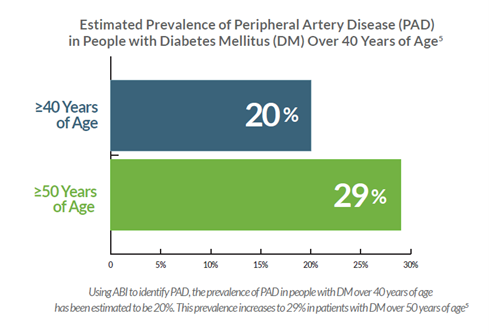
These metrics were derived using a cuff-based ABI pressure test to detect PAD.5 However, DM patients commonly present with non-compressible arteries due to advanced calcified atherosclerotic plaque which can lead to a false negative test when using pressure-based technologies. This means the true incidence rate of PAD is likely much higher.
Community outreach healthcare strategies are being deployed to measure A1C, cholesterol, and lipids, in addition to BP and weight. These screening programs have also been paired with early detection of cancer. What is lacking is a coordinated effort to detect early PAD as a marker for the atherosclerotic diathesis.
Atherosclerosis is a systemic disease; its detection anywhere is a predictor for adverse cardiovascular outcomes. Historically, diagnostic modalities using techniques like ABI have been limited to outpatient facilities simply due to the bulky nature of the equipment. Limited access to testing coupled with the lack of accuracy of ABI in patients reduces the opportunity for early detection in this PAD population.
Two studies recently published in the Journal of Vascular Surgery (JVS) and American Journal of Preventive Medicine (AJPM) documented that a positive PAD test in patients without a prior diagnosis of PAD was an independent outcomes indicator of all-cause mortality and major adverse cardiovascular events.10-11 These studies were performed using QuantaFlo® PAD – a fast, portable, FDA-cleared device which aids in the early detection of peripheral arterial disease. With this device it was possible to conduct these screening exams in either the outpatient community or home setting.
QuantaFlo PAD uses infrared sensor technology and a proprietary algorithm to measure arterial flow volumes as it is more sensitive than other pressure-based modalities, especially in the presence of calcified atherosclerotic plaque, thus simplifying the detection of early pre-clinical disease.
To optimize healthcare performance, the Institute for Healthcare Improvement developed the Triple Aim Initiative.8 This initiative is composed of three dimensions which are: better care for individuals, better health for populations and lower per capita costs. The first metric which is centered on improving the patient’s experience is a place where QuantaFlo PAD testing can easily be incorporated into routine clinic or home-based screening for pre-diabetes and ongoing management of patients with diabetes. The results are immediately available to the provider, who can implement risk-factor modification.
Offering an effective screening program to detect the presence of PAD in diabetic patients over 40 years of age combined with risk factor reduction programs, will be an important modality to address the leading causes of morbidity, mortality, and costs in the US and throughout the developed world.
Conclusion
In every disease entity, a successful outcome is the direct result of early detection and risk factor modifications. Historically, DM and PAD efforts have focused primarily on those patients already suffering from the complications of DM or with a major atherosclerotic burden. These patients are inherently more expensive to manage, have worse clinical outcomes, and are less likely to have value from their therapeutic interventions.
Early detection of both DM and PAD in the pre-clinical state may reduce the costs of care and reduce long-term complications of DM and all the sequelae of atherosclerosis, such as ischemic heart disease, stroke, renal failure, and amputation.
References
- DIABETES IN THE U.S A. SNAPSHOT DIABETES 37 million people have diabetes PREDIABETES. (n.d.). https://www.cdc.gov/diabetes/images/library/socialmedia/DiabetesInTheUS_Print.pdf
- 2022 State of the Union: US Population. (n.d.). USAFacts. Retrieved June 7, 2023, from https://usafacts.org/state-of-the-union-2022/population/
- Xu, J., Murphy, S., Kochanek, K., & Arias, E. (2022). Mortality in the United States, 2021 Key findings Data from the National Vital Statistics System. https://www.cdc.gov/nchs/data/databriefs/db456.pdf
- (2021, December 21). Prediabetes - Your Chance to Prevent Type 2 Diabetes. Centers for Disease Control and Prevention. https://www.cdc.gov/diabetes/basics/prediabetes.html
- Thiruvoipati, T., Kielhorn, C. E., & Armstrong, E. J. (2015). Peripheral artery disease in patients with diabetes: Epidemiology, mechanisms, and outcomes. World journal of diabetes, 6(7), 961–969. https://doi.org/10.4239/wjd.v6.i7.961
- AHA: One in three black Americans will experience PAD. (n.d.). Www.mdedge.com. Retrieved June 7, 2023, from https://www.mdedge.com/cardiology/article/104904/peripheral-vascular-disorders/aha-one-three-black-americans-will
- Centers for Disease Control and Prevention. (2022, December 30). Prediabetes - your chance to prevent type 2 diabetes. Centers for Disease Control and Prevention. https://www.cdc.gov/diabetes/basics/prediabetes.html
- The IHI triple aim: IHI. Institute for Healthcare Improvement. (n.d.). https://www.ihi.org/Engage/Initiatives/TripleAim/Pages/default.aspx
- Centers for Disease Control and Prevention. (2022a, June 29). National Diabetes Statistics Report. Centers for Disease Control and Prevention. https://www.cdc.gov/diabetes/data/statistics-report/index.html
- Smolderen, K. G., Heath, K., Scherr, T., Bauzon, S. R., Howell, A. N., & Mena-Hurtado, C. (2022). The Nevada peripheral artery disease screening effort in a Medicare Advantage population and subsequent mortality and major adverse cardiovascular event risk. Journal of vascular surgery, 75(6), 2054–2064.e3. https://doi.org/10.1016/j.jvs.2022.01.134
- Howell, S. C., & Master, R. C. (2023, February 27). Clinical evaluation of volume plethysmography as an aid for diagnosis of heart failure in the Primary Care Setting. Journal of Preventive Medicine. https://preventive-medicine.imedpub.com/clinical-evaluation-of-volume-plethysmography-as-an-aid-for-diagnosis-of-heart-failure-in-the-primary-care-setting.php?aid=50066
About the Author
Dr. Long is a retired Board-Certified Vascular Surgeon. Dr. Long's areas of expertise are noninvasive diagnosis of vascular and venous insufficiency and management of venous diseases. He specialized in open arterial reconstructive procedures and was one of the first in Northern California to move towards minimally invasive reconstructive venous procedures.
Multiplex Testing at the Point of Care
Sunday, August 06, 2023
by Aaron Medaris
Is it influenza, COVID, RSV, or some other respiratory infection? HCPs are faced with these questions every day as patients fill their exam rooms with coughs, fevers, and congestion. Your training and experience will help you in your diagnosis and subsequent treatment, but with so many similar symptoms between different infections, the need for assistance and even assurance is at an all-time high. Luckily, testing at the point of care is becoming more advanced and effective. One of the most important advancements in point of care testing is the addition of multiplex testing – the ability analyze multiple analytes or targets in a single test. Multiplex testing is nothing new but has been steadily evolving over the last several decades and is gaining a larger presence in physician offices and urgent care centers around the nation. In this article, take a closer look at multiplex testing, its development over the years, and how it’s making a difference in point of care testing.
Understanding Multiplex Testing
Multiplex testing, also known as multiplexing or multiplex assay, is a technique used in laboratory diagnostics to simultaneously analyze multiple analytes or targets in a single test. It allows for the efficient and cost-effective detection of multiple biomarkers or genetic variants in a single sample.
Traditionally, diagnostic tests would focus on a single target, requiring separate tests for each analyte of interest. Multiplex testing revolutionizes this process by enabling the detection of multiple targets in a parallel and high-throughput manner.
There are different methods of multiplex testing, depending on the specific application and technology used. Here are a few examples:
- Multiplex Polymerase Chain Reaction (PCR): PCR is a widely used technique to amplify and detect specific DNA sequences. Multiplex PCR involves designing primers that can amplify multiple target DNA sequences simultaneously. By incorporating different fluorescent dyes or molecular tags, the amplified products can be differentiated and detected in a single reaction.
- Multiplex Immunoassays: These assays are used to detect and quantify proteins or antibodies in a biological sample. Multiplex immunoassays employ different types of capture beads or microarrays, each coated with specific antibodies or antigens. By labeling the analytes with fluorescent or enzymatic tags, multiple targets can be detected and quantified simultaneously.
- Mass Spectrometry-based Multiplexing: Mass spectrometry can be used for multiplex analysis by labeling analytes with unique mass tags. By introducing stable isotopes or mass labels, multiple samples can be combined and analyzed together, allowing for the simultaneous detection of multiple targets.
Multiplex testing offers several advantages over single-target assays, including reduced sample volume requirements, lower costs, and faster turnaround time. It has found applications in various fields, including clinical diagnostics, infectious disease testing, genetic testing, and drug discovery.
The Evolution of Multiplex Testing
The concept of multiplex testing has been evolving over several decades, and the specific techniques used in multiplex testing have been developed and refined over time. Here are some key milestones in the history of multiplex testing:
- 1980s: The development of enzyme-linked immunosorbent assays (ELISAs) laid the foundation for multiplex immunoassays. ELISAs allowed for the quantification of a single analyte, but researchers began exploring ways to expand the assay to measure multiple targets simultaneously.
- 1990s: Multiplex PCR techniques started to emerge during this period. Researchers began developing methods to amplify and detect multiple DNA targets using PCR, such as multiplex allele-specific PCR (AS-PCR) and multiplex ligation-dependent probe amplification (MLPA).
- Late 1990s to early 2000s: The advent of microarray technology revolutionized multiplex testing. DNA microarrays allowed for the simultaneous analysis of thousands of genetic targets. This technology enabled gene expression profiling, SNP genotyping, and other multiplex applications.
- 2000s: The field of multiplex immunoassays expanded with the introduction of microsphere-based technologies. Luminex Corporation introduced the xMAP® (Multiplexed Assays with Beads) technology, which uses color-coded beads to enable the detection of multiple analytes simultaneously.
- 2010s: Advances in next-generation sequencing (NGS) technologies facilitated high-throughput multiplex sequencing. Techniques such as targeted sequencing panels and amplicon sequencing allowed researchers to simultaneously analyze multiple genetic variants or mutations.
These milestones illustrate the progressive development and application of multiplex testing techniques. The field continues to evolve, with ongoing advancements in technology, assay design, and data analysis methods, enabling even more comprehensive and efficient multiplex testing capabilities.
Multiplex Testing at the Point of Care
Multiplex testing at the point of care refers to the use of multiplex assays or devices in settings outside of a central laboratory, such as clinics, doctor's offices, or even at home. Point-of-care multiplex testing offers several advantages, including rapid results, immediate clinical decision-making, and improved patient management. Here are some examples of how multiplex testing is used at the point of care:
- Infectious Disease Diagnosis: Multiplex assays are commonly used for the simultaneous detection of multiple pathogens in infectious disease diagnostics. Point-of-care multiplex tests can rapidly identify the presence of multiple viral, bacterial, or parasitic pathogens in a single sample, enabling timely diagnosis and appropriate treatment decisions. For example, a single test may detect respiratory viruses like influenza A and B, respiratory syncytial virus (RSV), and SARS-CoV-2 (the virus that causes COVID-19).
- Syndromic Panels: Syndromic panels combine multiplex testing with a broad range of targets related to specific clinical syndromes, such as respiratory infections, gastrointestinal infections, or sexually transmitted infections. These panels can simultaneously detect multiple pathogens associated with a particular syndrome, providing a comprehensive diagnostic approach and aiding in targeted treatment.
- Pharmacogenetics: Point-of-care multiplex testing can be utilized to analyze multiple genetic variants associated with drug metabolism or treatment response. These tests can provide insights into an individual's genetic profile and help guide personalized medication selection or dosing adjustments.
- Cancer Biomarkers: Multiplex assays can be used at the point of care to detect multiple cancer biomarkers, such as specific mutations or protein markers. These tests aid in cancer diagnosis, prognosis, and treatment decision-making, allowing for a more targeted and personalized approach.
- Rapid Screening: Multiplex tests can be employed for rapid screening of various conditions or diseases. For instance, multiplex lateral flow assays are commonly used for point-of-care testing of pregnancy, infectious diseases, cardiac markers, or drug testing. These tests provide quick results and are often simple to use, making them suitable for non-laboratory settings.
Recent advancements even include CLIA Waived multiplex testing, allowing healthcare professionals to make immediate and informed decisions, leading to improved patient care and outcomes.
As we ramp up for cold and flu season and patient begin to fill your exam room with coughs, congestion, and fevers, remember there are sound diagnostic multiplex tests available to assist in your diagnosis.
Transforming Medicine with AI
Sunday, July 02, 2023
by Aaron Medaris
I think my first true introduction of Artificial Intelligence or AI, (that wasn’t from a sci-fi movie) came in February of this year, when I read an article about ChatGPT, a language processing tool that could write essays, papers, and articles in seconds; thus, leading to its quick ban from schools and universities around the nation. Granted it writes articles around a 6th grade level, so if you’re using that to cheat your way through college, you probably have other problems coming your way.
Today it seems like every time I open my favorite news app, there’s a new article about AI and how it’s helping to advance industries across the globe. Aside from language processing tools like ChatGPT, industries from finance, manufacturing, retail, agriculture, transportation, and entertainment are utilizing AI to do things they have never been able to do before. Take this headline from today’s news: “The Beatles are releasing their ‘final’ record. AI helped make it possible.” Yes, even the Beatles are benefiting from AI technology.
With AI transforming industries across the globe, some of the most promising advancements are in the field of healthcare. In this article, we’ll look at some of the different ways that AI is transforming healthcare.
Medical imaging analysis: AI algorithms can analyze medical images, such as X-rays, CT scans, and MRIs, to detect and diagnose diseases with high accuracy. AI systems can identify patterns and anomalies that may be difficult for human experts to spot, leading to faster and more accurate diagnoses. AI can also provide precise and quantitative measurements from medical images. For example, AI algorithms can calculate tumor size, volume, or growth rates, providing valuable information for treatment planning and monitoring response to therapy. It’s also helping to provide image-based risk predictions. By analyzing medical images and patient data, AI algorithms can predict the risk of certain diseases or conditions. For instance, in cardiovascular imaging, AI can analyze cardiac images to assess the risk of future cardiac events and guide preventive measures.
Precision medicine: AI enables personalized treatment plans by analyzing large amounts of patient data, including genetic information, medical records, and lifestyle factors. This data can be used to predict disease risks, identify optimal treatment options, and develop tailored therapies for individual patients. Take for instance, genomic analysis. AI algorithms can analyze genomic data to identify genetic variations, mutations, and biomarkers associated with specific diseases. By understanding a patient's genetic profile, AI can help determine personalized treatment options and predict disease risks.
Drug discovery and development: AI is being used to accelerate the drug discovery process. AI algorithms can analyze massive datasets to identify potential drug candidates, simulate and predict drug behavior, and optimize drug formulations. This helps in reducing costs and time required for drug development. AI algorithms can even optimize various drug properties, such as efficacy, safety, and pharmacokinetics. By analyzing chemical structures and properties, as well as historical data on drug development, AI can suggest modifications to enhance the potency and selectivity of compounds, improve drug-like properties, and reduce toxicity. One exciting way AI is helping in drug discovery and development is by repurposing existing drugs. AI can identify new therapeutic uses for existing drugs by analyzing large datasets and identifying potential drug-disease associations. By leveraging known drug properties and their effects on different biological pathways, AI algorithms can suggest repurposing strategies, leading to the development of new treatments for different diseases.
Virtual assistants and chatbots: AI-powered virtual assistants and chatbots can interact with patients, answer their questions, and provide basic medical advice. They can triage patients, schedule appointments, and offer information on common symptoms or conditions, improving access to healthcare services and reducing the burden on healthcare providers.
Predictive analytics: AI algorithms can analyze large volumes of patient data to predict disease progression, identify high-risk patients, and optimize treatment plans. This helps healthcare providers make informed decisions and allocate resources more effectively. Take for instance, early disease detection. AI algorithms can analyze patient data, including medical records, genetic information, and lifestyle factors, to identify early indicators of diseases. By detecting patterns and risk factors, AI can predict the likelihood of developing certain conditions, enabling early intervention and preventive measures. AI algorithms can also stratify patients into different risk groups based on their individual characteristics and health data. By considering factors such as age, gender, medical history, genetic markers, and environmental factors, AI can predict the likelihood of adverse events, disease progression, or treatment response. This helps in prioritizing high-risk patients for targeted interventions.
Robot-assisted surgery: AI-enabled robotic systems assist surgeons during complex procedures, providing more precision, flexibility, and control. These systems can enhance surgical outcomes, reduce invasiveness, and shorten recovery times. In fact, AI is helping in robot assisted surgery before the surgery even begins. AI algorithms can assist in preoperative planning by analyzing patient-specific data, including medical images and patient anatomy. By simulating different surgical scenarios, AI can help surgeons visualize the procedure, optimize surgical approaches, and develop personalized surgical plans. During surgery, AI-powered robotic systems can assist surgeons during procedures by performing specific tasks or providing guidance. For example, AI algorithms can enable robotic arms to perform precise suturing or stapling with enhanced stability and dexterity, allowing for more precise tissue manipulation.
Health monitoring and wearable devices: According to a recent survey, about 35 percent of adults use wearable devices. AI algorithms can analyze data from wearable devices, such as fitness trackers and smartwatches, to monitor vital signs, detect abnormalities, and provide real-time feedback on health status. This facilitates remote patient monitoring and early intervention. AI algorithms can analyze wearable data to identify early signs of certain diseases or conditions. By tracking changes in vital signs, sleep patterns, or activity levels, AI can help in early detection and intervention, improving the chances of successful treatment and management.
Patient data management: AI can streamline and improve the management of electronic health records (EHRs). Natural language processing algorithms can extract relevant information from unstructured medical records, improving accuracy and efficiency in data entry and retrieval.
These are just a few examples of how AI is being used in medicine. As the field continues to advance, AI has the potential to revolutionize healthcare delivery, improve patient outcomes, and enhance the overall efficiency of medical systems. But we do need to be careful with our use of AI especially when it comes to our healthcare. An amazing yet concerning fact is that AI is still in its infancy. Think about where we were 30 years ago when America Online was spamming our mailboxes, not inboxes, with CDs of their internet software. Remember the sound of dialup internet via your 56k modem, praying that it would connect long enough and be quick enough so you could check your email? Now think about where we are today in terms of technology. The differences are so great, I don’t think many of us in 1996 could even imagine the technological miracles we experience on a daily basis. I personally think we’re at the America Online stage of AI, maybe even before that. This is just the beginning, and the advancements are going to come much quicker than they did with the early days of the internet. That’s an exciting prospect when you think about it. But I can see why some tech giants and politicians are calling for a pause in AI development while we figure out rules and legislation going forward. AI has already transformed many industries for the better and it has the great potential to change our lives for the better, but if it’s not done right, especially with healthcare, it could have the opposite effect. It’s my hope that we do get this right and that AI technology continues to advance in a positive way, opening doors to the cure of diseases that have plagued our world for far too long.
Legitimate Question: Is it Possible to Find Trustworthy Financial Advice
Wednesday, June 21, 2023
by ScrubMoney™ co-founders
It seems you can turn anywhere these days and you’ll get financial advice. Look in any direction and you’re probably hit with an advertisement, a quick tip, a savvy money narrative to digest, or perhaps even an enthusiastic stranger who swears they’ll grow your wealth.
Meanwhile, your mind lingers with questions involving your personal finances that remain unresolved: “Who can I go to for advice?” “Who can I trust for help?” “What financial services address my most urgent needs?”
Certainly, there are many simple steps you can take to set yourself up for a successful financial path. If you’re on top of your monthly budget and aware of your incoming and outgoing money flows, you’re in better shape than many physicians. With limited time to dedicate to personal financial planning, this is about as far as most of us get. The good news is there is expert and experienced help available — the real challenge may be knowing what you’re looking for and how to ask for guidance.
Let’s assume you’ve got a pretty good idea of where you’re at financially, meaning you possess a general idea of how much debt you’ve accumulated to this stage of your career and are bringing home enough income to make ends meet. However, you’re looking to avoid financial mistakes, save money more efficiently, invest money and chart a healthy course for the years ahead. It may be time to find a financial planner and access other financial professionals.
Our research shows that e many physicians turn to existing relationships when seeking professional financial support. Referrals often come from family members, fellow residents and colleagues, neighbors, and friends. In most cases, this is how financial professionals are introduced to early-career physicians and attendings. Alternatively, physicians know that having a white coat almost immediately attracts financial advisory service professionals — haven’t we all been approached, often repeatedly? Some of us are fortunate to find prudent, qualified professionals by these methods. Others aren’t so lucky, and sadly feel preyed upon.
For those still looking for financial planning and other specific financial advisory services, we’ll lay out some considerations which we hope are helpful. Before diving deeper into specific services, let’s look at some typical services needed at various career stages in medicine.
If you’re a resident, you’ll probably be best served by advisors that can assist with the following: debt repayment strategies (student loans and consumer debts), budgeting and saving prioritization, insurance services (disability and life), tax and estate planning services.
For attending physicians, the previous services remain applicable with additional recommendations for retirement planning, investment management and educational savings for children. As your career progresses nearer retirement, it's certainly advisable to seek financial advice involving retirement income, long-term care planning, and post-career specific financial services.
As medical professionals, we know the value of expertise and specialization. We can similarly use this framework when seeking a financial professional. When searching for an advisor who can look holistically at your (or you and your family’s) circumstances, find out how experienced they are at working with physicians. Don’t hesitate to ask them for their track-record with healthcare professionals, how they think through some of the financial situations facing medical professionals, such as sizable educational debt and the need for disability insurance. Furthermore, find out if they (along with their firm) provide a full suite of services (planning, tax, insurance, etc.) or if they specialize in one area primarily. Some physicians may prefer a one-stop shop, while others feel confident in having various professionals focused on fewer aspects of finance working together toward a healthy financial future.
If you’re encouraged that a prospective financial professional is competent (i.e. experienced) working with physicians and physician families, here are some additional determining factors to consider:
Compensation model: Know how your agent/advisor is paid for their services.
- We suggest aiming to find a Fee-Only advising arrangement, particularly for planning services. The National Association of Personal Financial Advisors takes the position that the Fee-Only method of compensation is the most transparent and objective method available. This model minimizes conflicts and ensures that your financial planner acts as a fiduciary. Fee-Only planners are compensated directly by their clients for advice, plan implementation and for the ongoing management of assets.[1] Fee-only financial advisors may be paid hourly, as a retainer, as a percentage of assets under management, or as a flat fee, depending upon the planner you choose.
- Additional compensation models include fee-based (set fee for the client, additionally an agent may receive compensation from other sources, such as a commission for sale of the financial product) and commission-based (agent receives compensation from products sold to client). *One note on the insurance services: you’re likely to encounter commission-based models in this area. Given this commonly used compensation structure in this industry, we suggest an emphasis on finding proper coverages and quality agents over a determination based solely on an agent’s compensation model. More on this below.
One easy way to check for transparency is to find out if an agent is always a fiduciary. In other words, is the advisor obligated to do what is always in the client’s best interest? You may be surprised to learn that even fee-based advisors, in some cases, may alternate between the suitability standard (their recommendations only need to be suitable for a client’s situation) and the fiduciary standard.
Tax strategies: I need a tax strategy?! The answer is probably yes.
Unless you finished medical school while earning your CPA on the side (highly improbable) or have a personal accountant and tax preparer as your partner, you’ll probably need help here. Similar to finding a financial planner, make sure you find an agent experienced with physician personal finances. The reasons for a tax strategy and consulting with a capable, licensed tax advisor are underscored here:
- Tax laws, both at federal and state levels, are ever evolving.
- A plan which considers deductions and capital gains not only for this tax-year but also subsequent tax years will save you money.
- If your household has multiple income sources, certainly you’ll need a tax plan with a comprehensive approach, and an agent to advise you through the filing process.
Insurance services: Why choose an Independent Advisor?
An important component of a physician's financial health and financial security will be insurance services, and we strongly urge you to consider an independent advisor when seeking help in this area. The marketplace for insurance policies is wide and an independent agent is best suited to shop the offerings of various companies on your behalf. An independent advisor can walk you through the nuances of policy language, help with determining sound coverages personal to your needs, and highlight key factors for choosing the best company to work with (age, gender, specialty, benefits, etc.). Moreover, an independent agent will not have loyalties to any specific company nor any economic ties to a specific insurer.
If finding trustworthy and competent financial advisors seems bewildering, know that you are not alone. If relationships nearest you (family, friends, colleagues) make introductions to qualified financial professionals, count your blessings! And if you’re still wondering how to get this kind of help and not turn prey to rent-seeking financial resources, we hope this article will focus your efforts toward finding fiduciary and fee-only service providers with a focus on transparent client relationships.
This article is authored by co-founders of ScrubMoney, a physician-created and physician-focused mobile app aimed to make sure every physician in the US healthcare system has a strong financial plan so they can better focus on healing their patients and living their lives.
The Power of Next Generation Point of Care Diagnostics
Thursday, June 01, 2023
by Brian K. DuChateau, Ph.D., D(ABMLI)
The need for increased access to immediate diagnostics and care has never been highlighted more than during the pandemic. And one by-product of the pandemic has been the rapid implementation and adoption of innovative testing technologies. These instant health care delivery tools, including next-generation rapid antigen tests have transformed the way we can deliver health care at the point of need, whether that be in hospitals, labs and importantly in community-based settings. The forthcoming generation of rapid antigen tests leverage novel technologies to allow both speed and accuracy at the nexus of action or the point of need where critical split-second medical decisions are made.
The latest point of care testing technologies not only promise accurate and fast results but also serve as a key component in addressing testing access and inequities. The Lancet study released earlier this year “The silent and dangerous inequity around access to COVID-19 testing” explained that POC rapid antigen tests are one of the most promising tools to increase access to testing and address the extreme inequities the pandemic exposed in testing across low- and middle-income countries (LMICs).
And, while rapid diagnostics provide an effective and scalable care delivery model at the point of need, they are also crucial for controlling future infectious outbreaks. Bill Gates, in his recent book, “How to Prevent the Next Pandemic” presents a detailed strategy on what can be done at a global scale to avoid the catastrophic impact of another pandemic. His recommended framework for pandemic prevention and response coordination specifically calls out point of care diagnostics as having untapped potential, which we can apply to disease outbreaks.
If we are to future proof our health system today, we must ensure diagnostic equity—integrating point of care diagnostics into every part of our health system—hospitals, labs, and also pharmacies, schools, and other community settings.
Laboratory-run PCR tests are expensive, required skilled labor to perform and do not guarantee this level of efficiency, especially for care centers in remote communities. Laboratory tests may take days to run, and the facilities are often miles away from community hospitals, not an enabling ecosystem for treatment follow through for people that travel long distances. Additionally, rapid antigen tests also circumvent the “persistent positive” results common to PCR tests, which indicate an infection for an extended period even when the person is likely no longer contagious. Antigen tests offer an advantageous alternative, since a growing body of evidence demonstrate that antigen tests correlate more closely to culture suggesting positive results are more likely to be from active infections. In a study from a group at Johns Hopkins University (Pekosz et. al.), antigen tests demonstrated a higher positive predictive value (90%) than rt-PCR (70%) when compared to culture-positive results. Similar findings were reported by a group at Harvard (Kirby et. al), however their study design went a step further to include both lateral flow as well as microfluidic based rapid antigen test. Their findings showed enhanced sensitivity for the rapid microfluidic immunofluorescence method compared to the lateral flow antigen tests. This level of specificity empowers our ability to go back to “normal”.
The power of next generation point of care diagnostics was discussed at the recent American Association for Clinical Chemistry (AACC) Annual Conference in Chicago this summer. The discussion presented data-backed insights on the impact of LumiraDx advanced microfluidic technology over lateral flow point-of-care antigen tests, and the role of these rapid immunoassays in response to the COVID-19 pandemic.
LumiraDx, established in 2014, is transforming community-based healthcare by providing fast, accurate, and comprehensive diagnostic information to healthcare providers at the point of need, thereby enabling better medical decisions and improved patient outcomes at a much lower cost.
As the Scientific & Clinical Affairs Vice President at LumiraDx, I spoke alongside Dr. Paul Drain, Associate Professor at the University of Washington in the Departments of Global Health, Medicine (Infectious Diseases), and Epidemiology at the session. Dr. Drain presented his prospective validation study of the LumiraDx severe acute respiratory syndrome coronavirus 2 (SARS-CoV-2) rapid antigen test, which uses a high-sensitivity, microfluidic immunoassay to detect the nucleocapsid protein of SARS-CoV-2 for diagnosing acute coronavirus disease 2019 (COVID-19) in adults and children across point of care settings.
The study showed that, among 512 participants, the LumiraDx SARS-CoV-2 Ag has a 97.6% positive agreement to RT PCR in patients up to 12 days following symptom onset, and 100% PPA up to Ct 33. These findings testify to the effectiveness of rapid, high-sensitivity assay using nasopharyngeal or anterior nasal sampling, offering significant improvements for diagnosing acute SARS-CoV-2 infection in clinic- and community-based settings. Dr. Drain also shared more recent data showing that differences between Delta and Omicron variants did not affect the performance of the LumiraDx SARS-CoV-2 Antigen Test
As we look ahead, immediacy is central to meeting patient care needs and optimizing provider decision making. Given the looming challenges of future pandemics, we should support policies that invest in integrated, scalable diagnostic solutions, which we can deploy rapidly at the point of care, especially in communities where little healthcare infrastructure is present. This will enable effective decision-making at the point of need, increase access to care, save health care costs, and improve patient outcomes.
Brian K. DuChateau, Ph.D., D(ABMLI) is a board certified clinical laboratory immunologist who received his Ph.D. in immunology and medical microbiology from the University of Wisconsin-Madison and completed a post-doctoral residency in clinical immunology at the Chicago Medical School. Dr. DuChateau has over 20 years of experience as a clinical laboratory director and 12 years of in vitro diagnostics (IVD) experience and currently serves as the LumiraDx Vice President of US Scientific and Clinical Affairs.
Atrial Fibrillation: The Case for Cardiac Catheter Ablation First over Drug Treatment
Thursday, May 04, 2023
by Physician Office Resource
Within the right atrium is a group of cells called the sinus node, the heart’s natural pacemaker. It’s here where signals are produced to start each heartbeat. When a heart is functioning properly, the signal travels from the sinus node through both atria, and through a pathway between the atria and ventricles known the atrioventricular node. This transmission of electrical signals allows the heart to contract and pump blood through the body.
But what happens when those electrical signals are not functioning properly? When faulty electrical signals are sent, a heart experiences arrhythmia, making the heartbeat too fast, too slow, or irregular in nature.
Atrial Fibrillation (AFib) is the most common type of heart arrythmia and occurs when the two atria of the heart beat in an irregular way thus inhibiting the flow of blood to the ventricles. Symptoms of AFib include irregular heartbeat, heart palpitations, lightheadedness, extreme fatigue, shortness of breath, and chest pain. Chronic AFib is a progressive disorder that can lead to heart failure and increases a person’s risk for stroke. The CDC reports that AFib causes about 1 in 7 strokes.1
Today, an estimated 6 million people in the US suffer with atrial fibrillation. The CDC expects that number to grow to 12.1 million by the year 2030. In 2019 AFib was mentioned on 183,321 death certificates and was the underlying cause of death in 26,535 of those deaths.1
In this article we’ll review current treatments for AFib including drug therapy and cardiac catheter ablation; in addition to new findings from a study published by the New England Journal of Medicine titled, “Progression of Atrial Fibrillation after Cryoablation or Drug Therapy” that focuses on the benefits of treating AFib patients with a cardiac catheter ablation rather than with drug therapy.
Drug Therapy
When a patient is first treated for AFib, they are often prescribed three types of medications to help prevent and control irregular heartbeats and stoke2:
- Heart rate controllers
- Heart rhythm controllers
- Blood Thinners
Heart Rate Controllers
Heart rate controllers usually consist of two different classes of drugs, Beta blockers and calcium channel blockers.
Beta Blockers are a class of drug that prevent the stimulation of the adrenergic receptors, thus blocking the effects of the hormone epinephrine (adrenaline). Because of this block, the heart begins to beat slower and with less force. Some examples of beta blockers include2:
- Metoprolol
- Propranolol
- Timolol
- Nadolol
- Atenolol
- Bisoprolol
- Carvedilol
Calcium Channel Blockers are medications that lower blood pressure by preventing calcium to enter the heart and artery cells. By blocking calcium and its effects of causing the heart and arteries to contract with greater force, heart rate slows and blood pressure lowers.
Depending on heath and conditions being treated, there are short-acting and long-acting forms of calcium channel blockers available. Short-acting medications work quicker but don’t last very long. Long-acting medications release at a slower rate thus providing a longer lasting effect. Some examples of calcium blockers that are used to treat AFib include:
- Diltiazem
- Verapamil
Heart Rhythm Controllers
Known as a chemical/pharmacological cardioversion, heart rhythm controllers are drugs used to restore normal heart rhythm. Drugs used in this therapy fall in to two classifications: sodium channel blockers and potassium channel blockers.
Sodium Channel Blockers are a class I antiarrhythmic that inhibit sodium influx through cell membranes. This inhibition of sodium lowers the heart’s ability to conduct electricity. Examples of this drug include:
- Flecainide
- Propafenone
- Quinidine
Potassium Channel Blockers are a Class III Antiarrhythmic that prolongs the action potential duration by inhibiting repolarizing potassium channel blockers.3 This prolongs the length of time that the cell is unexcitable. Examples of this drug include:
- Amiodarone
- Sotalol
- Dofetilide
- Dronedarone
Blood Thinners
Because blood clots and stroke are closely associated with AFib, physicians often prescribe blood thinners to reduce the risk of occurrence and damage caused by those conditions. Examples of blood thinners include:
- Warfarin
- Apixaban
- Dabigatran
- Edoxaban
- Rivaroxban
With the heart rate and rhythm controlled, most people begin to feel better. But what about disease progress? Yes, the medications are treating the symptoms of AFib, but the actual disease can still progress and affect other cells of the heart and AFib can return. Other treatment options for AFib include Electrical Cardioversion Therapy and Cardiac Ablation.
Electrical Cardioversion
Electrical cardioversion is a method in which the heart rhythm is rest by sending electric shocks through the heart. Even with electrical cardioversion, patients are often still prescribed heart rate and rhythm controllers and blood thinners to help prevent future episodes.
Cardiac Ablation
Normally last in line in the treatment of AFib, a cardiac catheter ablation involves utilizing heat or extreme cold to create a pattern of scars (known as a maze procedure) in the atria. Scar tissue does not send electrical signals, so the scars act as barriers to the cells that are sending rogue signals that cause AFib.
The Case for Cardiac Catheter Ablation First over Drug Treatment
As mentioned previously, a cardiac catheter ablation is often last in line in treatment of patients with AFib. However, a recent study published in the New England Journal of Medicine titled, “Progression of Atrial Fibrillation after Cryoablation or Drug Therapy,” concluded that treating patients with cardiac catheter ablation first rather than with drugs can stop the disease from getting worse.4
Dr. Jason G. Andrade, principle investigator of the study said, “If we perform the procedure earlier, the thinking was that maybe we could change that disease trajectory. We could prevent people from having these more advanced forms of atrial fibrillation, and so the procedure will not only work better, but it will change how people are living with the disease and lead to a much better long-term outcomes”5
Their study included two randomized groups out of a cohort of 303 people who were treated for AFib to compare the disease progression. One group would be treated with medicine first and the second group would receive a cardiac catheter ablation first. Patients of both groups received an implanted cardiac monitor after treatment to track changes over a three-year period.
One of the most striking findings of this study showed a 75% reduction in the progression of AFib in patients who received a cardiac catheter ablation over those who only received drug treatment. Dr. Andrade went on to say, “By doing the procedure, you really got at the source of the problem and prevented people from developing more advanced forms of the disease over several years of follow-up. We know that the more advanced forms of atrial fibrillation have higher rates of stroke, are more likely to cause heart failure, and result in premature mortality. We’ve now shown for the first time that an intervention in the form of catheter ablation changes the disease trajectory and prevents patients from going on to have those more advanced forms of atrial fibrillation.”5
The study also showed that patients who received the ablation experienced fewer serious adverse events at a rate of 4.5% compared to those who received only drug treatment at 10.1%.
This is the second of such a study performed on treating AFib with a catheter ablation over drug therapy. The authors of this study suggested that more research on the topic will be coming.
Drug therapy will always be essential in the treatment of AFib. However, based on this study’s findings, I believe this will help flip the trend to patients receiving cardiac catheter ablations sooner rather than later.
References
- https://www.cdc.gov/heartdisease/atrial_fibrillation.htm
- https://www.heart.org/en/health-topics/atrial-fibrillation/treatment-and-prevention-of-atrial-fibrillation/atrial-fibrillation-medications
- https://www.cvpharmacology.com/antiarrhy/potassium-blockers
- https://www.nejm.org/doi/full/10.1056/NEJMoa2212540
- https://thedailyscan.providencehealthcare.org/2023/01/surgery-first-vs-drugs-for-a-fib-could-stop-diseases-progress-nejm-study/
Bacterial Vaginosis & Trichomoniasis: Key Aspects on Different Diagnostic Methods
Thursday, May 04, 2023
by Jeff Reid, Sr. Commercial Manager at SEKISUI Diagnostics
Each year, millions of women of all ages and backgrounds are impacted by vulvovaginal disorder, making it the main cause for health care visits by women in the United States.1 This disorder usually occurs due to an infection or when the bacterium in the vagina becomes unbalanced. Two common causes of vulvovaginal disorder are Bacterial vaginosis and Trichomoniasis.
Bacterial vaginosis and Trichomoniasis are linked to a broad range of associated health complications, from preterm birth to an increase in Sexually Transmitted Infections (STIs).2,3 If immediately diagnosed and treated, the risk of associated health complications can be greatly minimized. Therefore, a “test and treat” approach is critical to take when diagnosing Bacterial vaginosis and Trichomoniasis. Key considerations on different diagnostic methods for Bacterial vaginosis and Trichomoniasis will be reviewed in this editorial.
BACTERIAL VAGINOSIS:
Bacterial vaginosis occurs when the healthy balance of vaginal bacteria is disrupted by an overgrowth of pathogenic bacteria. It is the most prevalent form of all vulvovaginal disorder, resulting up to 50% of all cases.1
Common symptoms of Bacterial vaginosis consist of the following:2
- A thin white or gray vaginal discharge
- Pain, itching, or burning in the vagina
- A strong fish-like odor, especially after sex
- Burning when urinating
- Itching around the outside of the vagina
There are serious health complications associated with Bacterial vaginosis, including the increased risk of contracting several different STIs. Therefore, all women suspected of having Bacterial vaginosis should be evaluated for Human Immunodeficiency Virus (HIV) and other STIs.1
Common diagnostic methods for Bacterial vaginosis consists of Nugent scoring from a vaginal Gram stain, Amsel’s Criteria, molecular tests, and rapid point-of-care tests.4
Nugent scoring from a vaginal Gram stain is considered the gold standard for diagnosing Bacterial vaginosis.4 It consists of performing a Gram stain where the vaginal specimen is smeared on a glass slide. Then the vaginal smear is evaluated under a microscope according to the Nugent scoring system. The Nugent score is calculated by assessing for the presence of large gram-positive rods (Lactobacillus morphotypes; decrease in Lactobacillus scored as 0 to 4), small gram-variable and gram-negative rods (G. vaginalis and Bacteroides morphotypes; scored as 0 to 4), and curved gram-variable rods (Mobiluncus spp. morphotypes; scored as 0 to 2).4 Although considered the gold standard, there are challenges associated with Nugent scoring from a vaginal Gram stain. For example, a Gram stain is a multistep process that requires significant hands-on activities and is usually performed in a laboratory setting. Also, the method is considered a Provider-Performed Microscopy (PPM) procedure, which is a complex procedure that requires a specific skillset to perform. Due to the significant hands-on activities of the process and the complexity of the procedure, Nugent scoring from a vaginal Gram stain does not allow for a test and treat approach.
Amsel’s Criteria is a traditional diagnostic method based on microscopy and clinical symptoms. The method is based on the presence of 3 of the following criteria:4
- Discharge: homogeneous, thin, white-gray discharge that smoothly coats the vaginal walls
- Clue cells: more than 20% clue cells on saline microscopy
- pH >4.5: vaginal fluid pH >4.5
- Positive KOH: positive KOH whiff test result
Diagnosing Bacterial vaginosis by Amsel’s Criteria can be time consuming and it is prone to subjectivity as there are multiple steps involved. Like Nugent scoring from a vaginal Gram stain, Amsel’s Criteria is considered a Provider-Performed Microscopy (PPM) procedure, which is a complex procedure that requires a specific skillset to perform. Due to the multiple steps of the process and the complexity of the procedure, Amsel’s Criteria usually does not allow for a test and treat approach.
There are different molecular tests available for diagnosing Bacterial vaginosis, which detect specific bacterial nucleic acids. The sensitivity and specificity of these tests are high, allowing for accurate test results. However, the methodology requires highly expensive and sophisticated instrumentation that require a specialized skillset to perform, making it hard for health care providers to adopt the technology into their practice.
The Centers for Disease Control and Prevention (CDC) notes that the OSOM® BVBLUE® test in their 2021 Sexually Transmitted Infections Treatment Guidelines as a recommended rapid point-of-care test for diagnosing Bacterial vaginosis.4 Unlike Nugent scoring from a vaginal Gram stain and Amsel’s Criteria, the OSOM® BVBLUE® Test is CLIA-waived and does not require a specific skillset. Also, unlike molecular tests, the OSOM® BVBLUE® Test does not require specialized instrumentation to perform. It is a visual read, enzymatic activity assay that detects the sialidase enzyme of bacterial pathogens. The test can be performed at the point-of-care and the results are produced in 10 minutes, allowing for a test and treat approach.
TRICHOMONIASIS:
Trichomoniasis is a parasitic infection caused by a protozoan parasite called Trichomonas vaginalis. It is considered the most curable, non-viral sextually transmitted disease, with an estimated 3.7 million cases per year in the United States.6 It is estimated that up to 35% of all vulvovaginal disorders are caused by Trichomonas vaginalis.1
Common symptoms of Bacterial vaginosis consist of the following:3
- A thin clear, white, yellowish, or greenish vaginal discharge
- Itching, burning, redness or soreness of the vagina
- An unusual fishy smell
- Discomfort with urination
The health complications associated with Trichomoniasis consists of an increased risk of getting or spreading other STIs, a greater chance of preterm birth, an increased risk of cervical cancer.3
Common diagnostic methods for diagnosing Trichomoniasis consists of wet-mount microscopy, culture followed by wet-mount microscopy, molecular tests, and rapid point-of-care tests.5
Wet-mount microscopy has traditionally been used to diagnose Trichomoniasis. The method consists of collecting a vaginal specimen and examining it for motile organisms, called trichomonads, under a microscope. It is important to note that the specimen should be immediately examined after collection as 20% of trichomonads lose their motility within 10 minutes of specimen collection.7 Wet-mount microscopy is a relatively inexpensive method and can be performed at the point-of-care. However, the sensitivity can be relatively low, leading to an increase in false negative tests results.5
Culture followed by wet-mount microscopy is a more sensitive test method than wet-mount microscopy.5 Prior to examining the specimen under a microscope for trichomonads, the specimen is inoculated and incubated for 2-5 days. The primary challenge with this method is the time it takes to incubate the specimen, resulting in a disrupted quality of life for the patient.
Molecular tests are considered the gold standard for diagnosing Trichomoniasis. These are highly sensitive tests that detect the genetic material of the parasite, called Trichomonas vaginalis. Although these tests are highly accurate, they require highly expensive and sophisticated instrumentation that usually require a specialized skillset to perform, making it hard for health care providers to adopt the technology into their practice.
The CDC notes the OSOM® Trichomonas Test in their 2021 Sexually Transmitted Infections Treatment Guidelines as a recommended rapid point-of-care test for diagnosing Trichomonas.5 The OSOM® Trichomonas Test is a visual read, lateral flow antigen test that detects the protein of trichomonas called Trichomonas vaginalis. It is a CLIA-waived test that can be performed at the point-of-care, allowing for a test and treat approach. The sensitivity of the OSOM® Trichomonas Test compares favorably to the molecular tests with reported sensitivities of 83%-90%.6
SUMMARY:
Vulvovaginal disorder is a common condition that can drastically impact the quality of life for women. It is a disorder that is responsible for 10 million physician visits per year.1 Bacterial vaginosis and Trichomoniasis are two common causes of vulvovaginal disorder, which both have a mix of symptoms and associated health complications. To overcome the disrupted quality of life for women and the associated health complications, a test and treat approach should be taken when diagnosing Bacterial vaginosis and Trichomoniasis. There are only a few diagnostic options that allow for such approach, which are the OSOM® BVBLUE® Test and the OSOM® Trichomonas Test. The CDC notes both tests in the 2021 Sexually Transmitted Infections Treatment Guidelines as diagnostic considerations for Bacterial vaginosis and Trichomoniasis. Both tests have high sensitivity and specificity compared to the gold standard methods and allow for a test and treat approach.
REFERENCES:
- Brown, H. Improving the Diagnosis of Vulvovaginitis. Population Health Management. Vol. 23, suppl 1, 2020.
- Fact Sheet - Bacterial Vaginosis. 2017
- Fact Sheet - Trichomoniasis. 2017
- Sexually Transmitted Infections Treatment Guidelines, Bacterial Vaginosis. 2021
- Sexually Transmitted Infections Treatment Guidelines, Trichomoniasis. 2021
- C. Rapid and Point-of-Care Tests for the diagnosis of Trichomonas vaginalis in women and men. Sex Trans Infect. 2017.
- Kingston MA, Bansal D, Carlin EM. ‘Shelf life’ of Trichomonas vaginalis. Int J STD AIDS. 2003 Jan;14(1)
Financial Considerations Unique to U.S. Physicians - Simple Steps for Early Action
Thursday, May 04, 2023
by Andrew Harms and Miriam Sweeney
For the average U.S. household, everyday living is getting pricey. Childcare, food, energy, transportation, and housing costs are all rising. Among U.S. physicians and healthcare professionals, personal financial matters may make things tougher given high educational debt-loads, capped income levels during residency years, and unique insurance needs.
Furthermore, job-related stressors emanating from clinical and patient-care priorities, administrative duties, continuing education, licensing requirements, and professional responsibilities leave little time for prudent, active personal financial management.
Self-reported depression and burnout rates are high. In fact, in recent years more than 4 in 10 U.S. physicians report feeling burned out.[1] When asked to rate factors that contribute to depression, results from Medscape’s annual National Physician Lifestyle Report indicate personal finances ranked second to job/workplace as a contributing factor.[2]
When asked what would reduce their burnout, the number one response from physicians (roughly a third) indicated the best way to combat burnout would be increased financial compensation. We want to be paid more. In fact, more money was a more common response than a more manageable schedule.
The circumstances facing a physician's personal finances present a unique challenge to most in medicine, regardless of specialty. A predominant factor to financial troubles for physicians includes the high cost of education required to become a physician.
According to the AMA, one in four medical students graduates with training-related debt that exceeds $200,000, and half of medical school graduates report debt burdens greater than $150,000. Those financial burdens are combined with a demanding schedule during graduate medical education and can affect well-being for physician residents and fellows. “Between financial restraints and 80-hour workweeks, trainees often struggle with having the time and budget for necessities. When residency and fellowship programs provide benefits to assist with these needs, it can significantly improve trainee well-being,” said AMA Trustee Jesse Ehrenfeld, MD, MPH.[3]
Compounding the difficulties, we recognize that the time and attention required to study medicine, biological sciences, and patient care during training to become a physician leaves little room to acquire a solid education in personal financial management.
Prioritizing personal financial literacy for early-career physicians
Many physicians have access to financial resources early on in their career, but that doesn’t mean they’re confident about their financial situation. At the medical school level, some hopeful trends have emerged to address the rising educational debt levels burdening many graduates.
At a handful of US medical schools, financial aid offices have transitioned to financial wellness offices—aiming to better help students with personal financial understanding, housing and living expense considerations, etc.—moving beyond simply providing tuition financing guidance in order to provide holistic financial support and literacy. A great example of this is witnessed at the University of Arkansas for Medical Sciences, where Jason Mizell, M.D., and UAMS faculty have facilitated a popular ‘Business of Medicine’ course since 2012, taught to residents and fourth-year medical students.[4] This course serves to teach early-stage physicians both practice management finance (coding, billing, malpractice, etc.) and, very importantly, personal finance.
Another excellent example of an offering available to medical students is provided by the University of Wisconsin School of Medicine and Public Health. When medical student Rufus Sweeney struck up conversations with his peers some years ago about their personal finances, he was shocked by how few understood their student debt or even knew about options to pay it off. With a grant from the Wisconsin Medical Society, Rufus joined with Emma Crawford, UW SMPH Director of Financial Wellness and Financial Aid Advising, to develop UW-Madison SMPH’s first ever course focused on physician personal finance. This course continues and remains the most popular elective credit offering at the medical school.
While such personal finance educational initiatives exemplified by UAMS and UW-Madison go a long way to improving financial literacy for young physicians, the trend to educate and empower physicians in the way of personal finances should be prioritized in order to meet cost of living challenges and resultant burnout rates. An introduction to personal finance is a great offering at the medical school level, and—if followed on with subsequent support at each next stage of a physician's career—would provide a proper runway to financial health and wellness.
At the residency level, new expenditure considerations often outweigh the long-awaited first paycheck. Many times, newly minted residents find themselves unprepared to manage a tight budget. A resident may sometimes find financial resources made available as a new employee helpful—though the quality and availability of personal financial support is disparate and often inadequate. While the financial picture of a resident includes income, the AMA clearly points out the following: “It takes years to realize your earning potential. As a physician, you will not maximize your earnings until the completion of your graduate medical education. The average first-year resident makes around $60,000, (2018 report) and there’s not much wiggle room. Resident salaries are determined by an institution and correlate with training year rather than specialty. So, in a given training institution, all residents who are in their third year of training get the same salary, and all in their sixth year are paid the same.”[5]
Given the ceiling on income, how many physicians at the resident level have developed the experience and skills to single handedly manage the new challenges to their budget which may stem from debt-repayment, insurance needs, retirement saving, and other important considerations?
Factoring in time constraints and the reasonable desire for a personal life, very few residents have the time to dedicate to getting a handle on personal finances. A host of negative consequences may arise if physicians make financial mistakes at these early stages.
Where to start? Where to turn for help? Start simply.
Financial health should be treated in a similar way to attending to physical and mental health. When viewed from this perspective, the training of physicians gives this occupational group an advantage when tackling personal finances.
Let’s outline some simple steps early-career physicians can take to prepare for a healthier financial future:
- Become familiar with your financial vital signs
While carving out time from a busy schedule may seem impossible, scheduling a bit of time to learn some basics about your individual circumstances is essential. Dedicate some time—think about this as you would think about making an appointment with a doctor. Put it on your calendar.
Begin with some basic information gathering: Identify all sources of household income (review your paychecks, line by line); identify your fixed monthly expenses (housing payments, childcare costs, set-aside contributions for savings, etc.), as well as your variable monthly expenses (utilities, subscription services, transportation costs, etc.). As in most things in life, the best first step is figuring out where you are.
- Construct a monthly budget
You may think of this step as you would a treatment regimen. Crafting a monthly financial plan that identifies each incoming dollar and prudently purposes each outgoing dollar will provide a way forward and likely reduce the mental burden of financial unknowns. There are many good budgeting templates and guides. Like finding a good primary care physician, find yourself a budget that you like and works well for you. And like any treatment regimen, stick to your budget in order to achieve good health.
- Know your debt repayment options
For the majority of physicians, this step is vital to understand and implement. One resource worth checking out is provided by Doctored Money[6], a non-profit serving physicians that has wonderful debt repayment tools and calculators.
- Identify support and establish communication
Assess your surroundings to locate trustworthy financial resources and fiduciary support, if needed. In many cases, the institution with which you are affiliated may have personal financial resources offered. Take advantage of these opportunities when available, if nothing else than to better educate yourself. Once you’ve built a network of professionals with whom you can confide, communicate to them as you would with your PCP, remembering that your goal is to limit risks and improve your overall health.
- Conduct routine financial check-ups
Living within a smartly formulated monthly budget is a winning health strategy, and combined with periodic (quarterly, semi-annual, annual) reviews of your financial vitals will increase your ability to achieve your financial goals. Schedule these reviews on your calendar well in advance, and approach them as you would a visit to any healthcare specialist. Satisfied debts, cost of living adjustments, salary increases, unexpected expenses, changes in the investable landscape, and other life events will prompt adjustments to your monthly budget. Regular check-ups will help you recognize and appropriately transition your personal finances. Utilize your network of resources and professional support on a regularly scheduled basis.
We’ve been talking a lot about early-career physician groups, but our suggestions are applicable to most, if not all, readers.
Address your financial needs with consistency, and in spite of uncertainties facing the cost of goods and households, we’ll make the U.S. healthcare system a secure, confident foundation for personal and community growth.
[1] Medscape National Physician Burnout & Suicide Report 2020: The Generational Divide
[2] Medscape National Physician Burnout & Depression Report 2018
[3] https://www.ama-assn.org/residents-students/resident-student-health/resident-physicians-should-get-help-shoulder-financial
[4] Business of Medicine Course Preps Med Students for Real World | UAMS News
[5] 6 things medical students should know about physician compensation | American Medical Association (ama-assn.org)
Respiratory Viruses and Infections: Making the Right Diagnosis
Thursday, May 04, 2023
by Aaron Medaris, Physician Office Resource
The last couple of years as we hunkered down, masked up, social distanced, and used gallons of hand sanitizer to avoid the dreaded results of COVID-19, we also avoided the flu the and a variety of other respiratory infections. Talk to any parent with young children and they’ll most likely tell you that 2020 was the healthiest their kids had been in a long time.
Now that we’ve been vaccinated, eliminated social distancing, shed the masks, toned down the use of hand sanitizer, and even had the leader of the free world declare the pandemic is “over” (I personally don’t agree with that last one), multiple questions linger in my mind:
- With a public that became accustomed to being tested for COVID seek medical care to be tested for other respiratory infections?
- Will HCPs be willing to test for multiple respiratory viruses (ex: Flu vs. COVID)?
- What can HCPs do to prepare themselves for this coming COVID and Flu season?
To Test, or Not to Test, That is the Question
While no forecast is perfect, initial reports from states across the country are showing an increase in influenza. Some experts even estimate that the flu will outpace COVID this winter season. Assessing our current situation and looking at the forecast, what can you do to be better prepared for the increase of patients respiratory infections that will soon be entering your exam rooms? The first and one of the most important is to test for respiratory infections. That may seem simple, but this important step is often skipped because well, if it looks like a duck, and it talks like a duck, well then it’s probably a duck…right? But what if there’s more to it? A couple of years ago, I got really sick. Cough, fever, chills, body aches that came on hard and fast. I went to the doctor and after his examination, he told me he has seen this a lot lately and it was just a virus. I then asked if he thought it was the flu. He quickly replied, “I highly doubt it. I haven’t seen any flu cases this year.” This illness just felt different to me, and so I asked, “Is it ok if you test me for the flu?” He again stated he was quite certain it wasn’t the flu, but that if I wanted the test he would have the nurse administer one. And wouldn’t you know it, when I got the test results back, I had the flu. My good doctor prescribed an antiviral which helped immensely! A treatment I would have never received if I hadn’t been tested. Could it be that all those that my physician had been seeing with similar symptoms as I had the flu as well, but were never tested for it?
Why Should You Test
Some physicians like in the example above choose not to test. Whether that’s because doubts regarding the accuracy of tests or feel that empirical treatment will be effective in most cases. Despite these concerns there are multiple reasons why you should test:
- Empirical treatment can lead to more patients receiving antiviral treatment than actually need to receive it. This could possibly give rise to an antiviral shortage and delaying the correct care for another patient that actually needs it.
- Testing frequently will provide the physician with valuable “market intelligence.” It will help the physician understand what viruses are currently spreading through the community and will allow them to provide a better treatment path.
- Better patient experience. That might seem odd because what patient wants a stick shoved up their nose. The truth is, testing shows the patient that you want to provide the best possible care and it can bring peace of mind to the patient, even if they do test positive. They will know that they are being treated the correct way.
What to Know When Purchasing Tests
I’m sure that many of you are testing for respiratory infections. If you’ve talked to your distributor lately, you’ve probably noticed a lot of different respiratory tests out there. When it comes to testing for flu, COVID, RSV, rhinovirus, etc. which test is best for you and your practice? Here are some things to consider when evaluating which ones are best for you:
CLIA Complexity – A test is only good if you are able to administer it. Make sure that you are equipped with the correct CLIA certificate of perform the test. Check to see if the test is a Waived (most simple) or Moderately complex (requires additional certification). If you’re a waived facility and are interested in purchasing a moderately complex test, that’s fine, but make sure you take the steps before hand to become a certified compliance facility with CLIA.
Ease of Use – Is the test simple to perform? Difficult? Require additional equipment? Training? Will the additional equipment help me in the long run?
Performance – Sensitivity and specificity are essential. I would even be sensitive to the brand of test that I am purchasing. Especially when it comes to different COVID tests. Due to the EUA that the FDA has granted, there are many counterfeit and poor quality COVID tests that are being pushed on doctors.
Volume – How many tests are you planning on running? What’s the average you use during a flu season? Will you need more this season?
Time to Results – How long does it take to run and receive test results? Is it important to get results back quickly to your patients?
Sample Type – is it a single sample type or does it allow for multiple sample types (nasal, nasopharyngeal, saliva, etc.)?
Connectivity – Is it important to have the results transmitted electronically?
Cost – Brand is important when it comes to getting accurate results. But brand can also be expensive. Be sure to check with different brand reps, distributors, websites, publications, and promo emails for discounts and specials. They’re out there.
What Types of Tests are Available?
Rapid Lateral Flow Immunochemical Tests:
There are different varieties of these test which have been on the market for decades and are used to confirm the presence or absence of a specific antigen. Results of these types of tests can either be viewed visually or with the use of an instrument. May of these tests are CLIA Waived and can be completed in less than 15 minutes.
Molecular Tests:
Many flu and other respiratory infections can be run on molecular devices. These tests detect the presence of the genetic material of the virus and generally produce results in 30 minutes or less. Molecular results are the gold standard in testing. Be sure to verify the CLIA compliance that is needed for molecular tests, some are CLIA Waived and some require a moderate complexity license. CLIA Waived molecular test typically use rapid PCR detection and the device can be moved closer to the point of care. CLIA Waived molecular devices usually cost less than traditional molecular devices, but still offer the same reimbursement.
One important thing to note is that no respiratory test provides 100% accuracy. Results depend on a few different criteria: type of test used, virus strain, and integrity of the sample. For best results please review test instructions and be aware of any test limitations.
Be Prepared
No one can predict the future, but we can look at where we’ve been and current trends. Now whether those trends will hold true is yet to play out, but I do know we can do our best to be prepared for this COVID and flu season. Physicians Office Resource offers valuable insights on a variety of different respiratory infection tests and testing devices. Look for them in this issue or visit our website and learn more. Have questions feel free to reach out and we’ll be sure to put you in contact with the right people.
Preparing For The Coming Covid-19 And Influenza Winter Season
Monday, October 03, 2022
by John D. Tamerius, Ph.D. and Jhobe Steadman, Ph.D.
The Secretary of Health & Human Services (HHS) declared a Public Health Emergency on Jan. 31, 2020. Congress followed a few weeks later on March 13, 2020 with the declaration of a National Emergency and granted $25 billion to HHS to take immediate steps to accelerate the development of vaccines, therapeutics and diagnostic tests. Five weeks later the National Institutes of Health (NIH) created the Rapid Acceleration of Diagnostics Initiative (RADx) and Quidel® Corporation was one of several companies that received scientific and regulatory guidance and funding to help meet the profound need of the American people during this emergency. Despite the criticisms commonly heard, a tremendous amount was accomplished in record time, including the creation of effective vaccines, the development of diagnostic antigen and molecular tests for diagnosis of SARS-CoV-2 and for the advancing development of therapeutic agents---all in less than one year.
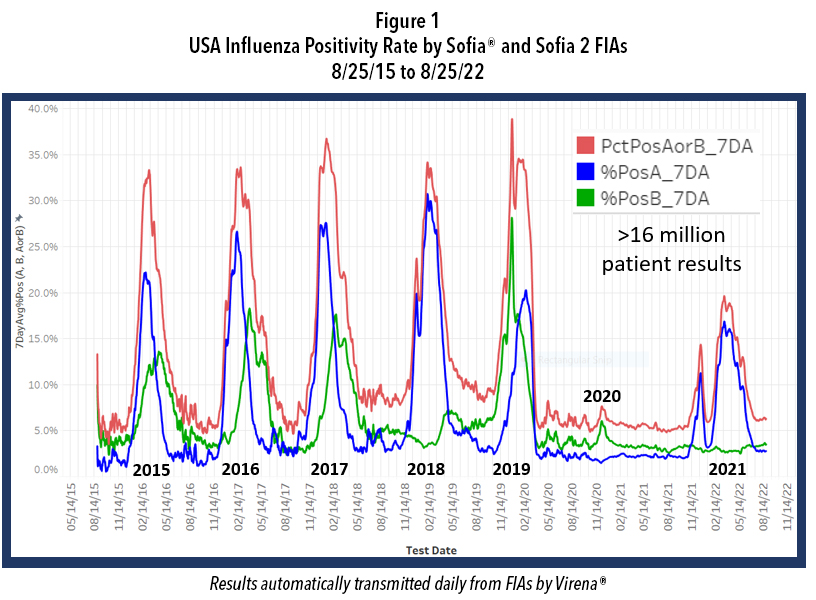
Quidel, partly with RADx support, was the first diagnostic firm to receive the FDA’s Emergency Use Authorization (EUA) for a rapid antigen test in the U.S.—the fluorescence immunoassay (FIA) called Sofia® SARS Antigen FIA for point-of-care (POC) use in the physician’s office lab. A few months later, Quidel was also the first to receive an EUA for a multiplex antigen assay, Sofia 2® Flu + SARS Antigen FIA, for simultaneous testing for SARS-CoV-2, Influenza A, and influenza B from one swab specimen. As shown in Table 1, within one year after the declaration of our National Emergency, Quidel had received EUAs for 8 different assays, including EUAs for the QuickVue SARS Assay (a 10-minute, visually read dipstick assay), one for POC and one for at-home use and two molecular assays.
This unprecedented work by government and industry required time. The pandemic was spreading quickly around the world and the public had very little to no protection. Fortunately, non-pharmaceutical interventions (NPI) were quickly introduced and promoted widely across the United States. Wherever lock downs, school closures, reduced face-to-face interaction, mask wearing, reduced mobility, and working at home occurred, there were significantly reduced hospitalizations and deaths. This protection by NPI, although not absolute, bought research scientists and industry time while vaccines, COVID-19 therapeutics and diagnostics were being developed.
While our government agencies and industries were working on these goals, NPI also reduced the incidence of certain other respiratory infections, including that of influenza Types A and B. Figure 1 shows the course of influenza in the United States from September 2015 to the present and reveals the profound impact of NPI on influenza incidence. Note the data depicted in this figure are derived from over 16 million patient de-identified test results that were automatically transmitted to Quidel by users of Sofia and
Sofia 2 for surveillance, using a system called Virena®. Virena information is updated daily and is automatically and securely shared with the CDC and readily available to Quidel customers on MyVirena.com. Virena is also a no charge service provided to all Sofia and Sofia 2 users.

After the abrupt end of the 2019-2020 season, there followed 18 months during which the combined influenza positive rates for influenza types A and B rarely exceeded 6%. Then last winter, 2021-2022, there were two influenza surges; both failed to approach the positivity rates and the duration seen in the previous 5 epidemic seasons. Both surges this past winter also ended abruptly, timed closely to the arrivals of Omicron in Dec. 2021 and of the BA.4 and BA.5 Omicron subvariants that became dominant after January 2022. This dramatic decline in influenza is believed largely due to the implementation of NPI that were needed to reduce the spread of COVID-19 until other measures could be taken.
A large portion of our population is now feeling exhausted after doing their best to address this pandemic for over two and a half years. NPI use is on the decline. Omicron and its direct subvariant offspring are much less virulent than their predecessors, further reducing the concern about being infected, thus further reducing interest or willingness to be vaccinated or to use NPI. In addition, much of the testing for COVID-19 is now done at home and most at-home results are not reported, reducing the awareness and concern of COVID-19 in their communities. On top of this, promotional activities for NPI have diminished.
In addition to enabling COVID-19 infections to more easily spread and persist in our population, failing to use NPI will likely increase the risk of a stronger influenza season this coming winter, perhaps even resulting in a more traditional season with epidemic levels of influenza rather than the “failed” surges* we experienced last winter. Enhancing this risk, only 52% of the U.S. population is vaccinated against influenza. Even many of those who have gotten routine vaccinations for influenza annually, have possibly skipped the last year or two given the widely known low influenza incidence and, with the passing of time, whatever immunity they might have had before the advent of the COVID-19 pandemic has likely wanned. So, the risks for significant influenza season seem higher than at any time since the winter of 2019.
We often look to the southern hemisphere for clues because their winter precede ours by half a year. Careful examination of Figure 2 shows the profound decline in incidence of influenza in their two previous winters, just like in the USA. This winter there was a pronounced influenza epidemic and the worst influenza in May in Australia’s history. Such events in the southern hemisphere are not absolute predictors of events in the northern hemisphere, but they rightfully raise further concern for this winter in North America.
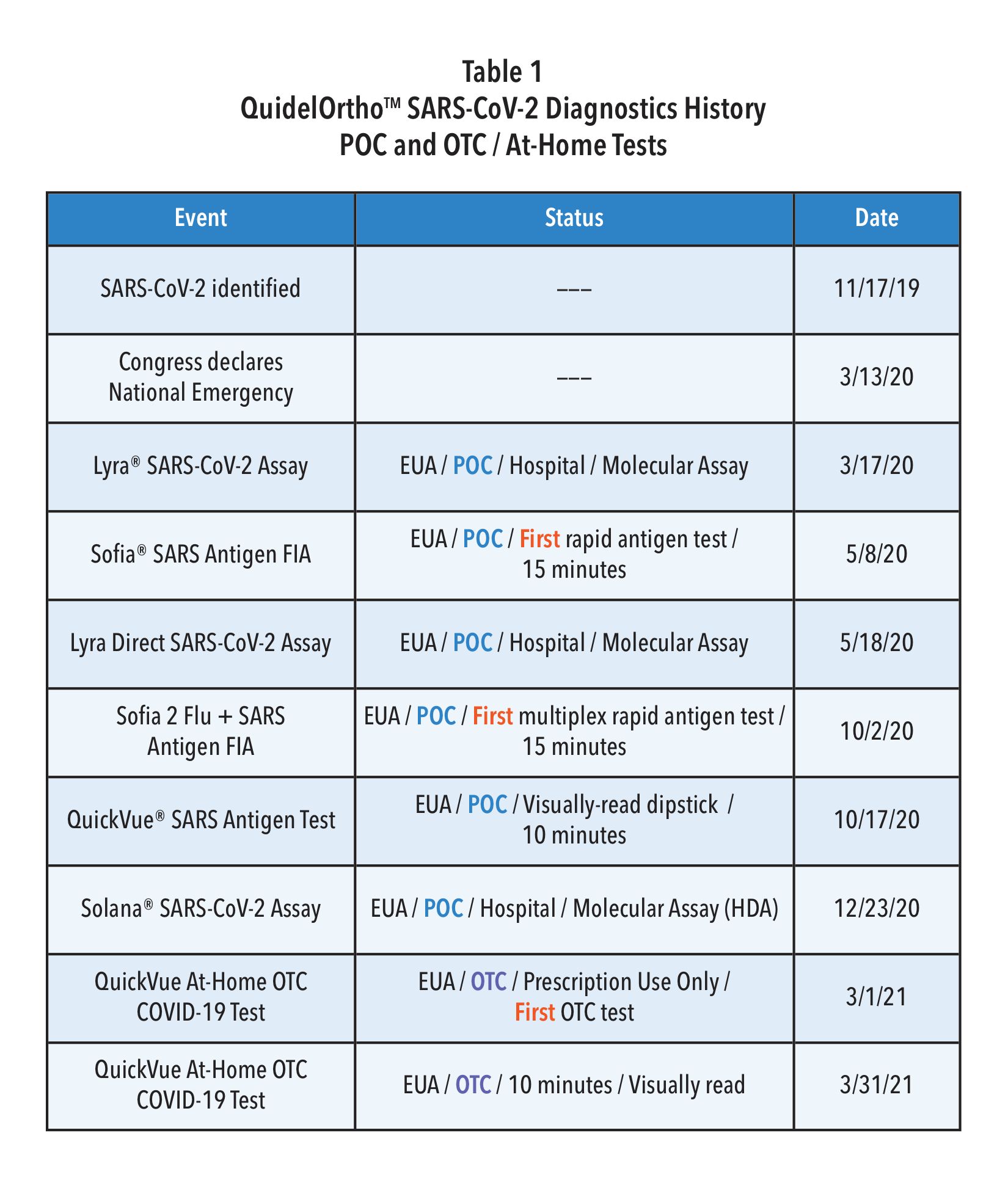
Many epidemiologists agree that a combination of both a new COVID-19 surge and a true influenza epidemic winter season in the U.S. is possible, if not likely. Indeed, it appears that the annual influenza epidemic almost broke out last 2021-2022 winter with the two surges as we discussed above. The use of NPI was likely strong enough to possibly slow or halt its spread. This may not be the case this year given the exhaustion of our populace, the low vaccination rate, reopening of schools, beginning of return to workplaces, ongoing decline in NPI use, and overall diminution of herd immunity.
Unfortunately, the signs and symptoms for infections by SARS-CoV-2 and influenza are very similar (Table 2). Given that there are now effective treatments for both influenza and COVID-19, it seems imperative that steps are taken to test for all three pathogens when patients present with such symptoms—especially in communities where both COVID-19 and Influenza are likely circulating at the same time.
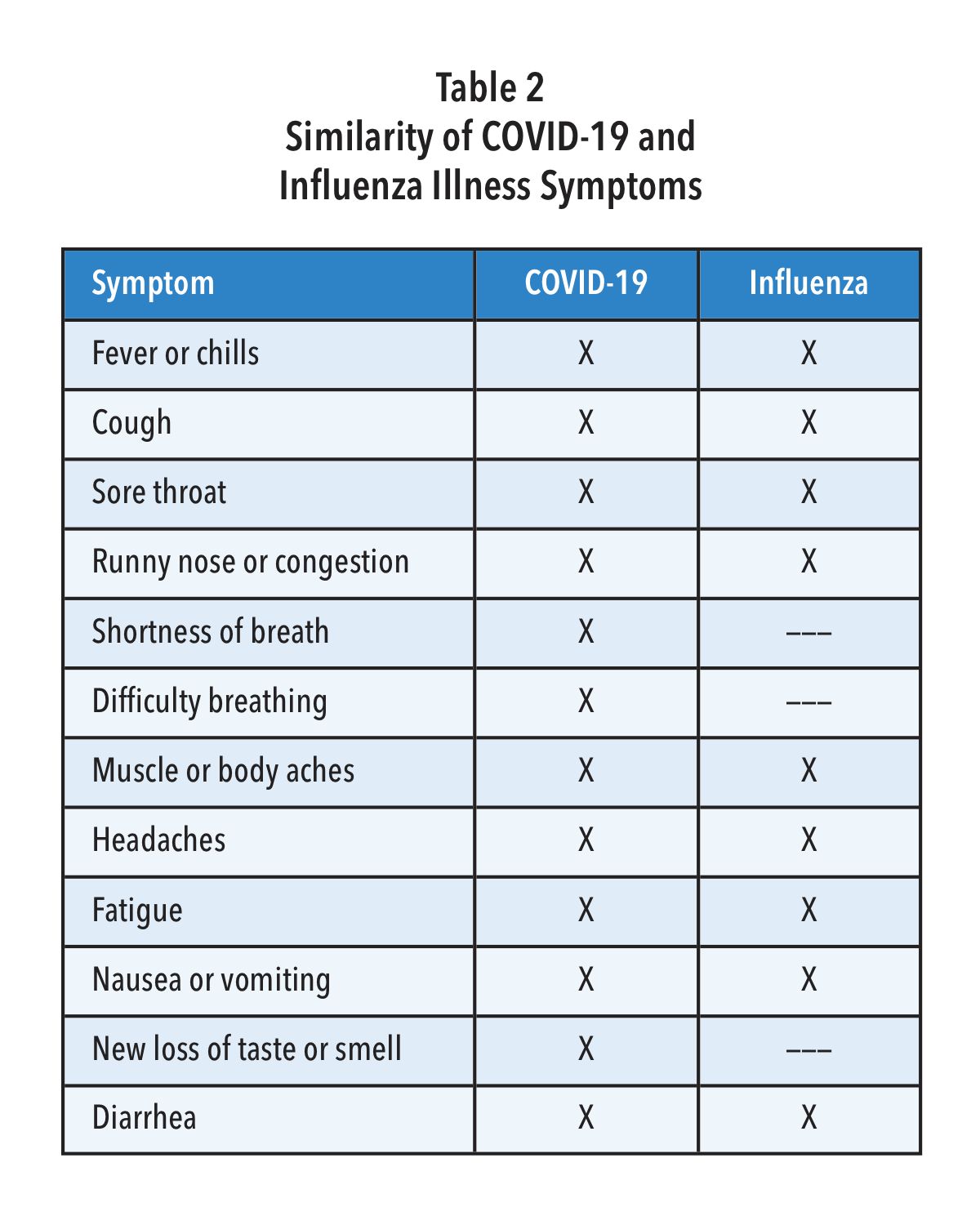
As mentioned in Table 1, Quidel was the first company to receive an EUA for a multiplex antigen detection assay in the United States. This CLIA waived test provides a result in 15 minutes with a simple nasal swab and is available for most labs. For busy clinics it provides flexible workflows, requiring limited hands-on-time, including a batch testing mode that allows processing and testing of several patient samples at a time. Getting daily reports from your local public health office or by accessing Quidel’s on-line reporting system (MyVirena.com) could indicate whether only COVID-19 or Influenza are in your community. If this is the case, options in Table 1 provide you practical and available alternatives available from Quidel.
With decline in use of NPI, reduced herd immunity, only 52% influenza vaccination rate (persons > 6 months of age), and given the hint from Australia (Figure 2), as well as the two attempts by influenza to break out in the United States more broadly last December and again in February (Figure 1), it is best to begin to prepare now for the return of influenza and potentially at the same time when COVID-19 is surging or otherwise maintaining a moderate incidence level. Rapid diagnosis is critically important as patients, especially high-risk ones, can be treated successfully with specific antivirals that have been developed for each of the pathogens—provided they are administered early, preferably starting within 2 days after symptom onset for influenza and within 5 days after symptom onset for COVID-19.
To prepare for the likely resurgence of influenza, perhaps at the same time as a new surge of COVID-19, we encourage physicians to do the following:
- Monitor surveillance data for incidence of COVID-19 and influenza in your state, county and community. This could be accomplished by monitoring public health reports and/or, for users of Sofia and Sofia 2, by monitoring the status of both viruses’ incidence by readily accessing Virena data on Quidel’s MyVirena.com.
- Make sure that your clinic provides COVID-19 and influenza test results to your local and regional public health agencies, so that they can provide a more complete status update for you and others.
- Actively support vaccinations, including boosters with the newly approved vaccine(s) covering the new SARS-CoV-2 Omicron subvariants.
- Encourage your staff and patients to get the new season’s influenza vaccines that are now available. Patients older than 65 years, should get the special influenza vaccine designed for them. Given that the influenza season started so early in Australia, it could do the same here, so providing the flu vaccinations for yourself, staff, and your patients by the end of September could be best.
- Encourage the use of NPI, especially at least through this winter, and especially reinforced by your knowledge through surveillance of incidence of both pathogens circulating in your community. The data show without question that NPI reduces COVID-10 and Influenza infections and spread.
- Be prepared for testing for both SARS-CoV-2 and Influenza. All three viruses are likely to be circulating in your community this winter—potentially at the same time. Using Sofia 2 SARS + Flu FIA may be the best choice for you, as it screens for all three viruses at once with only one patient nasal swab sample required.
*Failed “surges”. Even though the surges this past winter did not constitute a typical influenza epidemic, the CDC has reported that between Oct. 2021, and June 11, 2022, there were 8 million to 13 million influenza cases, 82,000 to 170,000 hospitalizations, and 5,000 to 14,000 deaths In the United States. We must all take steps now to prepare for the coming COVID-19 and Influenza winter season.
Paging all Residents: Who’s looking out for your financial wellness?
Monday, October 03, 2022
by Andy Harms
If your wallet needs live-saving measures, now is a great time to avert a crisis.
The grind. Residents know about it. Long days requiring intense mental focus. Physically demanding. Exhilarating and enjoyable, yet exhausting and overwhelming at times. Loving what we do—but not loving what it does to us on some of those days.
We’re a diverse set of people yet bound together by purpose. We can thrive in ever-changing, always-evolving patient care environments and on-call opportunities. Just as well, many of us excel best with a more structured day, one with meticulous order and greater command over outcomes. Our personal identities and varied interests were a large part of how we chose our specialty.
Regardless, as residents we’ve all been trained to think on our feet, orient and analyze quickly, decide with assurance, and act toward a favorable outcome.
In speaking with residents over the years about personal financial situations, I see an incredible ability for young physicians to manage—if not juggle! —their money matters despite weighty, disorderly, and persistent challenges.
Wouldn’t it be nice if there was an easier way to prepare and plan financially, to bring order from chaos? The good news: there IS a better way. The bad news is you likely were NOT trained in finances the same way you trained for medical practice.
The Journal of the American College of Surgeons published a study in 2018 titled “Clinically Competent and Fiscally at Risk: Impact of Debt and Financial Parameters on the Surgical Resident.”[1] One hundred five resident trainees were surveyed on topics of personal finance, and the majority (79%) of respondents felt strongly that inclusion of additional financial training in residency education is a critical need. The authors conclude: In a climate of increasingly delayed financial gratification, surgical trainees are on critically unstable financial footing. There is a major gap in current surgical education that requires reassessment for the long-term financial health of residents.
In digging deeper for perspective on resident finances, I spoke with the researcher and author of this study with the longest tenure in medicine, Dr. Bruce Harms, MD, MBA, FACS. “My generation of doctors, I believe, assumed that we could out-grow, with time, any financial mistakes and miscalculations we made in residency and early on in our careers. I think that is an incorrect assumption nowadays. For younger docs, in this era, the mistakes made from a financial standpoint may be extremely costly in the long run.” When asked to point out the biggest differences from then (Dr. Harms began residency in 1978) to now, he pointed out “certainly educational debt is the biggest difference I see, but also the cost of living. Housing, transportation, health care and childcare command a significantly greater part of a budget as compared to when I received my start in medicine.”
If you’re in a residency program that addresses your financial literacy and financial preparation needs well, count your blessings. That’s certainly not common throughout organized medicine in the United States. Similarly, if you’re employed in a residency program that offers a retirement plan with matching employer contributions, count yourself fortunate.
So where can we turn for assistance to avoid making costly financial mistakes and confidently face the challenges of personal finance during residency, given it may be unlikely to come through our employers or GME programs?
One of my favorite recommendations for residents hoping for better command over their personal finances is to pick up, digest, and implement suggestions from a book titled MD in the Black: A Personal Finance Primer for Medical Residents.[2] (Please note: I have no ties to the authors or sponsors of this book) It’s informative, practical, and concise. For all those in the TL;DR camp, it's only a hundred pages. I recognize your time is limited—among the barriers to better financial literacy—but reading this book is certainly worth making a priority. Editor-in-Chief Eric Shappell, MD, MHPE, and physician educators from around the United States created a great resource, specifically designed for residents.
The book focuses on five topics: 1) Educational debt, 2) Long-term disability insurance, 3) Life insurance, 4) Investing, and 5) Financial advisors
Likely you have questions in all these areas. The authors point out “they are each related to a significant financial decision that the majority of residents will encounter during training.”
We won’t breakdown each major category here, of course, but I would like to highlight two takeaways that every reader of this article at the residency level should consider:
First, on the topic of educational debt: Have you asked yourself “What is Public Service Loan Forgiveness?” and “Should I Pursue PSLF?” This is the first decision you should make, and various sources can help you better understand how to approach this process of determination. Once a determination is made regarding PSLF, a debt repayment strategy can be mapped out further.
As important as long-term disability insurance, life insurance, and investing are to the needs of a resident, a personal and in-depth commentary on each is beyond the scope and space of this article. However, they are a good lead-in to the second point we’d like to highlight here from Dr. Shappell’s book, considering the question “Should I Hire a Financial Advisor in Residency?”
Most residents should be able to get along just fine with only a few hours dedicated to researching the basic financial decisions of residency (1) choosing a loan repayment plan, (2) choosing which insurance products to purchase and when, and (3) what to do with any extra income (typically a decision of whether to make extra payments on loans vs. invest). If you don’t feel comfortable making these decisions on your own and aren’t interested in learning more about them yourself, choosing to hire a financial advisor may be the way to go. This also may be a good idea if you have unusually complex financial circumstances. (Shappell 84)
Whether during residency or as an attending, the likely outcome in any event is a search for an experienced and trusted financial advisor. What credentials do you seek, what questions do you ask? MD in the Black notes residents looking to start at the ground-level in forming a financial plan will do well to consider an advisor with a Certified Financial Planner (CFP), Chartered Financial Consultant (ChFC) or Certified Public Accountant/Personal Financial Specialist (CPA/PFS) designation. Additionally, I suggest aiming to find a Fee-Only advising arrangement, particularly for planning services. This model minimizes conflicts and ensures that your financial planner acts as a fiduciary. Fee-Only planners are compensated directly by their clients for advice, plan implementation and for the ongoing management of assets.[3] Fee-only financial advisors may be paid hourly, as a retainer, as a percentage of assets under management, or as a flat fee, depending upon the planner you choose.
As residents, we understand the importance of preventative health care and the consequences of delayed treatment. This understanding, applied to our personal finances, will not only stave off a trip to the financial ED (i.e., more borrowing, lower net worth, less financial freedom), but enable us to enjoy the peace of mind and sense of confidence that comes with financial health. Our goal should be to confine the chaotic moments and stressors related to medicine to the hospital and away from our pocketbooks.
We invite you to check out the resources mentioned above and reach out for help at any time to gain better financial understanding, set financial goals, and establish a path to financial wellness. Residency may be the best time to reach out, while the time is still on your side.
Andy Harms is co-founder of ScrubMoney, a free app now available for download, providing financial literacy and relevant personal financial content. ScrubMoney aims to empower early-career physicians to achieve financial wellness and enable stakeholders in healthcare to better develop financially confident doctors within their organizations.
[1] Clinically Competent and Fiscally at Risk: Impact of Debt an... : Journal of the American College of Surgeons (lww.com)
[2] MD in the Black: Personal Finance for Residents and Medical Students
Could your personal finances benefit from early intervention and treatment?
Wednesday, September 07, 2022
(If you’re a physician reading this, the answer is most likely yes)
by Andrew Harms
Every so often, a multi-state lottery jackpot in the US becomes so enormous that casual conversations and nightly newscasts take up the topic of playing the lottery with great anticipation and fascination. This summer, the Mega Millions lottery doled out their second-largest prize to a fortunate ticket-purchaser in the Chicago suburbs after 29 consecutive draws without a jackpot winner. A nearly $1.3 billion dollar jackpot!
If there was ever a remedy for financial difficulties, certainly windfall lottery winnings would be the answer, right? On the contrary, researchers studying lottery winners conclude that while lump-sum payments reduce the probability of bankruptcy in the first two years after winning, this reduction is followed by statistically significant increases of similar magnitude three to five years after winning.[1] Research scientist and economist Jay Zagorsky points to imprudent spending behaviors and poor savings and investment choices as culprits for financial woes despite winning millions.[2] “The key lesson for everyone, whether you play or not, is that when you get a windfall or win the lottery, plan ahead and resist the all-too-human temptation to spend all the money,” notes Zagorsky.
What can the hard-working physician earning a salary take away from such findings? Perhaps most simply: it appears even good luck and millions can’t replace financial literacy, a good financial plan, and responsible money management in achieving healthy outcomes.
A recent study published in The American Surgeon takes a closer look at the fiscal situation of surgical residents in a paper titled “Medically Smart, Fiscally Illiterate: Lack of Financial Education Leads to Poor Retirement Savings Strategies in Surgical Trainees.”[3] The authors introduce important findings about the need for addressing fiscal issues among physicians early in their training, concluding “surgery residents have a large debt burden, minimal retirement savings and an overall lack of understanding of savings strategies. Well-designed, early, and accessible educational interventions may improve the “financial vital signs” of surgical trainees and establish habits for long-term financial success.”
Regardless of medical specialty, what sorts of early interventions relating to personal finances can a physician pursue to avoid financial mistakes early-on in their careers, set themselves up for successful years ahead, and ultimately enjoy a stable financial picture in retirement?
Assessment and Diagnosis of your Financial Picture
Earlier this year, the AMA’s medical residency personal finance team outlined financial advice for residents in a series of blogs from Senior News Writer Brendan Murphy.[4] We’ll highlight a few points we think are helpful in assessing where you may need to begin in formulating a financial plan.
- Understand your income: The typical annual salary for a first-year resident is about $58,000, according to the Association of American Medical Colleges. But that does not mean that you will have $4,833 each month to spend as you see fit.
- Create a budget: There is across-the-board consensus—from fellow residents who have had experience in living on a comparable salary to financial experts who have worked with young physicians—that it is critical to put together a realistic budget and to stick to it as best you can.
- Have a loan-repayment game plan: For those in federal loan repayment, the present climate—which has allowed for two-plus years of interest-free loan forbearance—has been beneficial. Setting a repayment strategy—whether that involves remaining in federal loan repayment after the forbearance period ends or refinancing—is paramount for shaping a young physician’s financial well-being going forward.
Interventions in Personal Finance: The earlier the better when it comes to saving!
The findings from the recent “Medically Smart, Fiscally Illiterate” study suggest both a deficit in financial literacy and a lack of widely adopted solutions cause physicians challenges with respect to saving and investing, namely “despite these data establishing that there is indeed a problem, reports on sustainable solutions have been rare.” As we know well, our time demands and responsibilities as physicians leave us little or no room to become financial experts. Regardless, we must start somewhere if we desire financial well-being, and the earlier we start the better.
Following the creation of a budget, it's time to map out our goals and take some corrective actions where necessary. Once comfortable with their debt-repayment strategy and once reassured with an emergency fund in the event of the unforeseen, most physicians we talk to have goals which turn to saving and investing.
Although a wealth of information about saving and investing is available, we prefer to point our readers to resources focused on physician financial health. One important note we must point out: before jumping into the world of investing, be sure to understand well the investment vehicles you’re opting into and the tax consequences of each. And don’t hesitate to ask questions—you’re sure to have some, if not many!
For those investing during residency, our experienced friends serving nationwide physicians from Larson Financial Group point to two crucial steps every resident should take to protect their future income and reward themselves for their hard work:
- Start contributing today. We understand the financial constraints you’re up against during residency, but the benefits of saving just a small portion of your salary to a tax-deferred account can quickly add up, especially if you contribute enough to take advantage of your employer’s matching fund program. For example, if your hospital matches up to 5 percent of your salary, but you only contribute 3 percent, you leave thousands of dollars in free money on the table. Plus, because contributions are pre-tax, it hurts a bit less in the moment. You may also consider contributing to a tax-advantaged Roth IRA in addition to your 401(k) or 403(b), but contributions are capped at $6,000 each year.
- Make your move. Your income will be at its lowest during residency compared to any other time in your professional life moving forward if you remain in healthcare. That’s why we encourage residents to convert their tax-deferred account to a tax-advantaged account, such as a Roth IRA, upon graduation (or as early as you can) with both as low of income and as low of a balance as possible. When you retire, that money you earned in residency can be distributed tax-free, providing you with thousands more in retirement income. For instance, a graduate who converts $20,000 to a Roth IRA can potentially generate $5,000 more each year in income when they retire and benefit from $100,000 in tax savings. But before you do convert, it’s best to speak with a financial advisor to avoid any possible tax repercussions.[5]
In lieu of winning the Mega Millions jackpot (odds of a winning ticket are 1-in-302,575,350), we physicians must navigate a longer road to wealth requiring countless hours of medical training and years of providership. Though as we indicated above, even a lucky lotto winner must formulate and implement a sound savings and investment strategy without overspending and blowing it all away. Nothing is a given on the road to financial success.
If you’re struggling with diagnosing or treating your “financial vital signs” (to steal a phrase coined by the authors of “Medically Smart, Fiscally Illiterate”) and/or looking for assistance with how best to save and invest, please feel free to reach out for guidance and support. As in medicine, early interventions when it comes to personal financial planning may save you some troubles in the near future and provide benefits to you throughout your years of practice and long into retirement.
[1]Hankins, Scott and Hoekstra, Mark and Skiba, Paige Marta, The Ticket to Easy Street? The Financial Consequences of Winning the Lottery (March 26, 2010). Vanderbilt Law and Economics Research Paper No. 10-12.
[2] https://theconversation.com/odds-are-1-5-billion-powerball-winner-will-end-up-bankrupt-52972
[3] Medically Smart, Fiscally Illiterate: Lack of Financial Education Leads to Poor Retirement Savings Strategies in Surgical Trainees - PubMed (nih.gov)
[4] https://www.ama-assn.org/medical-residents/medical-residency-personal-finance
[5] Investing During Residency Options to Maximize Your Current Benefits and Future Retirement – Larson Financial
Point-of-care testing: A winning strategy in the battle against diabetes
Wednesday, September 07, 2022
by Susan Garramone, Senior Clinical Marketing Manager - Siemens Healthineers
Diabetes: The medical condition
Diabetes is a chronic, metabolic disease characterized by elevated levels of blood glucose. The hormone insulin is required for glucose to enter the body’s cells, where it is used for energy. If the body does not make enough insulin (type 1 diabetes) or does not respond to insulin as it should (type 2 diabetes), the level of glucose in the blood becomes elevated.1 This high blood sugar, or hyperglycemia, is dangerous and can lead to long-term complications.1,2

Type 1 diabetes is an autoimmune condition typically diagnosed in children, teens, and young adults.1 There is no cure for type 1 diabetes, and in addition to following a healthy eating and exercise plan, people with type 1 diabetes need to take insulin every day to control blood glucose levels.3
Type 2 diabetes, representing the majority of diabetes diagnoses, is a condition that develops over time.1,3 Once more commonly diagnosed in adults, the prevalence of diabetes in children, teens, and young adults is increasing.1 Lifestyle management, with healthy eating and exercise, is a cornerstone of type 2 diabetes treatment plans. Additionally, patients may be prescribed insulin or other injectable or oral diabetes medications to help manage blood sugar.1
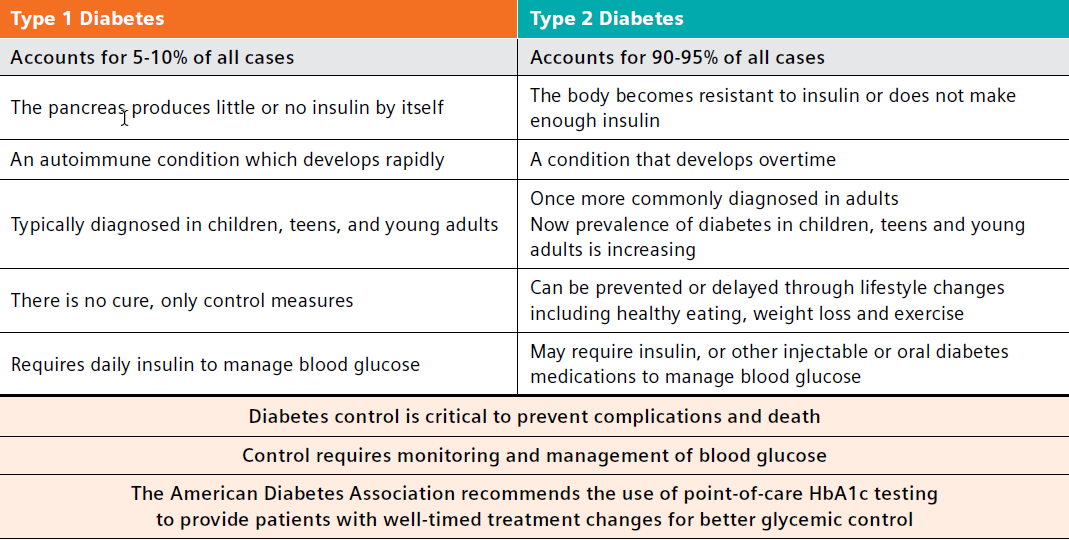
Diabetes: The comorbidity concern
Not only is diabetes the seventh-leading cause of death in the United States, affecting 11.3% of the U.S. population, it also is attributed to an estimated $327 billion in annual medical and lost productivity costs.3-6 Generally, care for patients with diabetes accounts for 1 in 4 healthcare dollars spent in the U.S., and a large portion of these costs results from diabetes-associated comorbidities that include potential neurological, cardiovascular, renal, and other chronic complications.2 A search of the PubMed National Library of Medicine yields thousands of new publications on diabetes and diabetes-related issues thus far in 2022, underscoring the importance of this chronic disease and the efforts to help those affected.7
Similarly, the body of evidence regarding the profound consequences of diabetes continues to grow.

The results also showed that for all chronic conditions, the average age of onset among people with type 2 diabetes was 5 years earlier than in people without the disease.8
Another recent study by Antal et al. reports type 2 diabetes mellitus (T2DM) is associated with neurocognitive changes suggestive of accelerated brain aging and cognitive decline.9
The wide-reaching consequences of diabetes and importance of diabetes management were devastatingly evident during the COVID-19 pandemic, when reports emerged demonstrating that COVID-19 was the leading cause of death in people with diabetes in the fourth quarter of 2020.10
In fact, a large systematic review and meta-analysis conducted by researchers from the University of Aberdeen has found that people with diabetes are almost twice as likely to die with COVID-19, and almost three times as likely to be critically or severely ill, compared to those without the condition.11 They reported that HbA1c over 70 mmol (equivalent to 8.6% HbA1c) increased the risk of mortality among patients with diabetes.
Additionally, at the 2022 American Diabetes Association meeting, a presentation by Harding et al. identified that diabetes may increase the risk for long COVID symptoms four-fold. In fact, the author was quoted as stating, “Careful monitoring of glucose levels in at-risk individuals may help to mitigate excess risk and reduce the burden of lingering symptoms that inhibit their overall well-being.”12
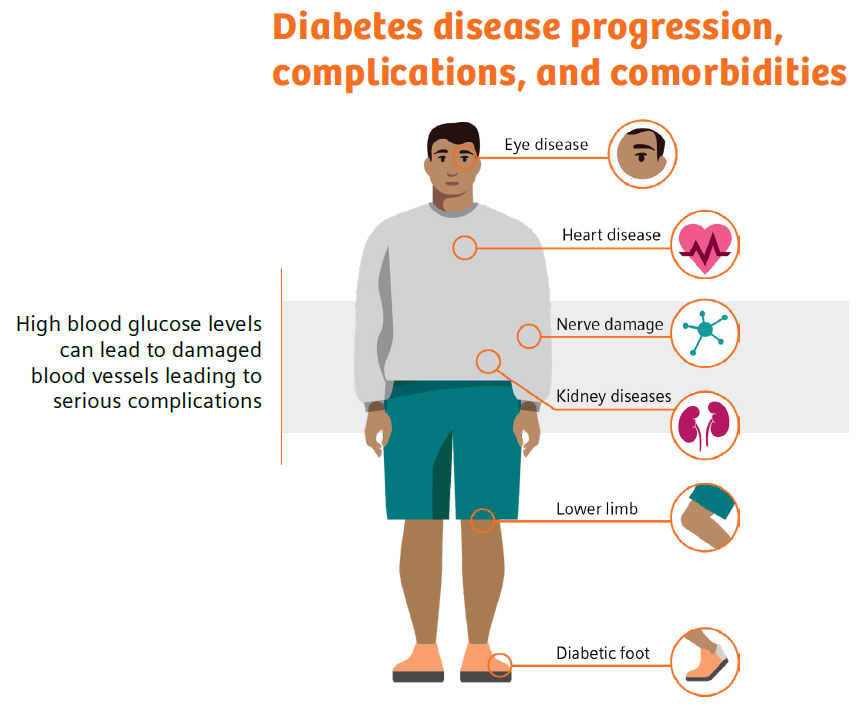
- https://www.practiceupdate.com/content/ada-diabetes-may-quadruple-risk-for-long-covid/137205/23/8/2. Accessed 6-21-22.
- https://www.healthcatalyst.com/insights/managing-diabetes-population-health-management. Accessed 6-21-22.
Diabetes: Monitoring leads to management
It is quite clear that people with diabetes are at risk for poor health outcomes, and diabetes management is critical. The higher a patient’s hemoglobin A1c level, the poorer their blood sugar control and the higher their risk of complications.15 For example, 1 out of 3 adults with diabetes develop diabetic kidney disease, which can then lead to high blood pressure, heart disease, stroke, and early death.16
However, it is also quite clear that facilitating changes in patient behavior, with diabetes self-management education and patient-provider collaboration as outlined by the ADA, can improve health outcomes.17 In fact, studies have shown that every percentage-point drop in A1c blood test results can reduce the risk of eye, nerve, and kidney disease complications by as much as 40%.18,19 Even with this knowledge, high HbA1c levels are seen in 50–60% of diabetic patients, indicating that they either are not receiving proper care or are not adhering to their treatment regimen!20
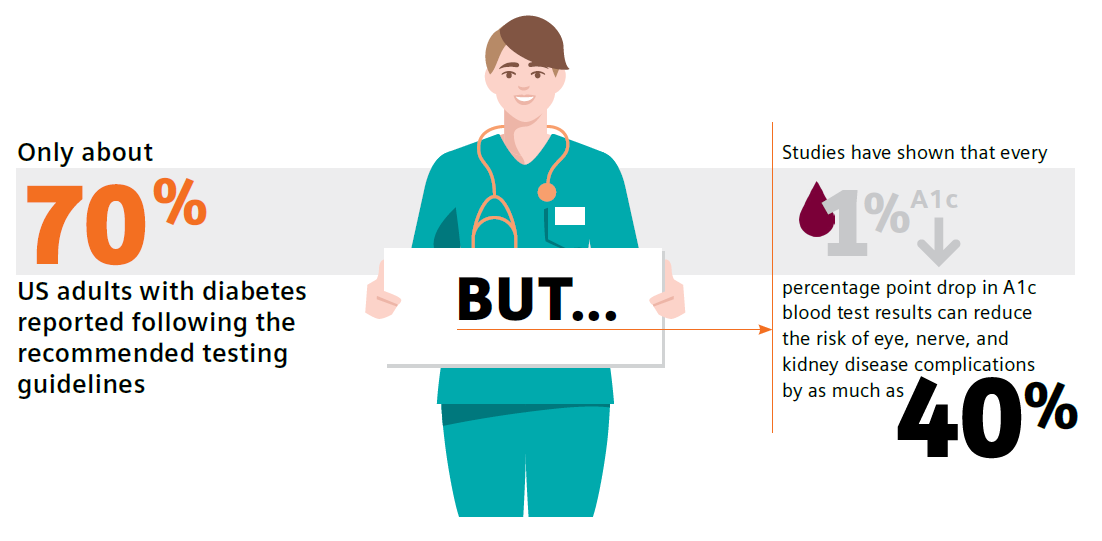
Guidelines call for routine testing of hemoglobin A1c (HbA1c) and urine albumin-creatinine ratio (uACR) for diabetes and chronic kidney disease monitoring and management, respectively.21,22 These tests are part of national quality measures, which underscores their importance in early diagnosis, monitoring, and treatment leading to improved outcomes. However, there is a major disconnect: Adherence to recommended testing is astonishingly low—only approximately 70% and 32% of patients with diabetes follow the testing guidelines for HbA1c and uACR, respectively.23,24
Reasons for low test adherence were addressed in a 2021 study by Al Hayek et al. in which patients identified having to make a trip to a laboratory as a main barrier to testing.25 Patient-reported pain points included “difficulties in handling absence from school/work (56%), inconvenience associated with revisits (45.3%), and the additional costs of travel (44%)”.25 Additionally, a review by Schnell et al. documented the potential for time delays in pre-visit laboratory HbA1c testing.26 These delays may lead to nonadherence, downstream delays in communicating results and intensifying or modifying treatment, and reduced patient adherence to the treatment plan.
Diabetes: Primary care holds the key to control
Did you know that having a primary-care doctor, as well as getting routine care and health-screening services, are linked to improved overall health and longevity?27
Primary-care physicians treat at least 90% of patients with diabetes in the United States. Therefore, the biggest opportunity for positive change lies within the primary-care office.28
According to the ADA, “The goals of diabetes treatment are to prevent or delay complications, optimize quality of life, and establish a care plan with patients based on their individual preferences, principles, and goals.”29 Implementation of point-of-care testing in the primary-care office provides an opportunity to meet these goals, whereby patient education and monitoring of progress with real-time clinical data, such as guideline-driven HbA1c and uACR results, can increase patient motivation to make lifestyle modifications and adhere to medication-management plans. In fact, in 2021 the ADA stated that POC testing for A1c provides opportunity for more timely treatment changes.21
There is a large body of evidence further supporting the clinical value of point-of-care testing (POCT) as a quick, easy, reliable method for monitoring diabetes in the primary-care office setting. Such testing can improve test adherence and patient outcomes while also increasing practice efficiency, decreasing costs, and driving achievement of quality measures.25,30-36 In addition, studies have demonstrated that POCT is associated with a high level of patient and staff satisfaction, which further aligns with the Quadruple-Aim goals of better outcomes, lower costs, improved patient experience, and improved clinician experience.25,30,31,36
Diabetes: The clinical conundrum
There are a lot of knowns when discussing diabetes.
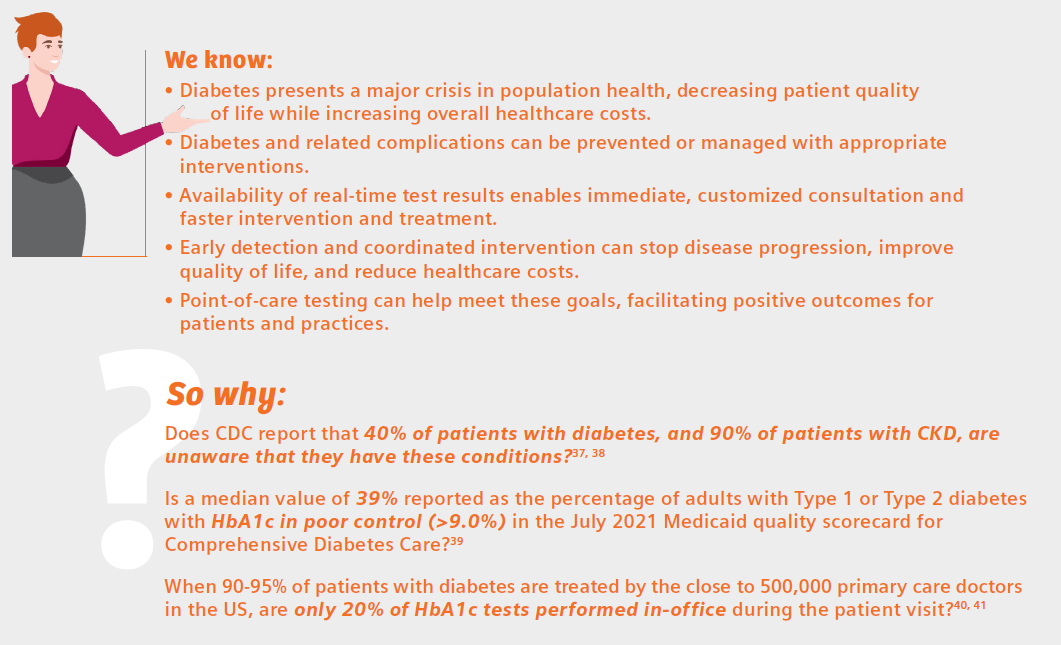
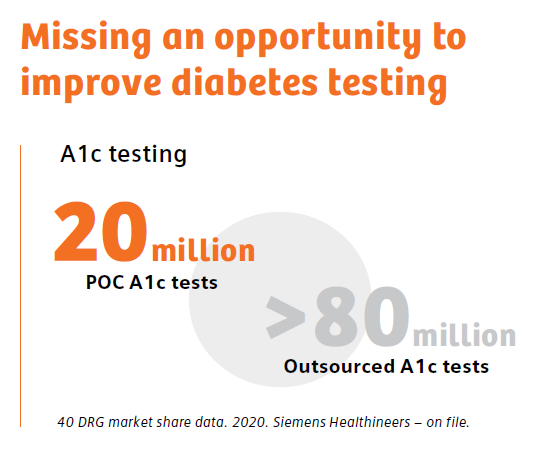
The review by Schnell et al. neatly summarizes the benefits of diabetes testing at the point of care:26
- Increases compliance with recommendations for HbA1c testing frequency and treatment adoption
- Improves clinical outcomes
- Facilitates patient education and motivation
- Improves patient’s quality of life
- Appears to contribute to cost/time savings both for healthcare professionals and patients
That describes a winning strategy for facilitating positive change in the battle against diabetes—a win for patients, and a win for the physicians who care for them. If point-of-care, in-office diabetes testing is not a tool currently in your diabetes-management tool kit, perhaps it is time for its adoption.

References
- https://www.cdc.gov/diabetes/basics/diabetes.html. Accessed 6-21-22.
- https://www.cdc.gov/diabetes/managing/manage-blood-sugar.html. Accessed 6-21-22.
- https://www.cdc.gov/diabetes/library/socialmedia/infographics/diabetes.html. Accessed 6-21-22.
- https://www.cdc.gov/diabetes/basics/quick-facts.html. Accessed 6-21-22.
- https://www.cdc.gov/diabetes/data/statistics-report/index.html. Accessed 6-21-22.
- American Diabetes Association. Economic costs of diabetes in the U.S. in 2017. Diabetes Care. 2018;41(5):917-28. doi: 10.2337/dci18-0007. Accessed 6-21-22.
- gov. (diabetes) and (2022) Search. Accessed 6/15/22.
- https://www.medscape.co.uk/viewarticle/burden-chronic-conditions-heavier-type-2-diabetes-2022a1000tht. Diabetes UK Professional Conference 2022: Abstract A19 (P139). Presented March 29. Accessed 6/15/22.
- Antal B, McMahon LP, Sultan SF, Lithen A, Wexler DJ, Dickerson B, Ratai E-M, Mujica-Parodi LR. Type 2 diabetes mellitus accelerates brain aging and cognitive decline: complementary findings from UK Biobank and meta-analyses. eLife. 2022;11:e73138. https://doi.org/10.7554/eLife.73138
- https://www.healio.com/news/endocrinology/20220517/covid19-leading-cause-of-death-in-people-with-diabetes-in-fourth-quarter-of-2020. Accessed 6-21-22.
- Kastora S, Patel M, Carter B, Delibegovic M, Myint PK. Impact of diabetes on COVID-19 mortality and hospital outcomes from a global perspective: an umbrella systematic review and meta-analysis. Endocrinol Diabetes Metab. 2022 May;5(3):e00338. doi: 10.1002/edm2.338. Epub 2022 Apr 20. PMID: 35441801; PMCID: PMC9094465.
- https://www.practiceupdate.com/content/ada-diabetes-may-quadruple-risk-for-long-covid/137205/23/8/2. Accessed 6-21-22.
- https://www.ajmc.com/view/multiple-chronic-conditions-in-type-2-diabetes-mellitus-prevalence-and-consequences. Accessed 6-27-22.
- https://www.verywellhealth.com/side-effects-of-diabetes-5181506. Accessed 6-27-22.
- https://www.healthcatalyst.com/insights/managing-diabetes-population-health-management. 6-27-22.
- https://www.cdc.gov/kidneydisease/publications-resources/ckd-national-facts.html. Accessed 6-27-22.
- https://diabetesjournals.org/care/article/43/Supplement_1/S48/30785/5-Facilitating-Behavior-Change-and-Well-being-to. Accessed 6-27-22.
- Nathan DM, Genuth S, Lachin J, Cleary P, Crofford O, Davis M, Rand L, Siebert C: Diabetes Control and Complications Trial Research Group. The effect of intensive treatment of diabetes on the development and progression of long-term complications in insulin-dependent diabetes mellitus. N Engl J Med. 1993 Sep 30;329(14):977-86.
- https://www.cdc.gov/chronicdisease/programs-impact/pop/diabetes.htm. Accessed 6-22-22.
- LeBlanc ES, Rosales AG, Kachroo S, et al. Provider beliefs about diabetes treatment have little impact on glycemic control of their patients with diabetes. BMJ Open Diabetes Res Care. 2015;3:e000062. https://doi.org/10.1136/bmjdrc-2014-000062.
- American Diabetes Association. Glycemic targets: standards of medical care in diabetes—2021. Diabetes Care. 2021 Jan;44(Suppl 1):S73-S84. Available from: https://doi.org/10.2337/dc21-S006.
- American Diabetes Association Professional Practice Committee, et al. Chronic kidney disease and risk management: standards of medical care in diabetes-2022. Diabetes Care. 2022;45(Suppl_1):S175-S184. doi:10.2337/dc22-S011.
- https://www.cdc.gov/diabetes/pdfs/library/Diabetes-Report-Card-2019-508.pdf. Accessed 12-17-21. Accessed 6-22-22.
- Alfego D, et al. Chronic kidney disease testing among at-risk adults in the U.S. remains low: real-world evidence from a national laboratory database. Diabetes Care. 2021;44(9):2025-32. doi:10.2337/dc21-0723.
- Al Hayek AA, et al. Assessment of patient satisfaction with on-site point-of-care hemoglobin A1c testing: an observational study. Diabetes Ther. 2021;12(9):2531-44. doi: 10.1007/s13300-021-01126-7
- Schnell O, et al. Impact of HbA1c testing at point of care on diabetes management. J Diabetes Sci Technol. 2017;11(3):611-17. doi: 10.1177/1932296816678263
- Basu S, Berkowitz SA, Phillips RL, Bitton A, Landon BE, Phillips RS. Association of primary care physician supply with population mortality in the United States, 2005-2015. JAMA Intern Med. 2019;179(4):506-14. doi: 10.1001/jamainternmed.2018.7624
- Davidson JA. The increasing role of primary care physicians in caring for patients with type 2 diabetes mellitus. Mayo Clinic proceedings. 2010;85(12 Suppl):S3-4. doi: 10.4065/mcp.2010.0466
- American Diabetes Association. Standards of Medical Care in Diabetes—2022 Abridged for Primary Care Providers. Clin Diabetes. 2022 Jan 1;40(1):10-38. https://doi.org/10.2337/cd22-as01
- Crocker JB, et al. The impact of point-of-care hemoglobin A1c testing on population health-based onsite testing adherence: a primary-care quality improvement study. J Diabetes Sc Technol. 2021;15(3):561-7. doi: 10.1177/1932296820972751.
- Crocker JB, Lee-Lewandrowsky E, Lewandrowsky N, et al. Implementation of point-of-care testing in an ambulatory practice of an academic medical center. Am J Clin Pathol. 2014;142(5):640-6.
- Christofides EA, Desai N. Optimal early diagnosis and monitoring of diabetic kidney disease in type 2 diabetes mellitus: addressing the barriers to albuminuria testing. J Prim Care Community Health. 2021;12:21501327211003683. doi: 10.1177/21501327211003683.
- Schultes B, Emmerich S, Kistler AD, Mecheri B, Schnell O, Rudofsky G. Impact of albumin-to-creatinine ratio point-of-care testing on the diagnosis and management of diabetic kidney disease. J Diabetes Sci Technol. 2021 Oct 28;19322968211054520. doi: 10.1177/19322968211054520.
- Rhyu J, Lambrechts S, Han MA, Freeby MJ. Utilizing point-of-care A1c to impact outcomes – can we make it happen in primary care? Curr Opin Endocrinol Diabetes Obes. 2022 Feb 1;29(1):29-33. doi: 10.1097/MED.0000000000000700.
- Nichols JH. Utilizing point-of-care testing to optimize patient care. EJIFCC. 2021 Jun;32(2):140-4.
- Crocker B, Lewandrowski EL, Lewandrowski N, Gregory K, Lewandrowski K. Patient satisfaction with point-of-care laboratory testing: report of a quality improvement program in an ambulatory practice of an academic medical center. Clin Chim Acta. 2013 Sep 23;424:8-11. doi: 10.1016/j.cca.2013.04.025. Epub 2013 May 10. PMID: 23669184.
- https://www.cdc.gov/nchs/fastats/kidney-disease.htm. Accessed 6-22-22.
- https://www.kidney.org/atoz/content/does-type-2-diabetes-increase-your-risk-kidney-disease-yes. Accessed 6-27-22.
- https://www.medicaid.gov/state-overviews/scorecard/comprehensive-diabetes-care/index.html. Accessed 6-27-22.
- https://www.kff.org/other/state-indicator/total-active-physicians/. Accessed 6-22-22.
- DRG market share data. Siemens Healthcare Diagnostics Inc. (on file). 2020.
Meeting the Goals of Value-based Care in Chronic Disease Management
Thursday, July 14, 2022
by Susan Garramone, Senior Clinical Marketing Manager - Siemens Healthineers
Chronic diseases are the leading causes of death and disability in the U.S. and major drivers of the nation’s rising healthcare costs.1 Per the Centers for Disease Control and Prevention, the top seven chronic diseases include heart disease, cancer, chronic lung disease, stroke, Alzheimer’s disease, diabetes, and chronic kidney disease (CKD). In the United States, 60% of adults have one chronic disease, and 40% are reported as having two or more.1 The costs of these chronic diseases account for nearly 86% of healthcare costs.2
Chronic diseases are the leading causes of death and disability in the U.S. and major drivers of the nation’s rising healthcare costs.1 Per the Centers for Disease Control and Prevention, the top seven chronic diseases include heart disease, cancer, chronic lung disease, stroke, Alzheimer’s disease, diabetes, and chronic kidney disease (CKD). In the United States, 60% of adults have one chronic disease, and 40% are reported as having two or more.1 The costs of these chronic diseases account for nearly 86% of healthcare costs.2
With these staggering statistics, chronic disease management has become one of the most important priorities for healthcare organizations today and the driving force behind value-based care: the measured improvement in a patient’s health outcomes for the cost of achieving that improvement.3
Value-based Care (VBC)
The goal of value-based care is to standardize healthcare processes and develop proactive best practices for patient care to prevent progression and avoid complications of disease before they start. The Value-Based Care (VBC) model centers around patient and provider accountability, shifting emphasis from fee-for-service.5 In this model, physician and hospital payments are based on patient outcomes, rather than volume-based metrics such as the number of patients seen, or procedures performed. The focus on patient outcomes is intended to help reduce healthcare costs while improving overall patient health and well-being.5
Patients seeking care for most of the high-cost chronic conditions, including diabetes and CKD, rely heavily on primary care physicians.6 In fact, primary care physicians treat at least 90% of patients with diabetes in the United States.7 Regular visits with primary care physicians can involve screenings, checkups, monitoring and coordinating treatment, and patient education to help manage chronic conditions.
Value-based care may provide earned financial relief to primary care practices while allowing clinicians to strengthen the rewarding patient relationships that are the backbone of primary care.8 In a joint survey by the American Academy of Family Physicians and CompHealth, 87% of providers said the best part of their job was “interacting with patients and helping patients.”9 Unfortunately, to achieve success in fee-for-service models, providers spend less time with patients, often addressing immediate needs but not underlying causes.9 Value-based care changes this dynamic, as it aligns incentives with the physician’s focus on patient outcomes rather than volume. Additionally, moving from a patient-volume model improves the experience of both the patient and physician, and may allow more time for valuable consultation.9,10 Overall, value-based care helps address the goals of the Quadruple Aim: better outcomes, lower costs, improved patient experience, and improved clinician experience.

Quality Measures and Quality Payment Programs
Quality measures are standards for evaluating performance when caring for patients. They are developed by both private and public-sector organizations and are generally based on the current clinical guidelines or literature reviews. Quality measures are used to not only benchmark individual clinicians and distribute bonus payments, but also to evaluate facilities, health systems, treatments, and care coordination.11 There are several quality-payment programs and performance-measurement sets designed to hold providers accountable for quality, assist in identifying opportunities for improvement, and monitor progress over time.
The Centers for Medicare & Medicaid Services (CMS) is the largest payer of healthcare services in the United States.12 CMS is also the primary driver of changes in payment and delivery models and incorporation of value-based purchasing of healthcare services based on incentives.12 The Medicare Access and CHIP Reauthorization Act of 2015 (MACRA) established a physician payment system that incentivizes improvements in U.S. healthcare. Under MACRA, physicians participate in the Quality Payment Program (QPP), depending on eligibility, payment impact, and other factors, through the Merit-Based Incentive Payment System (MIPS) or through Advanced Alternative Payment Models (APM), such as risk-bearing accountable care organizations (ACOs).13
All eligible clinicians must choose to participate in either the MIPS or the APMs track and meet eligibility based on specific requirements.13 MIPS is the default program for all providers. In the MIPS program, providers’ performance is measured in four categories: quality, costs, the use of certified EHR, and improvements in clinical practice. Each category is weighted, and providers receive a score between 0 and 100.13,14 This score is then used to adjust payments. Under APMs, there are financial incentives related to the level of provider financial risk and the quality of care provided.14
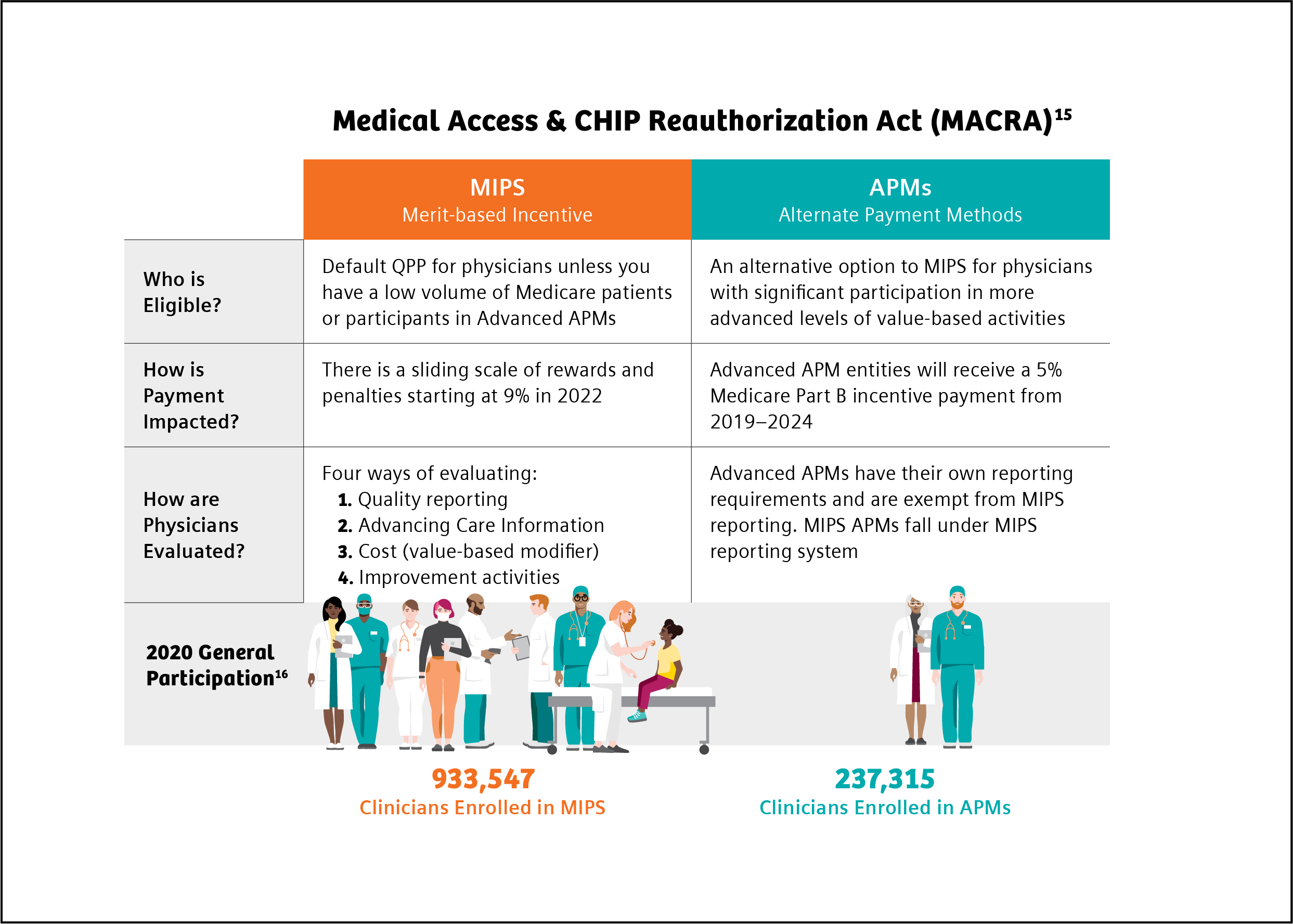
In 2022, MIPS scoring is weighted as follows: Quality (30%), Advancing Care Information (25%), Clinical Practice Improvement Activities (15%), and Cost and Resource Use (30%). The maximum payment adjustment for 2022 is ±9%.17
The National Committee for Quality Assurance (NCQA) established a comprehensive set of standardized performance measures, the Healthcare Effectiveness Data and Information Set (HEDIS), to give purchasers and consumers a way to reliably compare health plan performance.18 90% of U.S. health plans, including commercial, Medicare, and Medicaid health plans, use HEDIS measurement targets in determining quality incentive payments.18 Several HEDIS measures align with and are included in MIPS criteria.
Chart references 13, 18
Quality Measures in Diabetes and CKD
Diabetes is an ideal target for prevention strategies, as it is a major risk factor for other serious chronic conditions, including CKD. In the U.S., 37 million people are diagnosed with diabetes.19 This epidemic is responsible for an estimated $327 billion in annual medical and lost productivity costs.20
Additionally, 1 in 3 adults with diabetes also have CKD, responsible for more than $81 billion in annual Medicare costs.21,22 For those at risk for diabetes and CKD, early identification can prevent disease. For those with disease, early identification and treatment and routine monitoring can control disease progression and prevent related complications.23 On this basis, both diabetes and CKD are good targets for value-based care, where there is a desire to positively manage long-term outcomes while containing total cost of care in these growing populations. As such, diabetes and kidney health quality measures are often a focus of quality payment programs.
Guidelines call for routine testing of hemoglobin A1c (HbA1c) and urine albumin-creatinine ratio (uACR) for disease monitoring and management.24,25 However, the literature demonstrates that only approximately 70% and 32% of patients with diabetes follow the testing guidelines for HbA1c and uACR, respectively.26,27
Key quality measures in diabetes care are HbA1c control for patients with diabetes and uACR for patients with diabetes and kidney disease.28,29
The population health challenge presented by diabetes, and the need for action, have been recognized for a long time. In 1998, to assess quality of care in diabetes management, the Centers for Medicare & Medicaid Services (CMS), the National Committee on Quality Assurance (NCQA), and the American Diabetes Association (ADA) led the first national effort to develop a set of performance measures for diabetes.30 These quality performance measures have since been widely adopted for assessment in Medicare, Medicaid, and commercial health plans, as a driver toward value-based care.31
Both MIPS and HEDIS quality measures for 2022 include measures for guideline supported HbA1c and uACR testing (Table 1).28,29
Table 1. HEDIS and MIPS 2022 quality measures for HbA1c and uACR testing.
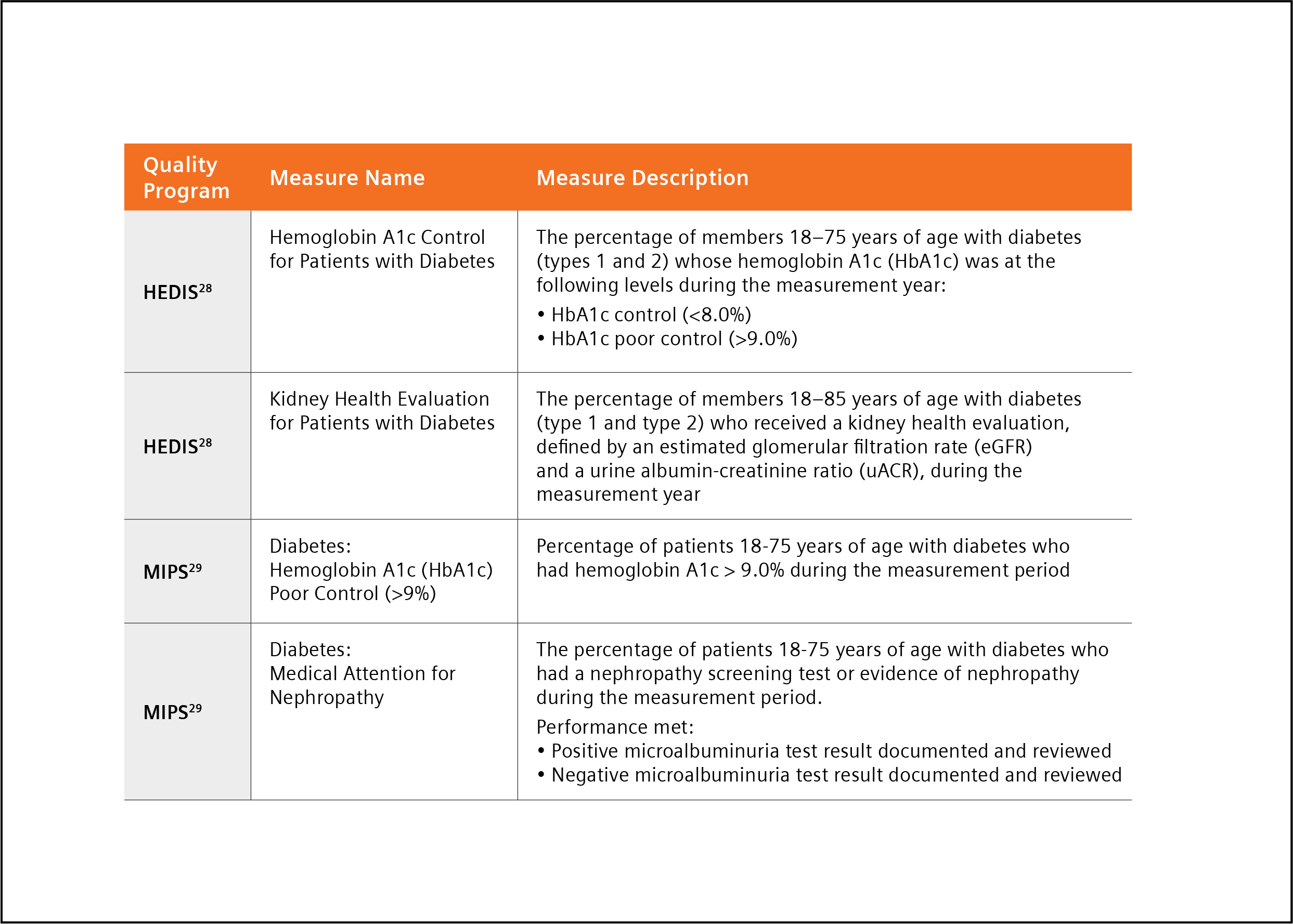
A Path to Success in Quality Programs with Point-of-care Testing
Managing patients diagnosed with diabetes according to clinical guidelines is critically important, yet overall testing compliance is poor26,27 Point-of-care testing (POCT), clinical laboratory testing at the site of patient care, has been described as a quick, easy, reliable method for monitoring diabetes, and improving test adherence, in the primary care office setting.32 POCT enables the physician to perform diagnostic testing during an office-visit and affords the opportunity for immediate patient-physician consultation and intervention, eliminating potential loss and cost of follow-up associated with traditional laboratory (send-out) testing.32 In fact, the ADA has stated that “The use of point-of-care A1C testing may provide an opportunity for more timely treatment changes during encounters between patients and provider.”24
There is a growing body of evidence supporting the benefits of point-of-care testing to meet goals:
- A study by Crocker et al. demonstrated that POC HbA1c testing led to 3.7 times decreased likelihood of missing HbA1c 32
- A second study by Crocker demonstrated that point-of-care HbA1c testing “can significantly improve clinical operations with cost reductions through improved practice efficiency,” realizing a potential savings from improved efficiency of $24.64 per patient.33 This savings was achieved through a reduction in the number of calls, letters and additional patient visits required following implementation of POCT.
- A recent study by Christofides stated, “Access to uACR testing may be improved by using Clinical Laboratory Improvements Amendments (CLIA)-waived point of care UACR testing options, that is, those approved for use closer to the patient and not necessarily in a central laboratory,” and noted that using a CLIA-waived POC uACR option was a means to optimize test ordering.34
- A study by Schultes et al. found that the implementation of uACR POCT in daily general practice can improve the diagnosis and treatment of diabetic kidney disease (DKD).35 The availability of uACR results at the time of the consultation led physicians to make medication adjustments to 18.5% of the patients enrolled in the study.35
The findings reported in these papers, and others they cite, suggest implementation of POCT may help busy practices achieve quality measures with increased testing adherence while decreasing operating costs through improved practice efficiency.32-35
Conclusion
The goal of value-based care is to cost-effectively improve patient outcomes. Value-based care models reward providers for efficient and effective patient care based on reported quality measures. Chronic conditions such as diabetes and CKD are ideal targets for value-based care because early detection and coordinated intervention can stop disease progression, improve quality of life, and reduce healthcare costs.
Quality measures in both diabetes and CKD are focused on guideline-recommended diagnostic testing. Adoption of point-of-care testing can improve test adherence while bringing increased value to patient office visits. Availability of real-time test results enables immediate consultation and faster intervention and treatment. This facilitation of care may lead to improved patient outcomes and decreased overall diabetes-related healthcare costs, meeting the goals of value-based care.
References
- https://www.cdc.gov/chronicdisease/about/index.htm#:~:text=Many%20chronic%20diseases%20 are%20caused. Accessed 4-13-22.
- Holman HR. The relation of the chronic disease epidemic to the health care crisis. ACR Open Rheumatol. 2020 Mar;2(3):167-73. doi: 10.1002/acr2.11114. Epub 2020 Feb 19. PMID: 32073759; PMCID: PMC7077778.
- https://www.nachc.org/wp-content/uploads/2017/05/CHF-Winter-Spring-2017-Facing-the-Transition.pdf. Accessed 4-13-22.
- Petersen R, et al. Improving population health by incorporating chronic disease and injury prevention into value-based care models. North Carolina Med J. 2016;77(4):257-60. doi: 10.18043/ncm.77.4.257.
- https://my.clevelandclinic.org/health/articles/15938-value-based-care. Accessed 4-13-22.
- Sharma MA, et al. Patients with high-cost chronic conditions rely heavily on primary care physicians. J Am Board Fam Med. 2014;27(1):11-2. doi: 3122/jabfm.2014.01.130128.
- Davidson JA. The increasing role of primary care physicians in caring for patients with type 2 diabetes mellitus. Mayo Clin Proc. 2010;85(12 Suppl):S3-S4. doi: 10.4065/mcp.2010.0466
- https://www.capphysicians.com/articles/overview-value-based-care-primary-care-practices. Accessed 4-13-22.
- https://www.priviahealth.com/blog/how-the-quadruple-aim-and-value-based-care-intersect/. Accessed 4-13-22.
- Teisberg E, Wallace S, O'Hara S. Defining and implementing value-based health care: a strategic framework. Acad Med. 2020;95(5):682-5. doi: 10.1097/ACM.0000000000003122.
- https://carejourney.com/physician-quality-and-why-it-is-important/ABCs of Measurement. Accessed 4-13-22. Error! Hyperlink reference not valid.
- https://www.cms.gov/Medicare/Quality-Initiatives-Patient-Assessment-Instruments/MMS/Quality-Programs. Accessed 4-13-22.
- https://www.aapc.com/macra/macra.aspx. Accessed 4-13-22.
- https://checkpointehr.com/blog/difference-between-mips-and-apms/. Accessed 4-13-22.
- https://www.myavls.org/member-resources/macra-resources.html . Accessed 4-13-22.
- https://qpp-cm-prod-content.s3.amazonaws.com/uploads/1783/QPP%202020%20Participation%20Results%20Infographic.pdf . Accessed 4-13-22.
- https://mdinteractive.com/mips-blog/cms-releases-2022-mips-final-rule-key-takeaways. Accessed 4-13-22.
- https://healthpayerintelligence.com/news/how-hedis-cms-star-ratings-cqms-impact-healthcare-payers. Accessed 4-13-22.
- https://www.cdc.gov/diabetes/basics/quick-facts.html . Accessed 4-13-22.
- American Diabetes Association. Economic costs of diabetes in the U.S. in 2017. Diabetes Care. 2018;41(5):917-28. doi: 10.2337/dci18-0007.
- https://www.cdc.gov/kidneydisease/prevention-risk/make-the-connection.html. Accessed 4-13-22.
- https://adr.usrds.org/2020/chronic-kidney-disease/6-healthcare-expenditures-for-persons-with-ckd. Accessed 4-13-22.
- https://www.consultant360.com/articles/diabetes-and-chronic-kidney-disease-prevention-early-recognition-and-treatment. Accessed 4-13-22.
- American Diabetes Association. Glycemic targets: standards of medical care in diabetes—2021. Diabetes Care. 2021 Jan;44(Suppl 1): S73-S84. Available from: https://doi.org/10.2337/dc21-S006. Accessed 4-13-22.
- American Diabetes Association Professional Practice Committee, et al. 11. Chronic kidney disease and risk management: standards of medical care in diabetes-2022. Diabetes Care. 2022;45(Suppl_1): S175-S184. doi: 10.2337/dc22-S011.
- https://www.cdc.gov/diabetes/pdfs/library/Diabetes-Report-Card-2019-508.pdf. Accessed 12-17-21. Accessed 4-13-22.
- Alfego D, et al. Chronic kidney disease testing among at-risk adults in the U.S. remains low: real-world evidence from a national laboratory database. Diabetes Care. 2021;44(9):2025-32. doi:10.2337/dc21-0723.
- https://www.ncqa.org/wp-content/uploads/2021/12/HEDIS-MY-2022-Measure-Descriptions.pdf. Accessed 4-13-22.
- https://qpp.cms.gov/mips/explore-measures?tab=qualityMeasures&py=2022#measures. Accessed 4-13-22.
- Fleming BB, et al. The Diabetes Quality Improvement Project: moving science into health policy to gain an edge on the diabetes epidemic. Diabetes Care. 2001;24(10):1815-20. doi: 10.2337/diacare.24.10.1815.
- https://diabetesjournals.org/care/article/34/7/1651/38635/Diabetes-Performance-Measures-Current-Status-and . Accessed 4-13-22.
- Crocker JB, et al. The impact of point-of-care hemoglobin A1c testing on population health-based onsite testing adherence: a primary-care quality improvement study. J Diabetes Sc Technol. 2021;15(3):561-7. doi: 10.1177/1932296820972751.
- Crocker JB, Lee-Lewandrowsky E, Lewandrowsky N, et al. Implementation of point-of-care testing in an ambulatory practice of an academic medical center. Am J Clin Pathol. 2014;142(5):640-6.
- Christofides EA, Desai N. Optimal early diagnosis and monitoring of diabetic kidney disease in type 2 diabetes mellitus: addressing the barriers to albuminuria testing. J Prim Care Community Health. 2021;12:21501327211003683. doi: 10.1177/21501327211003683.
- Schultes B, Emmerich S, Kistler AD, Mecheri B, Schnell O, Rudofsky G. Impact of albumin-to-creatinine ratio point-of-care testing on the diagnosis and management of diabetic kidney disease. J Diabetes Sci Technol. 2021 Oct 28;19322968211054520. doi: 10.1177/19322968211054520.
Why No One Responds to “Why did you want to become a doctor?” with anything starting with “The salary —”
Thursday, July 14, 2022
by Miriam Sweeney
Money is one of the most influential things in our lives that is simultaneously most difficult to talk about. And the medical field is no exception. In my unique situation, I’ve had the opportunity to talk with an abnormally high number of doctors-to-be about their finances.
It started when I began to edit friends' personal statements with them before their applications to medical school. Editing one friend’s statement led to editing their friend’s statement, and soon enough, I had a small seasonal editing side gig on my hands.
As I worked with premeds to articulate why they wanted to go to medical school, it surprised me how infrequently people would tell me that one of their motivations for going to medical school was financial. When talking with bright young people who are midway through their undergraduate degrees and sincerely contemplating the next decade of their lives and stating (not only with a straight face, but with excessive volunteer and shadowing hours and effort to get great grades) that they think that going back to school and staying in it for years to come is actually a fantastic idea, very few talked me about how much money they hope to make.
In fact, as part of my personal statement editing process, I’ll ask everyone why they want to go to med school. I never let them give me just one simple answer. I encouraged everyone I worked with to brainstorm a list of responses in the style of “there are no wrong answers here.” Of course, I didn’t tell them they needed or even should include all the reasons in their personal statement, but I wanted to see their minds were open and they were willing to be honest with themselves. And not one of the dozens of students who I worked with ever mentioned compensation until after I prodded them and indicated that money and lifestyle are also valid reasons for enormous career decisions. Once prompted, everyone would chuckle, loosen up a bit, and agree that they wanted to be compensated well for hard work in their career.
But we don’t talk about this. We don’t talk about how much money we make or how much money we wish we made. Or, if we do, perhaps we fear being lumped together with money-hungry ladder climbing go-getters who want nothing more than to increase their salary and die someday on a king-sized bed built of hundred dollar bills. No one wants to be lumped into a category with that guy.
But that stigma is keeping us from conversations that could potentially truly benefit us and help us in continuing our education of how to navigate the world as professionals, providers, family members, members of various communities, and adults in general.
When exploring the need for a physician personal finance education platform, I had as many conversations with medical students, residents, and early-in-their-attending-years physicians as I could. I want to know the same thing from all of them: I wanted to better understand their experience and relationship with money and how those have shaped their decisions and experiences in relation to their careers. In a field as demanding and highly intellectual as medicine, I was surprised by the enormous variety I found when people talked through their relationship with money.
Some people I talked to were extremely debt-tolerant, going into more debt than strictly necessary to ensure that their undergraduate medical school and residency experiences were not just livable, but top-notch. Others had been raised in families where they were taught that maintaining a monthly balance on their credit cards would improve their credit scores (in case you fall into this category, know that it doesn’t). Still others would readily confess (and sometimes proudly brandish) their utter and complete ignorance to all things financial — whether we were discussing simple monthly budgets or complex investing and retirement plans — and wave to me in the direction of a significant other, a cousin, or, in many cases, a tired and caring member of their physician faculty who had somehow earned himself or herself the reputation for being the go-to money person on staff for generations of medical students, residents, and attending physicians.
In stages as demanding and vertical as medical school and residency, it is a blessing, I’m sure, to have someone in your life who is willing to take on the mental load of finances. In fact, in my informal research, I discovered it was more common than not for a medical student's partner to be not just in charge of household finances, but the primary go to person for matters of their own educational debt and repayment. In other words, we find ourselves with a system that is not only so demanding and rigorous that it’s leading to increasingly poor health outcomes for its own people, but that it leaves individuals so flabbergasted as to how to navigate its financial implications that those individuals are left to resort to the patient research of their loved ones to understand their own options for how to pay for their medical education.
Such a system, combined with the trend of not talking about finance, also creates an uncomfortable inequality between professionals. According to recent statistics, 25% of medical students graduate without debt from medical school.[1] That means that if you as a medical student are looking to your peers for an example of what a suitable, sustainable lifestyle is like for yourself, then a quarter of the time, you may be looking at someone who is not dealing with the mental load and pressure of debt in the way you are dealing with it. Even something as simple as seeing your friends take vacations or make arguably unnecessary purchases may create subliminal pressure for you to also indulge in things that appear to be affordable for a fellow medical student, whether or not you have determined that they are personally affordable for you.
This tendency to avoid discussing personal finances has also led to extreme oversimplification from a systemic perspective. I was again surprised in my conversations with medical students and residents to hear how generally unhelpful many of their interactions with their financial aid offices at their respective institutions have been. One person recounted being told (for the entirety of a lecture, mind you, that was advertised as designed to help them to make a plan for budgeting on a limited residence budget) that their financial situation was their fault because their generation was likely to be buying fancy coffee daily instead of brewing their own. Such oversimplification and condescension was, I’m sorry to say, much more common than one would hope in these conversations with medical students, residents, and attending physicians. Such an experience, even this one in its extreme, produces droplets of shame that are bound to fester and prevent otherwise productive conversations, whether formal or spontaneous, from happening in the first place. It could prevent an individual physician from learning something about money management or investing that could change their lives – and, by extension, the lives of their patients and families – for the better.
For most people, it is unthinkable to get through a full medical education without any debt. And that’s not necessarily a bad thing; modern society allows for investments of time and money into the promise of future value, and the existence of student loans is one of the things helping to ensure that we have the best providers being trained and not just the providers who happen to come from families who can afford to make them doctors. But if we don’t reevaluate our own relationship with money and openly revisit the stigma of talking about money and one another, I’m afraid that we will create a stagnant environment where needed change – whether that change is needed on administrative levels to ensure the sustainability and financial viability of healthcare organizations, or needed on individual levels to sustain and promote good mental health for hard-working physicians– is entirely inaccessible.
You can start today. If you have a solid knowledge of personal finance, complete with a robust retirement and investing plan and debt payoff strategies, then bring up something you’ve learned or heard recently about personal finance with your colleagues. If they see you’re willing to discuss finances, they may also be willing to open up.
Conversely, if you don’t feel confident in your own understanding of your options and personal finances — or even if you just recognize that there’s no way to know what you don’t know — then make a plan to learn something. There are plenty of podcasts and Youtubers who discuss personal finance at length, and some of us even focus specifically on physician personal finance. If you want a bite sized, free way to start that educational experience, I would love to hear if the app that my team and I built in response to those dozens of conversations I had scratches that itch for you.
What is perhaps most important is remembering that money is just a tool. If we treat it like a tool and not like a prize to be won on one end of the spectrum or an unknown, unfeeling god to fear on the other, then we’ll be more likely to be personally in control of our money. We’ll be more able to be a source of positive change where changes are needed to make the world safer, healthier, and more prone to thrive.
[1] MedSchoolInsiders: https://medschoolinsiders.com/pre-med/the-real-cost-of-medical-school/#:~:text=Approximately%2012%25%20graduate%20with%20%24300%2C000,just%20a%20few%20years%20ago.
The Importance of Testing for Trichomonas
Wednesday, May 18, 2022
by Sekisui Diagnostics
Estimated global incidence of Trichomonas vaginalis compared to three other curable STIs (Chlamydia trachomatis, Neisseria gonorrhoeae, and syphilis) according to WHO
Trichomoniasis is a common, curable, non-viral sexually transmitted infection caused by a motile protozoan parasite called Trichomonas vaginalis. Trichomonas (sometimes referred to as “Trich”) infects the vagina and sometimes urethra and is transmitted during unprotected sex. It is roughly as big as a white blood cell, and it is thought to be responsible for approximately 15-20% of symptomatic vaginitis infections.
Both men and women can get a Trichomonas infection, but it is more commonly detected in women.
Formerly considered a nuisance infection, trichomoniasis is now recognized as a cause of serious health problems. Nevertheless, it continues to be highly underdiagnosed and undertreated.
The World Health Organization estimates an incidence of 276 million new cases of T vaginalis each year and a prevalence of 187 million infected individuals between the age of 15 and 49 years old. In the United States, the Centers for Disease Control and Prevention estimates that there were more than two million trichomoniasis infections in 2018. The incidence of trichomoniasis in Europe is similar to that in the United States. In Africa, the prevalence of trichomoniasis may be much higher. The prevalence of vaginal T vaginalis infection was estimated to be 11-25% among African study populations.
Symptoms
Only about 30% develop any symptoms of trichomoniasis. When symptoms do occur, they range from mild irritation to severe inflammation. Some people with symptoms get them within 5 to 28 days after being infected. Others do not develop symptoms until much later, and those symptoms can come and
- It is important to note that people without symptoms can still pass the infection on to others. Trichomonas symptoms in women can be differentiated from other common forms of vaginitis.
Men with trichomoniasis may notice:
- Itching or irritation inside the penis
- Burning after urination or ejaculation
- Discharge from the penis
Complications
Trichomoniasis can be treated with medication but left untreated it can last for months or even years and lead to serious complications. For example, trichomoniasis can cause genital inflammation, which makes it easier to get infected with HIV or to pass the HIV virus on to a sex partner. Pregnant women with trichomoniasis are more likely to have their babies too early (preterm delivery). Also, babies born to infected mothers are more likely to have a low birth weight (less than 5.5 pounds).
A woman with untreated trichomoniasis has a greater chance of having an infected uterus and Fallopian tubes. This infection, called pelvic inflammatory disease, can cause belly pain, fever, and perhaps the inability to have children (infertility), a pregnancy outside the uterus (ectopic pregnancy), and chronic pelvic pain.
Treatment and Prevention
Since it is a STI, the best way to prevent Trichomonas is to have protected sex. Re-infections with Trichomoniasis are also possible. The best way to avoid re-infections is for the patient to avoid having sex for seven days after treatment has been administered. Trichomoniasis is typically treated with the following antibiotics: Tinidazole 500mg x 4 tablets as a single dose or Metronidazole twice a day for 5-7 days.
NAATs [nucleic amplification assay tests], with reported sensitivities of 83%–90%. Suitable for Laboratory and Point-of-Care (POC) setting:
- Offers 95% agreement with culture and wet mount combined
- A test-and-treat approach in one visit
- Detects the antigen; does not require live organism
- Yields results in 10 minutes or less
- Offers objective, easy-to-read two-color results
- Is the only CLIA-waived rapid test for the detection of trichomoniasis
Advantages of a Test and Treat Approach
- Prevent spread – Quick diagnosis allows the clinician to provide appropriate and immediate treatment to prevent further spread of Trichomoniasis
- Patient compliance – Ensures the patient starts medication immediately
- Prevent inappropriate treatment – Accurate diagnosis results in avoidance of syndromic management
Thank You, Healthcare Workers
Wednesday, May 18, 2022
by Andrew Harms
Since our last monthly article, I spent more time in hospital rooms and hallways interacting with healthcare workers than I had any time prior — for great and happy reasons. My wife and I welcomed a daughter, our first child, and received wonderful care from Georgetown University Hospital, a teaching hospital nestled into one of the oldest neighborhoods in Washington, D.C. We are so thankful and so overjoyed. Our appreciation for healthcare workers remains at an all-time high.
Sentiments of thanks are timelessly applicable to healthcare workers yet much less noticeable than during the early days of the pandemic era. My travels throughout the U.S. anecdotally confirm that declining visibility of signs of appreciation are not isolated to my local surroundings.
Just two years ago, the signs were evident everywhere you looked. “Thank You, Healthcare Workers”
Murals and billboards adorning buildings, posters on public transportation vehicles, signage in front yards and prints on personal apparel — the loud and communal response of appreciation toward healthcare teams serving on the frontlines of pandemic care were voluminous across the United States. Rightly and deservedly so.
I suppose one could argue that the draw-down in visible support is an indication we’ve collectively made it through the most difficult times — that frontline workers succeeded and continue to succeed in their efforts. A good thing. On the other hand, dwindling public reminders of the determined and consistent efforts to care for communities during pandemic peaks may signal a somber retracement to a state of underappreciation for healthcare workers.
Let's hope that’s not the case. We know the effort to care for patients, families and communities by the U.S. healthcare team is never ending if not ever-increasing.
To friends, family and colleagues in healthcare, the busy hospital hallway scenes probably appear normal and familiar. To a patient or visitor to a hospital, the scenes may seem surreal (especially after two years of laying low and spending more time near home). Patients with all ailments experiencing medical conditions of all varieties, people of great diversity in age and background, coming together in a mix reminiscent of Union Station or a busy airport terminal. All descending on the hospital seeking care and comfort from healthcare providers.
In the month since my daughter’s birth, our family of three made visits to the hospital for two-day, two-week, and month-out newborn appointments, as well as one visit to a specialist and some follow-ups for mother. In this context, I’ve been thinking and speaking to providers through the lens of a new (sometimes overwhelmed) father and yet also as co-founder of ScrubMoney.
Each month, ScrubMoney’s articles appearing in Physicians Office Resource direct our readers to topics related to physician personal finance — in most cases, topics with ubiquitous applicability to healthcare workers of all specializations. We hope these short articles may offer readers some helpful perspective, perhaps a takeaway or two if not a call to action and change in behavior. We’ve written previously on subjects pertaining to perspectives and outlook toward one’s own finances (i.e. finding happiness), the unique circumstances of physician personal finances, and tips on budgeting. We hope you’ll continue to look forward to our commentary each month going forward.
We know physicians and medical professionals are up to the challenge of combating and navigating the personal financial space with the same resolve we witnessed in the response to the pandemic and as we see every single day in the hallways of hospitals. We know this because the appreciation that medical professionals have for one another is not an ebbing or perhaps fleeting sentiment. Today as ever, medical professionals are pulling together and tackling the most difficult challenges to improve all types of situations. It's a type of determination unique to this group, appreciated and respected among this group.
Medical professionals are a smart, detail-oriented, solution-based membership body capable of overcoming the most difficult problems. So why is it that personal financial matters so often create stumbling blocks, frustrations and a source of burnout?
There appears good research and plenty written about the need for better understanding of personal finances in the world of healthcare providers. Yet when walking the halls of a hospital, a provider may wonder “who’s got time for this?” or “I wish I had a better understanding of personal finance,” or worse yet, “where is all my money going?”
We understand. In forming ScrubMoney, in appreciation for healthcare workers, we brought together physicians at all stages of their careers to better support healthcare professionals with their personal financial journeys.
So where should a physician uncertain about personal financial matters begin? We suggest starting with a basic educational experience, one that addresses the most important personal financial matters. We recognize learning is an ongoing process and encourage each reader to learn the basics of personal finance through building blocks that are appropriate to each person’s situation.
To best enable healthcare professionals to improve their personal financial health, ScrubMoney is busy developing and delivering a free mobile app to provide an individualized, interactive and on-demand personal finance education. Our curriculum spans from the essentials to more actionable elements of personal finance. We favor a quality curriculum accessible for medical professionals who are always on the go.
We hope a better understanding of personal financial matters and an improvement in literacy will inspire physicians to take control of one’s own personal financial pathway. Creating a plan to overcome educational debts, designing a clear method to save and invest over time — these are the fruits of a person empowered with a goal of financial wellness. We know healthcare professionals are well-suited to achieve this goal. Time management, focus, determination, study and preparation are traits ingrained in the fabric of healthcare workers. We encourage all to make actionable plans and follow smart to-do lists, reducing the mental load of debt repayment and financial planning in order to stay on track over time.
We know at some point a physician or healthcare professional may certainly need financial assistance from a qualified and trusted expert in a specialized financial field. Financial resources and qualified professionals supportive of physician financial wellness are available. Very often, though, these much-needed outlets are inaccessible due to providers’ training and attending schedules that may approach near-burnout levels. Whereas ScrubMoney is physician-built and physician-focused, we aim to provide support in finding the most suitable and trustworthy service providers. We encourage medical professionals to connect with resources that may already be available to them through their affiliated schools, employers and institutional relationships.
While public displays of support for healthcare workers may have weathered and waned from their highs, we know appreciation and support within the healthcare fields will always remain strong. Together we will strive to empower medical school students, residents, attendings and institutions to tackle the persistent challenge of how-to better address managing rising educational debts, insufficient time for personal financial education and seek creative solutions to enable access to needed financial help.
We believe a great way to say “Thank You” to yourselves as healthcare workers is to afford yourself a bright financial future through timely education and trusted resources. We’re excited to find stakeholders in medicine that are eager to solve these challenges as well. You – our healthcare team – are very much deserving of financial wellness.
Point-of-care Testing: Facilitating Positive Outcomes in Chronic Disease Management
Wednesday, May 18, 2022
by Susan Garramone, Senior Clinical Marketing Manager
Siemens Healthcare Diagnostics Inc.
Introduction
Chronic diseases are the leading causes of death and disability in the U.S. and are leading drivers of the nation’s rising healthcare costs.1 Chronic diseases are defined as conditions that last 1 year or more and require ongoing medical attention, limit activities of daily living, or both. Heart disease, cancer, chronic lung disease, stroke, Alzheimer’s disease, diabetes, and chronic kidney disease are among the most common. A staggering 40% of adults in the U.S. have two or more chronic diseases.1 Unfortunately, chronic diseases are common, serious, and costly.
Common Comorbidities: Diabetes and Chronic Kidney Disease
Diabetes is the seventh-leading cause of death in the United States, affecting more than 37 million Americans.2,3 It is attributed to an estimated $327 billion in annual medical and lost productivity costs.2,3 Generally, care for patients with diabetes accounts for 1 in 4 healthcare dollars spent in the U.S., and a large portion of these costs results from diabetes-associated comorbidities that include potential neurological, cardiovascular, renal, and other chronic complications.3 In fact, diabetes is a risk factor for the development of chronic kidney disease (CKD); 1 in 3 adults with diabetes also have chronic kidney disease!4 In the U.S., where kidney disease is the tenth-leading cause of death, annual Medicare costs related to CKD are greater than $81 billion.5,6

In addition to major healthcare cost implications, complications from diabetes and CKD may have significant impact on patient well-being and quality of life. Early recognition and management of diabetes and CKD enable timely intervention and greater opportunity to protect patient health. Tragically, 40% of patients with diabetes and 90% of patients with CKD are unaware that they have these conditions.5,7
With primary care being the first point of contact and foundation of a person’s healthcare team, the ability to test, diagnose, consult, and manage diabetes and CKD in the primary care setting may provide the opportunity to prevent clinically worsening disease and improve patient outcomes and overall population health.8,9
Diabetes and Hemoglobin A1c Testing
Glycated hemoglobin (A1c, hemoglobin A1c, HbA1c), which reflects average levels of blood glucose over the previous 2–3 months, is the most widely used test to monitor chronic glycemic control and the efficacy of treatment.10 In contrast to blood glucose levels, which fluctuate throughout the day based on diet and activity, the HbA1c level reflects a patient’s glycemic control for the past 3 months.10
The American Diabetes Association (ADA) recommends the assessment of glycemic status (A1c or other glycemic measurement) at least two times per year in patients who are meeting treatment goals (and who have stable glycemic control) and at least quarterly, and as needed, in patients whose therapy has recently changed and/or who are not meeting glycemic goals.11 HbA1c testing can be performed in point-of-care (POC) settings such as a physician’s office or laboratory, though the ADA states that POC testing for A1c provides opportunity for more timely treatment changes.11
According to the CDC, between 2011 and 2016, only 67.3–71.4% of U.S. adults with diabetes reported following the recommended testing guidelines.12 This statistic is very concerning from a population health perspective, as low adherence to HbA1c testing has been shown to lead to higher HbA1c levels, which in turn may lead to complications and comorbidities.13 Research shows that every 1% decrease in the HbA1c level in a diabetes patient can remarkably lower the risk of complications, underscoring the importance of HbA1c monitoring and control.14
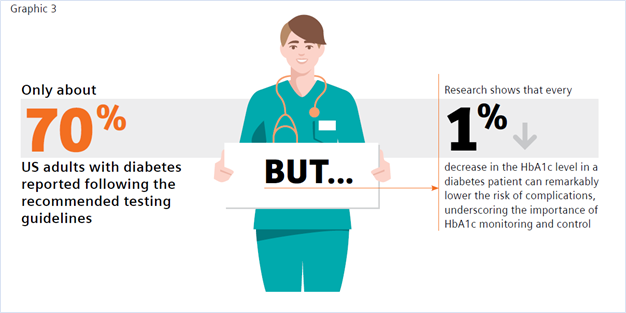
A review of the literature suggests that incorporating A1c testing into the patient visit and customizing the consultation to the patient’s status appear to help physicians influence their patients to improve their glycemic control.15
The benefit of POC HbA1c testing has been widely reported in the literature.9,15-19 Of note is a study by Crocker et al. that demonstrated that POC HbA1c testing led to 3.7 times decreased likelihood of missing HbA1c testing.9 Nearly 1 in 4 of the individuals tested were found to have clinically worsening diabetes. Their diagnosis using POC testing enabled more timely intervention in diabetes management. A recent review by Rhyu et al. also highlighted the benefits of POC HbA1c testing in the physician’s office, where the authors concluded that “POC A1c testing in primary care, if widely available and integrated into workflow, has the potential to positively impact diabetes care. Real-time feedback may change patient and physician behaviors, allowing earlier therapeutic intensification.”15
In addition to addressing the clinical benefit, numerous studies have shown the cost-effectiveness of implementing POC HbA1c testing.16-20 Rosa et al. found that “compared to a centralized laboratory test, the use of the POC-A1c device in a healthcare unit increased the chance of the early control of type 2 diabetes and reduced costs in relation to DM-related outcomes.”19 Crocker et al. reported that point-of-care HbA1c testing “can significantly improve clinical operations with cost reductions through improved practice efficiency,” realizing a potential savings from improved efficiency of $24.64 per patient. This savings resulted from 89% and 85% decreases in follow-up phone calls and letters, respectively, and a 61% decrease in patient revisits.17
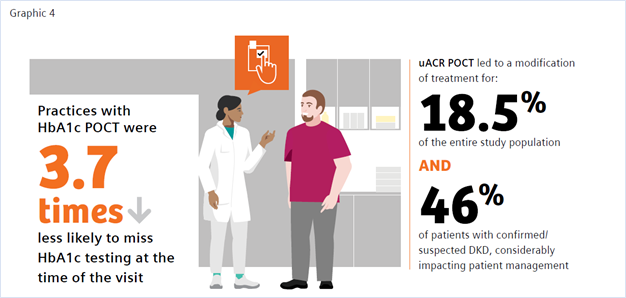
CKD and Urinary Albumin-to-Creatinine Ratio (uACR)
The benefits of uACR testing at the point of care have similarly been studied, with findings of accuracy, convenience, improved patient access, and improvements in test adherence.21-25 The ADA recommends performing a spot uACR and estimated glomerular filtration rate (eGFR) test at least annually in patients with type 1 diabetes with duration of >5 years and in all patients with type 2 diabetes regardless of treatment. Patients with diabetes and urinary albumin >300 mg/g creatinine and/or an estimated glomerular filtration rate of 30–60 mL/min/1.73 m2 should be monitored twice annually to guide therapy.26
A recent study by Christofides and Desai discussed the importance of monitoring albuminuria in patients with type 2 diabetes as an essential tool in the detection of onset of CKD and monitoring disease progression. They stated, “Access to UACR testing may be improved by using Clinical Laboratory Improvements Amendments (CLIA)-waived point of care UACR testing options, that is, those approved for use closer to the patient and not necessarily in a central laboratory,” and noted that using a CLIA-waived POC uACR option was a means to optimize test ordering.21
CLIA stands for Clinical Laboratory Improvement Amendments of 1988, a set of U.S. regulatory standards that apply to all clinical laboratory testing performed on humans (except for clinical trials and basic research), regardless of where the test is performed. A test system or product that is granted waived status is defined, in part, as a methodology that is simple and accurate to render negligible the likelihood of erroneous results.27 Many POC tests meet this classification, as they require no formal training, and operators must only follow the manufacturer’s instructions for use. Waived POC tests are portable, easy to use, and offer accurate, quick near-patient results, making them particularly useful for testing in a physician’s office. In this environment a physician can test a patient at the time of visit and obtain the result in real time, providing the opportunity to counsel the patient and make treatment adjustments at the time of the office visit.28
There is a documented need for strategies to improve routine CKD assessment nationwide and overcome testing barriers to increase test adherence.
A study by Folkherts et al. reported that physicians treating patients with diabetes are selectively adhering to chronic kidney disease screening guidelines where, despite recommendations to monitor both eGFR and urinary ACR, less than half of patients were screened for albuminuria during the 1-year follow-up.29 Additionally, a large retrospective study of patients at-risk for CKD by Alfego et al. found only 21% of adults at risk for CKD and 32.2% of patients with diabetes specifically had guideline-recommended uACR testing.30 Schultes et al. found that the implementation of ACR POCT in daily general practice can improve the diagnosis of diabetic kidney disease (DKD) in diabetes, which may support improved management of CKD.22 DKD was newly diagnosed in 8.6% of the entire study population and DKD was suspected in 9.9% based on their ACR POCT values. In 18.5% of the entire study population ACR POCT led to a change in medication, demonstrating a benefit in patient management. When surveyed regarding the relevance of the ACR POCT, 75% of physicians considered the test very important for people with diabetes; 25% rated it important.
Conclusion
Primary care physicians treat at least 90% of patients with diabetes in the United States.31 Patients with diabetes are at risk of developing CKD and monitoring for both conditions is important for disease management. Guidelines call for routine testing of HbA1c and uARC for disease monitoring and management.12,27 Adoption of in-office POC HbA1c and uACR testing may provide physicians an important tool toward the goal of closing the diabetes care gap, enabling convenient, efficient, cost-effective testing, and facilitating improved patient adherence to testing. Increased patient test adherence will enable faster intervention and treatment, leading to improved patient outcomes and decreased overall diabetes-related healthcare costs—a win for all in the fight against chronic disease.

References
- https://www.cdc.gov/chronicdisease/about/index.htm#:~:text=Many%20chronic%20diseases%20are%20caused. Accessed 1/25/22.
- https://www.cdc.gov/diabetes/basics/quick-facts.html
- American Diabetes Association. Economic costs of diabetes in the U.S. in 2017. Diabetes Care. 2018;41(5):917-28. doi: 10.2337/dci18-0007
- https://www.cdc.gov/kidneydisease/prevention-risk/make-the-connection.html. Accessed 1/25/22.
- https://www.cdc.gov/nchs/fastats/kidney-disease.htm. Accessed 1/25/22.
- https://adr.usrds.org/2020/chronic-kidney-disease/6-healthcare-expenditures-for-persons-with-ckd. Accessed 1/25/22.
- https://www.cdc.gov/kidneydisease/publications-resources/ckd-national-facts.html. Accessed 1/25/22.
- Savoy M, et al. The role of primary care physicians in managing chronic disease. Dela J Public Health. 2017 Mar 22;3(1):86-93. doi: 10.32481/djph.2017.03.012
- Crocker JB, et al. The impact of point-of-care hemoglobin A1c testing on population health-based onsite testing adherence: a primary-care quality improvement study. J Diabetes Sc Technol. 2021;15(3):561-7. doi: 10.1177/1932296820972751
- https://www.uptodate.com/contents/measurements-of-glycemic-control-in-diabetes-mellitus?search=hba1c%20diabetes&source=search_result&selectedTitle=3~150&usage_type=default&display_rank=3. Accessed 1/25/22.
- American Diabetes Association. Glycemic targets: standards of medical care in diabetes—2021. Diabetes Care. 2021 Jan;44(Suppl 1):S73-S84. Available from: https://doi.org/10.2337/dc21-S006. Accessed 1/25/22.
- https://www.cdc.gov/diabetes/pdfs/library/Diabetes-Report-Card-2019-508.pdf. Accessed 12-17-21. Accessed 1/25/22.
- Imai C, et al. Adherence to guideline-recommended HbA1c testing frequency and better outcomes in patients with type 2 diabetes: a 5-year retrospective cohort study in Australian general practice. BMJ Quality & Safety. 2021;30(9):706-14. doi: 10.1136/bmjqs-2020-012026
- Stratton IM, Adler AI, Neil HA, Matthews DR, Manley SE, Cull CA, et al. Association of glycaemia with macrovascular and microvascular complications of type 2 diabetes (UKPDS 35): prospective observational study. BMJ. 2000;321:405-12.
- Rhyu J, Lambrechts S, Han MA, Freeby MJ. Utilizing point-of-care A1c to impact outcomes – can we make it happen in primary care? Curr Opin Endocrinol Diabetes Obes. 2022 Feb 1;29(1):29-33. doi: 10.1097/MED.0000000000000700.
- Schnell, Oliver et al. “Impact of HbA1c Testing at Point of Care on Diabetes Management.” Journal of diabetes science and technology vol. 11,3 (2017): 611-617. doi:10.1177/1932296816678263
- Crocker JB, Lee-Lewandrowsky E, Lewandrowsky N, et al. Implementation of point-of-care testing in an ambulatory practice of an academic medical center. Am J Clin Pathol. 2014;142(5):640-646.
- Al Hayek, Ayman A et al. “Assessment of Patient Satisfaction with On-Site Point-of-Care Hemoglobin A1c Testing: An Observational Study.” Diabetes therapy: research, treatment and education of diabetes and related disorders vol. 12,9 (2021): 2531-2544. doi:10.1007/s13300-021-01126-7
- Rosa, Lorena de Sousa et al. “Cost-Effectiveness of Point-of-Care A1C Tests in a Primary Care Setting.” Frontiers in pharmacology vol. 11 588309. 19 Jan. 2021, doi:10.3389/fphar.2020.588309)
- Chadee, A et al. “Point-of-Care Hemoglobin A1c Testing: A Budget Impact Analysis.” Ontario health technology assessment series vol. 14,9 1-23. 1 Jul. 2014
- Christofides, Elena A, and Niraj Desai. “Optimal Early Diagnosis and Monitoring of Diabetic Kidney Disease in Type 2 Diabetes Mellitus: Addressing the Barriers to Albuminuria Testing.” Journal of primary care & community health vol. 12 (2021): 21501327211003683. doi:10.1177/21501327211003683
- Schultes B, Emmerich S, Kistler AD, Mecheri B, Schnell O, Rudofsky G. Impact of Albumin-to-Creatinine Ratio Point-of-Care Testing on the Diagnosis and Management of Diabetic Kidney Disease. Journal of Diabetes Science and Technology. October 2021. doi:10.1177/19322968211054520
- Currin, S.D., Gondwe, M.S., Mayindi, N.B. et al. Diagnostic accuracy of semiquantitative point of care urine albumin to creatinine ratio and urine dipstick analysis in a primary care resource limited setting in South Africa. BMC Nephrol 22, 103 (2021). https://doi.org/10.1186/s12882-021-02290-5
- Shephard, Anne K. BSc (Hons)*; Shephard, Mark D.S. PhD*; Halls, Heather J. MSc*; Corso, Olivia BSc†; Mathew, Timothy H. MBBS, FRACP† Innovative Use of Point-of-Care Testing for Chronic Kidney Disease Screening, Point of Care: The Journal of Near-Patient Testing & Technology: June 2011 - Volume 10 - Issue 2 - p 98-101 doi: 10.1097/POC.0b013e31821c6bd0
- Harasemiw, Oksana et al. “Impact of point-of-care screening for hypertension, diabetes and progression of chronic kidney disease in rural Manitoba Indigenous communities.” CMAJ: Canadian Medical Association journal = journal de l'Association medicale canadienne vol. 193,28 (2021): E1076-E1084. doi:10.1503/cmaj.201731
- American Diabetes Association Professional Practice Committee et al. “11. Chronic Kidney Disease and Risk Management: Standards of Medical Care in Diabetes-2022.” Diabetes care vol. 45, Supplement_1 (2022): S175-S184. doi:10.2337/dc22-S011
- https://www.ecfr.gov/current/title-42/chapter-IV/subchapter-G/part-493. Accessed 1/25/22.
- Nichols, James H. “Utilizing Point-of-Care Testing to Optimize Patient Care.” EJIFCC vol. 32,2 140-144. 29 Jun. 2021
- Folkerts, Kerstin et al. “Adherence to Chronic Kidney Disease Screening Guidelines Among Patients with Type 2 Diabetes in a US Administrative Claims Database.” Mayo Clinic proceedings vol. 96,4 (2021): 975-986. doi: 10.1016/j.mayocp.2020.07.037
- Alfego, David et al. “Chronic Kidney Disease Testing Among At-Risk Adults in the U.S. Remains Low: Real-World Evidence from a National Laboratory Database.” Diabetes care vol. 44,9 (2021): 2025-2032. doi:10.2337/dc21-0723
- Davidson, Jaime A. “The increasing role of primary care physicians in caring for patients with type 2 diabetes mellitus.” Mayo Clinic proceedings 85,12 Suppl (2010): S3-4. doi:10.4065/mcp.2010.0466
- Bodenheimer, Thomas, and Christine Sinsky. “From triple to quadruple aim: care of the patient requires care of the provider.” Annals of family medicine 12,6 (2014): 573-6. doi:10.1370/afm.1713 (ONLY ADD IF INCLUDED IN GRAPHICS)
Point of Care Testing for Emerging Respiratory Diseases
Wednesday, May 18, 2022
by Sekisui Diagnostics
Per the Forum of International Respiratory Societies report, five respiratory diseases are among the most common causes of severe illness and death worldwide.
The human toll of COVID-19 has demonstrated the necessity – and difficulty – of quickly identifying emerging respiratory diseases. Lab-based diagnostic tests have played an important role during the pandemic. But from the viewpoint of quality of care and clinical management, timely infection control, and the ability to act upon results, the future will likely belong to portable, CLIA-waived rapid diagnostic tests.
Point-of-care tests (POCTs) are performed at the site of sample collection (e.g., bedside, physician’s office or emergency department) and provide results usually in less than two hours and in some cases, within 10 minutes. They require little hands-on time and no laboratory training, as most critical steps are automated in a single device. Perhaps most important, they promptly identify the causative pathogen and help the healthcare professional choose the appropriate treatment or make the right decisions in outbreak situations, such as hospitalization or quarantine.
“CLIA-waived” tests refer to those that the U.S. Food and Drug Administration has determined to be simple and that present “an insignificant risk of erroneous result.” (A list of tests granted waived status under CLIA may be found here.) Physician office labs wishing to perform CLIA-waived tests must first apply for a CLIA Certificate of Waiver, and then ensure that those performing tests follow the manufacturers’ instructions.
Diagnostic challenges of respiratory disease
For some time, point-of-care tests have allowed healthcare professionals to identify whether an infectious agent is viral or bacterial. That’s important, because antibiotics are only needed for treating certain infections caused by bacteria. Respiratory tract infections are a significant contributor to the global burden of respiratory tract illnesses. Per the Forum of International Respiratory Societies report, five respiratory diseases are among the most common causes of severe illness and death worldwide:
- Chronic obstructive pulmonary disease (COPD) - around 65 million people suffer from moderate to severe COPD, from which 3 million die each year, making it the third leading cause of death.
- Acute lower respiratory tract infections are considered the top three causes of death and disability among both children and adults. It is estimated that annually 4 million deaths of children under 5 years are caused by acute lower respiratory tract infections. Respiratory tract infections caused by influenza kill between 250,000 and 500,000 people and cost between $71 and $167 billion annually.
- Tuberculosis – 10.4 million people developed tuberculosis (TB) in 2015, from which 1.4 million died.
- Lung cancer kills 1.6 million people each year
- Asthma – Around 334 million people suffer from asthma and affects 14% of children globally.
Several pathogens, including viruses and bacteria, can cause respiratory tract infections. As clinical presentations often overlap, identification of the underlying pathogen based solely on clinical criteria is challenging.
While some respiratory viruses -- such as influenza A virus (IAV) or human respiratory syncytial virus (RSV) – are well-known and circulate worldwide, previously unknown or rare infectious diseases are spreading rapidly. They include human bocavirus (HBoV), human coronaviruses (HCoV-HKU1, -NL63), human metapneumovirus (HMPV), rhinovirus type C (RV-C), and human polyomaviruses (KIPyV, WUPyV), as well as SARS coronavirus (SARS-CoV), MERS coronavirus (MERS-CoV), novel strains of influenza virus A and B, and, most recently, SARS coronavirus 2 (SARS-CoV-2). Patients who develop such infectious diseases are also at risk of progressing to pneumonia which can cause even further complications. Early detection is key and leads to faster recovery.
Next generation
New and innovative diagnostic techniques, ranging from biosensors to novel portable and current lab-based nucleic acid amplification methods, offer a look at next-generation POCTs. While prototypes for some methods already exist, others are still experimental.
A key criterion for the evaluation of future POCTs will be their ability to identify the origin of the patient’s symptoms, and to distinguish relevant pathogen(s) from bystander pathogens. Questions need to be answered about the correct timing of diagnostic testing regarding a patient’s course of illness. The sensitivity and predictive value of a diagnostic test depend on:
- Specimen quality and virus load (which is usually higher in children and early in the course of illness).
- Duration of viral shedding (that is, release of the pathogen into the environment).
- Patient’s immune status.
- The epidemiology of viruses in the respective season or region.
Advances in diagnostic capabilities may change the way we identify, document, and communicate respiratory viral infections. In the future, patients will increasingly demand to know the responsible pathogen and their clinical prognosis. As researchers develop pathogen-specific antiviral therapies and vaccines, new diagnostic algorithms will be needed to ensure the highest quality of care while containing costs. The more accurate the diagnosis, the faster patients are on the road to recovery.
With worldwide manufacturing facilities and an international sales and distribution network, Sekisui Diagnostics is a solid partner for healthcare professionals and distributors around the world. Among its offerings are a line of CLIA-waived point-of-care tests to help identify influenza virus A and B, including Acucy® Influenza A&B, OSOM Ultra Flu A&B Test and OSOM Ultra Plus Flu A&B Test.
How To Have the Lifestyle You Want, No Matter What Your Specialty Is
Wednesday, May 18, 2022
by Miriam Sweeney
The stratification starts in medical school. Before anyone has matched into their residency — long before attention has shifted from Step One and Two to writing a round of personal statements and preparing for interviews — conversations have already started about who is pursuing what specialty.
And in schools that emphasize class rank, pitting students against each other in preparation for a career where collaboration is key, medical students may already be making assumptions about their peers’ future specialties based on their class ranking or rumored scores. “There’s no way Sahil will match into ortho with a ranking like that.” “Emily may say she wants to be a pediatrician, but with a step score like that and the way she’s been buddying up to the attendings, she’d be a shoo-in for derm.”
In a field that requires immense financial and time commitment from its newest members, medicine shakes out to have very different compensations on the other side of residency depending on a physician’s specialty. There are ways of ensuring stability for everyone, especially the majority of medical students who graduate with medical debt. Having a solid understanding of investing, loan repayment options, and intentional spending can lay the path to success for someone making $150k or $500k. Tools like ScrubMoney — a free mobile app — that help support physician financial education and planning can be key in this process. But just understanding the nuances of why we spend the way we do can also go a long way in making sure we’re using what we have to build the life we want.
I'd recommend two basic focuses to achieving the lifestyle you want, no matter your income or specialty.
Focus I: The bold and swaggering decision to define what you want
We all grew up with motivational posters inviting us to go for our dreams, right? Those posters never took the time to help us understand how to know what our dream is, or how to form a dream in the first place.
You can’t get to where you’re going without knowing where you’re going, and too few of us take the time to really pinpoint where we want to be. I’m not talking about knowing our own tastes; it’s one thing to see something interesting, be it a style of a home or a fashion choice or a job description, and know if it’s for us or not. It’s an entirely different arrow in your quiver to visualize that home or outfit or job before any options are presented to you.
I’ve adapted a few different researchers’ and influencers’ ideas[1] of what this process can look like and simplified it for this column.
- Sit with the idea of what a successful life looks like. We don’t like talking about it, but physicians know it better than most: our lives are finite, and we don’t get endless opportunities for course correction. When you think of a successful, happy life, what does that look like for you?
Focus on what you can control. You have less control, for instance, over whether you live to a ripe old age or are a casualty of irresponsible driving next month. Nevertheless, your life was a life, legitimate in spite of its abbreviated length. What will have made it successful? - Now that you’ve pictured your own brand of success, consider: in order to get to that success, what are the non-negotiables involved? What is irreplaceable in your picture of a life that leaves you happy and proud of what you’ve done and how you’ve spent your time?
- Now, it’s a simple (or not) matter of defining how to go about shaping your decisions around those non-negotiables. How will you prioritize what’s most important? If your self-defined success has anything to do with an existing life partner, this process of planning for priorities might be one of deciding how to encourage habits that keep that relationship strong. If success requires something that must be checked off as a binary, it may be worth your time to think through what it’s going to take to mark that box.
Many people who get this far stop there. That would still be a productive exercise. But without the next step, it’s still not necessarily going to help with making your resources — time and money — work for you. - Decide what to cut out. Do you have goals you’re actively working towards that aren’t reflected in your life success rubric? Are you spending your precious time or your hard-earned money on something that’s unattached to your idea of a successful, happy existence? This step requires confidence in yourself. Are you bold enough to cut out something that may matter greatly to other people, but isn’t central to your own life success?
A big part of this step is understanding how to use your money in a way that will make you happy. Money can’t buy happiness, but according to researchers at the University of British Columbia, Harvard, and the University of Virginia[2], the way you spend your money can lead to happiness.
Don’t take it from me. Listen to the experts, as described in Chapter II of our effort to use money intentionally to get the life we want regardless of specialty or circumstance.
Focus II: “If Money Doesn't Make You Happy Then You Probably Aren't Spending It Right”
When aligning your actions with your definition of personal life success, the decision of how to allocate your resources can make a considerable difference in your progress. The question of how to spend your time belongs in another column. But the question of how to spend your money, happily, has been answered and peer-reviewed for us. Let’s break down the researchers’ findings.
- Buy more experiences and fewer material goods. This notion is backed up by many studies, as cited in the paper itself. The gist is that we become accustomed to material possessions, but we never dull a happy memory when recalling it; on the contrary, a happy memory may become even happier when mentally reliving it. A treat yo’self day might be better spent on a visit to a spa or a chocolate tasting night instead of a new bathrobe or quality dark chocolate.
- Use your money to benefit others rather than yourself. In a study that asked Americans to report about how much they spend on bills and expenses, gifts for themselves, gifts for others, and donations to charity, there was no significant correlation between spending money on the self (the first two categories) and happiness. There was, however, a strong relationship between people who spent money on others and self-reported happiness, even after controlling for income.
- Buy many small pleasures rather than fewer large ones. I’ll admit, this one caught me off guard. Lots of little things instead of bigger, more significant things? It almost seems to contradict #1 on this list. But the research holds out, and it’s worth diving into the article itself to review the citations. The line that resonated most with me: “Eating two 6 ounce cookies on different days may be better than eating a 12 ounce cookie at a single sitting.”
- Eschew extended warranties and other forms of overpriced insurance. This piece of advice feels remarkably specific for a list that otherwise boasts great general applicability. But this principle has less to do with specific retail tactics and more to do with human resilience.
There is insurance that makes a lot of sense, and this article isn’t talking about it. This article is talking about the kind of insurance you get when you’re over concerned about losing something material, like the integrity of your new TV. Interestingly enough, the research suggests that, while the prospect of inconvenient loss is devastating, the experience of inconvenient loss tends to be one people recover from reliably and quickly. - Delay consumption. This principle essentially suggests that, if you plan a getaway to the tropics, plan it for nine months away, not two weeks. You will enjoy the experience more because you spent so much longer anticipating it.
- Consider how peripheral features of your purchases may affect your day-to-day life. In other words, it’s easy to picture a dream of ours and only see the positives. Filtering out the negative effects of a decision may lead to disappointment when the time comes to enjoy a wish come true. Both the past and the wished-for future can be distorted with rose-colored glasses.
- Beware of comparison shopping. Comparison shopping — looking for things based on how they measure up to each other instead of based on what you want in the first place — is designed to distract us from what we really want and make us make purchase decisions based on the best deal, not whatever is right for us.
This holds true whether in a literal shopping situation or a more metaphorical situation that involves searching and decisions. (Dating and home browsing apps wouldn’t have anything to say about this, would they?) - Pay close attention to the happiness of others. Not to encourage a herd mentality, but, according to this article, “Research suggests that the best way to predict how much we will enjoy an experience is to see how much someone else enjoyed it.” It may be a good exercise to think about someone who you would define as successful or happy in your circle, then have a frank, humble conversation with them about what they think has made them happy and what might help you reach some of your intangible goals. We are all unique, but this research makes it look like we wax and wane in our satisfaction with things and experiences in concert with our peers.
It can be easy to assume that people with x will be guaranteed success in life, but success is a personal, arbitrary measurement.
If we can first a) define success for ourselves, along with a healthy foundational education of the elements that influence our success (like financial, mental, and social wellbeing, for instance), then b) follow best practices when spending our resources (our time and money), we’re more likely to reach our goals and be proud of our lives than if our personal rubric for success remains undefined or suffers from moving goalposts.
Find out what resources your institution and community offer to support you in designing an intentional, satisfied life.
About the Author
Miriam Bay Sweeney is a co-founder and Head of Product of ScrubMoney, an app designed to help physicians lay the foundation for financial independence. She’s been fascinated by personal finance ever since learning as a young adult that sticking her paychecks and babysitting money she made as a teenager in a savings account was a crummy idea. She researches personal productivity and the foundational aspects — including financial confidence — that enable a person to innovate and thrive creatively. ScrubMoney is her way of giving back to the community of physicians that so many of her friends are part of, because we ought to think about taking care of the people who dedicate their lives to taking care of us.
Sources
- Thanks to Clayton Christsensen, Ramit Sethi, Eric Barker, Dave Burnet, Bill Evans, James Clear, and likely a handful of others whose writing influences my perspective subconsciously
2. https://scholar.harvard.edu/files/danielgilbert/files/if-money-doesnt-make-you-happy.nov-12-20101.pdf
Financial Considerations Unique to US Physicians
Wednesday, May 18, 2022
by Andrew Harms and Miriam Sweeney
For the average U.S. household, everyday living is getting pricey. Childcare, food, energy, transportation, and housing costs are all rising. Among U.S. physicians and healthcare professionals, personal financial matters may make things tougher given high educational debt-loads, capped income levels during residency years, and unique insurance needs. Furthermore, job-related stressors emanating from clinical and patient-care priorities, administrative duties, continuing education, licensing requirements, and professional responsibilities leave little time for prudent, active personal financial management.
Self-reported depression and burnout rates are high. In fact, in recent years more than 4 in 10 U.S. physicians report feeling burned out.[1] When asked to rate factors that contribute to depression, results from Medscape’s annual National Physician Lifestyle Report indicate personal finances ranked second to job/workplace as a contributing factor.[2]
When asked what would reduce their burnout, the number one response from physicians (roughly a third) indicated the best way to combat burnout would be increased financial compensation. We want to be paid more. In fact, more money was a more common response than a more manageable schedule.
The circumstances facing a physician's personal finances present a unique challenge to most in medicine, regardless of specialty. A predominant factor to financial troubles for physicians includes the high cost of education required to become a physician.
According to the AMA, one in four medical students graduates with training-related debt that exceeds $200,000, and half of medical school graduates report debt burdens greater than $150,000. Those financial burdens are combined with a demanding schedule during graduate medical education and can affect well-being for physician residents and fellows. “Between financial restraints and 80-hour workweeks, trainees often struggle with having the time and budget for necessities. When residency and fellowship programs provide benefits to assist with these needs, it can significantly improve trainee well-being,” said AMA Trustee Jesse Ehrenfeld, MD, MPH.[3]
Compounding the difficulties, we recognize that the time and attention required to study medicine, biological sciences, and patient care during training to become a physician leaves little room to acquire a solid education in personal financial management.
Prioritizing personal financial literacy for early-career physicians
Many physicians have access to financial resources early on in their career, but that doesn’t mean they’re confident about their financial situation. At the medical school level, some hopeful trends have emerged to address the rising educational debt levels burdening many graduates.
At a handful of US medical schools, financial aid offices have transitioned to financial wellness offices—aiming to better help students with personal financial understanding, housing and living expense considerations, etc.—moving beyond simply providing tuition financing guidance in order to provide holistic financial support and literacy. A great example of this is witnessed at the University of Arkansas for Medical Sciences, where Jason Mizell, M.D., and UAMS faculty have facilitated a popular ‘Business of Medicine’ course since 2012, taught to residents and fourth-year medical students.[4] This course serves to teach early-stage physicians both practice management finance (coding, billing, malpractice, etc.) and, very importantly, personal finance.
Another excellent example of an offering available to medical students is provided by the University of Wisconsin School of Medicine and Public Health. When medical student Rufus Sweeney struck up conversations with his peers some years ago about their personal finances, he was shocked by how few understood their student debt or even knew about options to pay it off. With a grant from the Wisconsin Medical Society, Rufus joined with Emma Crawford, UW SMPH Director of Financial Wellness and Financial Aid Advising, to develop UW-Madison SMPH’s first ever course focused on physician personal finance. This course continues and remains the most popular elective credit offering at the medical school.
While such personal finance educational initiatives exemplified by UAMS and UW-Madison go a long way to improving financial literacy for young physicians, the trend to educate and empower physicians in the way of personal finances should be prioritized in order to meet cost of living challenges and resultant burnout rates. An introduction to personal finance is a great offering at the medical school level, and—if followed on with subsequent support at each next stage of a physician's career—would provide a proper runway to financial health and wellness.
At the residency level, new expenditure considerations often outweigh the long-awaited first paycheck. Many times, newly minted residents find themselves unprepared to manage a tight budget. A resident may sometimes find financial resources made available as a new employee helpful—though the quality and availability of personal financial support is disparate and often inadequate. While the financial picture of a resident includes income, the AMA clearly points out the following: “It takes years to realize your earning potential. As a physician, you will not maximize your earnings until the completion of your graduate medical education. The average first-year resident makes around $60,000, (2018 report) and there’s not much wiggle room. Resident salaries are determined by an institution and correlate with training year rather than specialty. So, in a given training institution, all residents who are in their third year of training get the same salary, and all in their sixth year are paid the same.”[5]
Given the ceiling on income, how many physicians at the resident level have developed the experience and skills to single handedly manage the new challenges to their budget which may stem from debt-repayment, insurance needs, retirement saving, and other important considerations?
Factoring in time constraints and the reasonable desire for a personal life, very few residents have the time to dedicate to getting a handle on personal finances. A host of negative consequences may arise if physicians make financial mistakes at these early stages.
Where to start? Where to turn for help? Start simply.
Financial health should be treated in a similar way to attending to physical and mental health. When viewed from this perspective, the training of physicians gives this occupational group an advantage when tackling personal finances.
Let’s outline some simple steps early-career physicians can take to prepare for a healthier financial future:
- Become familiar with your financial vital signs
While carving out time from a busy schedule may seem impossible, scheduling a bit of time to learn some basics about your individual circumstances is essential. Dedicate some time—think about this as you would think about making an appointment with a doctor. Put it on your calendar.
Begin with some basic information gathering: Identify all sources of household income (review your paychecks, line by line); identify your fixed monthly expenses (housing payments, childcare costs, set-aside contributions for savings, etc.), as well as your variable monthly expenses (utilities, subscription services, transportation costs, etc.). As in most things in life, the best first step is figuring out where you are.
- Construct a monthly budget
You may think of this step as you would a treatment regimen. Crafting a monthly financial plan that identifies each incoming dollar and prudently purposes each outgoing dollar will provide a way forward and likely reduce the mental burden of financial unknowns. There are many good budgeting templates and guides. Like finding a good primary care physician, find yourself a budget that you like and works well for you. And like any treatment regimen, stick to your budget in order to achieve good health.
- Know your debt repayment options
For the majority of physicians, this step is vital to understand and implement. One resource worth checking out is provided by Doctored Money[6], a non-profit serving physicians that has wonderful debt repayment tools and calculators.
- Identify support and establish communication
Assess your surroundings to locate trustworthy financial resources and fiduciary support, if needed. In many cases, the institution with which you are affiliated may have personal financial resources offered. Take advantage of these opportunities when available, if nothing else than to better educate yourself. Once you’ve built a network of professionals with whom you can confide, communicate to them as you would with your PCP, remembering that your goal is to limit risks and improve your overall health.
- Conduct routine financial check-ups
Living within a smartly formulated monthly budget is a winning health strategy, and combined with periodic (quarterly, semi-annual, annual) reviews of your financial vitals will increase your ability to achieve your financial goals. Schedule these reviews on your calendar well in advance, and approach them as you would a visit to any healthcare specialist. Satisfied debts, cost of living adjustments, salary increases, unexpected expenses, changes in the investable landscape, and other life events will prompt adjustments to your monthly budget. Regular check-ups will help you recognize and appropriately transition your personal finances. Utilize your network of resources and professional support on a regularly scheduled basis.
We’ve been talking a lot about early-career physician groups, but our suggestions are applicable to most, if not all, readers.
Address your financial needs with consistency, and in spite of uncertainties facing the cost of goods and households, we’ll make the U.S. healthcare system a secure, confident foundation for personal and community growth.
[1] Medscape National Physician Burnout & Suicide Report 2020: The Generational Divide
[2] Medscape National Physician Burnout & Depression Report 2018
[3] https://www.ama-assn.org/residents-students/resident-student-health/resident-physicians-should-get-help-shoulder-financial
[4] Business of Medicine Course Preps Med Students for Real World | UAMS News
[5] 6 things medical students should know about physician compensation | American Medical Association (ama-assn.org)
Pulmonary Fibrosis Reversed in Mice Utilizing Existing FDA-approved Drug
Wednesday, February 09, 2022
The Abstract - Medical News and Research Update
A monthly column from Physicians Office Resource looking into current research and the future of medical science
Pulmonary fibrosis occurs when lung tissue becomes damaged and scarred, leading to thick and stiff tissue making it more difficult for lungs to function properly. Scarring is caused by a multitude of factors and in most cases doctors are not able to pinpoint the exact cause. Currently there is no cure, and mortality often happens within a few years; though there are certain therapies can sometimes ease symptoms1. Promising results were published recent article in the journal Nature, researchers at the University of Alabama are starting to make headway on a possible reversal of this disease.
Utilizing mice models and an already approved FDA drug called ABT-199 (currently approved for treating types of leukemia), scientists treated the mice with lung fibrosis with the drug and after 21 days the mice’s lung architecture had returned to normal. This specific test was initiated when researchers discovered that human patients with pulmonary fibrosis exhibited higher amounts of Bcl-2, a regulator of apoptosis, in their lung immune cells. With higher levels of Bcl-2, macrophages refused to die off after completing their work, which lead to lung damage caused by pulmonary fibrosis. Research is still in the early stages but scientists are hopeful this will lead to new therapies for treating pulmonary fibrosis in humans.2
Effectiveness of COVID-19 Vaccines Against the Delta Variant
Questions and concern among the public and health officials about the rise of SARS-CoV-2 variants (specifically the Delta variant – the now dominant strain) and the effectiveness of current Covid vaccines in precenting symptomatic disease led to a new study published in the New England Journal of Medicine, titled “Effectiveness of Covid-19 Vaccines against the b.1.617.2 (Delta) Variant.” Within this study, researchers reviewed data from England with symptomatic persons over the age of 16 who underwent Covid-19 testing between October 2020 and May 2021. They then assessed vaccination status in 4,272 persons who tested positive for the delta variant and in 14,837 who tested positive for the alpha variant. The two vaccines utilized in this test were the Pfizer-BioNTech and the AstraZeneca. Results showed that after one dose of either vaccine, the effectiveness was lower against the delta variant than the alpha variant. However, after two doses vaccine effectiveness was high with only modest differences between the variants. Researchers showed that after two doses, the Pfizer-BioNTech vaccine was 88% effective against the delta variant and the AstraZeneca vaccine was 67% effective3.
Maternal Speech Increases Oxytocin Levels and Decreases Pain Scores in Preterm infants During Painful Procedures
15 million premature infants are born worldwide every year and are often faced with early maternal separation and painful procedures which can have short and long term effects on their neurodevelopment. In an article in Nature published on August 27, 2021, researchers wanted to see “whether the mother’s voice could provide an effective and safe analgesia for preterm infants and whether endogenous oxytocin (OXT) could be linked to pain modulation.”4 In this study, 20 preterm infants when undergoing painful procedures had their OXT levels in saliva and plasma cortisol levels measured, and the Premature Infant Pain Profile was blindly coded by trained psychologist. When the mother was speaking to the child during the procedure, Premature Infant Pain Profile scores significantly decreased, along with an increase of OXT levels over the baseline. No effects on cortisol levels were found.4
Artificial Intelligence Models Show 17 Potential FDA Approved Drugs to Help Treat COVID-19
While vaccines provide the best way to prevent COIVD-19, researchers have been working to find ways to treat COVID may have just found some hope in several drugs already FDA approved. In a recent study published in the Proceedings of the National Academy of Science of the United State of America5, researchers at the University of Michigan utilized artificial intelligence powered image analysis of human cell lines during infection with the coronavirus. In this computer model, cells were treated in over 1,400 individual FDA approved drugs either before or after viral infection. This resulted in 17 potential therapies, 10 of which were new to the science community. Dr. Johathan Sexton, Ph.D assistant professor of Internal medicine at the University of Michigan Medical School and one of the senior authors on the paper said, “Traditionally, the drug development process takes a decade—and we just don’t have a decade. The therapies we discovered are well positioned for phase 2 clinical trials because their safety has already been established.”6 One of the surprises of this study was the anti-viral activity of lactoferrin, a protein found naturally in human breast milk that can also be found over the counter in a dietary supplement derived from cow’s milk. Dr. Sexton went on to say, “We found lactoferrin had remarkable efficacy for preventing infection, working better than anything else we observed.”6 In their article published in PNAS, researchers mention that lactoferrin “inhibits SARS-CoV-2 infection in the nanomolar range in all cell models with multiple modes of action, including blockage of virus attachment to cellular heparan sulfate and enhancement of interferon responses.”5
Ultrasound Activates Genetically Engineered Immune Cells to Safely Attack Tumors in Mice
CAR T Cell (chimeric antigen receptor) therapy is a type of treatment in which a patient’s T cells are changed in the laboratory so they will attack cancer cells. Large numbers of these CAR T cells are grown in a laboratory and given to the patient by infusion. This type of treatment has been used to treat certain blood caners, but not solid tumors. The reason being is the CAR T cells are always turned on and are very potent – destroying not only cancer cells, but normal healthy cells. In a recent article published in Nature Biomedical Engineering titled, “Control of the activity of CAR-T cells within tumours via focused ultrasound,”7 researchers at UC San Diego took CAR T cells and re-engineered them so that they only express the CAR protein when ultrasound energy is applied. Thus, allowing the researchers to turn on the CAR T proteins and focus them on a specific spot in the body. The scientist tested their hypothesis on mice with solid tumors. Taking the mice and injecting them with the re-engineered CAR T cells, they then used an ultrasound transducer on the area of the skin on top of the tumor. The heat from the ultrasound activated the CAR T cells over the tumor, attacking the tumor but keeping surrounding tissue and cells safe. Though still early in its research, the work looks promising for new therapies to treat solid tumors.
New Heart Disease Drug Approved in the UK Hailed as “Life Changing”
It’s long been known that too much LDL cholesterol can lead to a buildup of plaques in the blood vessels. Plaque build-ups deprive the flow of oxygen rich blood to the heart which can lead to heart attacks and strokes. A new drug developed by Novaris called Inclisiran is the first drug to utilize RNA interference to help remove LDL from the bloodstream. Inclisiran silences a gene called PCSK9, by doing so Inclisiran helps the liver absorb more LDL cholesterol from the blood and break it down. The therapy is delivered via injection and could cut LDL cholesterol levels by 50%. Studies also noted that Inclisiran when combined with a statin could reduce cholesterol levels by 75-80%. The National Health Service of England and Wales estimate that if “300,000 people receive the drug as planned, a projected 30,000 people could avoid premature death due to heart attacks and stroke.”8
Sources:
- Mayo Clinic
Pulmonary Fibrosis
https://www.mayoclinic.org/diseases-conditions/pulmonary-fibrosis/symptoms-causes/syc-20353690
- Nature
Targeting Cpt1a-Bcl-2 interaction modulates apoptosis resistance and fibrotic remodeling
https://www.nature.com/articles/s41418-021-00840-w
- 3. New England Journal of Medicine
Effectiveness of Covid-19 Vaccines against the b.1.617.2 (Delta) Variant
https://www.nejm.org/doi/full/10.1056/NEJMoa2108891?query=featured_coronavirus
- Nature
Maternal speech decreases pain scores and increases oxytocin levels in preterm infants during painful procedures
https://www.nature.com/articles/s41598-021-96840-4
- Proceedings of the National Academy of Science of the United State of America
Morphological cell profiling of SARS-CoV-2 infection identifies drug repurposing candidates for COVID-19
https://www.pnas.org/content/118/36/e2105815118
- Existing drugs kill SARS-CoV-2 in cells
https://labblog.uofmhealth.org/lab-report/existing-drugs-kill-sars-cov-2-cells
- Nature Biomedical Engineering
Control of the activity of CAR-T cells within tumours via focused ultrasound
https://www.nature.com/articles/s41551-021-00779-w
- Cholesterol-lowering jab could save over 30,000 lives
Study Shows, Plant used in Traditional Samoan Medicine Could be as Effective as Ibuprofen
Wednesday, February 09, 2022
The Abstract - Medical News and Research Update
Leaves of the psychotria inularum plant, known to the locals of Samoa as matalafi, have been used for centuries to treat inflammation, fever, elephantiasis, vomiting, incontinence, and infections. Skepticism is often associated with traditional medicine, but is there really something to this matalafi plants that are “found in back yards across Samoa?” Lead author and researcher, Seeseei Molumau-Samasoni said, “I was skeptical at first, when researching. There was a lot of superstition around this plant particularly, even in traditional medicine, but I was keen to find out if I could provide scientific merit to the traditional medicines of the Samoan people.
.”1 In November 2021, research from Molimau-Samasoni and her colleagues have been peer-reviewed in the Proceedings of the National Academy of Sciences, not only show matalafi’s potential as a anti-inflammatory, but potential treatment for cancer, neurodegenerative diseases, diabetes, cardiovascular diseases, and even COVID-19. Using “chemical genomic analyses in the model organism Saccharomyces cerevisiae (baker’s yeast) to identify and characterize an iron homeostasis mechanism of action in the traditional medicine as an unfractionated entity to emulate its traditional use. Bioactivity-guided fractionation of the homogenate identified two flavonol glycosides, rutin and nicotiflorin, each binding iron in an ion-dependent molecular networking metabolomics analysis. Translating results to mammalian immune cells and traditional application, the iron chelator activity of the P. insularum homogenate or rutin decreased proinflammatory and enhanced anti-inflammatory cytokine responses in immune cells.”2 The science is still young, but there seems to be great potential with this common plant found in back yards across Samoa.
Noninvasive Imaging Strategy Detects Dangerous Blood Clots in the Body
Detecting clots in atrial fibrillation patients requires transesophageal ultrasound which involves the patients to be sedated and have a large tube inserted down their throat and esophagus. In a November press release from Massachusetts General Hospital, investigators announced that they have developed and tested a targeted contrast agent to detect and image clots noninvasively. This agent that investigators used has a strong affinity for fibrin, a component of blood clots, and can be detected with a radioactive copper tag. David Sosnovik, MD, FACC, lead author and director of the Program in Cardiovascular Imaging at Mass General, said, “The idea behind the technology is that the agent will find and bind to blood clots anywhere in the body—not just in the heart—and make the clots detectable like a bright star in the night sky… In some ways this is analogous to doing a smart search with a search engine such as Google, where the search terms one uses guide the search. We inject the agent into a small peripheral vein and it circulates throughout the human body on its search for clots.”3 If it finds a clot and binds to it, clinicians can detect it with positron emission tomography. In AFib patients, imaging tests of the heart showed bright signals within the clots that were not seen in patients without blood clots. If the agent does not find a clot, then it is excreted from the body within several hours.
Protein Predicts a Brain’s Future After Traumatic Injury
Researchers and clinicians have understood that axonal injury is a key determinant of long-term outcomes after traumatic brain injury. The problem was that the ability to clinically measure axonal injuries has been difficult. In a recent study published in Science, Dr. Neil Graham, et al. performed a multicenter study and showed that the plasma concentration of the neurofilament light (NfL) protein increased after TBI in patients.4 Plasma NfL concentration predicted white matter damage and clinical outcome. NfL levels rise for weeks after an injury, typically peak around 20 days, and can stay high a year later.5 These increased levels of NfL tell that something is wrong in the nervous system. The increased biomarkers won’t tell you where the damage is, but it’s an easier way of measuring and tracking the damage. Experts say we’re a long way off from point of care devices that test for NfL biomarkers, but they’re hopeful neural panels will be added to routine head injuries.
Researchers Design Antibodies That Destroy Senescent Cells, Slowing Down Pathological Aging
A wide range of diseases, including fibrosis, tumor progressing, cataracts, obesity, diabetes, and Alzheimer’s disease have been shown to be influenced by the accumulation of senescent cells. Senescence is needed to prevent the propagation of damaged cells. However progressive accumulation of senescent cells with time has been associated with loss of tissue homeostasis and is known to contribute to the functional impairment of different organs typically seen in ageing. Parallel to this, clearance of senescent cells can prolong lifespan in in vivo models. This lead to the production of a new classification of drugs known as senolytics, designed to specifically eliminate senescent cells in human tissue. One of the major issues with senolytics is that they lack the targeting skills to be clinically effective. In a recent study published in the journal Nature, Marta Poblocka, et al. were able to target and clear senescent cells using an antibody-drug conjugate against a specific membrane marker. Utilizing an extracellular epitope of B2M, an membrane marker of senescence, Poblocka and her team successfully delivered toxic drugs into senescent cells, thus clearing the senescent cells. Non-senescent cells were not affected by the treatment, confirming the accuracy of the treatment.6
Scientists Successfully Test Prototype Bioartificial Kidney
KidneyX, a public-private partnership between the US Department of Health and Human Services and the American Society of Nephrology, recently sponsored a competition to accelerate innovation in the prevention, diagnosis, and treatment of kidney diseases. One of this year’s winner’s was KidneyX for its first ever demonstration of a functional prototype of its implantable artificial kidney. KidneyX successfully combined a hemofilter (removes waste products and toxins from blood) and a bioreactor, which replicates other kidney functions. The artificial kidney was able to be powered by blood pressure alone and without immunosuppressant or blood thinning drugs. Shuvo Roy, who was involved in the research and development of the artificial kidney said, “The vision for the artificial kidney is to provide patients with complete mobility ad better physiological outcomes than dialysis…[and] a higher quality of life. for millions worldwide with kidney failure.”7
UK Scientists Discover Gene Linked to Doubling the Risk of COVID-19 Death
Questions among healthcare professionals and the general public about why people are more susceptible to severe illness and death from COVID-19 may have more of an answer when a gene that may be associated with doubling the risk of lung failure from COVID-19 was recently discovered by Oxford University Scientists. The gene LZTFL1 is carried by around 60% of people with South Asian ancestry, and is involved in how the lung cells respond to viruses. The findings which were published in the Nature Genetics journal, show “that the way in which the lung responds to the infection in critical. This is important because most treatments have focused on changing the way in which the immune system reacts to the virus.”8
Abstract Sources
Study Shows, Plant used in Traditional Samoan Medicine Could be as Effective as Ibuprofen
- https://www.theguardian.com/world/2021/nov/04/plant-in-traditional-samoa-medicine-could-be-as-effective-as-ibuprofen-study-shows?utm_source=nextdraft&utm_medium=email
- https://www.pnas.org/content/118/45/e2100880118
Noninvasive Imaging Strategy Detects Dangerous Blood Clots in the Body
Protein Predicts a Brain’s Future After Traumatic Injury
- https://www.wired.com/story/this-protein-predicts-a-brains-future-after-traumatic-injury/
- https://www.science.org/doi/10.1126/scitranslmed.abg9922
Researchers Design Antibodies That Destroy Senescent Cells, Slowing Down Pathological Aging
Scientists Successfully Test Prototype Bioartificial Kidney
UK Scientists Discover Gene Linked to Doubling the Risk of COVID-19 Death
Respiratory Viruses and Infections: Making the Right Diagnosis
Wednesday, February 09, 2022
by Aaron Medaris - Physicians Office Resource
Last year as we hunkered down, masked up, social distanced, and used gallons of hand sanitizer to avoid the dreaded results of COVID-19, we also avoided the flu the and a variety of other respiratory infections. Talk to any parent with young children and they’ll most likely tell you that 2020 was the healthiest their kids had been in a long time. Now that we’ve emerged from our quarantines, shed the masks, and probably aren’t as good as using the hand sanitizer as we were 12 months ago, respiratory infections are on the rise. Yes, it’s true that most children who contract COVID-19 will be fine, but health officials are reporting an influx of patients, especially pediatric, with corona virus and other respiratory infections at the same time, presenting additional challenges in an already difficult situation. Are we entering in to the “perfect storm” of challenges for this cold and flu season? That is yet to be told, but rain is definitely in the forecast for the months ahead.
Assessing our current situation and looking at the forecast, what can you do to be better prepared for the increase of patients respiratory infections that will soon be entering your exam rooms? The first and one of the most important is to test for respiratory infections. That may seem simple, but this important step is often skipped because well, if it looks like a duck, and it talks like a duck, well then it’s probably a duck…right? But what if there’s more to it? A couple of years ago, I got really sick. Cough, fever, chills, body aches that came on hard and fast. I went to the doctor and after his examination, he told me he has seen this a lot lately and it was just a virus. I then asked if he thought it was the flu. He quickly replied, “I highly doubt it. I haven’t seen any flu cases this year.” This illness just felt different to me, and so I asked, “Is it ok if you test me for the flu?” He again stated he was quite certain it wasn’t the flu, but that if I wanted the test he would have the nurse administer one. And wouldn’t you know it, when I got the test results back, I had the flu. My good doctor prescribed an antiviral which helped immensely! A treatment I would have never received if I hadn’t been tested. Could it be that all those that my physician had been seeing with similar symptoms as me had the flu as well, but were never tested for it?
Why Should You Test
Some physicians like in the example above choose not to test. Whether that’s because doubts regarding the accuracy of tests or feel that empirical treatment will be effective in most cases. Despite these concerns there are multiple reasons why you should test:
- Empirical treatment can lead to more patients receiving antiviral treatment than actually need to receive it. This could possibly give rise to a antiviral shortage and delaying the correct care for another patient that actually needs it.
- Testing frequently will provide the physician with valuable “market intelligence.” It will help the physician understand what viruses are currently spreading through the community and will allow them to provide a better treatment path.
- Better patient experience. That might seem odd because what patient wants a stick shoved up their nose. The truth is, testing shows the patient that you want to provide the best possible care and it can bring peace of mind to the patient, even if they do test positive. They will know that they are being treated the correct way.
What to Know When Purchasing Tests
I’m sure that many of you are testing for respiratory infections. If you’ve talked to your distributor lately, you’ve probably noticed a lot of different respiratory tests out there. When it comes to testing for flu, COVID, RSV, rhinovirus, etc. which test is best for you and your practice? Here are some things to consider when evaluating which ones are best for you:
CLIA Complexity – A test is only good if you are able to administer it. Make sure that you are equipped with the correct CLIA certificate of perform the test. Check to see if the test is a Waived (most simple) or Moderately complex (requires additional certification). If you’re a waived facility and are interested in purchasing a moderately complex test, that’s fine, but make sure you take the steps before hand to become a certified compliance facility with CLIA.
Ease of Use – Is the test simple to perform? Difficult? Require additional equipment? Training? Will the additional equipment help me in the long run?
Performance – Sensitivity and specificity are essential. I would even be sensitive to the brand of test that I am purchasing. Especially when it comes to different COVID tests. Due to the EUA that the FDA has granted, there are many counterfeit and poor quality COVID tests that are being pushed on doctors.
Volume – How many tests are you planning on running? What’s the average you use during a flu season? Will you need more this season?
Time to Results – How long does it take to run and receive test results? Is it important to get results back quickly to your patients?
Sample Type – is it a single sample type or does it allow for multiple sample types (nasal, nasopharyngeal, saliva, etc.)?
Connectivity – Is it important to have the results transmitted electronically?
Cost – Brand is important when it comes to getting accurate results. But brand can also be expensive. Be sure to check with different brand reps, distributors, websites, publications, and promo emails for discounts and specials. They’re out there.
What Types of Tests are Available?
Rapid Lateral Flow Immunochemical Tests:
There are different varieties of these test which have been on the market for decades and are used to confirm the presence or absence of a specific antigen. Results of these types of tests can either be viewed visually or with the use of an instrument. May of these tests are CLIA Waived and can be completed in less than 15 minutes.
Molecular Tests:
Many flu and other respiratory infections can be run on molecular devices. These tests detect the presence of the genetic material of the virus and generally produce results in 30 minutes or less. Molecular results are the gold standard in testing. Be sure to verify the CLIA compliance that is needed for molecular tests, some are CLIA Waived and some require a moderate complexity license. CLIA Waived molecular test typically use rapid PCR detection and the device can be moved closer to the point of care. CLIA Waived molecular devices usually cost less than traditional molecular devices, but still offer the same reimbursement.
One important thing to note is that no respiratory test provides 100% accuracy. Results depend on a few different criteria: type of test used, virus strain, and integrity of the sample. For best results please review test instructions and be aware of any test limitations.
Be Prepared
I don’t know if we are heading towards and “perfect storm” of challenges, but I do know that whatever the forecast is you can be prepared. Physicians Office Resource offers valuable insights on a variety of different respiratory infection tests and testing devices. Look for them in this issue or visit our website and learn more. Have questions feel free to reach out and we’ll be sure to put you in contact with the right people.
Planning for New Instruments and New Tests
Wednesday, February 09, 2022
By Irwin Z. Rothenberg, MBA, MS, CLS(ASCP), Technical Writer /Quality Advisor, COLA Resources, Inc.
Introduction
Whether planning a new, start-up laboratory operation, or performing an analysis of current testing, (providing input for decisions on whether or not to purchase new or replacement instruments, or add or delete tests), it is important to do a realistic assessment not only of what you want to offer, but what you can realistically offer. The laboratory’s test menu should be aligned as closely as possible with physician expectations and needs, as well as the laboratory’s operational capabilities.
By strengthening relationships with ordering physicians, laboratories can more accurately forecast future service needs and make the best decisions as to test menu, instrumentation, and staffing, including which tests to outsource or maintain in-house[i].
Begin this process by:
Reviewing Basic Information about the Current / Proposed Laboratory Operation
The first step in the planning process for adding new tests and new instrumentation begins with asking the following baseline questions regarding the present or proposed laboratory operation:
- What is your present test menu? Present instrumentation? Present staffing levels?
- What medical specialties are represented by your ordering physicians? (an important determinant of what tests will be requested, as well as patient demographics)
- Do you anticipate changes in the number of client physicians served? New specialties added? New populations served?
- What are your current or anticipated test volumes / demand for specific tests?
- What is the complexity of testing already performed or planned? (waived vs. non-waived, with attendant regulatory requirements, including personnel)
- What are your present hours of operation with attendant staffing levels / type and volume of testing performed per shift / commitment for turn-around times?
- What are your anticipated operating and capital budgets? (important determinant for changes to instrumentation and level of automation; as well as staffing expertise)
- Is adequate workspace available to accommodate all phases of new patient testing from specimen collection to test result reporting?
The answers to these questions provide guidance for any changes to the test menu, which will be a driver for decisions on whether to acquire new or replacement instruments.
The next step forward is to perform a Cost/Benefit analysis of your present operation, and of the proposed changes to the test systems to determine economic and logistical feasibility.
Determine the Feasibility of Adding New Tests:
Perform a Cost / Benefit Analysis[ii]
It is by taking into account the internal as well as external factors in the laboratory environment, that the decisions made will have the best chance of success.
Below are items to consider for your cost/benefit analysis:
- Instrument capacity for current or proposed test menu (is it “right-sized” for test volume and level of staffing)
- Instrument cost (purchase or lease)
- Reagent cost (are you obligated to purchase reagents from a particular manufacturer?)
- Reagent life (expiration dates: days, weeks, months before/after opening packages)
- Storage requirements for reagents (do you need to buy a new refrigerator or freezer?)
- Frequency and expense of Quality Controls, Calibration, and Maintenance
- Tests run singly or in batch-mode
- Comparison of in-house testing with reference laboratory charges and turn-around time
- Complexity of present and proposed testing.
- Staffing requirements: number, training expenses; qualifications and experience beyond present staffing; continuing education
- Proficiency Testing requirements
- Facility space, ventilation, electrical needs; hazardous disposal requirements
- Time and involvement of the Lab Director, and the Technical Consultant
- Document storage requirements / LIS capability
- Adjusting the front office staffing to handle additional pre and post analytical paperwork and communications
Additional strategies to determine the appropriateness of testing offered, and the instrumentation needed[iii].
- Analyze test mix and outsource demanded but low-volume tests. Only outsource these tests if you can provide the test results a lower cost and with a better turnaround time.
- Project test demand and costs to determine which tests to perform in house. Conversely, analysis of send-out volumes may indicate opportunities to bring certain tests in-house.
- Partner with reference laboratories. Reference laboratories can provide valuable support in the form of financial analysis, methodology assessment, and provision of clinical samples to help make in-source-versus-outsource decisions and to establish and increase on-site test volumes.
Consider external factors as well[iv]
Consider what is going on in the laboratory industry today, noting trends both locally and across the country and seeing if these factors may affect your laboratory:
- What will be the impact of changes in reimbursement / payment mechanisms?
- What is the current market for your laboratory services? Estimating market size and location is a critical component to determine market opportunity. These estimates will drive financial outcomes.
- If you are part of an organization that has adopted the concept of value-based medical care, and it now part of an Accountable Care Organization (ACO), or accepts “bundled payments”, your expenses will come under increased pressure to be held down and minimized. You may be encouraged to outsource more than originally planned.
- The well-documented staffing shortage may be a factor in your area; consider your local situation if planning to increase testing, add shifts, and new pre-analytic services.
Of course, providing the highest level of service for your patients may justify costs associated with the above considerations, but it is vital to ensure that your instrumentation can handle the changes in projected demand in terms of test volume capacity, variety of tests offered, operating times and staffing. This may require considering more automation. Automation has long been regarded as an important means for clinical laboratories to achieve greater operational efficiency, test accuracy, method standardization, total data handling and reduced turnaround time; in short, an improved quality of patient care.
The development of new generations of automated stand-alone and bench top equipment has made automation a more viable option for labs of all sizes—and in many cases, a necessary option for labs seeking to remain competitive in today’s marketplace[v].
Steps in Determining the Right Automation for Your Laboratory[vi]
- Questions to ask when deciding how much automation is needed
The amount of automation needed depends on the type and size of your laboratory. If all you are looking for is increased throughput and you don’t really have to deal with diverse assays and readouts, then you might want to think about modular components. So, with a few nonintegrated pieces of equipment, you can get the throughput you need without a huge investment, or additional space required.
- Set priorities for automation based on realistic budget limitations
Once you have taken care of the above, and determined your needs, start getting quotes on systems needed. Budget negotiations will begin, with sets of reality checks on what is doable and what is not. Decisions should be based on priorities set in advance.
- A few more points to remember
Always choose a vendor who can provide prompt, affordable service to minimize any downtime. Remember the data management involved. There are different sets of tools for data processing, data mining and data visualization, and you need to think about how you are going to track and analyze this data. Finally, create an infrastructure that can be easily modified or expanded for other applications.
- Plan for downtime for routine maintenance and equipment breakdown
- Consider purchasing a service contract[vii]
A service contract can include many services beyond a general warranty, such as software updates, calibration, certification, preventative maintenance, priority service, and/or additional discounts on upgrades. Service contracts can be costly, and you can either discuss options with colleagues or make your own informed decision. Several reasons why you may choose to purchase a service contract could include reduced hassles if your equipment breaks, faster/priority repairs and a predictable expense in your budget. If a piece of equipment is critical to your work, you use it frequently, and major repairs are very expensive, a service contract may be worthwhile. In terms of budget, you will know exactly what you are going to pay in advance and will not be blindsided with a major "surprise" expense.
Recognize the strategic importance of physician / laboratory relationships
One of the ways that laboratories can use their resources more effectively is to strengthen their relationships with physicians. These relationships are vital as strategic assets, and, as the demands on physicians continue to multiply, they will increasingly rely on their laboratory partners for diagnostic support. Physicians increasingly seek a diagnostic resource that can meet all of their testing needs[viii].
Laboratories are discovering that they are well positioned to provide medical guidance and direction for clinicians who are trying to maneuver their way through the increasingly complex world of laboratory testing.
To efficiently manage laboratory test utilization requires both ensuring adequate utilization of needed tests in some patients and discouraging superfluous tests in other patients[ix].
An important step in this process is to work with client physicians on a program of proper test utilization to encourage the most efficient and relevant use of the testing offered.
The key role of competent management in accomplishing these goals[x]
Effective laboratory planning requires competent management. It is through the application of management skills that you can implement change with minimal disruption.
Competent laboratory management includes effective communication with the staff; providing key information and direction for the continuing future development of the laboratory; and encouraging involvement in the development of strategic plans.
Successful management can motivate staff to provide feedback about their workload; instruments and kits used; make suggestions for improvement of, and changes to, their test menu; and provide information about interactions with other offices, departments, physicians, and patients. These types of information play an important role when developing strategies for cost containment, automation, growth, re-alignment, and even repositioning of the lab in the community.
[i]R. Saunders and A. Westerink. Sidebar: The Strategic Value of laboratory Outreach. Nov 1, 2014. http://www.hfma.org/Content.aspx?id=25853
[ii] The Cost Effective Laboratory: The Changing Landscape of Laboratory Testing. Laboratory Testing Matters. August 2015. http://www.labtestingmatters.org/the-cost-effective-laboratory-the-changing-landscape-of-laboratory-testing/
[iii] R. Saunders and A. Westerink. Sidebar: The Strategic Value of laboratory Outreach. Nov 1, 2014. http://www.hfma.org/Content.aspx?id=25853
[iv] Strategic Planning For The Clinical laboratory. Martha Robbins and Associates. Clinical laboratory Consulting.
http://www.labconsultant.com/strategic.htm
[v] G Tufel Right-Sizing Laboratory Automation. Clinical Lab Products. December 17, 2014. http://www.clpmag.com/2014/12/right-sizing-laboratory-automation/
[vi] M. Ferrer. Ask the Expert: How to Automate Your Lab to Best Fit Your Needs. Lab Manager. January 2011.
[vii] K Huey. Starting a New Lab: How to Develop a Budget and Buy Equipment. American Physiological Society (APS).
[viii]R. Saunders and A. Westerink. Sidebar: The Strategic Value of laboratory Outreach. Nov 1, 2014. http://www.hfma.org/Content.aspx?id=25853
[ix] Dr. Curtis Hanson and Elizabeth Plumhoff. MAYO CLINIC: Test Utilization and the Clinical Laboratory. May 2012. http://www.mayomedicallaboratories.com/articles/communique/2012/05.html
[x] How To become A Good Lab Manager by Elizabeth Sandquist. ASBMB Today. October 2013.
Strategies Necessary to Achieve Quality Waived Testing
Monday, February 07, 2022
By Irwin Z. Rothenberg, MBA, MS, CLS(ASCP), Technical Writer /Quality Advisor, COLA Resources, Inc.
Introduction
The Clinical Laboratory Improvement Amendments of 1988 (CLIA 88) created the concept of waived tests which are defined as tests that are so simple to perform, and produce accurate results so reliably, as to render the likelihood of erroneous results negligible; and which also pose no reasonable risk of harm to the patient even if the test is performed incorrectly. Thus, these tests are exempt from federal requirements for personnel qualification, training, and competency assessment; quality control (except as specified by the manufacturer), proficiency testing, quality assessment, and the need for routine inspection
As a result, laboratory professionals have long expressed concern about the quality of testing performed in these laboratories. This concern has only grown with the rapid proliferation of waived tests, along with point of care /remote testing sites.
Quality Concerns
As a response to these concerns, both CMS and the CDC conducted random surveys of waived laboratories several years after CLIA 88 was enacted. These labs had significant quality issues, including the lack of available written procedures; adequate personnel training, quality control performed as required; also, the lack of a proper attention to reagent expiration dates and storage requirements; and the failure to enter test results into electronic medical records[i]. Although not usually specified in the product insert (and therefore not a CLIA requirement), proper documentation and recordkeeping of patient and testing information are also important elements of good laboratory practices.
Among the waived laboratories surveyed, the study also found[ii]:
- High staff turnover
- Lack of formal laboratory education
- Limited training in test performance and quality assessment
Strategies to Address These Concerns
- Competent Management and Organization
To be effective, efforts to achieve quality waived testing through good lab practice must start even before the testing process, all the way back to assessing the laboratory structure, organization, and purpose. These include:
- Commitment to Constant Oversight of the Testing Process
In POLs, this might be a physician or someone in a senior management position who has the appropriate background and knowledge to make decisions about laboratory testing.
- Anticipating and Addressing Personnel Needs
Personnel competency and turnover are important factors affecting the quality and reliability of waived testing results. While there are no CLIA requirements for personnel performing waived testing, all applicable state or local personnel regulations must be met.
Personnel issues to consider include assessment of present staffing levels and training, to ascertain whether employees have sufficient time and skills to reliably perform all activities needed for testing.
- Personnel Training
Personnel should be trained and competent in each test they will perform before reporting patient results. It is the responsibility of the laboratory director or other supervisory staff to ensure that this training has occurred, along with proper documentation of these efforts.
- Competency Assessment
To ensure testing procedures are performed consistently and accurately, periodic evaluation of competency is recommended, with retraining, as needed, on the basis of results of the competency assessment.
- Development and Maintenance of Procedure Manuals
It is good laboratory practice to develop written policies and procedures so that responsibilities and testing instructions are clearly described for the testing personnel. Written test procedures also form the basis of training and evaluation of testing personnel. These procedures should be derived from the manufacturer's instructions, and include directions for specimen collection and handling, quality control, test and reagent preparation, and instructions for test performance, interpretation, and reporting.
New testing procedures should be reviewed, signed, and dated by the laboratory director before incorporating them into the procedure manual. The manual should be updated as tests or other aspects of the testing service change and should be reviewed by the director whenever changes are made. When procedures are no longer used, the date of discontinuance should be noted, and they should be removed from the manual. The manual should always be readily available to all testing personnel.
- Maintenance of Complete and Accurate Documents and Records
Proper documentation is necessary for monitoring and assessing test performance, identifying and resolving problems that could affect patient testing, retrieving and verifying information, and maintaining adequate patient and personnel records. Log books or electronic systems can be used for maintaining and tracking information. In some cases, records might be part of the patient's medical chart.
- Performance of Quality Assessment
Good laboratory practices can be expanded to include activities to evaluate and improve the quality of waived site testing, utilizing both internal and external quality assessment activities. Results from these assessment activities should be documented and evaluated, noting any irregularities and the actions taken to resolve problems or improve processes or procedures.
- Follow Best Practices During Testing
- The Pre-analytic phase[iii]
- Test orders
Confirm that the written test order is correct. If there is a question, check with the ordering clinician before proceeding.
- Patient identification
Use two unique identifiers to ensure accurate identification of the patient before the specimen is collected. Names can be similar and lead to confusion, therefore use birth dates, middle initials, patient identification numbers or other means to ensure correctness.
- Pretest instructions and information
Some tests require special preparation on the patient’s part (e.g. fasting), or that the patient collect the specimen (e.g. urine or stool). Provide the patient with pretest instructions when appropriate, and verify that patients have received and understood the instructions before collecting or accepting the specimen.
- Specimen collection and handling
The product insert provides details on proper collection, handling and storage of patient specimens. Specimens need to be adequately labeled to prevent mix-up. Always label specimens as soon as they are collected with pertinent patient information. Labeling should also include the date and time of collection and identification of the collector.
- The Analytic Phase[iv]
- Quality Control (QC)
Quality control provides assurance that the test system has performed as expected, and alerts the user when problems occur which may affect patient results; these can be problems due to operator error, reagent or test kit deterioration, instrument malfunction or improper environmental conditions.
If quality control testing fails to perform as expected, patient testing should not be performed or results should not be reported until the problem is identified and corrected. QC test results should be recorded and monitored. Records of control results should be periodically reviewed by the person responsible for testing oversight to detect shifts or changes in performance over time which may affect patient results.
- Test Performance
Follow the steps in the test procedure exactly as described in the manufacturer’s product insert and /or the written procedures.
- Results Interpretation.
Results can be recorded directly in a patient's chart, in log books, or on a separate report form. Interpretation of the results should be in accordance with instructions in the product insert.
- Resolving problems
If a test result is not acceptable or requires repeat testing (e.g., out of range or invalid), record the initial result, noting it was unacceptable, take steps necessary to resolve the problem, then repeat the test and record the correct result. Good laboratory practice includes recording what happens, whether acceptable or not, and what is done to correct problems encountered during testing. Results should not be reported until the problem is resolved. Follow the steps in the product insert to resolve problems with the test results. If repeat testing does not resolve the problem, contact the manufacturer or technical representative.
- The Post-analytic phase[v]:
- Reporting Test Results
Patient reports should be legible and reported in a timely manner to the appropriate person. All verbal reports of test results should be documented and followed by a written report. Critical values require immediate notification of the clinician, and procedures should be in place to ensure documentation of these values along with the time of notification of the proper medical personnel.
- Confirmatory testing
The product insert should explain when additional testing is needed to confirm a waived test result or when the test is to be used as part of a multi-test algorithm (e.g. throat culture needed to confirm a negative result for rapid group A strep antigen). There should be written policies and procedures to ensure that all confirmatory and supplemental testing is performed when needed. When collecting specimens for referral to another laboratory, the instructions provided by the reference laboratory must be followed, and the appropriate request form completed.
- Maintaining records of referred testing
Important for patient care and follow-up. Logs and other records should have sufficient information to track and retrieve the test results and reports, such as:
- Information linking the referred specimen to patient identification.
- The name and contact information for the referral laboratory.
- The test name and date referred.
- Complete test results and the date received.
- The date the final report is issued.
A designated employee should be responsible for ensuring that all tests ordered from a referral laboratory are returned and charted appropriately for review by the ordering clinician.
Conclusion
The findings of multiple surveys of sites performing waived testing throughout the United States have shown widespread lapses in quality. These studies highlight the need additional education, training and planning related to waived testing for Certificate of Waiver laboratory directors and testing personnel.
Irwin Z. Rothenberg is a Technical Writer/Quality Advisor for COLA Resources, Inc. (CRI), a leader in online continuing education for physicians, laboratory personnel, and allied health professionals. CRI offers continuing education through online courses, informational products in both electronic and hard copy form, webinars on cutting-edge technology and regulatory issues, and CRI on-site Symposia for Clinical Laboratories, providing live educational sessions and interactive workshops with leading industry organizations. For more information, visit their website at www.criedu.org or call 1-800-981-9883.
[i] Howerton, D., Anderson, N., Bosse, D., Granade, S. and G. Westbrook. Division of Public Health Partnerships, National Center for Health Marketing, Coordinating Center for Health Information and Service. “Good Laboratory Practices for Waived Testing Sites: Survey Findings from Testing Sites Holding a Certificate of Waiver Under the Clinical Laboratory Improvement Amendments of 1988 and Recommendations for Promoting Quality Testing.” CDC/ MMWR, Reports and Recommendations, November 11, 2005. The material in the MMWR report originated in the Coordinating Center for Health Information and Service, Steven L. Solomon, MD, Director; National Center for Health Marketing, Jay M. Bernhardt, PhD, Director; and the Division of Public Health Partnerships, Robert Martin, DrPH, Director. https://www.cdc.gov/mmwr/PDF/rr/rr5413.pdf
[ii] Ibid.
[iii] Ibid.
[iv] Ibid.
[v] Ibid
Identifying MIS-C with Risk Prediction Model
Monday, February 07, 2022
by Physicians Office Resource
While children often recover quickly from COVID-19, with the emergence of the highly contagious omicron variant, cases and hospitalizations are on the rise. With the rise in COVID-19 cases, brings on another concern, MIS-C.
What is MIS-C?
According to the CDC, “Multisystem inflammatory syndrome in children (MIS-C) is a condition where different body parts can become inflamed, including the heart, lungs, kidneys, brain, skin, eyes, or gastrointestinal organs.” Scientists aren’t quite sure what causes MIS-C; however they do know that many children with MIS-C have had COVID-19. The CDC continues, “MIS-C can be serious, even deadly, but most children who were diagnosed with this condition have gotten better with medical care.”1
MIS-C often comes as a surprise to parents and clinicians as some who develop this serious condition never showed signs or symptoms of COVID-19 and symptoms of MIS-C often do not arise until two to six weeks after COVID-19 infection.
While MIS-C is rare, there have been almost 6,500 cases and 55 deaths over the last year. Experts expect that number to increase this year as we battle against the highly contagious omicron variant, especially within children younger than 5 who are unable to receive the vaccine.
Can MIS-C be Prevented?
Much is still being learned about MIS-C and its relationship to COVID-19, however according to a new report from the CDC, the “estimated effectiveness of 2 doses of Pfizer-BioNTech vaccine against MIS-C was 91% [in patients aged 12-18]. Among critically ill MIS-C case patients requiring life support, all were unvaccinated.”2
MIS-C Prediction Model
Late last year, a team of medical scientists and investigators from Vanderbilt University and John Hopkins presented a risk prediction model at the annual meeting of the American College of Rheumatology. The model utilizes clinical, laboratory, and cardiac feature to help identify MIS-C cases within 24 hours of observed symptoms. Identifying MIS-C is difficult because MIS-C shares features common with infectious and inflammatory syndromes. Therefore, having a prediction model could be verry valuable to clinicians needing to identify these cases quickly and accurately.4
The four predictors in the model included:
- Hypotension (defined as requiring fluid resuscitation, vasopressor support or blood pressure less than 10th percentile for age, height, and sex).
- Abdominal Pain
- Rash
- Serum Sodium
To develop this prediction model, investigators used retrospective chart data of children less than 20 years old that were evaluated for MIS-C at Vanderbilt Children's Hospital during the pandemic. While in the care of the hospital, clinicians collected a set of standardized clinical, lab, and cardiac characteristics. In all the trial population included 127 children admitted to the Vanderbilt hospital that were evaluated for MIS-C. Utilizing the retrospective chart data of the 127 children evaluated for MIS-C, 45 cases of MIS-C were confirmed versus 82 non-cases.
Matthew Clark, MD, RhMSUS and lead investigator on the study said, “We used early clinical and laboratory features to inform the design of a clinical diagnostic prediction model with excellent discrimination to assist clinicians in distinguishing patients with MIS-C from those without…We plan to test this model with external and prospective validation.”3
Sources
- https://www.cdc.gov/mis/mis-c.html
- https://www.cdc.gov/mmwr/volumes/71/wr/mm7102e1.htm
- https://acrabstracts.org/abstract/a-prediction-model-to-distinguish-patients-with-multisystem-inflammatory-syndrome-in-children/
- https://www.hcplive.com/view/risk-prediction-model-identify-pediatric-mis-c-cases
How Can You Prevent Antimicrobial Resistance?
Monday, February 07, 2022
by Sekisui Diagnostics
In 2019, the World Health Organization declared antibacterial resistance one of the top 10 threats to global health.
As deadly as it has already proven to be, COVID-19 could result in even more health-related
disruptions in the future. Several studies estimate that 70% to 97% of hospitalized patients with
COVID-19 received antibiotic therapy. Here’s the problem: Increased antibiotic usage accelerates antibiotic resistance.
The irony is, SARS-CoV-2 is a virus with respiratory symptoms, and no antibiotic is yet available against it. Inappropriate prescribing could have been avoided with diagnostic testing for influenza, Respiratory Syncytial Virus, group A strep, etc., prior to prescription and treatment. COVID-19 pandemic reminds us of the value of infectious diseases diagnostics. Even though economic value of infectious diseases diagnostics is not always easily quantifiable, diagnostics play a valuable and critical role in effective patient care. Diagnostics helps to determine the disease etiology, influence treatment modalities, and enable public health surveillance. Moreover, advances in Point-Of-Care (POC) testing have further improved patient care.
Antimicrobial resistance
Microbes are survivors. To paraphrase German philosopher Friedrich Nietzsche, what doesn’t kill them makes them stronger. When exposed to conditions that inhibit growth, such as antibiotics, microbes make changes that help them survive. Those that acquire resistance can multiply rapidly and spread the resistance to other microbes.
Per Rodney Rohde, PhD, professor, and chair for the Clinical Laboratory Science (CLS) Program in the College of Health Professions at Texas State University, COVID-19 pandemic can worsen the threat posed by antimicrobial resistance.
In 2019, the World Health Organization declared antibacterial resistance one of the top 10 threats to global health. Left unchecked, drug-resistant diseases could cause 10 million deaths each year by 2050, warns the UN Ad hoc Interagency Coordinating Group on Antimicrobial Resistance.
In the United States, antibiotic-resistant bacteria and fungi cause more than 2.8 million infections and 35,000 deaths each year— nearly twice as many annual deaths from antibiotic resistance as reported in 2013. The Centers for Disease Control and Prevention’s 2019 AR Threats Report includes two new urgent threats: drug-resistant Candida auris and Carbapenem-resistant Acinetobacter. These were added to three identified in 2013: Carbapenem-resistant Enterobacteriaceae (CRE), Neisseria gonorrhoeae, and Clostridioides difficile.
Enter COVID-19
COVID has exacerbated the threat. In 2020, the World Health Organization reported on a study that showed that while 72% of COVID-19 patients received antibiotics, only 8% demonstrated bacterial or fungal co-infections. WHO also reported that early in the pandemic, azithromycin was widely used with hydroxychloroquine in the mistaken belief it could quell the virus. Azithromycin has since been shown to have no effect on SARS-CoV-2.
Another factor exacerbating antibiotic resistance has been the upswing in telehealth during the pandemic. Studies have shown that antibiotics are prescribed for a broader set of symptoms in the absence of physical examinations or laboratory tests -- e.g., telehealth.
Hospital admissions increase the risk of healthcare-associated infections and the transmission of multidrug-resistant organisms. Disruptions to health services during the pandemic also led to interruptions to treatments, such as for tuberculosis and human immunodeficiency virus, which can lead to selection for drug resistance. Similarly, disruptions to vaccination services increase the risk of infection, potentially leading to an overuse of antimicrobials.
The widespread use of biocidal agents for environmental and personal disinfection represents another threat. Low-level exposure to biocidal agents can select for drug-resistant strains and enhance the risk of cross-resistance to antibiotics, particularly those that treat Gram-negative bacteria.
What now?
Outsmarting microbes will never be easy. After all, they’ve been at it for a long time. Researchers believe that Enterococci bacteria – which cause thousands of multidrug-resistant infections in patients each year – were carried onto land in the guts of the world’s first terrestrial animals 425 million years ago. Still, efforts are being made to slow down the growth of antibiotic resistance. For the duration of the current pandemic, the World Health Organization recommends:
- Training health workers to identify signs and symptoms of severe COVID-19 and those of bacterial or fungal disease; evaluate the need for medical devices that increase the chances of healthcare-associated
infections; and implement strict infection prevention and control measures.
- Ensuring the regular supply of quality-assured antimicrobials, including antiretroviral and tuberculosis drugs, and vaccines.
- Reducing the turnaround time of COVID-19 testing by improving testing methods and expanding testing facilities, especially for presumed patients, to reduce the urge to initiate antibiotics.
- Exercising caution in the use of biocides for environmental and personal
disinfection, and prioritizing biocidal agents with a low selection pressure for antibiotic resistance.
In the long run
Government agencies, academic institutions, and nonprofit and industry groups around the world are sharing their expertise and aligning clinical trials and resources to tackle the growing problem. For example, the Antibacterial Resistance Leadership Group, funded by the U.S. National Institute of Allergy and Infectious Diseases (NIAID) is collaborating with groups in 19 countries and has initiated more than 40 clinical studies at 130 sites.
In 2019, the UN Interagency Coordination Group on Antimicrobial Resistance recommended countries support awareness programs for prudent use of antimicrobials by professionals in human, animal and plant health; invest in research and development for new technologies to combat antimicrobial resistance; and urgently phase out the use of critically important antimicrobials as growth promoters in agriculture.
In 2020, NIAID proposed a four-pronged approach to the challenge:
- Support research into promising therapeutics. For example, the Institute is funding research projects to develop models to predict the potency of therapeutics based on an understanding of how molecules enter and leave Gram-negative pathogens.
- Optimize existing antibiotics, that is, developing regimens of older antibiotics to more effectively treat infections and suppress the emergence of resistance.
- Develop microbiome-based approaches. For example, NIAID scientists collaborated with researchers in Thailand on a project that showed that Bacillus -- a “good” bacterium commonly found in probiotic digestive supplements -- helps eliminate Staphylococcus aureus.
- Explore phage therapy. Bacteriophages (phages) are viruses that selectively infect and kill bacteria. Phage therapy has been used to treat patients with severe, multi-drug-resistant infections under compassionate use conditions with promising results. However, knowledge gaps have hindered its development in the U.S.
Diagnostics an essential component
The need for antibiotic stewardship programs has never been more urgent. The UK’s National Institute for Health and Care Excellence (NICE) defines such programs as “an organizational or healthcare-system-wide approach to promoting and monitoring judicious use of antimicrobials to preserve their future effectiveness.” They emphasize education and training about antimicrobial resistance, providing regular feedback to prescribers, and integrating audits into existing quality improvement programs.
In the U.S., the National Action Plan for Combating Antibiotic-Resistant Bacteria, 2020-2025 recognizes the importance of rapid and innovative diagnostics as a tool to ensure appropriate antimicrobial use.
Specifically, the authors call for researchers to:
- Develop new or enhance existing diagnostics that use isolates and primary samples to determine the presence, severity, or antimicrobial susceptibility or resistance of bacterial or fungal infections and to identify appropriate treatment.
- Stimulate research to better understand the appropriate use of diagnostics to determine the presence, severity, or antimicrobial susceptibility or resistance of bacterial or fungal infections in human and veterinary care.
- Develop evidence-based guidance to promote the appropriate use of new diagnostics and to improve the use of existing diagnostics that determine the presence, severity, or antimicrobial susceptibility or resistance of bacterial or fungal infections in human clinical care.
To summarize
- Detect, respond to, and contain emerging resistance
- Prevent and stop spread of resistant infections in healthcare and community settings.
- Improve antibiotic use.
In addition to the above, Point-of-Care (POC) testing can play a crucial role in antibiotic stewardship.
A study in a UK hospital demonstrated that a point-of-care test (POCT) for viral respiratory infections reduced the number of inappropriate hospital admissions and antibiotic prescriptions. With advancement in POC testing and conscious efforts towards antibiotic stewardship we can prevent antimicrobial resistance.
Evaluating Memory Loss in Primary Care – A New Approach
Monday, February 07, 2022
By Morgan Ingemanson, PhD
How Do You Evaluate Memory Loss?
When an individual begins to show signs of memory loss, a physician’s greatest challenge is often discovering the underlying cause of symptoms. Behavioral evaluations (including self-report questionnaires such as MoCA and MMSE, effort-based computerized testing, and psychological evaluations) and laboratory tests (such as APOE genotyping and biochemical labs such as blood, urine, and CSF analysis) can be useful in developing a diagnosis in cases of advanced symptom presentation1. But how useful are these tools in assessing cases of early memory loss? Are they capable of detecting dementia early, before disease advancement, so that the physician has the opportunity to implement a successful treatment intervention?
Unfortunately, gold standard assessments often struggle with discovering early stage memory loss. The diagnosis of Alzheimer’s disease (AD) is delayed on average 2-3 years after symptom onset2,3, at a point in which prognosis is poor. Ample clinical research has repeatedly demonstrated that brain changes associated with AD may begin 20 or more years before symptoms appear4. If implemented during this pre-symptomatic stage, lifestyle interventions including diet, exercise, cognitive training and monitoring vascular risk can improve or maintain cognitive functioning and potentially course-correct patients headed down the road to dementia5. Sadly, the tools most often used by physicians to evaluate memory loss are unable to detect this early stage of memory loss.
Moreover, many individuals have dementia-like symptoms without the progressive brain changes of Alzheimer’s disease (AD) or other degenerative brain diseases. Especially in early stages, memory loss related to dementia can be difficult to distinguish from cognitive decline caused by depression, thyroid problems, medication side effects, certain vitamin deficiencies, and even normal healthy aging6. Indeed, up to one in five patients diagnosed with probable AD during their lifetime did not have AD pathology at autopsy7.
How is it possible that current gold standard tools lack the sensitivity and objectivity needed to develop timely and accurate diagnoses for patients experiencing memory loss? It is because memory loss is a brain problem. Symptom screeners and effort-based computerized testing base conclusions off of behavior, not off of how the brain is functioning. Likewise, laboratory tests do not directly assess the main organ of interest. The impairment of memory, language, problem-solving, and other cognitive skills that characterize dementia occurs because neurons in the brain are damaged, destroyed, or dysfunctional. Shouldn’t the highest standard of care for memory loss patients include a direct and objective assessment of the brain itself?
Brain-Based Biomarkers.
Biomarkers are measurable characteristics of a biological function or response that can be objectively measured and evaluated to investigate processes in health and disease. Given that an objectively brain assessment is critical in pinpointing the cause of memory loss, a number of neuroimaging diagnostic biomarkers have been identified for clinical use. These include amyloid deposition as measured by PET scan and cerebral atrophy as measured by MRI8. Unfortunately, in the case of Alzheimer’s disease, these biomarkers begin to present once the disease has already begun to progress (Figure 1). Only once clinical symptoms are evident do various regions of the brain demonstrate atrophy detectible by volumetric MRI4. Moreover, from a practical perspective, these imaging techniques are expensive and/or invasive and therefore remain unavailable to the patients’ first line of contact – the primary care physician.
Electroencephalography, or EEG, involves the measurement of neural oscillations in the brain (i.e., brainwaves), and has long been established as a robust and valuable tool for investigating changes in neural functional. As opposed to techniques that measure brain structure like MRI and CT, EEG evaluates the electrical activity of the brain to reveal how the brain functions. These electrical changes can be measured during a resting state, reflecting spontaneous neural activity, and in “event-related potentials” (ERP), which reflect brain processing speed of environmental stimuli. Due to the un-intrusive, non-invasive, and inexpensive nature of EEG, it is a widely used tool for investigating brain function and neurophysiological health or disease in humans. Additionally, and of particular pertinence, a number of hallmark alterations have been noted in the EEG and ERPs of patients with dementia9.
Up to 20 years prior to the onset of symptoms, there is a window within Alzheimer’s disease progression wherein tau pathology and early amyloid pathology cause impairments in brain function prior to extensive neurodegeneration (Figure 1). Although CSF changes in Aβ and tau are absent at this stage, and functional impairments are not great enough to result in clinical symptoms, clinical research has demonstrated that EEG is capable of detecting biomarkers of impaired brain function. These include spectral “slowing” as measured by quantitative EEG (qEEG), which presents as a relative increase in low frequency brainwaves, and slowed brain processing speed, as indicated by a delay in the P300b component of the ERP waveform9. It is hypothesized that the most effective treatments for AD will be initiated during this early pre-symptomatic stage of the disease, when any damage may be reversed4. Thus, the ability for a primary care physician to collect EEG data and measure these memory loss biomarkers would profoundly improve their ability to make the correct diagnosis and to also provide the prognosis of how to treat the cause.
EEG and ERP for the Primary Care Physician.
Leading research agrees that utilizing traditional clinical evaluation and biochemical labs together with other supportive diagnostic techniques such as functional neuroimaging may be necessary to substantiate the diagnosis of MCI and the subsequent risk of developing AD10 (Figure 2).
With the understanding that the highest standard of care for patients with memory loss includes brain electrophysiology evaluations, comes the need for tools that provide objective memory-related measures that guide and inform physicians in their provision of more targeted therapies. Ideally, such tools would be available in the primary care office, as this is often the first point of care for patients experiencing symptoms of memory loss. However, traditional EEG devices have remained unavailable to most doctors because of expense and complex, time-consuming data interpretation. Historically, only neurologists have had the resources and training to derive clinical significance from EEG data. Moreover, the biomarkers useful in detecting pre-clinical dementia are measured via ERP and quantitative EEG (qEEG) testing, which require sophisticated data processing and comparisons with normative database references values. ERP and qEEG biomarkers provide enhanced objectivity and sensitivity over conventional visual inspection of EEG, yet primary care and specialty physicians alike have not had access to normative database comparisons that permit this type of quantitative analysis.
Advances in data processing and analytics have led to a golden age of electrophysiology assessments. Companies like Evoke Neuroscience (www.evokeneuroscience.com) have created low-cost, easy to use systems designed specifically to suit the needs of primary care physicians. In the case of Evoke Neuroscience’s eVox® System, primary care physicians now have access to these important biomarkers for memory loss to aid their diagnosis. A simple solution of integrated EEG hardware and software allows objective evaluations of brain function that can be performed by office staff. By providing these memory loss biomarkers, the eVox® System supports doctors in objectively assessing patients and may aid in recognizing pre-clinical dementia conditions, identifying the root cause of memory loss, and performing a differential diagnosis.

Figure 1. Depiction of the main changes across the progression of Alzheimer’s disease and the sequence of associated biomarkers4. A) Tau and amyloid pathology begin. B) The shaded region indicates a window in which tau and amyloid pathology cause functional impairments that are not great enough to result in clinical symptoms. CSF changes in Aβ and tau are absent but functional biomarkers as measured by EEG and ERP are present. This early pre-symptomatic stage is the time during which the most effective treatments will be initiated and any damage may be reversed. C) Clinical symptoms become apparent. D) Clinical symptoms are progressive and severe. Various brain regions demonstrate atrophy as measured by volumetric MRI.
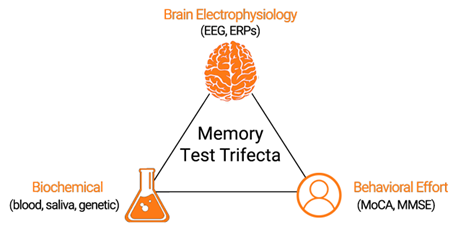
Figure 2. The highest standard of care for patients with memory loss includes assessments of brain electrophysiology, biochemical labs, and effort-based screeners.
References
- National Institute of Health: National Institute on Aging. Diagnosing dementia. Available at: https://www.nia.nih.gov/health/diagnosing-dementia.
- Boise L, et al. Am J Alzheimers Dis. 1999;14:20-26.
- Balasa M, et al. Neurology. 2011;76(20):1720-1725.
- Walsh C, et al. Neurosci Biobehav Rev. 2017;73:340-58.
- Ngandu T, et al. Lancet. 2015; 385(9984):2255-63.
- Alzheimer’s Association. Alzheimer’s Dement. 2018;14(3):367-429
- Beach TG, et al. J Neuropathol Exp Neurol. 2012;71(4):266-273.
- McKhann GM, at al. Alzheimer’s Dement. 2011;7(3):263-9.
- Horvath A, et al. Front Biosci. 2018;23:183-220.
- Ladeira RB, et al. CLINICS. 2009;64(10):967-73.
Adapting to Change: How Resilient is your Laboratory?
Monday, February 07, 2022
By Irwin Z. Rothenberg, MBA, MS, CLS(ASCP), Technical Writer /Quality Advisor, COLA Resources, Inc.
Introduction
The 21st century challenge is to redesign healthcare systems to be safe, efficient, effective, timely, equitable and patient-centered. Laboratory medicine is integral to many of these objectives, involving disease prevention, diagnosis, treatment, and management.
As a result, the laboratory profession continues to undergo rapid change. Not only is there an impact through advances in technology, with new tests and test methodologies, new modes of communication, and new capacities for storage, retrieval and analysis and dissemination of data, but through emerging socio-political trends resulting in changes to the very structure of organized medicine, and how medical care is delivered. These include major legislation such as the Affordable Care Act which encourages shifts from private practice to integrated healthcare networks; and the development of new models of healthcare delivery such as Accountable Care Organizations, which mandate value-based compensation models. These changes, whether on a macro institutional level, or micro departmental level, impact our laboratories. Millions more insured will lead to significantly increased demand for laboratory services at the same time that baby boomer staff (who have been the backbone of laboratory staffing since the 1960’s) are retiring in large numbers, but with fewer schools training replacements. Exacerbating this is the continuing growth of tests available (currently at least 3500 tests), new specialties, new global health issues (i.e. Opiod epidemic), accelerating the increase in workload.
Challenges and Changes Forecast for the Laboratory Profession
The two main forces directly affecting laboratory operations are rapid technological advances (e.g. total laboratory automation, molecular diagnostics techniques, digital technology; point-of-care and remote testing, etc.) and resultant increased economic pressures, with the need to align to increasingly limited budgets[i]
One major outcome of the introduction and growth of digital technology, in particular,is the huge increase in the generation and utilization of data, both for immediate patient care needs as well as population health management and trend analysis. This has resulted in the laboratory becoming “information central” within the greater healthcare environment, touching almost every point of healthcare delivery. Under these circumstances it is easy to recognize that laboratory medicine has a pivotal role, increasingly integral to many clinical decisions on disease prevention, diagnosis, treatment and management. The overall challenge for the laboratory profession is to adapt to these rapid changes, while maintaining quality service.
A summary of these challenges include[ii]:
- Increased scope of services offered, requiring changes in laboratory organization and communication, including workflow, scheduling, reporting policies, data transmission and storage; expanded relationships with other healthcare providers; integrated roles for information technologists; and increased direct interaction with the public.
- New roles and responsibilities of the laboratory due to changes in healthcare delivery through integrated network organizations —Accountable Care Organizations (ACOs) and Patient Centered Medical Homes (PCMHs), integrating the laboratory as a part of team-based care
- The need for updating policies and procedures to reflect this new paradigm of increased scopes of practice and involvement
- New personnel requirements, recruitment and training to ensure a competent workforce to meet these challenges.
- Adjusting to the new age of patient empowerment: patient initiated testing; and test results reported and interpreted directly to patients.
- Keeping up with the changing political and regulatory climate
- Changing population demographics and the need for interventions for specific subsets of the population; use of big data influencing government resource allocation.
Dealing with all these changes can be stressful for laboratory professionals. The clinical laboratory industry is already embracing networking, consolidation, integration, outsourcing, and creating additional value by providing knowledge services related to in vitro diagnostics. Clinical laboratory services are also increasingly defined by their value provided for patient outcomes[iii]. Already, there is evidence that ongoing technological developments have considerably improved the productivity of clinical laboratories.
The next thirty years comprise a perfect storm scenario for laboratory medicine in terms of meeting professional staffing needs to meet these challenges[iv]:
- Millions more people will be insured and able to access the healthcare system far more comprehensively than ever before, including laboratory services
- Millions of baby boomers adding to the post-65 year old demographic, requiring more frequent and intensive healthcare, including laboratory services
- Significant numbers of boomer clinical laboratory professionals are part of this retirement tidal wave, contributing to the shortage of available staff
- The continued rapid development of advanced technology such as molecular genetics. requiring ever more sophisticated instruments and advanced training by staff
- Increased competition from other healthcare professions that are able to promise and deliver on better working conditions, higher compensation, and greater recognition.
- Lack of adequate funding for enough schools and graduation capacity to provide the needed numbers of laboratory professionals.
Resilient Leadership
As a result, these times call for leadership that is more adaptive and agile than ever before, i.e. resilient leadership. This is leadership that understands change, and can adapt through creating an organizational culture of resilience; going beyond continuous quality improvement to embrace change on an institutional as well as departmental level, enabling their laboratory operation to not only survive but prosper and grow.
Resilient Laboratories
These are laboratories that are able to respond effectively, and adapt to all kinds of changes in operation, internal and external demands, and expectations, through effective planning and resource allocation, thus allowing the continuation of normal services without compromising quality. Gaps in the continuity of healthcare threaten a patient’s well-being and introduce the potential for adverse events. Whether, or how, a system responds to fill such gaps in care continuity indicates its resilience[v]. Adaptations include new clinician initiatives, adaptive instrumentation, flexible staffing patterns, continuous quality improvement practices, and institutional networking leading to improvements in performance and service. These approaches make up the resilience that is built into the system to help accommodate demands for care. Resilience provides the means for organizations to target resource investments by integrating safety and productivity concerns. Quality work processes are not static properties of an organization, embracing resilience reflects a dynamic effort to maintain quality.
A culture of resilience[vi]
A culture of resilience recognizes the value of the laboratory staff, the stresses that they may be experiencing, the training that is needed, and the need to be supportive and understanding. It goes beyond a culture of continuous quality improvement to include trust, teamwork, tolerance, and a global perspective that more change is inevitable. The properties necessary for resilient organizations include:
Top Management commitment: to recognize performance concerns and addresses them with continuous and extensive follow-through based on applying competency improvement processes utilizing coaching and management observation.
Key management strategies include: providing staff with key information about future plans for the development of the laboratory, and involving the staff when possible; and determining how to implement these changes through adjustments to job assignments; staffing levels; policies and procedures; management of timelines and budgets.
The characteristics of a resilient laboratory include support for:
An open and fair culture : the reporting of issues, problems, events, and errors throughout the organization is supported and encouraged, but culpable behaviors are not tolerated.
A Learning culture: Wherein issues, problems, events, and errors are handled with an eye toward cofrrection, and solution, not denial; but not a “blame game” attitude either
Realism: Management is aware of any potential for serious problems and events due to weaknesses inherent in their operation, and continuously monitor these.
Awareness: Management collects ongoing data to gather insight into quality of performance, problems, and the state of safety defenses. Utilizes the staff for feedback and innovative ideas.
Flexibility: New or complex problems are handled in a way that maximizes the ability to solve the problem without disrupting overall work.
Transparency: Management keeps staff informed of all happenings, both good and bad. This can open up new avenues of discussion, problem-solving, and team-building.
Resilience relies on constant feedback from the staff regarding the effectiveness of the changes made by management. Additional steps that enhance the ability of the laboratory to successfully adapt to these challenges include[vii]:
- Encouraging two-way communication
- Recognize and reward achievement.
- Help employees succeed. Provide employees with the resources and support to do their work, and as they show signs of readiness, be willing to entrust them with new tasks and greater responsibility.
- Provide continuing education. This should include a formal orientation program, cross-functional training, maintenance of professional skills, coaching, career development, and personal development.
Out of this develops a resilient innovative workforce, one that is capable of adaptively learning to correct errors and to take advantage of new opportunities (e.g., digital technology; remote testing; ACOs), to improve quality of service.
The end result is the leveling of silos, enhancing communication, creating a workforce that is not hesitant to innovate and adapt to change; feels appreciated and experiences less stress when change is needed.
Irwin Z. Rothenberg is a Technical Writer/Quality Advisor for COLA’s Educational subsidiary, COLA Resources, Inc. (CRI), a leader in online continuing education for physicians, laboratory personnel, and allied health professionals. CRI offers continuing education through online courses, informational products in both electronic and hard copy form, webinars on cutting-edge technology and regulatory issues, and CRI on-site Symposia for Clinical Laboratories, providing live educational sessions and interactive workshops with leading industry organizations. For more information, visit their website at www.criedu.org or call 1-800-981-9883.
[i] Laboratory Medicine in the New Healthcare Environment. Ferraro, S., Braga, F. and Panteghini, M. De Gruyter.
Oct.14, 2015. https://www.degruyter.com/view/j/cclm.2016.54.issue-4/cclm-2015-0803/cclm-2015-0803.xml
[ii] Ibid.
[iii] Laboratory Medicine: Challenges and Opportunities. Bossuyt, X., Verweire, K. and Blanckaert, N. Clinical Chemistry. Sept. 2007. http://clinchem.aaccjnls.org/content/53/10/1730
[iv] Building a Laboratory Workforce to Meet the Future: ASCP Task Force on the Laboratory Professionals Workforce. Garcia, E., Schulze, M., Bailey, M., Doyle, K., Finn, W., Glenn, D. Holladay, E.B., Jacobs, J., Kroft, S., et.al. Jan.2014. https://academic.oup.com/ajcp/article/141/2/154/1760592
[v] Minding the Gaps: Creating Resilience in Healthcare. Nemeth, C., Wears, R., Woods, D., Hollnagel, E. and Cook, R. Semantic Scholar. 2008. https://pdfs.semanticscholar.org/0e2a/37fbc0762f7b909277c18178902df603f010.pdf?_ga=2.100922756.48796617.1547406901-1451235872.1547406901
[vi] Elder N, McEwen T, Flach J, Gallimore J. Creating Safety in the Testing Process in Primary Care Offices. .
[vii] Shenkel, R, Gardner, C. Five Ways to Retain Good Staff. Fam. Pract. Manag. 2004 Nov-Dec: 11(10) 57-62.
3 Things Patients Really Want From Their Doctors
Monday, February 07, 2022
by Suneel Dhand, Md
Suneel Dhand is a physician, author and speaker. He is the Founder at DocSpeak, and Co-founder at DocsDox. He blogs at his self-titled site: suneeldhand.com
The doctor-patient interaction is the absolute core of clinical medicine. Maybe I’ll go much further: it’s the core of health care in general. I always try to remember, whenever I’m ever feeling frustrated with the system, the crazy bureaucracy — and of course, the debacle of our clunky electronic medical records and their data entry requirements — to separate myself from all of that when I’m face-to-face with my patient and their family. This time is priceless, it’s why I went into this. The interactions and honor of serving my patients at a low point in their lives, makes it all worth it. It’s where the magic of medicine happens, and is something that is untouchable by any external factor, if you choose to make it that way.
Here are three things that patients want from that doctor-patient interaction:
- A compassionate doctor who communicates well. A physician who understands that they are coming to them for help, shows empathy, and listens carefully to the problem. The doctor should exhibit both in their verbal and non-verbal communication, that they are fully engaged in being their doctor, who truly cares for them. There are an array of phrases and body language techniques that can be used to show empathy, all of them are very learnable, and deeply appreciated by your patients.
- A doctor who is honest and transparent. I actually think almost all physicians are this way anyway — highly trustworthy professionals in the first place (anyone not that way, would unlikely have made it so far). Nothing but complete honesty with a sincere interest in getting the best possible outcome. Explain everything slowly, clearly and in understandable terms — as if you are talking to a family member who knows nothing about health care.
- A non-distracted physician. Nobody wants to pour their heart out to somebody who is not fully present in the conversation. No turning around, clicking, or looking elsewhere for extended periods of time. This is patient face time, not screen time. A technique that I use, that gets very positive feedback: I actually ditch the computer completely, especially when meeting a patient for the first time. I sit opposite them, lean in, and am fully present. I jot notes down on a piece of paper on my lap. Patients love it (actually anyone would like that kind of service when they are explaining something in a professional situation, even at Home Depot!). Writing things down when face-to-face with someone, subconsciously gives a better impression that you are concentrating and mentally processing, rather than typing on a keyboard and turning at a screen. It just does.
So these are just three things that any physician should strive to do in their interaction, to give their patients the experience they deserve. It may just be another “name on the list” for us — but for patients who may have waited hours or days to see us, it’s the part of their day that they will usually remember and appreciate the most.
Over my years of treating thousands of patients, seeing so many misunderstandings and poor interactions, and now being in a position where I am teaching many of these skills — I am really of the belief that what patients ask for is really not that much. We are already very good with our scientific knowledge and have stellar treatments at our disposal — but it’s the human side that is too often forgotten. Sure, time is tough, and not available in abundance. But even just an extra minute or two can make a huge difference.
What I am saying here may not sound “trendy or fashionable” to lots of folks. Scroll the Twitter and LinkedIn feeds of many of our administrators and technologists, who are now dominating health care, and you’ll soon see why the above is the last thing they want to hear. To lots of them, health care is all about spreadsheets and numbers, expensive new technologies, and building factory-like processes. But it really isn’t, and never will be. Unfortunately too, the doctor-patient relationship is something that may even be intimidating to many administrators — because it’s something that they can’t “get to” or really control. It shouldn’t be that way.
We are currently in a health care swamp of epic proportions, where we lose the forest for the trees. We keep moving further away from the frontlines, among a tidal wave of bureaucracy (see this chart, if you want to see the unbelievable growth of administrators versus physicians over the last 30 years). Of course, a sector as big as health care does need some oversight, rules, and regulations — but we’ve gone too far.
That moment when a physician sits down with their patient, is what the practice of medicine is all about, and should take front and center stage in any health care system. So Doctor, this is your time. Make the most of it and let’s give patients what they deserve when we are face-to-face. Even if the rest of the world around us feels like its tumbling down.
Diabetes Patient Management: Transformative Technology
Tuesday, September 21, 2021
by David Kliff
There is no question that when it comes to diabetes technology, continuous glucose monitoring (CGM) has been the most transformative. Unlike insulin pumps or connected insulin pens, CGM is used by all patients with diabetes, not just patients who use insulin. Thanks to CGM researchers, we now have a clearer understanding of diabetes. CGM is quickly becoming the standard for glucose measurement.
To fully appreciate just how transformative CGM technology is to diabetes management, take a look at the life of a patient before CGM. Back in the day, when blood glucose monitoring (BGM) was state of art technology, patients had to prick their fingers multiple times each day. Not only was this inconvenient, but it required extreme dedication from the patient. Besides the constant finger pricks, BGM required the patient to carry around all testing tools– the meter, lancet, and test strips. Worse, with no connectivity, patients had to manually log their readings creating even more work.
Fast forward to today when all CGM patients have to do is secure the sensor to their bodies, which is an easy and painless task performed either once every 10 or 14 days. Thanks to advancements in CGM technology, there are NO finger prick calibrations and readings are sent directly to the patient’s smartphone, where apps provide advanced data analytics. CGM not only makes getting the data a snap, but helps the patient understand what all the data means. It really should shock no one that so many patients have seen their outcomes improve thanks to CGM technology.
Even better, going forward CGM is becoming more affordable, easier to use, and includes more sophisticated data analytics. Hence the reason CGM continues to replace BGM in diabetes patient management.
Yet even with all of these advancements, it must be noted that technology does not prevent one of the biggest issues facing a person with diabetes, hypoglycemia. Yes, these systems have alarms and alerts, which is another benefit, but they cannot PREVENT hypoglycemia. Anyone who has experienced a hypoglycemic event understands this. As much as a patient or caregiver would like to prevent these events, unfortunately they do happen, and many times come out of nowhere.
Now the majority of hypoglycemic events can be quickly dealt with. Hence the reason so many patients keep instant sugar at the ready. An experienced person with diabetes knows that untreated hypoglycemia is a life-threatening event. An event that can impact not just their lives but those around them as well, including their caregivers, family and friends.
Still there are instances when a patient crashes and is unable to manually deal with this event. Thankfully we have also seen a dramatic improvement in ready-to-use glucagon delivery systems. Systems that can easily and quickly be used by people both experienced and inexperienced in diabetes management. Two of the newer and more advanced options are a nasal formulation and a premixed autoinjector pen. Both quickly deliver lifesaving glucagon, are simple to use and require little if any advanced training.
As great as CGM is, it is nice to know that in those instances when a severe hypoglycemic event occurs, glucagon technology has also advanced.
Why DXA Shouldn’t Be Your Only Option
Sunday, August 01, 2021
by Physicians Office Resource
Meet Bindex® – the revolutionary, portable bone density scanning device that could be the new gold standard in first-level osteoporosis diagnostics.
For over 30 years, DXA bone density scanning has been the most reliable and the most accurate way to diagnose and monitor osteoporosis. But could it be missing the mark?
Osteoporotic fractures account for more hospitalizations than breast cancer, diabetes and myocardial infarction combined.1 Yet while the entire Medicare population of around 60 million
is at risk of osteoporosis, only 2.5 million DXA scans are performed annually.
While its accuracy is not in question, does the very nature of DXA – high cost, limited to those with appropriate insurance coverage, less than universal availability – ignore all but the most at-risk patients, those who might already have been identified as osteoporosis sufferers? Could there, in fact, be an easier, more inclusive yet comparably accurate way to assess bone density?
The osteoporosis diagnosis gap
The discrepancy between patients at risk for osteoporosis and the number of DXA scans performed annually may be attributed to several factors.
Patients without an osteoporosis diagnosis who are at risk because of their age, gender or other health issues may not all be eligible for a DXA scan. Younger at-risk patients may not be eligible because of their age.
Many health insurance plans cover only eligible patients (which often means patients over 65) and only for one DXA scan every two years (when osteoporosis is diagnosed) even though more frequent scanning may allow physicians to offer more timely, more customized and, potentially, more effective treatment.
Bone density scanning made easier
There is, clearly, a need for accurate bone density scanning that is both easier and more affordable for patients, especially Medicare-eligible patients. The answer may come in the form
of an outwardly simple but technologically advanced handheld device called Bindex.
Designed and manufactured by Bone Index Ltd, Bindex promises a more equitable arrangement that potentially allows more at-risk patients – of Medicare age and younger, with or without an existing diagnosis – to receive fast and accurate bone density scans in a doctor’s office, clinic or any setting.
Bindex is 90% accurate in detecting osteoporosis
Extensive clinical research has proven Bindex to be 90% accurate in detecting osteoporosis which means it can replace nearly 70% of DXA scans for patients with suspected osteoporosis.
Using safe pulse-echo ultrasound, handheld Bindex measures cortical bone thickness in seconds and instantly analyzes bone density, generating a detailed yet easy-to-read report.
Better for patients – with clear advantages for doctors
Its size and portability means that Bindex can be used anywhere – in physician’s offices, hospitals and clinics as well as in patients’ homes and at bone density screening events. A
Bindex scan costs a fraction of a DXA scan and, for many patients, particularly those who want more frequent screenings than allowed by their insurance, represents a very affordable
out-of-pocket medical expense.
Bindex means that physicians can diagnose more at-risk patients and scan more diagnosed patients more frequently, and so make timely treatment decisions and adjustments. It
may also be a useful patient acquisition and retention tool, especially as patients age into Medicare, allowing physicians to keep an important source of patient revenue within their
own practices.
An opportunity to trial Bindex at no cost
Bone Index Ltd, manufacturer of Bindex, is currently offering selected US-based physicians the opportunity to be part of the device’s US launch by trialing Bindex with patients at no cost.
To register your interest in participating in the trial, please visit Bindex.us/launch or call
(970)-306-7452.
Footnote:
- International Osteoporosis Foundation
Designed and developed by Bone Index Ltd, a healthcare diagnostics company, Bindex is
FDA-cleared and has been validated in clinical trials with several thousand patients. This
revolutionary device has already screened over 1.6 million people in the US, and has 19
global patents in the US, China, Japan and major EU countries.
The Abstract: Medical News and Research Update
Sunday, August 01, 2021
A new monthly column from Physicians Office Resource looking into the current research and the future of medical science
Blood Markers Indicating Labor is Approaching Identified
Researchers at Stanford University School of Medicine have identified for the first-time blood markers indicating when a pregnant women will go into labor. The study, which was published in Science Translational Medicine, gives insights on how labor begins, by analyzing immune and other biological signals in a blood sample. The study’s lead author, Ina Stelzer, PhD, said, “We found a transition from ‘progressing pregnancy’ to a ‘pre-labor’ phase that happens two to four weeks before the mom goes into labor…We’ve identified a novel way to use the maternal blood to predict when a mother will go into labor. This prediction is independent from the duration of pregnancy.”1 Brice Gaudilliere, MD, PhD, and the study’s senior author said, “Clinicians are good at estimating gestational age, which measures the development of the fetus. But there is a disconnect between this timing and when labor starts, because whether the baby is ready is only one factor in the onset of labor, the other part of the equation is the mother.”1 The study focused on 63 women during the last 100 days of pregnancy. Blood samples were taken two to three time prior to birth and each sample was analyzed for 7,142 metabolic, protein, and single-cell immune features. Researchers utilizing mathematical modeling where able to identify blood markers that best predicted the onset of labor. Current results though imprecise, about a five-week window, could lay the foundation for a more accurate clinical blood test.
“New Generation” Artificial Heart Implanted in Patient – First in United States
Drs. Jacob Schroder and Carmelo Milano lead a surgical team at Duke University Hospital which successfully implanted a new generation artificial heart. The 39-year-old man in which the artificial heart was implanted suffered from advanced biventricular heart failure. The artificial heart developed by CARMAT is intended to replace the ventricles of the native heart in patients and is currently approved to begin studies in the US. “Because of the shortages of donor hearts, many patients die while waiting for a heart transplant…we are hopefully for new options to help these patients,” said Dr. Schroder. Dr. Milano continued, “We are encouraged that our patient is doing so well after the procedure. As we evaluate this device, we are both excited and hopeful that patients who otherwise have few to no options could have a lifeline.”2
New Technique to Treat Middle Ear Infections
Middle ear infections affect more than 80% of children. Current treatment methods often include prescribing antibiotics; however research has shown that in 30% of middle ear infection cases, antibiotics don’t work. Also due to the prevalence of middle ear infections, overuse of antibiotics can lead to antibiotic resistant bacteria. That’s why results coming from a study funded by the National Science Foundation is providing hope for another treatment option. Researchers at the University of Illinois Urbana-Champaign have developed a 3D printed device to inactivate a common bacterium that causes middle ear infections. The 3D printed device generates plasma composed of charged particles and reactive molecules which can inactivate a variety of pathogens. Researchers in this project decided to try and penetrate the biofilm of the bacteria within the ear. Helen Nhuyen, an engineer who was part of the study, stated, “Biofilms are very dense, making it difficult for the antibiotics to penetrate. Our idea was that if we could disrupt the structure of the biofilm, we could increase the penetration of the antibiotics.”3 The research has been tested on rats and found after 15 minutes of treatment, bacteria was inactivated with no results of physical damage to the rat eardrum. The results suggest that this method could be used to treat middle ear infections in humans.
Calcium Regulating Heart Protein Could Lead to New Treatment for Heart Failure
It has long been known that calcium plays a vital role in bone, muscle, and heart health. Regarding heart health, calcium surge and diminish during and in between normal heart beats. Scientist also know that mitochondria depend on calcium to help produce energy that in return keeps the cell alive.
In a recent study published in Nature5, an international study lead by researchers from the University of Utah sought to better understand the specific role of mitochondria and it’s relation to calcium signaling within heart cells. Researchers observed that when the signaling pathway for protein, VDAC2 was disrupted severe impairment of heart cell contraction occurred; thus making it harder for the heart to pump blood to the body. Stavrose Drakos, MD, PhD, senior author on the study, said, “Based on our human and laboratory research, it appears that if VDAC2 is not working properly, then everything in the heart can cascade downward from there. If we can figure out ways to help this protein do its job again, then it’s possible that we might be able to address heart failure far earlier in the disease process.”4 Researchers are hopeful this will open the way for therapeutic drugs to alleviate heart failure by targeting VDAC2.
Children with Type 2 Diabetes Face Dire Future
Type 2 diabetes in youth is increasing not just within the United States, but throughout the world. Up until now, little was known about the direct impact that type 2 diabetes would have on these youth as they entered adulthood. Now, thanks to a 15 year study, researchers have a better understanding of the dire effects this childhood disease will have on adults. According to a study published in the New England Journal of Medicine, “among participants who had onset of type 2 diabetes in youth, the risk of complications, including microvascular complications, increased steadily over time and affected most participants by the time of young adulthood.”6 500 participants were evaluated with a mean age of 26.4±2.8 years, after being diagnosed with T2D around the age of 13 showed the following complications:
- Cumulative incidences of hypertension = 67.5%
- Incidence of dyslipidemia = 51.6%
- Incidence of kidney disease was 54.8%
- Incidence of nerve disease 32.4%
- Prevalence of retinal disease increased from 13.7% in 2010/2011 to 51% in 2017/2018
The study also noted that “complications were more common among participants of minority race and ethic group and among those with hyperglycemia, hypertension, and dyslipidemia.”6
Certain Types of Body Fat Decrease Gray Brain Matter
Gray brain matter is named for its grayish-pink color and is home to neural cell bodies, axon terminal, dendrites, and all never synapses. Gray matter is also essential in learning, memory, muscle control, and cognitive function. So, when researchers at the University of South Australia found that some types of obesity lead to a reduction in gray matter in the brain, alarms were raised. Lead author of the study, Anwar Mulugeta, PhD., said “We found that people with higher levels of obesity, especially those with metabolically unfavorable and neutral adiposity subtypes, had much lower levels of gray brain matter, indicating that these people may have compromised brain function, which needed further investigation.”8 The study found that for, “every extra 6.6 lbs. of body weight in a person of average height, the amount of gray matter decreased by .3%”8 Dr. Mulugeta lead author of the study stated, “However, we did not find conclusive evidence to link a specific obesity subtype with dementia or stroke. Instead, our study suggests the possible role of inflammation and metabolic abnormalities and how they can contribute to obesity and gray matter volume reduction.”8
Sources
Blood Markers Indicating Labor is Approaching are Identified
“New Generation” Artificial Heart Implanted in Patient – First in United States
New Technique to Treat Middle Ear Infections
Calcium Regulating Heart Protein Could Lead to New Treatment for Heart Failure
- https://healthcare.utah.edu/publicaffairs/news/2021/07/drakos-heart-failure-protein.php
- https://www.nature.com/articles/s41467-021-24869-0
Children with Type 2 Diabetes Face Dire Future
Certain Types of Body Fat Decrease Gray Brain Matter
Helping Patients Help Themselves Online
Sunday, August 01, 2021
by Dlyan Chadwick
These days, virtually any brick and mortar service has its own internet doppleganger. One can attain a college degree by attending online classes, stream movies directly from the source and of course, there’s Wikipedia, the online staple that’s put the final nail in the coffin of the door-to-door Encyclopedia industry. And while there’s seemingly no end to the wealth of information afforded to us on the internet, that information does come at a price: internet “quality control” is spotty at best.
Now, that’s well and good, likely entry level information to anyone who’s ever written a term paper or sought out unbiased information in a Honda forum...but then again, internet literacy isn’t always a straightforward metric. In an article by Tanya Fenke MD, (Dr. Google Should Be Sued for Malpractice. Here’s Why), the author illustrates the inherent problem of taking all our health concerns to Google, namely that internet sources quickly become outdated, are biased towards their benefactors and constituents, aren’t often written by healthcare professionals and often lack traceable references. In fact, as the title dictates, she suggests that if Google were a physician, he or she should be sued for malpractice, based on the number of problems that disseminating false information causes (no word on Dr. Pepper and Dr. Feelgood’s prospects at the time of publication).
While I wholeheartedly agree with Fenke’s assessment, that Google, or an internet search, isn’t a sustainable replacement for actual medical advice from an actual, living, breathing medical professional, I also realize the dilemma of Google’s involvement in everything. The trends of internet ubiquity aren’t going to slow, nor will Google’s lumbering ascent into total control of the internet cease. This isn’t glass half-empty philosophizing either, just the acceptance that if/when (more like when) the machines finally do take over, we can assume Google will be in the mix somewhere.
Instead, it’s becoming important for physicians to not only be the conduits towards viable health information, but also to help patients establish good searching habits for when they come across health information on their own time. Physicians cannot dictate what their patients will read and see outside of the office, but by giving them the tools to sniff out what’s good and what probably needs a second opinion, they greatly reduce the number of faulty accidents and misunderstandings.
Look for Recent Content
Health information is subject to ongoing developments and research, on micro and macro scales. What was once the de-rigeur health fad or yesterday might have been proven total bunk today, and vice versa. In that regard, information on the internet can run a little bit dicey since (theoretically) anything put online stays online forever. Encourage patients to check their sources and to be wary of any sources from more than a few years old, particularly if it’s dispensing health advice. Even if the information has stayed the same, credible and reputable outlets will be sure to keep things current anyway.
Additionally, the idea of timeliness opens up the discussion for physician blogging and social media, a great way to create relevant and reputable content quickly, to update on information that is changing and to just generally maintain a current channel of communication. Patients should also be wary of information that doesn’t contain any dates as there’s no way to determine how recently it was obtained and published.
Objectivity and Bias
It can be difficult to look objectively at one’s own symptoms, especially when emotions are running strong and influencing one’s actions. In this regard, internet searching along various strings of keywords can push the user towards a “self-diagnosis” that is biased or at the very least a little skewed. This also introduces what I call the “WebMD” effect in which a person goes down the internet rabbit-hole of reading all symptoms associated with a certain disorder and slowly convinces themselves that they indeed have the disorder. No one is immune to momentary flashes of anxious grandiosity.
Furthermore, there’s a wealth of “for profit” sources out there, posing as viable health professionals, even when they’re not. Wary patients should be mindful of any sites with corporate sponsors, as the information contained may just be a sideways plug to get you to buy a miracle product or to sell you on an affliction you don’t actually have. Solid health information is a right, and shouldn’t market you towards buying anything new.
Experience and Credibility
It goes without saying, but a number of those dispensing health care information are just writers….not doctors (this one included). In this regard, knowing exactly where a source comes from can be what will set off the “nonsense meter” right away. Patients should look for the credentials of an author who’s dispensing health care information, ensuring that they’re actual, medically licensed doctors. Even so, it’s not uncommon for professionals to get their articles ghost written by off-site writers. Patients should assume that any information coming from a source that doesn’t identify as a physician should probably not be regarded at all, and those that come from doctors, should be carefully vetted before following up on them.
Sources and Citations
In print, most must cite their sources, but on the internet, and it can be a bit more difficult to truly regulate this principle. If a site doesn’t cite the sources of its claims, or if they’re especially absolute or broad and sweeping, one should maintain their skeptic senses a bit. Information can be sensationalized to drive ratings and page views to a site, and often take claims and facts out of context, specifically to fit their own content agenda. If a site doesn’t provide sources for its health care advice, isn’t from a health sanctioned organization or contains many sources from less credible sources, patients shouldn’t accept the information sight unseen. Remember, if a site doesn’t want readers to know where they got their stories, at best they likely don’t have anyone’s best interests in mind and at worst, could be hiding something.
Encourage the In-Person Follow Up
Fortunately, physicians still have the ultimate, and most credible, say in directing patients towards quality health care information. Besides endowing them with a dose of healthy skepticism towards online health information (and let’s be honest, it’s a good trait to have in an election year too), it’s important to remind them that they can always follow up directly with you, a primary health care source, about anything unclear. Not only does this type of outreach send the message that you’re there to help and guide them in their healthcare journey, but also establishes a precedent for always checking up with a qualified source before taking anything to heart.
Ultimately, we shouldn’t recognize Google as anything even remotely like a doctor and should recast it for what it really is: “a huge repository of information, scrupulously indexed and largely unregulated.” Patients and users still have the power.
References
Feke, Tanya, MD. "Dr. Google Should Be Sued for Malpractice. Here's Why."
KevinMD.com. KevinMD, 09 Aug. 2015. Web. 17 Aug. 2015.
Johns Hopkins Medicine Health Library. "Finding Reliable Health Information Online."
Hopkinsmedicine.org. Johns Hopkins, n.d. Web. 17 Aug. 2015.
The Abstract: Medical News and Research Update
Thursday, July 01, 2021
A new monthly column from Physicians Office Resource looking into current research and the future of medical science
University of Oxford Launches Phase 1 Trial for HIV Vaccine
Since the first report of AIDS in 1981, researchers have been looking for ways to combat HIV infections. Today, there are dozens of drugs available to help inhibit HIV, but as of yet, no vaccines have been approved to prevent HIV. HIV’s ability to change and escape immune responses, has proved to be the biggest challenge in creating a safe and effective vaccine. That’s why the announcement from University of Oxford that a Phase 1 Trial has been launched for an HIV vaccine was met with great excitement in early July. Tomas Hanke, the trial’s lead researcher and Professor of Vaccine Immunology at the University of Oxford’s Jenner Institute had this to say about the trial, “An effective HIV vaccine has been elusive for 40 years. This trial is the first in a series of evaluations of this novel vaccine strategy in both HIV-negative individuals for prevention and in people living with HIV for cure…Even in the broader context of increasing antiretroviral treatment and prevention, an HIV-1 vaccine remains the best solution and likely a key component to any strategy ending the AIDS epidemic.”1
New Treatment Candidate for Halting and Reversing the Effects of Dementia and Alzheimer’s Disease
A recent study published in the International Journal of Molecular Sciences, a research team based at Tohoku University in Sendai Japan, have identified a new treatment candidate to halt and reverse the effects of neurodegenerative diseases such as dementia and Alzheimer’s in mouse models.
Previous studies suggest that when a calcium channel is disrupted in a neurotransmitter, dopamine and acetylcholine releases are reduced, resulting in cognitive confusion and decreased motor function. This also leads to the buildup of aggregated proteins which inhibit proteasome activity leading to neuronal death. To combat this, researchers developed a disease modifying therapeutic, knows as SAK3 a T-type calcium channel enhancer. This therapeutic rescued neurons in most protein-misfolding, neurodegenerative diseases. The calcium channel enhancement is thought to trigger a change from resting to active in neuronal activity. According to the paper author, Kohi Fikunaga, professor emeritus in Tohoku University’s Graduate School of Pharmaceutical Sciences, “Even after the onset of cognitive impairment, SAK3 administration significantly precented the progression of neurodegenerative behaviors in both motor dysfunction and cognition.” Fikunaga went on to say, "SAK3 is the first compound targeting this regulatory activity in neurodegenerative disorders. SAK3 administration promotes the destruction of misfolded proteins, meaning the therapeutic has the potential to solve the problems of diverse protein misfolding diseases such as Parkinson's disease, Lewy body dementia and Huntington disease, in addition to Alzheimer's disease."2
Increasing Evidence Suggests Controversial Sputnik COVID Vaccine is Safe and Effective
According to an article in the scientific journal, Nature, Russia’s COVID-19 vaccine, Sputnik, is showing evidence from Russia and many other countries that suggests it is safe and effective. Sputnik, has been controversial from its early release in August 2020 before it ever completed Phase III trials. Even today after Phase III trials have been published, which showed the adenovirus vaccine was 91.6% effective at preventing symptomatic COVID-19 infection and 100% effective at preventing sever infection, “some scientists have criticized the authors for failing to provide full access to the raw data.”3 Almost one year later from its release, the Russian vaccine has been approved for use in 67 countries, however it has yet to gain EUA from the WHO.
Utilizing two different adenoviruses for the first and second doses as a delivery mechanism for inserting the genetic code for the SARS-CoV-2 spike protein into human cells, has been shown to increase efficacy. The United Arab Emirates Ministry of Health reported a 97.8% efficacy in preventing symptomatic COVID-19 and just as trail results showed, a 100% efficacy in preventing sever disease in the 81,000 people who had received both doses. Another and as of yet, unpublished study from the Buenos Aires health ministry in Argentina, involving 40,387 vaccinated and 146,194 unvaccinated people ages 60-79 showed that a single does of Sputnik Light (a one shot variation of the vaccine) reduced symptomatic infections by 78.6% and deaths by 84.7%.3
Sequencing of over 600,000 Exomes Identifies 16 Variant Genes that Provide Protection from Obesity
In an article in the journal Science, researchers Parsa Akari et al. sought understanding in “how genes predispose individuals to, or protect individuals from, obesity.”4 640,000 exomes were sequenced from the UK, US, and Mexico and identified 16 rare coding variants. One variant allele, GPR75, found in Mexican populations was associated with lower BMI. GPR75 was only found in 4 out of 10,000 sequenced people and were associated with “1.8 kg/m2 lower BMI, 5.3 kg lower bodyweight, and 54% lower odds of obesity in heterozygous carriers.” In laboratory studies in mice with a knockout of GPR75 resulted in resistance to weight gain despite introduction of a high fat diet. Knockout mice also showed improved glycemic control and insulin sensitivity. Results were significant and lead researchers to believe that inhibition of GPR75 could be a therapeutic strategy for obesity.4
CRISPR Injection Treats Genetic Disease in Patients for the First Time
For years, scientists have been using the gene editor CRISPR for correcting mutations in laboratory settings. However, utilizing CRISPR technology to treat people with genetic diseases has faced a variety of obstacles, and specifically one large one: injecting CRISPR into a patient and making sure it slices the DNA in the correct spot. According to a recent article published in Science, researchers have successfully breached that large obstacle. In this trial, four men and two women suffering with the genetic disease transthyretin amyloidosis were injected a lipid particle containing two different RNAs: “an mRNA encoding the protein Cas, the CRISPR component that snips DNA, and a guide RNA to direct it to the gene for TTR. After Cas makes its cut, the cell’s DNA repair machinery heals the break, but imperfectly, knocking out the activity of the gene.”5 Results after about a month showed that three men had an 80-96% drop in transthyretin (a protein which builds up on the nerves of the heart causing pain and heart disease) levels. This research study is still in its early stages and there are still many unknowns such as side effects and if symptoms will continue to improve. But the early results are extremely promising and could open the door for CRISPR therapies. 5
Research Shows COVID mRNA Vaccine Does Not Affect Male Fertility
With rumors running rampant on social media and other outlets regarding the safety of the COVID mRNA vaccines, a new study published in JAMA sought to put to bed at least one of those rumors: that the COVID-19 mRNA vaccines cause a decrease in sperm parameters. The study hosted at the University of Miami recruited health volunteers aged 18-50 and were prescreened to make sure there were no underlying fertility issues. Two samples were taken after a prescribed number of days after the first and second doses. Results were then analyzed by trained professionals based on guidelines from the WHO. After analysis, this study showed that there was no significant decreases in any sperm parameter. 6
Sources
University of Oxford Launches Phase 1 Trial for HIV Vaccine
https://www.rt.com/uk/528446-oxford-university-launches-hiv-vaccine-trial/
https://www.openaccessgovernment.org/hiv-vaccine/114764/
New Treatment Candidate for Halting and Reversing the Effects of Dementia and Alzheimer’s Disease
https://www.mdpi.com/journal/ijms
Increasing Evidence Suggests Controversial Sputnik COVID Vaccine is Safe and Effective
Sequencing of over 600,000 Exomes Identifies 16 Variant Genes that Provide Protection from Obesity
CRISPR Injection Treats Genetic Disease in Patients for the First Time
Research Shows COVID mRNA Vaccine Does Not Affect Male Fertility
6. https://jamanetwork.com/journals/jama/fullarticle/2781360
The Increase in Waived Testing in the Physician Office
Thursday, July 01, 2021
by Irwin Z. Rothenberg, MBA, MS, M.T. (ASCP), Technical Writer/Quality Advisor, COLA Resources, Inc.
Introduction
Laboratory testing plays a critical role in health assessment, treatment, monitoring, and ultimately, the public’s health. Test results contribute to diagnosis and prognosis of disease, the monitoring of treatment and health status, and population screening for disease. An estimated 7-10 billion laboratory tests are performed each year in the United States and laboratory test results influence approximately 70% of medical decisions. Increasingly, these decisions are based on simple tests performed using devices that are “waived” from most federal oversight requirements, and are thus designated as waived tests.
When these waived laboratory tests are performed at or near the site of patient care - such as in an emergency room or urgent care clinic, or at patient’s bedside - they fall under the definition of Point of Care Testing (POCT). Physician office laboratory testing also is included under the definition of POCT when these tests are performed, and the results are provided to the physician, while the patient is still present and diagnostic and treatment decisions can then be made utilizing this information.
The rapid growth of POCT testing is a prime driver for the increase in waived testing at physician office laboratories, and is a direct result of the convergence of several trends that are already impacting POL operations:
- Technological advances that bring higher quality waived testing closer to the patient,
- The decentralization of laboratory services, so that POLs can now perform testing previously confined to core laboratories
- The Increased number and variety of tests classified as CLIA-Waived, and available to POLs
- Growth of Drugs of Abuse/Pain Management Clinics performing drug testing in-house
Bringing Laboratory Services Closer to the Patient
The increased number of waived tests now available for physician office laboratory testing eliminates the need for trips to and from a central core laboratory (and specimen collection sites that are run by laboratories). These tests enable physicians to make more rapid diagnoses and treatment decisions on site, and they improve patient compliance with physicians’ recommendations.
Garnering information on site often allows immediate treatment, which avoids requiring the patient to make multiple trips to the physician office and pharmacy, saving time for both the patient and the clinician. Accurate diagnostic information at the point-of-care saves critical medical resources and improves both patient and clinician satisfaction. In light of the role of waived testing in the healthcare delivery system and their overall benefits, the availability of and timely access to these technologies will continue to be important to meet the needs of patients and clinicians for rapid and reliable testing[i].
New Tests/Instruments = Increased Demand = Additional New Tests/Instruments
This demand for point-of-care capability has spurred the development of smaller, faster, and easier-to- use tests that are more sophisticated in design than tests traditionally found in smaller office laboratories.
Since the inception of CLIA 88 and the concept of waived testing, technological advances that simplified test processes and increased reliability of test results, has led to a dramatic increase in the number of approved waived tests from 9 to 119; and the number of test systems to over 1600.[ii]
Some of the waived now tests performed in the physician office include streptococcus testing, HIV testing, INR (coagulation) testing for Coumadin, and pregnancy testing. The ability to immediately treat the patient for these and other conditions, without having to send a sample to a central laboratory, can be critical to the patient’s well-being. As an example, a positive test for strep can allow the clinician to immediately prescribe antibiotics, catching an infection before it becomes severe, with potential health consequences (or ruling out strep and avoiding unnecessary use of antibiotics).
According to research, POC testing is growing faster than any other segment of the diagnostic industry with an average growth rate of 14% a year. Of this, CLIA- waived is the fastest-growing segment of this market.[iii] The number of Waived labs had increased from 20% in 1992 to 75% of the more than 270,000 CLIA laboratories in 2021. Of these waived labs, 67% were POL’s.
Pain Management / “Drugs of Abuse” Testing[iv]
Pain management is one of the fastest-growing reasons for waived testing. With an increasing number of internists and anesthesiologists opening pain clinics, and primary care and family practice physicians opting to treat patient pain in house instead of referring out to specialists, the pain management opportunity is ever increasing. Pharmaceutical companies are encouraging physicians to perform drug tests to monitor prescription compliance and aid in risk management.
The number of free-standing and university-based clinics in the U.S. alone has increased from just 500 in 1998 to 2,000 in 2008. Each of those clinics on average treats approximately 400 chronic pain patients per month. Over 70% of these patients are prescribed some form of opiate medication.
Deaths caused by overdose of prescriptions drugs also are on the rise and, as a result, one of the prescribing guidelines, indicated by the National Pain Foundation, is to evaluate patients for the risk of abuse before starting opioid therapy. Drug testing helps the doctor in evaluating the patient’s drug history as well as aids them in avoiding or minimizing a possible reaction to other medications or narcotics. Physicians, not necessarily skilled in recognizing the signs for drug abuse or addiction and wanting to exercise caution, are also being proactive and instituting drug testing as a regular part of their patient evaluation.
The tests are even used to monitor patients and their adherence to a pain management protocol of narcotics prescribed. Testing is sometimes used to determine if in fact the patient is taking their prescribed medications.
What does all this mean for the physician office laboratory?
- The continued expansion of testing classified as waived, including those involved with drugs of abuse, infectious disease screening, and chronic disease management, provides the opportunity for greater point-of-care testing by physician office laboratories, while the patient is present, facilitating immediate medical decisions, the initiation of treatment, and continued monitoring.
- The growing utilization of waived testing in a physician office setting brings great benefits for patient care, but it also brings great responsibility to ensure that the results obtained are of the highest quality to realize these potential benefits. These responsibilities include ensuring adequate personnel training and competency assessment; performance of required quality control, maintenance, and calibrations of the instruments used; proper specimen collection, handling and labeling, and documentation of test results. This requires maintaining adequate oversight and accountability.
- Efficient, quality-run physician office laboratories, able to provide a larger array of on-site testing that provides faster results, diagnosis and treatment decisions support the goals of patient-centered laboratory service.
[i] Waived Testing and patient Safety: Future Trends. COLA Insights January/February 2015. Irwin Rothenberg
[ii] CMS.gov. Certificate of Waiver Laboratory Project / Requirements of waived Tests 2014.
[iv] Alfa Rapid Medical Tests. CLIA Waived Medical Testing Explained. “Just What The Doctor Ordered” Why Are Doctors Testing? 2009. http://www.alfascientific.com/news-events/clia-waived-testing-explained
Irwin Z. Rothenberg is a Technical Writer/Quality Advisor for COLA’s Educational subsidiary, COLA Resources, Inc. (CRI), a leader in online continuing education for physicians, laboratory personnel, and allied health professionals. CRI offers continuing education through online courses, informational products in both electronic and hard copy form, webinars on cutting-edge technology and regulatory issues, and CRI on-site Symposia for Clinical Laboratories, providing live educational sessions and interactive workshops with leading industry organizations. For more information, visit their website at www.criedu.org or call 1-800-981-9883.
Complex Conditions and Team Based Care
Thursday, July 01, 2021
by Dylan Chadwick
If health care had a definitive "face," the primary care physician would likely occupy the position. The primary care physician is often a patient's first contact with recovery and in turn, plays a crucial role in public health care: making the initial diagnosis.
Primary care physicians see a staggering variety of patients and conditions on a day-to-day basis. Many of these conditions are treatable within one office visit, but occasionally they're more severe. When patient conditions are determined to be more complicated, or specialized, primary care physicians can refer them to specialists, who can address these patients in a more specific manner, drawing on their own experience of a given school of medicine. Patients then convene with specialists regularly to monitor their condition and develop a treatment plan.
This is the traditional (and highly paraphrased) pattern for how most patient diagnoses work. However, recent data from the Robert Graham Center for Policy Studies in Family Medicine and Primary Care indicates that this paradigm is rapidly shifting, and that more and more patients, particularly those with complicated and chronic health conditions, are seeking the advice and care of their primary care doctors than they are with specialists and sub-specialists. The development becomes increasingly more interesting when examined in the current health care climate that seems constantly faced with threats of imminent physician deficits, and statistics the number of medical students entering primary care in flux.
Just How Much?
A summary of the aforementioned research, published in the Journal of the American Board of Family Medicine illustrates these shifts. Led by Manisha Sharma, MD, a visiting scholar at the Graham Center, and a research team, the study (entitled “Patients with High Cost Chronic Conditions Rely Heavily on Primary Care physicians”) examined outpatient physician in an effort to determine the frequency of primary care visits versus specialist visits. Their data was culled from a National Ambulatory Medical Care Survey for care, provided for each of the 14 high-cost chronic conditions listed in the Centers for Medicare and Medicaid Services Chronic Conditions Dashboard.
Their research indicates that 86 percent of asthma visits occurred in the primary care physician offices, verses 14 percent which occurred in sub-specialist offices, as well as 84 percent of visits for chronic obstructive pulmonary disease which occurred in primary care physician offices, versus 15 percent in sub-specialist offices. Both conditions represent a substantial portion of health conditions that all physicians must treat, with CDC and American Lung Association figures attributing $56 billion in medical costs for the former and $49.9 billion for the latter.
“These data demonstrate how much patients depend on primary care physician to take care of these complex and chronic conditions,” says Andrew Bazemore, MD, MPH, director of the Graham Center. “Many of these patients have multiple chronic conditions, so a physician with expertise in the whole person and the broad range of medical diagnoses is instrumental to ensuring that all their health needs are met.”
This data has led some team members to push for a semantic distinction for those in "primary care" suggesting that the name "Primary Care Physician" fails to account for the entirety of their position. Since an increasing amount of the country's health burden continually falls on these physicians, some suggest that the name “complex care physicians” is more accurate.
What's in a Name?
But why bother with this kind of distinction? Does it truly matter? In terms of public health, it doesn't, but the suggestion does indicate a changing landscape for primary care medicine generally. Essentially, the data suggests that the role and influence of, as well as the dependence on, primary care physicians has been expanding, and it may be time for other members of the health care equation to shift as well.
Chronic health conditions are defined as those which result in long-lasting effects. Generally speaking, diseases become “chronic” when their effects last for longer than three months. After a diagnosis from a primary care physician, patients with chronic conditions often learn about the necessary lifestyle decisions and habits they must make, to properly deal with the condition. The subsequent result (and truthfully, the goal) of these visits often becomes a long-lasting relationship between the physician and patient which involves multiple visits, checkups and progress monitoring.
Complex, or complicated conditions are those which arise from various interactions between inherited traits (“nature”) and environmental factors (“nurture”). One of the most immediate and identifiable examples of a complex condition would be cancer in its various forms. “More and more primary care physicians must not only identify medical needs of patients with chronic conditions, but they also must identify, coordinate, facilitate and manage issues surrounding and shaping these conditions such as lifestyle behaviors, food access, safety, and social, environmental and economic conditions,” says Sharma. “That’s not simple, primary care medicine. That’s complex care medicine.”
Indeed, when it comes to complex and chronic patient conditions, primary care physicians wear a host of differing “hats” to provide total and lasting healthcare to their patients.
Team-Based Care
The specific and long-lasting nature of chronic and complex conditions, and the fact that primary care physicians are likely to be the physicians shouldering these burdens, highlight a push for more "team-based" care. Data from the study hypothesizes that, on average, primary care physicians would need 10.6 hours per working day to adequately care for patients with multiple chronic conditions, a serious time investment!
In these particular cases, patients would benefit from a team or network of care providers who can collectively help them execute treatment plans and coordinate care strategies care with other providers and community resources. This would make great strides to delegate care and alleviate some of the burden from primary care physicians.
A Becker’s Hospital Review article entitled The Affordable Care Act and Physicians: A Prescription for Change describes team-based care as a method for physician “capacity expansion.” It's a re-interpretation, an evolution of the health care delivery model that employs the use of information technology and a re-design of the care delivery structure to account for a “team” of resources which care for patients. They suggest that medical practices establish procedures and policies geared towards each team member practicing to the highest level of their individual license, granting multiple team members, through the appropriate platform, access to information to best suit the needs of the patient.
The article also suggests that physicians adopt the best technology for the best purpose. As an example, primary care physicians, and other members of the care team, can utilize frequent communication with patients through various online platforms, including Email. Chronic and complex conditions often necessitate long term communication, and an email can be just as beneficial for an entire office visit, and it's cheaper. Furthermore, physicians can invest more time in disseminating non face-to-face “touch points” with patients like telemedicine, informational web pages and mobile technology.
A move towards a more “role-based” expectation model for staff members could lend greater responsibility to each team member. It will also involve some level of coordination and communication among team members, significant training on leadership skills and a structure put in place for team management.
Some Set-backs
Team-based care isn't without its own share of sticking points. For one, expanding the flow of patient information always introduces the risk of privacy breaches, especially when health information is being shared along a chain of command. It goes without saying that any changes made to patient information command would involve special protocol and security checks.
It can also affect payments and reimbursements. When physicians place a greater emphasis on disseminating health care information, they’re taking their in-office services into an arena that's often not covered by Medicare or other insurance providers.
Finally, when the process of distributing health care is “shared” among a variety of professionals, patients may experience an extended time between their need for care and their actual treatment.
The Next Chapter
There’s certainly no “magic bullet” scenario here. However, in an era where health care reform practically forces some elements of team-based care, and when primary care physicians are finding more and more of their time and services for complicated conditions being demanded, the need for delegation becomes increasingly crucial.
“Value based” health care, health care that seeks to improve the population’s health while also increasing patient and physician satisfaction is a model that requires a fair amount of work, planning and re-structuring. It involves engaging physicians in assessing their health models and incentives, creating the most efficient platform that provides the best access to data and a “holistic” view of patients that extends beyond the office.
No one can definitely say where exactly reform will take health care, but the need for new care models may become apparent. With the right model, team and incentives, primary care physicians will continue to lead the charge for public health, regardless of the name we give them.
References
American Lung Association. "Chronic Obstructive Pulmonary Disease Fact Sheet"
American Lung Association. N.p., Aug. 2013. Web. 15 Jan. 2014.
Bayliss, Elizabeth A., MD. "Simplifying Care for Complex Patients."
Annfammed.org. Annals of Family Medicine, 1 Oct. 2013. Web. 15 Jan. 2014.
Bendix, Jeffrey. "Building a Team-based Medical Practice."
MedicalEconomics.com. Medical Economics, 10 Sept. 2013. Web. 14 Jan. 2014.
Centers for Disease Control and Prevention. "Asthma in the US - Growing Every
Year." CDC.gov. Centers for Disease Control and Prevention, 03 May 2011.
Web. 14 Jan. 2014.
Doerr, Tom, MD. "The Affordable Care Act and Physicians: A Prescription for Change."
Beckershospitalreview.com. Becker's Hospital Review, 4 Oct. 2013. Web. 15 Jan. 2014.
Physiciansnews.com. "‘Primary Care’ Doctors Should Be Called ‘Complex Care’
Docs." PhysiciansNews.com. Physicians News, 10 Jan. 2014. Web. 15 Jan.
2014.
Praus, Julie. "Team-based Health Care' Can Be Costly and Slow."
PostBulletin.com. Post Bulletin, 6 Jan. 2014. Web. 15 Jan. 2014.
Looking Ahead What the Future Will Bring
Wednesday, October 14, 2020
Part Three of a Three Part Series on Continuous Glucose Monitoring
by David Kliff – The Diabetic Investor
When it comes to innovate new therapies or medical devices there is a lag time between introduction, adoption and full-blown usage. This pattern is playing out right this very moment with continuous glucose monitoring. It should surprise no one that early adopters of this revolutionary technology are endocrinologists and their intensively managed patients. CGM is successfully penetrating this segment of the diabetes patient population.
Yet as we look to the future CGM offers the potential to forever change how all patients with diabetes manage their condition. Intensively managed patients may be the early adopters of this technology, but they are just the tip of the iceberg. So let’s take out the crystal ball and look to see how CGM will be used in the future.
In the near-term future thanks to CGM technology we will soon see what was once thought to be a dream, a true closed loop insulin delivery system or what some call an artificial pancreas. The systems available today driven by insulin pumps combined with CGM and insulin dosing algorithms will look like rotary telephone technology in just a few short years. It won’t be long before these systems morph into a system that a patient slaps on, turns on and forgets about.
As whiz bang and way cool as these systems will be, they will not for a variety reasons impact a substantial percentage of the insulin using patient population. While insulin pump therapy has been around for more than 30 years, is well established and readily accessible only 35% of the Type 1 population and less than 5% of the Type 2 population use an insulin pump, numbers that have not change much over the last 10 years even with all the advancements in insulin pump therapy.
Therefore we will see systems that combine a connected insulin pen, CGM, insulin dosing algorithm and app. While these systems will require a higher level of patient participation, we anticipate wide spread adoption. Insulin dosing has always been a tricky subject for physicians and their patients as there are multiple variables that go into the calculation. Thanks to CGM and insulin dosing algorithms much of the heavy lifting once performed by the patient will be done by the system.
One of the misunderstood aspects of these systems is they are not static but dynamic. Or put another way the system learns and adjusts. Perhaps the best way to think about this is insulin dosing algorithms are effectually a form of artificial intelligence. Like other forms of AI the more data they gather the more they are used they more they learn. We anticipate that the early studies now underway for these systems will show excellent results which will pave the way for wide spread adoption.
Adding fuel to the fire here will be another advantage as these systems will be cost effective, will require little in the way of patient training while providing excellent outcomes. The only obstacle these systems cannot overcome is the human element, to be effective the patient has to follow the instructions given by the system. The system can gather the data and learn but the patient must do their part to fully benefit.
However we see the real potential with patients who do not use insulin, by far the largest group of patients. As we all know the biggest obstacle standing between this patient population and better outcomes is therapy compliance or adherence. Put simply we’d see much better outcomes if patients took their meds as they are prescribed. That they did not skip doses or manipulate doses.
Thanks to CGM physicians will have a clearer picture as to what is and what is not going on. The key of course is a CGM that is patient friendly. Thankfully that day is almost here as soon we will have CGM systems that are slap it on turn it on and that’s it. No fingerstick calibrations, no extra devices to collect the data and best of all they will be very affordable.
Even better for the physicians the analytics will be done for them, they will know before seeing the patient what is and what is not happening. We hate to state the obvious but there are only so many reasons why a patient is not achieving good control. Nine times out of ten it usually comes down to what we said before therapy adherence. Armed with CGM data and the analytics the physician can show the patient what’s going on, no more guess work.
We anticipate the healthcare system and economics to drive adoption of these systems. Diabetes is not just growing at epidemic rates it is becoming a huge financial crisis for payors and employers. Numerous studies have shown that patients under good control not only live healthier lives but also avoid many of the very costly complications due to poorly controlled diabetes.
Even with all the advancements we have seen in diabetes therapies and devices one indisputable facts remains, a fact that has not changed in the last 20 years, almost two-thirds of all patients are not under good control. Hence the reason diabetes has morphed from a healthcare crisis into an economic crisis. Thanks to CGM, insulin dosing algorithms and advanced analytics i.e. AI we now have the tools to do what has never been done before, forever change how diabetes is managed.
Yet diabetes is not the only condition where CGM can have this impact. In the future CGM will become an equally powerful tool to combat another, excuse the expression, huge problem. Research indicates that CGM can also be used to combat obesity. The same sophisticated algorithms and analytics which will help patients better manage their diabetes will be adjusted to help a patient lose weight. Although in the very early stages this transformation is underway with early studies looking very promising.
Some early research also suggest CGM can be used to monitor cardiovascular conditions. Again this work is very early stage but now that smartwatches can monitor heart rates this early research indicates that when this data is combined with CGM data preventive measures can be taken.
Today everyone looks at CGM as strictly a tool for patients with diabetes. More specifically they see it as tool for insulin using patients. But as we noted earlier this is just the tip of the iceberg and not just for diabetes. These systems we have today have already achieved the necessary level of accuracy. Costs are coming down which will drive even greater adoption. The last domino to fall will be the results from the studies which are now underway. Studies that go beyond uses in diabetes but obesity and cardiovascular too.
There is no question that CGM has a very bright and very promising future. We know of few other tools which have the transformative potential of CGM. It won’t happen overnight and there surly will be some hiccups along the way. But one thing is clear CGM is here and here to stay.
Turning the Toy Into a Tool
Sunday, September 20, 2020
Part two of a Three Part Series on Continuous Glucose Monitoring
by David Kliff
How many times does it happen something new comes out, you here good things about it, you take the time to learn about it so you can tell your patients about it and you actually get them to use it. However after all this this great new device which was supposed to be a tool to help the patient has turned into a toy rarely played with.
Here we are again as you’ve likely heard very good things about continuous glucose monitors (CGM), you are taking the time to educate yourself about the various systems but the last thing you want is this fantastic piece of technology to become another toy the patient doesn’t play with. As an experienced CGM user and highly engaged Type 1 patient who has been covering this technology since its invention allow us to pass along a few tips.
First the very good news you can tell your patients that the days of pricking their fingers are gone forever. No more finger sticks. Next you can also tell them no more logbooks nothing to carry around but their smartphone. CGM is not just ground breaking technology it’s a technology that actually makes the patients life easier. Put simply once the sensor is inserted or attached to the patients body, a very simple and nearly pain free experience, for the 10 to 14 days the patient really doesn’t do all that much.
It’s also important to be prepared and prepare your patient for a few things.
- Data, data and more data – Remember this is a CONTINUOUS monitor so the patient is moving from a point to point system that gathered maybe 4 data points per day to a CONTINUOUS system which gathers over 250 data points per day. In the beginning this avalanche of data can be overwhelming creating lots of Wow and Why moments. Wow as for the first time the patient will see what their levels do all day and all night long. This in turn creates lots of Why moment as Why is this happening, which creates phone calls for you. (More on this in a moment)
- Medical devices can and do fail or malfunction- While we would say that the majority of CGM systems are accurate and reliable they are medical devices and as such they can and sometimes do fail or malfunction. Hey this happens and honestly there is not much you or your patient can do about it but it does help to talk about this before the patients starts using the CGM.
- CGM is NOT real time information and will differ from finger stick data- although the two most popular CGM systems do not require any finger stick calibrations there is a group of patients new to CGM who check anyway to see how their CGM system matches up with their BGM system. While it can happen it’s a rare occurrence when the two systems match up exactly and there are times when they provide dramatically different readings. This obviously creates more questions for you so just be prepared for the which is right question my new system or my old system.
To be very clear here the two most popular CGM systems the Dexcom G6 and Abbott FreeStyle Libre have proven to be very accurate and very reliable.Neither system requires finger stick calibrations and neither requires a patient confirm readings before they dose insulin. While no system works perfectly 100% of the time you and your patient should feel very confident that the data being seen is accurate.
- Connectivity – one of the best features of CGM is they send readings to an app on the patients smartphone which then can be shared with you, a family member, friend or care giver. This is the good news, the bad news is just as sometimes there is no cell service the app and sensor don’t communicate. This of course creates lots of calls to tech support.
- Reports – another great feature of these apps are all the great reports they generate. Reports which create lots of Wow and Why moments. Now before we go any further you should be seeing a pattern as that’s one of the greatest things about CGM as it does create lots of Wow and Why moments. Perhaps the best way to think about the difference between CGM and BGM is BGM data is like looking at a still picture while looking at CGM data is like watching a movie, that’s how dramatic the difference is.
- Trend Management – In the old days before CGM diabetes management was pretty much point to point as data was only available when the patient tested. With CGM diabetes management changes to managing trends rather than managing moments. CGM data allows you to see things that were only guessed at before things like time to action or duration of action. As we noted in the first part of this series CGM data provides a comprehensive overview a complete picture of what’s happening.
- Social Media – whether its Facebook, Twitter or Instagram social media is now part of diabetes management and CGM technology has spawned lots of chatter (some of it white noise) on social media. Having reviewed many of the diabetes dedicated web sites and blogs we’d say for the ,most part the information posted is helpful, the same goes for the various posts on Facebook. Yes there is a fair amount of ranting however for the most part we’d say social media is a net positive. However like most things related to CGM social media does create questions so be prepared. Like almost everything else in diabetes what happens with one patient does not necessarily transform to all patients.
- Alarms. Alerts – These are two of the most maddening features of CGM. In one respect these alarms and alerts can be a life saver helping the patient avoid a severe hypoglycemic event or deal with a possible hyperglycemic event. They can also be very annoying and not just to the patient but anyone who happens to be around when they go off. The good news here is this feature does NOT have to be enabled and second the patient can adjust the settings as to when these alarms and alerts happen.
- Skin issues – although we have never had any issues with rashes or skin irritations it does occur with some patients. Some CGM users and we are among them use skin prep pads which provide stronger adhesive so that sensor stays attached during exercise, etc. This is one area where we have found social media to be very helpful with patients sharing information as to what and what hasn’t worked for their situation.
- Expectations- this is THE most important aspect transitioning a patient from BGM to CGM, managing expectations. CGM creates lots of Wows and Why’s which in turn creates lots of questions. What should discussed UP FRONT is who will answer these questions. While we understand that your time is valuable and that you are not compensated to analyze and interrupt all this data most patients do not understand this. Understandably as their trusted advisor they will reach out to with questions so it’s imperative they have a clear understanding of what you will and will not do.
While it is true that CGM apps can share data/reports with you or your team there are certain things these reports do not tell you. They do not collect insulin dosing data nor do they collect meal data nor do they tell you if the patient was exercising, etc. Yes there are patients who will track such things and you likely know who they are already but the majority of patients don’t track these things. We mention this as lots of why questions can be more easily answered with this information.
As to which system is right for your patients that like almost everything you deal with has a lot to do with who their insurance provider is and what type of patient they are. The two most popular systems are the FreeStyle Libre from Abbott and the G6 from Dexcom. Although we have had no personal experience with the Libre the patients we have spoken with who have or are using the LIbre seem very pleased.
Our personal experience with the G6 has been nothing short of outstanding. The sensor is very easy to insert and yes is pretty much pain free. The sensor data has been reliable and accurate. Yes we have dealt with some connectivity issues, as have Libre users, but for the most part the G6 has matched and exceeded our expectations. We can say without question that CGM is the most transformational technology we have ever used.
We understand that adding CGM to your practice is not an easy decision which is why you need to be aware of how CGM works in the real world. However we can state unequivocally that this technology can be enlightening and transformational.
Navigating the Complex Maze of Apps
Tuesday, July 14, 2020
by David Kliff of the Diabetic Investor
There is no question that the COVID pandemic has forever changed healthcare. Telemedicine, virtual patient consults and increased use of remote patient monitoring are just some of the byproducts of the pandemic. As welcome as some of these changes are they have also brought with them some new concerns. This is particularly true in the area of chronic disease management. Physicians have always been acutely aware that their patients with chronic diseases such as diabetes have the additional burden of monitoring their condition.
In the old days before all the gizmos a patient used communicated with their smartphone, patients with diabetes would record their glucose readings in an old-fashioned logbook. There were no such thing as connected insulin pens or continuous glucose monitoring systems which not only collected data but shared this data with an app, which in turn then could be shared with their physician.
This new world on interconnected devices brings with it some promise and some peril. In theory all this connectivity can help the patient more effectively manage their diabetes. Using connectivity the patient can easily share all this information with their physician who in turn can then better advise the patient. Thanks to COVID physicians can now more easily bill for these virtual consultations. Still there is little uniformity in how all this data is presented or transmitted. Nor are there any standards or restrictions on how these apps communicate with the user.
The last thing any physician needs is for an app to be telling the patient one thing, when they are telling the patient something else. To our knowledge there is just one diabetes app which has received FDA approval, Diabetes Manager by WellDoc. This basically means when it comes to the plethora of diabetes apps choosing which one is best for your patients with diabetes is pretty much like rolling the dice on a crap table.
To help navigate this complex maze here are some simple tips that will help enhance the physician patient relationship.
- Is an app needed in the first place?
This may seem like a dumb question but in reality there are some patients who don’t need or don’t want to deal with all this way cool whiz bang technology. Just by way of example a Type 2 patient on oral medication(s) alone may see an app as overburdensome. Sure it would be nice to know how their glucose levels are trending but any changes to their therapy regimen are more likely to be based on a multiplicity of factors including their most recent HbA1c.
- What information is needed?
To a great extent this question is also answered by the patient’s therapy regimen. Is the patient following intensive insulin therapy? Or are they using insulin plus orals? Keep in mind that glucose data is not the lone data point that can be collected by an app. Given the importance of food intake there are a host of apps which allow the patient to record meal intake. There are also several apps which record the patient’s weight, blood glucose monitors and CGM’s aren’t the only devices which send data to apps.
- Is data all that’s needed or should coaching be included?
One thing most of these apps are very good at is data collection. However there are an equal number which go beyond mere data collection and apply analytics to all this data. These analytical apps can provide valuable insight into how the patient is managing their diabetes.
Recently a bundle of apps have gone well beyond data collection combined with data analytics. These newer apps have entered the world of patient coaching offering the patient tips on how they can more effectively manage their diabetes. Using text messaging these apps can send these tips directly to the patient bypassing any physician input or oversight.
- Is this information safe?
It would be foolish in today’s world to ignore the security of a patient’s personal health information and these apps are no different. Several studies have noted that cybersecurity or the fear of information being hacked is the number one concern for patients. Given that there are no universal standards which govern how these apps should protect all this data this is a very legitimate concern. While we would not go as far and state that it’s the wild west out in diabetes app land without any uniform standards combined with the complexity of factors involved we don’t see this concern going away.
- What’s the goal?
Again this seems like a stupid question as the default response is better patient outcomes. Yet the real consideration is will use of these apps achieve this goal. Here too there are numerous studies which unfortunately draw different conclusions. Some studies have concluded that these apps help strengthen the doctor patient relationship providing more productive interactions. Others however have concluded that as helpful as all this information can be this avalanche of information creates more questions.
There is no question that apps are here to stay and will see greater usage. The real yet unanswered question is will use of these apps lead to better outcomes. Will patients and their physicians embrace this technology, or will they become another diabetes tool that goes unused?
On balance we see more positives than negatives however we continue to believe that it’s not about the toys in the toy chest. That it’s all about getting the patient to play with the toys.
Innovations in GLP-1 Therapy
Sunday, June 14, 2020
by David Kliff of the Diabetic Investor
The statistics are startling, even with all the improvements in diabetes therapies and devices, almost two-thirds of patients are not achieving good control. For years diabetes researchers, those in the diabetes industry and academia have struggled to understand why after the billions spent there has not been an improvement in patient outcomes. Yet if you ask any primary care physician, endocrinologist or diabetes educator they consistently note the reason more patients are not achieving good control comes down to one factor; therapy compliance. As one very respected endocrinologist once said; “Things would be very different if patients took their meds as prescribed.”
The problem with therapy compliance does not discriminate between patients with Type 1 or Type 2 diabetes. It’s widespread throughout the diabetes population. Now there are multiple factors that contribute to non-compliance. These factors can be socioeconomic, i.e. the patient cannot afford their meds. Still if you ask patients one of the biggest issues is the complexity of their therapy regimen. Keep in mind that a vast majority of patients are not just taking medications for diabetes but are also taking a plethora of pills for other conditions. As we have stated many times managing diabetes is 24x7x365 job with no days off.
Thankfully over the years drug companies have recognized that the less frequently a patient has to take their meds the more likely it is they will take it. One class of medications where this has played out is GLP-1 therapies. The first FDA approved GLP-1 was Byetta which was administered twice daily, next came Victoza a once daily injection which has now been followed by Trulicity and Ozempic which are once weekly injections. Not surprisingly with each improvement in administration GLP-1 usage has grown.
Besides less frequent administration GLP-1 offers several additional benefits;
- Unlike insulin which requires the patient to monitor their glucose levels, GLP-1 is a preset dose and does not require that the patient to monitor their glucose levels. There are no complex calculations the patient simply dials out the dose and injects.
- GLP-1 therapy has proven to be very effective at lowering HbA1c.
- There is the additional benefit of weight loss.
- While there are some adverse events associated with GLP-1 usage they are manageable and easily rectified if they appear.
- Although we would never say any injection is pleasant thanks to advance needle technology the newer long acting GLP-1 use shorter thinner lubricated needles which make injections much more patient friendly.
The one thing missing until recently has been an orally administered GLP-1. The first orally administered has now arrived with Rybelsus. This once daily pill has the same benefits as the injectable GLP-1’s. However before starts jumping it should be noted that are drawbacks with Rybelsus as it has a rather complex dosing regimen. First it must be taken on an empty stomach, it also cannot be taken with too much liquid and once taken the patient cannot eat or drink anything for at least 30 minutes.
So far, remember this drug has just hit the market, these obstacles can be overcome by taking the drug when the patient awakes every morning. Novo Nordisk the maker of the drug has also recommended the patient use a small glass of water. The general consensus has been by taking the drug in the morning this satisfies the empty stomach requirement, the small glass the liquid requirement and since the pill is taken in the morning after the patient awakes it then left to patient to wait 30 minutes before having their morning coffee.
Given that Rybelsus has only been available for a very short period of time it is too early to tell whether this rather complex dosing regimen hinders patients from using it.
A very promising yet unapproved approach to GLP-1 administration is having the drug administered via an implantable micropump. Intarcia Therapeutics was the closet with this approach but has run into issues getting the delivery device through the FDA. The company is currently navigating the FDA process. Thankfully Intarcia is not the only company working on this approach which to us anyway is the most promising.
Using the Intracia system as an example here’s why, as once inserted the patient does nothing, there is no possibility, barring a malfunction, that the drug is not administered. No shots, no pills the drug is continuously delivered. Again using the Intarcia system as an example the insertion procedure is simple and painless and the micropump is replaced every six months. Patients in the Intracia clinical trials noted how life changing this technology was many noting that not only how their outcomes improved but also how their daily lives improved.
It remains to be seen whether Intracia will be successful in their efforts to work with the FDA. However as we noted Intarcia is not the only company working on this type of technology. Although we cannot guarantee such a system will be available anytime soon to us it’s not a question of if this will become available but when it will get here.
GLP-1 therapy offers several compelling advantages as noted earlier and as also noted more improvements are on the way. Yet the most compelling case for GLP-1 therapy is that it has the potential to solve the biggest obstacle standing between patients and better outcomes, therapy compliance.
Diabetes Patient Management: The Pros, The Cons, and the Costs of Insulin Pump Therapy
Saturday, March 14, 2020
by David Kliff, The Diabetic Investor
Insulin pump therapy has long been recognized as one of the most effective therapy options for both Type 1 and intensively managed Type 2 patients. There are hundreds if not thousands of studies that have shown how the use of an insulin pump improves patient outcomes. Over the years insulin pumps have made some substantial leaps in terms of usability features and benefits. While more complex than multiple daily injection (MDI) therapy, insulin pump therapy has also become more patients and physician friendly.
In this column we’ll examine the pros and cons of insulin pump therapy with a focus on the intensively managed Type 2 population. We’ll pay very close attention to the latest sensor augmented systems given the increasing usage of continuous glucose monitoring (CGM) Please also note, it’s pretty easy for an existing pump patient to switch from one system to another, therefore our comments here will focus more on patients initiating pump therapy for the first time. With that said, let’s begin.
The Pros
Thankfully, because of CGM technology initiating pump therapy has never been easier. In fact, we would go as far and state that no patient should initiate pump therapy without being on a CGM for at least 30 days (60 or 90 would be better). Why? Using the software that works with the existing CGM system it becomes simple to determine several of the factors that are used to program the pump. Factors such as:
- Insulin time to action
- Duration of action
- Insulin to Carb Ratio’s
CGM data also provides a more detailed overview which allows for better pump programming. For example, given that pumps now allow for multiple basal rates, should a patient be experiencing dawn phenomenon, the pump can be programmed to deal with this issue.
owever Now thanks to technology we have two systems and soon a third where the CGM and pump are designed to work together. There is the 670G from Medtronic and the Control IQ from Tandem; Insulet will soon have the Horizon on the market sometime later this year. These hybrid closed loop systems offer several benefits; most notably is that the majority of the heavy lifting decisions that patients used to make are now being made by the system. Using sophisticated insulin dosing algorithms, these systems can almost be like an auto pilot on an airplane managing the patient’s insulin dosing.
These systems are designed to keep patients in a tighter range with the additional benefit of protecting patients from dangerous hypoglycemic events. Should the system detect a hypoglycemic event coming it automatically shuts down the delivery of insulin while warning the patient of pending low. On the flip side, should the system detect the patient’s glucose going outside their range on the high side it automatically delivers insulin keeping the patient in range.
Frankly the real-world results of these new systems has been astonishing with patients achieving Time In Range (TIR), a key new very important metric for measuring control, of greater than 70%. More astonishing is achieving these ranges with few adverse hypoglycemic events. Although the Control IQ has not been available for as long as the 670G, the real-world results are nothing short of fantastic with patients achieving TIR of greater than 85%.
Although we have yet to see detailed data on the coming Horizon system from Insulet, we suspect it will perform as well as the Control IQ as it works with the same CGM system, Dexcom and has a similar insulin dosing algorithm. The fact is when it comes to insulin pumps in today’s world the pump itself is just a piece of programmable hardware, the real work is done by the CGM and the insulin dosing algorithm. However, we should note that patients have indicated the user interface for the Control IQ is much more patient friendly than the 670G interface.
The Cons
Now as way cool and whiz bang as these new systems are, they do not come without drawbacks. First and foremost, they are medical devices, and unfortunately medical devices can and do malfunction. This is fact of life with any medical device and insulin pumps are no different. The big difference is these systems deliver insulin which is not just a life sustaining drug but also a lethal drug when incorrectly dosed. While deaths are very rare with these systems they have occurred.
Secondarily, as sophisticated as these systems have become, they do not function without patient interaction. Infusion sets needed to change every three days, reservoirs replaced and filled every three days, sensors replaced every 10 days, etc. The pump itself needs to charge with a typical charge lasting a day perhaps two. The reality is some patients just don’t want to do all this stuff and find it easier to inject even if that means injecting multiple times per day.
Third, there is training and an adjustment period for patients new to pump therapy. Yes, pumps are much smarter these days as they are basically minicomputers, but even with this advanced technology patients still need training. There is also an adjustment period as the patient transitions from MDI to insulin pump therapy. A period which not only impacts their outcomes but mindset as well. Some patients experience a feeling of relief or freedom when put on these systems no longer worrying about having their insulin with them or having to inject in a public place. Others feel somewhat anxious as they realize they are attached to a machine which for all practical purposes has control over their lives and until they trust the system this anxiety will remain. Obviously, each patient is different which is why we recommend patients new to pump therapy also work with a CDE who can help them deal with these issues.
The Costs
Now no discussion of insulin pump therapy would be complete without discussing the financial ramifications. With the exception of the OmniPod system from Insulet, pump therapy is not cheap and does require ongoing costs to the patient. Add in the cost of a CGM and it’s understandable why some patients chose to excuse the expression stick with MDI. Even the OmniPod which requires no upfront cost nor any costs for pump supplies does require an ongoing cost.
Before advising any patient on whether to implement pump therapy we’d highly recommend a discussion on this issue of cost. As we all know diabetes besides being a chronic disease is also a costly disease and given the complexities of health insurance coverage the cost of diabetes sometimes can and does interfere with the management of diabetes. No one likes this situation however it is better to address this issue up front.
There is no question that insulin pump therapy has made tremendous advancements these past few years. However, this does not in any way mean insulin pump therapy is for everyone. As we have noted there are several critical issues that may prevent a patient from transitioning from MDI to pump therapy. Still, given the results we are seeing in the real world with the newer sensor augmented systems, it’s hard to ignore the potential of insulin pump therapy.
Diabetes Patient Management: Time in Range the Newest Metric
Tuesday, January 14, 2020
by David Kliff, The Diabetic Investor
Diabetes management has changed dramatically with each new technological innovation. It wasn’t that long ago when knowing a patient’s glucose level was basically guess work. Yes there were tools to measure glucose, however these tools were difficult to use and highly inaccurate. This all changed with the invention of blood glucose monitors which measured glucose using a drop of blood. Although the process wasn’t perfect; for the first-time patients were able to accurately measure their glucose levels on a regular.
The biggest jump in glucose measurement came with the invention and now widespread adoption of continuous glucose monitoring systems (CGMS). For the first time not only could a patient see their glucose levels, they could also see a series of continuous readings. This explosion of data created a whole new world of diabetes management. Patients not only knew where their levels are but thanks to advancements in CGMS they knew were their glucose levels were trending.
This is turn created a new metric for measuring glucose control. HbA1c, always considered the gold standard for measuring glycemic control, was augmented with a new metric, time in range (TIR). Several studies noted that two patients could have exactly the same HbA1c but vastly different TIR profiles. Further studies noted that TIR was as critical if not more so than HbA1c in determining whether or not the patient was at risk for many of the complications experienced with poor glycemic control.
Thanks to CGMS it was now possible to more effectively manage a patient who previously was thought to be under good control because their HbA1c was 7 or below. TIR management allowed patients and their physicians to design therapy regimens which kept the patient in a tighter glycemic range therefore further reducing the likelihood of complications.
Even better the more advanced CGMS systems were supplemented with smartphone apps and/or web sites which provided advanced reporting capabilities. Using these cloud-based capabilities patients could now easily share not just their readings but also the many reports produced by the sites/apps.
In its simplest form TIR isn’t just about detecting and avoiding hypoglycemic events. TIR management is equally about avoiding the higher highs.
As you are aware, in a real world setting its virtually impossible to keep any patient, no matter how engaged they are with diabetes management, in a tight range 100% of the time. However many physicians and patients have adopted a goal of not just keeping their HbA1c below 7 but staying in range 70% or more of the time. Something that wasn’t even considered only a short time ago.
TIR has become so critical a metric that efforts are underway by many of the diabetes governing bodies to expand the definition of what constitutes good glycemic from just HbA1c to include TIR. It’s critical to note that as revealing as TIR is becoming this metric is more meaningful to intensively managed insulin using patients then it is to non-intensively managed patients. There is good reason for this as non-intensively managed patients due to their regimen have less control over their swings in their glucose levels.
For the less intensively managed patient TIR remains a valuable metric it’s just differently than it is for an intensively managed patient. For example with a non-intensively managed patient TIR discovers whether their current therapy regimen is effective. Even better thanks to CGMS the physician and patient do not have to wait for the results of an HbA1c. Additionally this means the patient avoids a blood draw. The data from the CGMS can be used to calculate Average Mean Glucose which is easily converted to the equivalent HbA1c.
It goes without saying that TIR is invaluable for the intensively managed patient. These patients can now see many of the factors which go into determining their insulin dosing calculations. For example two critical factors with in determining insulin dosing are time to insulin action and duration of insulin action. CGMS takes all the guess work out of determining these factors the physician and patient can see them. Many physicians and patients have begun to readjust their insulin dosing for the better thanks to this data therefore enabling optimum glucose control.
Thankfully CGMS have become more sophisticated, cheaper and more patient friendly making it easier than to keep a patient in a tighter glucose range. Welcome to the new frontier of diabetes management.
Diabetes Patient Management: A Simpler, Better, and Safer Way to Dose Insulin
Thursday, November 14, 2019
by David Kliff of the Diabetic Investor
Over the years there have been several notable advancements when it comes to insulin therapy. The introduction of analogue insulin’s, “smart” insulin pumps and continuous glucose monitoring systems (CGMS) are just some that quickly come to mind. Coming in the very near future will be insulin pens which talk to a patient’s smartphone and the most promising advancement since the discovery of insulin, insulin dosing algorithms. Algorithms that not only help the patient more effectively dose their insulin, but algorithms which learn allowing them to get even better over time.
Let’s face facts, for the majority of patients dosing is basically guess work, especially those who follow multiple daily injection (MDI) therapy. Typically their physician assigns a set amount of basal insulin to be taken each night before bed or each morning before the patient starts their day. The basal insulin is then supplemented with short-acting insulin taken when the patient has a meal or snack, otherwise known as the bolus. In theory the patient would calculate the amount of insulin to take with a meal based on a multiplicity of factors, such as;
Carb intake
Target Glucose Range
Current Glucose Level
Time to Action
Duration of Insulin Action
Insulin to Carb Ratio’s
Insulin on Board
This is not a complete list but it does explain why so many patients use the WAG (wild ass guess) method dosing their insulin. Yes there are several apps available which can perform the calculation for the patient. However, the apps require the patient enter all the above-mentioned factors so it can make an accurate calculation. Quite frankly the majority of patients either don’t know what to enter or don’t take the time to enter it.
For these reasons and to keep insulin dosing simple, many physicians dumb down insulin dosing; telling the patient to dose a set amount with each meal. This may not be the most effective method but as we all know while insulin is a life sustaining drug it is also can be a lethal drug when dosed incorrectly.
Thanks to advancements in diabetes device technology we are quickly approaching the day when all the guess work will be taken out of insulin dosing. A day when the system will do all the heavy lifting for the patient who will have just one job, injecting the recommended dose. The cornerstones of these soon to be available systems are an insulin pen which communicates with the patients smartphone, a CGM which also communicates and an insulin dosing algorithm which takes all the data generated by these devices and calculates the amount of insulin a patient should dose.
Although no one company has begun marketing a “Tyler,” our term for these connected pen/app/CGM systems, several are under development. Lilly, Novo Nordisk and Sanofi are developing their own version of a Tyler. Systems which will communicate with the two most popular CGM systems the G6 from Dexcom and the Libre from Abbott. Thankfully the CGM component of Tyler are becoming more patient friendly, easier to use and most importantly cheaper.
One company, Companion Medical already has an FDA approved connected pen called the inPen which communicates with a smartphone app which also can collect glucose data from a Dexcom CGM. The inPen does not yet come with an insulin dosing algorithm but does offer the patient and their physician a plethora of data which can then be used as a learning tool. Given that Dexcom also owns TypeZero an insulin algorithm, it would not come as shock if one day this algorithm becomes part of the inPen app.
No matter which system a patient chooses, one thing is certain: when used as designed all the guess work will be taken out of insulin dosing. Even without these new sophisticated insulin dosing algorithms, several studies have noted that patients using a CGM achieve better outcomes no matter how the insulin is delivered, insulin pen or insulin pump. It stands to given that when insulin dosing algorithms are added these results will get even better.
Quite frankly with these advancements we are not going out on a limb when we state that in the very near future it will be easier than ever to be an insulin using patient. Thanks to these learning algorithms all the guess work will be gone. Providing a simpler, better, and safer way to dose insulin.
Diabetes Patient Management: Understanding Insulin Dosing Algorithms and Apps
Monday, October 14, 2019
by David Kliff of the Diabetic Investor
Over the past few years there have been some tremendous technical advances for patients with diabetes. In particular, insulin using patients have some of the best tools at their disposal. Insulin pumps have gotten smarter and less of a hassle, the same goes for insulin pens which now offer connectivity. Continuous glucose monitoring systems (CGMs) are becoming the standard for glucose measurement. Perhaps the most important tool is not a device, but a software program more commonly known as an algorithm, which processes all the patient data and helps them more effectively dose their insulin.
These sophisticated algorithms not only have the ability to process information, they also are capable of learning and adjusting. Simply put the more data fed into the algorithm the better it gets.
What may come as somewhat of a surprise is that there are newer algorithms designed specifically for patients that only use long-acting insulin, either alone or in combination with oral medications. Even better these algorithms don’t require that a patient use a CGM and can be very effective using a conventional blood glucose monitor. And no they don’t require the patient consistently check their glucose levels and can be used with just one glucose test each day. The goal here is simple: help the patient more effectively dose their insulin.
To help sort through the complex maze of all the various programs available here is overview of some of the more popular programs:
Isage RX: This program supports all of the leading long acting insulin’s and requires just one glucose test per day.
Insulia®: Provides dosing recommendations and offers patient coaching.
Insulin Insights™: Allows for importing glucose data plus provides detailed reporting.
D-Nav®: Provides patient coaching along with dosing recommendations.
There are also a host of programs being offered and/or developed by all the leading insulin companies.
All of the programs offer similar features;
Smartphone apps
Physician and Patient portals
Reporting
Coaching
The key here of course is getting the patient to use the programs. Here are some tips on how to make this happen:
- Proper positioning – as effective as these programs can be, they can and do add another step in the insulin dosing process. Therefore we’d recommend positioning these tools as an enhancement to insulin therapy helping the patient more effectively manage their diabetes.
- Enhancing the doctor patient relationship – since all the programs share data with the physician it’s important the patient understand that these programs do not replace the physician rather helps the physician better advise the patient.
- Baby steps – while it would be great if these tools were used each day, we would recommend phasing them in. Get the patient to try the program first but don’t make them mandatory. It’s ok if the patient doesn’t use the program every day.
- Setting the proper expectations - data can sometimes be a doubled edge sword creating more questions than answers. This is to be expected as for the majority of patients this will be their first experience seeing this data. Some patients may be slightly overwhelmed which could cause them to stop using the program. We’d recommend explaining that just as insulin is a tool to help the patient more effectively manage their diabetes these programs are just one more tool to help in that regard.
- Manage Expectations – while there is an extensive portfolio of clinical evidence that patients utilizing these programs achieve better outcomes these results do not happen overnight. It’s critical that the patient understand this and not expect immediate improvements in outcomes.
There is no question that advanced technology is changing the nature of the patient physician relationship. As noted previously, as effective as this technology can be it can at times seem overwhelming. Hence the reason we recommend taking a slow methodical approach when adopting new technology. Positioning the technology as an enhancement to diabetes management will help the patient feel more at ease.